Home › Utilities

 US
US
USen-US GBen-GB
 DEde-DE
 FRfr-FR
 INen-GB
 PLen-GB
 THen-GB
 AEen-GB
 AFen-GB
 AGen-GB
 AIen-GB
 ALen-GB
 AMen-GB
 AOen-GB
 ARes-MX
 ATde-DE
 AUen-AU
 AZen-GB
 BAen-GB
 BBen-GB
 BEen-GB
 BFen-GB
 BGen-GB
 BHen-GB
 BJen-GB
 BMen-GB
 BNen-GB
 BOes-MX
 BRpt-BR
 BSen-GB
 BTen-GB
 BWen-GB
 BYen-GB
 BZen-GB
 CAen-CA
 CDen-GB
 CGen-GB
 CHde-CH
 CIfr-FR
 CLes-MX
 CMfr-FR
 CNzh-Hans-CN
 COes-MX
 CRes-MX
 CVen-GB
 CYen-GB
 CZen-GB
 DKen-GB
 DMen-GB
 DOes-MX
 DZen-GB
 ECes-MX
 EEen-GB
 EGen-GB
 ESes-ES
 FIen-GB
 FJen-GB
 FMen-GB
 GAfr-FR
 GDen-GB
 GEen-GB
 GHen-GB
 GMen-GB
 GRen-GB
 GTes-MX
 GWen-GB
 GYen-GB
 HKzh-Hant-HK
 HNes-MX
 HRen-GB
 HUen-GB
 IDen-GB
 IEen-GB
 ILen-GB
 IQen-GB
 ISen-GB
 ITit
ITit JMen-GB
 JOen-GB
 JPja
JPja KEen-GB
 KGen-GB
 KHen-GB
 KNen-GB
 KRko
KRko KWen-GB
 KYen-GB
 KZen-GB
 LAen-GB
 LBen-GB
 LCen-GB
 LKen-GB
 LRen-GB
 LTen-GB
 LUen-GB
 LVen-GB
 LYen-GB
 MAen-GB
 MDen-GB
 MEen-GB
 MGen-GB
 MKen-GB
 MLen-GB
 MMen-GB
 MNen-GB
 MOzh-Hant-HK
 MRen-GB
 MSen-GB
 MTen-GB
 MUen-GB
 MVen-GB
 MWen-GB
 MXes-MX
 MYen-GB
 MZen-GB
 NAen-GB
 NEen-GB
 NGen-GB
 NIes-MX
 NLnl
NLnl NOen-GB
 NPen-GB
 NRen-GB
 NZen-AU
 OMen-GB
 PAes-MX
 PEes-MX
 PGen-GB
 PHen-GB
 PKen-GB
 PTpt-PT
 PWen-GB
 PYes-MX
 QAen-GB
 ROen-GB
 RSen-GB
 RUru
RUru RWen-GB
 SAen-GB
 SBen-GB
 SCen-GB
 SEsv
SEsv SGen-GB
 SIen-GB
 SKen-GB
 SLen-GB
 SNen-GB
 SRen-GB
 STen-GB
 SVes-MX
 SZen-GB
 TCen-GB
 TDen-GB
 TJen-GB
 TMen-GB
 TNen-GB
 TOen-GB
 TRen-GB
 TTen-GB
 TWzh-Hant-TW
 TZen-GB
 UAen-GB
 UGen-GB
 UYen-GB
 UZen-GB
 VCen-GB
 VEes-MX
 VGen-GB
 VNen-GB
 VUen-GB
 XKen-GB
 YEen-GB
 ZAen-GB
 ZMen-GB
 ZWen-GB
175 of 175 storefronts
Content in en-US
Content in en-US
Information
Preview 2 platforms
iPhone 9 images


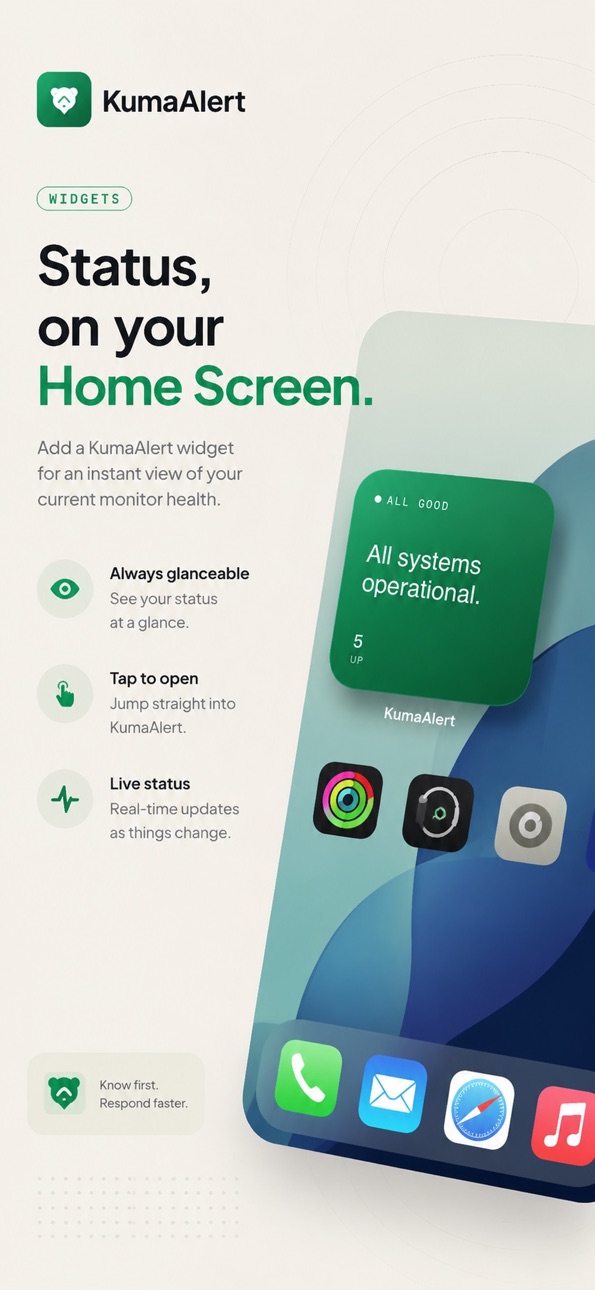

iPad 8 images


What’s New Version 3.2.0
NEW FEATURES
- See how long a monitor has been down. Down monitors now show a live outage duration on the Monitors list, on the monitor's detail screen ("Down for 23 min"), and next to the affected monitor on the Home Screen widget.
- Optional "last updated" caption on the widget. Turn it on under Settings → Widget to see how fresh the widget's data is. Off by default.
PERFORMANCE
- Much smoother scrolling on the Monitors tab. Heartbeat history now lives in memory instead of being written to the on-device database on every check, removing the constant background churn that caused stutters while scrolling.
- Snappier everywhere on large servers. The monitor list no longer re-parses every monitor's configuration on each screen update, and incoming status updates are applied on a steady cadence instead of piling up and landing as one big freeze.
- The Overview tab no longer rebuilds itself every few seconds. The live average-response figure now updates in place.
- The app takes up less space. A one-time cleanup on first launch after updating removes the heartbeat history previously accumulated on your device; history is fetched fresh from your server instead.
BUG FIXES
- Background widget refresh now works on standard Uptime Kuma servers. The app was calling an endpoint that only exists on some forks and silently giving up; it now uses the standard metrics endpoint your API key is made for, so the widget updates in the background as intended.
- History chart tooltips now point at the bar you tapped. Near the edges of the 24-hour chart on a monitor's detail screen, the popup could appear anchored to a neighbouring bar.
NOTES
Response-time charts and recent checks now stream from your Uptime Kuma server when the app connects, so they may take a second or two to appear after a cold launch and aren't available offline - matching how the Uptime Kuma web dashboard behaves.
Description
KumaAlert keeps you connected to your Uptime Kuma monitoring server - wherever you are.
Get instant push notifications when monitors go down or recover. View live status across all your monitors at a glance, with colour-coded heartbeat history and uptime stats. Manage monitors and maintenance windows directly from your phone.
FEATURES
• Real-time monitor status via Socket.IO
• Push notifications for down/recovery events
• Multi-server support — monitor all your instances in one app
• Heartbeat bar charts with 24h history
• Maintenance window management
• Home screen widgets (small & medium)
• Overview tab with instant uptime summary
• Incident history
• Dark mode support
• Cloudflare Access & custom header support
REQUIREMENTS
• A running Uptime Kuma instance (self-hosted)
• API key or username/password authentication
Accessibility
ipadiphonemacrealityDevicetvoswatch
Version history 11 versions
Build 887710537v3.2.02026-07-02 15:23:40
NEW FEATURES
- See how long a monitor has been down. Down monitors now show a live outage duration on the Monitors list, on the monitor's detail screen ("Down for 23 min"), and next to the affected monitor on the Home Screen widget.
- Optional "last updated" caption on the widget. Turn it on under Settings → Widget to see how fresh the widget's data is. Off by default.
PERFORMANCE
- Much smoother scrolling on the Monitors tab. Heartbeat history now lives in memory instead of being written to the on-device database on every check, removing the constant background churn that caused stutters while scrolling.
- Snappier everywhere on large servers. The monitor list no longer re-parses every monitor's configuration on each screen update, and incoming status updates are applied on a steady cadence instead of piling up and landing as one big freeze.
- The Overview tab no longer rebuilds itself every few seconds. The live average-response figure now updates in place.
- The app takes up less space. A one-time cleanup on first launch after updating removes the heartbeat history previously accumulated on your device; history is fetched fresh from your server instead.
BUG FIXES
- Background widget refresh now works on standard Uptime Kuma servers. The app was calling an endpoint that only exists on some forks and silently giving up; it now uses the standard metrics endpoint your API key is made for, so the widget updates in the background as intended.
- History chart tooltips now point at the bar you tapped. Near the edges of the 24-hour chart on a monitor's detail screen, the popup could appear anchored to a neighbouring bar.
NOTES
Response-time charts and recent checks now stream from your Uptime Kuma server when the app connects, so they may take a second or two to appear after a cold launch and aren't available offline - matching how the Uptime Kuma web dashboard behaves.
Build 887538431v3.1.02026-06-28 16:57:23
NEW FEATURES
- Tap a bar in a monitor's history chart to see what happened. On a monitor's detail screen, tap any bar in the 24 hour chart to see the time and status, like "Degraded performance" or "Offline". Tap again to dismiss.
BUG FIXES
- Recent Incidents stays put when you go back. Opening an incident and returning no longer clears the list.
- New monitors now keep your default notification channels. Any channel set as a default in Uptime Kuma is switched on automatically, just like the web app.
- Kiosk Mode fits the screen on iPad. Tiles now resize to fit however many monitors you have, so everything stays visible without scrolling.
Build 886304836v3.0.22026-05-29 22:11:38
## New Features
- A "What's New" welcome on first launch after updating, highlighting each release and pointing you to anything you need to set up.
## Bug Fixes
- The Home Screen widget now refreshes on its own while the app is closed, instead of staying on a stale status until you reopen the app. This requires an API key (Uptime Kuma → Settings → API Keys), saved in the app under Settings → your server → API Key. iOS still decides exactly when background refreshes run, so updates are periodic rather than instant.
Build 886149972v3.0.12026-05-26 18:47:45
Bug fixes and performance improvements.
Build 885987237v3.0.02026-05-25 00:10:53
KumaAlert 3.0 — now on iPad
- Universal app — a native iPad layout with a dashboard Overview, plus Stage Manager and Split View.
- Sign in with Apple — your servers, logins, and settings sync across devices, end-to-end encrypted.
- Per-monitor alerts — mute any monitor or set it to down-only, right from its detail screen.
- Live Activities — watch an outage live on your Lock Screen and Dynamic Island, with a duration timer.
- Kiosk mode — turn a wall-mounted iPad into a full-screen status board.
- Recovery alerts & louder sounds — see how long something was down, and pick alarm-style tones you won't miss.
Plus smoother scrolling, faster reconnects, and a long list of fixes.
Full changelog at https://kumaalert.app/changelog/
Build 885171392v2.1.02026-05-01 22:19:58
New Features
- In-app support form, send a message from Settings → Support without leaving the app
- Tag filtering on the Monitors tab
- Soft monitor-list refresh, pull-to-refresh
- Scrub the response time chart on the monitor detail page, press and drag across the chart to see the latency and timestamp at any point
- Support for Uptime Kuma's new oracledb monitor type (Uptime Kuma 2.3.0)
- Support for Uptime Kuma's websocket-upgrade monitor type, including editing the wss:// URL in the monitor form
Refinements
- Default monitor sort is now alphabetical (A–Z), and the "Default order" option has been retired
- Maintenance tab in Manage now leads with a clearer explanatory note
Performance
- Smoother scrolling on the Monitors tab
Bug Fixes
- Adding a server with a plain http:// URL now shows an inline warning and a clear error explaining that iOS blocks plain HTTP
- Servers with missing or rejected stored credentials previously left the UI stuck on Offline with no message
- Filtering by Down, Maintenance or Paused on the Monitors tab no longer renders empty group folders
- Page titles could overlap the iOS status bar on certain devices (notably iPhone 15 Pro Max), the headers now always sit below the system clock
Build 885075118v2.0.32026-04-29 14:40:05
New Features
- Server picker on the Manage tab — switch between configured servers and see which monitors and maintenance windows live on each, matching the Monitors tab behaviour
- Choose which server to add a new monitor to — the Add Monitor form now shows a target server picker when you have more than one configured
- Type numbers directly into stepper fields — port, packet size, intervals, retries, and other numeric inputs now accept tap-to-edit input instead of requiring +/- presses
Refinements
- Default monitor sort is now alphabetical (A–Z) — existing installs are migrated automatically on next launch; the sort menu still lets you switch back to server order or Z–A
- Display title no longer overlaps the system status bar on certain iPhones
- New monitors appear in the Manage list immediately after creation instead of waiting for the next sync
Bug Fixes
- Fixed maintenance toggle not visually reflecting the paused/active state — sliding the toggle now flips the row immediately and stops the maintenance as expected
- Fixed Save button being incorrectly disabled when editing a maintenance window with no monitors selected — you can now save with zero monitors to clear all assignments
- Fixed "Cannot read properties of undefined" and "NOT NULL constraint failed: monitor.conditions" errors when adding a monitor on Uptime Kuma 2.x — required default fields are now seeded automatically
Build 884933742v2.0.22026-04-26 19:10:57
New Features
- Persistent down alerts — opt-in time-sensitive notifications that break through Focus and Do Not Disturb so you don't miss an outage
- Sort monitors alphabetically (A–Z or Z–A) from a new sort menu beside the search bar on the Monitors tab; your choice is remembered between sessions
Performance
- Fixed UI lockup when switching between tabs with many monitors — Response Times card no longer blocks the main thread on appear
- Reduced redraw cost on the dashboard — heartbeat updates for one monitor no longer invalidate the entire monitor list
- Smoother scrolling on the Monitors tab — heartbeat charts now reserve their space from first paint instead of growing as data loads, and nested group lists update independently rather than rebuilding together
- Removed the always-on red pulse animation from the Monitors list dots; the leading red bar still flags down monitors and scroll no longer competes with per-row animations
- Throttled the response time number on each Monitors row to refresh every 10 seconds — detail view and widget continue to update live
Refinements
- Removed the unused "Switch" button from the settings server card — all configured servers are always live
Bug Fixes
- Fixed servers with two-factor authentication showing as "disconnected" in the app even when they were working normally — sign-in is now recognised correctly on every reconnect
Build 884870701v2.02026-04-24 20:07:43
New Features
- Complete overhaul of app design!
- New app icon
- Ability to change Server Names
- New homescreen widget introduced
- Added quiet hours to notifications
- Notifications on/off for up/down now supported
- Change notification sounds!
Refinements
- Able to remove API key once added
Bug Fixes
- TCP monitors are now fully supported - an error before showed them as consistently down
- App locked up with more than one server and many monitors - background work to reduce this and queue them, rather than loading at once.
- Cloudflare secrets now working
Build 884034451v1.22026-04-02 00:59:17
New Features
- New App Icon!
- Cloudflare Access support - connect to Uptime Kuma instances behind Cloudflare Zero Trust with Service Token authentication
- Custom HTTP headers - add arbitrary headers for reverse proxies and custom authentication gateways
- No-auth server support - connect to Uptime Kuma instances with authentication disabled
- Email (SMTP) monitor type - properly displays SMTP monitors with envelope icon and hostname:port
Bug Fixes
- Fixed dark mode readability - status header backgrounds now adapt to dark mode instead of showing bright pastels with unreadable text
- Fixed heartbeat bar charts showing empty gray bars due to UTC timestamp parsing - bars now fill correctly regardless of device timezone
- Fixed heartbeat timestamp parsing for MariaDB-backed servers that include milliseconds
- Fixed "Add" button not working in Manage tab for monitors and maintenance windows
- Fixed server connection status dot always showing red in server list
- Fixed maintenance windows showing "No monitors assigned" when monitors were assigned
Build 883563309v1.12026-03-31 09:12:03
Price history by region
Currency
Show
Columns
Search
Availability 175 of 175 storefronts
| Region | Language | Price | Ratings | Avg | Version |
|---|---|---|---|---|---|
| US | en-US | USD 3.99 | 8 | 4.3 | 3.2.0 |
| GB | en-GB | GBP 3.99 | 4 | 5.0 | 3.2.0 |
| DE | de-DE | EUR 4.99 | 3 | 4.0 | 3.2.0 |
| FR | fr-FR | EUR 4.99 | 2 | 5.0 | 3.2.0 |
| IN | en-GB | INR 399 | 1 | 4.0 | 3.2.0 |
| PL | en-GB | PLN 19.99 | 1 | 5.0 | 3.2.0 |
| TH | en-GB | THB 149 | 1 | 5.0 | 3.2.0 |
| AE | en-GB | AED 14.99 | 0 | — | 3.2.0 |
| AF | en-GB | USD 3.99 | 0 | — | 3.2.0 |
| AG | en-GB | USD 3.99 | 0 | — | 3.2.0 |
| AI | en-GB | USD 3.99 | 0 | — | 3.2.0 |
| AL | en-GB | USD 4.99 | 0 | — | 3.2.0 |
| AM | en-GB | USD 4.99 | 0 | — | 3.2.0 |
| AO | en-GB | USD 3.99 | 0 | — | 3.2.0 |
| AR | es-MX | USD 3.99 | 0 | — | 3.2.0 |
| AT | de-DE | EUR 4.99 | 0 | — | 3.2.0 |
| AU | en-AU | AUD 5.99 | 0 | — | 3.2.0 |
| AZ | en-GB | USD 4.99 | 0 | — | 3.2.0 |
| BA | en-GB | EUR 4.99 | 0 | — | 3.2.0 |
| BB | en-GB | USD 4.99 | 0 | — | 3.2.0 |
| BE | en-GB | EUR 4.99 | 0 | — | 3.2.0 |
| BF | en-GB | USD 3.99 | 0 | — | 3.2.0 |
| BG | en-GB | EUR 4.99 | 0 | — | 3.2.0 |
| BH | en-GB | USD 3.99 | 0 | — | 3.2.0 |
| BJ | en-GB | USD 4.99 | 0 | — | 3.2.0 |
| BM | en-GB | USD 3.99 | 0 | — | 3.2.0 |
| BN | en-GB | USD 3.99 | 0 | — | 3.2.0 |
| BO | es-MX | USD 3.99 | 0 | — | 3.2.0 |
| BR | pt-BR | BRL 24.9 | 0 | — | 3.2.0 |
| BS | en-GB | USD 3.99 | 0 | — | 3.2.0 |
| BT | en-GB | USD 3.99 | 0 | — | 3.2.0 |
| BW | en-GB | USD 3.99 | 0 | — | 3.2.0 |
| BY | en-GB | USD 4.99 | 0 | — | 3.2.0 |
| BZ | en-GB | USD 3.99 | 0 | — | 3.2.0 |
| CA | en-CA | CAD 4.99 | 0 | — | 3.2.0 |
| CD | en-GB | USD 3.99 | 0 | — | 3.2.0 |
| CG | en-GB | USD 3.99 | 0 | — | 3.2.0 |
| CH | de-CH | CHF 3 | 0 | — | 3.2.0 |
| CI | fr-FR | USD 4.99 | 0 | — | 3.2.0 |
| CL | es-MX | CLP 4990 | 0 | — | 3.2.0 |
| CM | fr-FR | USD 4.99 | 0 | — | 3.2.0 |
| CN | zh-Hans-CN | CNY 28 | 0 | — | 3.2.0 |
| CO | es-MX | COP 19900 | 0 | — | 3.2.0 |
| CR | es-MX | USD 3.99 | 0 | — | 3.2.0 |
| CV | en-GB | USD 3.99 | 0 | — | 3.2.0 |
| CY | en-GB | EUR 4.99 | 0 | — | 3.2.0 |
| CZ | en-GB | CZK 99 | 0 | — | 3.2.0 |
| DK | en-GB | DKK 39 | 0 | — | 3.2.0 |
| DM | en-GB | USD 3.99 | 0 | — | 3.2.0 |
| DO | es-MX | USD 3.99 | 0 | — | 3.2.0 |
| DZ | en-GB | USD 3.99 | 0 | — | 3.2.0 |
| EC | es-MX | USD 3.99 | 0 | — | 3.2.0 |
| EE | en-GB | EUR 4.99 | 0 | — | 3.2.0 |
| EG | en-GB | EGP 199.99 | 0 | — | 3.2.0 |
| ES | es-ES | EUR 4.99 | 0 | — | 3.2.0 |
| FI | en-GB | EUR 4.99 | 0 | — | 3.2.0 |
| FJ | en-GB | USD 3.99 | 0 | — | 3.2.0 |
| FM | en-GB | USD 3.99 | 0 | — | 3.2.0 |
| GA | fr-FR | USD 3.99 | 0 | — | 3.2.0 |
| GD | en-GB | USD 3.99 | 0 | — | 3.2.0 |
| GE | en-GB | USD 4.99 | 0 | — | 3.2.0 |
| GH | en-GB | USD 4.99 | 0 | — | 3.2.0 |
| GM | en-GB | USD 3.99 | 0 | — | 3.2.0 |
| GR | en-GB | EUR 4.99 | 0 | — | 3.2.0 |
| GT | es-MX | USD 3.99 | 0 | — | 3.2.0 |
| GW | en-GB | USD 3.99 | 0 | — | 3.2.0 |
| GY | en-GB | USD 3.99 | 0 | — | 3.2.0 |
| HK | zh-Hant-HK | HKD 32 | 0 | — | 3.2.0 |
| HN | es-MX | USD 3.99 | 0 | — | 3.2.0 |
| HR | en-GB | EUR 4.99 | 0 | — | 3.2.0 |
| HU | en-GB | HUF 1790 | 0 | — | 3.2.0 |
| ID | en-GB | IDR 69000 | 0 | — | 3.2.0 |
| IE | en-GB | EUR 4.99 | 0 | — | 3.2.0 |
| IL | en-GB | ILS 14.9 | 0 | — | 3.2.0 |
| IQ | en-GB | USD 3.99 | 0 | — | 3.2.0 |
| IS | en-GB | USD 4.99 | 0 | — | 3.2.0 |
| IT | it | EUR 4.99 | 0 | — | 3.2.0 |
| JM | en-GB | USD 3.99 | 0 | — | 3.2.0 |
| JO | en-GB | USD 3.99 | 0 | — | 3.2.0 |
| JP | ja | JPY 600 | 0 | — | 3.2.0 |
| KE | en-GB | USD 4.99 | 0 | — | 3.2.0 |
| KG | en-GB | USD 3.99 | 0 | — | 3.2.0 |
| KH | en-GB | USD 3.99 | 0 | — | 3.2.0 |
| KN | en-GB | USD 3.99 | 0 | — | 3.2.0 |
| KR | ko | KRW 6600 | 0 | — | 3.2.0 |
| KW | en-GB | USD 3.99 | 0 | — | 3.2.0 |
| KY | en-GB | USD 3.99 | 0 | — | 3.2.0 |
| KZ | en-GB | KZT 2490 | 0 | — | 3.2.0 |
| LA | en-GB | USD 3.99 | 0 | — | 3.2.0 |
| LB | en-GB | USD 3.99 | 0 | — | 3.2.0 |
| LC | en-GB | USD 3.99 | 0 | — | 3.2.0 |
| LK | en-GB | USD 3.99 | 0 | — | 3.2.0 |
| LR | en-GB | USD 3.99 | 0 | — | 3.2.0 |
| LT | en-GB | EUR 4.99 | 0 | — | 3.2.0 |
| LU | en-GB | EUR 4.99 | 0 | — | 3.2.0 |
| LV | en-GB | EUR 4.99 | 0 | — | 3.2.0 |
| LY | en-GB | USD 3.99 | 0 | — | 3.2.0 |
| MA | en-GB | USD 3.99 | 0 | — | 3.2.0 |
| MD | en-GB | USD 4.99 | 0 | — | 3.2.0 |
| ME | en-GB | EUR 3.99 | 0 | — | 3.2.0 |
| MG | en-GB | USD 3.99 | 0 | — | 3.2.0 |
| MK | en-GB | USD 3.99 | 0 | — | 3.2.0 |
| ML | en-GB | USD 3.99 | 0 | — | 3.2.0 |
| MM | en-GB | USD 3.99 | 0 | — | 3.2.0 |
| MN | en-GB | USD 3.99 | 0 | — | 3.2.0 |
| MO | zh-Hant-HK | USD 3.99 | 0 | — | 3.2.0 |
| MR | en-GB | USD 3.99 | 0 | — | 3.2.0 |
| MS | en-GB | USD 3.99 | 0 | — | 3.2.0 |
| MT | en-GB | EUR 4.99 | 0 | — | 3.2.0 |
| MU | en-GB | USD 4.99 | 0 | — | 3.2.0 |
| MV | en-GB | USD 3.99 | 0 | — | 3.2.0 |
| MW | en-GB | USD 3.99 | 0 | — | 3.2.0 |
| MX | es-MX | MXN 89 | 0 | — | 3.2.0 |
| MY | en-GB | MYR 19.9 | 0 | — | 3.2.0 |
| MZ | en-GB | USD 3.99 | 0 | — | 3.2.0 |
| NA | en-GB | USD 3.99 | 0 | — | 3.2.0 |
| NE | en-GB | USD 3.99 | 0 | — | 3.2.0 |
| NG | en-GB | NGN 6900 | 0 | — | 3.2.0 |
| NI | es-MX | USD 3.99 | 0 | — | 3.2.0 |
| NL | nl | EUR 4.99 | 0 | — | 3.2.0 |
| NO | en-GB | NOK 49 | 0 | — | 3.2.0 |
| NP | en-GB | USD 4.99 | 0 | — | 3.2.0 |
| NR | en-GB | USD 3.99 | 0 | — | 3.2.0 |
| NZ | en-AU | NZD 6.99 | 0 | — | 3.2.0 |
| OM | en-GB | USD 3.99 | 0 | — | 3.2.0 |
| PA | es-MX | USD 3.99 | 0 | — | 3.2.0 |
| PE | es-MX | PEN 17.9 | 0 | — | 3.2.0 |
| PG | en-GB | USD 3.99 | 0 | — | 3.2.0 |
| PH | en-GB | PHP 249 | 0 | — | 3.2.0 |
| PK | en-GB | PKR 1100 | 0 | — | 3.2.0 |
| PT | pt-PT | EUR 4.99 | 0 | — | 3.2.0 |
| PW | en-GB | USD 3.99 | 0 | — | 3.2.0 |
| PY | es-MX | USD 3.99 | 0 | — | 3.2.0 |
| QA | en-GB | QAR 14.99 | 0 | — | 3.2.0 |
| RO | en-GB | RON 19.99 | 0 | — | 3.2.0 |
| RS | en-GB | EUR 4.99 | 0 | — | 3.2.0 |
| RU | ru | RUB 349 | 0 | — | 3.2.0 |
| RW | en-GB | USD 3.99 | 0 | — | 3.2.0 |
| SA | en-GB | SAR 17.99 | 0 | — | 3.2.0 |
| SB | en-GB | USD 3.99 | 0 | — | 3.2.0 |
| SC | en-GB | USD 3.99 | 0 | — | 3.2.0 |
| SE | sv | SEK 49 | 0 | — | 3.2.0 |
| SG | en-GB | SGD 5.98 | 0 | — | 3.2.0 |
| SI | en-GB | EUR 4.99 | 0 | — | 3.2.0 |
| SK | en-GB | EUR 4.99 | 0 | — | 3.2.0 |
| SL | en-GB | USD 3.99 | 0 | — | 3.2.0 |
| SN | en-GB | USD 4.99 | 0 | — | 3.2.0 |
| SR | en-GB | USD 3.99 | 0 | — | 3.2.0 |
| ST | en-GB | USD 3.99 | 0 | — | 3.2.0 |
| SV | es-MX | USD 3.99 | 0 | — | 3.2.0 |
| SZ | en-GB | USD 3.99 | 0 | — | 3.2.0 |
| TC | en-GB | USD 3.99 | 0 | — | 3.2.0 |
| TD | en-GB | USD 3.99 | 0 | — | 3.2.0 |
| TJ | en-GB | USD 3.99 | 0 | — | 3.2.0 |
| TM | en-GB | USD 3.99 | 0 | — | 3.2.0 |
| TN | en-GB | USD 3.99 | 0 | — | 3.2.0 |
| TO | en-GB | USD 3.99 | 0 | — | 3.2.0 |
| TR | en-GB | TRY 199.99 | 0 | — | 3.2.0 |
| TT | en-GB | USD 3.99 | 0 | — | 3.2.0 |
| TW | zh-Hant-TW | TWD 120 | 0 | — | 3.2.0 |
| TZ | en-GB | TZS 11900 | 0 | — | 3.2.0 |
| UA | en-GB | USD 4.99 | 0 | — | 3.2.0 |
| UG | en-GB | USD 4.99 | 0 | — | 3.2.0 |
| UY | en-GB | USD 3.99 | 0 | — | 3.2.0 |
| UZ | en-GB | USD 3.99 | 0 | — | 3.2.0 |
| VC | en-GB | USD 3.99 | 0 | — | 3.2.0 |
| VE | es-MX | USD 3.99 | 0 | — | 3.2.0 |
| VG | en-GB | USD 3.99 | 0 | — | 3.2.0 |
| VN | en-GB | VND 119000 | 0 | — | 3.2.0 |
| VU | en-GB | USD 3.99 | 0 | — | 3.2.0 |
| XK | en-GB | EUR 4.99 | 0 | — | 3.2.0 |
| YE | en-GB | USD 3.99 | 0 | — | 3.2.0 |
| ZA | en-GB | ZAR 79.99 | 0 | — | 3.2.0 |
| ZM | en-GB | USD 4.99 | 0 | — | 3.2.0 |
| ZW | en-GB | USD 4.99 | 0 | — | 3.2.0 |
Change log 15 changes · US
✎
releaseNotes updated
NEW FEATURES
- See how long a monitor has been down. Down monitors now show a live outage duration on the Monitors list, on the monitor's detail screen ("Down f
✎
description updated
KumaAlert keeps you connected to your Uptime Kuma monitoring server - wherever you are.
Get instant push notifications when monitors go down or recover. View l
✎
subtitle updated
Uptime Kuma Monitor Alerts
✎
name updated
KumaAlert
◆
Version 3.2.0 released
NEW FEATURES
- See how long a monitor has been down. Down monitors now show a live outage duration on the Monitors list, on the monitor's detail screen ("Down for 23 min"), and next to the affected monitor on the Home Screen widget.
- Optio
◆
Version 3.1.0 released
NEW FEATURES
- Tap a bar in a monitor's history chart to see what happened. On a monitor's detail screen, tap any bar in the 24 hour chart to see the time and status, like "Degraded performance" or "Offline". Tap again to dismiss.
BUG FIXE
◆
Version 3.0.2 released
## New Features
- A "What's New" welcome on first launch after updating, highlighting each release and pointing you to anything you need to set up.
## Bug Fixes
- The Home Screen widget now refreshes on its own while the app is closed, ins
◆
Version 3.0.1 released
Bug fixes and performance improvements.
◆
Version 3.0.0 released
KumaAlert 3.0 — now on iPad
- Universal app — a native iPad layout with a dashboard Overview, plus Stage Manager and Split View.
- Sign in with Apple — your servers, logins, and settings sync across devices, end-to-end encrypted.
-
◆
Version 2.1.0 released
New Features
- In-app support form, send a message from Settings → Support without leaving the app
- Tag filtering on the Monitors tab
- Soft monitor-list refresh, pull-to-refresh
- Scrub the response time chart on the monitor detail page,
◆
Version 2.0.3 released
New Features
- Server picker on the Manage tab — switch between configured servers and see which monitors and maintenance windows live on each, matching the Monitors tab behaviour
- Choose which server to add a new monitor to — the Add Moni
◆
Version 2.0.2 released
New Features
- Persistent down alerts — opt-in time-sensitive notifications that break through Focus and Do Not Disturb so you don't miss an outage
- Sort monitors alphabetically (A–Z or Z–A) from a new sort menu beside the search bar on th
◆
Version 2.0 released
New Features
- Complete overhaul of app design!
- New app icon
- Ability to change Server Names
- New homescreen widget introduced
- Added quiet hours to notifications
- Notifications on/off for up/down now supported
- Change notificatio
◆
Version 1.2 released
New Features
- New App Icon!
- Cloudflare Access support - connect to Uptime Kuma instances behind Cloudflare Zero Trust with Service Token authentication
- Custom HTTP headers - add arbitrary headers for reverse proxies and custom authent
◆
Version 1.1 released