Home › Utilities

 US
US
USen-US AONot Available
 BWNot Available
 CDNot Available
 CGNot Available
 CMNot Available
 CVNot Available
 DZNot Available
 GANot Available
 GHNot Available
 GWNot Available
 KENot Available
 LYNot Available
 MANot Available
 MUNot Available
 MZNot Available
 NANot Available
 NGNot Available
 STNot Available
 TDNot Available
 TNNot Available
 TZNot Available
 UGNot Available
 ZMNot Available
 ZWNot Available
1 of 25 storefronts
Content in en-US
Content in en-US
Information
Preview 2 platforms
iPhone 8 images




iPad 1 image

What’s New Version 1.2.2
A few quiet reliability and measurement fixes under the hood.
Description
Time Zone Buddy is a beautiful world clock and meeting planner for people who work, travel, or collaborate across time zones. Now on iPhone, iPad and Mac.
Whether you're scheduling a call with Tokyo, checking if London is still in the office, or planning a meeting across five time zones — it makes the world easy to read.
AURORA-INSPIRED DESIGN
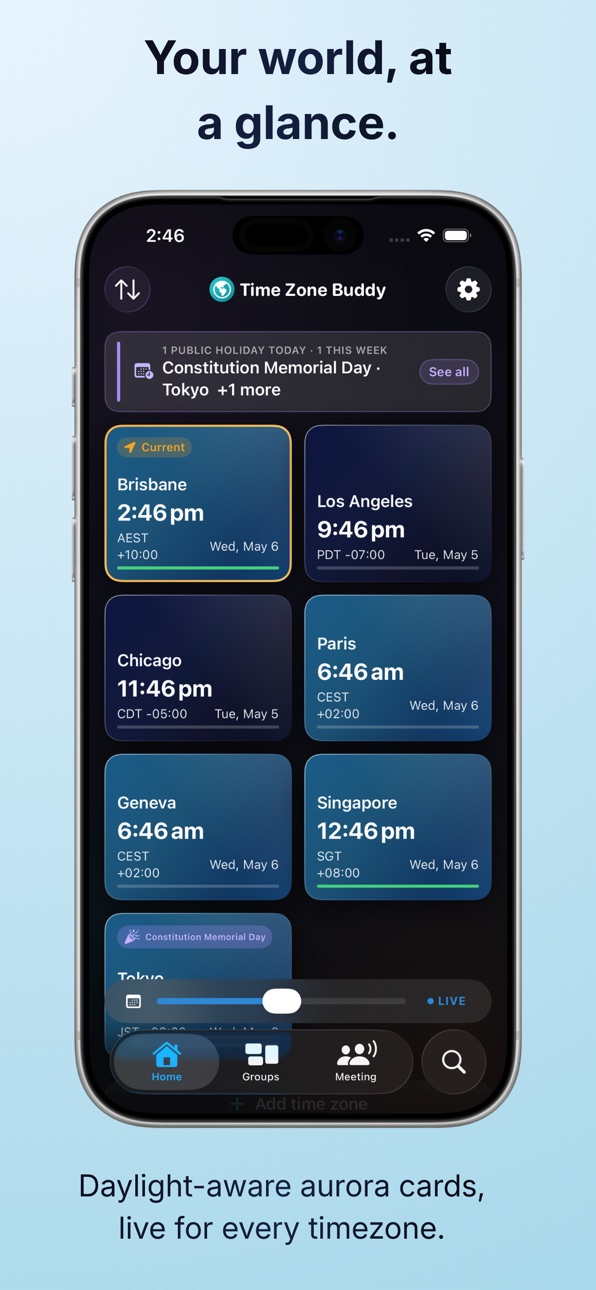
Every card glows with daylight-aware aurora gradients — warm amber at sunrise, vivid cerulean at midday, golden hour, deep navy at night. Live, for every zone.
TIME SHIFT & PLANNING
A docked time-shift slider lives at the bottom of every tab. Pick a future date and time, choose which zone you're planning from, and instantly see what time it will be everywhere.
MEETING HUB
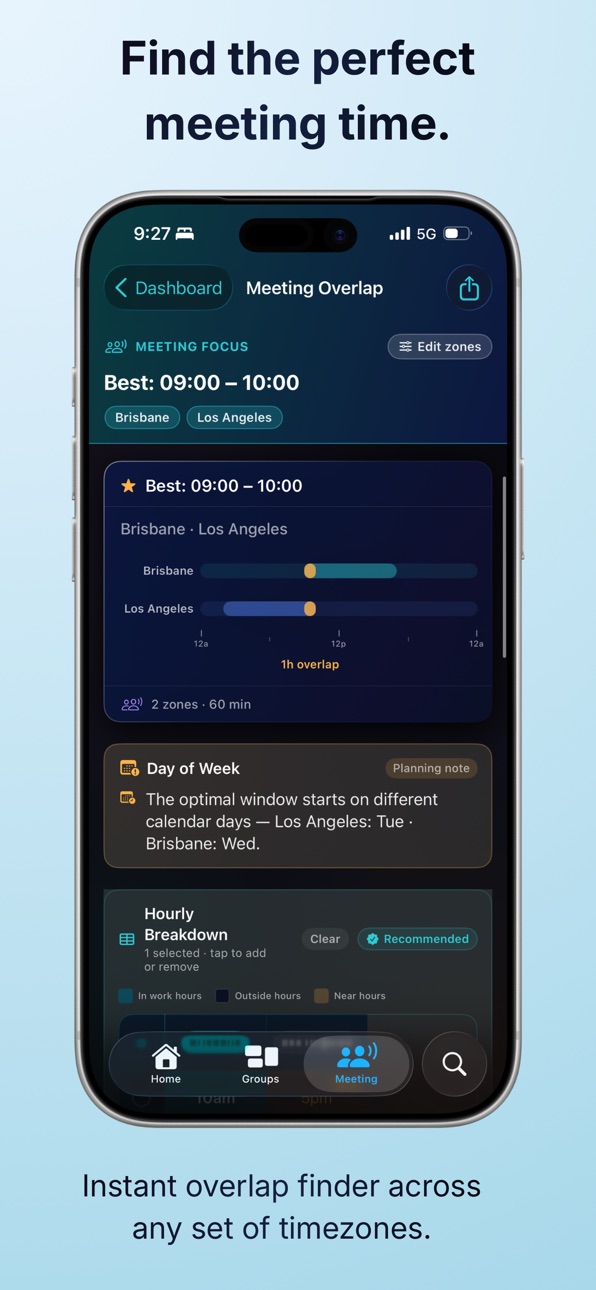
The Meeting tab opens to a live dashboard: who's in work hours right now (with countdowns to end-of-day), who's coming online soon, an at-a-glance overlap visualiser, and DST + holiday alerts — all driven by the time-shift slider. Tap "Plan a Meeting" to pick zones for a full overlap analysis.
INTELLIGENT ZONE CARDS
Each zone card shows local time, UTC offset, daylight status, work hours, DST alerts, and today's public holiday (Plus/Lifetime).
DRAG TO REORDER
Long-press any zone on the home screen to drag it into a custom order.
DETAIL THAT DELIGHTS
Tap any zone for a full detail view featuring:
• A live map header showing the city
• A redesigned daylight bar with continuous sky gradient and a glowing current-time pill
• An Hour Crossover table — your time and the zone's time, hour by hour, ±12h from now
• A "Best Time to Call" card showing the clearest call time between you and that city (free)
• DST change alerts and public-holiday banners
• A share card you can export and send
SEARCH YOUR WAY
Search by city, country, or region. Type "Australia" to see all Australian timezones. Type "NYC", "India", or "EST" and get exactly what you need.
GROUPS & ORGANISATION (PLUS/LIFETIME)
Create named groups for your team, family, or travel contacts. Collapse and expand on the home screen. Share a group's times as an image in seconds.
MEETING OVERLAP (PLUS/LIFETIME)
Find the best time to meet across any set of time zones. Time Zone Buddy ranks every overlap window by how many people it covers. Share as a clean image or plain text.
WIDGETS
Put the world on your Home Screen and Lock Screen.
• Single Zone (free) — any city's live time with daylight-aware shading
• Lock Screen clocks (Plus/Lifetime) — configurable circular, inline, and rectangular clocks
• Meeting Hub (Plus/Lifetime) — a live dashboard showing who's working right now across all your zones, who's online soon, and who's off duty
• Tap a widget to jump straight to that zone, the Meeting tab, or the app
DST ALERTS & NOTIFICATIONS (PLUS/LIFETIME)
Never be caught off guard by a clock change. Get notifications 7 days before, the business day before, the day itself, and the day after.
PUBLIC HOLIDAYS (PLUS/LIFETIME)
Today's public holiday on every Aurora card, with a banner in the detail view and a full year view per zone. 80+ countries, state-level for AU, UK, CA, US, and BR. Powered by Nager.Date.
NATIVE SHORTCUTS & QUICK ACTIONS
• Long-press the icon for Plan Meeting, Add Zone, or Show Alerts
• Siri + Spotlight + Shortcuts: "Hey Siri, plan a meeting in Time Zone Buddy"
ACCESSIBILITY
Full VoiceOver support, Dynamic Type, and Reduce Motion respected throughout.
PRIVACY FIRST
No account required. No data leaves your device. iCloud sync (Plus only) uses Apple's private iCloud Key-Value Storage — your data never touches our servers.
PRICING
• Free — up to 5 zones, aurora cards, time shift planner, Best Time to Call, Single Zone widget
• Lifetime — one-time purchase, all features unlocked forever, including Lock Screen & Meeting Hub widgets (except iCloud Sync)
• Plus — subscription with iCloud Sync, Annual-plan Family Sharing, and early access
Terms of Use (EULA): https://www.apple.com/legal/internet-services/itunes/dev/stdeula/
Capabilities
In-App Purchases
Accessibility
ipadiphonemacrealityDevicetvoswatch
Version history 8 versions
Build 887727285v1.2.22026-07-02 19:37:45
A few quiet reliability and measurement fixes under the hood.
Build 887276807v1.2.12026-06-22 18:28:15
This update polishes the details:
• Public holidays now appear right at the top of a city's detail page on the day they happen, in that city's own time zone — so you'll never miss a "they're off today" before you schedule.
• The Meeting Hub widget now tells you when the next person comes online instead of just saying nobody's around.
• A few quiet reliability fixes under the hood.
Thanks for using Time Zone Buddy!
Build 887085187v1.2.02026-06-19 15:12:45
v1.2.0 — Widgets
Time Zone Buddy now lives on your Home Screen and Lock Screen.
New
• Single Zone widget (free) — keep any city's live time on your Home Screen in small or medium size, with the same daylight-aware shading as the app: warm at sunrise, bright at midday, deep navy at night. The medium size adds a day timeline and an at-a-glance work-hours status with the next start or finish time.
• Lock Screen widgets (Plus/Lifetime) — a glanceable, configurable clock for any saved zone in the circular, inline, and rectangular accessory slots.
• Meeting Hub widget (Plus/Lifetime) — a zero-config dashboard across all your saved zones: who's in work hours right now with end-of-day countdowns, who's coming online soon, and how many are off duty. Small, medium, and large sizes.
• Public holidays show on widgets too (Plus/Lifetime) — a violet party-popper marker, matching the app.
• Tap any widget to jump straight to that zone, the Meeting tab, or the app.
Improved
• A new in-app guide (Settings → Features → Widgets, and a one-time card on Home) walks you through adding and configuring widgets.
Widgets read your data on-device through a private App Group — nothing leaves your device.
Build 885859385v1.1.22026-05-19 22:21:12
V1.1.2 - Search, overlap chart, and polish
Improved
• Search redesigned — the empty state is now a discovery surface: Quick Start packs (Work, Americas, Europe/Asia-Pac, Night Shift), Popular Business Hubs chips, a "Working Right Now" section, and Browse by Region. Find useful zones without typing a thing.
• City search now shows partial matches as you type — no more waiting for the full city name. Powered by MapKit.
• Meeting overlap chart fixed — the 24-hour bars are now anchored to the anchor zone's local clock, so the work blocks and overlap window land where you expect them. Brisbane + Los Angeles no longer cluster at a mysterious "24" mark.
• Drag to reorder is now smoother and more reliable — gaps between cards no longer create dead drop zones, and the placeholder appears consistently.
• Alerts banner layout improved — the category header now spans the full width, with the cycling zone name and navigation indicator on the line below. With many upcoming holidays, a compact counter (e.g. 2/10) replaces the row of dots.
• Meeting overlap Best Times share card now fills the full card width with 2 cities — columns no longer float in the middle.
Bug fixes
• Fixed a calculation error where the anchor zone's UTC offset was not correctly converted from seconds to minutes in the meeting overlap view.
Build 885514065v1.1.12026-05-12 19:11:10
This is v1.1.1. v1.0–v1.1.0 are already live on the App Store.
v1.1.1 is a polish + native-integrations release on top of v1.1 ("Liquid Glass"). No schema changes, no new in-app purchases, no pricing changes.
What's new in v1.1.1:
• Meeting Hub — the Meeting tab now opens to a live dashboard showing who's in work hours, who's coming online soon, and an overlap visualiser. The previous single "Plan a Meeting" CTA is now a button at the bottom of this dashboard.
• Hour Crossover table + Best Time to Call card on the zone Detail view.
• Custom drag-to-reorder on the Home grid and Manage Locations.
• Home Screen Quick Actions (Plan Meeting / Add Zone / Show Alerts).
• App Intents for Siri / Spotlight / Shortcuts (PlanMeetingIntent, AddZoneIntent, ShowAlertsIntent). All open the app — no background execution required.
• Full macOS parity pass — Firebase, StoreKit 2, CloudKit / NSUbiquitousKeyValueStore sync, Settings scene sizing, and notifications all verified on Mac.
How to test the new features (no account required):
• Quick Actions: long-press the app icon → choose any of the three actions.
• Siri Shortcuts: "Hey Siri, plan a meeting in Time Zone Buddy".
• Meeting Hub: open the Meeting tab — dashboard appears immediately for entitled users; free users see the existing upsell flow.
• Hour Crossover / Best Time to Call: tap any zone card → scroll the Detail view.
• Drag-to-reorder: long-press any home-grid card to enter drag mode.
Subscription legal links remain visible in Settings → About and on every paywall. Apple Standard EULA applies. The EULA link is included at the bottom of the App Description in App Store Connect.
The app works fully offline for core features. Network is used for:
• MapKit tiles and MKLocalSearch geocoding (Detail view city map / search)
• SunriseSunset.io (solar data, cached on-device after first fetch per zone/year)
• Nager.Date (public holidays, Plus/Lifetime — cached on-device)
• Firebase Analytics + Crashlytics (anonymous aggregate, no personal data)
iCloud Sync (Plus only) uses NSUbiquitousKeyValueStore. Reviewer must be signed into iCloud to test sync; all other features work without iCloud.
In-app purchases can be tested in the standard Sandbox environment.
The Debug Menu (Settings → Developer) is DEBUG-only and is not present in the App Store build.
VoiceOver is fully supported on every screen. Reduce Motion is honoured.
Build 885304918v1.12026-05-06 16:28:52
A redesigned navigation, public holidays, and a global planning slider.
• New tab-based layout — Home, Search, Meeting, and Settings each get their own tab, with a global time-shift slider docked along the bottom so you can plan from anywhere in the app
• Dedicated Search tab — find any city, country, or region without leaving the main flow. Type "PST", "EST", "PDT" or "AEDT" and the matching default city now appears first
• Dedicated Meeting tab — the overlap planner is always one tap away instead of buried behind a sheet
• Public holidays (Plus/Lifetime) — see today's holiday as a violet pill on every Aurora card, with a banner in the detail view and a full year view per zone. Powered by Nager.Date with coverage for 80+ countries and state-level filtering for AU, GB, CA, US, and BR
• Unified pills row on every Aurora card — Local/Slider, DST, and Holiday pills now sit together at the top and wrap cleanly instead of overlapping
• iPad polish — Meeting Overlap now uses a true two-column layout, with the hourly breakdown and other-options tables expanding to fill the available width
• Groups now look identical to Home — same cards, same pills, same adaptive grid sizing on every device
• Detail view cleanup — common timezone name and abbreviation only (the long IANA technical name has been retired from the header)
Build 884623616v1.0.12026-04-18 00:30:54
Bug fixes and improvements.
• Added Terms of Use (EULA) and Privacy Policy links to the upgrade screen
and Settings, as required by App Store guidelines
• Improved upgrade screen layout — now fully scrollable with all plan
options and Lifetime details always visible
• Manage Subscription now opens directly to your subscription
• Meeting Overlap "no ovrlap" sharing redesigned — share the best meeting time or recommended compromise slots as a card image with one tap
• Lifetime members can now upgrade to Plus directly from Settings
Build 883530880v1.02026-04-15 20:58:51
No pricing data captured yet — comparisons appear once the app has paid storefronts or in-app purchases.
Availability 1 of 25 storefronts
| Region | Language | Price | Ratings | Avg | Version |
|---|---|---|---|---|---|
| US | en-US | Free | 0 | — | 1.2.2 |
Not available in: AO, BW, CD, CG, CM, CV, DZ, GA, GH, GW, KE, LY, MA, MU, MZ, NA, NG, ST, TD, TN, TZ, UG, ZM, ZW
Change log 12 changes · US
✎
releaseNotes updated
A few quiet reliability and measurement fixes under the hood.
✎
description updated
Time Zone Buddy is a beautiful world clock and meeting planner for people who work, travel, or collaborate across time zones. Now on iPhone, iPad and Mac.
Whet
✎
subtitle updated
World clock & meeting planner
✎
name updated
Time Zone Buddy
◆
Version 1.2.2 released
A few quiet reliability and measurement fixes under the hood.
◆
Version 1.2.1 released
This update polishes the details:
• Public holidays now appear right at the top of a city's detail page on the day they happen, in that city's own time zone — so you'll never miss a "they're off today" before you schedule.
• The Meeting Hu
◆
Version 1.2.0 released
v1.2.0 — Widgets
Time Zone Buddy now lives on your Home Screen and Lock Screen.
New
• Single Zone widget (free) — keep any city's live time on your Home Screen in small or medium size, with the same daylight-aware shading as the app: warm
◆
Version 1.1.2 released
V1.1.2 - Search, overlap chart, and polish
Improved
• Search redesigned — the empty state is now a discovery surface: Quick Start packs (Work, Americas, Europe/Asia-Pac, Night Shift), Popular Business Hubs chips, a "Working Right Now" sect
◆
Version 1.1.1 released
This is v1.1.1. v1.0–v1.1.0 are already live on the App Store.
v1.1.1 is a polish + native-integrations release on top of v1.1 ("Liquid Glass"). No schema changes, no new in-app purchases, no pricing changes.
What's new in v1.1.1:
• Meeti
◆
Version 1.1 released
A redesigned navigation, public holidays, and a global planning slider.
• New tab-based layout — Home, Search, Meeting, and Settings each get their own tab, with a global time-shift slider docked along the bottom so you can plan from anywh
◆
Version 1.0.1 released
Bug fixes and improvements.
• Added Terms of Use (EULA) and Privacy Policy links to the upgrade screen
and Settings, as required by App Store guidelines
• Improved upgrade screen layout — now fully scrollable with all plan
options and
◆
Version 1.0 released