Home › Finance

 US
US
1 of 1 storefronts
Content in en-US
Content in en-US
Information
Preview 1 platform
iPhone 10 images



What’s New Version 6.6
What's New in Version 6.6
• New Lifetime option: get Premium with a single one-time purchase. Yours forever, no renewal.
• The yearly subscription is unchanged, and everything free stays free.
Description
Your bank app shows what cleared. Basic Checkbook shows what's real.
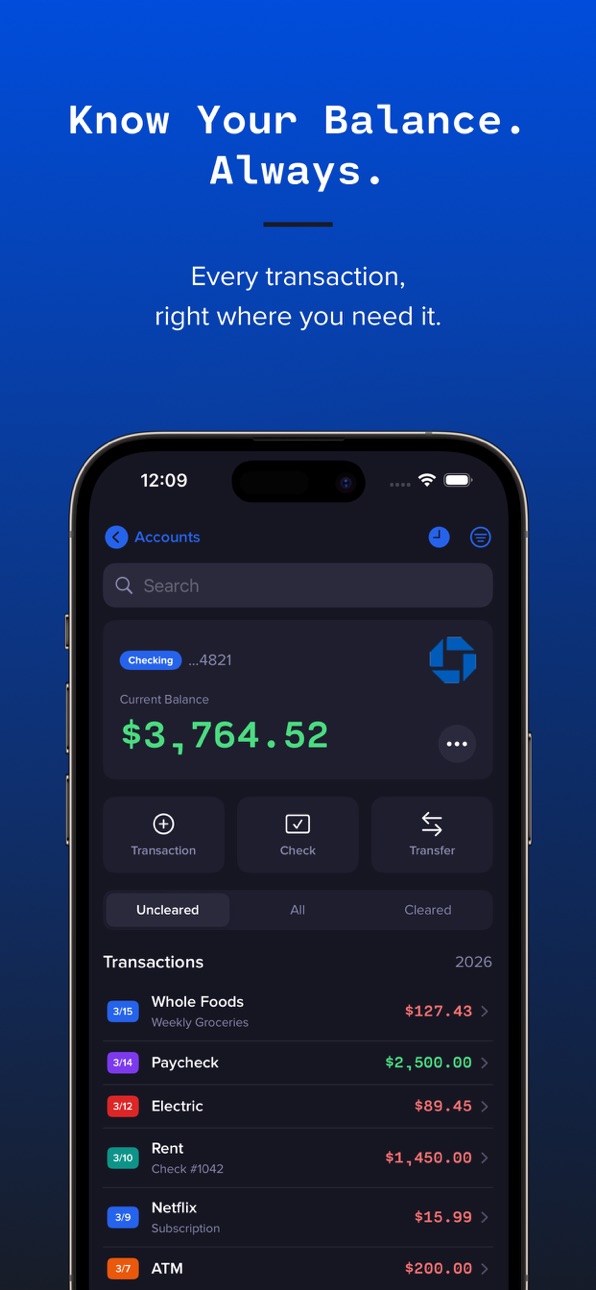
Most banking apps only reflect transactions that have already posted, not the check you wrote yesterday, the bill that hits Friday, or the withdrawal you made this morning. Basic Checkbook is a personal transaction register that lets you log every dollar as you spend it, so your running balance is always accurate, always up to date, and always yours.
No bank logins. No syncing your credentials to a third-party server. Just a fast, private checkbook register that works the way a checkbook always has, only better.
WHAT YOU CAN DO
• Log purchases, deposits, bills, withdrawals, checks, credits, and transfers as they happen
• Watch your true running balance update with every entry
• Add a transaction hands-free with Siri, the Shortcuts app, or Spotlight
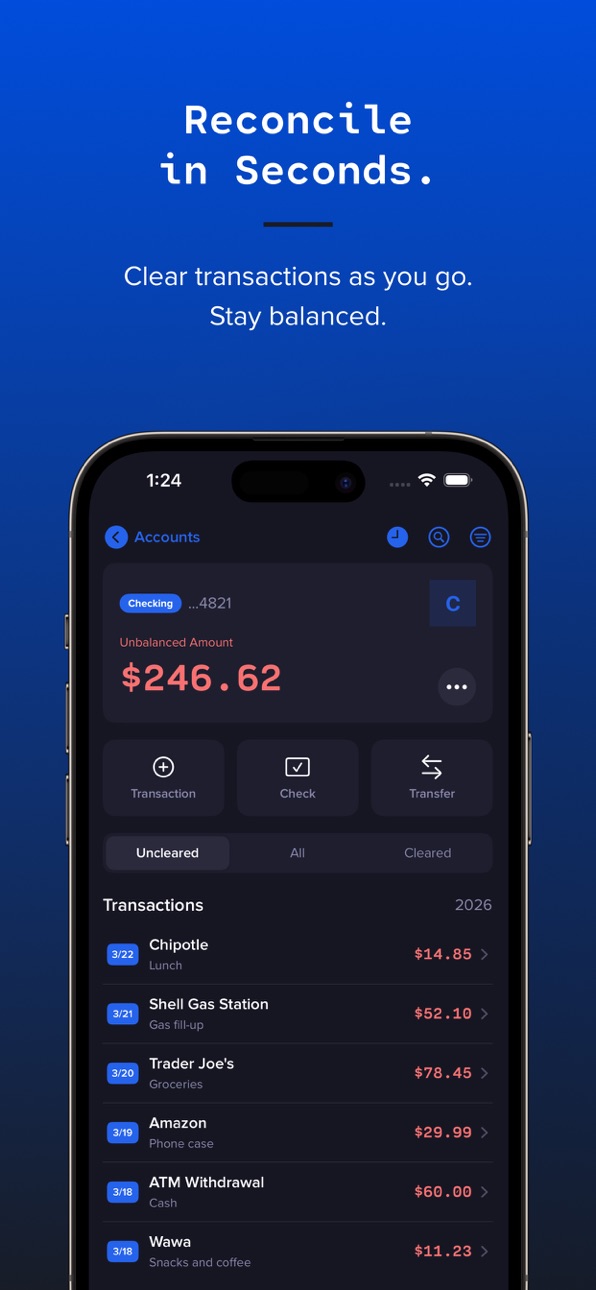
• Mark items cleared one at a time, fly through a statement with Quick Reconcile, or balance against your bank statement with the guided Reconcile to Statement flow
• Void a canceled or torn-up check and keep it on the record while the money returns to your balance
• Tag transactions with as many labels as you like, and tap a tag you have used before to add it in a second
• Filter by type or status (Uncleared, Cleared, or All) and search your whole register by payee, amount, memo, or tag
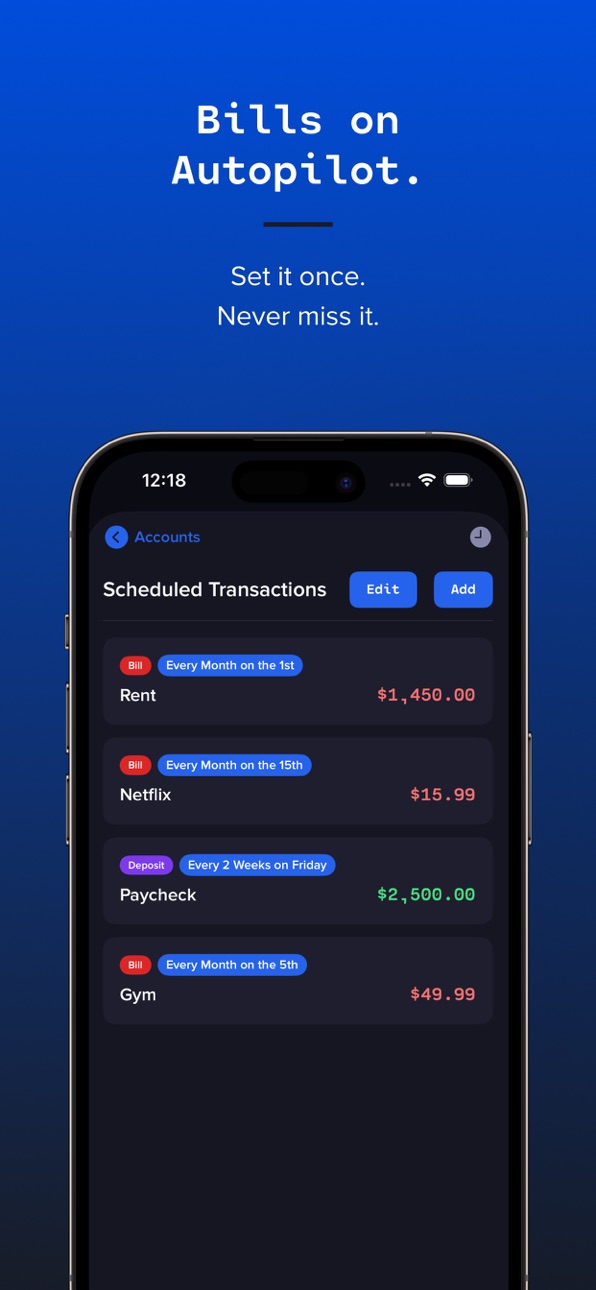
• Schedule recurring bills and income with reminders, and let them post automatically on the right day
• Earn interest on a savings account: choose the day it posts each month, and see your total interest earned at a glance
• Get your next check number suggested for you when you write a check
• Scan a check or receipt to fill in the details automatically
• Track a different currency per account
• Keep every account in sync across your devices with iCloud, free for everyone
• Back up your entire register to a file and restore it anytime
• Lock the app with Face ID, Touch ID, or a passcode
• Add your bank's logo to personalize each account
BASIC CHECKBOOK PREMIUM
Upgrade to unlock the full experience:
• Unlimited accounts: keep checking, savings, and more in one place
• Projected balance: see where your balance is headed from your scheduled and recurring activity
• Receipt photos: attach a photo of any receipt to the transaction it belongs to
• Spending analytics: charts, trends, budgets, and period comparisons that show where your money goes
• Monthly PDF statements: export clean, bank-style statements for any date range
• CSV import and export: bring your history in, or take it anywhere
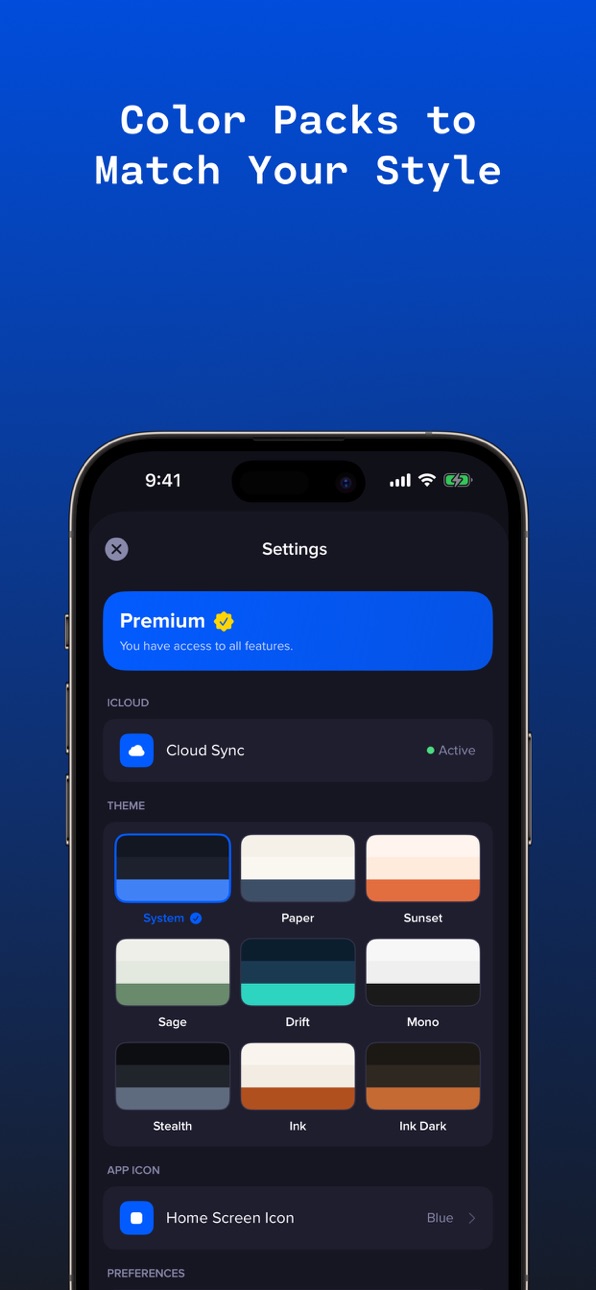
• Color themes and app icons: make Checkbook yours with premium palettes and home-screen icons
Basic Checkbook doesn't connect to your bank. It never reads your transactions automatically or stores your credentials anywhere. It's your ledger: private, accurate, and completely in your control.
Privacy Policy: https://basicapps.tech/privacy
In-App Purchases US pricing
Annual Premium Subscription
Yearly$23.99
One-Time Purchases
Lifetime Premium$59.99
Capabilities
In-App Purchases
Accessibility
ipadiphonemacrealityDevicetvoswatch
Version history 25 versions
Build 888014129v6.62026-07-09 13:21:47
What's New in Version 6.6
• New Lifetime option: get Premium with a single one-time purchase. Yours forever, no renewal.
• The yearly subscription is unchanged, and everything free stays free.
Build 887924740v6.52026-07-07 17:14:53
What's New in Version 6.5
• Rebuilt iCloud sync: your accounts and transactions now sync reliably across all your devices
• New in Settings: a quick guide to adding transactions with Siri, plus you can now just say "Checkbook"
• Siri now understands spoken amounts like "$55" and "fifty-five dollars"
• The Cloud Sync status in Settings now shows your real sync state
• Cleaner passcode setup screen and assorted fixes
Build 887868616v6.42026-07-06 02:37:54
Spent some time under the hood. Drives better now.
Build 887804746v6.32026-07-04 05:18:48
What's New in Version 6.3
- Savings accounts: choose the day your interest posts, and see the total interest you've earned right on the account.
- Interest payments now stand out in your register with their own color and marker.
- A refreshed lock screen and account card.
- Cleaner, higher-contrast light mode.
Build 887531627v6.22026-06-28 16:55:15
What's New in Version 6.2
• Tag transactions with more than one label. Add as many tags as you need, and tap your previously used tags to fill them in fast.
• A brighter new default app icon. The previous navy icon is still available as an alternate icon in Settings.
• Settings now shows the date of your last backup, so you always know how current your data is.
• A little faster, a little smoother, a little better.
Build 887291517v6.12026-06-22 21:25:09
What's New (v6.1)
Reconcile to a statement.
A new guided flow: enter your bank statement's ending balance, tick off the matching transactions, and watch the difference drop to zero, with a record of your last reconciliation.
Three new themes.
Stealth (sleek dark monochrome), Ink, and Ink Dark, plus a refreshed Drift. Buttons and tags now stay crisp and legible across every theme.
Smoother and more solid.
Faster transaction entry, a no-freeze backup export, and a batch of fixes to keep your balances and recurring entries exactly right.
Build 887019147v6.02026-06-16 17:51:41
What's New (v6.0)
Void a check.
Tore one up? Mark it void and the money comes right back to your balance, while the check stays on record so your register stays complete.
Add transactions with Siri & Shortcuts.
Just say it (or tap a shortcut) to log a purchase, deposit, bill, or check, hands-free, right from your Home Screen or Spotlight.
Made the app a little smarter and a lot less cranky.
Build 886848139v5.912026-06-12 16:53:59
What's New (v5.91)
• Writing a check? Checkbook now suggests the next check number automatically and shows your last check number right under the field.
• Cleaner forms and small enhancements
• Nothing flashy, just better.
Build 886707188v5.92026-06-09 18:17:47
What's New (v5.9)
• Writing a check? Checkbook now suggests the next check number automatically and shows your last check number right under the field.
• Cleaner forms and small enhancements
• Nothing flashy, just better.
Build 886313828v5.82026-05-30 18:13:54
What's New (v5.8)
Improvements throughout, we sweat the small stuff so you don't have to.
Build 886063495v5.72026-05-25 00:08:37
What's New (v5.7)
Convert Transactions to Recurring
When you're viewing any transaction, a new "Set Up Recurring Payment" option appears right below "Mark as Cleared." Tap it to turn a one-off payment into a scheduled recurring transaction with the payee, amount, and day-of-month pre-filled. Your original transaction stays in the register as a historical record; the new schedule handles future posts.
Quick Reconcile
A new checkmark toggle in the toolbar lets you batch-clear transactions in the Uncleared tab. Turn it on, tap the circle next to each transaction to mark it cleared, and the rows stay visible so you can see your progress. Turn it off when you're done and the list snaps back to show only what's still uncleared.
Improvements throughout, we sweat the small stuff so you don't have to.
Build 886023451v5.62026-05-23 02:17:51
What's New (v5.6)
Change Passcode: head to Settings → Security to update your
passcode without having to reset the app.
Smarter Boot Recovery: if Basic Checkbook ever has trouble
opening your data, you'll see a clear screen with options
instead of an automatic wipe. Your data stays put while you
decide what to do.
30-Day Backup Reminder: a quiet card on the Accounts screen
nudges you to back up your data once a month. One tap and you
can save a backup straight from the banner.
Safer Backup Restore: restoring from a backup file is now
atomic. If anything goes wrong mid-restore, your existing data
is fully preserved instead of half-replaced.
Calendar Fix: scheduled bills set for the 31st now correctly
land on the last day of short months (Feb 28, Apr 30, etc.)
instead of slipping into the following month.
Plus dozens of under-the-hood polish items, faster sheet
transitions, and the foundation for a more robust app going
forward.
Build 885893724v5.52026-05-20 18:55:07
Three meaningful additions in 5.5:
Per-Account Currency
Every account now picks its own currency. Manage USD, GBP, EUR, JPY, CHF, CAD, AUD, and 7 others side-by-side — perfect for travelers, expats, or anyone juggling foreign accounts. Statements and reports honor each account's currency.
Color Packs (Premium)
Make Basic Checkbook yours. Pick from System (free), Paper, Sunset, Sage, Ocean, or Mono — five new themes that transform the entire app.
App Icon Picker (Premium)
Swap your home-screen icon between Brand, Black, Blue, Concrete, Glass, or Paper. Match your phone's aesthetic, no jailbreak required.
Plus polish: localized subscription pricing, smoother passcode entry, and a few quiet fixes.
Build 885767413v5.42026-05-17 21:44:44
A smarter way to see your money and a fresh new look.
Smart Projected Balance
Projected Balance now scans the last 90 days of your activity to detect recurring patterns automatically, no setup required. Subscriptions, bills, paychecks all show up in your forecast as "Detected." Tap any of them to add as a permanent scheduled transaction.
Light Mode
Bright, clean, and easy on the eyes. Choose System, Light, or Dark from Settings → Preferences → Appearance and switch any time. The look that fits your day.
Polish & Fixes
• Refined contrast across the register, charts, and Settings
• Improved Settings layout and section ordering
• Cross-promo for Ink, our notes & to-do dictation app
Build 885507179v5.22026-05-11 21:37:27
We did some stuff. It's better now. Trust us.
Build 884930112v5.12026-04-26 18:18:00
What's in 5.1:
• Number entry now uses iOS's native decimal pad (faster, more familiar)
• Keyboard auto-dismisses when you tap the date picker, dropdowns, type pills, or scroll the form
• Done button in the keyboard toolbar for explicit dismissal
• Accessibility improvements on the passcode pad (VoiceOver now properly announces buttons)
• Misc polish
Build 884680774v5.02026-04-19 21:04:23
Major update 5.0 packed with new features.
Projected Balance (Premium)
See what your balance will be 30 days, 90 days, or any date up to a year out — based on your scheduled transactions. Includes a visual balance curve and a chronological list of upcoming postings.
Receipt Photos (Premium)
Attach a photo of any receipt to a transaction. Snap with the camera or pick from your library. Pinch to zoom, double-tap to fit, pan to explore.
Smarter Keyboard
The number pad now dismisses automatically when you tap another field — no more hunting for "Done."
Polish & Fixes
- Refreshed iCloud status in Settings
- Better handling of large backup files with receipts attached
- Performance improvements across the register
Build 884411117v4.1.12026-04-12 05:13:05
• Bug fixes and under-the-hood improvements for a smoother experience
• Performance improvements across account views and transaction entry
• General housekeeping to keep things running cleanly
• Thanks for using Basic Checkbook.
Build 884160723v4.12026-04-05 20:48:16
Bug fixes and improvements.
- Updated support and legal links
- Improved premium feature descriptions
- Search now includes tags
- Minor stability and polish improvements
Build 884122562v4.02026-04-04 19:10:43
Transaction Tags — Add custom tags to any transaction for personal organization. Tag filter lets you quickly find tagged transactions. Tags autocomplete from your history.
Bill Reminders — Get notified before scheduled transactions post. Set reminders per-transaction with configurable lead time (day-of, 1-7 days before).
UI Polish — Refreshed navigation icons in the account register.
Build 883905993v3.22026-03-30 20:19:14
What's New
Data & Backup
- Export a complete backup of all your accounts and transactions to any location — Files, iCloud Drive, email, or AirDrop
- Restore your full account setup from any previously exported backup file
- Find both options under Settings → Data & Backup
iCloud Sync Fix (Critical)
- Fixed an issue where iCloud sync was not functioning correctly, causing data to be lost when the app was deleted and reinstalled
- Your data now syncs to iCloud and will be fully restored on any reinstall or new device
- Existing users: your data will automatically upload to iCloud on first launch of this update
Build 883885135v3.02026-03-29 21:36:40
What's New in Version 3.0
PDF Statement Export
Generate professional account statements as PDF documents. Choose any date range, a single month, a full quarter, or a custom window—and export a formatted statement with your account details, transaction list with running balance, and a summary of deposits and withdrawals. Perfect for printing, sharing with your accountant, or keeping records.
Monthly Budget Tracking
Set a spending limit on any account and track your progress in the analytics dashboard. A visual progress bar shows how much you've spent against your monthly target, turning from green to yellow to red as you approach or exceed your budget.
Smarter Search
Search your transaction register by payee, amount, or memo — all from one search bar. Type an amount like "48" to find matching transactions instantly.
Bug Fixes & Improvements
- Transfers now correctly start as uncleared in both accounts
- Added Credit filter to the transaction register
- Refreshed account menu design
Build 883808885v2.12026-03-27 01:06:49
- Fixed Share App button not working
- Share App now includes App Store link
- Bug fixes and stability improvements
Build 883817795v2.22026-03-27 16:08:07
- Payee autocomplete: Previously used payees suggested as you type
- Amount suggestions: Recent amounts shown after selecting a payee
- New app icon
- Fixed Share App not working
- Bug fixes including improved data reliability, performance optimizations, and stability improvements
Build 883727246v2.02026-03-25 16:49:28
Analytics Dashboard:
See your money in vs. money out at a glance with monthly bar charts and cash flow trend lines
Period Filters:
View spending for this month, last month, 3 months, 6 months, this year, last year, or all time
Bulk Edit:
Change transaction categories across all matching payees in one tap
Auto Interest:
Savings accounts with an interest rate now automatically post monthly interest
Category Colors:
Toggle between detailed color categories or simplified view in Settings
Delete All Data:
Full data reset option in Settings for complete control over your information
Improved CSV Import:
Better detection of checks and transaction types
Bug fixes and performance improvements
Price history by region
Currency
Show
Columns
Search
Availability 1 of 1 storefronts
| Region | Language | Price | Ratings | Avg | Version |
|---|---|---|---|---|---|
| US | en-US | Free | 2 | 5.0 | 6.6 |
Change log 29 changes · US
✎
releaseNotes updated
What's New in Version 6.6
• New Lifetime option: get Premium with a single one-time purchase. Yours forever, no renewal.
• The yearly subscription is unchanged,
✎
description updated
Your bank app shows what cleared. Basic Checkbook shows what's real.
Most banking apps only reflect transactions that have already posted, not the check you wr
✎
subtitle updated
Track Transactions & Balance
✎
name updated
Basic Checkbook: Spending Log
◆
Version 6.6 released
What's New in Version 6.6
• New Lifetime option: get Premium with a single one-time purchase. Yours forever, no renewal.
• The yearly subscription is unchanged, and everything free stays free.
◆
Version 6.5 released
What's New in Version 6.5
• Rebuilt iCloud sync: your accounts and transactions now sync reliably across all your devices
• New in Settings: a quick guide to adding transactions with Siri, plus you can now just say "Checkbook"
• Siri now un
◆
Version 6.4 released
Spent some time under the hood. Drives better now.
◆
Version 6.3 released
What's New in Version 6.3
- Savings accounts: choose the day your interest posts, and see the total interest you've earned right on the account.
- Interest payments now stand out in your register with their own color and marker.
- A refresh
◆
Version 6.2 released
What's New in Version 6.2
• Tag transactions with more than one label. Add as many tags as you need, and tap your previously used tags to fill them in fast.
• A brighter new default app icon. The previous navy icon is still available as an
◆
Version 6.1 released
What's New (v6.1)
Reconcile to a statement.
A new guided flow: enter your bank statement's ending balance, tick off the matching transactions, and watch the difference drop to zero, with a record of your last reconciliation.
Three new them
◆
Version 6.0 released
What's New (v6.0)
Void a check.
Tore one up? Mark it void and the money comes right back to your balance, while the check stays on record so your register stays complete.
Add transactions with Siri & Shortcuts.
Just say it (or tap a shor
◆
Version 5.91 released
What's New (v5.91)
• Writing a check? Checkbook now suggests the next check number automatically and shows your last check number right under the field.
• Cleaner forms and small enhancements
• Nothing flashy, just better.
◆
Version 5.9 released
What's New (v5.9)
• Writing a check? Checkbook now suggests the next check number automatically and shows your last check number right under the field.
• Cleaner forms and small enhancements
• Nothing flashy, just better.
◆
Version 5.8 released
What's New (v5.8)
Improvements throughout, we sweat the small stuff so you don't have to.
◆
Version 5.7 released
What's New (v5.7)
Convert Transactions to Recurring
When you're viewing any transaction, a new "Set Up Recurring Payment" option appears right below "Mark as Cleared." Tap it to turn a one-off payment into a scheduled recurring transaction
◆
Version 5.6 released
What's New (v5.6)
Change Passcode: head to Settings → Security to update your
passcode without having to reset the app.
Smarter Boot Recovery: if Basic Checkbook ever has trouble
opening your data, you'll see a clear screen with options
i
◆
Version 5.5 released
Three meaningful additions in 5.5:
Per-Account Currency
Every account now picks its own currency. Manage USD, GBP, EUR, JPY, CHF, CAD, AUD, and 7 others side-by-side — perfect for travelers, expats, or anyone juggling foreign accounts. Sta
◆
Version 5.4 released
A smarter way to see your money and a fresh new look.
Smart Projected Balance
Projected Balance now scans the last 90 days of your activity to detect recurring patterns automatically, no setup required. Subscriptions, bills, paychecks all
◆
Version 5.2 released
We did some stuff. It's better now. Trust us.
◆
Version 5.1 released
What's in 5.1:
• Number entry now uses iOS's native decimal pad (faster, more familiar)
• Keyboard auto-dismisses when you tap the date picker, dropdowns, type pills, or scroll the form
• Done button in the keyboard toolbar for explicit di
◆
Version 5.0 released
Major update 5.0 packed with new features.
Projected Balance (Premium)
See what your balance will be 30 days, 90 days, or any date up to a year out — based on your scheduled transactions. Includes a visual balance curve and a chronological
◆
Version 4.1.1 released
• Bug fixes and under-the-hood improvements for a smoother experience
• Performance improvements across account views and transaction entry
• General housekeeping to keep things running cleanly
• Thanks for using Basic Checkbook.
◆
Version 4.1 released
Bug fixes and improvements.
- Updated support and legal links
- Improved premium feature descriptions
- Search now includes tags
- Minor stability and polish improvements
◆
Version 4.0 released
Transaction Tags — Add custom tags to any transaction for personal organization. Tag filter lets you quickly find tagged transactions. Tags autocomplete from your history.
Bill Reminders — Get notified before scheduled transactions post. S
◆
Version 3.2 released
What's New
Data & Backup
- Export a complete backup of all your accounts and transactions to any location — Files, iCloud Drive, email, or AirDrop
- Restore your full account setup from any previously exported backup file
- Find both optio
◆
Version 3.0 released
What's New in Version 3.0
PDF Statement Export
Generate professional account statements as PDF documents. Choose any date range, a single month, a full quarter, or a custom window—and export a formatted statement with your account details,
◆
Version 2.2 released
- Payee autocomplete: Previously used payees suggested as you type
- Amount suggestions: Recent amounts shown after selecting a payee
- New app icon
- Fixed Share App not working
- Bug fixes including improved data reliability, performance
◆
Version 2.1 released
- Fixed Share App button not working
- Share App now includes App Store link
- Bug fixes and stability improvements
◆
Version 2.0 released
Analytics Dashboard:
See your money in vs. money out at a glance with monthly bar charts and cash flow trend lines
Period Filters:
View spending for this month, last month, 3 months, 6 months, this year, last year, or all time
Bulk Edit: