Home › Health & Fitness

 US
US
1 of 1 storefronts
Content in en-US
Content in en-US
Information
Preview 1 platform
iPhone 9 images




What’s New Version 2.8.2
Circadian Rhythm — see when your body is active
• New Circadian rhythm card on the Dashboard: a 24-hour clock showing when your steps, heart rate and active energy typically peak, with a plain-English guide to reading it
• Choose a 7, 14 or 30-day average, toggle metrics on/off, and see each metric's daily peak time
• Reorder or hide it anytime from Customise Dashboard
Export Data, made clearer
• New "Export Data" page explains how to continue your analysis for free at dashboard.metrya.app — still zero servers, zero accounts, 100% private
• Free plan exports your last 7 days once a week; Pro exports your full 30-day history with hourly detail, anytime
Also in this release
• Fixed a mismatch where a morning Insight report's stat numbers (recovery, HRV, steps) could reference a different day than the AI's written summary
Description
Metrya turns Apple Health data into clear, private AI insights. Analyze HRV, sleep, recovery, and trends directly on your iPhone - no servers, no accounts, and no subscriptions. With your own Claude / OpenAI / Gemini key, Metrya acts as a personal health and longevity coach, asking “why am I tired?” or “is my HRV trending down?” and answering with data‑grounded advice.
Built for privacy, Metrya processes every metric on your iPhone. Your health data never touches our servers, and you always control which AI provider you use.
Core features (free forever):
Apple Health dashboard: Steps, sleep stages, heart rate, HRV, resting HR, SpO₂, body temperature, body composition, VO₂ max, workouts, and more - synced automatically across the last 30 days.
Daily Recovery Score: A 0–100 score calculated on-device from HRV vs your personal baseline, resting HR, sleep duration, deep and REM sleep quality, and 3-day HRV trend. See each contributing factor at a glance.
Smart anomaly alerts: Metrya builds a 30-day personal baseline for 8 key metrics. When a reading deviates significantly, you get a colour-coded alert - mild, moderate, or severe - automatically correlated with nearby lifestyle events like alcohol, travel or high-intensity training.
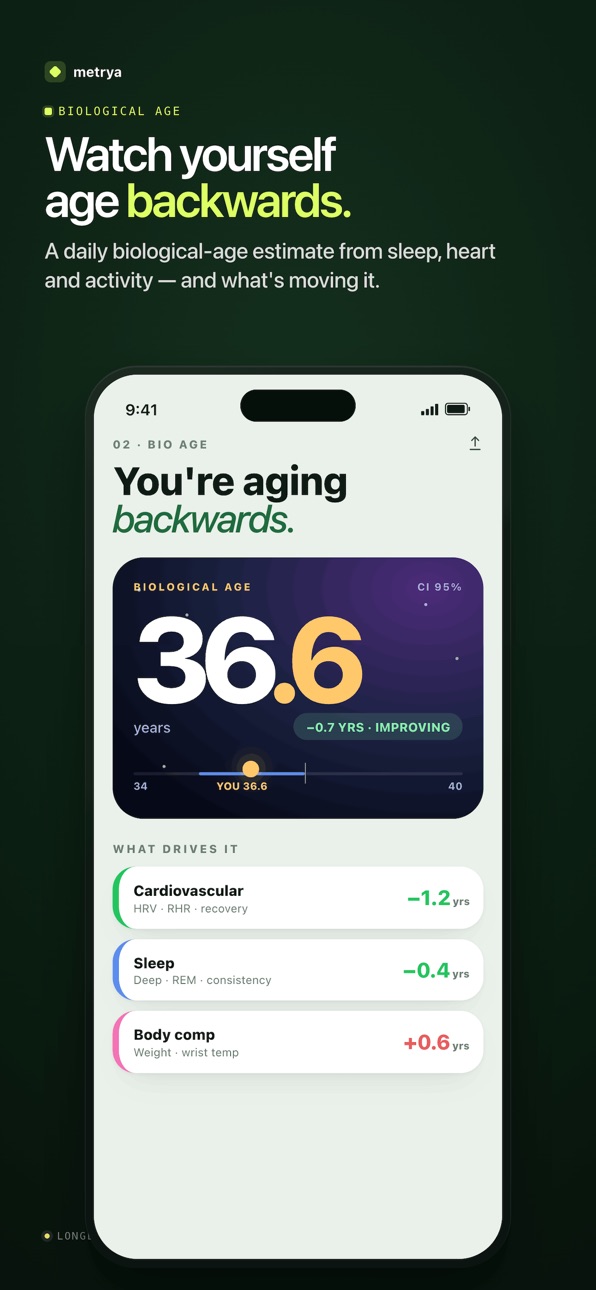
Biological Age: Estimated from cardiovascular fitness, sleep quality, metabolic markers, and activity level - benchmarked against age-group averages with a plain-language explanation for each factor and a trend line over time.
Set Commitments for steps, sleep, HRV, weight and more, and track your progress with automatic streaks and milestone badges - all included, no Pro upgrade required.
Total privacy: No backend servers. No accounts.
Metrya Pro (lifetime unlock):
One-time purchase. No subscriptions, ever.
AI health chat: Ask questions like: "How did my HRV trend this week?" or "Why was my recovery so low after that flight?" The AI receives full context of your recent data and answers with specific numbers, not generic advice.
Bring Your Own Key (BYOK): Use your own Anthropic Claude, OpenAI, or Google Gemini API key. You choose the model and control the cost. AI calls go directly from your device to the provider you chose.
Apple Intelligence support - full private on-device AI Anslysis powered by Apple Intelligence (for supported devices)
Recurring Insights: Schedule AI-generated health reports to run automatically - daily or weekly, at times you choose, with push notification delivery. Tap the notification to read your report instantly.
Wellness Log: Sessions: sauna, cold plunge, breathwork, meditation, red light therapy, contrast, foam rolling, and more
Daily check-ins: rate energy, mood, stress, soreness, readiness, and focus (1–5 scale)
Lifestyle events: supplements, caffeine, alcohol, sunlight, nicotine, travel
Profile context: Tell the AI your supplement stack, available equipment, and dietary approach. It uses this to personalise every answer.
Turn any AI advice into a trackable goal with one tap - extract full Commitments (habits, metrics, and targets) directly from chat
30-day AI context: Full detail for the last 7 days, compact weekly summaries for days 8–30. Detected anomalies are automatically surfaced in chat so the advisor can reference them unprompted.
Full health history: Interactive charts with 7, 14 and 30-day views, sleep detail screen with full stage hypnogram, personal records across 6 metrics, training load overview, week-over-week comparisons, and rule-based trend insights.
AI-powered Nutrition Log - Log meals in plain English and let AI extract macros, calories, and micronutrients
Compatibility
Works with any device that writes to Apple Health, including Ultrahuman Ring, Amazfit, Oura, Apple Watch, and smart scales.
Metrya Pro requires an active API key from a supported AI provider (OpenAI, Anthropic, or Google) to use AI features. Metrya is an analytics tool and does not provide medical advice, diagnosis, or treatment.
Privacy Policy: https://metrya.app/privacy/
In-App Purchases US pricing
Monthly Subscription Subscription
Monthly Pro · Monthly 3-day free trial$2.99
One-Time Purchases
Lifetime Premium$9.99
Capabilities
In-App Purchases
Accessibility
ipadiphonemacrealityDevicetvoswatch
Version history 25 versions
Build 888011488v2.8.22026-07-08 22:48:07
Circadian Rhythm — see when your body is active
• New Circadian rhythm card on the Dashboard: a 24-hour clock showing when your steps, heart rate and active energy typically peak, with a plain-English guide to reading it
• Choose a 7, 14 or 30-day average, toggle metrics on/off, and see each metric's daily peak time
• Reorder or hide it anytime from Customise Dashboard
Export Data, made clearer
• New "Export Data" page explains how to continue your analysis for free at dashboard.metrya.app — still zero servers, zero accounts, 100% private
• Free plan exports your last 7 days once a week; Pro exports your full 30-day history with hourly detail, anytime
Also in this release
• Fixed a mismatch where a morning Insight report's stat numbers (recovery, HRV, steps) could reference a different day than the AI's written summary
Build 887920384v2.8.12026-07-07 05:51:52
New: Knowledge Feed — a daily-updated research feed on your Dashboard covering exercise, nutrition, supplements, recovery, and longevity. Tap any card to read the source.
The AI Advisor and Heads Up Today now factor in pollen levels — high grass, birch, ragweed and other pollen counts are flagged when they may be affecting your allergies, sleep, or recovery.
Sharp barometric pressure swings (5+ hPa drop in 24h) are now detected — a common trigger for headaches, joint pain, and poor sleep.
Geomagnetic activity is now tracked and surfaced when elevated, since some people are sensitive to it around sleep and HRV.
Build 887725105v2.8.02026-07-02 19:39:31
Reserve — your live energy battery (Beta)
Meet Reserve: a 5–100 gauge of how much usable energy you have right now. It starts each morning from your recovery and sleep, drains as you spend energy through the day, and recharges when you rest — so you always know whether to push or ease off. Add it to your dashboard, reorder or hide it anytime, and tap in for the full hour-by-hour breakdown.
More accurate recovery scores
We fixed a bug where a warm bedroom could make your body temperature look "elevated" and unfairly cap your recovery score. Temperature is now measured over your actual sleep window, so your score reflects how you really recovered.
Smarter Body Vision
Body Vision now asks about your training setup — gym, home, bodyweight, or outdoors — so exercise recommendations match what you actually have access to. Saving your plan now takes you straight home, with a quick link to your progress tracker.
Fixes & polish
• Body fat now always uses your latest reading in bio age and Body Vision
• "More from Developer" now opens each app's App Store page directly
• Various refinements to the AI Advisor and dashboard
Build 887609365v2.7.02026-06-30 21:08:07
Body Vision (new)
Set a physique goal — upload a reference photo, describe it in words, or pick a silhouette preset — then add your current photo. Metrya reads both against your scale data, sleep, and training load to estimate body composition, map the gap to your goal, and build a personalised plan covering training, nutrition, and recovery.
Add weekly check-in photos to track body fat, weight, and lean mass over time. Your goal and progress photos become permanent context in every AI Advisor reply — coaching, nutrition tweaks, and recovery targets all pull toward the physique you're working for.
Heads Up Today
A new dashboard card surfaces local weather and air quality conditions that may affect your health metrics today. Elevated heat, poor air quality, or active weather warnings are reflected automatically in AI Advisor answers. Fully customisable — reorder or hide it like any other dashboard section.
Build 887455991v2.6.62026-06-29 19:54:00
Fixed "Profile & body metrics" in Settings navigating back to Context instead of opening your profile
Bio Age "Setup Required" now correctly opens the profile editor to enter birth date and sex
Build 887234012v2.6.52026-06-21 04:47:39
Fixed the same workout importing multiple times (+ cleaned up existing duplicates)
Morning report now reads your training schedule on the correct days
Morning report now analyses workouts you actually did, not just what was planned
AI Advisor no longer fakes creating commitments — points you to the flag icon instead
Build 887159966v2.6.22026-06-18 21:18:19
Fixed the same workout appearing multiple times after a sync
Fixed "One tap to repeat" showing the same activity type in every slot
Fixed AI Advisor falsely claiming it created commitments — it now directs you to the flag icon instead
Build 887076317v2.6.12026-06-17 18:30:35
Tap any metric card in AI Advisor or Insight reports to open its full trend chart
Recovery Score stays steadier in the morning until today’s resting HR, SpO₂, and temperature readings arrive
Build 886985244v2.6.02026-06-16 19:47:02
- Workouts detected via Apple Health (Apple Watch, etc.) are now automatically added to your Wellness Log — no manual entry needed
- Fixed Nutrition History showing "Unknown" for meals synced from other apps
- Fixed incorrect protein/carbs/fat for meals synced from other apps
- Fixed a misleading weekly steps comparison
- AI Advisor responses now clearly label the metrics they reference
Build 886851167v2.5.02026-06-12 16:14:23
AI Advisor replies now show metric cards with live sparklines — HRV, sleep, recovery, bio age and more
Every number the AI shows is pulled directly from your real Apple Health data — no more guessed figures
Tap a suggested follow-up to keep chatting, or turn any answer into a trackable goal
Refreshed chat design with the new Metrya brand mark
Recurring Insight reports now include a stats grid with trends at a glance
"Run Now" on insights — no more weekly cap, just a short cooldown
Build 886764959v2.4.22026-06-10 21:36:09
- Caffeine in Data Export
- Customize Dashboard reset
- Duplicate wellness log entry
Build 886738303v2.4.12026-06-09 20:55:25
• Log entries in the past - choose any date and time when adding a new Wellness Log entry
• Edit existing entries - tap any card in the Wellness Log to update its details or timestamp
• Fixed weekly heatmap showing the wrong day letter on the current day
Build 886623437v2.4.02026-06-07 15:34:05
- Caffeine Tracker
- Customize Dashboard
Build 886430844v2.3.02026-06-02 22:33:18
- more metrics from Apple Health to be part of AI Context
Build 886356056v2.2.12026-06-01 16:48:57
Fixes for Gemini model for Nutrition log
Build 886340075v2.2.02026-05-31 18:15:20
AI-powered Nutrition Log - Log meals in plain English and let AI extract macros, calories, and micronutrients - then ask how your diet correlates with sleep, HRV, or energy levels.
Build 886123041v2.1.02026-05-26 17:55:33
- Context Center - new hub replacing the Profile tab; gives the AI structured knowledge about your lifestyle so it can interpret your data more accurately
- Workout Schedule - define your weekly training plan with activity type, intensity, and notes; the AI now cross-references scheduled hard days when interpreting suppressed HRV or elevated resting HR
- Nutrition Baseline - set daily calorie target, macro split, meal timing, and intermittent fasting window; the AI references your approach when discussing energy, weight trends, and overnight metrics
- Situation Notes - flag a temporary context (holiday, illness, deload, high-stress week) with an optional expiry date and tone hint; the AI eases up on targets while the situation is active
- Active situation banner on the Dashboard with quick edit and dismiss - no need to dig into settings
- Dietary data from Apple Health - calories, protein, carbs, fat and water now read from HealthKit and included in AI context when available
- AI prompt improvements - supplements, nutrition, and workout schedule now inform interpretation of recovery, sleep, and body-composition metrics
Build 885961199v2.0.72026-05-24 18:44:38
- reading sleep apnea data from HelthKit
- sync issue when Insight notification bootstrap application at the morning
Build 885850857v2.0.52026-05-19 19:22:20
- rewritten insights logic to query data in smarter way
Build 885783232v2.0.32026-05-18 18:05:11
- updating scheduled Insights logic to read fresh data from HealthKit
Build 885567716v2.0.22026-05-12 19:30:36
- Widget now shows a sync indicator when health data hasn't been refreshed in a while — tap it to update instantly
- Widget data is now refreshed automatically in the background, so it stays current even without opening the app
- AI Advisor: save any question you've sent using the bookmark icon and reuse it anytime from the new Saved Questions button on the chat screen
- Minor bug fixes and stability improvements
Build 885435718v2.0.02026-05-09 01:06:42
New iOS Home Screen widget - Small, Medium and Large sizes showing steps, sleep, HRV, active calories, Bio Age and streak at a glance. Quick-action buttons: AI Advisor, Log Wellness, Sync Health available on widget as well
Build 885323641v1.9.22026-05-06 18:29:20
Get private AI‑powered health insights from Apple Health, now with support for Apple Intelligence and Bring‑Your‑Own‑Key models. Track recovery, HRV, sleep, Longevity Signals, and biological age in one place - with no account, no subscription, and processing designed to keep your health data under your control
Build 885343406v1.9.32026-05-06 23:26:46
Redesigned first-run onboarding and Pro paywall to match the Metrya v2 sage / forest look
Build 885203953v1.9.12026-05-03 19:13:05
- notifications stability fixes
- longevity signals minor formula fixes
Price history by region
Currency
Show
Columns
Search
Availability 1 of 1 storefronts
| Region | Language | Price | Ratings | Avg | Version |
|---|---|---|---|---|---|
| US | en-US | Free | 3 | 3.7 | 2.8.2 |
Change log 29 changes · US
✎
releaseNotes updated
Circadian Rhythm — see when your body is active
• New Circadian rhythm card on the Dashboard: a 24-hour clock showing when your steps, heart rate and active ene
✎
description updated
Metrya turns Apple Health data into clear, private AI insights. Analyze HRV, sleep, recovery, and trends directly on your iPhone - no servers, no accounts, and
✎
subtitle updated
Private AI health insights
✎
name updated
Metrya – Health AI
◆
Version 2.8.2 released
Circadian Rhythm — see when your body is active
• New Circadian rhythm card on the Dashboard: a 24-hour clock showing when your steps, heart rate and active energy typically peak, with a plain-English guide to reading it
• Choose a 7, 14 or
◆
Version 2.8.1 released
New: Knowledge Feed — a daily-updated research feed on your Dashboard covering exercise, nutrition, supplements, recovery, and longevity. Tap any card to read the source.
The AI Advisor and Heads Up Today now factor in pollen levels — high
◆
Version 2.8.0 released
Reserve — your live energy battery (Beta)
Meet Reserve: a 5–100 gauge of how much usable energy you have right now. It starts each morning from your recovery and sleep, drains as you spend energy through the day, and recharges when you res
◆
Version 2.7.0 released
Body Vision (new)
Set a physique goal — upload a reference photo, describe it in words, or pick a silhouette preset — then add your current photo. Metrya reads both against your scale data, sleep, and training load to estimate body composit
◆
Version 2.6.6 released
Fixed "Profile & body metrics" in Settings navigating back to Context instead of opening your profile
Bio Age "Setup Required" now correctly opens the profile editor to enter birth date and sex
◆
Version 2.6.5 released
Fixed the same workout importing multiple times (+ cleaned up existing duplicates)
Morning report now reads your training schedule on the correct days
Morning report now analyses workouts you actually did, not just what was planned
AI Advis
◆
Version 2.6.2 released
Fixed the same workout appearing multiple times after a sync
Fixed "One tap to repeat" showing the same activity type in every slot
Fixed AI Advisor falsely claiming it created commitments — it now directs you to the flag icon instead
◆
Version 2.6.1 released
Tap any metric card in AI Advisor or Insight reports to open its full trend chart
Recovery Score stays steadier in the morning until today’s resting HR, SpO₂, and temperature readings arrive
◆
Version 2.6.0 released
- Workouts detected via Apple Health (Apple Watch, etc.) are now automatically added to your Wellness Log — no manual entry needed
- Fixed Nutrition History showing "Unknown" for meals synced from other apps
- Fixed incorrect protein/carbs/
◆
Version 2.5.0 released
AI Advisor replies now show metric cards with live sparklines — HRV, sleep, recovery, bio age and more
Every number the AI shows is pulled directly from your real Apple Health data — no more guessed figures
Tap a suggested follow-up to keep
◆
Version 2.4.2 released
- Caffeine in Data Export
- Customize Dashboard reset
- Duplicate wellness log entry
◆
Version 2.4.1 released
• Log entries in the past - choose any date and time when adding a new Wellness Log entry
• Edit existing entries - tap any card in the Wellness Log to update its details or timestamp
• Fixed weekly heatmap showing the wrong day letter on
◆
Version 2.4.0 released
- Caffeine Tracker
- Customize Dashboard
◆
Version 2.3.0 released
- more metrics from Apple Health to be part of AI Context
◆
Version 2.2.1 released
Fixes for Gemini model for Nutrition log
◆
Version 2.2.0 released
AI-powered Nutrition Log - Log meals in plain English and let AI extract macros, calories, and micronutrients - then ask how your diet correlates with sleep, HRV, or energy levels.
◆
Version 2.1.0 released
- Context Center - new hub replacing the Profile tab; gives the AI structured knowledge about your lifestyle so it can interpret your data more accurately
- Workout Schedule - define your weekly training plan with activity type, intensity,
◆
Version 2.0.7 released
- reading sleep apnea data from HelthKit
- sync issue when Insight notification bootstrap application at the morning
◆
Version 2.0.5 released
- rewritten insights logic to query data in smarter way
◆
Version 2.0.3 released
- updating scheduled Insights logic to read fresh data from HealthKit
◆
Version 2.0.2 released
- Widget now shows a sync indicator when health data hasn't been refreshed in a while — tap it to update instantly
- Widget data is now refreshed automatically in the background, so it stays current even without opening the app
- AI Advisor
◆
Version 2.0.0 released
New iOS Home Screen widget - Small, Medium and Large sizes showing steps, sleep, HRV, active calories, Bio Age and streak at a glance. Quick-action buttons: AI Advisor, Log Wellness, Sync Health available on widget as well
◆
Version 1.9.3 released
Redesigned first-run onboarding and Pro paywall to match the Metrya v2 sage / forest look
◆
Version 1.9.2 released
Get private AI‑powered health insights from Apple Health, now with support for Apple Intelligence and Bring‑Your‑Own‑Key models. Track recovery, HRV, sleep, Longevity Signals, and biological age in one place - with no account, no subscripti
◆
Version 1.9.1 released
- notifications stability fixes
- longevity signals minor formula fixes