Home › Music

 US
US
 JPja
JPja KRkoUSen-US
 TWzh-Hant-TW
 DEde-DE
 SGen-GB
 CAen-CA
 CHde-CH
 GBen-GB
 NOen-GB
 NZen-AU
 AEen-GB
 AFen-GB
 AGen-GB
 AIen-GB
 ALen-GB
 AMen-GB
 AOen-GB
 ARes-MX
 ATde-DE
 AUen-AU
 AZen-GB
 BAen-GB
 BBen-GB
 BEen-GB
 BFen-GB
 BGen-GB
 BHen-GB
 BJen-GB
 BMen-GB
 BNen-GB
 BOes-MX
 BRpt-BR
 BSen-GB
 BTen-GB
 BWen-GB
 BYen-GB
 BZen-GB
 CDen-GB
 CGen-GB
 CIfr-FR
 CLes-MX
 CMfr-FR
 CNzh-Hans-CN
 COes-MX
 CRes-MX
 CVen-GB
 CYen-GB
 CZen-GB
 DKen-GB
 DMen-GB
 DOes-MX
 DZen-GB
 ECes-MX
 EGen-GB
 ESes-ES
 FIen-GB
 FJen-GB
 FMen-GB
 FRfr-FR
 GAfr-FR
 GDen-GB
 GEen-GB
 GHen-GB
 GMen-GB
 GRen-GB
 GTes-MX
 GWen-GB
 GYen-GB
 HKzh-Hant-HK
 HNes-MX
 HRen-GB
 HUen-GB
 IDen-GB
 IEen-GB
 ILen-GB
 INen-GB
 IQen-GB
 ISen-GB
 ITit
ITit JMen-GB
 JOen-GB
 KEen-GB
 KGen-GB
 KHen-GB
 KNen-GB
 KWen-GB
 KYen-GB
 KZen-GB
 LAen-GB
 LBen-GB
 LCen-GB
 LKen-GB
 LRen-GB
 LTen-GB
 LUen-GB
 LVen-GB
 LYen-GB
 MAen-GB
 MDen-GB
 MEen-GB
 MGen-GB
 MKen-GB
 MLen-GB
 MMen-GB
 MNen-GB
 MOzh-Hant-HK
 MRen-GB
 MSen-GB
 MTen-GB
 MUen-GB
 MVen-GB
 MWen-GB
 MXes-MX
 MYen-GB
 MZen-GB
 NAen-GB
 NEen-GB
 NGen-GB
 NIes-MX
 NLnl
NLnl NPen-GB
 NRen-GB
 OMen-GB
 PAes-MX
 PEes-MX
 PGen-GB
 PHen-GB
 PKen-GB
 PLen-GB
 PTpt-PT
 PWen-GB
 PYes-MX
 QAen-GB
 ROen-GB
 RSen-GB
 RUru
RUru RWen-GB
 SAen-GB
 SBen-GB
 SCen-GB
 SEsv
SEsv SIen-GB
 SKen-GB
 SLen-GB
 SNen-GB
 SRen-GB
 STen-GB
 SVes-MX
 SZen-GB
 TCen-GB
 TDen-GB
 THen-GB
 TJen-GB
 TMen-GB
 TNen-GB
 TOen-GB
 TRen-GB
 TTen-GB
 TZen-GB
 UAen-GB
 UGen-GB
 UYen-GB
 UZen-GB
 VCen-GB
 VEes-MX
 VGen-GB
 VNen-GB
 VUen-GB
 XKen-GB
 YEen-GB
 ZAen-GB
 ZMen-GB
 ZWen-GB
174 of 174 storefronts
Content in en-US
Content in en-US
Information
Preview 2 platforms
iPhone 8 images


iPad 4 images

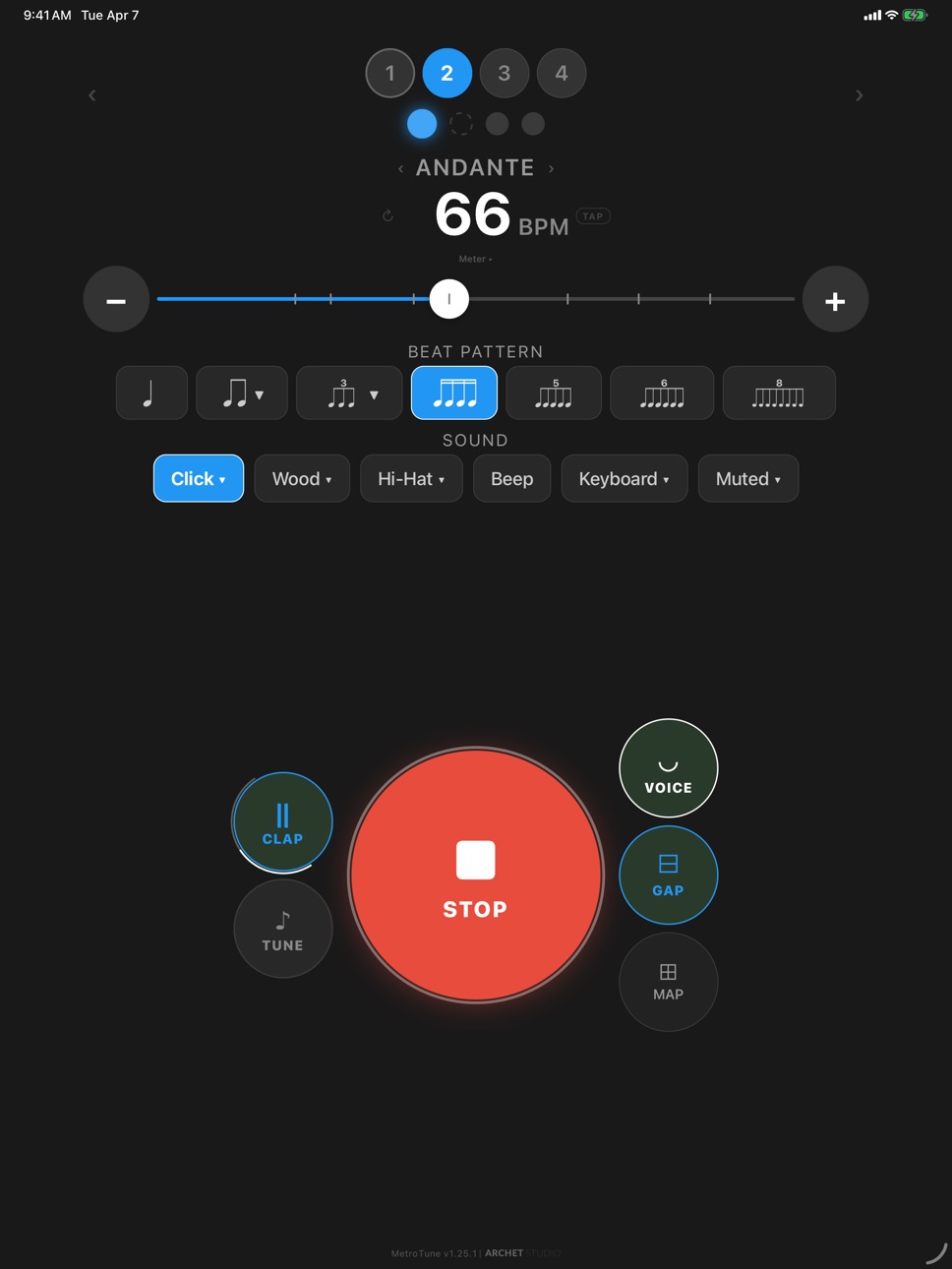


What’s New Version 1.46.15
- Tuner temperaments: tune to Just or Pythagorean intonation — not only standard Equal — in any major or minor key, with note names spelled to match.
- In-tune highlight: the note name brightens and glows as you land on the pitch, with adjustable range, glow, and color.
- Reference tones can add a perfect fifth above the note — handy for hearing intervals.
Description
MetroTune is a focused practice companion for musicians who want a metronome, tuner, and scale trainer in one app.
METRONOME
Precise tempo control with tap tempo
Beat patterns for eighth notes, triplets, sixteenth notes, swing, and subdivision rests
Polyrhythm mode: layer two independent subdivision lines, like 3-against-2, over the same beat
Support for common and compound meters, including 6/8, 9/8, 12/8, and 2/2
Tempo Map for automated BPM changes during longer practice sessions
Multiple sound profiles, including click, wood, hi-hat, beep, and keyboard-style tones
Per-note sound customization: give any individual beat or subdivision its own sound profile
Vocal count-ins, guide tones, and clap detection for hands-free practice
GAP mode for building internal rhythm through silent measures
TUNER
Real-time chromatic pitch detection with clear visual feedback
Equal, Just, and Pythagorean temperaments in any major or minor key, with note names spelled to match
In-tune highlight that brightens the note name as you land on the pitch, with adjustable range, glow, and color
Pitch Checker mode for intonation practice
Custom reference pitch with A4 calibration
Reference tone playback, optionally with a perfect fifth above the note, for tuning by ear
SCALE PRACTICE AND SCORE VIEW
Live scrolling music notation for scale practice
Treble, bass, and grand staff rendering with automatic staff selection
Major, minor, modal, pentatonic, whole-tone, diminished, and other scale patterns
Arpeggios, diatonic chords, dominant 7th, and diminished 7th practice
Curated templates including Circle of Fifths, ii-V-I jazz drills, and vocal warmups
Echo Mode: listen first, then play back to train pitch and timing
Key Cycle: move through all 12 keys by chromatic order, fifths, or random order
Long-Tone mode for wind, string, and vocal endurance practice
Articulation options including staccato, marcato, legato, and tenuto
Resume From controls so you can restart exactly where you need
WHY METROTUNE
Works well on phones and tablets, with optimized landscape layouts on iPad
Clean adaptive interface for focused practice
Multiple color themes, including premium Grey and Mono themes
Localized in 14 languages
No account required
No subscription required
Premium can be unlocked for 24 hours by watching one short ad
Download MetroTune and make every practice session more focused.
Accessibility
ipadiphonemacrealityDevicetvoswatch
Version history 24 versions
Build 887213219v1.46.152026-06-24 08:46:57
- Tuner temperaments: tune to Just or Pythagorean intonation — not only standard Equal — in any major or minor key, with note names spelled to match.
- In-tune highlight: the note name brightens and glows as you land on the pitch, with adjustable range, glow, and color.
- Reference tones can add a perfect fifth above the note — handy for hearing intervals.
Build 886871680v1.46.62026-06-15 06:16:07
- Custom patterns in Scale Practice now change keys correctly when Key Cycle is turned on.
- Score View now matches what you hear for those key-changing patterns.
Build 886754593v1.46.22026-06-11 18:53:24
- Polyrhythm support: add a second rhythm line at the same BPM, with its own pattern, Sound Profile, rests, and per-note customization.
- Better landscape layouts on iPad across Metronome, Tuner, and Score View.
- Smoother playback timing, scale audio starts, Score View notation, and overall practice stability.
Build 886511857v1.45.432026-06-04 09:59:25
- Customize metronome beats and subdivision notes individually: long-press any beat or subdivision dot to choose its Sound Profile.
- Works with Tempo Map pattern entries too, so custom practice patterns can use the same detailed sound control.
- Reset controls make it easier to return a beat, subdivision, or full pattern back to the standard click setup.
- Improved metronome interaction and audio refinements for smoother, more reliable practice.
Build 886227410v1.45.402026-06-01 08:44:34
- Customize metronome beats and subdivision notes individually: long-press any beat or subdivision dot to choose its Sound Profile.
- Works with Tempo Map pattern entries too, so custom practice patterns can use the same detailed sound control.
- Reset controls make it easier to return a beat, subdivision, or full pattern back to the standard click setup.
- Improved metronome interaction and audio refinements for smoother, more reliable practice.
Build 885800487v1.45.312026-05-19 20:07:49
- Introducing Phrase Replay beta: record a short melody, then hear a cleaner replay with corrected pitch and approximate rhythm in Score View.
- Reference tone playback is easier to control, with 1 to 10 second durations or infinite sustain.
- Metronome sound profiles have been balanced for more consistent volume.
- Improved audio handoff when switching between Tuner, Score View, Metronome, and Phrase Replay.
Build 885699097v1.45.192026-05-16 01:00:42
Phrase Replay preview is now available as a premium feature. Record a short melody and replay it with
corrected pitch and approximate rhythm.
Score View now shows recorded phrases more clearly, including eighth and sixteenth note rhythms.
The SNAP metronome sound has been updated with a more natural finger snap recording.
Tuner layout and localized text have been polished across supported languages.
Build 885659182v1.45.152026-05-15 05:10:55
Phrase Replay preview is now available as a premium feature. Record a short melody and replay it with
corrected pitch and approximate rhythm.
Score View now shows recorded phrases more clearly, including eighth and sixteenth note rhythms.
The SNAP metronome sound has been updated with a more natural finger snap recording.
Tuner layout and localized text have been polished across supported languages.
Build 885375440v1.44.662026-05-08 21:20:40
What's New in This Version
PRACTICE TIME AT A GLANCE
Score View now shows estimated elapsed and total practice time. Tempo Map and Scale Practice profiles
also show total play time, making longer practice sessions easier to plan.
MORE PRECISE SCORE RESUME
Resuming from a note in Score View is more reliable near measure and section boundaries, including
repeated scale patterns.
EXPANDED ARPEGGIO PRACTICE
Scale Practice now includes Dominant 7th and Diminished 7th arpeggio options for more advanced harmony
and intonation work.
AUDIO PLAYBACK POLISH
Improved Android tone playback during Scale Practice to reduce small clicks between notes.
LAYOUT POLISH
Banner ads now keep cleaner spacing from the iPhone home indicator.
Thanks for using MetroTune!
Build 885197866v1.44.622026-05-04 17:01:13
What's New in This Version (v1.44.62)
AUTHENTIC MUSIC ENGRAVING
Score view now uses Bravura, the standard SMuFL music font from Steinberg. Noteheads, accidentals, and
rest symbols now look closer to professionally published sheet music.
SMARTER REST RENDERING
Quarter rests now combine into half and whole rests where the time signature allows it. Rest grouping
also respects compound meters like 6/8, 9/8, and 12/8.
SCROLLING PLAYHEAD THROUGH RESTS
The Score view playhead now advances through rest beats instead of freezing on the previous note.
Resuming mid-bar after a count-in also aligns the score to your starting note.
CLEANER SCALE PLAYBACK
Rest counts are now more accurate when resuming practice. Count-in playback, entry transitions, and
final note subdivisions are smoother and more reliable.
FASTER SCORE VIEW SCROLLING
Cached music symbol rendering improves scrolling performance in longer passages. Notes that span tile
boundaries now draw correctly.
MORE RELIABLE REWARDED ADS
Improved rewarded ad handling so the unlock button recovers if an ad provider does not send a close
callback.
Thanks for using MetroTune.
Build 884952986v1.44.352026-04-28 21:07:09
What's New in This Version (v1.44.35)
SCORE VIEW SHOWS SUBDIVISIONS
Every eighth, triplet, and sixteenth note now renders as its own notehead in Score view - see exactly which beat divisions you're playing. Triplets and other irregular tuplet groups (3, 5, 6, 8) are labeled above the beam for at-a-glance recognition.
SMOOTHER SCORE VIEW
GPU-accelerated rendering and viewport-based note virtualization keep playback smooth even on long scales with high subdivisions. Memory and frame rate stay steady as you progress through dozens of measures.
CLEANER COUNT-IN
The count-in for scale practice no longer plays subdivision clicks between the final count beat and the first scale note. The count stays clean and the scale enters on a fresh downbeat.
NOTATION POLISH
Refined ledger lines (one per notehead, slightly thicker than staff lines per traditional engraving). Section bar lines no longer overlap the previous measure's notes. Key spelling on minor scales now reads conventionally - Bb Minor instead of A# Minor.
HEADS-UP BEFORE SCORE VIEW
When you enter Score view with subdivisions selected, a quick note explains the performance impact and recommends a simpler beat pattern for smoother practice.
Thanks for using MetroTune!
Build 884921119v1.44.202026-04-25 19:36:41
What's New in This Version (v1.44.20)
SHARPER METRONOME ACCENTS
Every sound profile carries a distinct accent cue. Hi-hat opens with a sustained metallic ring on accent, snap and cowbell brighten, rimshot pitches up, kick gains a brighter attack chirp, beep gets a sharper onset, low click stays tight without lingering bass resonance. All 17 sound profiles loudness-balanced — switching profiles keeps the same overall volume, and accent beats stand louder than off-beats with distinct timbral cues across the kit.
SCORE VIEW NOTATION ACCURACY
Minor key signatures display correctly across the full range of minor scales (A minor reads as no sharps, D minor as one flat, etc.). Circle of Fifths and other keyCycle drills update the staff signature as the keys rotate. Transitions to a simpler key include cancellation naturals matching standard music engraving. Sharps and flats render at standard staff positions.
Thanks for using MetroTune!
Build 884907903v1.44.142026-04-24 21:08:46
What's New in This Version (v1.44.14)
TRANSPOSE TUNING
New transpose control on the Tuner for Bb, Eb, F, A, and octave instruments — clarinets, trumpets, saxes, French
horns, piccolos, basses, and more. Read your written notes; tap-to-play and Scale Practice sound concert pitch
automatically. Your score stays in the written key, exactly like reading your part.
INTERFACE POLISH
Small refinements across modal behavior and the What's New popup for a more consistent feel.
Thanks for using MetroTune!
Build 884793697v1.44.82026-04-24 17:20:56
What's New in This Version (v1.41.6 → v1.44.8)
A bumper release built around making MetroTune sound right and stay out of your way.
SOUND QUALITY
• All 17 metronome sounds now balanced in volume — switching profiles no longer changes how loud the metronome feels.
• Keyboard now sounds like an actual piano (real hammer attack and stretched tuning). Dark Wood, Rosewood, and Bamboo rebuilt from "glassy and over-bright" into dry, woody timbres.
• Voice count "six" no longer quieter than the other counts.
• Tempo-adaptive release ends the "hi-hat / wood blur" at 180+ BPM. Gentler high-frequency rolloff for earbud listening.
TUNER VOICES
• Bell now sounds like a real struck bell (ding-then-hum) and sustains as long as you hold — no more fading to silence after a few seconds.
• Brass adds breath and lip-buzz character with a formant-shaped spectrum. Finally sounds brass instead of synth pad.
• Organ gains the missing Hammond drawbars (16′ sub-octave, 5⅓′ quint, 1⅗′ tierce) for a fuller, brighter timbre.
• High-note harshness fixed — no more aliasing at the top of the range.
A4 REFERENCE PITCH
• Full-control modal: slider covering 392-470 Hz at 0.1 Hz precision.
• One-tap presets for baroque (415), Verdi (432), and modern orchestras (440-444).
• Pitch playback duration: choose 1 second, 5 seconds, or hold forever.
• A4 pill duration lights up in your accent color while a tap-pitch is sounding.
PRACTICE
• Tempo Map count-in now flashes a big 4 - 3 - 2 - 1 number instead of unnumbered dashed circles.
• Muted sound profile collapses the screen to just the beat flash — distraction-free silent practice.
• Galamian Rhythm Ladder — auto-loaded Tempo Map for the classic violin acceleration drill (1 - 2 - 3 - 4 - 5 - 6 - 8 notes per beat at 72 BPM).
HELP AND DISCOVERY
• Floating Help (?) button on every screen — opens How to Use, What's New, Contact Support, and Privacy Policy.
• In-app web guide with video walkthroughs.
PERFORMANCE AND STABILITY
• Subdivision render-storm fix — UI no longer lags at high subdivisions (triplets, 16ths).
• iOS crash hardening (audio loader race condition resolved).
• Anti-clipping limiter prevents distortion when voice + percussion + accent overlap.
FREE PREMIUM through May 31, 2026 — every premium feature unlocked during the launch window. Watch a short rewarded ad anytime to add an extra day.
Thanks for using MetroTune — keep the feedback coming!
Build 884703203v1.41.62026-04-20 19:12:54
What's new in v1.41.6 (since v1.41.3)
Score View
- Full scale label shows the scale name and pattern variant (e.g., "Db Major (Broken 3rds)").
- Scales now start precisely on beat 1 — no more silent "ghost" beats between patterns.
- Smooth key-signature transitions at section boundaries — no visual jitter or duplicate sigs.
- Rest-fill in the score now matches what you hear — longer notes and holds extend correctly.
- Loop wrap snaps instantly back to measure 1 instead of scrolling across intermediate bars.
Onboarding
- New tip banner at the top of What's New explains the core gestures: tap a button to toggle it, long-press to open its settings.
Launch Celebration
- Free Premium extended through May 31, 2026.
- Clarified that watching a rewarded ad extends Premium by a day anytime — including after the promo ends.
Performance
- Smoother playback on older devices — the notation view re-renders only the notes whose state actually changed, and tuner sliders respond without hitching.
Build 884672424v1.41.32026-04-19 19:13:21
What's New in v1.41.3
Score View now handles multi-pattern scales the way real music reads — as one continuous staff, not a
restart.
Continuous Score across patterns
When you load a template with multiple scale patterns (for example, "Speed Building — C Major" which
steps through several exercises in a row), the Score View no longer snaps back to measure 1 when the
next pattern begins. The staff flows forward. The last measure of the ending pattern automatically fills
with rests so the bar closes cleanly, then the next pattern starts at the following measure, exactly
where a score editor would place it. The playhead moves forward only, and the bar counter keeps
climbing.
Per-section key signatures
Each pattern in a multi-pattern scale can live in its own key. Score View now renders a fresh inline key
signature right at the measure where a new pattern starts — not only at the top-left of the staff.
Accidentals are spelled correctly for each section too, so an Eb major pattern shows flats instead of
being forced into sharps inherited from the first pattern. Every key signature picks the musically
correct spelling (sharps for G, D, A, E, B, F#, C#; flats for F, Bb, Eb, Ab, Db, Gb, Cb).
Scroll-aware left-anchored key signature
As the score scrolls, the key signature that stays pinned to the left edge now updates in sync with
which section you're actually looking at. The inline key sig scrolls off the screen first, then the
fixed-zone key sig swaps to the new section — so you never see the same key signature twice or an
outdated one lingering on the left.
Dynamic key-signature width
The left-anchored key signature zone no longer reserves empty space for a maximum number of accidentals.
C major (no sharps, no flats) takes zero width; G major reserves one sharp; Eb major reserves three
flats. The staff uses every pixel it can.
Count-in between patterns
If your scale configuration has a lead-in count (leadBeats > 0), the count-in now replays before each
new pattern starts, not just at the very beginning of the session. You get the same rhythmic ramp-up for
each exercise.
Build 884630365v1.41.22026-04-17 22:13:52
What's New in v1.41.2
Performance Boost
Smoother playback and snappier UI response across the app. Under-the-hood optimizations reduce CPU use
during long practice sessions.
Score View Polish
Noteheads now scale perfectly on every screen — phones, tablets, and iPads all render proportionally.
Score stretches edge-to-edge with refined symbol alignment.
— Carried over from v1.41 —
Score View (Beta)
Follow along with live scrolling music notation while practicing scales. Real staff with clefs, key
signatures, time signatures, and rests — updated in real time as you play.
Accidentals & Key Signatures
Crisp sharp and flat symbols on notes and in key signatures. Toggle accidentals on individual notes.
Semitone Indicators
See where the half steps are at a glance. Connector lines highlight notes a half step apart.
Rest Playback & Highlighting
Rests are now part of the measure. Playback continues through rests at tempo with a moving playhead and
beat-by-beat highlighting.
Animated Score
Clefs and time signatures slide out during playback for more note space, then slide back at the start or
when stopped.
— Highlights from v1.30 —
Scale Practice
Build structured routines with scales, arpeggios, and diatonic chords. 8 scale types, 4 articulations,
ascending/descending control, seamless loops.
Echo Mode
Call-and-response training. The app plays a note, then waits for you to match it. Tempo leniency relaxes
after misses so you're not stuck.
28 Practice Templates
Six categories of drills: Circle of Fifths, ii-V-I jazz, long-tone warm-ups, vocal pentatonics,
speed-building, broken octaves, dotted rhythms. Organize with favorites.
Key Cycle + Long Tone + Direction
Auto-transpose across all 12 keys. Hold up to 16 beats for wind, brass, and vocal practice.
Ascending-only, descending-only, or both.
Build 884534296v1.41.02026-04-15 18:53:59
Welcome to the most significant update to MetroTune yet! We are thrilled to introduce Score View (Beta), a major addition to our Scale Practice module designed to help you visualize your progress.
Score View (Beta)
Scale practice is now visual. Instead of just following a metronome, you can now see live, scrolling music notation as you play.
High-quality staff rendering: Automatically switches between treble, bass, and grand staff based on your instrument's range.
Comprehensive notation: View noteheads, stems, clefs, key signatures, and time signatures with clarity.
Live Playhead: A moving cursor tracks the current beat, helping you stay perfectly in sync.
Intelligent Accidentals: Toggle per-note sharps and flats on or off; the key signature remains visible for reference.
Visual Semitones: Enable angled connector lines to identify half-steps at a glance.
Improved Rest Playback: Rests are now fully integrated into the measure. Playback continues at tempo with beat-by-beat highlighting.
Dynamic UI: Clefs and signatures slide away during playback to maximize notation space and return when you stop.
Quick Navigation: Use new toolbar buttons to jump to the start, the end, or snap back to the active note.
Status at a Glance: Your 'Resume From' settings are now clearly displayed in the Score View toolbar.
Improvements & Refinements
Universal Sizing: Score notation now scales perfectly across all devices. Whether you are on a phone, a tablet, or a large iPad, the layout remains proportional and stretches edge-to-edge.
Enhanced Performance: Experience smoother playback and more responsive note tracking.
Refined Alignment: We have polished the alignment and sizing of all musical symbols for a cleaner, professional look.
Thank you for practicing with MetroTune. If you enjoy the new Score View, please consider leaving us a review!
Build 884361462v1.302026-04-10 19:38:05
MetroTune — Professional Metronome, Tuner & Scale Trainer
Precision Timing. Perfect Pitch. Zero Distractions.
Experience the most complete practice tool for your music. MetroTune combines an ultra-stable metronome, a professional
chromatic tuner, and a full-featured scale and arpeggio trainer in one seamless, high-performance interface. Designed for
world-class musicians and dedicated students alike, MetroTune helps you master the three pillars of music: Rhythm,
Intonation, and Technique.
THE METROTUNE ADVANTAGE
Unlike standard apps, MetroTune allows you to use the metronome, pitch detector, and scale trainer simultaneously. Get
real-time feedback on your tuning while maintaining a rock-solid tempo and running guided scale drills.
SCALE & ARPEGGIO PRACTICE (NEW in v1.30)
Echo Mode: Interactive call-and-response ear training with pitch and timing feedback.
28 Practice Templates: One-tap starter routines from Circle of Fifths to Hanon-style drills.
Scales and Arpeggios: Major, Minor, Pentatonic, Blues, Chromatic scales plus triads and diatonic arpeggios.
Pattern Modifiers: Broken thirds, broken octaves, sequences of four, and dotted rhythms.
Long-Tone Mode: Hold each note for up to 16 beats, perfect for wind, brass, and vocal warmups.
Key Cycling: Automatically transpose through all 12 keys via chromatic, circle of fifths, or random order.
Direction Control: Practice ascending only, descending only, or both.
Editable Patterns: Customize any scale sequence note by note.
Save and Share: Export practice profiles as files and share with students or colleagues.
PROFESSIONAL CHROMATIC TUNER
Cent-Accurate: Professional-grade pitch tracking for all instruments.
Pitch Trend: Visual indicators show if you are drifting sharp or flat.
Custom Calibration: Adjustable A4 from 420 Hz to 460 Hz.
Drone and Guide Tones: Sustained reference pitches for ear training.
ELITE METRONOME ENGINE
Ultra-Stable: 20 to 240 BPM with 19 premium sounds.
Compound Meters: 6/8, 9/8, 12/8, 5/8, 7/8, and more with custom accent patterns.
Gap Click Training: Build an elite internal clock by practicing through silent measures.
10+ Beat Patterns: From simple quarters to complex swing, triplets, and sextuplets.
Tactile Practice: Use Vibration Mode for feel-based timing.
Voice Counting: Audible beat numbers to reinforce rhythmic awareness.
PROGRAMMABLE TEMPO MAPS
Automate Your Score: Program tempo changes and time signatures for every movement.
Folders: Organize your repertoire into folders for quick access.
Looping: Repeat difficult sections 1 to 99x or infinitely.
Save, Recall, and Share: Store your entire repertoire and export profiles as files.
TOUCHLESS CLAP CONTROL
Keep your hands on your instrument. Start and stop the metronome with a simple Double-Clap. It is the fastest, most
ergonomic way to practice.
BUILT FOR EVERY INSTRUMENT
Strings: Violin, Viola, Cello, Double Bass.
Fretted: Acoustic and Electric Guitar, Bass, Ukulele.
Winds and Brass: Flute, Clarinet, Saxophone, Trumpet.
Keys and Percussion: Piano, Organ, Drums, Click-tracks.
DESIGNED FOR FOCUS
Dark Interface: 12 stunning color themes designed to reduce eye strain.
Clean and Lightweight: No bloated features, only what you need to play better.
Always-On: Your device stays awake as long as you are practicing.
Stop practicing harder. Start practicing smarter. Whether you are warming up for a concert, drilling all 12 keys, or
building your internal rhythm from scratch, MetroTune gives you the professional precision you deserve.
Download MetroTune and take control of your sound.
Build 884163439v1.25.12026-04-07 17:00:51
v1.25.1
Free Premium until April 30 — All premium features unlocked at no cost through the end of April.
Watch an ad anytime to extend by an extra day.
Tablet Support — Improved layout scaling for iPad and Android tablets with larger controls and better
use of screen space.
Beat Pattern Improvements — Pattern buttons now display clear borders with a highlighted selection
indicator, making your current pattern easier to see at a glance.
Also includes performance improvements and bug fixes.
Build 884138111v1.25.02026-04-04 19:08:45
⏺ What's New in v1.25
• Meter Selection — Tap "Meter" to choose time signatures: 6/8, 3/8, 9/8, 12/8, 5/8, 7/8, and 2/2 with automatic accent
patterns
• Custom Subdivision Rests — Tap the small dots below beat circles to mute individual subdivisions and create your own
rhythmic patterns
• Custom Beat Accents — Tap any numbered beat circle to toggle accents, not just the first beat
• New Beat Patterns — Quintuplets, sextuplets, and 8-per-beat subdivisions
• Smart BPM Limits — Tempo range automatically adjusts per beat pattern to stay within usable speeds
• Tempo Map — Each entry now supports custom subdivision rests and accent patterns
• Improved tuner pitch detection accuracy
• UI polish: tighter layout, improved beat pattern icons
Build 883958139v1.23.92026-04-01 07:14:49
MetroTune combines a full-featured metronome and chromatic tuner in one free app — designed for musicians who practice with precision.
METRONOME
• 29 sounds across 6 categories including vibrate and flashlight modes
• 10 beat subdivision patterns with beautiful SVG music notation icons
• Swing eighths for jazz and shuffle practice
• Voice counting (female and male) to call out beat numbers
• Tap Tempo for quick BPM setting
• Gap Click with 5 training modes — build your internal clock by practicing through silence
• Double-Clap Detection — go hands-free with start/stop via clap
• Live Restart — change settings while playing without losing your flow
TEMPO MAP
• Program multi-entry sequences with different BPM, beats, patterns, and sounds per step
• Save and load named profiles with favorites
• Resume modes: Beginning, Last Pattern, Last Measure, or Last Beat
• Tempo Step: auto-generate entries with gradually increasing or decreasing BPM
• Import/export profiles as .metrotune.json files
• Global measure counter tracks your position across all entries
• Loop control with per-entry inclusion
TUNER
• Chromatic tuner with expanded range (30–4000 Hz)
• Scrollable keyboard pitch layout spanning octaves 0–8 with auto-scroll to detected pitch
• 5 harmonically-tailored sound profiles: Tone, Clarinet, Organ, Brass, Bell
• Guide Tone Loop with heads-up countdown beeps for autonomous pitch training
• Pitch Checker confirms when you hold a note in tune for a configurable duration
• Sustained note playback persists across page switches
• 3 sensitivity levels (Stable, Medium, Responsive)
PERSONALIZATION
• 12 color themes (6 base + 6 pastel)
• 14 languages supported
• Responsive layout for phones and tablets
PREMIUM
• No subscriptions, no paywalls
• Watch one short ad to unlock every premium feature for 24 hours
• Limited time promotion: renew with +48 hours bonus when your premium is running low!
Build 884008284v1.24.02026-04-01 14:46:06
• Fixed pitch detection accuracy offset for iOS
• Keyboard auto-scroll stabilized — no more jitter from rapid pitch fluctuations
• Removed background audio — app properly stops audio when backgrounded
Build 883497853v1.23.72026-03-30 13:53:00
No pricing data captured yet — comparisons appear once the app has paid storefronts or in-app purchases.
Availability 174 of 174 storefronts
| Region | Language | Price | Ratings | Avg | Version |
|---|---|---|---|---|---|
| JP | ja | Free | 12 | 4.3 | 1.46.15 |
| KR | ko | Free | 11 | 5.0 | 1.46.15 |
| US | en-US | Free | 9 | 5.0 | 1.46.15 |
| TW | zh-Hant-TW | Free | 8 | 4.9 | 1.46.15 |
| DE | de-DE | Free | 7 | 4.4 | 1.46.15 |
| SG | en-GB | Free | 5 | 4.2 | 1.46.15 |
| CA | en-CA | Free | 3 | 3.7 | 1.46.15 |
| CH | de-CH | Free | 3 | 4.3 | 1.46.15 |
| GB | en-GB | Free | 2 | 5.0 | 1.46.15 |
| NO | en-GB | Free | 1 | 2.0 | 1.46.15 |
| NZ | en-AU | Free | 1 | 1.0 | 1.46.15 |
| AE | en-GB | Free | 0 | — | 1.46.15 |
| AF | en-GB | Free | 0 | — | 1.46.15 |
| AG | en-GB | Free | 0 | — | 1.46.15 |
| AI | en-GB | Free | 0 | — | 1.46.15 |
| AL | en-GB | Free | 0 | — | 1.46.15 |
| AM | en-GB | Free | 0 | — | 1.46.15 |
| AO | en-GB | Free | 0 | — | 1.46.15 |
| AR | es-MX | Free | 0 | — | 1.46.15 |
| AT | de-DE | Free | 0 | — | 1.46.15 |
| AU | en-AU | Free | 0 | — | 1.46.15 |
| AZ | en-GB | Free | 0 | — | 1.46.15 |
| BA | en-GB | Free | 0 | — | 1.46.15 |
| BB | en-GB | Free | 0 | — | 1.46.15 |
| BE | en-GB | Free | 0 | — | 1.46.15 |
| BF | en-GB | Free | 0 | — | 1.46.15 |
| BG | en-GB | Free | 0 | — | 1.46.15 |
| BH | en-GB | Free | 0 | — | 1.46.15 |
| BJ | en-GB | Free | 0 | — | 1.46.15 |
| BM | en-GB | Free | 0 | — | 1.46.15 |
| BN | en-GB | Free | 0 | — | 1.46.15 |
| BO | es-MX | Free | 0 | — | 1.46.15 |
| BR | pt-BR | Free | 0 | — | 1.46.15 |
| BS | en-GB | Free | 0 | — | 1.46.15 |
| BT | en-GB | Free | 0 | — | 1.46.15 |
| BW | en-GB | Free | 0 | — | 1.46.15 |
| BY | en-GB | Free | 0 | — | 1.46.15 |
| BZ | en-GB | Free | 0 | — | 1.46.15 |
| CD | en-GB | Free | 0 | — | 1.46.15 |
| CG | en-GB | Free | 0 | — | 1.46.15 |
| CI | fr-FR | Free | 0 | — | 1.46.15 |
| CL | es-MX | Free | 0 | — | 1.46.15 |
| CM | fr-FR | Free | 0 | — | 1.46.15 |
| CN | zh-Hans-CN | Free | 0 | — | 1.46.15 |
| CO | es-MX | Free | 0 | — | 1.46.15 |
| CR | es-MX | Free | 0 | — | 1.46.15 |
| CV | en-GB | Free | 0 | — | 1.46.15 |
| CY | en-GB | Free | 0 | — | 1.46.15 |
| CZ | en-GB | Free | 0 | — | 1.46.15 |
| DK | en-GB | Free | 0 | — | 1.46.15 |
| DM | en-GB | Free | 0 | — | 1.46.15 |
| DO | es-MX | Free | 0 | — | 1.46.15 |
| DZ | en-GB | Free | 0 | — | 1.46.15 |
| EC | es-MX | Free | 0 | — | 1.46.15 |
| EG | en-GB | Free | 0 | — | 1.46.15 |
| ES | es-ES | Free | 0 | — | 1.46.15 |
| FI | en-GB | Free | 0 | — | 1.46.15 |
| FJ | en-GB | Free | 0 | — | 1.46.15 |
| FM | en-GB | Free | 0 | — | 1.46.15 |
| FR | fr-FR | Free | 0 | — | 1.46.15 |
| GA | fr-FR | Free | 0 | — | 1.46.15 |
| GD | en-GB | Free | 0 | — | 1.46.15 |
| GE | en-GB | Free | 0 | — | 1.46.15 |
| GH | en-GB | Free | 0 | — | 1.46.15 |
| GM | en-GB | Free | 0 | — | 1.46.15 |
| GR | en-GB | Free | 0 | — | 1.46.15 |
| GT | es-MX | Free | 0 | — | 1.46.15 |
| GW | en-GB | Free | 0 | — | 1.46.15 |
| GY | en-GB | Free | 0 | — | 1.46.15 |
| HK | zh-Hant-HK | Free | 0 | — | 1.46.15 |
| HN | es-MX | Free | 0 | — | 1.46.15 |
| HR | en-GB | Free | 0 | — | 1.46.15 |
| HU | en-GB | Free | 0 | — | 1.46.15 |
| ID | en-GB | Free | 0 | — | 1.46.15 |
| IE | en-GB | Free | 0 | — | 1.46.15 |
| IL | en-GB | Free | 0 | — | 1.46.15 |
| IN | en-GB | Free | 0 | — | 1.46.15 |
| IQ | en-GB | Free | 0 | — | 1.46.15 |
| IS | en-GB | Free | 0 | — | 1.46.15 |
| IT | it | Free | 0 | — | 1.46.15 |
| JM | en-GB | Free | 0 | — | 1.46.15 |
| JO | en-GB | Free | 0 | — | 1.46.15 |
| KE | en-GB | Free | 0 | — | 1.46.15 |
| KG | en-GB | Free | 0 | — | 1.46.15 |
| KH | en-GB | Free | 0 | — | 1.46.15 |
| KN | en-GB | Free | 0 | — | 1.46.15 |
| KW | en-GB | Free | 0 | — | 1.46.15 |
| KY | en-GB | Free | 0 | — | 1.46.15 |
| KZ | en-GB | Free | 0 | — | 1.46.15 |
| LA | en-GB | Free | 0 | — | 1.46.15 |
| LB | en-GB | Free | 0 | — | 1.46.15 |
| LC | en-GB | Free | 0 | — | 1.46.15 |
| LK | en-GB | Free | 0 | — | 1.46.15 |
| LR | en-GB | Free | 0 | — | 1.46.15 |
| LT | en-GB | Free | 0 | — | 1.46.15 |
| LU | en-GB | Free | 0 | — | 1.46.15 |
| LV | en-GB | Free | 0 | — | 1.46.15 |
| LY | en-GB | Free | 0 | — | 1.46.15 |
| MA | en-GB | Free | 0 | — | 1.46.15 |
| MD | en-GB | Free | 0 | — | 1.46.15 |
| ME | en-GB | Free | 0 | — | 1.46.15 |
| MG | en-GB | Free | 0 | — | 1.46.15 |
| MK | en-GB | Free | 0 | — | 1.46.15 |
| ML | en-GB | Free | 0 | — | 1.46.15 |
| MM | en-GB | Free | 0 | — | 1.46.15 |
| MN | en-GB | Free | 0 | — | 1.46.15 |
| MO | zh-Hant-HK | Free | 0 | — | 1.46.15 |
| MR | en-GB | Free | 0 | — | 1.46.15 |
| MS | en-GB | Free | 0 | — | 1.46.15 |
| MT | en-GB | Free | 0 | — | 1.46.15 |
| MU | en-GB | Free | 0 | — | 1.46.15 |
| MV | en-GB | Free | 0 | — | 1.46.15 |
| MW | en-GB | Free | 0 | — | 1.46.15 |
| MX | es-MX | Free | 0 | — | 1.46.15 |
| MY | en-GB | Free | 0 | — | 1.46.15 |
| MZ | en-GB | Free | 0 | — | 1.46.15 |
| NA | en-GB | Free | 0 | — | 1.46.15 |
| NE | en-GB | Free | 0 | — | 1.46.15 |
| NG | en-GB | Free | 0 | — | 1.46.15 |
| NI | es-MX | Free | 0 | — | 1.46.15 |
| NL | nl | Free | 0 | — | 1.46.15 |
| NP | en-GB | Free | 0 | — | 1.46.15 |
| NR | en-GB | Free | 0 | — | 1.46.15 |
| OM | en-GB | Free | 0 | — | 1.46.15 |
| PA | es-MX | Free | 0 | — | 1.46.15 |
| PE | es-MX | Free | 0 | — | 1.46.15 |
| PG | en-GB | Free | 0 | — | 1.46.15 |
| PH | en-GB | Free | 0 | — | 1.46.15 |
| PK | en-GB | Free | 0 | — | 1.46.15 |
| PL | en-GB | Free | 0 | — | 1.46.15 |
| PT | pt-PT | Free | 0 | — | 1.46.15 |
| PW | en-GB | Free | 0 | — | 1.46.15 |
| PY | es-MX | Free | 0 | — | 1.46.15 |
| QA | en-GB | Free | 0 | — | 1.46.15 |
| RO | en-GB | Free | 0 | — | 1.46.15 |
| RS | en-GB | Free | 0 | — | 1.46.15 |
| RU | ru | Free | 0 | — | 1.46.15 |
| RW | en-GB | Free | 0 | — | 1.46.15 |
| SA | en-GB | Free | 0 | — | 1.46.15 |
| SB | en-GB | Free | 0 | — | 1.46.15 |
| SC | en-GB | Free | 0 | — | 1.46.15 |
| SE | sv | Free | 0 | — | 1.46.15 |
| SI | en-GB | Free | 0 | — | 1.46.15 |
| SK | en-GB | Free | 0 | — | 1.46.15 |
| SL | en-GB | Free | 0 | — | 1.46.15 |
| SN | en-GB | Free | 0 | — | 1.46.15 |
| SR | en-GB | Free | 0 | — | 1.46.15 |
| ST | en-GB | Free | 0 | — | 1.46.15 |
| SV | es-MX | Free | 0 | — | 1.46.15 |
| SZ | en-GB | Free | 0 | — | 1.46.15 |
| TC | en-GB | Free | 0 | — | 1.46.15 |
| TD | en-GB | Free | 0 | — | 1.46.15 |
| TH | en-GB | Free | 0 | — | 1.46.15 |
| TJ | en-GB | Free | 0 | — | 1.46.15 |
| TM | en-GB | Free | 0 | — | 1.46.15 |
| TN | en-GB | Free | 0 | — | 1.46.15 |
| TO | en-GB | Free | 0 | — | 1.46.15 |
| TR | en-GB | Free | 0 | — | 1.46.15 |
| TT | en-GB | Free | 0 | — | 1.46.15 |
| TZ | en-GB | Free | 0 | — | 1.46.15 |
| UA | en-GB | Free | 0 | — | 1.46.15 |
| UG | en-GB | Free | 0 | — | 1.46.15 |
| UY | en-GB | Free | 0 | — | 1.46.15 |
| UZ | en-GB | Free | 0 | — | 1.46.15 |
| VC | en-GB | Free | 0 | — | 1.46.15 |
| VE | es-MX | Free | 0 | — | 1.46.15 |
| VG | en-GB | Free | 0 | — | 1.46.15 |
| VN | en-GB | Free | 0 | — | 1.46.15 |
| VU | en-GB | Free | 0 | — | 1.46.15 |
| XK | en-GB | Free | 0 | — | 1.46.15 |
| YE | en-GB | Free | 0 | — | 1.46.15 |
| ZA | en-GB | Free | 0 | — | 1.46.15 |
| ZM | en-GB | Free | 0 | — | 1.46.15 |
| ZW | en-GB | Free | 0 | — | 1.46.15 |
Change log 28 changes · US
✎
releaseNotes updated
- Tuner temperaments: tune to Just or Pythagorean intonation — not only standard Equal — in any major or minor key, with note names spelled to match.
- In-tune
✎
description updated
MetroTune is a focused practice companion for musicians who want a metronome, tuner, and scale trainer in one app.
METRONOME
Precise tempo control with tap te
✎
subtitle updated
Practice Scales, Pitch & Tempo
✎
name updated
MetroTune: Tuner & Metronome
◆
Version 1.46.15 released
- Tuner temperaments: tune to Just or Pythagorean intonation — not only standard Equal — in any major or minor key, with note names spelled to match.
- In-tune highlight: the note name brightens and glows as you land on the pitch, with adju
◆
Version 1.46.6 released
- Custom patterns in Scale Practice now change keys correctly when Key Cycle is turned on.
- Score View now matches what you hear for those key-changing patterns.
◆
Version 1.46.2 released
- Polyrhythm support: add a second rhythm line at the same BPM, with its own pattern, Sound Profile, rests, and per-note customization.
- Better landscape layouts on iPad across Metronome, Tuner, and Score View.
- Smoother playback timing,
◆
Version 1.45.43 released
- Customize metronome beats and subdivision notes individually: long-press any beat or subdivision dot to choose its Sound Profile.
- Works with Tempo Map pattern entries too, so custom practice patterns can use the same detailed sound cont
◆
Version 1.45.40 released
- Customize metronome beats and subdivision notes individually: long-press any beat or subdivision dot to choose its Sound Profile.
- Works with Tempo Map pattern entries too, so custom practice patterns can use the same detailed sound cont
◆
Version 1.45.31 released
- Introducing Phrase Replay beta: record a short melody, then hear a cleaner replay with corrected pitch and approximate rhythm in Score View.
- Reference tone playback is easier to control, with 1 to 10 second durations or infinite sustain
◆
Version 1.45.19 released
Phrase Replay preview is now available as a premium feature. Record a short melody and replay it with
corrected pitch and approximate rhythm.
Score View now shows recorded phrases more clearly, including eighth and sixteenth note rhy
◆
Version 1.45.15 released
Phrase Replay preview is now available as a premium feature. Record a short melody and replay it with
corrected pitch and approximate rhythm.
Score View now shows recorded phrases more clearly, including eighth and sixteenth note rhy
◆
Version 1.44.66 released
What's New in This Version
PRACTICE TIME AT A GLANCE
Score View now shows estimated elapsed and total practice time. Tempo Map and Scale Practice profiles
also show total play time, making longer practice sessions easier to plan.
◆
Version 1.44.62 released
What's New in This Version (v1.44.62)
AUTHENTIC MUSIC ENGRAVING
Score view now uses Bravura, the standard SMuFL music font from Steinberg. Noteheads, accidentals, and
rest symbols now look closer to professionally published sheet
◆
Version 1.44.35 released
What's New in This Version (v1.44.35)
SCORE VIEW SHOWS SUBDIVISIONS
Every eighth, triplet, and sixteenth note now renders as its own notehead in Score view - see exactly which beat divisions you're playing. Triplets and other irregular tup
◆
Version 1.44.20 released
What's New in This Version (v1.44.20)
SHARPER METRONOME ACCENTS
Every sound profile carries a distinct accent cue. Hi-hat opens with a sustained metallic ring on accent, snap and cowbell brighten, rimshot pitches up, kick gains a brighter
◆
Version 1.44.14 released
What's New in This Version (v1.44.14)
TRANSPOSE TUNING
New transpose control on the Tuner for Bb, Eb, F, A, and octave instruments — clarinets, trumpets, saxes, French
horns, piccolos, basses, and more. Read your written notes; tap-t
◆
Version 1.44.8 released
What's New in This Version (v1.41.6 → v1.44.8)
A bumper release built around making MetroTune sound right and stay out of your way.
SOUND QUALITY
• All 17 metronome sounds now balanced in volume — switching profiles no longer changes how
◆
Version 1.41.6 released
What's new in v1.41.6 (since v1.41.3)
Score View
- Full scale label shows the scale name and pattern variant (e.g., "Db Major (Broken 3rds)").
- Scales now start precisely on beat 1 — no more silent "ghost" beats between patterns.
◆
Version 1.41.3 released
What's New in v1.41.3
Score View now handles multi-pattern scales the way real music reads — as one continuous staff, not a
restart.
Continuous Score across patterns
When you load a template with multiple scale patterns (for examp
◆
Version 1.41.2 released
What's New in v1.41.2
Performance Boost
Smoother playback and snappier UI response across the app. Under-the-hood optimizations reduce CPU use
during long practice sessions.
Score View Polish
Noteheads now scale perfectly on e
◆
Version 1.41.0 released
Welcome to the most significant update to MetroTune yet! We are thrilled to introduce Score View (Beta), a major addition to our Scale Practice module designed to help you visualize your progress.
Score View (Beta)
Scale practice is now vi
◆
Version 1.30 released
MetroTune — Professional Metronome, Tuner & Scale Trainer
Precision Timing. Perfect Pitch. Zero Distractions.
Experience the most complete practice tool for your music. MetroTune combines an ultra-stable metronome, a professional
c
◆
Version 1.25.1 released
v1.25.1
Free Premium until April 30 — All premium features unlocked at no cost through the end of April.
Watch an ad anytime to extend by an extra day.
Tablet Support — Improved layout scaling for iPad and Android tablets with lar
◆
Version 1.25.0 released
⏺ What's New in v1.25
• Meter Selection — Tap "Meter" to choose time signatures: 6/8, 3/8, 9/8, 12/8, 5/8, 7/8, and 2/2 with automatic accent
patterns
• Custom Subdivision Rests — Tap the small dots below beat circles to mute individ
◆
Version 1.24.0 released
• Fixed pitch detection accuracy offset for iOS
• Keyboard auto-scroll stabilized — no more jitter from rapid pitch fluctuations
• Removed background audio — app properly stops audio when backgrounded
◆
Version 1.23.9 released
MetroTune combines a full-featured metronome and chromatic tuner in one free app — designed for musicians who practice with precision.
METRONOME
• 29 sounds across 6 categories including vibrate and flashlight modes
• 10 beat subdivi
◆
Version 1.23.7 released