Home › Finance

 US
US
1 of 1 storefronts
Content in en-US
Content in en-US
Information
Preview 2 platforms
iPhone 9 images




iPad 2 images


What’s New Version 1.1.8
What's New in 1.1.8
• Catch duplicates faster. Okane now flags possible duplicate transactions with a badge, and a new Duplicates filter lets you review and clear them in one place. Your home review prompt jumps straight there when duplicates are all that's left.
• Dark mode by default. Okane now opens in a sleek dark theme on first launch. Prefer light? Switch anytime in Settings.
• Performance and stability improvements under the hood.
Description
Okane Budgeting helps you plan your money with clarity and flexibility.
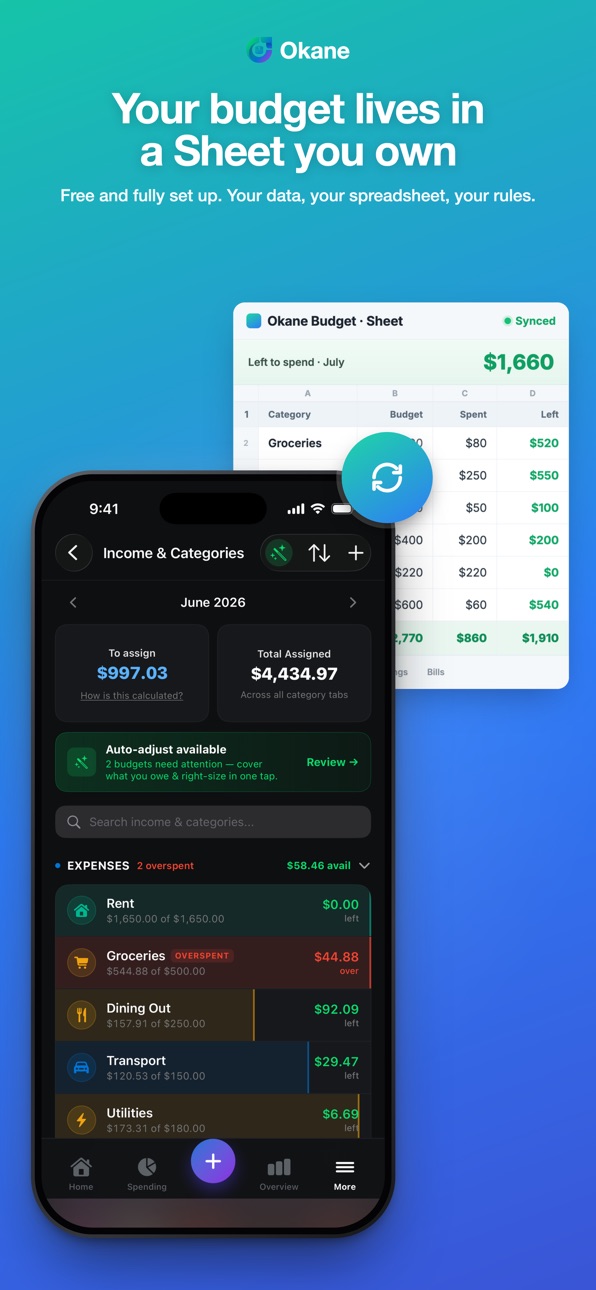
Built around a spreadsheet-connected workflow, Okane combines the structure of zero-based budgeting with the customization of Google Sheets.
With Okane, you can:
Create and manage monthly budgets
Track spending across categories
Review transactions in one place
Stay aligned with your personal budgeting system
Use a familiar spreadsheet-driven workflow with more convenience on mobile
Okane is designed for people who want more control than a typical budgeting app, while keeping their financial workflow flexible and transparent.
Whether you’re assigning every dollar, reviewing spending trends, or keeping your budget organized month to month, Okane helps you stay intentional with your money.
Terms of Use: https://okane.finance/terms/
Capabilities
In-App Purchases
Accessibility
ipadiphonemacrealityDevicetvoswatch
Version history 10 versions
Build 887706515v1.1.72026-07-02 05:47:14
What's New — Okane iOS 1.1.7
Recurring subscriptions
Detected-subscription review — Okane spots recurring charges and lets you add them to Bills in a tap.
Surfaced as a Home alert (promoted out of a buried More-screen row), Pro-gated with a proper upgrade CTA (no dead-end).
Auto-match: an incoming bank charge for a tracked subscription auto-marks the linked bill paid — and the link is rename-safe (survives you renaming the bill).
New bills seed their due date from the subscription's predicted next charge.
Handled subscriptions are remembered server-side, so a dismissed/added one doesn't nag you again across devices.
Duplicate transactions
Possible-duplicate badges on transaction rows + a Duplicates filter chip.
The Home "Transactions to review" CTA now routes to Duplicates when duplicates are all it's flagging.
Theme
Defaults to dark mode on first launch (respects your saved System/Light/Dark choice if you've set one).
Bills
Delete option added to the bill payment sheet.
Polish & fixes
Onboarding category selection capped to each table's row band (no overflow).
Sign-out / account deletion now de-registers your push token from the backend (privacy + no ghost notifications).
Fixed the Income pie chart not rendering (dead template formulas cleared).
Free users no longer make a wasted subscription-fetch call (skips a 403).
Build 887748368v1.1.82026-07-02 23:55:19
What's New in 1.1.8
• Catch duplicates faster. Okane now flags possible duplicate transactions with a badge, and a new Duplicates filter lets you review and clear them in one place. Your home review prompt jumps straight there when duplicates are all that's left.
• Dark mode by default. Okane now opens in a sleek dark theme on first launch. Prefer light? Switch anytime in Settings.
• Performance and stability improvements under the hood.
Build 887511023v1.1.62026-06-27 20:12:47
Refer a friend, give a month of Premium and get one back! Share your code (or redeem one) right from the new Refer-a-friend screen.
We also tidied up For Review — your pending bank transactions now show up alongside everything else to review, and "Delete all" clears the whole queue at once. Adding a transaction is quicker too: switch between Expense, Bills, Investments, and Debt without backing out.
Plus a simpler sign-up questionnaire, more reliable sign-in, and a handful of bug fixes.
Build 887310626v1.1.42026-06-23 16:20:15
What's New in 1.1.4
Investments & Net Worth
• Connect a brokerage to track your portfolio, holdings, and daily gains — plus an Earnings calendar with reminders for upcoming report dates.
• A new Net Worth view brings every account into one wealth picture with drill-in on holdings. Your latest figures load instantly and show when they were last updated.
Light Mode
• Okane now has a polished light mode, with a System / Light / Dark toggle in Settings.
Redesigned Home & Spending
• A cleaner Home built around a true "safe to spend" number — income minus what you've spent and your unpaid bills — with a tap-to-learn explainer.
• Reworked Spending and All Categories with search, sort, and drag-to-reorder, plus a Savings Goals section.
Smarter budgeting
• Auto-adjust proposes budget fixes you can accept or reject one at a time.
• Pull money back out of a category with negative budgets, clearer "spent of available" rows, an "Available this month" line, and OWED indicators for carried debt.
Bank sync & transactions
• Pending bank transactions now appear in For Review across months, with one-tap Confirm all / Delete all.
• Unconfirmed transactions are flagged in Recent activity, and quick-category chips speed up entry.
Reliability & polish
• Past months now load their data when you navigate to them.
• Easier navigation — clear back buttons and bottom-bar behavior so you can always exit a screen.
• Consistent currency formatting and a range of accuracy fixes so the app's numbers match your spreadsheet.
Build 887349159v1.1.52026-06-23 22:03:22
Updated App Store.
Build 885647689v1.1.32026-05-14 18:16:36
Redesigned Budget tab from the ground up:
• Hero progress ring showing what's left to spend at a glance
• Day-grouped transaction sections with filter chips
• Cleaner category cards with custom icons and colors
Plus:
• New Annual Overview with sparklines and category trends
• Standalone Investments screen and Bills & Subscriptions on Spend
• Celebration confetti when you save a transaction
• Send Feedback now auto-attaches the current session's debug logs
• Comma decimals (12,50) accepted across transactions, budgets, and savings goals — for German, French, and Brazilian Portuguese users
• Many polish fixes: full-row tap targets, larger month-nav chevrons, currency picker auto-scrolls to your selection, Bill Calendar marks today, plus dozens of small visual and accessibility wins
Build 885354412v1.1.22026-05-07 16:45:25
A round of polish:
• Tap anywhere on Add/Edit Transaction rows — not just the icon
• Save button on Edit Transaction is no longer hidden behind the tab bar
• Add another savings goal anytime, plus a back button on onboarding
• Better category icons (Credit Card stops showing a car, Index Fund stops showing a TV)
• Faster sync, badge, and permissions refresh when you switch back to Okane
Build 884743722v1.1.12026-04-21 20:06:56
Bill Calendar and Annual View are now free features. The spreadsheet has been improved.
Build 884416116v1.1.02026-04-14 10:15:26
Spreadsheet creation bugs fixed. UI bugs fixed.
Build 883474648v1.02026-04-11 16:31:18
No pricing data captured yet — comparisons appear once the app has paid storefronts or in-app purchases.
Availability 1 of 1 storefronts
| Region | Language | Price | Ratings | Avg | Version |
|---|---|---|---|---|---|
| US | en-US | Free | 0 | — | 1.1.8 |
Change log 13 changes · US
✎
releaseNotes updated
What's New in 1.1.8
• Catch duplicates faster. Okane now flags possible duplicate transactions with a badge, and a new Duplicates filter lets you review and cl
✎
description updated
Okane Budgeting helps you plan your money with clarity and flexibility.
Built around a spreadsheet-connected workflow, Okane combines the structure of zero-bas
✎
name updated
Okane Budgeting
◆
Version 1.1.8 released
What's New in 1.1.8
• Catch duplicates faster. Okane now flags possible duplicate transactions with a badge, and a new Duplicates filter lets you review and clear them in one place. Your home review prompt jumps straight there when duplica
◆
Version 1.1.7 released
What's New — Okane iOS 1.1.7
Recurring subscriptions
Detected-subscription review — Okane spots recurring charges and lets you add them to Bills in a tap.
Surfaced as a Home alert (promoted out of a buried More-screen row), Pro-gated with
◆
Version 1.1.6 released
Refer a friend, give a month of Premium and get one back! Share your code (or redeem one) right from the new Refer-a-friend screen.
We also tidied up For Review — your pending bank transactions now show up alongside everything else to revi
◆
Version 1.1.5 released
Updated App Store.
◆
Version 1.1.4 released
What's New in 1.1.4
Investments & Net Worth
• Connect a brokerage to track your portfolio, holdings, and daily gains — plus an Earnings calendar with reminders for upcoming report dates.
• A new Net Worth view brings every account into one
◆
Version 1.1.3 released
Redesigned Budget tab from the ground up:
• Hero progress ring showing what's left to spend at a glance
• Day-grouped transaction sections with filter chips
• Cleaner category cards with custom icons and colors
Plus:
• New Annual Overview
◆
Version 1.1.2 released
A round of polish:
• Tap anywhere on Add/Edit Transaction rows — not just the icon
• Save button on Edit Transaction is no longer hidden behind the tab bar
• Add another savings goal anytime, plus a back button on onboarding
• Better categ
◆
Version 1.1.1 released
Bill Calendar and Annual View are now free features. The spreadsheet has been improved.
◆
Version 1.1.0 released
Spreadsheet creation bugs fixed. UI bugs fixed.
◆
Version 1.0 released