Home › Productivity

 US
US
1 of 1 storefronts
Content in en-US
Content in en-US
Information
Preview 1 platform
iPhone 2 images

What’s New Version 1.4.0
bug fixs
Description
DayClock turns your daily routine into a 24-hour circular planner — so you can see exactly how your time is shaped, at a glance.
Instead of a list, your schedule lives on a clock face. Sleep, work, meals, free time — each block takes its place around the circle, giving you an honest picture of where your day actually goes.
- Key Features
24-hour circular schedule view
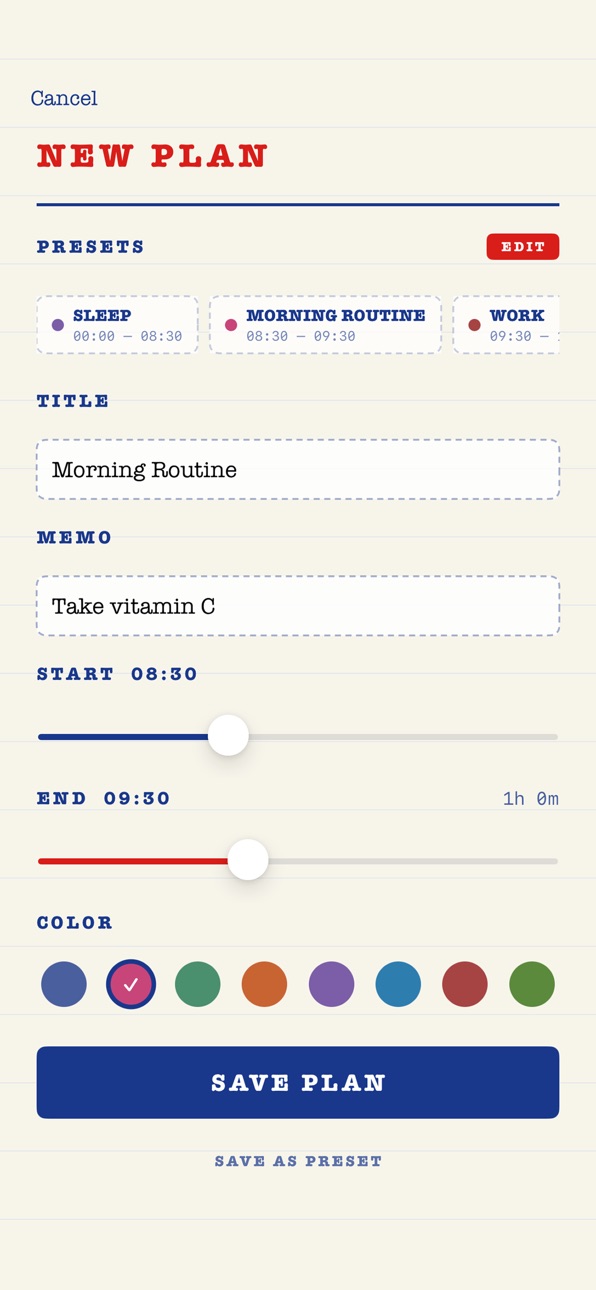
Add, edit, and color-code daily blocks
Per-block notes for quick reminders
Date navigation to review past days
Share your daily plan as an image
Retro notebook aesthetic — calm and distraction-free
Whether you're planning the day ahead or reflecting on how it went, DayClock gives your time a shape.
Accessibility
ipadiphonemacrealityDevicetvoswatch
Version history 5 versions
Build 887070325v1.4.02026-06-17 17:40:39
bug fixs
Build 886559245v1.3.02026-06-08 14:53:14
bug fixs
Build 884225298v1.2.02026-04-08 08:45:54
bug fixs
Build 883742945v1.1.02026-04-02 07:57:50
bug fixs
Build 883451669v1.0.02026-03-21 10:25:24
No pricing data captured yet — comparisons appear once the app has paid storefronts or in-app purchases.
Availability 1 of 1 storefronts
| Region | Language | Price | Ratings | Avg | Version |
|---|---|---|---|---|---|
| US | en-US | Free | 1 | 5.0 | 1.4.0 |
Change log 9 changes · US
✎
releaseNotes updated
bug fixs
✎
description updated
DayClock turns your daily routine into a 24-hour circular planner — so you can see exactly how your time is shaped, at a glance.
Instead of a list, your schedul
✎
subtitle updated
Daily routine, in a circle
✎
name updated
DayClock: Circular Scheduler
◆
Version 1.4.0 released
bug fixs
◆
Version 1.3.0 released
bug fixs
◆
Version 1.2.0 released
bug fixs
◆
Version 1.1.0 released
bug fixs
◆
Version 1.0.0 released