Home › Productivity

 US
US
1 of 1 storefronts
Content in en-US
Content in en-US
Information
Preview 1 platform
iPhone 9 images


What’s New Version 1.6.0
PDF to Word Conversion — Rebuilt from Scratch!
• New AI-powered conversion engine: Tables, headings, and formatting are perfectly preserved.
• Faster conversion: Completes in about 15 seconds on average.
• Automatic landscape page support for wide tables.
AI Performance Improvements
• AI Doc Builder and PDF editing now produce higher quality output.
• Timeout errors fixed for a more stable AI experience.
Bug Fixes & Improvements
• General stability and performance enhancements.
Description
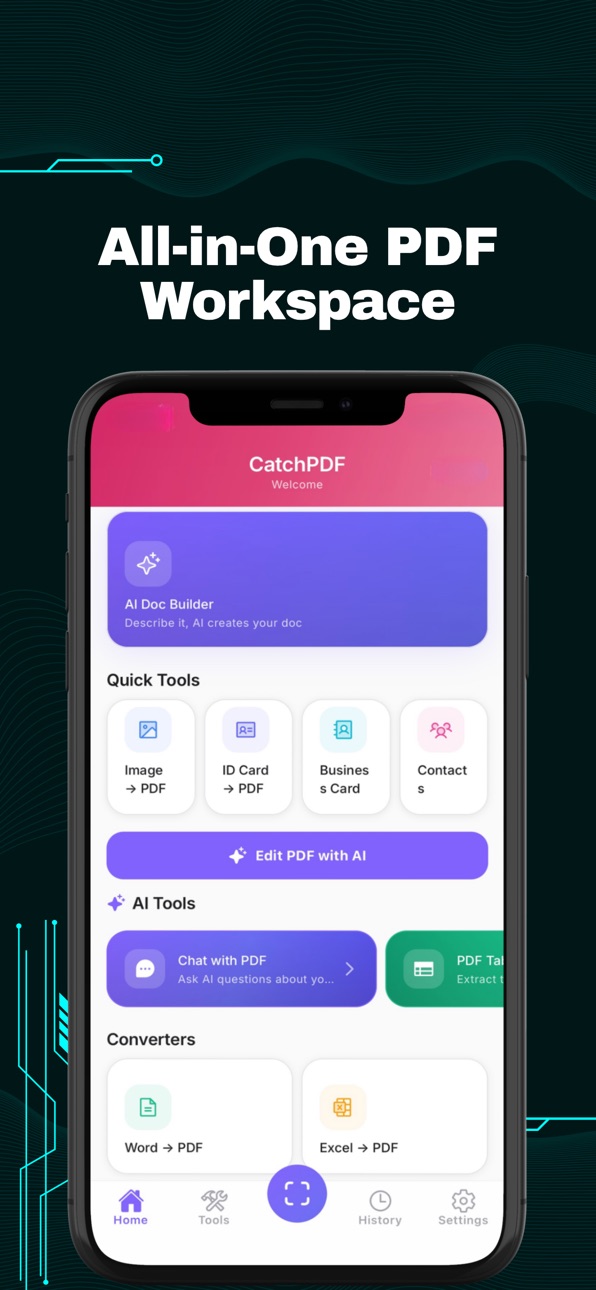
CatchPDF is your all-in-one AI-powered document management hub. Convert photos, notes, and text into perfect PDF files in seconds. Whether you're a student or a business professional, boost your productivity with CatchPDF's next-generation tools.
AI-POWERED FEATURES
• AI Doc Builder: Simply describe what you need, and the AI will draft contracts, reports, or letters and turn them into professional PDFs instantly.
• Chat with PDF: No time to read a long file? Ask your PDF questions and get summaries, key points, and extracted tables in seconds.
SMART SCANNER & OCR
• Document Scanner: Scan your receipts, invoices, or contracts in high quality using your device's camera.
• Precise OCR: Extract text from scanned documents, copy it, or translate it.
• Business Card Scanner: Scan business connections and directly save contacts to your phone.
POWERFUL PDF EDITING
• Merge & Split: Separate pages or combine different files into one.
• Sign & Watermark: Digitally sign your documents or add custom text watermarks.
• Encrypt: Protect your sensitive PDFs with secure passwords.
• Reorder & Rotate: Easily change page order with drag and drop.
• Compress: Reduce large PDF sizes to save space without losing quality.
• Converters: Image to PDF, Word to PDF, Excel to PDF, and more.
TOKEN SHOP & PREMIUM SUBSCRIPTION
CatchPDF offers flexible models tailored to your needs:
• Premium Subscription: Enjoy unlimited document creation, ad-free experience, and unrestricted access to all AI tools with a Monthly or Yearly plan. Save big with the annual option!
• Token System (Pay-As-You-Go): Don't want a subscription? Just pay for what you use! Buy "Tokens" from the Token Shop to use AI tools, OCR, and advanced document converters whenever you need them. Your tokens never expire!
Download CatchPDF now and experience the AI revolution in mobile document management!
Terms of Use: https://catchpdf.app/terms.html
Privacy Policy: https://catchpdf.app/privacy.html
In-App Purchases US pricing
Premium Subscription
Annual Premium · Yearly$29.99
Monthly Premium · Monthly$3.99
One-Time Purchases
100 Tokens$4.99
200 Tokens$7.99
300 Tokens$9.99
Capabilities
In-App Purchases
Accessibility
ipadiphonemacrealityDevicetvoswatch
Version history 8 versions
Build 884599029v1.6.02026-04-20 20:06:31
PDF to Word Conversion — Rebuilt from Scratch!
• New AI-powered conversion engine: Tables, headings, and formatting are perfectly preserved.
• Faster conversion: Completes in about 15 seconds on average.
• Automatic landscape page support for wide tables.
AI Performance Improvements
• AI Doc Builder and PDF editing now produce higher quality output.
• Timeout errors fixed for a more stable AI experience.
Bug Fixes & Improvements
• General stability and performance enhancements.
Build 884155550v1.5.22026-04-07 14:57:15
You can now add multiple pages to a single scan.
Summaries are now generated in the app's language, regardless of the document's language.
Translated text is now read-only — simply copy and use it.
The page reordering screen has been redesigned for a better experience.
Improved visual consistency across the app.
Various bug fixes and performance improvements.
Build 884112197v1.5.02026-04-03 22:15:34
Smarter Backups: Your documents and scans are now backed up more intelligently. You’ll be able to access your past work safely and instantly, anytime you need.
Seamless AI Summaries: We fixed an issue where long AI summaries were cut off. Now, you can comfortably scroll down to read the entire generated text without any hassle.
Under-the-Hood Improvements: We’ve made UI alignment tweaks and improved the stability of our subscription system for a much smoother experience.
Build 883928731v1.4.02026-03-31 05:49:09
-Bug fixes.
Build 883891726v1.3.42026-03-30 09:37:24
Scanner: Text extraction is no longer automatic. A new "Extract Text" button has been added — users can now save scanned documents as PDF without spending tokens. Text extraction with AI is optional and triggered only when needed.
Subscription validation: Improved receipt verification with transaction date checks. Stale or expired sandbox/test purchases no longer incorrectly activate subscriptions.
Token Shop: The subscription description below the "Subscribe" button now dynamically updates based on the selected plan (monthly/annual), showing the correct price and billing period.
Bug Fixes
Fixed an issue where new installs could incorrectly receive an active subscription instead of the 3-day free trial.
Fixed subscription restore using incorrect default duration — now correctly applies 30 days for monthly and 365 days for annual plans.
Removals
Removed type filter chips (All, Favorites, Conversion, Tools, Scan) from the History screen due to persistent rendering issues.
Build 883812027v1.2.02026-03-27 13:27:26
AI-Powered Document Enhancement
• Shadows, color issues, and low contrast in scanned documents are now automatically fixed with AI
• Professional scan quality with 6-layer image enhancement
Automatic Perspective Correction
• Tilted or skewed documents are automatically straightened
• Non-document areas (fingers, desk, background) are automatically removed
New Scanning Experience
• Added 3-step animated processing screen
• Faster and more reliable PDF creation
Bug Fixes and Improvements
• Fixed PDF full-page layout issue
• Improved app stability
Build 883400182v1.02026-03-25 02:15:11
Build 883765767v1.1.02026-03-25 21:03:41
Smarter Document Scanner — Scanned pages now fill the entire PDF page. Fingers and objects at edges are automatically trimmed.
Complete Language Support — All screens fully support English, Turkish, Spanish, French, and German.
New Animated Splash Screen — Polished launch experience with the updated logo.
Bug fixes and performance improvements.
Price history by region
Currency
Show
Columns
Search
Availability 1 of 1 storefronts
| Region | Language | Price | Ratings | Avg | Version |
|---|---|---|---|---|---|
| US | en-US | Free | 0 | — | 1.6.0 |
Change log 12 changes · US
✎
releaseNotes updated
PDF to Word Conversion — Rebuilt from Scratch!
• New AI-powered conversion engine: Tables, headings, and formatting are perfectly preserved.
• Faster conversion
✎
description updated
CatchPDF is your all-in-one AI-powered document management hub. Convert photos, notes, and text into perfect PDF files in seconds. Whether you're a student or a
✎
subtitle updated
Create & Edit PDF with AI
✎
name updated
CatchPDF: AI Editor, Converter
◆
Version 1.6.0 released
PDF to Word Conversion — Rebuilt from Scratch!
• New AI-powered conversion engine: Tables, headings, and formatting are perfectly preserved.
• Faster conversion: Completes in about 15 seconds on average.
• Automatic landscape page support f
◆
Version 1.5.2 released
You can now add multiple pages to a single scan.
Summaries are now generated in the app's language, regardless of the document's language.
Translated text is now read-only — simply copy and use it.
The page reordering screen has been redesi
◆
Version 1.5.0 released
Smarter Backups: Your documents and scans are now backed up more intelligently. You’ll be able to access your past work safely and instantly, anytime you need.
Seamless AI Summaries: We fixed an issue where long AI summaries were cut off. N
◆
Version 1.4.0 released
-Bug fixes.
◆
Version 1.3.4 released
Scanner: Text extraction is no longer automatic. A new "Extract Text" button has been added — users can now save scanned documents as PDF without spending tokens. Text extraction with AI is optional and triggered only when needed.
Subscript
◆
Version 1.2.0 released
AI-Powered Document Enhancement
• Shadows, color issues, and low contrast in scanned documents are now automatically fixed with AI
• Professional scan quality with 6-layer image enhancement
Automatic Perspective Correction
• Tilted or skew
◆
Version 1.1.0 released
Smarter Document Scanner — Scanned pages now fill the entire PDF page. Fingers and objects at edges are automatically trimmed.
Complete Language Support — All screens fully support English, Turkish, Spanish, French, and German.
New Animated
◆
Version 1.0 released