Home › Utilities

 US
US
1 of 1 storefronts
Content in en-US
Content in en-US
Information
Preview 2 platforms
iPhone 4 images


iPad 6 images




What’s New Version 1.13
Two things in this update, both from your feedback:
Fixed a bug where parts of the onboarding could be cut off — on some iPhones, especially with Display Zoom enabled, content and the Next button could end up off-screen. Those screens now scroll, so nothing stays hidden.
Lowered the price of the Lifetime unlock. A few of you said it was steep, and since MyAI runs entirely on your device, a cheaper one-time unlock made sense.
Thanks to everyone who wrote in.
Description
Run powerful AI models directly on your iPhone — no internet required, no data ever leaves your device.
Completely offline. Your conversations stay on your device, always.
PRIVATE BY DESIGN
Every response is generated on your device using Apple's Metal GPU. No API keys. No cloud. No tracking.
BROWSE & DOWNLOAD MODELS
Explore curated model categories — Reasoning, Coding, General, and Creative — sourced from trusted community packagers and filtered to fit your device's RAM. Search HuggingFace live to find any model.
CHAT MODES & PERSONAS
Seven response modes — Markdown, LaTeX, Code, Concise, Step-by-step, ELI5, and Formal. Give your AI a custom Persona with a name, icon, and system prompt tailored to any task.
WEB SEARCH
Research Mode searches DuckDuckGo before every response so any model can answer questions about current
events, prices, or news. Off by default — you control when it's active.
STAY INFORMED
The Discover tab surfaces the latest AI news from The Verge and TechCrunch, updated throughout the day.
See what models are trending in the community right now.
OPTIMIZED FOR IPHONE
Best results on iPhone 15 Pro and later with 8GB RAM.
---
OFFLINE AI PRO
Unlock advanced features with an optional Pro subscription:
• Arena Mode — Run two models side-by-side in the same conversation
• Voice Mode — Hands-free AI with premium TTS voice selection
• HuggingFace Live Search — Find and download any GGUF model from HuggingFace
• Vision Models — Add multimodal MLX vision models to your library
• Image Generation — Generate images on-device with Stable Diffusion. Fully private.
• Unlimited Saved Models — Save as many models as your storage allows
Subscription options:
• Monthly — $4.99/month, auto-renewing
• Annual — $29.99/year, auto-renewing
• Lifetime — $59.99, one-time purchase (not a subscription)
Payment is charged to your Apple ID at confirmation of purchase. Subscriptions automatically renew
unless cancelled at least 24 hours before the end of the current period. You can manage or cancel in
Settings > [Your Name] > Subscriptions.
Privacy Policy: https://myai.twinsuns.dev/privacy
Terms of Use: https://www.apple.com/legal/internet-services/itunes/dev/stdeula/
In-App Purchases US pricing
Offline AI Pro Subscription
Pro Monthly · Monthly$4.99
Pro Annual · Yearly$29.99
One-Time Purchases
Pro Lifetime$39.99
Capabilities
In-App Purchases
Accessibility
ipadiphonemacrealityDevicetvoswatch
Version history 14 versions
Build 887511781v1.132026-06-27 20:12:00
Two things in this update, both from your feedback:
Fixed a bug where parts of the onboarding could be cut off — on some iPhones, especially with Display Zoom enabled, content and the Next button could end up off-screen. Those screens now scroll, so nothing stays hidden.
Lowered the price of the Lifetime unlock. A few of you said it was steep, and since MyAI runs entirely on your device, a cheaper one-time unlock made sense.
Thanks to everyone who wrote in.
Build 885755215v1.122026-05-17 18:54:43
Feature Requests — there's now a link in your Profile to vote on what comes next in MyAI. Head to the Feature Requests page and let us know what you'd like to see built.
Also added a Write a Review link in Profile if you've been meaning to leave one.
Build 885693034v1.112026-05-15 18:24:29
Fixed a crash when loading an image generation model while a chat model was active — the app now properly unloads before switching.
Image model loading now shows a heads-up when the final stage slows down, so you know it's still working.
Build 885643038v1.102026-05-14 16:31:43
Document Chat — Attach a PDF, Word doc, Excel spreadsheet, or text file and ask your AI anything about it. Extracted and processed entirely on-device.
Email Reply Mode — A new chat mode that drafts ready-to-send replies. Paste the email you received, tap "Open in Mail" to send it from your email app.
Bug fixes and performance improvements.
Build 885594838v1.92026-05-13 18:57:45
v1.9 — Personas + Web Search
AI Personas: Give your AI a personality. Tap the masks icon in the input bar to create a custom persona with a name, icon, and system prompt. Presets included, or write your own from scratch.
Web Search: Research Mode searches DuckDuckGo before every response so any model can answer questions about current events and news. Off by default — your queries never include conversation content.
Also in this update:
— Input bar reorganized so the text field always has full width
— Image generation models can now be deleted from My Models (swipe left)
— Loading progress bar when initializing an image generation model
Build 885501096v1.82026-05-12 03:17:30
Chat Modes — Tap sparkle icon in the input bar to change how the AI responds. Seven modes: Markdown, LaTeX, Code, Concise, Step-by-step, ELI5, and Formal. Mode is saved per conversation.
LaTeX rendering — Switch to LaTeX mode for math questions. Equations render as formatted expressions instead of raw symbols.
Copy code — Every code block now has a copy button. Tap to copy the full snippet to your clipboard.
File export — Tap the file card below any response to export it. Markdown saves as .md, code as .py/.js/etc., math as .tex. Share directly to Files, Notes, or any app.
Build 885119695v1.72026-05-06 05:44:52
Image Generation — generate images entirely on your device using Stable Diffusion. No internet required after the model downloads. Type a prompt, or upload a photo and reimagine it with adjustable strength. Fully private, zero cloud.
Pro — unlock Arena mode, Voice tab, HuggingFace live search, Vision models, Image Generation, and unlimited saved models with a single subscription. Early supporters who installed before this update get Pro free, forever — no action needed.
Qwen3 VL 2.5B — Alibaba's newest vision model is now available. Best-in-class at OCR, charts, and document reading, all on-device.
Bug fixes and performance improvements.
Build 884299916v1.62026-04-09 16:03:59
Voice Mode — A dedicated Voice tab lets you talk to your AI and hear it respond, entirely on-device.
Choose from any voice installed on your iPhone, including enhanced neural voices.
Model Picker — Tap the model name to open a rich model sheet showing capability tags, quantization,
size, and description for every downloaded model.
Vision in Voice — Vision models now work in the Voice tab. Attach a photo and ask anything about it.
Onboarding — New users now get a walkthrough of Voice, Arena, and Vision before their first chat.
Re-engagement notifications — Optional nudges if you haven't chatted in a few days.
Bug fixes — Fixed a crash when switching between vision and standard models. Fixed image attachments
not displaying in chat after sending.
Build 884034743v1.52026-04-02 01:00:28
• Fixed an issue where the chat would scroll to a wrong position or show a blank screen when sending
a message from the middle of your chat history
• Fixed auto-scroll during AI responses — scrolling up to read previous messages no longer gets
interrupted
• Fixed a bug where your loaded model would unexpectedly unload after a few conversations, requiring
you to reload it manually
• Minimum iOS version is now 18.0
Build 883995328v1.42026-04-01 16:31:21
- Fixed a bug where selecting a model in the My Models tab caused chat to show an error when sending
messages — model selection now happens directly in the Chat tab
- Fixed a bug where scrolling up in a long conversation during generation would leave the screen
stuck — you can now scroll freely while the model responds
Build 883730542v1.32026-03-25 19:17:54
Introducing Arena — set two AI models against each other and watch them debate, reason, and respond to one another entirely on your
device. Pick from 16 personas (The Skeptic, Socrates, Tech Architect, CTO, and more), choose a topic or browse examples, set the number
of rounds, and let them run. Sessions are saved so you can revisit them anytime.
Choose your quantization — models now show every available variant (Q2_K through Q8_0) so you can pick the right balance of speed,
size, and quality.
Set a maximum output length in Settings to control how long responses can be.
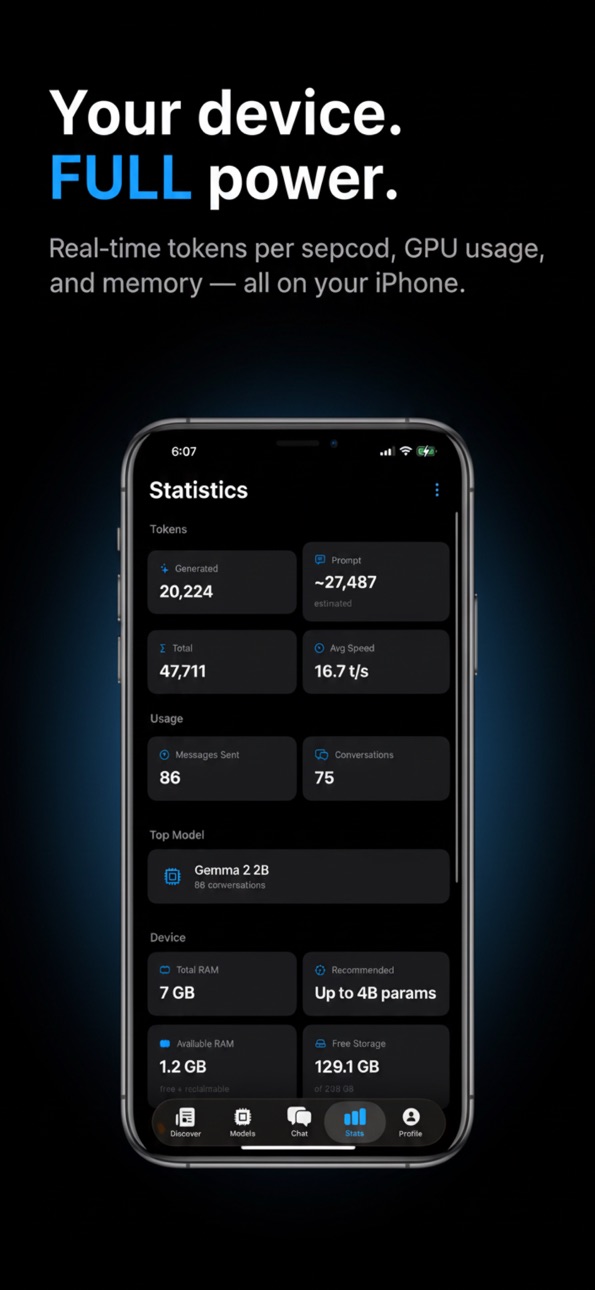
A new live stats card shows tokens/sec, token count, time to first token, and memory usage while the model is running.
Build 883604608v1.22026-03-21 17:14:54
Discover tab — browse the latest AI news from The Verge and TechCrunch,
updated every 2 hours.
Model categories — explore curated picks for Reasoning, Coding, General,
and Creative use cases, all ready to download directly in-app.
Trending — see what the AI community is downloading on HuggingFace right now.
Learn tab — new educational content explaining how LLMs work, what
quantization means, and how to pick the right model for your device.
Build 883379604v1.12026-03-15 19:41:55
Bug Fixes & Improvements
- Fixed an issue where models could produce garbled or nonsensical
output
- Fixed a crash that could occur when switching between models
- Added Gemma 3 support and improved compatibility with newer
open-source models
- Improved memory management for more stable inference on all devices
Build 883284514v1.02026-03-14 18:40:01
Price history by region
Currency
Show
Columns
Search
Availability 1 of 1 storefronts
| Region | Language | Price | Ratings | Avg | Version |
|---|---|---|---|---|---|
| US | en-US | Free | 8 | 4.5 | 1.13 |
Change log 18 changes · US
✎
releaseNotes updated
Two things in this update, both from your feedback:
Fixed a bug where parts of the onboarding could be cut off — on some iPhones, especially with Display Zoom
✎
description updated
Run powerful AI models directly on your iPhone — no internet required, no data ever leaves your device.
Completely offline. Your conversations stay on your dev
✎
subtitle updated
Private Local AI on Your Phone
✎
name updated
Offline AI - Private Chat
◆
Version 1.13 released
Two things in this update, both from your feedback:
Fixed a bug where parts of the onboarding could be cut off — on some iPhones, especially with Display Zoom enabled, content and the Next button could end up off-screen. Those screens now
◆
Version 1.12 released
Feature Requests — there's now a link in your Profile to vote on what comes next in MyAI. Head to the Feature Requests page and let us know what you'd like to see built.
Also added a Write a Review link in Profile if you've been meaning to
◆
Version 1.11 released
Fixed a crash when loading an image generation model while a chat model was active — the app now properly unloads before switching.
Image model loading now shows a heads-up when the final stage slows down, so you know it's still working.
◆
Version 1.10 released
Document Chat — Attach a PDF, Word doc, Excel spreadsheet, or text file and ask your AI anything about it. Extracted and processed entirely on-device.
Email Reply Mode — A new chat mode that drafts ready-to-send replies. Paste the
◆
Version 1.9 released
v1.9 — Personas + Web Search
AI Personas: Give your AI a personality. Tap the masks icon in the input bar to create a custom persona with a name, icon, and system prompt. Presets included, or write your own from scratch.
Web Search: Resea
◆
Version 1.8 released
Chat Modes — Tap sparkle icon in the input bar to change how the AI responds. Seven modes: Markdown, LaTeX, Code, Concise, Step-by-step, ELI5, and Formal. Mode is saved per conversation.
LaTeX rendering — Switch to LaTeX mode for math ques
◆
Version 1.7 released
Image Generation — generate images entirely on your device using Stable Diffusion. No internet required after the model downloads. Type a prompt, or upload a photo and reimagine it with adjustable strength. Fully private, zero cloud.
Pro —
◆
Version 1.6 released
Voice Mode — A dedicated Voice tab lets you talk to your AI and hear it respond, entirely on-device.
Choose from any voice installed on your iPhone, including enhanced neural voices.
◆
Version 1.5 released
• Fixed an issue where the chat would scroll to a wrong position or show a blank screen when sending
a message from the middle of your chat history
• Fixed auto-scroll during AI resp
◆
Version 1.4 released
- Fixed a bug where selecting a model in the My Models tab caused chat to show an error when sending
messages — model selection now happens directly in the Chat tab
- Fixed a bug where scrolling up i
◆
Version 1.3 released
Introducing Arena — set two AI models against each other and watch them debate, reason, and respond to one another entirely on your
device. Pick from 16 personas (The Skeptic, Socrates, Tech Architect, CTO, and more), choose a topic or br
◆
Version 1.2 released
Discover tab — browse the latest AI news from The Verge and TechCrunch,
updated every 2 hours.
Model categories — explore curated picks for Reasoning, Coding, General,
and Creative use cases, all ready to download directly in-app.
◆
Version 1.1 released
Bug Fixes & Improvements
- Fixed an issue where models could produce garbled or nonsensical
output
- Fixed a crash that could occur when switching between models
- Added Gemma 3 support and improved compatibility with newer
open-
◆
Version 1.0 released