Home › Entertainment

 US
US
1 of 1 storefronts
Content in en-US
Content in en-US
Information
Preview 2 platforms
iPhone 5 images


iPad 5 images



What’s New Version 2.4.0
v2.4.0 Release Notes:
- TTS play is now free for all users
- Simplified user interface
- Minor bug fixes and stability improvements
Description
Can't read Korean? Doesn't matter.
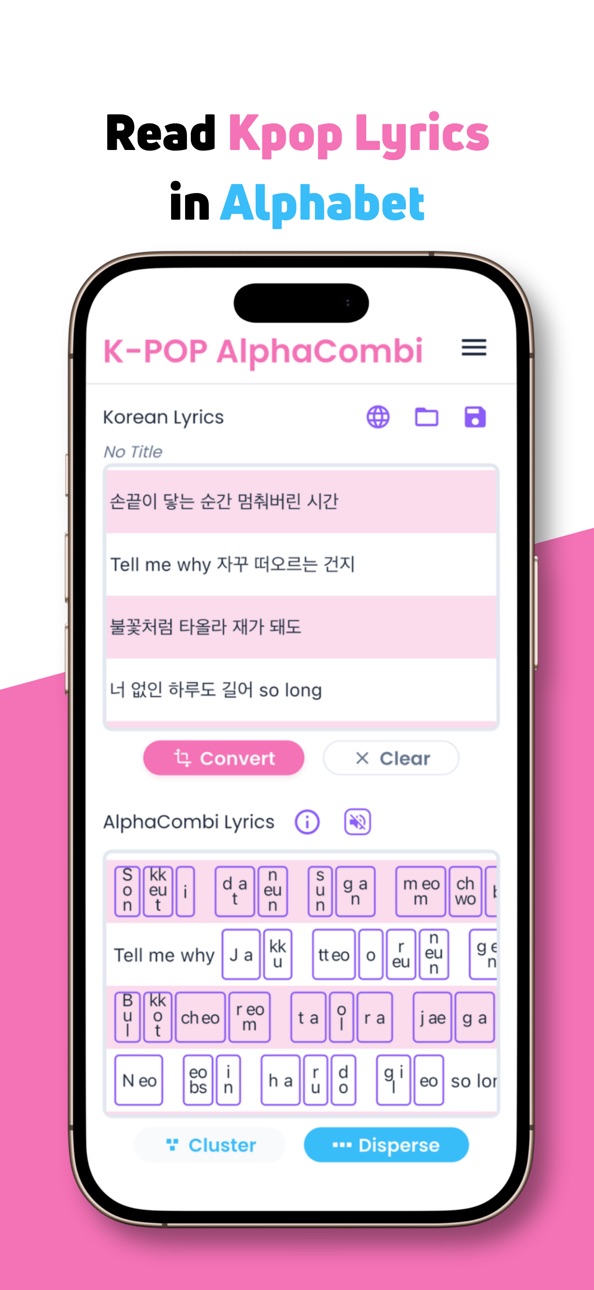
K-AlphaCombi turns any Korean lyrics into alphabet letters you can read.
Paste Korean text, tap Convert, and every Korean character is broken down into Roman letters. No Korean keyboard. No signup. No internet required.
K-AlphaCombi shows you how each Hangul character is built, letter by letter — and gives you a way to read along with any K-POP song.
• HOW IT WORKS
1. Copy Korean lyrics from any site, fan page, or group chat.
2. Paste into the app and tap Convert.
3. The original Korean and the romanized AlphaCombi version appear side by side — synced line by line as you scroll.
Need lyrics? Tap the globe icon to jump to a lyrics site or search engine. Find what you need, copy, come back, and paste.
• TWO WAYS TO READ
Disperse Mode: Alphabet letters are lined up left to right, like English. Easy to read along quickly at a concert or while listening.
Cluster Mode: Alphabet letters are arranged in the block shape, which helps you see exactly how each Korean character is assembled — consonants and vowels fitting together like puzzle pieces.
Switch to Cluster when you are curious about how Korean character works.
• HEAR EVERY LETTER
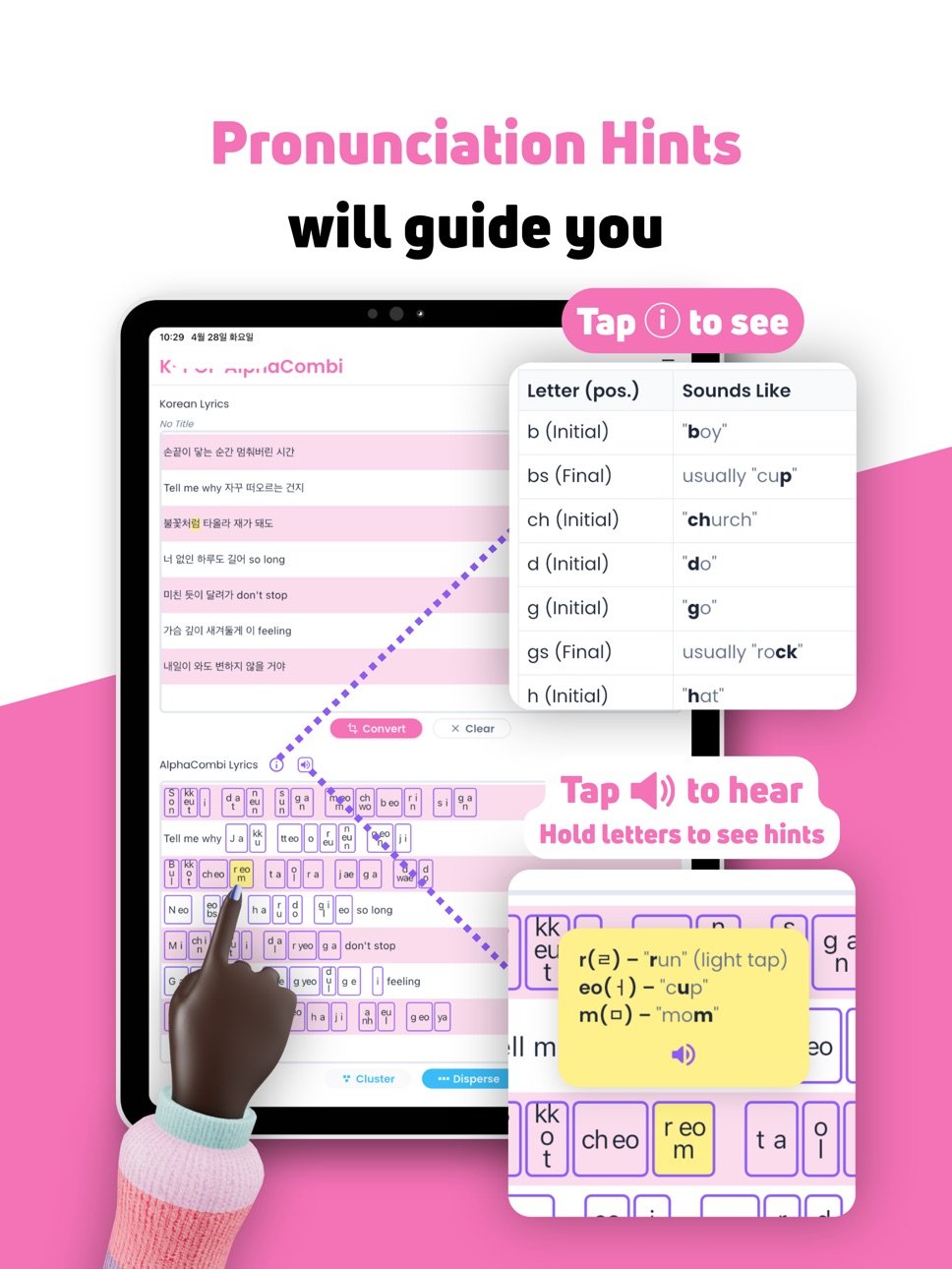
Turn on the sound icon and tap any letter block in the converted lyrics to hear it spoken in Korean. Long-press a block for a quick pop-up hint showing how each letter sounds in English. Perfect for picking up the chorus before the show.
• BUILD YOUR SETLIST
Save every song and organize your setlist inside the app. Group your favorites into folders — one for each artist, album, or upcoming concert — and load any saved lyrics with one tap to practice the fan chant, the chorus, every word.
K-AlphaCombi works 100% offline — on the plane, at the hotel, in the venue queue. No Wi-Fi needed.
• BACK UP & SHARE
Heading to a new phone? Want to send your concert setlist to a friend? Export your saved lyrics and folders as a single file, then share it via AirDrop, email, or cloud storage. Import it on any device to pick up right where you left off.
• PRONUNCIATION HINTS BUILT IN
Tap the info icon anytime to see every romanized letter with a phonetic hint using a familiar English word — like "j as in joy" or "ch as in church."
A FRIENDLY NOTE
K-AlphaCombi maps each Hangul letter to its alphabet equivalent, one by one. It does not apply the pronunciation rules that change sounds when characters combine — like linking between syllables or nasalization. Think of it as a reading guide, not a phonetic transcription. You will be closer to reading Korean lyrics than you have ever been.
Your favorite K-POP song is waiting. Paste it in!
In-App Purchases US pricing
One-Time Purchases
Save & Load Unlock$1.99
Capabilities
In-App Purchases
Accessibility
ipadiphonemacrealityDevicetvoswatch
Version history 21 versions
Build 887032861v2.4.02026-06-16 17:59:18
v2.4.0 Release Notes:
- TTS play is now free for all users
- Simplified user interface
- Minor bug fixes and stability improvements
Build 886095718v2.3.12026-05-25 18:04:09
v2.3.1 Release Notes:
- Clearer guidance for first-time users
Build 885862614v2.3.02026-05-19 22:38:46
v2.3.0 Release Notes:
- App now opens in edit mode — review the lyrics, then tap [Convert] when ready.
Build 885720246v2.2.02026-05-16 02:58:45
v2.2.0 Release Notes:
- Free users can now explore every line, not just the sample
- Long-press any box to see pronunciation hints
- Minor bug fixes and stability improvements
Build 885673193v2.1.02026-05-14 18:19:51
v2.1.0 Release Notes:
- Every tap now feels responsive with subtle haptics
- Dialogs use more screen space on tablets
- Minor bug fixes and stability improvements
Build 885452582v2.0.12026-05-11 03:13:34
v2.0.1 Release Notes
- Introducing our brand-new look
- Share lyrics with friends via AirDrop, email, or cloud storage.
- Smoother experience across all 36 supported languages
- Various bug fixes and improvements
Tip: To import a .kacdb file you received, save it to your device first, then tap Download inside the Load screen.
Build 885211529v1.6.52026-05-03 21:14:45
What's New in v1.6.5
- Back up your lyrics to a single .kacdb file anytime.
- Move your library to a new phone or tablet in seconds.
- Share lyrics with friends via AirDrop, email, or cloud storage.
- Confirmation preview shows what will be imported before anything changes.
- Fully translated into 36 languages.
Tip: To import a .kacdb file you received, save it to your device first, then tap Download inside the Load screen.
Build 885129564v1.6.42026-04-30 16:27:28
v1.6.4 Release Notes:
- New first-screen hint guides users to tap a box and hear Korean.
- Organize lyrics into folders — create, rename, delete, and navigate folders from Save and Load screens
- Manual sort mode — drag to reorder lyrics and folders in any order you like
- Added 5 new languages: Brazilian Portuguese, Latin American Spanish, Persian, Hebrew, Urdu
- Improved translation quality across 35 languages
Build 884969703v1.6.22026-04-29 00:45:06
v1.6.2 Release Notes:
- Organize lyrics into folders — create, rename, delete, and navigate folders from Save and Load screens
- Manual sort mode — drag to reorder lyrics and folders in any order you like
- Added 5 new languages: Brazilian Portuguese, Latin American Spanish, Persian, Hebrew, Urdu
- Improved translation quality across 35 languages
Build 884950118v1.6.02026-04-27 01:08:16
v1.6.0 Release Notes:
- Organize lyrics into folders — create, rename, delete, and navigate folders from Save and Load screens
- Manual sort mode — drag to reorder lyrics and folders in any order you like
Build 884879593v1.5.52026-04-25 00:07:58
v1.5.5 Release Notes
- Tap AlphaCombi box to hear Korean pronunciation
- Hold for sound hints
- Silent mode warning when muted or volume off
- Now supporting 31 languages (+Mongolian, Uzbek)
- Sound preview for free version
- Korean voice install guide if missing
Build 884684270v1.4.22026-04-20 02:02:53
v1.4.2
- Improved How To guide: streamlined from 8 to 7 steps for a clearer walkthrough
- Minor layout adjustment for better ad placement
Build 884638679v1.4.02026-04-18 00:52:01
v1.4.0 Release Notes
- 29 Languages Supported — App UI now automatically displays in your device's language, including English, Korean, Japanese, Chinese, Arabic, Spanish, French, German, Portuguese, and 20 more.
- Arabic RTL Support — Full right-to-left layout for Arabic users.
- Improved text rendering — Non-Korean pass-through text now displays with natural spacing and correct direction.
Build 884661150v1.4.12026-04-18 16:40:47
v1.4.1 Release Notes:
- Added app language change guide in How To tab (iOS/Android settings path)
- Fixed Traditional Chinese (zh_TW) not being recognized when set as app language
- Various localization fixes and refinements for all 29 languages
Build 884523849v1.3.12026-04-15 21:23:40
v1.3.1
- Fixed Korean text conversion when pasting from macOS/iOS sources
- Fixed Clear button and text input responsiveness
- Improved dialog and popup sizing on iPad and landscape mode
- Improved layout stability across various screen sizes
- Added Website and Open Source Licenses to App Info
- Various bug fixes and performance improvements
Build 884456040v1.2.02026-04-14 14:33:10
v1.2.0
- Fixed Korean text conversion when pasting from macOS/iOS sources
- Fixed Clear button and text input responsiveness
- Improved dialog and popup sizing on iPad and landscape mode
- Improved layout stability across various screen sizes
- Added Website and Open Source Licenses to App Info
- Various bug fixes and performance improvements
Build 884229538v1.0.72026-04-07 17:14:47
v1.0.7
- App info modified
Build 884119853v1.0.62026-04-04 19:07:43
v1.0.6
- Updated app information.
Build 884094074v1.0.52026-04-03 19:06:59
v1.0.5
- Minor UI updates
Build 884018041v1.0.42026-04-01 19:08:55
v1.0.4
- Enhanced user guidance for a more intuitive experience
- Minor bug fixes
Build 883224967v1.0.32026-03-18 01:57:14
Price history by region
Currency
Show
Columns
Search
Availability 1 of 1 storefronts
| Region | Language | Price | Ratings | Avg | Version |
|---|---|---|---|---|---|
| US | en-US | Free | 0 | — | 2.4.0 |
Change log 25 changes · US
✎
releaseNotes updated
v2.4.0 Release Notes:
- TTS play is now free for all users
- Simplified user interface
- Minor bug fixes and stability improvements
✎
description updated
Can't read Korean? Doesn't matter.
K-AlphaCombi turns any Korean lyrics into alphabet letters you can read.
Paste Korean text, tap Convert, and every Korean ch
✎
subtitle updated
Kpop Lyrics Romanized-Sing It!
✎
name updated
K-AlphaCombi: Korean Romanizer
◆
Version 2.4.0 released
v2.4.0 Release Notes:
- TTS play is now free for all users
- Simplified user interface
- Minor bug fixes and stability improvements
◆
Version 2.3.1 released
v2.3.1 Release Notes:
- Clearer guidance for first-time users
◆
Version 2.3.0 released
v2.3.0 Release Notes:
- App now opens in edit mode — review the lyrics, then tap [Convert] when ready.
◆
Version 2.2.0 released
v2.2.0 Release Notes:
- Free users can now explore every line, not just the sample
- Long-press any box to see pronunciation hints
- Minor bug fixes and stability improvements
◆
Version 2.1.0 released
v2.1.0 Release Notes:
- Every tap now feels responsive with subtle haptics
- Dialogs use more screen space on tablets
- Minor bug fixes and stability improvements
◆
Version 2.0.1 released
v2.0.1 Release Notes
- Introducing our brand-new look
- Share lyrics with friends via AirDrop, email, or cloud storage.
- Smoother experience across all 36 supported languages
- Various bug fixes and improvements
Tip: To import a .kacdb f
◆
Version 1.6.5 released
What's New in v1.6.5
- Back up your lyrics to a single .kacdb file anytime.
- Move your library to a new phone or tablet in seconds.
- Share lyrics with friends via AirDrop, email, or cloud storage.
- Confirmation preview shows what will b
◆
Version 1.6.4 released
v1.6.4 Release Notes:
- New first-screen hint guides users to tap a box and hear Korean.
- Organize lyrics into folders — create, rename, delete, and navigate folders from Save and Load screens
- Manual sort mode — drag to reorder lyrics a
◆
Version 1.6.2 released
v1.6.2 Release Notes:
- Organize lyrics into folders — create, rename, delete, and navigate folders from Save and Load screens
- Manual sort mode — drag to reorder lyrics and folders in any order you like
- Added 5 new languages: Brazilian
◆
Version 1.6.0 released
v1.6.0 Release Notes:
- Organize lyrics into folders — create, rename, delete, and navigate folders from Save and Load screens
- Manual sort mode — drag to reorder lyrics and folders in any order you like
◆
Version 1.5.5 released
v1.5.5 Release Notes
- Tap AlphaCombi box to hear Korean pronunciation
- Hold for sound hints
- Silent mode warning when muted or volume off
- Now supporting 31 languages (+Mongolian, Uzbek)
- Sound preview for free version
- Korean voice
◆
Version 1.4.2 released
v1.4.2
- Improved How To guide: streamlined from 8 to 7 steps for a clearer walkthrough
- Minor layout adjustment for better ad placement
◆
Version 1.4.1 released
v1.4.1 Release Notes:
- Added app language change guide in How To tab (iOS/Android settings path)
- Fixed Traditional Chinese (zh_TW) not being recognized when set as app language
- Various localization fixes and refinements for all 29 lan
◆
Version 1.4.0 released
v1.4.0 Release Notes
- 29 Languages Supported — App UI now automatically displays in your device's language, including English, Korean, Japanese, Chinese, Arabic, Spanish, French, German, Portuguese, and 20 more.
- Arabic RTL Support — Ful
◆
Version 1.3.1 released
v1.3.1
- Fixed Korean text conversion when pasting from macOS/iOS sources
- Fixed Clear button and text input responsiveness
- Improved dialog and popup sizing on iPad and landscape mode
- Improved layout stability across various screen si
◆
Version 1.2.0 released
v1.2.0
- Fixed Korean text conversion when pasting from macOS/iOS sources
- Fixed Clear button and text input responsiveness
- Improved dialog and popup sizing on iPad and landscape mode
- Improved layout stability across various screen si
◆
Version 1.0.7 released
v1.0.7
- App info modified
◆
Version 1.0.6 released
v1.0.6
- Updated app information.
◆
Version 1.0.5 released
v1.0.5
- Minor UI updates
◆
Version 1.0.4 released
v1.0.4
- Enhanced user guidance for a more intuitive experience
- Minor bug fixes
◆
Version 1.0.3 released