Home › Lifestyle

 US
US
1 of 1 storefronts
Content in en-US
Content in en-US
Information
Apple ID6760296943
Bundle IDcom.hizumedaisuke.rondo-ios
SellerSeller
Min iOS18.0
Min macOS15.0
Device familiesiphone, ipad
Released2026-04-03
Copyright© 2026 Daisuke Hizume
Privacy policyLink ↗
Preview 2 platforms
iPhone 6 images


iPad 3 images


What’s New Version 3.0.0
Thank you for using RONDO.
– RONDO is now on iPad
RONDO now works on iPad. See all your records on a map that fills the big screen, with Split View multitasking support.
– Landscape support for iPhone and iPad
Turn your device sideways and the map and panel switch to a two-column layout. Spot details appear in a panel on the right while the selected pin stays visible on the left — so you can read your records with the map in view.
– Improvements
・In full-screen view, you can now swipe through all photos in the visible area continuously. (Previously they were separated by spot.)
・On iPad and wider screens, photo tiles now add more columns automatically to fit the width.
・Smoother scrolling in the Log screen and faster map display when you have lots of photos.
– Stability and bug fixes
・Further improved pin selection: tapping a recorded pin no longer selects a nearby shop or place, thanks to finger-position-based detection.
・Fixed an issue where the Log map zoomed out too far after switching tabs.
・Fixed an issue where the widget was unavailable on some devices (iOS 18–26.3).
・Fixed an issue where map buttons overlapped the close button in album details.
Description
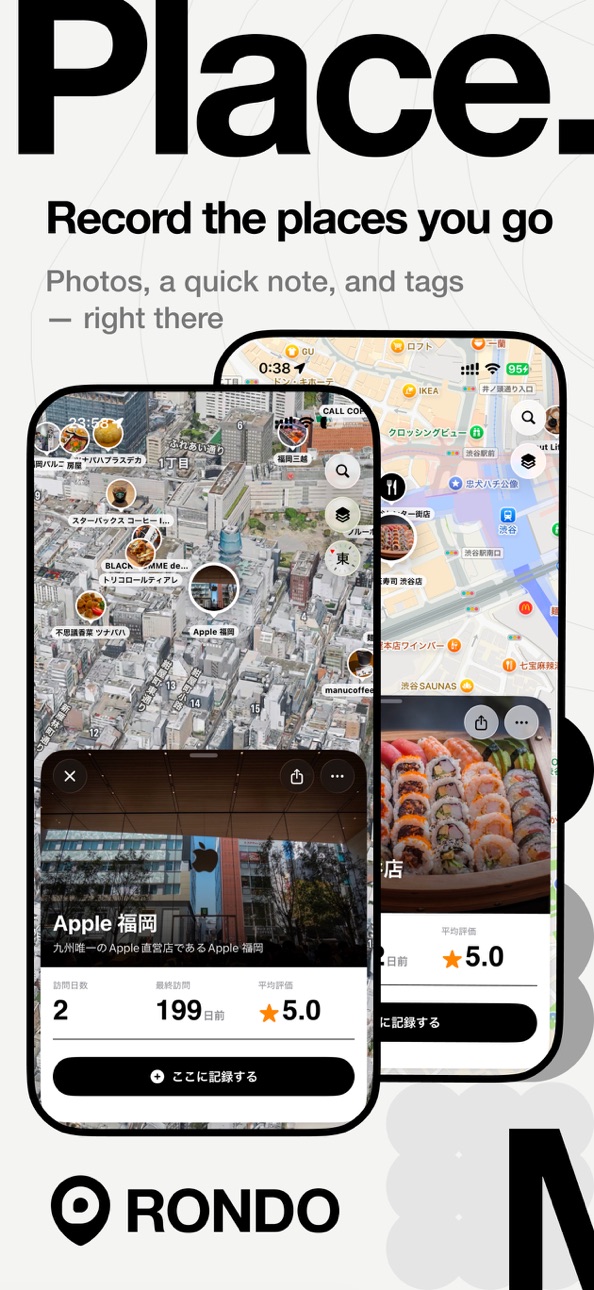
A diary of places—and how you felt—quietly kept on a map.
A private journaling app for your places, for your eyes only.
"What was so good at that cafe again?"
"That inn we stayed at last year—what was it called?"
"That park... I'd love to go back."
What if you could keep things like that on a map?
Features
- Layer memories onto a place
Add a photo, a quick note, a 5-star rating and tags, right there. Weather and temperature are saved automatically, and every visit adds to the record.
- Capture it the moment it strikes you
"Log here now" drops a pin at your current location in a single tap—so you can keep a place the instant it comes to mind.
- Look back on your day
A log screen where map and timeline come together. Your spots, photos, steps and distance line up as a summary of the day.
- Bundle trips and days into an album
Trips, weekend outings, a cafe-hopping afternoon—gather memories that span several days into a single album, and revisit them alongside the map.
- A map that becomes your own
Every place you record appears as a pin. Filter by tag, category or rating, and the patterns in where you go—and where you want to go—come into view.
- Trace memories through the calendar
A calendar lined with a photo for each day. The same date "a week ago / a month ago / a year ago" is just one tap away.
- Turn a place that stayed with you into a card
Make a favorite note or spot into a single shareable card image.
- Look back through your data
Streak days, a one-year activity calendar and the spread of places you've been, all gathered in the Data tab.
More features
- Proximity alerts that gently resurface past notes as you pass nearby
- Home screen widgets in three sizes
- HealthKit integration for automatic steps and distance
- Switch between standard and satellite maps
What RONDO is
- Not a social network
No posts, no followers, no likes.
- Not public reviews
Not scores or word of mouth—just what you felt, as it was.
- Everything stays in iCloud
Records are kept only on your device and in your iCloud, never sent to outside servers. No account needed.
- Any kind of place
Cafes, places you travel to, small spots you find on a walk—all on your map.
- Made and nurtured by one person
No ads, no subscriptions. The updates keep coming.
Place a memory on the map today.
In-App Purchases US pricing
One-Time Purchases
Coffee$0.99
Cake$3.99
Lunch$5.99
Capabilities
In-App Purchases
Accessibility
ipadiphonemacrealityDevicetvoswatch
Version history 25 versions
Build 888059810v3.0.02026-07-09 23:28:55
Thank you for using RONDO.
– RONDO is now on iPad
RONDO now works on iPad. See all your records on a map that fills the big screen, with Split View multitasking support.
– Landscape support for iPhone and iPad
Turn your device sideways and the map and panel switch to a two-column layout. Spot details appear in a panel on the right while the selected pin stays visible on the left — so you can read your records with the map in view.
– Improvements
・In full-screen view, you can now swipe through all photos in the visible area continuously. (Previously they were separated by spot.)
・On iPad and wider screens, photo tiles now add more columns automatically to fit the width.
・Smoother scrolling in the Log screen and faster map display when you have lots of photos.
– Stability and bug fixes
・Further improved pin selection: tapping a recorded pin no longer selects a nearby shop or place, thanks to finger-position-based detection.
・Fixed an issue where the Log map zoomed out too far after switching tabs.
・Fixed an issue where the widget was unavailable on some devices (iOS 18–26.3).
・Fixed an issue where map buttons overlapped the close button in album details.
Build 887696936v2.9.22026-07-02 15:24:25
Thank you for using RONDO.
– Choose your map view at launch
You can now choose how the map looks when you open the app: “Near your current location” or “Overview of all your recorded spots.” See all the places you’ve visited spread across the map at a glance. Switch anytime in Settings > Map.
– Log calories from any record
You can now enter meal calories not only when creating a memo, but also from the edit screen and when registering a spot. Adding them to a record later is just as easy. (Requires Apple Health integration.)
– Records are easier to read
• The memo detail screen now shows the time and weather in its heading.
• Heart rate, calories, and rating (stars) have been rearranged to sit neatly alongside your photos and notes.
• The calorie field is now easier to tap, with a “Done” button added to the number keypad.
Build 887554315v2.9.12026-06-28 20:15:17
Thank you for using RONDO.
– See your heart rate at each moment
On photos and records taken while wearing your Apple Watch, RONDO now shows your heart rate at that moment—so you can look back on the scenes that got your heart racing. (Requires Apple Health and an Apple Watch.)
– Log your meal calories
You can now enter calories in your record notes. The value appears on the record card and is also saved to Apple Health, so you can keep a log of your meals alongside the places you visited and your photos.
– Save captured photos to your Camera Roll
Photos taken with "Take a photo to record" can now also be kept in your iPhone's Camera Roll. You can turn this on or off anytime in Settings.
Build 887447035v2.9.02026-06-25 22:57:40
Thank you for using RONDO.
– Look back on nearby photos, right on the map
We've added a "Photos" view to the panel at the bottom of the map. Browse the photos taken in the area you're currently viewing as tiles, and tap one to see it full screen. From there you can jump to the photo's spot, check when it was taken, and edit the photo.
– Stability improvements and bug fixes
• Fixed an issue where a photo could be saved with the current time instead of the date it was taken.
• Fixed an issue where the bottom list could disappear after returning to the Map from another tab.
• Improved an issue where tapping a recorded pin while zoomed out could select a nearby place instead.
Build 887253059v2.8.52026-06-21 22:43:11
Thank you for using RONDO.
– Import straight from the Photos app
You can now send photos to RONDO from the share button in the Photos app and other apps. On the share screen, RONDO suggests and lets you search nearby spots based on the photo's location, so you can pick a spot right there. You can also save without choosing one by tapping "Decide later."
– Easier cleanup of unassigned photos
We added a "…" menu to the top-right of each card in "No spot assigned." Without a long press, you can quickly delete, assign a spot, or change the record date.
Build 887049809v2.8.42026-06-16 19:51:23
Thank you for using RONDO.
– Register places right from the map
Just tap a shop or venue pin on the map, or touch and hold the map to drop a pin, and record that place on the spot. You can also pick a spot you've already saved and add photos to it.
– Choose photos to create a spot
We added a screen that lets you hand-pick the photos you want from "Photos from this day" and group them into a spot. When the automatic grouping isn't quite right, you can select just the photos you mean.
– Stability improvements and bug fixes
Fixed an issue where spot names could appear in inconsistent text sizes in the Log timeline.
Build 886813109v2.8.32026-06-11 17:15:21
This update makes the entire app significantly faster and lighter.
• Overhauled how photo data is stored, eliminating stutters at launch, when switching tabs, and while scrolling
• During the first few launches after updating, your data is optimized automatically (the app may feel temporarily slower, but it will speed up once this is complete)
• You can now check iCloud sync status (uploading, last completed, etc.) in Settings
• If you use RONDO on multiple devices, please update all of them to this version
Build 886783322v2.8.22026-06-10 16:58:20
Thank you for using RONDO.
- Prefecture Map (Japan)
The Data tab now includes a map of Japan that fills in each prefecture you've visited, so you can see at a glance how many of the 47 you've explored. Switch the period to look back on your footprints by month or by year.
- Country Rankings
Your records from trips abroad are now grouped by country in the Data tab. Countries are detected automatically when you register a spot, and previously registered spots are classified automatically over time.
- Summary Comparisons
The four summary figures — places visited, memos, new places, and photos — now show the change (±) from the previous month or year.
- Newly Visited Places at a Glance
Tap "new visits" in the Explorer Index to see the places you visited for the first time during that period.
- The App Now Opens on the Map
The Map tab is now the first screen you see when launching the app.
- Stability Improvements and Bug Fixes
Fixed an issue where deleting a spot from the Data tab was not reflected immediately, and an issue where some spots (such as Okinawa) could be classified as overseas.
Build 886480712v2.8.12026-06-03 18:57:52
Thank you for using RONDO.
- Optimized display for large text and multiple languages
We've adjusted every screen so text no longer gets cut off with "…" or breaks the layout — even at larger system text sizes or in a language other than Japanese.
- A more flexible Split View
On the Log screen, you can now drag the divider between the map and the record list right from the start to set it to the size you prefer.
- Stability improvements and bug fixes
Fixed a rare issue where the app could close on the Settings screen.
Build 886422901v2.8.02026-06-02 22:23:41
Thank you for using RONDO.
- Now available in 11 languages
RONDO now supports Japanese, English, German, Korean, Chinese (Simplified & Traditional), Russian, Spanish, French, Portuguese (Brazil) and Italian.
- Redesigned Map tab
A new Split View design lets you see the map and your list of records at once, with the records and info around the area currently shown.
- Reworked Data tab
The summary now centers on "new places / photos taken," for metrics that help you look back.
- Improvements and bug fixes
General refinements, focused on the recording flow and photos.
Build 886248539v2.7.02026-05-28 20:53:57
New: "Pin Current Location" — drop a pin at your current spot in a single tap, no input required.
Redesigned Record Sheet
• Actions are organized into three categories: From Photo / From Place / Memo Only
• Each action is now a clearer, easier-to-tap card
Other minor improvements and bug fixes.
Build 886201374v2.6.32026-05-27 19:05:49
LOG tab redesign and a new "Quick Note"
- Made LOG the default tab at launch (tab order also updated)
- Added "Quick Note" to jot something down without picking a place
- Added "On this day, years ago" cards to LOG
- Added Map style, Album, and Current Location buttons on LOG's top map
- Album creation now supports non-consecutive multiple days
- Startup tab is now configurable in Settings
- Fixed: edited photos were not reflected in share cards
- Fixed: "Today" was sometimes not shown at launch
- Refined navigation and copy in the Record sheet
Build 886022746v2.6.22026-05-22 19:57:24
Photo selection fix and small improvements
- Fixed an issue where selecting multiple photos at once would fail to import them
- Tap the spot card in merged memo details (LOG) to open the spot
- Repositioned the "Register later" button on the record screen
- Hid the "photo location differs" notice when adding a memo
Build 885888918v2.6.12026-05-20 19:51:48
Introducing Photo Editing.
Tweak the colors of a shot from your travels, or polish a photo of your favorite spot just the way you want. You can now edit photos for memos and album covers right inside the app. The original is always preserved, so any edit can be undone at any time.
• Basic adjustments: Exposure, Contrast, Highlights, Shadows, Whites, Blacks, Clarity, and Dehaze
• Color adjustments: Temperature, Tint, Saturation, Sharpness, and Vignette
• HSL panel for fine-tuning Hue, Saturation, and Luminance across 8 colors
• Free crop, aspect-ratio lock, rotation, flip, and straighten
• 8 filter presets, Auto Enhance, and the option to save your favorite looks as "My Presets"
• Edit via the long-press menu on a thumbnail or the button at the bottom of the full-screen view — edits also flow to cover photos and map pins
• Photo storage switched to HEIC, with resolution increased to 1920px
Other minor improvements.
Build 885777713v2.52026-05-18 00:05:22
Introducing Albums.
Bundle the memories from a trip, a weekend, or your favorite café runs into a single album — and revisit them together on the map.
- Tap any day or range in the Log calendar to save it as an album
- Hero cover photos (2:1) with pinch and drag cropping
- Switch between list view and gallery view any time
- Add more days to an existing album, edit titles and covers
- Album spots also appear on the map, so place and time travel together
Plus various small improvements.
Build 885700063v2.4.22026-05-15 18:26:41
What's New
■ Profile
You can now register your name, avatar, and birthday from the Settings screen. Your name appears across personalized touches throughout the app.
■ App Sharing
A new menu under Settings > Support Development lets you share RONDO with friends and on social media via QR code or link.
Other
- Minor layout tweaks and bug fixes
Build 885671258v2.42026-05-14 18:15:58
What's New in Version 2.4
- Long-press anywhere on the map to create a new spot on the fly
- View your log across a date range, not just a single day
- Browse memories from one week, one month, and one year ago directly from the calendar
- Redesigned spot detail screen for a cleaner look
- Much faster photo loading and smoother map navigation
- Reduced memory usage when you have many GPX tracks saved
- Fixed minor issues including pin behavior for spots with multiple memos
Thank you for using RONDO.
Build 885581844v2.3.22026-05-12 19:33:07
Calendar is now a "memory browser"
- Each day shows a thumbnail of a representative photo, so you can recall what happened at a glance
- Tap a date to instantly preview that day's notes in a carousel
- New look-back sections: "1 week ago / 1 month ago / 1 year ago" stacked vertically, each with its own carousel
Improved photo display
- Notes spanning multiple times now show as a range like "12:12~14:32"
- Photos in note detail are no longer forced into a 4:3 crop — they're shown in their original aspect ratio
Polish
- Fixed flicker and spacing issues in the day's photo suggestions
- Fixed vertical scrolling in the calendar sheet
Build 885531340v2.32026-05-11 23:17:15
RONDO 2.3 — Layer your trail onto your memories.
■ GPX Track Import
You can now import GPX files recorded by your GPS logger.
・Map: Your day's trail appears in a gradient that shifts through morning, afternoon, evening, and night
・Log: A halo runs along the left of the timeline, perfectly synced with the trail on the map
・The "movement" between your spot entries is preserved, too
Go to Settings → GPX Tracks to pick a file and import it. Imported tracks can be browsed and deleted from the list. Nearly identical trails from the same day are automatically skipped.
■ 3D Focus for Spots
Tap a pin and the camera now places it in the upper half of the screen, then slowly orbits once over 60 seconds in 3D. Powered by MapKit's native animation — smooth, and light on the battery. Close the sheet and the view returns to where you were.
You can turn it off in Settings → Map → "3D Rotation on Spot Selection."
■ Redesigned Notification Date Picker
Memo notifications now use the standard iOS DatePicker. Pick a date and time the way you always do, intuitively.
■ New "Share This App" Page
Open Settings → About to see a QR code and share URL. Just show your screen to a friend — that's it. One tap also sends the link via AirDrop, Messages, or any social app.
■ Differential Merge Restore
A recovery option for when only the photo files themselves have gone missing. Existing photos are never overwritten — only missing memos, empty photos, and empty covers are filled in from your backup.
Available at Settings → Backup → "Differential Merge Restore (Fill Missing Only)."
■ Refinements
・Calendar sheet now always opens fully expanded, matching other sheets
・Improved color and readability of the timeline in the Log tab
・Reorganized settings sections — Map and GPX now sit just below Backup
・Optimized memory and power use when interacting with the map after selecting a spot
The places you visit every day, made a little more memorable.
Build 885488976v2.2.22026-05-10 17:01:07
Accessibility improvements.
• Fixed an issue where onboarding became unusable at the largest text size combined with Display Zoom
• Onboarding and "What's New" screens now scroll, with the action button pinned to the bottom
• Body text scales with Dynamic Type while large display headings stay at a fixed size for readability
• Stats rows, Tip Jar and other dense layouts now adapt cleanly to larger text sizes
Build 885426998v2.2.12026-05-08 21:05:35
■ New
- Overhauled "Unlogged photos from this day" suggestions on the Log tab (reliable loading, persistent dismissals, hide-all button)
- Days without records can now be opened on the Log tab as long as the camera roll has photos for that date
- Step count and distance (HealthKit) are shown even on no-record days
- The 10-photo limit per memo has been removed
■ Improvements
- Log tab arrow navigation now only steps to days that have a record or camera-roll photos
- On launch, today is preferred if the camera roll has today's photos
- Timeline spacing and separators are tidier and easier to read
- Larger tap area for the close button on photo suggestions
- Map scale bar moved to the bottom-left so it no longer collides with the search bar
- Map compass now sits directly above the current-location button
■ Performance
- Reworked photo-suggestion loading to suppress flicker on date changes
- Hardened persistence so dismissed suggestions stay hidden after relaunch and date changes
Build 885377608v2.22026-05-07 16:48:41
[New]
- Logo shortcut widget for the Lock Screen — open RONDO with one tap
- Quick Jump in the Log calendar (1 week / 1 month / 1 year ago)
- Redesigned map search: unified search bar, search history, and nearby landmarks
- Category filters now supported (over 70 categories including Shrines & Temples)
- New chip carousel on the map for quick tag/category toggling
- Map style toggle (Standard / Satellite) restored to the bottom-left
[Improvements]
- Search and Filter flows are now clearly separated
- Search bar auto-hides when a pin is focused for a cleaner view
- Multiple color fixes for Light & Dark Mode
- Unified thumbnail sizes for selected photos
[Performance]
- Significantly reduced location service power usage
- Optimized startup database and memory load
- Resolved input lag in memo fields
- Improved map rendering stability
- Better battery life
Build 885330177v2.1.22026-05-06 18:56:50
【Faster input】
Significantly reduced typing lag in memos, spot names, and search fields. Smooth even when memos have attached photos.
【Easier tag adding】
Tap "+Add tag" to open the tag input. Past tags appear as one-tap suggestions.
【Memo screen polish】
・Star rating now shown next to the memo title
・Voice input button moved to the bottom-right of the memo
・Auto-scroll keeps the input field visible above the keyboard
【Smarter spot search】
・Real-time suggestions as you type
・Existing spots also appear in suggestions to prevent duplicates
【Lock Screen widget】
The favorite spot widget can now be added to the Lock Screen.
【Bug fixes】
・Fixed a crash on the map view
・Fixed an issue when re-selecting a cover photo from a memo
【Other】
・You can now drag the boundary between the map and timeline to adjust their heights
Build 885225313v2.1.12026-05-04 15:39:12
- New: "Unlogged photos from this day" suggestions on the Log tab — create a spot or memo with one tap from photos you took today.
- New: Drag to resize the map area on the Log tab to your preferred height.
- Fixed: Dismissed photo suggestions no longer reappear after switching dates or relaunching the app.
- Fixed: Crash caused by missing HealthKit permissions.
Build 885200743v2.12026-05-03 16:57:57
v2.1 — A better way to look back on your day
LOG TAB — REIMAGINED
• Map + timeline, working together
• See all the places you visited that day at a glance
• Photos, notes, weather, and steps in one timeline
• Tap a pin → scroll to that memo
• Scroll the timeline → see the matching pin highlighted
• Easy day navigation: swipe, arrows, or calendar
NEW DAILY SUMMARY
• Spots, photos, steps, and distance at a glance
• Steps and distance via HealthKit
DRAMATIC PERFORMANCE IMPROVEMENTS
• ~85% reduction in memory usage
• Smoother tab switching and scrolling
UI POLISH
• Notification card placed right under the time
• Better card visibility on multi-spot save
• Cleaner support section in Settings
Plus many stability and speed improvements
Price history by region
Currency
Show
Columns
Search
Availability 1 of 1 storefronts
| Region | Language | Price | Ratings | Avg | Version |
|---|---|---|---|---|---|
| US | en-US | Free | 0 | — | 3.0.0 |
Change log 29 changes · US
✎
releaseNotes updated
Thank you for using RONDO.
– RONDO is now on iPad
RONDO now works on iPad. See all your records on a map that fills the big screen, with Split View multitaskin
✎
description updated
A diary of places—and how you felt—quietly kept on a map.
A private journaling app for your places, for your eyes only.
"What was so good at that cafe again?"
✎
subtitle updated
Photos & notes on your map
✎
name updated
RONDO: Place Journal
◆
Version 3.0.0 released
Thank you for using RONDO.
– RONDO is now on iPad
RONDO now works on iPad. See all your records on a map that fills the big screen, with Split View multitasking support.
– Landscape support for iPhone and iPad
Turn your device sideways an
◆
Version 2.9.2 released
Thank you for using RONDO.
– Choose your map view at launch
You can now choose how the map looks when you open the app: “Near your current location” or “Overview of all your recorded spots.” See all the places you’ve visited spread across
◆
Version 2.9.1 released
Thank you for using RONDO.
– See your heart rate at each moment
On photos and records taken while wearing your Apple Watch, RONDO now shows your heart rate at that moment—so you can look back on the scenes that got your heart racing. (Requ
◆
Version 2.9.0 released
Thank you for using RONDO.
– Look back on nearby photos, right on the map
We've added a "Photos" view to the panel at the bottom of the map. Browse the photos taken in the area you're currently viewing as tiles, and tap one to see it full
◆
Version 2.8.5 released
Thank you for using RONDO.
– Import straight from the Photos app
You can now send photos to RONDO from the share button in the Photos app and other apps. On the share screen, RONDO suggests and lets you search nearby spots based on the pho
◆
Version 2.8.4 released
Thank you for using RONDO.
– Register places right from the map
Just tap a shop or venue pin on the map, or touch and hold the map to drop a pin, and record that place on the spot. You can also pick a spot you've already saved and add phot
◆
Version 2.8.3 released
This update makes the entire app significantly faster and lighter.
• Overhauled how photo data is stored, eliminating stutters at launch, when switching tabs, and while scrolling
• During the first few launches after updating, your data is
◆
Version 2.8.2 released
Thank you for using RONDO.
- Prefecture Map (Japan)
The Data tab now includes a map of Japan that fills in each prefecture you've visited, so you can see at a glance how many of the 47 you've explored. Switch the period to look back on you
◆
Version 2.8.1 released
Thank you for using RONDO.
- Optimized display for large text and multiple languages
We've adjusted every screen so text no longer gets cut off with "…" or breaks the layout — even at larger system text sizes or in a language other than Jap
◆
Version 2.8.0 released
Thank you for using RONDO.
- Now available in 11 languages
RONDO now supports Japanese, English, German, Korean, Chinese (Simplified & Traditional), Russian, Spanish, French, Portuguese (Brazil) and Italian.
- Redesigned Map tab
A new Spl
◆
Version 2.7.0 released
New: "Pin Current Location" — drop a pin at your current spot in a single tap, no input required.
Redesigned Record Sheet
• Actions are organized into three categories: From Photo / From Place / Memo Only
• Each action is now a clearer, ea
◆
Version 2.6.3 released
LOG tab redesign and a new "Quick Note"
- Made LOG the default tab at launch (tab order also updated)
- Added "Quick Note" to jot something down without picking a place
- Added "On this day, years ago" cards to LOG
- Added Map style, Album
◆
Version 2.6.2 released
Photo selection fix and small improvements
- Fixed an issue where selecting multiple photos at once would fail to import them
- Tap the spot card in merged memo details (LOG) to open the spot
- Repositioned the "Register later" button on t
◆
Version 2.6.1 released
Introducing Photo Editing.
Tweak the colors of a shot from your travels, or polish a photo of your favorite spot just the way you want. You can now edit photos for memos and album covers right inside the app. The original is always preserv
◆
Version 2.5 released
Introducing Albums.
Bundle the memories from a trip, a weekend, or your favorite café runs into a single album — and revisit them together on the map.
- Tap any day or range in the Log calendar to save it as an album
- Hero cover photos (
◆
Version 2.4.2 released
What's New
■ Profile
You can now register your name, avatar, and birthday from the Settings screen. Your name appears across personalized touches throughout the app.
■ App Sharing
A new menu under Settings > Support Development lets you s
◆
Version 2.4 released
What's New in Version 2.4
- Long-press anywhere on the map to create a new spot on the fly
- View your log across a date range, not just a single day
- Browse memories from one week, one month, and one year ago directly from the calendar
-
◆
Version 2.3.2 released
Calendar is now a "memory browser"
- Each day shows a thumbnail of a representative photo, so you can recall what happened at a glance
- Tap a date to instantly preview that day's notes in a carousel
- New look-back sections: "1 week ago /
◆
Version 2.3 released
RONDO 2.3 — Layer your trail onto your memories.
■ GPX Track Import
You can now import GPX files recorded by your GPS logger.
・Map: Your day's trail appears in a gradient that shifts through morning, afternoon, evening, and night
・Log: A h
◆
Version 2.2.2 released
Accessibility improvements.
• Fixed an issue where onboarding became unusable at the largest text size combined with Display Zoom
• Onboarding and "What's New" screens now scroll, with the action button pinned to the bottom
• Body text sca
◆
Version 2.2.1 released
■ New
- Overhauled "Unlogged photos from this day" suggestions on the Log tab (reliable loading, persistent dismissals, hide-all button)
- Days without records can now be opened on the Log tab as long as the camera roll has photos for that
◆
Version 2.2 released
[New]
- Logo shortcut widget for the Lock Screen — open RONDO with one tap
- Quick Jump in the Log calendar (1 week / 1 month / 1 year ago)
- Redesigned map search: unified search bar, search history, and nearby landmarks
- Category filters
◆
Version 2.1.2 released
【Faster input】
Significantly reduced typing lag in memos, spot names, and search fields. Smooth even when memos have attached photos.
【Easier tag adding】
Tap "+Add tag" to open the tag input. Past tags appear as one-tap suggestions.
【Memo
◆
Version 2.1.1 released
- New: "Unlogged photos from this day" suggestions on the Log tab — create a spot or memo with one tap from photos you took today.
- New: Drag to resize the map area on the Log tab to your preferred height.
- Fixed: Dismissed photo suggesti
◆
Version 2.1 released
v2.1 — A better way to look back on your day
LOG TAB — REIMAGINED
• Map + timeline, working together
• See all the places you visited that day at a glance
• Photos, notes, weather, and steps in one timeline
• Tap a pin → scroll to that mem