Home › Photo & Video

 US
US
1 of 1 storefronts
Content in en-US
Content in en-US
Information
Preview 2 platforms
iPhone 6 images




iPad 6 images


What’s New Version 1.5
New: Share any photo straight from Cully. Long-press in the grid, tap Share, and the original image — with date, location and all metadata intact — goes to Messages, Mail, AirDrop or any other app. Works for photos, videos and Live Photos.
Improved: "Random day" now truly prefers unsorted days without locking you in. When your library is mostly sorted, Cully gently mixes in older days again — so you never get stuck bouncing between the same two dates.
Description
Tidy up your photo library. Day by day.
Over 20,000 photos and no idea where to start? Duplicates, blurry shots, screenshots from 2019? Cully turns that into something you can actually do.
The idea is simple: choose a random date and browse your photos from that day — from all years at once. A different slice of your life, every session. Keep the best, delete the rest. Five minutes a day, and your library feels lighter.
HOW IT WORKS
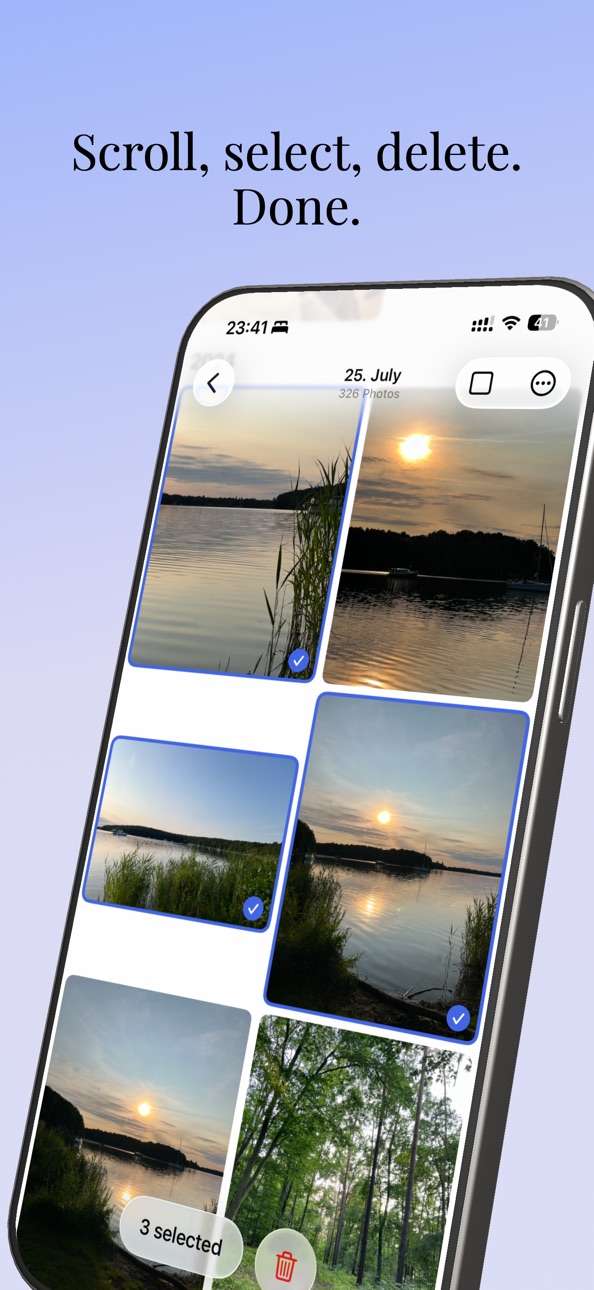
• Tap Random and Cully picks a date. You instantly see all photos from that day, across all years.
• Scroll through your grid. Tap to select, pinch to zoom for a closer look.
• iOS confirms every deletion. Photos go to Recently Deleted and can be restored for 30 days.
FEATURES
• Privacy first: No account, no cloud, no tracking. Your photos never leave your device.
• Smart random: Prefers days you haven't sorted yet.
• Share originals: Long-press any photo to share with full quality.
• Live Photos & videos: Play them right in the grid.
• Date picker: Pick a specific day — sorted days are marked.
• Your stats: See how many photos you've deleted and how much storage you've freed up.
• Gentle reminders: Optional notifications to help you stay on track.
• Lock screen widget: Your deletion stats at a glance.
• iCloud sync: Stats and settings across all your devices.
• iPhone and iPad: Optimized layouts for every screen size.
• Quick actions: Launch directly from your home screen.
• Pinch to zoom: Zoom into any photo for a better decision.
WHY CULLY?
In photography, "to cull" means going through your shots and keeping only the best. We built Cully because we had the same problem: a photo library that kept growing, with no good way to clean it up.
No account. No cloud. No AI. No analytics. No subscription. Just open it and get started.
Made in Berlin.
Accessibility
ipadiphonemacrealityDevicetvoswatch
Version history 7 versions
Build 884690057v1.52026-04-21 17:05:19
New: Share any photo straight from Cully. Long-press in the grid, tap Share, and the original image — with date, location and all metadata intact — goes to Messages, Mail, AirDrop or any other app. Works for photos, videos and Live Photos.
Improved: "Random day" now truly prefers unsorted days without locking you in. When your library is mostly sorted, Cully gently mixes in older days again — so you never get stuck bouncing between the same two dates.
Build 884133607v1.4.12026-04-07 08:50:44
New: Pick a day. A new calendar grid on the home screen lets you choose a specific date manually. Days you've already sorted are marked, so you can see your progress at a glance. Swipe or tap arrows to switch months.
New: The medium widget has been redesigned with a big total number and compact detail stats.
Fix: Video audio now stops reliably when closing the long-press preview. "Try another date" now returns to the calendar when started from there. Feb 29 is now correctly recognized. Random Day now covers all 366 days. Dark mode buttons are now properly visible. Missing translations added.
Also includes v1.3: Smart date selection that prefers days you haven't sorted yet, a "Today" stats counter, back confirmation, and redesigned settings and widgets.
Build 883994781v1.42026-04-03 06:19:43
New: Pick a day. A new calendar grid on the home screen lets you choose a specific date manually. Days you've already sorted are marked, so you can see your progress at a glance. Swipe or tap arrows to switch months.
New: The medium widget has been redesigned with a big total number and compact detail stats.
Fix: Video audio now stops reliably when closing the long-press preview. "Try another date" now returns to the calendar when started from there. Feb 29 is now correctly recognized. Random Day now covers all 366 days. Dark mode buttons are now properly visible. Missing translations added.
Also includes v1.3: Smart date selection that prefers days you haven't sorted yet, a "Today" stats counter, back confirmation, and redesigned settings and widgets.
Build 883902871v1.32026-03-30 13:08:29
New: Smart date picking. The app now tracks which days you've already sorted and prefers unsorted days when using Random Day. You can see when a date was last sorted before you start.
New: Back confirmation. A confirmation dialog prevents accidentally leaving your current session. Can be turned off in Settings.
Improved: Stats redesign. "Today" replaces "Last session" as a clear daily counter. Stats are saved immediately after each deletion.
Improved: Widget update. The small widget now shows today's or this week's deletions. "Time to cull?" when you haven't sorted in a while.
Improved: Settings reorganized into Photos & Behavior, Day Selection, and Statistics. Sorted days can be reset independently from deletion stats.
Fix: All 366 days are now available for Random Day, including Feb 29 and days 29-31.
Build 883709697v1.22026-03-25 14:58:29
Live Photo support. Tap and hold to play Live Photos in the preview. Live Photos, screenshots, and shared library photos now show badges in the grid.
Protect Favorites. New setting to prevent accidentally selecting favorited photos for deletion. Use "Select Anyway" in the long-press menu to override.
Favorite heart is now larger and more visible. Video badge moved to avoid overlapping with favorites. Stats for "This week" and "Last session" are now always shown, even when zero. Fixed a rare issue where photos could not be selected after pinch-to-zoom.
Build 883586890v1.12026-03-20 15:32:53
Video playback — Tap the play button to watch videos right in the grid. Pinch-to-zoom now works during video playback too.
iCloud photos that fail to load now show an error icon instead of loading forever. Translations completed and corrected for all languages. Rate button now reliably opens the App Store. Notification bug fixes.
Build 883146940v1.02026-03-18 08:01:42
Price history by region
Currency
Show
Columns
Search
Availability 1 of 1 storefronts
| Region | Language | Price | Ratings | Avg | Version |
|---|---|---|---|---|---|
| US | en-US | USD 3.99 | 32 | 5.0 | 1.5 |
Change log 11 changes · US
✎
releaseNotes updated
New: Share any photo straight from Cully. Long-press in the grid, tap Share, and the original image — with date, location and all metadata intact — goes to Mess
✎
description updated
Tidy up your photo library. Day by day.
Over 20,000 photos and no idea where to start? Duplicates, blurry shots, screenshots from 2019? Cully turns that into s
✎
subtitle updated
Day by day. All years.
✎
name updated
Cully - Photo Cleaner
◆
Version 1.5 released
New: Share any photo straight from Cully. Long-press in the grid, tap Share, and the original image — with date, location and all metadata intact — goes to Messages, Mail, AirDrop or any other app. Works for photos, videos and Live Photos.
◆
Version 1.4.1 released
New: Pick a day. A new calendar grid on the home screen lets you choose a specific date manually. Days you've already sorted are marked, so you can see your progress at a glance. Swipe or tap arrows to switch months.
New: The medium widget
◆
Version 1.4 released
New: Pick a day. A new calendar grid on the home screen lets you choose a specific date manually. Days you've already sorted are marked, so you can see your progress at a glance. Swipe or tap arrows to switch months.
New: The medium widget
◆
Version 1.3 released
New: Smart date picking. The app now tracks which days you've already sorted and prefers unsorted days when using Random Day. You can see when a date was last sorted before you start.
New: Back confirmation. A confirmation dialog prevents
◆
Version 1.2 released
Live Photo support. Tap and hold to play Live Photos in the preview. Live Photos, screenshots, and shared library photos now show badges in the grid.
Protect Favorites. New setting to prevent accidentally selecting favorited photos for del
◆
Version 1.1 released
Video playback — Tap the play button to watch videos right in the grid. Pinch-to-zoom now works during video playback too.
iCloud photos that fail to load now show an error icon instead of loading forever. Translations completed and correc
◆
Version 1.0 released