Home › Health & Fitness

 US
US
1 of 1 storefronts
Content in en-US
Content in en-US
Information
Preview 1 platform
iPhone 10 images



What’s New Version 1.4.1
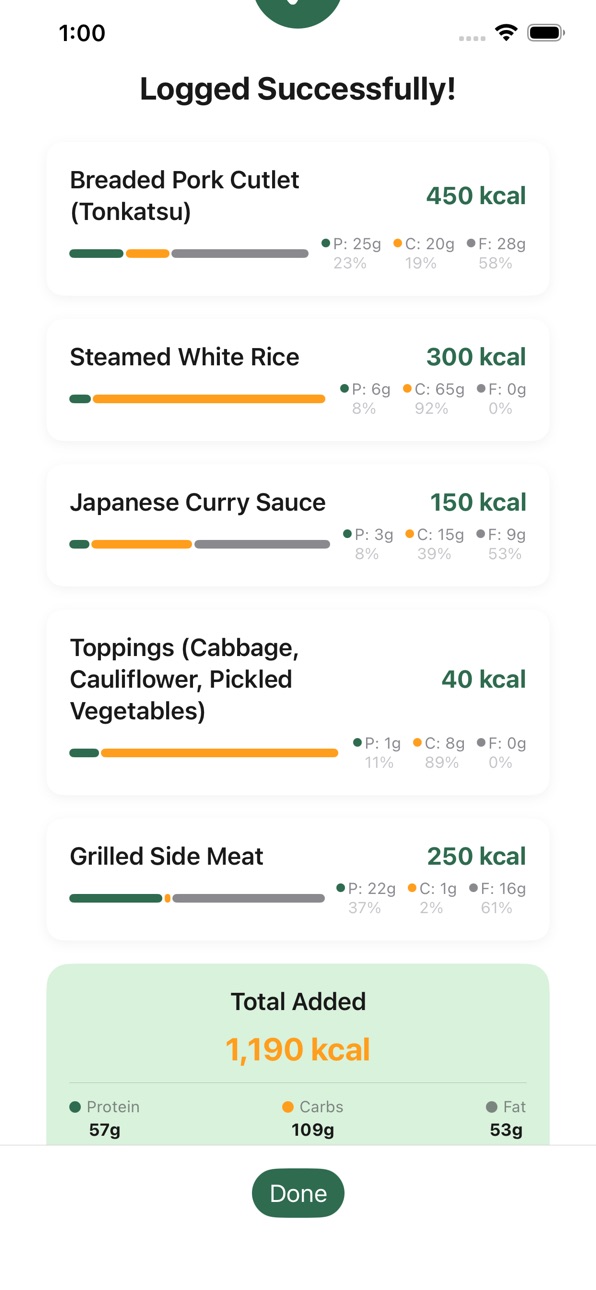
See your nutrition at a glance! After scanning food, the results screen now shows a full macro breakdown — protein, carbs, and fat with grams, percentages, and a visual proportional bar for each item and the meal total.
Also in this update:
Meal total summary — your combined nutrition is highlighted in a dedicated card so you can quickly see the overall picture
The Done button now stays visible at the bottom of the screen, even when you've logged many items
Food entries on the Dashboard and History now show a proportional bar visualizing your macro balance
Description
Track your daily calories effortlessly with AI-powered food recognition. Simply snap a photo of your meal — or choose one from your photo library — and Watch My Calories instantly identifies each food item, estimates portions, and calculates calories and macronutrients. You can also scan restaurant menus to see calorie estimates for every dish before you order.
KEY FEATURES
AI Food Analysis — Snap a photo of your meal or choose one from your photo library. Watch My Calories uses Google Gemini AI to identify foods and estimate calories, protein, carbs, and fat.
Menu Scanning — Take a photo of a restaurant menu to see AI calorie estimates for every item. Your approximate location helps identify the restaurant's cuisine for more accurate results. Scanned menus are saved automatically.
Smart Meal Tracking — Entries are automatically categorized as Breakfast, Lunch, Dinner, or Snack based on the time of day.
Daily Dashboard — See your calorie intake at a glance with a nutrition hero card showing calories consumed, remaining, and a protein/carbs/fat breakdown.
HealthKit Integration — Reads your active energy burned from Apple Health to dynamically adjust your effective calorie target.
Personalized Goals — Set your profile (height, weight, age, activity level) and the app calculates a recommended daily calorie target using the Mifflin-St Jeor formula.
Meal History — Browse all past entries organized by date and meal type, with daily nutrition summaries. View, edit, or delete individual items or entire meal groups.
Manual Entry — Prefer to log food yourself? Add entries manually with full control over name, calories, and macros.
Privacy First — All your food and health data stays on your device. No accounts, no sign-ups. Food and menu photos are sent to Google Gemini solely for analysis and are not stored. The app is supported by ads served via Google AdMob.
Watch My Calories is designed for anyone who wants a simple, private, and intelligent way to stay on top of their nutrition.
Accessibility
ipadiphonemacrealityDevicetvoswatch
Version history 5 versions
Build 884132251v1.4.12026-04-06 02:33:40
See your nutrition at a glance! After scanning food, the results screen now shows a full macro breakdown — protein, carbs, and fat with grams, percentages, and a visual proportional bar for each item and the meal total.
Also in this update:
Meal total summary — your combined nutrition is highlighted in a dedicated card so you can quickly see the overall picture
The Done button now stays visible at the bottom of the screen, even when you've logged many items
Food entries on the Dashboard and History now show a proportional bar visualizing your macro balance
Build 883900747v1.4.02026-03-30 00:22:14
Scan restaurant menus! Tap the new "Scan Menu" tab to photograph a menu and see AI calorie estimates for every dish. Your approximate location helps identify the restaurant for more accurate results. Scanned menus are saved automatically so you can revisit them anytime.
Also in this update:
Redesigned Log Food — tap the "Log Food" tab for a clean sheet with Scan Food, Choose from Library, and Log Manually options
New app menu — tap the (...) button to access Settings and About from any screen
About screen — view app version, rate on the App Store, and access support and legal links
Nutrition hero card — see protein, carbs, and fat breakdown with a proportional bar on your Dashboard
Daily nutrition in History — each day card now shows a macro summary when data is available
Stored Menus — browse, view, and delete your previously scanned menus
Banner ads in sheets — small ads appear in the Log Food and Scan Menu action sheets
Build 883638548v1.3.02026-03-23 18:09:29
Analyze food from your photo library! Tap the "+" button on your Dashboard and choose "Choose from Photo Library" to estimate calories from existing photos.
Also in this update:
Improved camera stability with portrait orientation lock
Better error messages when the service is busy
Automatic retry on network issues
Graceful handling when camera access is denied
Various stability and performance improvements
Build 883568139v1.2.12026-03-20 15:29:39
We've made behind-the-scenes improvements to keep the app running smoothly and ensure compliance with our ads platform.
Build 883142000v1.2.02026-03-19 14:31:59
No pricing data captured yet — comparisons appear once the app has paid storefronts or in-app purchases.
Availability 1 of 1 storefronts
| Region | Language | Price | Ratings | Avg | Version |
|---|---|---|---|---|---|
| US | en-US | Free | 1 | 5.0 | 1.4.1 |
Change log 9 changes · US
✎
releaseNotes updated
See your nutrition at a glance! After scanning food, the results screen now shows a full macro breakdown — protein, carbs, and fat with grams, percentages, and
✎
description updated
Track your daily calories effortlessly with AI-powered food recognition. Simply snap a photo of your meal — or choose one from your photo library — and Watch My
✎
subtitle updated
Snap, Track, Stay Fit with AI
✎
name updated
Watch My Calories
◆
Version 1.4.1 released
See your nutrition at a glance! After scanning food, the results screen now shows a full macro breakdown — protein, carbs, and fat with grams, percentages, and a visual proportional bar for each item and the meal total.
Also in this update
◆
Version 1.4.0 released
Scan restaurant menus! Tap the new "Scan Menu" tab to photograph a menu and see AI calorie estimates for every dish. Your approximate location helps identify the restaurant for more accurate results. Scanned menus are saved automatically so
◆
Version 1.3.0 released
Analyze food from your photo library! Tap the "+" button on your Dashboard and choose "Choose from Photo Library" to estimate calories from existing photos.
Also in this update:
Improved camera stability with portrait orientation lock
Bet
◆
Version 1.2.1 released
We've made behind-the-scenes improvements to keep the app running smoothly and ensure compliance with our ads platform.
◆
Version 1.2.0 released