Home › Business

 US
US
USen-US ARes-MX
 CDen-GB
 MXes-MX
 AGen-GB
 AIen-GB
 AOen-GB
 BBen-GB
 BFen-GB
 BJen-GB
 BOes-MX
 BRpt-BR
 BSen-GB
 BWen-GB
 BZen-GB
 CGen-GB
 CIfr-FR
 CLes-MX
 CMfr-FR
 COes-MX
 CRes-MX
 CVen-GB
 DMen-GB
 DOes-MX
 DZen-GB
 ECes-MX
 GAfr-FR
 GDen-GB
 GHen-GB
 GMen-GB
 GTes-MX
 GWen-GB
 GYen-GB
 HNes-MX
 JMen-GB
 KEen-GB
 KNen-GB
 KYen-GB
 LCen-GB
 LRen-GB
 LYen-GB
 MAen-GB
 MGen-GB
 MLen-GB
 MSen-GB
 MUen-GB
 MWen-GB
 MZen-GB
 NAen-GB
 NEen-GB
 NGen-GB
 NIes-MX
 PAes-MX
 PEes-MX
 PYes-MX
 RWen-GB
 SCen-GB
 SLen-GB
 SNen-GB
 SRen-GB
 STen-GB
 SVes-MX
 SZen-GB
 TCen-GB
 TDen-GB
 TNen-GB
 TTen-GB
 TZen-GB
 UGen-GB
 UYen-GB
 VCen-GB
 VEes-MX
 VGen-GB
 ZMen-GB
 ZWen-GB
75 of 75 storefronts
Content in en-US
Content in en-US
Information
Preview 1 platform
iPhone 9 images




What’s New Version 1.0.9
• Improved PDF scanning quality
• Bug fixes and experience improvements
Description
PDF Maker – Your All-in-One Professional Document Toolkit
Have you ever needed to turn a stack of paper into a professional PDF instantly, or combine multiple documents into one organized file on the go?
PDF Maker is the ultimate document management tool designed to handle every PDF task with precision and speed — all on your device, all in one place.
PDF Maker simplifies the way you create, edit, and organize documents. Whether you’re a student, a business professional, or an entrepreneur — PDF Maker is your perfect companion for a paperless lifestyle.
■ Main Features
• High-Quality Document Scanner
Turn your camera into a powerful scanner. Capture documents, receipts, or notes and instantly convert them into clean, professional PDF files with high clarity.
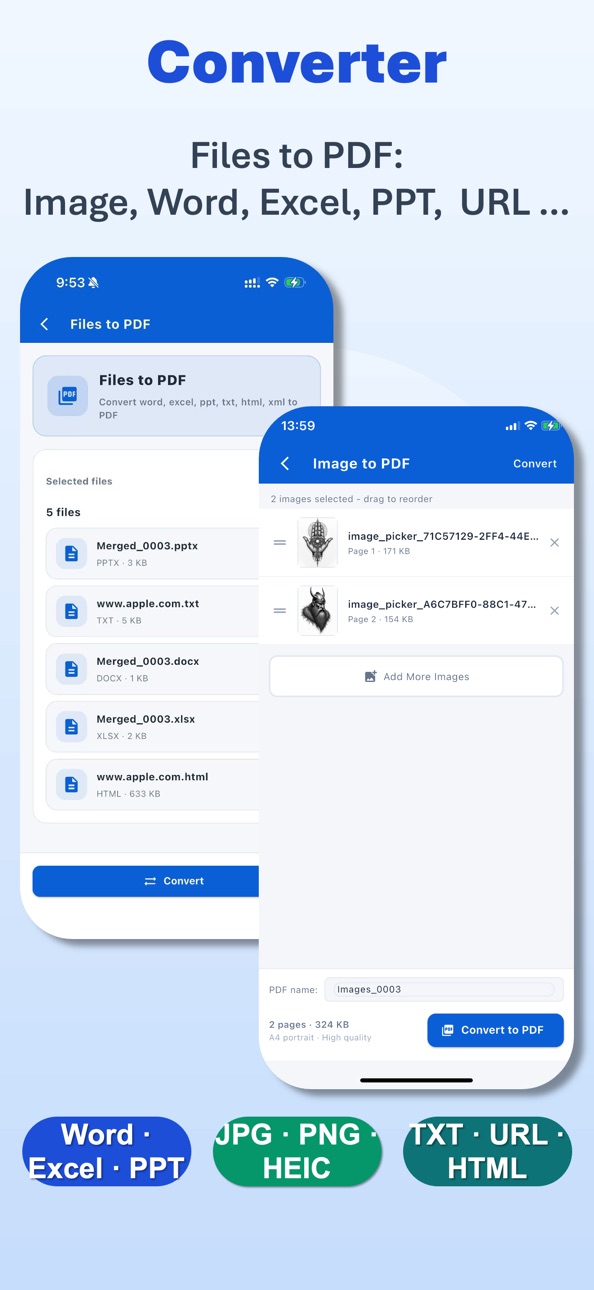
• Convert Files to PDF
Quickly convert images, photos, Office files (Word, Excel, PPT), HTML, TXT, and web pages into high-quality PDFs.
• Export PDF to Other Formats
Easily export PDFs to common formats such as Word, Excel, PPT, HTML, and TXT for editing and sharing.
• Merge & Organize
Combine multiple PDF files into a single document in any order you choose. Streamline your workflow by keeping all related information in one place.
• Precise PDF Splitter
Extract specific pages or sections from any PDF to create a new file. Flexibility at your fingertips for sharing only what’s necessary.
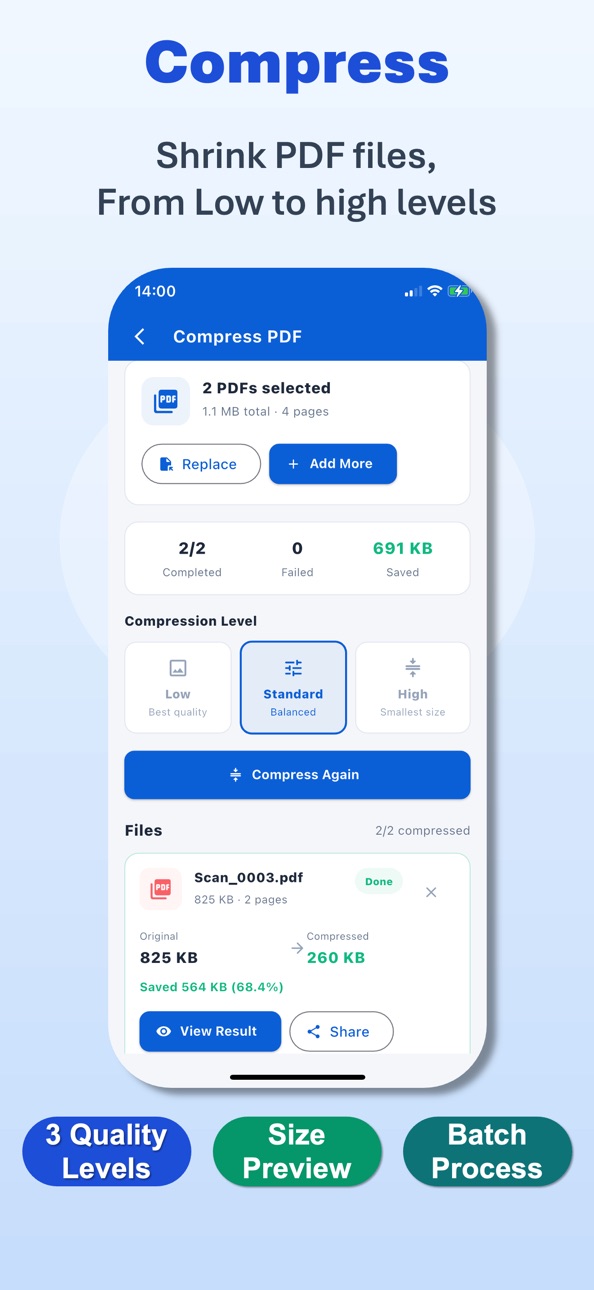
• Professional Compressor
Reduce file sizes without compromising readability. Choose from three optimization levels — Low, Standard, or High — to save storage and make sharing faster.
• Advanced Annotation Tools
Mark up your documents with ease. Use the pen tool, add text boxes, or use selection frames to highlight, comment, and collaborate on your PDF files.
■ Privacy First
Your security is our absolute priority.
PDF Maker operates with a strict local-only processing policy. We do not store, upload, or collect any of your documents or personal information on our servers. Your data stays where it belongs: on your device.
■ Why Choose PDF Maker?
• Powerful Processing Engine for high-quality document creation and conversion.
• Complete Toolkit for scanning, converting, merging, and editing in one app.
• Offline Efficiency — work anywhere, anytime without needing an internet connection.
• 100% Secure & Private — zero server-side data storage.
• Clean, Intuitive Interface designed for maximum productivity and ease of use.
■ Disclaimer
PDF Maker is an independent document management tool designed to help users process and organize their personal files.
It is not affiliated with or endorsed by any third-party document platforms.
The use of this application complies with “fair use” guidelines.
• Terms of Service: https://www.oxcellion.com/pdf-converter/assets/terms/user_agreement.html
• Privacy Policy: https://www.oxcellion.com/pdf-converter/assets/terms/privacy_policy.html
• Contact: service@oxcellion.com
PDF Maker — Scan, Convert, Edit, and Secure with Ease.
Download now and experience the next generation of smart document management!
Accessibility
ipadiphonemacrealityDevicetvoswatch
Version history 7 versions
Build 888002090v1.0.92026-07-08 22:50:59
• Improved PDF scanning quality
• Bug fixes and experience improvements
Build 886666712v1.0.82026-06-10 01:12:39
• Improved PDF scanning quality
• Bug fixes and experience improvements
Build 884499692v1.0.62026-04-14 19:13:58
• Improved PDF scanning quality
• Bug fixes and experience improvements
Build 884174617v1.0.32026-04-08 12:42:56
• Improved PDF scanning quality
• Bug fixes and experience improvements
Build 883907273v1.0.22026-04-03 18:14:08
• Enhanced dynamic PDF scanning and optimized image filter effects
• Bug fixes and multiple user experience improvements
Build 883420548v1.0.12026-03-23 21:23:13
• Added support for converting Office files, TXT, HTML, URL, and other file formats to PDF, as well as converting PDFs to various image formats, Office files, TXT, HTML, and more.
• Fixed several bugs and improved the overall app experience.
Build 883099970v1.02026-03-13 12:15:44
No pricing data captured yet — comparisons appear once the app has paid storefronts or in-app purchases.
Availability 75 of 75 storefronts
| Region | Language | Price | Ratings | Avg | Version |
|---|---|---|---|---|---|
| US | en-US | Free | 4 | 4.0 | 1.0.9 |
| AR | es-MX | Free | 3 | 5.0 | 1.0.9 |
| CD | en-GB | Free | 1 | 5.0 | 1.0.9 |
| MX | es-MX | Free | 1 | 5.0 | 1.0.9 |
| AG | en-GB | Free | 0 | — | 1.0.9 |
| AI | en-GB | Free | 0 | — | 1.0.9 |
| AO | en-GB | Free | 0 | — | 1.0.9 |
| BB | en-GB | Free | 0 | — | 1.0.9 |
| BF | en-GB | Free | 0 | — | 1.0.9 |
| BJ | en-GB | Free | 0 | — | 1.0.9 |
| BO | es-MX | Free | 0 | — | 1.0.9 |
| BR | pt-BR | Free | 0 | — | 1.0.9 |
| BS | en-GB | Free | 0 | — | 1.0.9 |
| BW | en-GB | Free | 0 | — | 1.0.9 |
| BZ | en-GB | Free | 0 | — | 1.0.9 |
| CG | en-GB | Free | 0 | — | 1.0.9 |
| CI | fr-FR | Free | 0 | — | 1.0.9 |
| CL | es-MX | Free | 0 | — | 1.0.9 |
| CM | fr-FR | Free | 0 | — | 1.0.9 |
| CO | es-MX | Free | 0 | — | 1.0.9 |
| CR | es-MX | Free | 0 | — | 1.0.9 |
| CV | en-GB | Free | 0 | — | 1.0.9 |
| DM | en-GB | Free | 0 | — | 1.0.9 |
| DO | es-MX | Free | 0 | — | 1.0.9 |
| DZ | en-GB | Free | 0 | — | 1.0.9 |
| EC | es-MX | Free | 0 | — | 1.0.9 |
| GA | fr-FR | Free | 0 | — | 1.0.9 |
| GD | en-GB | Free | 0 | — | 1.0.9 |
| GH | en-GB | Free | 0 | — | 1.0.9 |
| GM | en-GB | Free | 0 | — | 1.0.9 |
| GT | es-MX | Free | 0 | — | 1.0.9 |
| GW | en-GB | Free | 0 | — | 1.0.9 |
| GY | en-GB | Free | 0 | — | 1.0.9 |
| HN | es-MX | Free | 0 | — | 1.0.9 |
| JM | en-GB | Free | 0 | — | 1.0.9 |
| KE | en-GB | Free | 0 | — | 1.0.9 |
| KN | en-GB | Free | 0 | — | 1.0.9 |
| KY | en-GB | Free | 0 | — | 1.0.9 |
| LC | en-GB | Free | 0 | — | 1.0.9 |
| LR | en-GB | Free | 0 | — | 1.0.9 |
| LY | en-GB | Free | 0 | — | 1.0.9 |
| MA | en-GB | Free | 0 | — | 1.0.9 |
| MG | en-GB | Free | 0 | — | 1.0.9 |
| ML | en-GB | Free | 0 | — | 1.0.9 |
| MS | en-GB | Free | 0 | — | 1.0.9 |
| MU | en-GB | Free | 0 | — | 1.0.9 |
| MW | en-GB | Free | 0 | — | 1.0.9 |
| MZ | en-GB | Free | 0 | — | 1.0.9 |
| NA | en-GB | Free | 0 | — | 1.0.9 |
| NE | en-GB | Free | 0 | — | 1.0.9 |
| NG | en-GB | Free | 0 | — | 1.0.9 |
| NI | es-MX | Free | 0 | — | 1.0.9 |
| PA | es-MX | Free | 0 | — | 1.0.9 |
| PE | es-MX | Free | 0 | — | 1.0.9 |
| PY | es-MX | Free | 0 | — | 1.0.9 |
| RW | en-GB | Free | 0 | — | 1.0.9 |
| SC | en-GB | Free | 0 | — | 1.0.9 |
| SL | en-GB | Free | 0 | — | 1.0.9 |
| SN | en-GB | Free | 0 | — | 1.0.9 |
| SR | en-GB | Free | 0 | — | 1.0.9 |
| ST | en-GB | Free | 0 | — | 1.0.9 |
| SV | es-MX | Free | 0 | — | 1.0.9 |
| SZ | en-GB | Free | 0 | — | 1.0.9 |
| TC | en-GB | Free | 0 | — | 1.0.9 |
| TD | en-GB | Free | 0 | — | 1.0.9 |
| TN | en-GB | Free | 0 | — | 1.0.9 |
| TT | en-GB | Free | 0 | — | 1.0.9 |
| TZ | en-GB | Free | 0 | — | 1.0.9 |
| UG | en-GB | Free | 0 | — | 1.0.9 |
| UY | en-GB | Free | 0 | — | 1.0.9 |
| VC | en-GB | Free | 0 | — | 1.0.9 |
| VE | es-MX | Free | 0 | — | 1.0.9 |
| VG | en-GB | Free | 0 | — | 1.0.9 |
| ZM | en-GB | Free | 0 | — | 1.0.9 |
| ZW | en-GB | Free | 0 | — | 1.0.9 |
Change log 11 changes · US
✎
releaseNotes updated
• Improved PDF scanning quality
• Bug fixes and experience improvements
✎
description updated
PDF Maker – Your All-in-One Professional Document Toolkit
Have you ever needed to turn a stack of paper into a professional PDF instantly, or combine multiple d
✎
subtitle updated
Scan,Convert,Merge & Compress
✎
name updated
PDF Maker - Document Scanner
◆
Version 1.0.9 released
• Improved PDF scanning quality
• Bug fixes and experience improvements
◆
Version 1.0.8 released
• Improved PDF scanning quality
• Bug fixes and experience improvements
◆
Version 1.0.6 released
• Improved PDF scanning quality
• Bug fixes and experience improvements
◆
Version 1.0.3 released
• Improved PDF scanning quality
• Bug fixes and experience improvements
◆
Version 1.0.2 released
• Enhanced dynamic PDF scanning and optimized image filter effects
• Bug fixes and multiple user experience improvements
◆
Version 1.0.1 released
• Added support for converting Office files, TXT, HTML, URL, and other file formats to PDF, as well as converting PDFs to various image formats, Office files, TXT, HTML, and more.
• Fixed several bugs and improved the overall app experience
◆
Version 1.0 released