Home › Health & Fitness

 US
US
1 of 1 storefronts
Content in en-US
Content in en-US
Information
Apple ID6760041999
Bundle IDapp.eatlab
SellerSeller
Min iOS15.1
Min macOS12.0
Device familiesiphone, ipad, ipod
Released2026-03-07
Copyright© 2026 Eatlab
Privacy policyLink ↗
Preview 2 platforms
iPhone 6 images




iPad 4 images


What’s New Version v1.13.0
• Type what you ate to get an itemized calorie and macro estimate.
• Redesigned scan screen with a quicker camera and pinch-to-zoom.
• Stability and reliability fixes.
Description
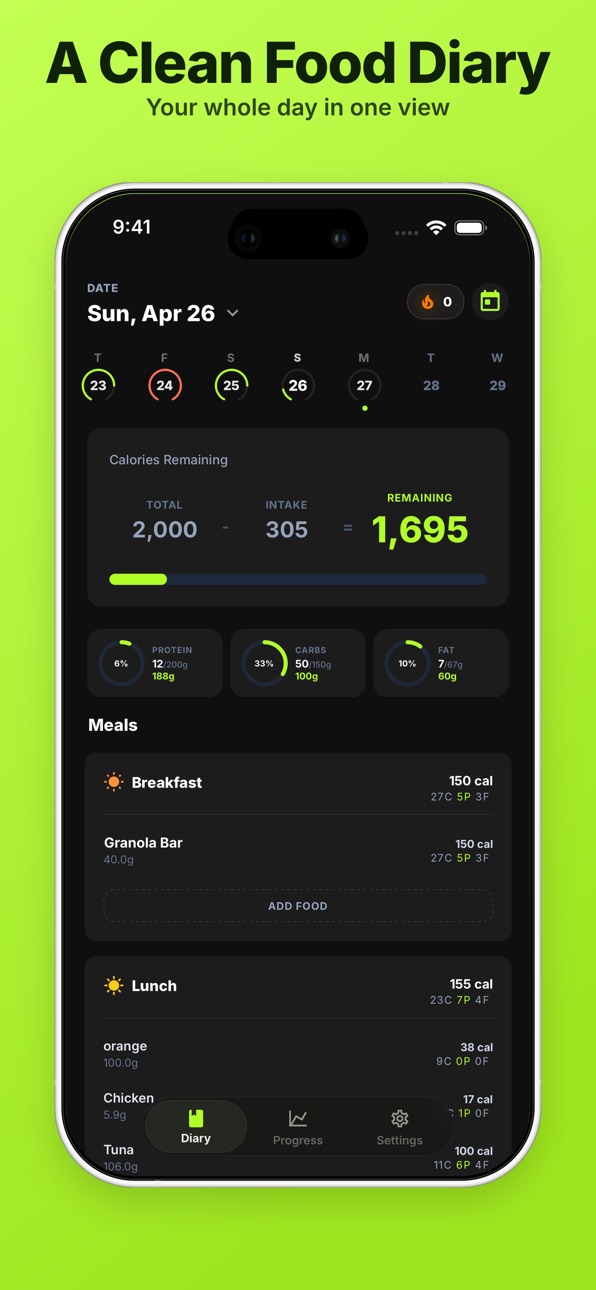
Eatlab is a calorie tracker and macro tracker built for fast, consistent food logging. Use it as your daily food diary to track calories, protein, carbs, and fat without the clutter.
Why people use Eatlab:
- Log meals quickly in a clean daily diary
- Track calories, protein, carbs, and fat by meal
- Add entries to breakfast, lunch, dinner, and snacks
- Snap a photo of your meal to estimate calories and macros for each item
- Scan a nutrition label to fill in the food automatically
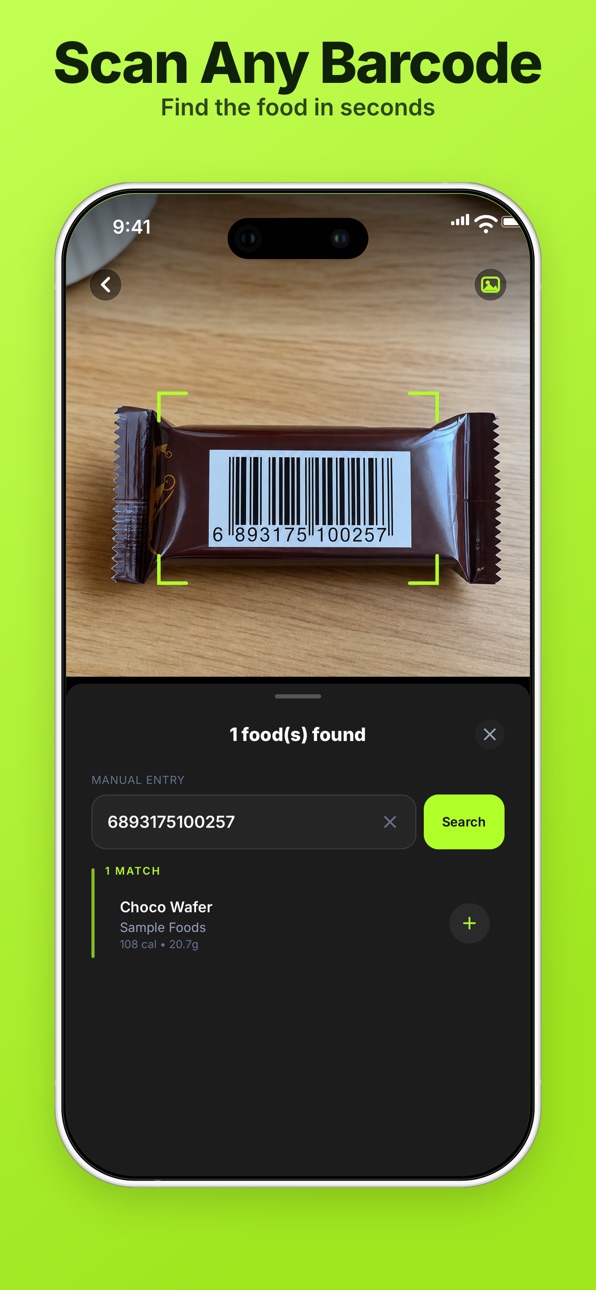
- Scan barcodes for instant lookup, or enter them manually
- Use Quick Add for fast custom calorie and macro entries
- Save favorites and re-log foods from history
- Create custom foods with serving sizes and nutrition facts
- Build recipes from ingredients and log by servings
- Create reusable meal templates for repeat days
- Set calorie and macro goals, including weekday-specific targets
- Review trends in daily, weekly, and monthly progress views
- Get a daily reminder so you never miss logging a meal
- Sign in quickly with Apple, Google, or email
- Available in English and Arabic, with full right-to-left support
Eatlab helps you stay consistent whether your goal is fat loss, maintenance, or muscle gain. It gives you a clear view of what you eat and how it compares to your goals.
Eatlab Pro is available as an auto-renewable subscription (weekly or yearly). Payment is charged to your Apple ID account at confirmation of purchase. The subscription renews automatically unless cancelled at least 24 hours before the end of the current period. Manage or cancel your subscription anytime in your App Store account settings.
Privacy Policy: https://eatlab.app/privacy
Terms of Use (EULA): https://eatlab.app/terms
Eatlab is for informational purposes only and does not provide medical advice.
Capabilities
In-App Purchases
Accessibility
ipadiphonemacrealityDevicetvoswatch
Version history 17 versions
Build 888164817vv1.13.02026-07-12 05:04:23
• Type what you ate to get an itemized calorie and macro estimate.
• Redesigned scan screen with a quicker camera and pinch-to-zoom.
• Stability and reliability fixes.
Build 887749002vv1.12.02026-07-05 03:32:37
• Refreshed the bottom navigation with a quick, expandable menu.
• Save meal photo estimates to review whenever you're ready.
• Stability and reliability fixes.
Build 887423439vv1.10.02026-06-30 22:05:33
• Add a note to your meal photo to fine-tune its calorie and macro estimate.
• Daily reminders so you never forget to log a meal.
• Sign in with Apple or Google, plus stability and reliability fixes.
Build 887198837vv1.9.02026-06-20 00:56:44
• Log a meal from a single photo: snap your plate to get calories and macros for each item, then review and save in a tap.
• Faster, more dependable label scanning that runs in the background and recovers on its own.
• A smoother welcome experience and stability and reliability fixes.
Build 886907982vv1.8.02026-06-13 15:53:32
• A fully redesigned welcome journey: a few quick questions, then a plan tailored to you.
• Keep your current setup or start fresh when you sign back in.
• Stability and reliability fixes.
Build 886648921vv1.7.22026-06-11 16:07:21
• Manage your subscription and view your current plan.
• Stability and reliability fixes.
Build 886444371vv1.7.02026-06-07 19:15:09
• Upgrade to Pro — unlimited nutrition label scans.
• Restore your purchases on any device.
Build 885500683vv1.6.02026-05-12 07:54:15
• Performance and reliability improvements throughout the app.
Build 885219753vv1.5.02026-05-04 14:46:15
• Refreshed bottom navigation.
• Recipes and meal templates stay intact when their ingredients change.
• Stability and reliability fixes.
Build 885118058vv1.4.12026-04-30 20:12:53
• Log a whole container in one tap — multi-serving packs now offer a "container" unit option.
• Scanning fixes: torch turns off after every capture, and the barcode result closes cleanly when you open a food.
• Back button now sits on the correct side in Arabic.
Build 884951218vv1.4.02026-04-29 19:55:48
• Scan a nutrition label — calories, macros, and serving size fill in automatically.
• Redesigned barcode scanner — bigger camera view and clearer results.
• Smoother scanning all around — better Arabic layouts, friendlier errors, and many small fixes.
Build 884662588vv1.3.52026-04-19 19:13:24
• Full calendar popup from the Diary date
• Smarter barcode scanning
• Polished Arabic experience
• Stability and performance improvements
Build 883705833v1.3.32026-03-24 22:14:00
Fixed an issue that could cause food serving units to reset to the default value during logging.
Build 883581188v1.3.22026-03-20 20:01:13
- Arabic language support
- Easier weight tracking updates
- Smoother diary experience
- Improvements to food logging
Build 883379014v1.2.02026-03-14 21:43:50
Added weight tracking with a new Progress chart, optional body profile settings, and richer streak insights across Diary and Progress. This update also redesigns the Progress and Food Detail experiences and improves day navigation.
Build 883138374v1.1.02026-03-12 02:22:57
- redesign navigation bar
- new charts for progress screen
- fix layout shift on RTL languages
- customize the start of the week
Build 883031680v1.02026-03-07 20:27:43
No pricing data captured yet — comparisons appear once the app has paid storefronts or in-app purchases.
Availability 1 of 1 storefronts
| Region | Language | Price | Ratings | Avg | Version |
|---|---|---|---|---|---|
| US | en-US | Free | 2 | 3.0 | v1.13.0 |
Change log 21 changes · US
✎
releaseNotes updated
• Type what you ate to get an itemized calorie and macro estimate.
• Redesigned scan screen with a quicker camera and pinch-to-zoom.
• Stability and reliability
✎
description updated
Eatlab is a calorie tracker and macro tracker built for fast, consistent food logging. Use it as your daily food diary to track calories, protein, carbs, and fa
✎
subtitle updated
Meal Photo & Label Scanner
✎
name updated
Calorie & Macro Log - Eatlab
◆
Version v1.13.0 released
• Type what you ate to get an itemized calorie and macro estimate.
• Redesigned scan screen with a quicker camera and pinch-to-zoom.
• Stability and reliability fixes.
◆
Version v1.12.0 released
• Refreshed the bottom navigation with a quick, expandable menu.
• Save meal photo estimates to review whenever you're ready.
• Stability and reliability fixes.
◆
Version v1.10.0 released
• Add a note to your meal photo to fine-tune its calorie and macro estimate.
• Daily reminders so you never forget to log a meal.
• Sign in with Apple or Google, plus stability and reliability fixes.
◆
Version v1.9.0 released
• Log a meal from a single photo: snap your plate to get calories and macros for each item, then review and save in a tap.
• Faster, more dependable label scanning that runs in the background and recovers on its own.
• A smoother welcome ex
◆
Version v1.8.0 released
• A fully redesigned welcome journey: a few quick questions, then a plan tailored to you.
• Keep your current setup or start fresh when you sign back in.
• Stability and reliability fixes.
◆
Version v1.7.2 released
• Manage your subscription and view your current plan.
• Stability and reliability fixes.
◆
Version v1.7.0 released
• Upgrade to Pro — unlimited nutrition label scans.
• Restore your purchases on any device.
◆
Version v1.6.0 released
• Performance and reliability improvements throughout the app.
◆
Version v1.5.0 released
• Refreshed bottom navigation.
• Recipes and meal templates stay intact when their ingredients change.
• Stability and reliability fixes.
◆
Version v1.4.1 released
• Log a whole container in one tap — multi-serving packs now offer a "container" unit option.
• Scanning fixes: torch turns off after every capture, and the barcode result closes cleanly when you open a food.
• Back button now sits on the c
◆
Version v1.4.0 released
• Scan a nutrition label — calories, macros, and serving size fill in automatically.
• Redesigned barcode scanner — bigger camera view and clearer results.
• Smoother scanning all around — better Arabic layouts, friendlier errors, and many
◆
Version v1.3.5 released
• Full calendar popup from the Diary date
• Smarter barcode scanning
• Polished Arabic experience
• Stability and performance improvements
◆
Version 1.3.3 released
Fixed an issue that could cause food serving units to reset to the default value during logging.
◆
Version 1.3.2 released
- Arabic language support
- Easier weight tracking updates
- Smoother diary experience
- Improvements to food logging
◆
Version 1.2.0 released
Added weight tracking with a new Progress chart, optional body profile settings, and richer streak insights across Diary and Progress. This update also redesigns the Progress and Food Detail experiences and improves day navigation.
◆
Version 1.1.0 released
- redesign navigation bar
- new charts for progress screen
- fix layout shift on RTL languages
- customize the start of the week
◆
Version 1.0 released