Home › Productivity

 US
US
1 of 1 storefronts
Content in en-US
Content in en-US
Information
Preview 3 platforms
iPhone 6 images


iPad 5 images


Mac 5 images




What’s New Version 1.3.0
What's new in v1.3.0:
- Import existing photos and PDFs — not just camera scans. They get the same OCR and AI categorization as a scan.
- Share to DocScan AI from Photos, Files, Safari and other apps
- New home-screen widget for instant Scan, Import, and Search
- Siri & Shortcuts support — scan, import, or search by voice or automation
- Accessibility improvements
- AI features still require iOS 26 with Apple Intelligence; everything else works on iOS 17 and later
Description
DocScan AI is the intelligent document scanner that keeps your data completely private. All AI processing happens on your device — no cloud, no servers, no compromises.
SCAN SMART
• Automatic edge detection and perspective correction
• Multi-page document capture in a single session
• Batch scanning — scan multiple documents back-to-back (Pro)
• Five image filters: Original, Enhanced, Grayscale, B&W, High Contrast
AI-POWERED ORGANIZATION
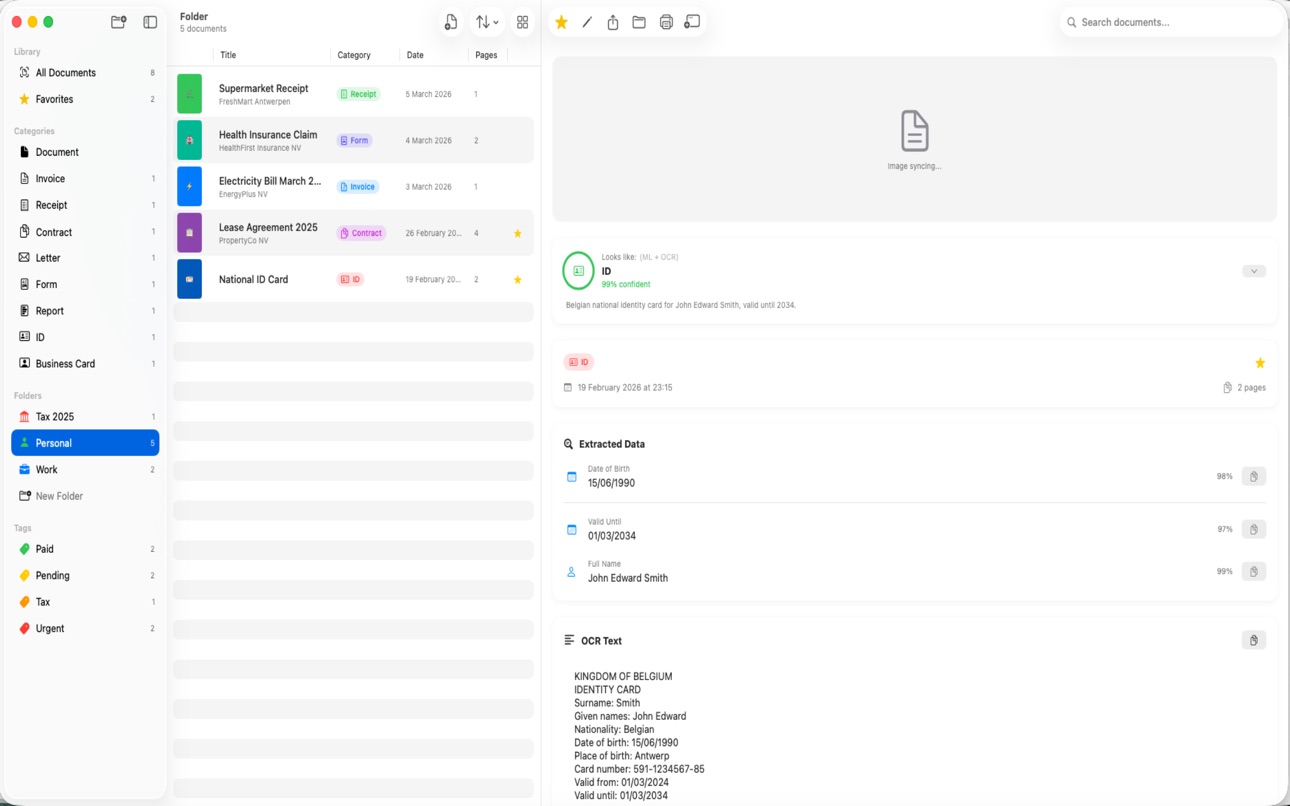
• Automatic document classification into 9 categories: Invoice, Receipt, Contract, Letter, Form, Report, ID, Business Card, and Document
• AI-suggested titles, summaries, and key insights (Pro)
• Smart field extraction: dates, amounts, VAT numbers, IBANs, company names, phone numbers, emails, and more (Pro)
• Confidence scores so you always know how accurate the AI is
• AI classification and field extraction require iOS 26 and an Apple Intelligence-compatible iPhone — all other features work on iOS 17 and later
POWERFUL OCR
• Full-text recognition powered by Apple Vision — works offline
• Automatic language detection
• Searchable PDF export with invisible text layer
• Find any word across all your documents instantly
ORGANIZE YOUR WAY
• Custom folders with icons and colors
• Tags with color coding — assign multiple per document
• Favorites for quick access
• Category-based browsing
• Full-text search across titles, OCR text, and extracted fields
EXPORT & SHARE
• PDF (OCR-searchable), JPEG, PNG, or plain text
• System share sheet: AirDrop, Mail, Messages, and more
• Bulk export — combine or export individually
CLOUD BACKUP (Pro)
• Back up to Dropbox, Google Drive, and OneDrive
• Auto-upload new scans to your own cloud accounts
• Organized folder structure by category
• Retry logic and sync status per document
SYNC ACROSS DEVICES
• iCloud sync between iPhone and Mac (optional)
• Companion macOS app for desktop document management
• Edit on Mac, see changes on iPhone — and vice versa
PRIVACY FIRST
• 100% on-device AI — documents never leave your phone
• No analytics, no tracking, no third-party data collection
• Camera used only for scanning — nothing else
• Cloud backup is opt-in to YOUR accounts only
• No account required to use the app
FREE TIER
• 5 scans per month with full OCR
• Folders, favorites, search, and export included
PRO (Lifetime Purchase)
• Unlimited scanning
• AI classification, summaries, and field extraction
• Cloud backup and auto-upload
• Batch scanning
• One purchase, yours forever — no subscription
DocScan AI is built with SwiftUI and Apple's latest frameworks. It requires no internet connection to scan, classify, and organize your documents.
In-App Purchases US pricing
One-Time Purchases
DocScan AI Pro (Lifetime)$2.99
Capabilities
In-App Purchases
Accessibility
ipadiphonemacrealityDevicetvoswatch
Version history 4 versions
Build 887008202v1.3.02026-06-17 04:56:58
What's new in v1.3.0:
- Import existing photos and PDFs — not just camera scans. They get the same OCR and AI categorization as a scan.
- Share to DocScan AI from Photos, Files, Safari and other apps
- New home-screen widget for instant Scan, Import, and Search
- Siri & Shortcuts support — scan, import, or search by voice or automation
- Accessibility improvements
- AI features still require iOS 26 with Apple Intelligence; everything else works on iOS 17 and later
Build 886851380v1.2.02026-06-12 04:51:52
What's new in v1.2.0:
- DocScan AI now runs on iOS 17 and later — previously iOS 26 was required
- AI classification and field extraction stay exclusive to iOS 26 with Apple Intelligence; the app now clearly shows when these features aren't available on your device
- Much faster search in large document libraries
- Lower memory usage when exporting many documents to PDF
- Free scans are only counted once a scan is safely saved
- Clearer cloud backup error messages
Build 883278161v1.0.12026-03-12 06:01:45
What's new in v1.0.1:
- Faster sequential scanning — documents save instantly, AI classification runs in the background
- Unfinished classifications are automatically picked up on next launch
- Cross-platform banner — easily find DocScan AI on your other Apple devices
- Bug fixes and performance improvements
Build 883009991v1.0.02026-03-11 12:59:05
Price history by region
Currency
Show
Columns
Search
Availability 1 of 1 storefronts
| Region | Language | Price | Ratings | Avg | Version |
|---|---|---|---|---|---|
| US | en-US | Free | 0 | — | 1.3.0 |
Change log 8 changes · US
✎
releaseNotes updated
What's new in v1.3.0:
- Import existing photos and PDFs — not just camera scans. They get the same OCR and AI categorization as a scan.
- Share to DocScan AI f
✎
description updated
DocScan AI is the intelligent document scanner that keeps your data completely private. All AI processing happens on your device — no cloud, no servers, no comp
✎
subtitle updated
Manage Scans from Your Mac
✎
name updated
DocScan AI
◆
Version 1.3.0 released
What's new in v1.3.0:
- Import existing photos and PDFs — not just camera scans. They get the same OCR and AI categorization as a scan.
- Share to DocScan AI from Photos, Files, Safari and other apps
- New home-screen widget for instant Sc
◆
Version 1.2.0 released
What's new in v1.2.0:
- DocScan AI now runs on iOS 17 and later — previously iOS 26 was required
- AI classification and field extraction stay exclusive to iOS 26 with Apple Intelligence; the app now clearly shows when these features aren'
◆
Version 1.0.1 released
What's new in v1.0.1:
- Faster sequential scanning — documents save instantly, AI classification runs in the background
- Unfinished classifications are automatically picked up on next launch
- Cross-platform banner — easily find DocScan A
◆
Version 1.0.0 released