Home › Finance

 US
US
 HKzh-Hant-HK
 JPja
JPja AEen-GB
 AFen-GB
 ALen-GB
 AMen-GB
 ATde-DE
 AUen-AU
 AZen-GB
 BAen-GB
 BEen-GB
 BGen-GB
 BHen-GB
 BMen-GB
 BNen-GB
 BTen-GB
 BYen-GB
 CAen-CA
 CHde-CH
 CNzh-Hans-CN
 CYen-GB
 CZen-GB
 DEde-DE
 DKen-GB
 EEen-GB
 EGen-GB
 ESes-ES
 FIen-GB
 FJen-GB
 FMen-GB
 FRfr-FR
 GBen-GB
 GEen-GB
 GRen-GB
 HRen-GB
 HUen-GB
 IDen-GB
 IEen-GB
 ILen-GB
 INen-GB
 IQen-GB
 ISen-GB
 ITit
ITit JOen-GB
 KGen-GB
 KHen-GB
 KRko
KRko KWen-GB
 KZen-GB
 LAen-GB
 LBen-GB
 LKen-GB
 LTen-GB
 LUen-GB
 LVen-GB
 MDen-GB
 MEen-GB
 MKen-GB
 MMen-GB
 MNen-GB
 MOzh-Hant-HK
 MRen-GB
 MTen-GB
 MVen-GB
 MYen-GB
 NLnl
NLnl NOen-GB
 NPen-GB
 NZen-AU
 OMen-GB
 PGen-GB
 PHen-GB
 PKen-GB
 PLen-GB
 PTpt-PT
 QAen-GB
 ROen-GB
 RSen-GB
 RUru
RUru SAen-GB
 SBen-GB
 SEsv
SEsv SGen-GB
 SIen-GB
 SKen-GB
 THen-GB
 TJen-GB
 TMen-GB
 TOen-GB
 TRen-GB
 TWzh-Hant-TW
 UAen-GBUSen-US
 UZen-GB
 VNen-GB
 VUen-GB
 XKen-GB
 YEen-GB
98 of 98 storefronts
Content in en-US
Content in en-US
Information
Preview 2 platforms
iPhone 5 images
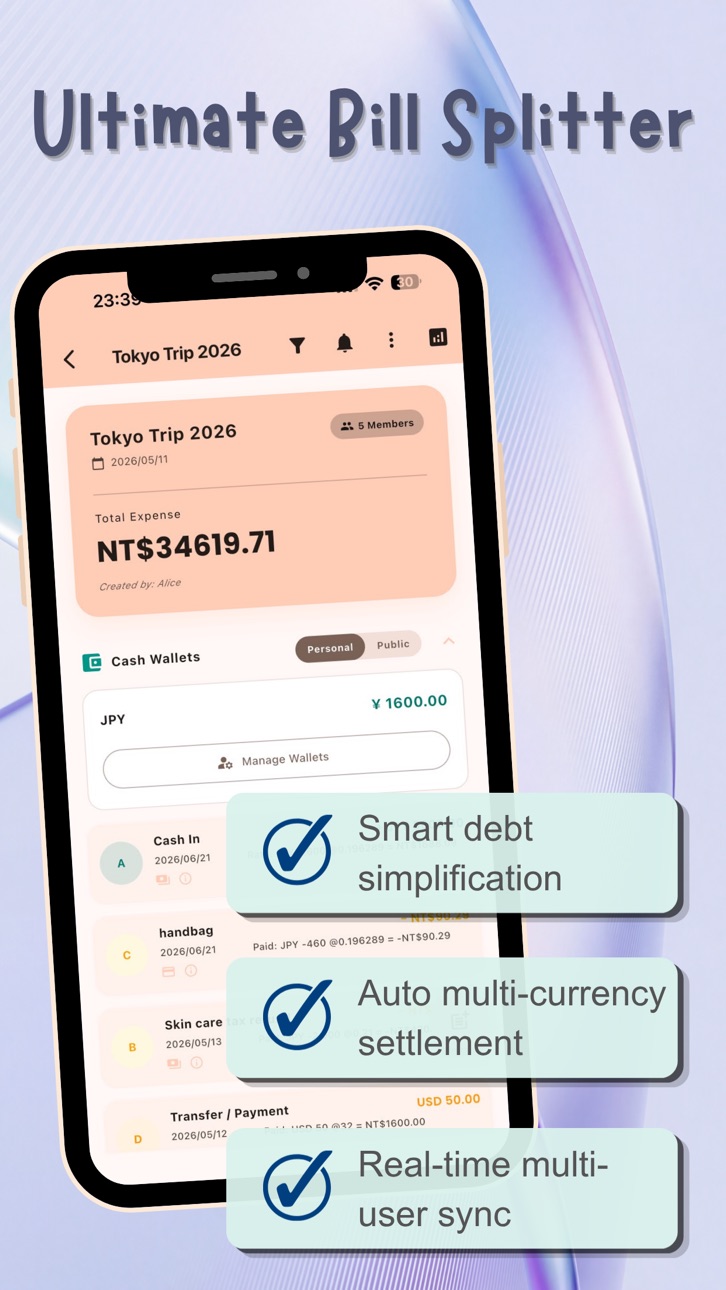


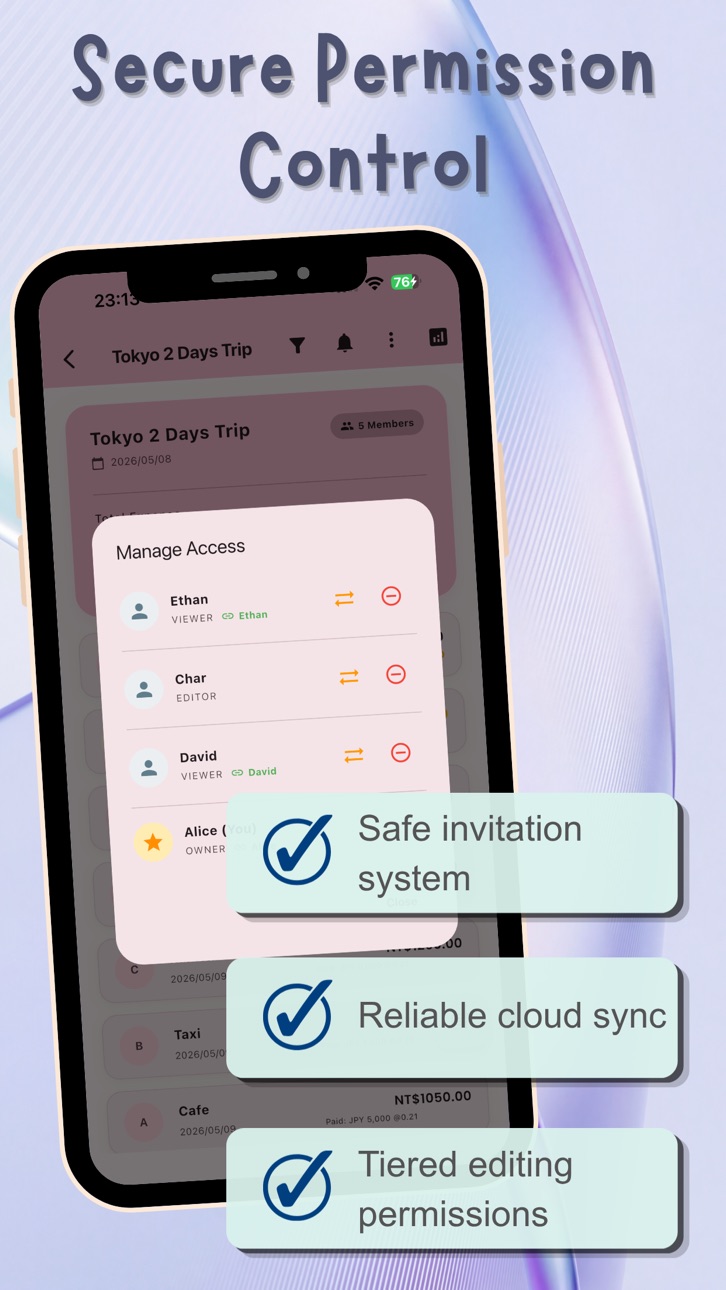

iPad 5 images


What’s New Version 3.1.0
UniSplit 3.1.0 Update Notes
This update significantly boosts expense tracking speed and enhances travel features!
[Faster Tracking]
● Smart Memory: Auto-saves your last split members and methods for seamless back-to-back tracking.
● Auto-Drafts: Expenses save automatically in the background. Never lose your data again.
● Recent Words: One-tap input for previously used item names.
● Minimalist UI: Unused advanced fields are now folded for a cleaner look.
[Better for Travel]
● Foreign Cash: Track your foreign cash wallet balance easily.
● Live Exchange Rates: Fetches the latest rates automatically for accurate conversions.
● Payment Stats: New charts show your card vs. cash spending ratio at a glance.
[Upgraded Experience]
● Enhanced Home: The dashboard now shows richer details without needing extra taps.
Description
UniSplit: Your All-in-One Bill Splitter
Tired of messy accounts after a trip? Or arguing with roommates over shared utilities? UniSplit was created to solve all your shared expense problems.
[Why Choose UniSplit?]
● All-Scenario Support: From couples' daily lives to large groups of 20+, handle any situation with ease.
● Financial-Grade Precision: We know every cent matters. Advanced logic ensures total balances always match—say goodbye to 0.01 discrepancies.
● Full Rate Control: Manually enter exact exchange rates to match your bank statements perfectly, avoiding auto-rate errors.
● Custom Currency System: Beyond standard currencies, use platform points, virtual tokens, or private credits for ultimate flexibility.
[Core Highlights]
● Professional Output: Export PDF reports with statistical charts for formal record-keeping.
● AI Efficiency: Snap a photo of your receipt to record items instantly—no more manual entry.
● Flexible Splitting: Split by percentage, weight, or specific amounts for complex shared costs.
● Cloud Backup: Data and receipt photos are securely stored in the cloud for real-time group management.
Stop letting math ruin your mood. Download UniSplit today—Simple, Elegant, and Professional.
In-App Purchases US pricing
UniSplit PRO Subscription
Yearly · Yearly 7-day free trial$24.99
6 Months · 6 months$14.99
Monthly · Monthly$3.99
Capabilities
In-App Purchases
Accessibility
ipadiphonemacrealityDevicetvoswatch
Version history 6 versions
Build 887254496v3.1.02026-06-22 00:52:37
UniSplit 3.1.0 Update Notes
This update significantly boosts expense tracking speed and enhances travel features!
[Faster Tracking]
● Smart Memory: Auto-saves your last split members and methods for seamless back-to-back tracking.
● Auto-Drafts: Expenses save automatically in the background. Never lose your data again.
● Recent Words: One-tap input for previously used item names.
● Minimalist UI: Unused advanced fields are now folded for a cleaner look.
[Better for Travel]
● Foreign Cash: Track your foreign cash wallet balance easily.
● Live Exchange Rates: Fetches the latest rates automatically for accurate conversions.
● Payment Stats: New charts show your card vs. cash spending ratio at a glance.
[Upgraded Experience]
● Enhanced Home: The dashboard now shows richer details without needing extra taps.
Build 886601489v3.0.12026-06-06 23:06:22
Thanks for using UniSplit! We are constantly optimizing the app to provide you with a smoother expense-sharing experience.
This update includes the following improvements and bug fixes:
• Visual Enhancements: Improved text color and contrast on certain screens for better readability.
• Accurate Filtering: Fixed a timezone offset issue in the date filter to ensure precise transaction filtering.
• Report Fixes: Resolved an issue with receipt links in the exported PDF reports.
If you enjoy using UniSplit, please leave us a review!
Build 885727154v3.0.02026-05-16 00:00:15
[Version Update v3.0.0]
Thank you for using UniSplit! This update brings significant core feature enhancements and visual optimizations:
* Comprehensive Visual Upgrade: Full support for Dark Mode with smoother transitions and personalized color themes for a more comfortable visual experience.
* Core Financial Upgrade: The "Exact Amount" mode now fully supports negative numbers! You can perfectly settle complex cash flows like coupons, tax refunds, or personal subsidies.
* Detail Refinement: Fully enhanced VoiceOver accessibility support and optimized full-screen immersive UI to ensure smooth operations.
* Enterprise-Grade Stability: Introduced a new underlying stability monitoring system to significantly improve app performance and exception handling.
* If you enjoy this update, please leave a rating and review in the store. Your encouragement is the greatest motivation for our development team to keep moving forward!
Build 885017189v2.0.12026-04-28 22:14:38
Version 2.0.1 Update: Detail upgrades for clearer reconciliation!
- AI Tax Details: Auto-extracts tax info from receipts.
- PDF Report Upgrade: Now shows original foreign currency amounts and exchange rates.
- Enhanced AI Recognition: Improved accuracy for complex receipt layouts.
- UI Tweaks: Redesigned exchange rate history and detail pages for a better visual experience.
Build 884841245v2.0.02026-04-24 04:25:27
[UniSplit 2.0.0 Major Update: Professional Evolution]
1. Professional PDF Reports: One-tap visual reports with spending charts, settlement details, and receipt links.
2. AI Receipt Recognition: Powered by AI to scan amounts and details; significantly boosts tracking efficiency.
3. Smart Debt Simplification: Optimized payment paths reduce transfers to the minimum, saving time and fees.
4. Custom Currencies & Points: Support for custom tokens (e.g., Trip.com Coins), ensuring alignment with bank statements.
5. Cloud Document Management: Receipts are stored securely in the cloud and accessible directly via PDF reports.
6. Precision Optimization: Enhanced financial logic for accurate calculations with no rounding errors.
Build 882969868v1.02026-04-08 16:01:57
Price history by region
Currency
Show
Columns
Search
Availability 98 of 98 storefronts
| Region | Language | Price | Ratings | Avg | Version |
|---|---|---|---|---|---|
| HK | zh-Hant-HK | Free | 1 | 5.0 | 3.1.0 |
| JP | ja | Free | 1 | 5.0 | 3.1.0 |
| AE | en-GB | Free | 0 | — | 3.1.0 |
| AF | en-GB | Free | 0 | — | 3.1.0 |
| AL | en-GB | Free | 0 | — | 3.1.0 |
| AM | en-GB | Free | 0 | — | 3.1.0 |
| AT | de-DE | Free | 0 | — | 3.1.0 |
| AU | en-AU | Free | 0 | — | 3.1.0 |
| AZ | en-GB | Free | 0 | — | 3.1.0 |
| BA | en-GB | Free | 0 | — | 3.1.0 |
| BE | en-GB | Free | 0 | — | 3.1.0 |
| BG | en-GB | Free | 0 | — | 3.1.0 |
| BH | en-GB | Free | 0 | — | 3.1.0 |
| BM | en-GB | Free | 0 | — | 3.1.0 |
| BN | en-GB | Free | 0 | — | 3.1.0 |
| BT | en-GB | Free | 0 | — | 3.1.0 |
| BY | en-GB | Free | 0 | — | 3.1.0 |
| CA | en-CA | Free | 0 | — | 3.1.0 |
| CH | de-CH | Free | 0 | — | 3.1.0 |
| CN | zh-Hans-CN | Free | 0 | — | 3.1.0 |
| CY | en-GB | Free | 0 | — | 3.1.0 |
| CZ | en-GB | Free | 0 | — | 3.1.0 |
| DE | de-DE | Free | 0 | — | 3.1.0 |
| DK | en-GB | Free | 0 | — | 3.1.0 |
| EE | en-GB | Free | 0 | — | 3.1.0 |
| EG | en-GB | Free | 0 | — | 3.1.0 |
| ES | es-ES | Free | 0 | — | 3.1.0 |
| FI | en-GB | Free | 0 | — | 3.1.0 |
| FJ | en-GB | Free | 0 | — | 3.1.0 |
| FM | en-GB | Free | 0 | — | 3.1.0 |
| FR | fr-FR | Free | 0 | — | 3.1.0 |
| GB | en-GB | Free | 0 | — | 3.1.0 |
| GE | en-GB | Free | 0 | — | 3.1.0 |
| GR | en-GB | Free | 0 | — | 3.1.0 |
| HR | en-GB | Free | 0 | — | 3.1.0 |
| HU | en-GB | Free | 0 | — | 3.1.0 |
| ID | en-GB | Free | 0 | — | 3.1.0 |
| IE | en-GB | Free | 0 | — | 3.1.0 |
| IL | en-GB | Free | 0 | — | 3.1.0 |
| IN | en-GB | Free | 0 | — | 3.1.0 |
| IQ | en-GB | Free | 0 | — | 3.1.0 |
| IS | en-GB | Free | 0 | — | 3.1.0 |
| IT | it | Free | 0 | — | 3.1.0 |
| JO | en-GB | Free | 0 | — | 3.1.0 |
| KG | en-GB | Free | 0 | — | 3.1.0 |
| KH | en-GB | Free | 0 | — | 3.1.0 |
| KR | ko | Free | 0 | — | 3.1.0 |
| KW | en-GB | Free | 0 | — | 3.1.0 |
| KZ | en-GB | Free | 0 | — | 3.1.0 |
| LA | en-GB | Free | 0 | — | 3.1.0 |
| LB | en-GB | Free | 0 | — | 3.1.0 |
| LK | en-GB | Free | 0 | — | 3.1.0 |
| LT | en-GB | Free | 0 | — | 3.1.0 |
| LU | en-GB | Free | 0 | — | 3.1.0 |
| LV | en-GB | Free | 0 | — | 3.1.0 |
| MD | en-GB | Free | 0 | — | 3.1.0 |
| ME | en-GB | Free | 0 | — | 3.1.0 |
| MK | en-GB | Free | 0 | — | 3.1.0 |
| MM | en-GB | Free | 0 | — | 3.1.0 |
| MN | en-GB | Free | 0 | — | 3.1.0 |
| MO | zh-Hant-HK | Free | 0 | — | 3.1.0 |
| MR | en-GB | Free | 0 | — | 3.1.0 |
| MT | en-GB | Free | 0 | — | 3.1.0 |
| MV | en-GB | Free | 0 | — | 3.1.0 |
| MY | en-GB | Free | 0 | — | 3.1.0 |
| NL | nl | Free | 0 | — | 3.1.0 |
| NO | en-GB | Free | 0 | — | 3.1.0 |
| NP | en-GB | Free | 0 | — | 3.1.0 |
| NZ | en-AU | Free | 0 | — | 3.1.0 |
| OM | en-GB | Free | 0 | — | 3.1.0 |
| PG | en-GB | Free | 0 | — | 3.1.0 |
| PH | en-GB | Free | 0 | — | 3.1.0 |
| PK | en-GB | Free | 0 | — | 3.1.0 |
| PL | en-GB | Free | 0 | — | 3.1.0 |
| PT | pt-PT | Free | 0 | — | 3.1.0 |
| QA | en-GB | Free | 0 | — | 3.1.0 |
| RO | en-GB | Free | 0 | — | 3.1.0 |
| RS | en-GB | Free | 0 | — | 3.1.0 |
| RU | ru | Free | 0 | — | 3.1.0 |
| SA | en-GB | Free | 0 | — | 3.1.0 |
| SB | en-GB | Free | 0 | — | 3.1.0 |
| SE | sv | Free | 0 | — | 3.1.0 |
| SG | en-GB | Free | 0 | — | 3.1.0 |
| SI | en-GB | Free | 0 | — | 3.1.0 |
| SK | en-GB | Free | 0 | — | 3.1.0 |
| TH | en-GB | Free | 0 | — | 3.1.0 |
| TJ | en-GB | Free | 0 | — | 3.1.0 |
| TM | en-GB | Free | 0 | — | 3.1.0 |
| TO | en-GB | Free | 0 | — | 3.1.0 |
| TR | en-GB | Free | 0 | — | 3.1.0 |
| TW | zh-Hant-TW | Free | 0 | — | 3.1.0 |
| UA | en-GB | Free | 0 | — | 3.1.0 |
| US | en-US | Free | 0 | — | 3.1.0 |
| UZ | en-GB | Free | 0 | — | 3.1.0 |
| VN | en-GB | Free | 0 | — | 3.1.0 |
| VU | en-GB | Free | 0 | — | 3.1.0 |
| XK | en-GB | Free | 0 | — | 3.1.0 |
| YE | en-GB | Free | 0 | — | 3.1.0 |
Change log 10 changes · US
✎
releaseNotes updated
UniSplit 3.1.0 Update Notes
This update significantly boosts expense tracking speed and enhances travel features!
[Faster Tracking]
● Smart Memory: Auto-saves
✎
description updated
UniSplit: Your All-in-One Bill Splitter
Tired of messy accounts after a trip? Or arguing with roommates over shared utilities? UniSplit was created to solve al
✎
subtitle updated
For travel, rent & dining
✎
name updated
UniSplit: Group Bill Split
◆
Version 3.1.0 released
UniSplit 3.1.0 Update Notes
This update significantly boosts expense tracking speed and enhances travel features!
[Faster Tracking]
● Smart Memory: Auto-saves your last split members and methods for seamless back-to-back tracking.
● Auto-D
◆
Version 3.0.1 released
Thanks for using UniSplit! We are constantly optimizing the app to provide you with a smoother expense-sharing experience.
This update includes the following improvements and bug fixes:
• Visual Enhancements: Improved text color and contra
◆
Version 3.0.0 released
[Version Update v3.0.0]
Thank you for using UniSplit! This update brings significant core feature enhancements and visual optimizations:
* Comprehensive Visual Upgrade: Full support for Dark Mode with smoother transitions and personalized
◆
Version 2.0.1 released
Version 2.0.1 Update: Detail upgrades for clearer reconciliation!
- AI Tax Details: Auto-extracts tax info from receipts.
- PDF Report Upgrade: Now shows original foreign currency amounts and exchange rates.
- Enhanced AI Recognition: Impro
◆
Version 2.0.0 released
[UniSplit 2.0.0 Major Update: Professional Evolution]
1. Professional PDF Reports: One-tap visual reports with spending charts, settlement details, and receipt links.
2. AI Receipt Recognition: Powered by AI to scan amounts and details; sig
◆
Version 1.0 released