Home › Productivity

 US
US
1 of 1 storefronts
Content in en-US
Content in en-US
Information
Apple ID6759948653
Bundle IDcom.snapactcompany.capturetodo
SellerSeller
Min iOS15.6
Min macOS12.5
Device familiesiphone, ipod
Released2026-03-28
Copyright© 2026 Manwol Co., Ltd
Privacy policyLink ↗
Preview 1 platform
iPhone 7 images



What’s New Version 0.3.3
What’s New: Track Your To-Dos Everywhere!
We’ve made managing your tasks smarter and more seamless than ever. Keep your goals in sight without even opening the app.
Dynamic Island & Live Activities: Stay on top of your active tasks directly from your Lock Screen and Dynamic Island.
Mac Menu Bar Integration: Your to-do status now syncs to the menu bar on your connected Mac, helping you stay focused while you work.
Instant Accessibility: No more digging for the app. Check your progress at a glance, right where you need it.
Update now and experience a whole new level of productivity!
Description
Stop forgetting what matters.
You see something important — a message, a deal, a tip.
You think, “I’ll do it later.”
And then… you forget.
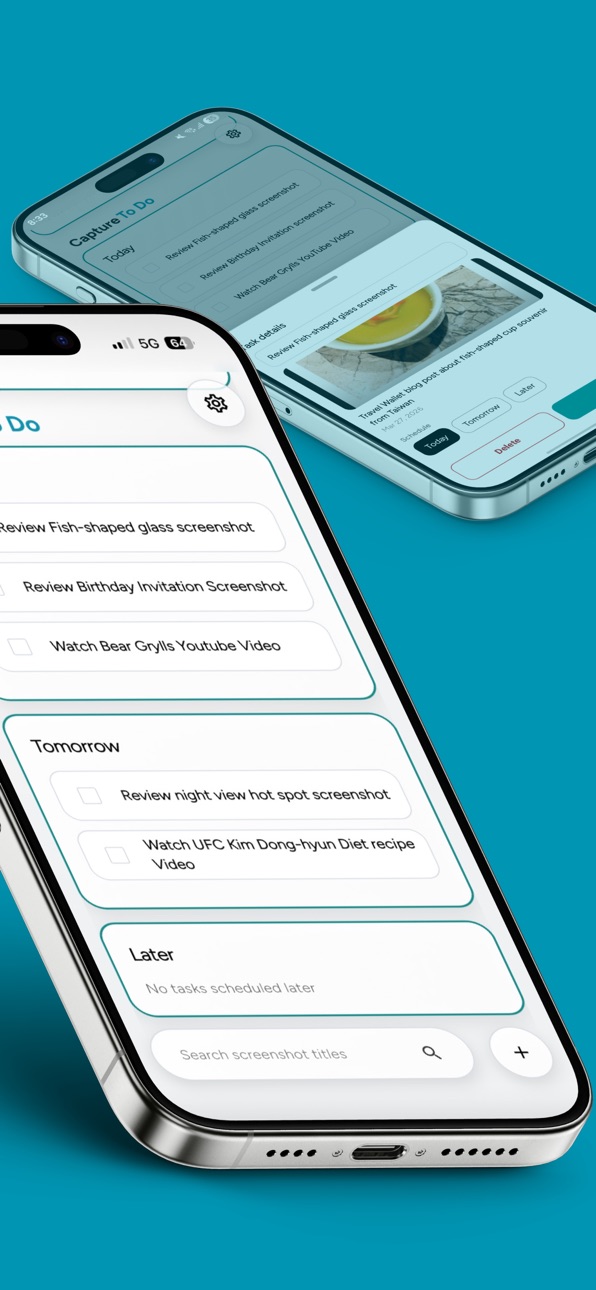
Capture To Do is a powerful to do list and reminder app
that turns your screenshots into tasks.
Just take a screenshot and share it to Capture To Do.
Your tasks are created automatically, and reminders help you never forget.
Key Features
- Turn screenshots into tasks instantly
- Smart reminders so you don’t forget
- Save things to check later
- Simple and powerful to do list
- All your tasks in one place
Capture it once. Never forget again.
Accessibility
ipadiphonemacrealityDevicetvoswatch
Version history 6 versions
Build 884622871v0.3.32026-04-21 06:34:44
What’s New: Track Your To-Dos Everywhere!
We’ve made managing your tasks smarter and more seamless than ever. Keep your goals in sight without even opening the app.
Dynamic Island & Live Activities: Stay on top of your active tasks directly from your Lock Screen and Dynamic Island.
Mac Menu Bar Integration: Your to-do status now syncs to the menu bar on your connected Mac, helping you stay focused while you work.
Instant Accessibility: No more digging for the app. Check your progress at a glance, right where you need it.
Update now and experience a whole new level of productivity!
Build 884502552v0.3.22026-04-15 04:10:27
[UX Enhancements]
Better Usability: Optimized navigation for faster access.
Polished UI: Refined layouts and improved visual feedback.
[Internationalization]
Localization: Improved translation accuracy and context.
Build 884280392v0.3.12026-04-10 01:39:33
New Feature: Home Screen Widgets!
Manage and track your tasks directly from your home screen without opening the app.
At a Glance: View your daily tasks instantly and stay on top of your schedule.
Easy Management: Quickly check off or manage tasks right from the widget.
Home Screen Optimization: Boost your productivity with a sleek design tailored for your home screen.
Build 884111391v0.2.12026-04-08 01:25:51
What’s New
We’ve made some major updates to enhance your experience.
New Link Sharing Feature: You can now easily share your favorite content with friends and family using a simple link.
Major UI/UX Redesign: Enjoy a completely refreshed look and feel! We’ve redesigned the interface to be more intuitive and optimized the user flow so you can find what you need faster than ever.
Performance Improvements: We’ve polished the app under the hood to ensure a smoother, more stable experience by fixing minor bugs and optimizing performance.
Update now to explore the latest improvements!
Build 883922767v0.1.12026-03-31 01:08:51
Improved Onboarding: Fixed an issue where the onboarding screen wouldn't appear correctly, ensuring a smoother start for new users.
Enhanced Performance: Optimized capture analysis and notification delivery logic for faster, more reliable processing.
Bug Fixes: Resolved minor bugs and improved overall app stability.
Build 882967898v0.1.02026-03-29 03:05:04
No pricing data captured yet — comparisons appear once the app has paid storefronts or in-app purchases.
Availability 1 of 1 storefronts
| Region | Language | Price | Ratings | Avg | Version |
|---|---|---|---|---|---|
| US | en-US | Free | 0 | — | 0.3.3 |
Change log 10 changes · US
✎
releaseNotes updated
What’s New: Track Your To-Dos Everywhere!
We’ve made managing your tasks smarter and more seamless than ever. Keep your goals in sight without even opening the
✎
description updated
Stop forgetting what matters.
You see something important — a message, a deal, a tip.
You think, “I’ll do it later.”
And then… you forget.
Capture To Do is
✎
subtitle updated
Captures to Tasks & Reminders
✎
name updated
Capture To Do: Task & Reminder
◆
Version 0.3.3 released
What’s New: Track Your To-Dos Everywhere!
We’ve made managing your tasks smarter and more seamless than ever. Keep your goals in sight without even opening the app.
Dynamic Island & Live Activities: Stay on top of your active tasks directl
◆
Version 0.3.2 released
[UX Enhancements]
Better Usability: Optimized navigation for faster access.
Polished UI: Refined layouts and improved visual feedback.
[Internationalization]
Localization: Improved translation accuracy and context.
◆
Version 0.3.1 released
New Feature: Home Screen Widgets!
Manage and track your tasks directly from your home screen without opening the app.
At a Glance: View your daily tasks instantly and stay on top of your schedule.
Easy Management: Quickly check off or ma
◆
Version 0.2.1 released
What’s New
We’ve made some major updates to enhance your experience.
New Link Sharing Feature: You can now easily share your favorite content with friends and family using a simple link.
Major UI/UX Redesign: Enjoy a completely refreshed
◆
Version 0.1.1 released
Improved Onboarding: Fixed an issue where the onboarding screen wouldn't appear correctly, ensuring a smoother start for new users.
Enhanced Performance: Optimized capture analysis and notification delivery logic for faster, more reliable
◆
Version 0.1.0 released