Home › Productivity

 US
US
 UAen-GB
 AEen-GB
 AGen-GB
 AIen-GB
 ALen-GB
 AMen-GB
 AOen-GB
 ARes-MX
 ATde-DE
 AUen-AU
 AZen-GB
 BAen-GB
 BBen-GB
 BEen-GB
 BFen-GB
 BGen-GB
 BHen-GB
 BJen-GB
 BNen-GB
 BRpt-BR
 BSen-GB
 BTen-GB
 BWen-GB
 BYen-GB
 BZen-GB
 CAen-CA
 CDen-GB
 CGen-GB
 CHde-CH
 CIfr-FR
 CLes-MX
 CMfr-FR
 CNzh-Hans-CN
 COes-MX
 CVen-GB
 CYen-GB
 CZen-GB
 DKen-GB
 DMen-GB
 DOes-MX
 DZen-GB
 ECes-MX
 EEen-GB
 EGen-GB
 ESes-ES
 FIen-GB
 FJen-GB
 FMen-GB
 FRfr-FR
 GAfr-FR
 GBen-GB
 GDen-GB
 GEen-GB
 GHen-GB
 GMen-GB
 GRen-GB
 GTes-MX
 GWen-GB
 GYen-GB
 HKzh-Hant-HK
 HRen-GB
 HUen-GB
 IEen-GB
 ILen-GB
 INen-GB
 IQen-GB
 ISen-GB
 ITit
ITit JMen-GB
 JOen-GB
 JPja
JPja KEen-GB
 KGen-GB
 KHen-GB
 KNen-GB
 KRko
KRko KWen-GB
 KYen-GB
 KZen-GB
 LAen-GB
 LBen-GB
 LCen-GB
 LRen-GB
 LTen-GB
 LUen-GB
 LVen-GB
 LYen-GB
 MAen-GB
 MDen-GB
 MEen-GB
 MGen-GB
 MKen-GB
 MLen-GB
 MMen-GB
 MNen-GB
 MOzh-Hant-HK
 MSen-GB
 MTen-GB
 MUen-GB
 MVen-GB
 MWen-GB
 MXes-MX
 MYen-GB
 MZen-GB
 NAen-GB
 NEen-GB
 NGen-GB
 NLnl
NLnl NOen-GB
 NRen-GB
 NZen-AU
 OMen-GB
 PAes-MX
 PEes-MX
 PGen-GB
 PLen-GB
 PTpt-PT
 PWen-GB
 QAen-GB
 ROen-GB
 RSen-GB
 RUru
RUru RWen-GB
 SAen-GB
 SBen-GB
 SCen-GB
 SEsv
SEsv SGen-GB
 SIen-GB
 SKen-GB
 SLen-GB
 SNen-GB
 SRen-GB
 STen-GB
 SZen-GB
 TCen-GB
 TDen-GB
 TJen-GB
 TMen-GB
 TNen-GB
 TOen-GB
 TRen-GB
 TTen-GB
 TZen-GB
 UGen-GBUSen-US
 UZen-GB
 VCen-GB
 VEes-MX
 VGen-GB
 VUen-GB
 XKen-GB
 YEen-GB
 ZAen-GB
 ZMen-GB
 ZWen-GB
156 of 156 storefronts
Content in en-US
Content in en-US
Information
Preview 3 platforms
iPhone 9 images




iPad 6 images


Mac 6 images



What’s New Version 2.1.0
- Offline tracking support
- Redesigned activity picker
- Smart "Likely next" suggestions in the picker
- More precise history editing with 1-second accuracy and smoother drag-to-adjust for time entries
- A "Now" line in history
- Choose to keep or remove tracked time when deleting an activity
- Bug fixes and stability improvements
Description
Most time trackers are built for freelancers and billing. Timetracker is built for your whole life.
Track everything you do — work, sleep, exercise, cooking, family time, reading — and see how your time is actually distributed across the areas of your life that matter to you.
HOW IT WORKS
1. Define your life areas — Work, Health, Family, Learning, Leisure, or whatever matters to you
2. Create activities and map them to life areas — "Morning run" → Health, "Reading" → Learning + Rest
3. Tap to start tracking. Tap to switch. That's it.
4. Open your dashboard — life-area balance is calculated automatically
You do the living. The app does the math.
KEY FEATURES
• Full 24-hour tracking — not just work hours. Sleep, exercise, commute, cooking, everything counts
• Life-area balance — automatic percentage breakdown across your life domains
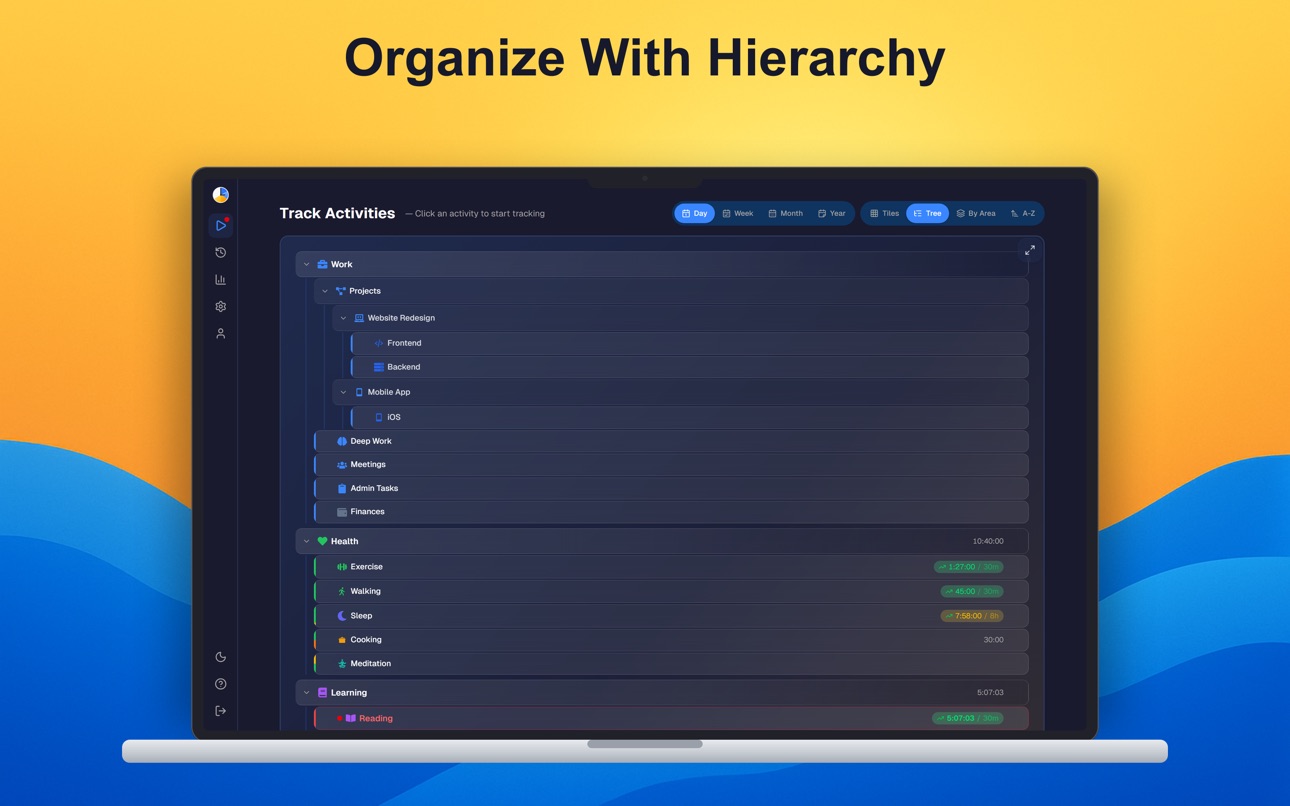
• Hierarchical activities — nest "Work → Meetings → Standups" instead of a flat list
• Flexible goals — set minimum, maximum, or exact time targets per day, workday, weekend, or custom schedule
• Easy corrections — forgot to switch? Drag the boundary between entries to fix it in seconds
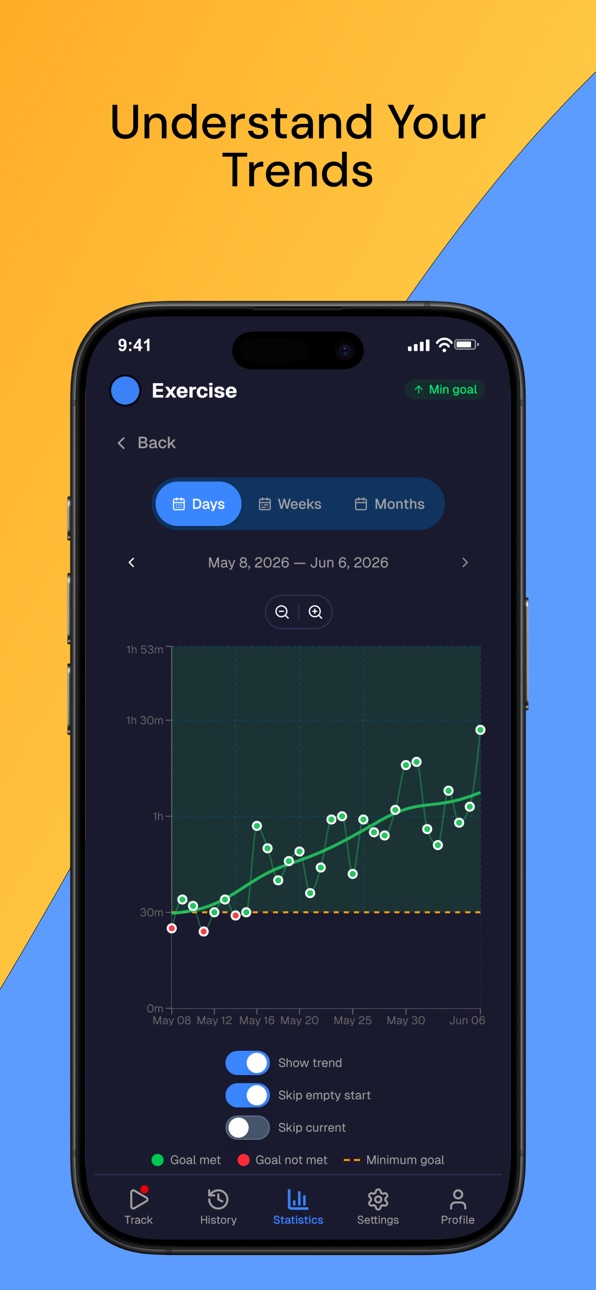
• Daily, weekly & monthly statistics — trends reveal what single days hide
• Built-in pomodoro — run focus sessions without leaving the app; every session is logged as a real time entry
• Real-time sync — switch between iPhone, iPad, and web seamlessly
• Dark mode — full support throughout the app
WHAT MAKES IT DIFFERENT
Unlike Toggl or Clockify, this isn't a work timer — it's a life picture.
Unlike RescueTime, it tracks offline activities too — sport, cooking, family time.
Unlike habit trackers, it measures duration — not just "did I do it?"
No judgment. No productivity scores. No streaks.
Just an honest picture of how you spend your time.
FREE TO USE
No ads. No credit card. No limits on core tracking. Every time-tracking feature you need is available for free.
WORKS EVERYWHERE
Your account syncs across all platforms and devices.
START IN 5 MINUTES
Create an account, set up your life areas and activities, and start tracking. Your data gets more valuable with every day you track.
Accessibility
ipadiphonemacrealityDevicetvoswatch
Version history 8 versions
Build 886613648v2.1.02026-06-07 01:05:21
- Offline tracking support
- Redesigned activity picker
- Smart "Likely next" suggestions in the picker
- More precise history editing with 1-second accuracy and smoother drag-to-adjust for time entries
- A "Now" line in history
- Choose to keep or remove tracked time when deleting an activity
- Bug fixes and stability improvements
Build 886119324v2.0.12026-05-25 20:35:16
- Redesigned Track screen
- New searchable activity picker for faster selection
- New dedicated Statistics details page with redesigned charts and Y-axis labels
- Dedicated Downloads tab in Settings to find apps for every platform
- Cleaner Add Time Entry dialog with better error handling
- Polished History date selector and fixed Year view data lookup
- Time entries can no longer be dragged or created into the future
- Bug fixes and stability improvements
Build 885484891v1.27.02026-05-11 02:58:02
- Reports: area percentages now sum to 100% across your assigned areas
- Reports: toggle between "Assigned" and "All time" views in Areas
- Support: in-app chat for questions and feedback
Build 884852485v1.26.22026-04-27 20:31:22
- Fixed report totals showing incorrect minute rollover (e.g. "1h 60m" instead of "2h")
- Fixed home-screen widget tile positions not refreshing with other cached data
- Fixed pomodoro overlay staying visible after logout; pomodoro state now clears on sign-out
- Fixed activity-picker search field causing the app to zoom in on focus and stay zoomed
Build 884407770v1.26.12026-04-11 22:07:29
- Minor fixes on the Pomodoro screen layout
Build 884385279v1.262026-04-10 22:46:02
- Pomodoro timer
- Redesigned Settings and Profile pages structure
- Bug fixes and stability improvements
Build 883357959v1.252026-03-14 19:25:55
- Simplified onboarding tour with fewer steps and ability to go back
- Restart the onboarding tour anytime from Profile
- Improved pie chart interactions
- Clickable page indicator dots in fullscreen mode
- Better bottom navigation usability
- Bug fixes and stability improvements
Build 882881986v1.02026-03-09 12:57:28
No pricing data captured yet — comparisons appear once the app has paid storefronts or in-app purchases.
Availability 156 of 156 storefronts
| Region | Language | Price | Ratings | Avg | Version |
|---|---|---|---|---|---|
| UA | en-GB | Free | 1 | 5.0 | 2.1.0 |
| AE | en-GB | Free | 0 | — | 2.1.0 |
| AG | en-GB | Free | 0 | — | 2.1.0 |
| AI | en-GB | Free | 0 | — | 2.1.0 |
| AL | en-GB | Free | 0 | — | 2.1.0 |
| AM | en-GB | Free | 0 | — | 2.1.0 |
| AO | en-GB | Free | 0 | — | 2.1.0 |
| AR | es-MX | Free | 0 | — | 2.1.0 |
| AT | de-DE | Free | 0 | — | 2.1.0 |
| AU | en-AU | Free | 0 | — | 2.1.0 |
| AZ | en-GB | Free | 0 | — | 2.1.0 |
| BA | en-GB | Free | 0 | — | 2.1.0 |
| BB | en-GB | Free | 0 | — | 2.1.0 |
| BE | en-GB | Free | 0 | — | 2.1.0 |
| BF | en-GB | Free | 0 | — | 2.1.0 |
| BG | en-GB | Free | 0 | — | 2.1.0 |
| BH | en-GB | Free | 0 | — | 2.1.0 |
| BJ | en-GB | Free | 0 | — | 2.1.0 |
| BN | en-GB | Free | 0 | — | 2.1.0 |
| BR | pt-BR | Free | 0 | — | 2.1.0 |
| BS | en-GB | Free | 0 | — | 2.1.0 |
| BT | en-GB | Free | 0 | — | 2.1.0 |
| BW | en-GB | Free | 0 | — | 2.1.0 |
| BY | en-GB | Free | 0 | — | 2.1.0 |
| BZ | en-GB | Free | 0 | — | 2.1.0 |
| CA | en-CA | Free | 0 | — | 2.1.0 |
| CD | en-GB | Free | 0 | — | 2.1.0 |
| CG | en-GB | Free | 0 | — | 2.1.0 |
| CH | de-CH | Free | 0 | — | 2.1.0 |
| CI | fr-FR | Free | 0 | — | 2.1.0 |
| CL | es-MX | Free | 0 | — | 2.1.0 |
| CM | fr-FR | Free | 0 | — | 2.1.0 |
| CN | zh-Hans-CN | Free | 0 | — | 2.1.0 |
| CO | es-MX | Free | 0 | — | 2.1.0 |
| CV | en-GB | Free | 0 | — | 2.1.0 |
| CY | en-GB | Free | 0 | — | 2.1.0 |
| CZ | en-GB | Free | 0 | — | 2.1.0 |
| DK | en-GB | Free | 0 | — | 2.1.0 |
| DM | en-GB | Free | 0 | — | 2.1.0 |
| DO | es-MX | Free | 0 | — | 2.1.0 |
| DZ | en-GB | Free | 0 | — | 2.1.0 |
| EC | es-MX | Free | 0 | — | 2.1.0 |
| EE | en-GB | Free | 0 | — | 2.1.0 |
| EG | en-GB | Free | 0 | — | 2.1.0 |
| ES | es-ES | Free | 0 | — | 2.1.0 |
| FI | en-GB | Free | 0 | — | 2.1.0 |
| FJ | en-GB | Free | 0 | — | 2.1.0 |
| FM | en-GB | Free | 0 | — | 2.1.0 |
| FR | fr-FR | Free | 0 | — | 2.1.0 |
| GA | fr-FR | Free | 0 | — | 2.1.0 |
| GB | en-GB | Free | 0 | — | 2.1.0 |
| GD | en-GB | Free | 0 | — | 2.1.0 |
| GE | en-GB | Free | 0 | — | 2.1.0 |
| GH | en-GB | Free | 0 | — | 2.1.0 |
| GM | en-GB | Free | 0 | — | 2.1.0 |
| GR | en-GB | Free | 0 | — | 2.1.0 |
| GT | es-MX | Free | 0 | — | 2.1.0 |
| GW | en-GB | Free | 0 | — | 2.1.0 |
| GY | en-GB | Free | 0 | — | 2.1.0 |
| HK | zh-Hant-HK | Free | 0 | — | 2.1.0 |
| HR | en-GB | Free | 0 | — | 2.1.0 |
| HU | en-GB | Free | 0 | — | 2.1.0 |
| IE | en-GB | Free | 0 | — | 2.1.0 |
| IL | en-GB | Free | 0 | — | 2.1.0 |
| IN | en-GB | Free | 0 | — | 2.1.0 |
| IQ | en-GB | Free | 0 | — | 2.1.0 |
| IS | en-GB | Free | 0 | — | 2.1.0 |
| IT | it | Free | 0 | — | 2.1.0 |
| JM | en-GB | Free | 0 | — | 2.1.0 |
| JO | en-GB | Free | 0 | — | 2.1.0 |
| JP | ja | Free | 0 | — | 2.1.0 |
| KE | en-GB | Free | 0 | — | 2.1.0 |
| KG | en-GB | Free | 0 | — | 2.1.0 |
| KH | en-GB | Free | 0 | — | 2.1.0 |
| KN | en-GB | Free | 0 | — | 2.1.0 |
| KR | ko | Free | 0 | — | 2.1.0 |
| KW | en-GB | Free | 0 | — | 2.1.0 |
| KY | en-GB | Free | 0 | — | 2.1.0 |
| KZ | en-GB | Free | 0 | — | 2.1.0 |
| LA | en-GB | Free | 0 | — | 2.1.0 |
| LB | en-GB | Free | 0 | — | 2.1.0 |
| LC | en-GB | Free | 0 | — | 2.1.0 |
| LR | en-GB | Free | 0 | — | 2.1.0 |
| LT | en-GB | Free | 0 | — | 2.1.0 |
| LU | en-GB | Free | 0 | — | 2.1.0 |
| LV | en-GB | Free | 0 | — | 2.1.0 |
| LY | en-GB | Free | 0 | — | 2.1.0 |
| MA | en-GB | Free | 0 | — | 2.1.0 |
| MD | en-GB | Free | 0 | — | 2.1.0 |
| ME | en-GB | Free | 0 | — | 2.1.0 |
| MG | en-GB | Free | 0 | — | 2.1.0 |
| MK | en-GB | Free | 0 | — | 2.1.0 |
| ML | en-GB | Free | 0 | — | 2.1.0 |
| MM | en-GB | Free | 0 | — | 2.1.0 |
| MN | en-GB | Free | 0 | — | 2.1.0 |
| MO | zh-Hant-HK | Free | 0 | — | 2.1.0 |
| MS | en-GB | Free | 0 | — | 2.1.0 |
| MT | en-GB | Free | 0 | — | 2.1.0 |
| MU | en-GB | Free | 0 | — | 2.1.0 |
| MV | en-GB | Free | 0 | — | 2.1.0 |
| MW | en-GB | Free | 0 | — | 2.1.0 |
| MX | es-MX | Free | 0 | — | 2.1.0 |
| MY | en-GB | Free | 0 | — | 2.1.0 |
| MZ | en-GB | Free | 0 | — | 2.1.0 |
| NA | en-GB | Free | 0 | — | 2.1.0 |
| NE | en-GB | Free | 0 | — | 2.1.0 |
| NG | en-GB | Free | 0 | — | 2.1.0 |
| NL | nl | Free | 0 | — | 2.1.0 |
| NO | en-GB | Free | 0 | — | 2.1.0 |
| NR | en-GB | Free | 0 | — | 2.1.0 |
| NZ | en-AU | Free | 0 | — | 2.1.0 |
| OM | en-GB | Free | 0 | — | 2.1.0 |
| PA | es-MX | Free | 0 | — | 2.1.0 |
| PE | es-MX | Free | 0 | — | 2.1.0 |
| PG | en-GB | Free | 0 | — | 2.1.0 |
| PL | en-GB | Free | 0 | — | 2.1.0 |
| PT | pt-PT | Free | 0 | — | 2.1.0 |
| PW | en-GB | Free | 0 | — | 2.1.0 |
| QA | en-GB | Free | 0 | — | 2.1.0 |
| RO | en-GB | Free | 0 | — | 2.1.0 |
| RS | en-GB | Free | 0 | — | 2.1.0 |
| RU | ru | Free | 0 | — | 2.1.0 |
| RW | en-GB | Free | 0 | — | 2.1.0 |
| SA | en-GB | Free | 0 | — | 2.1.0 |
| SB | en-GB | Free | 0 | — | 2.1.0 |
| SC | en-GB | Free | 0 | — | 2.1.0 |
| SE | sv | Free | 0 | — | 2.1.0 |
| SG | en-GB | Free | 0 | — | 2.1.0 |
| SI | en-GB | Free | 0 | — | 2.1.0 |
| SK | en-GB | Free | 0 | — | 2.1.0 |
| SL | en-GB | Free | 0 | — | 2.1.0 |
| SN | en-GB | Free | 0 | — | 2.1.0 |
| SR | en-GB | Free | 0 | — | 2.1.0 |
| ST | en-GB | Free | 0 | — | 2.1.0 |
| SZ | en-GB | Free | 0 | — | 2.1.0 |
| TC | en-GB | Free | 0 | — | 2.1.0 |
| TD | en-GB | Free | 0 | — | 2.1.0 |
| TJ | en-GB | Free | 0 | — | 2.1.0 |
| TM | en-GB | Free | 0 | — | 2.1.0 |
| TN | en-GB | Free | 0 | — | 2.1.0 |
| TO | en-GB | Free | 0 | — | 2.1.0 |
| TR | en-GB | Free | 0 | — | 2.1.0 |
| TT | en-GB | Free | 0 | — | 2.1.0 |
| TZ | en-GB | Free | 0 | — | 2.1.0 |
| UG | en-GB | Free | 0 | — | 2.1.0 |
| US | en-US | Free | 0 | — | 2.1.0 |
| UZ | en-GB | Free | 0 | — | 2.1.0 |
| VC | en-GB | Free | 0 | — | 2.1.0 |
| VE | es-MX | Free | 0 | — | 2.1.0 |
| VG | en-GB | Free | 0 | — | 2.1.0 |
| VU | en-GB | Free | 0 | — | 2.1.0 |
| XK | en-GB | Free | 0 | — | 2.1.0 |
| YE | en-GB | Free | 0 | — | 2.1.0 |
| ZA | en-GB | Free | 0 | — | 2.1.0 |
| ZM | en-GB | Free | 0 | — | 2.1.0 |
| ZW | en-GB | Free | 0 | — | 2.1.0 |
Change log 12 changes · US
✎
releaseNotes updated
- Offline tracking support
- Redesigned activity picker
- Smart "Likely next" suggestions in the picker
- More precise history editing with 1-second accuracy an
✎
description updated
Most time trackers are built for freelancers and billing. Timetracker is built for your whole life.
Track everything you do — work, sleep, exercise, cooking, f
✎
subtitle updated
Track your whole life
✎
name updated
Timetracker - 24h Life Tracker
◆
Version 2.1.0 released
- Offline tracking support
- Redesigned activity picker
- Smart "Likely next" suggestions in the picker
- More precise history editing with 1-second accuracy and smoother drag-to-adjust for time entries
- A "Now" line in history
- Choose to
◆
Version 2.0.1 released
- Redesigned Track screen
- New searchable activity picker for faster selection
- New dedicated Statistics details page with redesigned charts and Y-axis labels
- Dedicated Downloads tab in Settings to find apps for every platform
- Cleaner
◆
Version 1.27.0 released
- Reports: area percentages now sum to 100% across your assigned areas
- Reports: toggle between "Assigned" and "All time" views in Areas
- Support: in-app chat for questions and feedback
◆
Version 1.26.2 released
- Fixed report totals showing incorrect minute rollover (e.g. "1h 60m" instead of "2h")
- Fixed home-screen widget tile positions not refreshing with other cached data
- Fixed pomodoro overlay staying visible after logout; pomodoro state no
◆
Version 1.26.1 released
- Minor fixes on the Pomodoro screen layout
◆
Version 1.26 released
- Pomodoro timer
- Redesigned Settings and Profile pages structure
- Bug fixes and stability improvements
◆
Version 1.25 released
- Simplified onboarding tour with fewer steps and ability to go back
- Restart the onboarding tour anytime from Profile
- Improved pie chart interactions
- Clickable page indicator dots in fullscreen mode
- Better bottom navigation usab
◆
Version 1.0 released