Home › Productivity

iRecordAudio - Voice Recorder
Transcribe & Edit Audio
 US
US
1 of 1 storefronts
Content in en-US
Content in en-US
Information
Apple ID6759778013
Bundle IDcom.xiaobai.screen.recorder.audio.XBAudioIOS
SellerSeller
Min iOS15.0
Min macOS12.0
Device familiesiphone, ipod
Released2026-03-06
Copyright© 2024@Beijing Zaomeng Shidai Technology Co., Ltd.
Privacy policyLink ↗
Preview 1 platform
iPhone 7 images




What’s New Version 1.3.0
[Internal Audio Recording]
- Improved the stop flow so the app responds more reliably after you tap Stop.
- Recordings are now imported only after saving is ready, reducing occasional failed imports or too-short recording messages.
- Added a clearer saving state while a recording is being finalized.
[Stability]
- Improved system screen capture state handling and compatibility with newer iOS versions.
Description
iRecordAudio is a powerful, easy-to-use voice recording app for iPhone and iPad. Record high-quality audio, transcribe speech to text, edit with professional tools, and share anywhere — all in one app.
iRecordAudio — recording made simple.
HIGHLIGHTS
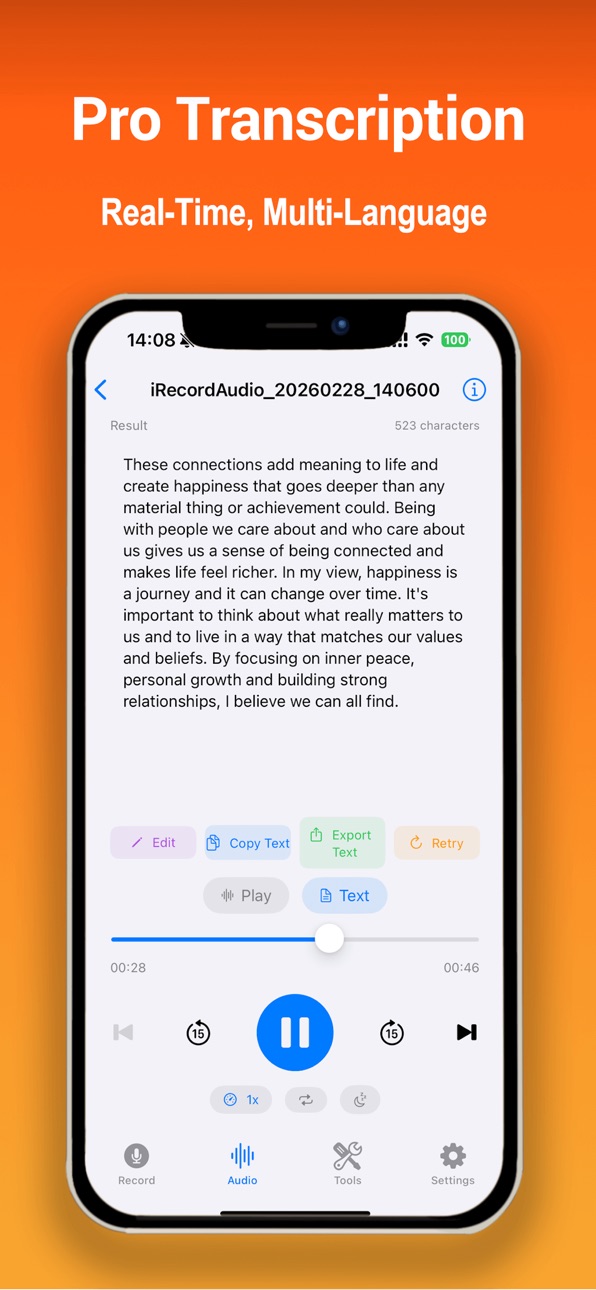
- Speech to Text: Real-time transcription while recording
- Recording to Text: Convert existing recordings to text
- Professional recording with quality presets (Standard / HiFi / Ultra)
- 10-band equalizer with 10 built-in presets
- Built-in audio editor with 15+ tools
- Countdown timer and auto-stop for hands-free recording
- Bookmark important moments during recording
- Share directly to iMessage, email, cloud storage, and more
RECORDING SCENARIOS
- Meeting: Record meetings, conferences, and brainstorming
- Lecture: Capture classes and seminars for later review
- Interview: Record for journalism, research, or hiring
- Music: Record rehearsals, instruments, and vocals
- Voice Memos: Quick notes, ideas, and reminders
- Field Recording: Capture ambient sound and nature audio
- Podcast: Record episodes and voice content
- Evidence: Document conversations for records
TRANSCRIPTION
- Real-time Speech to Text while recording
- Convert existing recordings to text with one tap
- Multi-language: Chinese, English, and more
- Export: Copy and share transcription results
RECORDING FEATURES
- Audio formats: M4A (AAC), WAV, CAF
- Quality: Standard (22kHz), HiFi (44.1kHz), Ultra (48kHz)
- Adjustable bitrate for file size and quality balance
- Countdown timer (3s / 5s / 10s) before recording
- Auto-stop after set duration (1 - 120 min)
- Pause and resume at any time
- Real-time waveform visualization
- Bookmark key moments while recording
- Background recording support
- Internal audio capture (system sound)
AUDIO EDITING
- Trim, Speed (0.5x–2.0x), Fade In/Out
- Noise Reduction, Equalizer (10-band, 10 presets)
- Volume Boost, Reverse, Silence Removal
- Background Music, TTS (Text-to-Speech)
- Merge, Split, Convert, Compress
- Voice Effects
PLAYBACK
- Audio player with waveform display
- Adjustable speed (0.5x–2.0x)
- 10-band equalizer for playback
- Quick jump to bookmarks
- A/B loop for repeated listening
MANAGE & SHARE
- Organized recording list with sorting and search
- File details: format, sample rate, bitrate, channels, size
- Rename, batch select, delete, or export
- Share to iMessage, WhatsApp, email, AirDrop, cloud storage
- Save to Files app
DESIGNED FOR EVERYONE
- Clean, intuitive interface
- Works on iPhone and iPad
- Dark mode support
- English and Chinese
Download iRecordAudio — professional recording in your pocket.
SUBSCRIPTION
iRecordAudio offers auto-renewable subscriptions (Monthly / Yearly) for premium features including Speech-to-Text and Recording-to-Text.
- Payment charged to your Apple ID at confirmation of purchase.
- Auto-renews unless canceled at least 24 hours before the end of the current period.
- Manage and cancel in Settings > Apple ID > Subscriptions.
Terms of Use (EULA): https://sites.google.com/view/arecorderapp/service-agreement
Privacy Policy: https://sites.google.com/view/arecorderapp/privacy_policy
Contact us: dreamera2022@gmail.com
In-App Purchases US pricing
会员订阅 Subscription
Annual · Yearly$49.99
Monthly · Monthly$9.99
One-Time Purchases
3-Hour Pack$2.99
10-Hour Pack$8.99
Capabilities
In-App Purchases
Accessibility
ipadiphonemacrealityDevicetvoswatch
Version history 7 versions
Build 887771764v1.3.02026-07-04 05:02:45
[Internal Audio Recording]
- Improved the stop flow so the app responds more reliably after you tap Stop.
- Recordings are now imported only after saving is ready, reducing occasional failed imports or too-short recording messages.
- Added a clearer saving state while a recording is being finalized.
[Stability]
- Improved system screen capture state handling and compatibility with newer iOS versions.
Build 887512949v1.2.92026-06-27 20:55:27
[Player]
- Reworked the recording player so controls, waveform, and transcripts load in smaller parts, making long recordings smoother to open and switch.
- Waveforms can now be cached and generated in the background to reduce repeated waiting.
[Feedback & Support]
- Improved the rating prompt. If something is not right, you can send feedback more easily, with privacy-safe recording settings diagnostics attached.
- Privacy, terms, support, and feedback links now open inside the app from Settings and About.
[Stability]
- Added guidance when network access is disabled and improved overall performance and stability.
Build 884117360v1.2.82026-04-04 17:21:35
- Subscription Fix: Resolved compatibility issues with subscription and hour pack purchases for a smoother experience
- General performance and stability improvements
Build 883488986v1.2.72026-03-18 17:11:51
- Video Import: Select videos from your photo library and automatically extract audio for editing and transcription
- Audio Quality Fix: Resolved low volume issue with Meeting and HiFi recording modes
- Review Prompt: Redesigned rating dialog for a less intrusive experience
- Customer Support: Improved in-app support for faster feedback
- Fixed occasional file rename failures
- General performance and stability improvements
Build 883162964v1.2.62026-03-09 20:40:40
- New Membership System: Subscription and hour pack purchase pages redesigned for a cleaner, more intuitive flow
- Membership Details: New status page showing your plan type (Monthly/Yearly), remaining hours, and expiry date at a glance
- Hour Pack Top-up: VIP members can purchase extra transcription hours anytime
- Transcription List: Added labels to quickly identify transcribed recordings
- General UX improvements and bug fixes
Build 883142215v1.2.52026-03-08 18:36:13
- Improved Audio Trimming: New zoomable waveform view with pinch-to-zoom and top time ruler for precise editing
- Improved Audio Splitting: Added undo support to recover from accidental splits or deletions; refined segment management
- Improved Audio Merging: Better stability and faster processing for multi-file merging
- Improved Background Recording: Enhanced stability for long recording sessions
- Improved Internal Audio Capture: Better system sound recording experience and compatibility
- Bug fixes and overall performance improvements
Build 882849023v1.2.42026-03-06 19:22:53
Price history by region
Currency
Show
Columns
Search
Availability 1 of 1 storefronts
| Region | Language | Price | Ratings | Avg | Version |
|---|---|---|---|---|---|
| US | en-US | Free | 0 | — | 1.3.0 |
Change log 11 changes · US
✎
releaseNotes updated
[Internal Audio Recording]
- Improved the stop flow so the app responds more reliably after you tap Stop.
- Recordings are now imported only after saving is rea
✎
description updated
iRecordAudio is a powerful, easy-to-use voice recording app for iPhone and iPad. Record high-quality audio, transcribe speech to text, edit with professional to
✎
subtitle updated
Transcribe & Edit Audio
✎
name updated
iRecordAudio - Voice Recorder
◆
Version 1.3.0 released
[Internal Audio Recording]
- Improved the stop flow so the app responds more reliably after you tap Stop.
- Recordings are now imported only after saving is ready, reducing occasional failed imports or too-short recording messages.
- Added
◆
Version 1.2.9 released
[Player]
- Reworked the recording player so controls, waveform, and transcripts load in smaller parts, making long recordings smoother to open and switch.
- Waveforms can now be cached and generated in the background to reduce repeated wait
◆
Version 1.2.8 released
- Subscription Fix: Resolved compatibility issues with subscription and hour pack purchases for a smoother experience
- General performance and stability improvements
◆
Version 1.2.7 released
- Video Import: Select videos from your photo library and automatically extract audio for editing and transcription
- Audio Quality Fix: Resolved low volume issue with Meeting and HiFi recording modes
- Review Prompt: Redesigned rating dial
◆
Version 1.2.6 released
- New Membership System: Subscription and hour pack purchase pages redesigned for a cleaner, more intuitive flow
- Membership Details: New status page showing your plan type (Monthly/Yearly), remaining hours, and expiry date at a glance
- H
◆
Version 1.2.5 released
- Improved Audio Trimming: New zoomable waveform view with pinch-to-zoom and top time ruler for precise editing
- Improved Audio Splitting: Added undo support to recover from accidental splits or deletions; refined segment management
- Impr
◆
Version 1.2.4 released