Home › Health & Fitness

 US
US
 KRko
KRko AEen-GB
 AFen-GB
 ALen-GB
 AMen-GB
 ATde-DE
 AUen-AU
 AZen-GB
 BAen-GB
 BEen-GB
 BGen-GB
 BHen-GB
 BMen-GB
 BNen-GB
 BTen-GB
 BYen-GB
 CAen-CA
 CHde-CH
 CNzh-Hans-CN
 CYen-GB
 CZen-GB
 DEde-DE
 DKen-GB
 EEen-GB
 EGen-GB
 ESes-ES
 FIen-GB
 FJen-GB
 FRfr-FR
 GBen-GB
 GEen-GB
 GRen-GB
 HKzh-Hant-HK
 HRen-GB
 HUen-GB
 IDen-GB
 IEen-GB
 ILen-GB
 INen-GB
 IQen-GB
 ISen-GB
 ITit
ITit JOen-GB
 JPja
JPja KGen-GB
 KHen-GB
 KWen-GB
 KZen-GB
 LAen-GB
 LBen-GB
 LKen-GB
 LTen-GB
 LUen-GB
 LVen-GB
 MDen-GB
 MEen-GB
 MKen-GB
 MMen-GB
 MNen-GB
 MOzh-Hant-HK
 MRen-GB
 MTen-GB
 MVen-GB
 MYen-GB
 NLnl
NLnl NOen-GB
 NPen-GB
 NZen-AU
 OMen-GB
 PGen-GB
 PHen-GB
 PKen-GB
 PLen-GB
 PTpt-PT
 QAen-GB
 ROen-GB
 RSen-GB
 RUru
RUru SAen-GB
 SBen-GB
 SEsv
SEsv SGen-GB
 SIen-GB
 SKen-GB
 THen-GB
 TJen-GB
 TMen-GB
 TOen-GB
 TRen-GB
 TWzh-Hant-TW
 UAen-GBUSen-US
 UZen-GB
 VNen-GB
 VUen-GB
 XKen-GB
 YEen-GB
97 of 97 storefronts
Content in en-US
Content in en-US
Information
Preview 2 platforms
iPhone 6 images


iPad 4 images

What’s New Version 1.10
Tidier Log grid — Apple Watch workouts that don't have a photo yet are now gathered into a clean strip at the bottom of each month, so your photos lead the grid and your stats stay neatly out of the way. Add a photo to a workout and it rejoins the photo collage automatically.
Description
Ballet Log is a notebook for dancers — a quiet place to record what you learned, capture how it felt, and look back on your progress.
Built around four spaces:
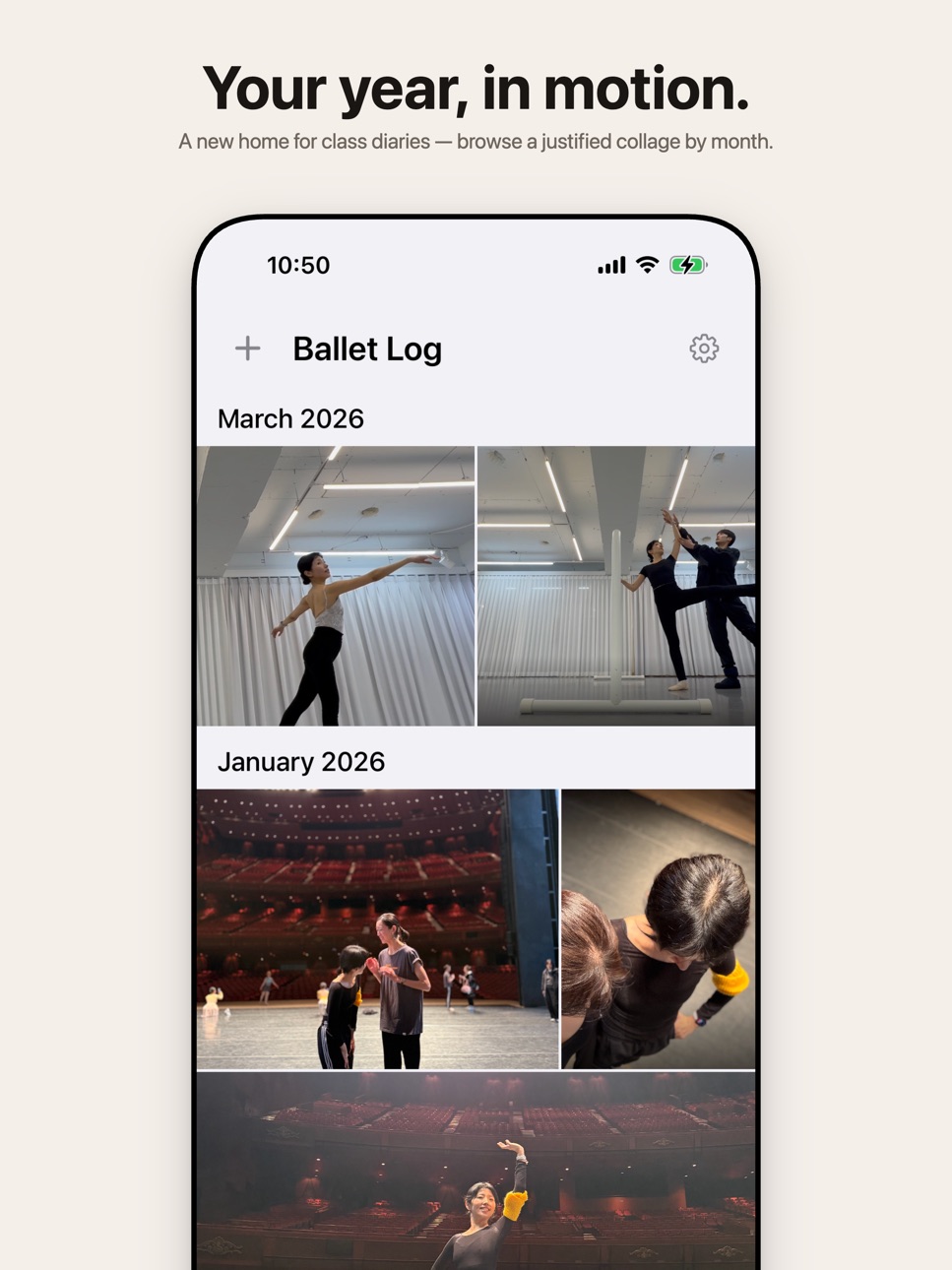
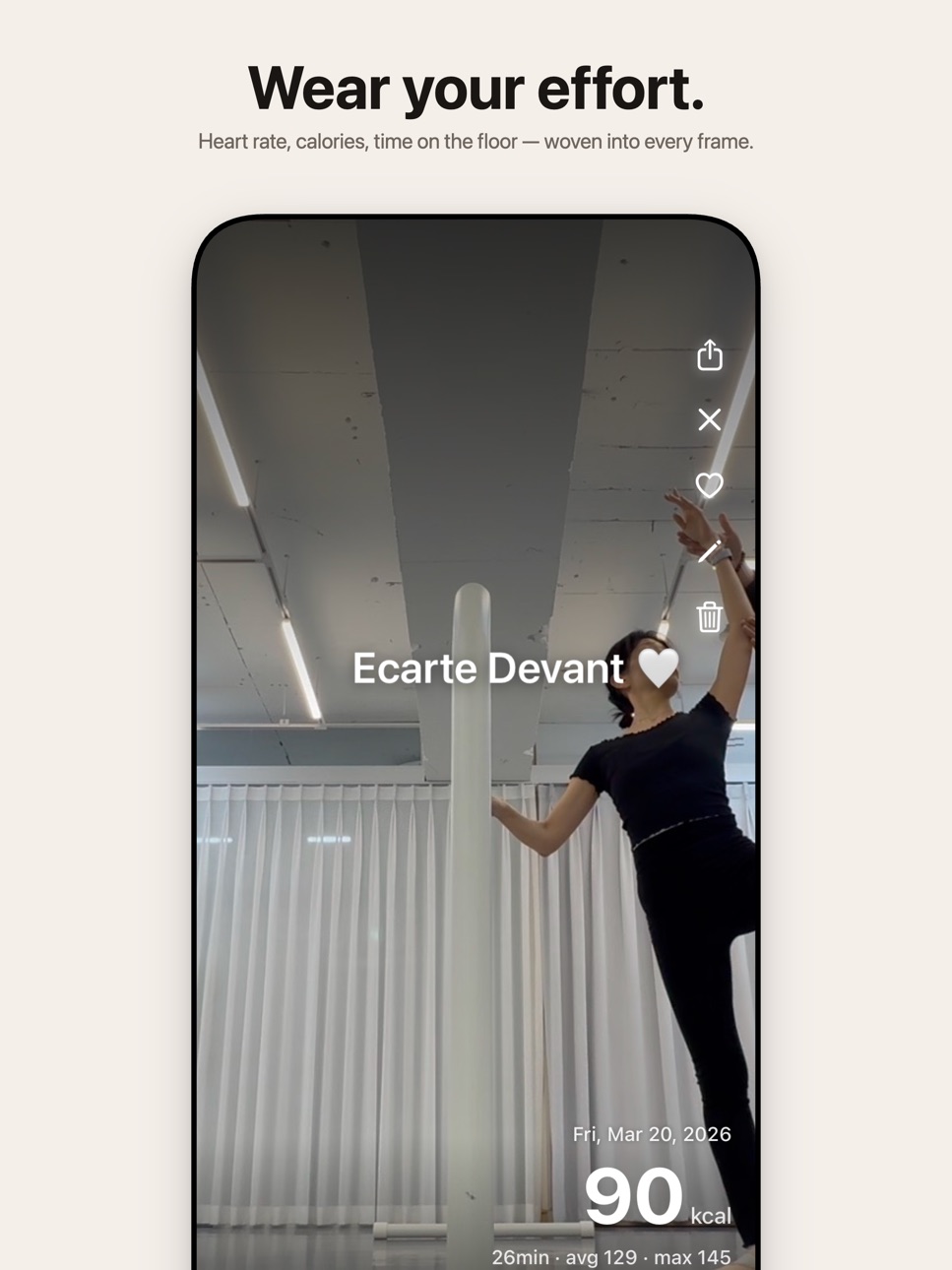
LOG — A photo diary in collage form. Save the moments that made class memorable, with filters, stickers, and one-line captions. Optional workout stats (calories, duration, heart rate) overlay your photo when you've worn Apple Watch.
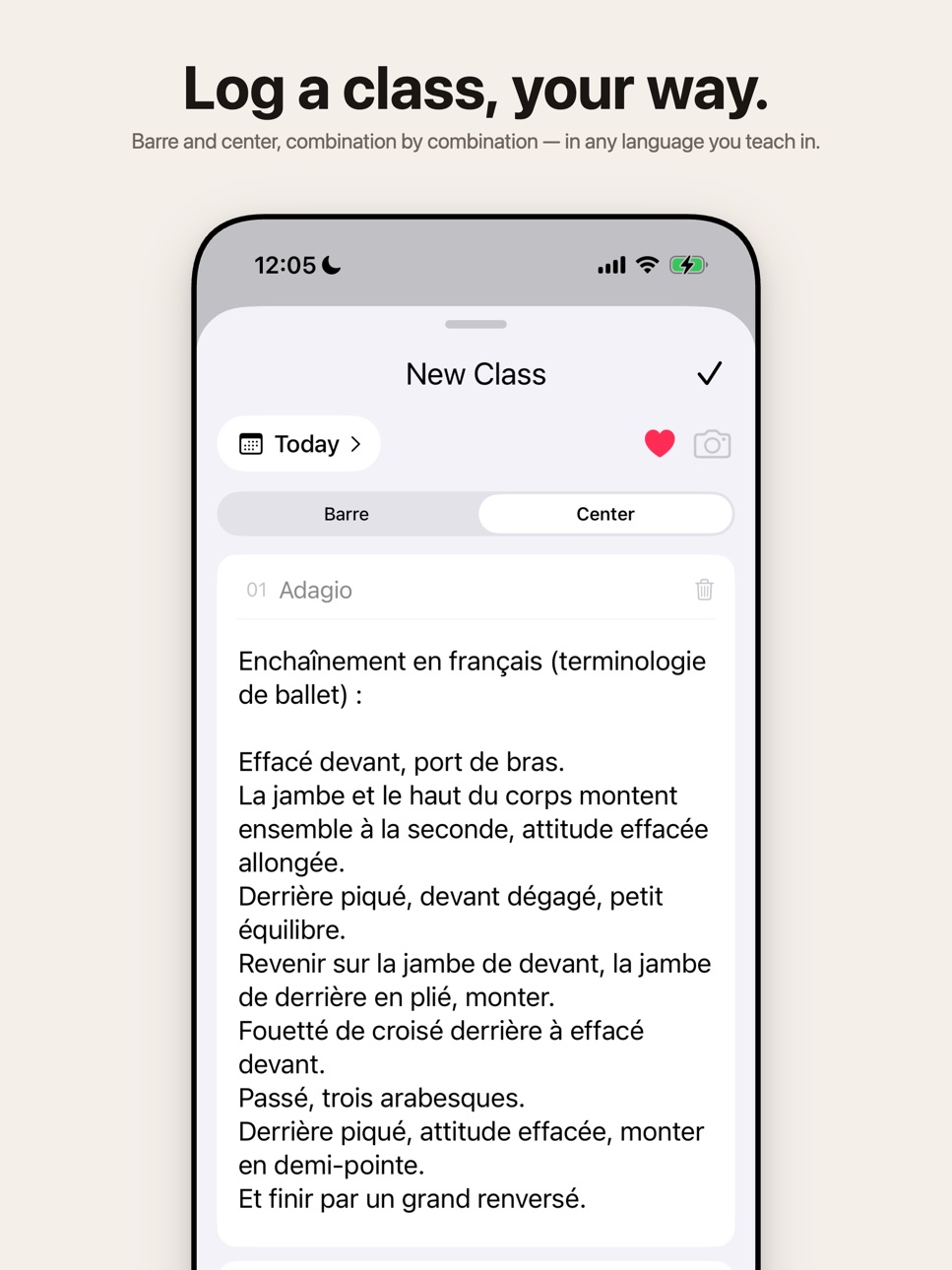
CLASS — Detailed class records. Note your barre and center combinations, the music your teacher used, who taught, and how you felt. Browse by month in a clean, minimal list.
NOTES — Free-form notes for choreography breakdowns, corrections, references, and links. Pin important ones, tag for quick filtering, attach photos, and link to specific classes.
HISTORY — A calendar view connecting everything. See which days had classes, photo logs, or notes — then dive into stats by week, month, or year.
Why Ballet Log:
• Local first. Your data lives on your device. No accounts, no cloud sync, no surveillance.
• Private by design. Export a backup file anytime to email, AirDrop, or Files. Restore on a new phone in seconds.
• Apple Health integration. Workout sessions from Apple Watch (Other / Dance / Pilates / Yoga / Functional Strength) auto-link to your class logs.
• Beautiful share images. Share a class log or photo log as a polished image to Instagram, Messages, or wherever you like.
• Three languages. Full English, Korean, and Japanese support.
Made by a dancer, for dancers. Quiet, focused, and yours.
Accessibility
ipadiphonemacrealityDevicetvoswatch
Version history 12 versions
Build 887469624v1.102026-06-30 03:08:44
Tidier Log grid — Apple Watch workouts that don't have a photo yet are now gathered into a clean strip at the bottom of each month, so your photos lead the grid and your stats stay neatly out of the way. Add a photo to a workout and it rejoins the photo collage automatically.
Build 886765270v1.9.02026-06-15 03:28:11
Bring in past workouts — When you connect Apple Health (or after this update, if you already have), Ballet Log offers to add the Apple Watch workouts from your last 30 days that aren't in your log yet. One tap and they're all in.
Pull one in from History — Open the History tab, pick a day, and any Apple Watch workout from that day that isn't logged yet shows up ready to add. Tap it and it becomes a workout entry — handy for older sessions or anything the automatic sync missed.
Under the hood — Quieter, faster logging and general housekeeping.
Build 886143636v1.8.02026-06-01 08:35:22
Apple Watch auto-logging: Finish a Barre, Dance, Pilates, Yoga, or Functional Strength workout and a Photo Log entry appears automatically with your calories, duration, and heart rate. Open the app within 24 hours to sync; for older workouts you can still attach one manually from the editor.
Connect from Settings: A new Apple Health row in Settings lets you grant permission once and check connection state. Tap "Open Health App" anytime to manage which data Ballet Log can read.
Tap to add a photo: Workout entries appear as quiet cream cards in the grid and as a dark workout card in full-screen. Tap anywhere in the full-screen view (or the "+ Add Photo" pill) to attach a photo when you find the one that fits. Photo and workout data live together from then on.
Revert the photo: Changed your mind? The full-screen menu now has a Remove Photo action that keeps the workout details and returns the card to its photo-less state.
History parity: Tapping a Photo Log card from History now opens the same full-screen viewer as the Log tab, with share, edit, favorite, remove-photo, and delete all in one place.
Editor improvements: Class log changes save automatically when you swipe the editor down (existing logs only; new ones still need to be saved manually). Default step names are now consistently plural (Pliés, Tendus, Jetés, Fondus, Frappés, Développés) to match how class syllabi name them.
Build 885797100v1.7.02026-05-18 18:03:37
Ballet term chip bar — Tap any combination notes field and a horizontal bar of ballet terms appears above the keyboard. Tap a chip to drop the term at your cursor; the bar reorders by what you use most.
Smarter suggestions — The chips shown depend on which step you're editing. Tendu shows tendu/devant/à la seconde/derrière; Adagio shows croisé/écarté/effacé and friends. Eleven barre and center step patterns are pre-mapped.
Type-to-filter — As you type, the bar narrows to matching terms (accent-insensitive, English or Korean). Tap a chip and the partial word becomes the full term, ready for the next step.
Language toggle — In Settings, choose whether chips show in English, Korean, or follow your system language.
Better autosave — Existing class logs now save automatically when you swipe the editor closed.
Build 885483978v1.6.12026-05-11 03:04:38
Share Ballet Log — Recommend the app to a friend straight from Settings. Tap "Share Ballet Log" to send a link via Messages, Mail, AirDrop, and more.
Polish — Cleaner empty-state copy across tabs that points to the "+" button, a friendlier first-time tutorial that aligns the arrow with "+", and reordered cards under the History calendar so Photo Logs come first.
Build 885209841v1.6.02026-05-04 19:27:14
Photo Log — A new dedicated tab for photo diaries. Tap "+" to capture moments from class with filters, captions, and workout
overlays. Browse a justified collage grid by month, swipe vertically to exit, and horizontally between photos in
full-screen.
Backup & Restore — In Settings, tap Export Data to package your entire library — classes, notes, and photos — into a single
backup file. Email it, AirDrop it, or save it to Files. Import on any device to restore everything in seconds. Local-only:
no accounts, no cloud sync.
Class — The monthly accordion is cleaner, with subtle card outlines around each log so the list reads like a notebook.
Apple Health — Photo Logs can now link any workout type from that day — Dance, Pilates, Yoga, Functional Strength, and more
are all recognized alongside the existing Barre support.
Settings — A new Settings sheet (gear icon, top-right of the Photo Log tab) houses your profile, Apple Health, backup, and
app info in one place.
Build 884657969v1.5.12026-04-18 16:40:16
Now you can use the app in Japanese.
Build 884405011v1.52026-04-11 22:06:47
Stats — Tap the chart icon in History to see your class count, workout time, calorie totals, and most-viewed logs by week, month, or year. Weekly and monthly views display a stacked cube chart — the more you train in a day, the taller the stack. Double and triple sessions are clearly visible.
Share — Export your weekly stats or any class log as a shareable image card.
View Count — Each class log now tracks how many times you've opened it.
Build 883473986v1.32026-03-17 22:21:46
A fresh new look for the home screen, plus improvements to Notes and History.
Home
New photo section at the top — featuring 8 random photos from your classes and notes
Favorites and Recent classes now displayed as scrollable cards
Cards show calories prominently when no photo is available
Notes
Tag management: long-press a tag to delete it from all notes
Tags now wrap into rows with a "more" chip to expand
Active tag filter shown at the top while searching
Tap photos in a note to view them full screen with pinch-to-zoom
History
Calendar now starts on Sunday
Notes are marked with a dot on the calendar
Build 883219830v1.22026-03-13 10:06:17
Notes
You can now jot down anything between classes — technique tips, corrections, things to remember. Add tags, photos, and link a note to a specific class. Find all your notes in the new Notes tab.
History gets smarter
Your class logs and notes now appear together when you browse by date. No class on a particular day? Tap "Record Class" to log one right from the calendar.
YouTube preview
Paste a YouTube link into the music field and see the thumbnail appear instantly.
Build 882871113v1.12026-02-28 04:17:46
Bug fixes and improvements.
- Fixed an issue where class logs were not being saved
- Photos now appear at the top of the editor
Build 882792587v1.02026-02-27 14:28:42
No pricing data captured yet — comparisons appear once the app has paid storefronts or in-app purchases.
Availability 97 of 97 storefronts
| Region | Language | Price | Ratings | Avg | Version |
|---|---|---|---|---|---|
| KR | ko | Free | 4 | 5.0 | 1.10 |
| AE | en-GB | Free | 0 | — | 1.10 |
| AF | en-GB | Free | 0 | — | 1.10 |
| AL | en-GB | Free | 0 | — | 1.10 |
| AM | en-GB | Free | 0 | — | 1.10 |
| AT | de-DE | Free | 0 | — | 1.10 |
| AU | en-AU | Free | 0 | — | 1.10 |
| AZ | en-GB | Free | 0 | — | 1.10 |
| BA | en-GB | Free | 0 | — | 1.10 |
| BE | en-GB | Free | 0 | — | 1.10 |
| BG | en-GB | Free | 0 | — | 1.10 |
| BH | en-GB | Free | 0 | — | 1.10 |
| BM | en-GB | Free | 0 | — | 1.10 |
| BN | en-GB | Free | 0 | — | 1.10 |
| BT | en-GB | Free | 0 | — | 1.10 |
| BY | en-GB | Free | 0 | — | 1.10 |
| CA | en-CA | Free | 0 | — | 1.10 |
| CH | de-CH | Free | 0 | — | 1.10 |
| CN | zh-Hans-CN | Free | 0 | — | 1.10 |
| CY | en-GB | Free | 0 | — | 1.10 |
| CZ | en-GB | Free | 0 | — | 1.10 |
| DE | de-DE | Free | 0 | — | 1.10 |
| DK | en-GB | Free | 0 | — | 1.10 |
| EE | en-GB | Free | 0 | — | 1.10 |
| EG | en-GB | Free | 0 | — | 1.10 |
| ES | es-ES | Free | 0 | — | 1.10 |
| FI | en-GB | Free | 0 | — | 1.10 |
| FJ | en-GB | Free | 0 | — | 1.10 |
| FR | fr-FR | Free | 0 | — | 1.10 |
| GB | en-GB | Free | 0 | — | 1.10 |
| GE | en-GB | Free | 0 | — | 1.10 |
| GR | en-GB | Free | 0 | — | 1.10 |
| HK | zh-Hant-HK | Free | 0 | — | 1.10 |
| HR | en-GB | Free | 0 | — | 1.10 |
| HU | en-GB | Free | 0 | — | 1.10 |
| ID | en-GB | Free | 0 | — | 1.10 |
| IE | en-GB | Free | 0 | — | 1.10 |
| IL | en-GB | Free | 0 | — | 1.10 |
| IN | en-GB | Free | 0 | — | 1.10 |
| IQ | en-GB | Free | 0 | — | 1.10 |
| IS | en-GB | Free | 0 | — | 1.10 |
| IT | it | Free | 0 | — | 1.10 |
| JO | en-GB | Free | 0 | — | 1.10 |
| JP | ja | Free | 0 | — | 1.10 |
| KG | en-GB | Free | 0 | — | 1.10 |
| KH | en-GB | Free | 0 | — | 1.10 |
| KW | en-GB | Free | 0 | — | 1.10 |
| KZ | en-GB | Free | 0 | — | 1.10 |
| LA | en-GB | Free | 0 | — | 1.10 |
| LB | en-GB | Free | 0 | — | 1.10 |
| LK | en-GB | Free | 0 | — | 1.10 |
| LT | en-GB | Free | 0 | — | 1.10 |
| LU | en-GB | Free | 0 | — | 1.10 |
| LV | en-GB | Free | 0 | — | 1.10 |
| MD | en-GB | Free | 0 | — | 1.10 |
| ME | en-GB | Free | 0 | — | 1.10 |
| MK | en-GB | Free | 0 | — | 1.10 |
| MM | en-GB | Free | 0 | — | 1.10 |
| MN | en-GB | Free | 0 | — | 1.10 |
| MO | zh-Hant-HK | Free | 0 | — | 1.10 |
| MR | en-GB | Free | 0 | — | 1.10 |
| MT | en-GB | Free | 0 | — | 1.10 |
| MV | en-GB | Free | 0 | — | 1.10 |
| MY | en-GB | Free | 0 | — | 1.10 |
| NL | nl | Free | 0 | — | 1.10 |
| NO | en-GB | Free | 0 | — | 1.10 |
| NP | en-GB | Free | 0 | — | 1.10 |
| NZ | en-AU | Free | 0 | — | 1.10 |
| OM | en-GB | Free | 0 | — | 1.10 |
| PG | en-GB | Free | 0 | — | 1.10 |
| PH | en-GB | Free | 0 | — | 1.10 |
| PK | en-GB | Free | 0 | — | 1.10 |
| PL | en-GB | Free | 0 | — | 1.10 |
| PT | pt-PT | Free | 0 | — | 1.10 |
| QA | en-GB | Free | 0 | — | 1.10 |
| RO | en-GB | Free | 0 | — | 1.10 |
| RS | en-GB | Free | 0 | — | 1.10 |
| RU | ru | Free | 0 | — | 1.10 |
| SA | en-GB | Free | 0 | — | 1.10 |
| SB | en-GB | Free | 0 | — | 1.10 |
| SE | sv | Free | 0 | — | 1.10 |
| SG | en-GB | Free | 0 | — | 1.10 |
| SI | en-GB | Free | 0 | — | 1.10 |
| SK | en-GB | Free | 0 | — | 1.10 |
| TH | en-GB | Free | 0 | — | 1.10 |
| TJ | en-GB | Free | 0 | — | 1.10 |
| TM | en-GB | Free | 0 | — | 1.10 |
| TO | en-GB | Free | 0 | — | 1.10 |
| TR | en-GB | Free | 0 | — | 1.10 |
| TW | zh-Hant-TW | Free | 0 | — | 1.10 |
| UA | en-GB | Free | 0 | — | 1.10 |
| US | en-US | Free | 0 | — | 1.10 |
| UZ | en-GB | Free | 0 | — | 1.10 |
| VN | en-GB | Free | 0 | — | 1.10 |
| VU | en-GB | Free | 0 | — | 1.10 |
| XK | en-GB | Free | 0 | — | 1.10 |
| YE | en-GB | Free | 0 | — | 1.10 |
Change log 16 changes · US
✎
releaseNotes updated
Tidier Log grid — Apple Watch workouts that don't have a photo yet are now gathered into a clean strip at the bottom of each month, so your photos lead the grid
✎
description updated
Ballet Log is a notebook for dancers — a quiet place to record what you learned, capture how it felt, and look back on your progress.
Built around four spaces:
✎
subtitle updated
Ballet class & combo tracker
✎
name updated
Ballet Log
◆
Version 1.10 released
Tidier Log grid — Apple Watch workouts that don't have a photo yet are now gathered into a clean strip at the bottom of each month, so your photos lead the grid and your stats stay neatly out of the way. Add a photo to a workout and it rejo
◆
Version 1.9.0 released
Bring in past workouts — When you connect Apple Health (or after this update, if you already have), Ballet Log offers to add the Apple Watch workouts from your last 30 days that aren't in your log yet. One tap and they're all in.
Pull one
◆
Version 1.8.0 released
Apple Watch auto-logging: Finish a Barre, Dance, Pilates, Yoga, or Functional Strength workout and a Photo Log entry appears automatically with your calories, duration, and heart rate. Open the app within 24 hours to sync; for older workout
◆
Version 1.7.0 released
Ballet term chip bar — Tap any combination notes field and a horizontal bar of ballet terms appears above the keyboard. Tap a chip to drop the term at your cursor; the bar reorders by what you use most.
Smarter suggestions — The chips show
◆
Version 1.6.1 released
Share Ballet Log — Recommend the app to a friend straight from Settings. Tap "Share Ballet Log" to send a link via Messages, Mail, AirDrop, and more.
Polish — Cleaner empty-state copy across tabs that points to the "+" button, a friendlier
◆
Version 1.6.0 released
Photo Log — A new dedicated tab for photo diaries. Tap "+" to capture moments from class with filters, captions, and workout
overlays. Browse a justified collage grid by month, swipe vertically to exit, and horizontally between photos
◆
Version 1.5.1 released
Now you can use the app in Japanese.
◆
Version 1.5 released
Stats — Tap the chart icon in History to see your class count, workout time, calorie totals, and most-viewed logs by week, month, or year. Weekly and monthly views display a stacked cube chart — the more you train in a day, the taller the s
◆
Version 1.3 released
A fresh new look for the home screen, plus improvements to Notes and History.
Home
New photo section at the top — featuring 8 random photos from your classes and notes
Favorites and Recent classes now displayed as scrollable cards
Cards sh
◆
Version 1.2 released
Notes
You can now jot down anything between classes — technique tips, corrections, things to remember. Add tags, photos, and link a note to a specific class. Find all your notes in the new Notes tab.
History gets smarter
Your class logs an
◆
Version 1.1 released
Bug fixes and improvements.
- Fixed an issue where class logs were not being saved
- Photos now appear at the top of the editor
◆
Version 1.0 released