Home › Health & Fitness

 US
US
1 of 1 storefronts
Content in en-US
Content in en-US
Information
Apple ID6759614107
Bundle IDcom.tangthinker.HRV-Watch
SellerSeller
Min iOS17.0
Min macOS14.0
Device familieswatch, iphone
Released2026-03-25
Copyright© 2026 TangThinker
Privacy policyLink ↗
Preview 2 platforms
iPhone 7 images




Apple Watch 3 images


What’s New Version 3.0
• New flat home layout: a cleaner list-style view alongside classic cards; customize visible items and drag to reorder
• Home display options: toggle today/real-time stress, HRV, heart rate, steps, sleep, and an optional home stress trend section
• Home header gradients: Dawn, Sky, Lavender, Mint (default), Sunset, Ocean—or turn off
• In flat mode, tap through to details via navigation push; custom theme icons appear larger on the flat home screen
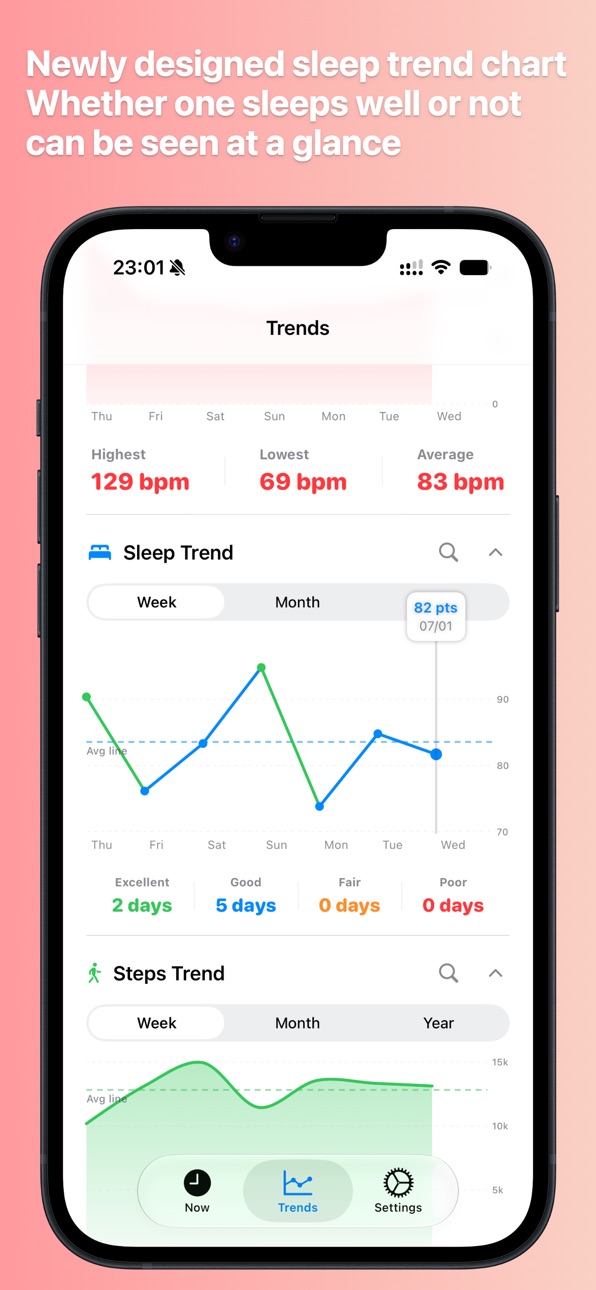
• Redesigned Trends tab: separate sections for stress, HRV, heart rate, sleep, and steps; flat layout by default, cards optional in Settings
• Trend chart options: bar/line style, average line, and expand non-stress charts by default
• Animated stress ring on the detail view; metric detail pages adapted for flat navigation
• 12 new hand-drawn stress themes: Samoyed, Husky, brindle dog, Corgi, plus orange tabby, ragdoll, Siamese, golden shaded, Scottish fold, white cat, calico, and more—28 custom themes in total
• Still includes v2.0: theme sync to Apple Watch & widgets, yearly heatmap, custom tier labels, and more
• Stability and UX improvements
Description
HRV Watch helps you understand stress, heart rate, and recovery trends more intuitively—using Apple Watch and data from the Health app.
Key features:
- HRV trends: Track HRV (SDNN) over time to see how your body is recovering
- Heart rate: Current heart rate, resting heart rate, and historical trends
- Stress insights: Estimates stress from HRV, heart rate, and related signals; includes a yearly stress heatmap for long-term patterns
- Custom stress display: Beyond the default color ring, choose from 16 cute hand-drawn theme icon sets (animals, plants, spooks, jelly, and more) that change across four tiers—Relaxed, Normal, Moderate, High; optional custom tier labels
- Steps & sleep: Daily activity and sleep data to help you see the bigger picture
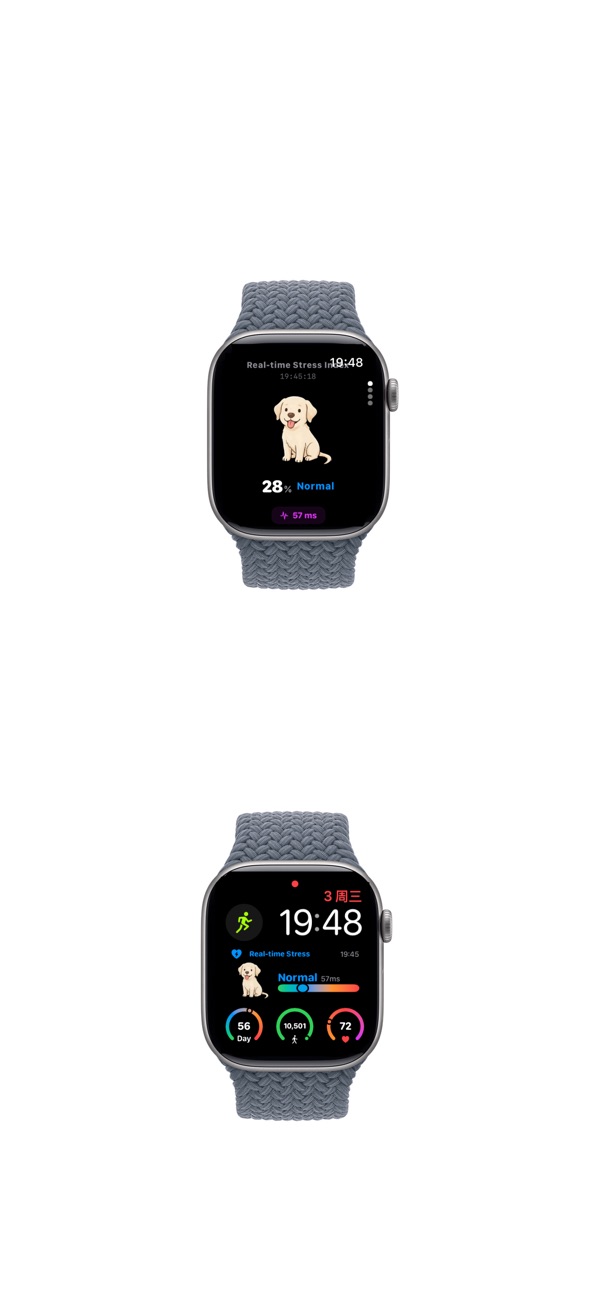
- Apple Watch: Quick access to key metrics on your wrist; theme syncs from iPhone
- Widgets & complications: Stress, steps, heart rate, and more on your watch face; rectangular stress complications show theme icons when a custom theme is selected
- Languages: English and Simplified Chinese
- Home: Cards or flat layout with customizable visible items, order, and optional header gradient
- Trends: Dedicated sections per metric; flat by default, cards optional
- 28 hand-drawn stress themes including new cartoon animal breeds; synced to Apple Watch and widgets
HRV Watch reads only the Health data you authorize and analyzes it on your device. It does not replace professional medical advice; all results are for everyday reference only.
Who it’s for:
- Anyone tracking stress day to day
- People who care about HRV and recovery
- Apple Watch users who want a simple health dashboard
- Users who prefer visual themes or heatmaps for stress
Important disclaimer:
HRV Watch is for general wellness purposes only and is not a medical device. All data, estimates, and insights are for informational use only and are not intended to diagnose, treat, cure, or prevent any disease or condition. Consult a qualified healthcare professional before making health-related decisions.
Accessibility
ipadiphonemacrealityDevicetvoswatch
Version history 6 versions
Build 887695804v3.02026-07-02 21:07:03
• New flat home layout: a cleaner list-style view alongside classic cards; customize visible items and drag to reorder
• Home display options: toggle today/real-time stress, HRV, heart rate, steps, sleep, and an optional home stress trend section
• Home header gradients: Dawn, Sky, Lavender, Mint (default), Sunset, Ocean—or turn off
• In flat mode, tap through to details via navigation push; custom theme icons appear larger on the flat home screen
• Redesigned Trends tab: separate sections for stress, HRV, heart rate, sleep, and steps; flat layout by default, cards optional in Settings
• Trend chart options: bar/line style, average line, and expand non-stress charts by default
• Animated stress ring on the detail view; metric detail pages adapted for flat navigation
• 12 new hand-drawn stress themes: Samoyed, Husky, brindle dog, Corgi, plus orange tabby, ragdoll, Siamese, golden shaded, Scottish fold, white cat, calico, and more—28 custom themes in total
• Still includes v2.0: theme sync to Apple Watch & widgets, yearly heatmap, custom tier labels, and more
• Stability and UX improvements
Build 886470472v2.02026-06-03 18:55:16
• New Custom Themes: 16 hand-drawn icon sets beyond the default color ring—icons change across four tiers (Relaxed, Normal, Moderate, High)
• Animals (11): Little dinosaur, Labra pig, Border collie, Dahuang, Little baga, Bichon, Panda, Little wolf, Cute cow, Little white horse, Little cat
• More (5): Tiny spook, Watercolor spook, Potted plant, Line portrait, Little jelly
• iPhone home stress cards and detail view show tier icons; detail sheet highlights the theme artwork with percentage and label
• Apple Watch app and rectangular complications synced—theme icon on the left; tier label, HRV, and linear gauge on the right
• Pick a theme in Settings → Custom labels → Custom Theme; syncs to Watch and widgets via App Group
• Still includes v1.3 features: yearly heatmap, custom tier labels, medical disclaimer
• Stability and UX improvements
Build 886276112v1.32026-05-29 18:57:38
1. New Year's view heatmap, providing a comprehensive overview of pressure changes throughout the year;
2. Fix the issue where some old system devices cannot be installed, and improve overall stability.
Build 886068085v1.22026-05-27 20:44:57
- Added support for iOS 17.5 and watchOS 10, improving installation compatibility with Apple Watch Series 5 and similar devices
- Added app language declarations for English and Simplified Chinese
- Fixed installation issues on some older system versions
- Improved overall stability
Build 884126516v1.12026-04-04 20:02:38
- Custom stress tier labels: In Settings → Custom labels, you can set your own text or emoji for each of the four stress levels (up to 5 grapheme clusters per level; common emoji supported).
- Same defaults as before: When custom labels are off, you still see the original tier names (e.g. Relaxed, Normal, Moderate, High) and they follow your language setting.
- Fixes and improvements: Addressed known issues and improved overall stability.
Build 882752418v1.02026-03-25 15:05:44
Price history by region
Currency
Show
Columns
Search
Availability 1 of 1 storefronts
| Region | Language | Price | Ratings | Avg | Version |
|---|---|---|---|---|---|
| US | en-US | USD 0.99 | 0 | — | 3.0 |
Change log 10 changes · US
✎
releaseNotes updated
• New flat home layout: a cleaner list-style view alongside classic cards; customize visible items and drag to reorder
• Home display options: toggle today/real
✎
description updated
HRV Watch helps you understand stress, heart rate, and recovery trends more intuitively—using Apple Watch and data from the Health app.
Key features:
- HRV tre
✎
subtitle updated
Stress | Realtime Stress Watch
✎
name updated
HRV Watch - Stress Watch
◆
Version 3.0 released
• New flat home layout: a cleaner list-style view alongside classic cards; customize visible items and drag to reorder
• Home display options: toggle today/real-time stress, HRV, heart rate, steps, sleep, and an optional home stress trend s
◆
Version 2.0 released
• New Custom Themes: 16 hand-drawn icon sets beyond the default color ring—icons change across four tiers (Relaxed, Normal, Moderate, High)
• Animals (11): Little dinosaur, Labra pig, Border collie, Dahuang, Little baga, Bichon, Panda, Litt
◆
Version 1.3 released
1. New Year's view heatmap, providing a comprehensive overview of pressure changes throughout the year;
2. Fix the issue where some old system devices cannot be installed, and improve overall stability.
◆
Version 1.2 released
- Added support for iOS 17.5 and watchOS 10, improving installation compatibility with Apple Watch Series 5 and similar devices
- Added app language declarations for English and Simplified Chinese
- Fixed installation issues on some older s
◆
Version 1.1 released
- Custom stress tier labels: In Settings → Custom labels, you can set your own text or emoji for each of the four stress levels (up to 5 grapheme clusters per level; common emoji supported).
- Same defaults as before: When custom labels are
◆
Version 1.0 released