Home › Productivity

 US
US
1 of 1 storefronts
Content in en-US
Content in en-US
Information
Preview 1 platform
iPhone 8 images




What’s New Version 1.3.1
- Stability: Fixed a rare crash when removing the last available quantity of an item
- Item list: The filter section can now be collapsed and expanded for a cleaner view
Description
Stay on top of everything you store. Kammerfuchs helps you manage your groceries, household items, and more — from the fridge to the pantry to the basement.
Stop throwing food away
Track best-before dates and get reminded in time, before anything spoils. The dashboard shows you at a glance what's expiring soon.
Print QR labels straight from the app
Print your QR labels without detours — on plain A4 paper (free), pre-cut label sheets, or tape labels via AirPrint. Name, location, best-before and storage date go onto the label automatically. Find any item again in seconds — just scan and you're there.
Add items in seconds
Type in an EAN code — Kammerfuchs pulls name, category, and nutrition automatically from Open Food Facts. With Pro it's even faster via camera scan. And the QR code scanner finds your stored items in a heartbeat.
Your locations, your structure
Create storage locations like fridge, pantry, or garage and organize them with up to 10 levels of nested sub-locations — as detailed as you want.
Bottle deposits at a glance
When you add an item, Kammerfuchs automatically detects whether it has a bottle deposit (when available online) and tracks your empties. So you always know how much you can return.
Synced everywhere — works offline, too
Your data is stored securely on your iPhone only, or synced via iCloud between your iPhones — your choice. No internet? No problem — Kammerfuchs works fully offline. As soon as you're back online, changes sync automatically. Only the EAN-based product lookup requires an internet connection.
Simple mode
For everyone who likes it uncomplicated: Simple mode automatically assigns new items to a default location. Perfect for getting started quickly.
Accessible for everyone
Kammerfuchs is built accessible from the ground up. VoiceOver, Dynamic Type, and Reduce Motion ensure everyone can use the app comfortably.
Your data belongs to you
All data is stored exclusively in your private iCloud or only on your iPhone — your choice. No tracking, no ads, no third-party servers.
Start free — with everything you need:
· Up to 100 items and 10 locations
· 23 pre-defined categories
· Best-before notifications
· iCloud sync & offline mode
· Dashboard with statistics
· QR code scanner to find your items
· Manual EAN entry (with Open Food Facts lookup)
· Bottle deposit tracking
· QR label printing on A4
· Dark Mode
· German & English
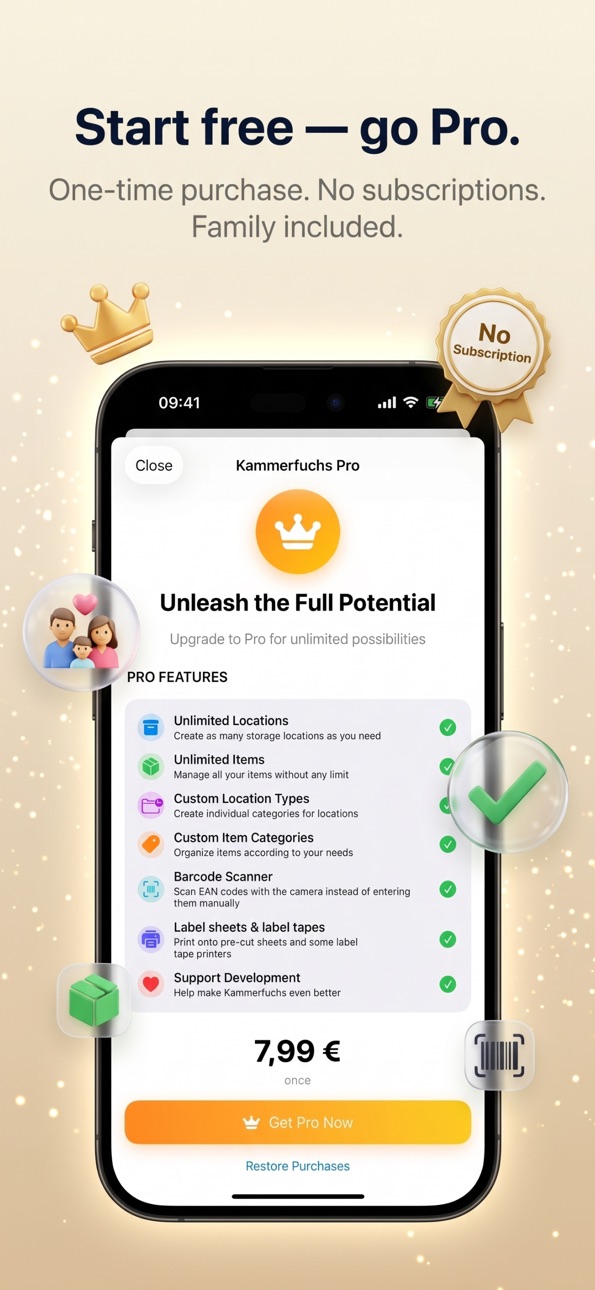
Kammerfuchs Pro (one-time purchase):
· Unlimited items and locations
· Create your own categories
· Create your own location types
· Barcode scanner with the camera (instead of manual EAN entry)
· QR label printing on pre-cut label sheets
· QR label printing on tape labels (AirPrint, 12/18/24 mm)
· Shareable via Apple Family Sharing
Capabilities
In-App Purchases
Accessibility
ipadiphonemacrealityDevicetvoswatch
Version history 4 versions
Build 886031961v1.3.12026-05-23 17:08:03
- Stability: Fixed a rare crash when removing the last available quantity of an item
- Item list: The filter section can now be collapsed and expanded for a cleaner view
Build 885042377v1.3.02026-05-06 16:27:28
New in 1.3.0 — Print QR labels straight from the app!
- A4 printing for standard labels (free)
- Pre-cut label sheets in 4 sizes (Pro)
- Tape labels for AirPrint printers, 12/18/24 mm (Pro)
- Name, best-before date, storage date & location selectable
- Multi-print mode — view stays open between prints
Also in this update:
- Consistent print preview across all formats
- Improved behavior when switching between label sizes
- Many detail improvements to the print workflow
Thanks for all your feedback! Let us know what you'd like to see next.
Build 884540103v1.2.12026-04-19 19:14:39
New in this version:
· Context Menus — Long press any storage location or item for quick access to all actions: view details, edit, change quantity, archive or delete.
· Archive Actions — Archived entries now support long press too: restore or permanently delete, right from the list.
· Expand on Tap — Tap a storage location to expand or collapse its sub-locations.
Improvements:
· More stable navigation throughout the app
· Better guidance when reaching limits (Free version)
· Various bug fixes and performance improvements
Build 882615734v1.2.02026-04-08 18:39:28
No pricing data captured yet — comparisons appear once the app has paid storefronts or in-app purchases.
Availability 1 of 1 storefronts
| Region | Language | Price | Ratings | Avg | Version |
|---|---|---|---|---|---|
| US | en-US | Free | 0 | — | 1.3.1 |
Change log 8 changes · US
✎
releaseNotes updated
- Stability: Fixed a rare crash when removing the last available quantity of an item
- Item list: The filter section can now be collapsed and expanded for a cle
✎
description updated
Stay on top of everything you store. Kammerfuchs helps you manage your groceries, household items, and more — from the fridge to the pantry to the basement.
St
✎
subtitle updated
Pantry, Expiry & QR Labels
✎
name updated
Kammerfuchs
◆
Version 1.3.1 released
- Stability: Fixed a rare crash when removing the last available quantity of an item
- Item list: The filter section can now be collapsed and expanded for a cleaner view
◆
Version 1.3.0 released
New in 1.3.0 — Print QR labels straight from the app!
- A4 printing for standard labels (free)
- Pre-cut label sheets in 4 sizes (Pro)
- Tape labels for AirPrint printers, 12/18/24 mm (Pro)
- Name, best-before date, storage date & location
◆
Version 1.2.1 released
New in this version:
· Context Menus — Long press any storage location or item for quick access to all actions: view details, edit, change quantity, archive or delete.
· Archive Actions — Archived entries now support long press too: restore
◆
Version 1.2.0 released