Home › Finance

 US
US
1 of 1 storefronts
Content in en-US
Content in en-US
Information
Preview 3 platforms
iPhone 10 images


iPad 3 images


Mac 3 images


What’s New Version 3.0.0
Node Expense goes big — now on iPad and Mac, with your PRO license everywhere you go, and zero ads.
Now on iPad & Mac
Node Expense is a native iPad and Mac app. Get a spacious two-column layout on iPad and a full desktop experience on Mac — your expenses, everywhere you work.
Sync your PRO license across devices
Have PRO on one device? Just Sign in with Apple to unlock it on every device signed in with the same Apple ID. One tap, no passwords, no restore needed.
No ads, no tracking
We removed all advertising from Node Expense. The app is now completely ad-free and doesn't track you across other apps or websites.
Plus refinements to the receipt scanner and interface. Thanks for using Node Expense!
Description
Node Expense: Split Bills & Budget Smarter
Stop the "who owes who" awkwardness. Whether you're splitting dinner, planning a group trip, or tracking personal spending, Node Expense organizes your money while keeping your data private.
Powerful group splitting meets intelligent personal budgeting—a crystal-clear financial overview without the clutter of data-hungry apps. Now on iPhone, iPad, and Mac. Perfect for roommates, couples, and travelers tracking multi-currency costs.
Smart Personal Insights
Smart, personalized cards that analyze your spending automatically—no setup required.
• Sub Creep: Spot when recurring bills quietly grow over time.
• Duplicate Detector: Catch accidental double-entries within 48 hours.
• No-Spend Streak: Track consecutive days without logged spending.
• Month-End Forecast: Project where you'll land by month's end.
Plus 9 more cards covering category dominance, weekend habits, and multi-currency tracking.
Business Travel Expense Reports (PRO)
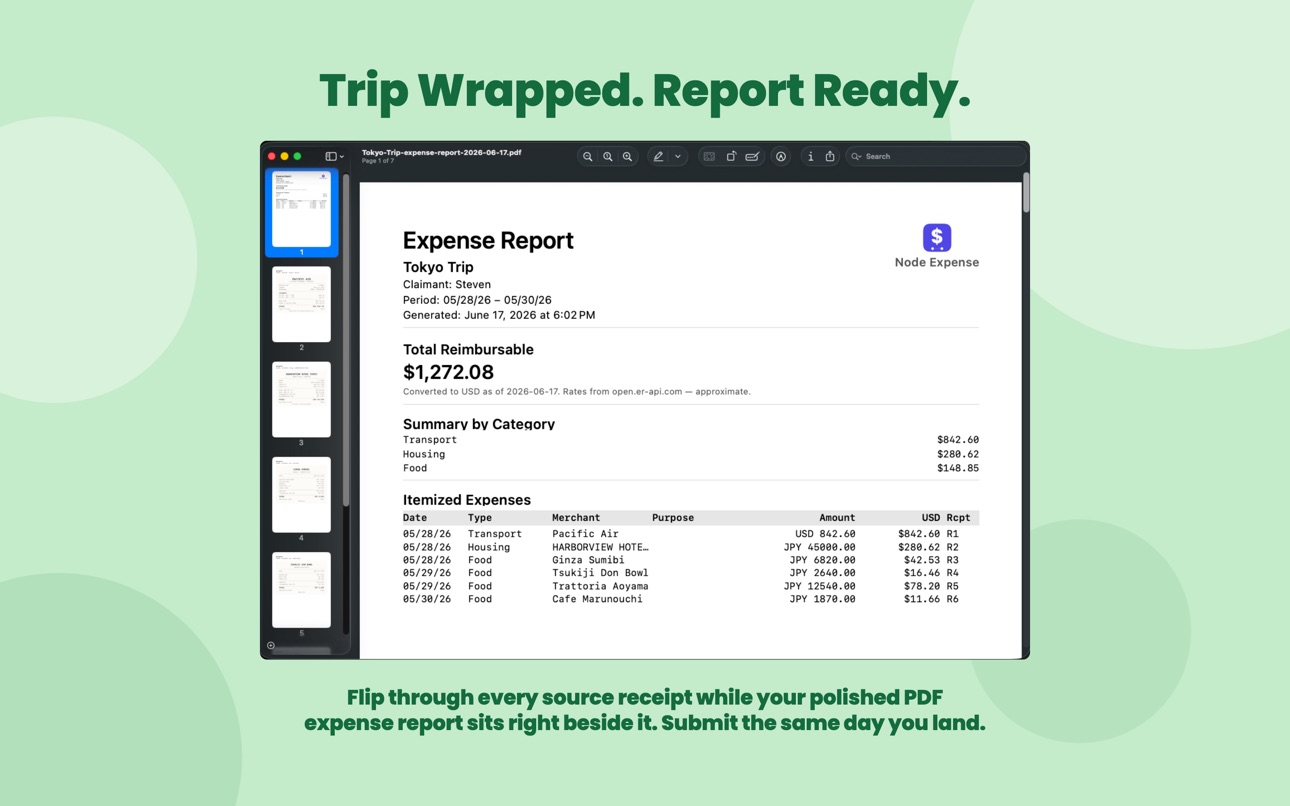
Export a professional PDF from any group—itemized expenses with each receipt on its own page, automatic home-currency conversion, a category summary, and a clear total to claim. Built for corporate reimbursement.
Effortless Group Splitting & Payments
Settling up should be fast and fair:
• Pick & Pay (AI-Powered): Snap a receipt and let AI extract itemized lines. Assign items to friends who don't have the app, and share via iMessage, QR, or AirDrop.
• Flexible Splits: Split by %, exact amounts, equal shares, or exact quantity—one beer, not five. Exclude members or edit anytime.
• Custom Tip Entry: Enter an exact tip when preset percentages don't fit.
• Smart Debt Simplification: Minimizes the transactions needed to settle up.
• Smart Settlements: Confirm payments in-app without moving actual money.
• Photo Receipts: Attach receipt photos to any expense.
• Smart Refunds: Record a refund on any expense; balances adjust automatically.
• Seamless Payments: Settle instantly via deep-links to Venmo, Cash App, or PayPal.me.
• Group Activity Feed: A full audit trail of every change.
• Expense Comments: Talk through any shared expense in its own thread, with push alerts when someone replies.
Master Your Budget
• Custom Category Budgets: Set spending caps, view live progress bars, and get limit alerts.
• Visual Trends: Monitor monthly and yearly patterns to plan ahead.
• Recurring Expenses: Manage subscriptions and bills automatically.
Power User Features
• Smart Receipt Scanning: Capture a photo to instantly extract the total, merchant, and category for fast on-device logging.
• Control Center Widgets: Log expenses in a single tap without opening the app.
• Widgets & Calendar Sync: Track balances via Home Screen widgets and view spending timelines in your calendar.
• Multi-Currency: Seamless tracking for international travel.
Privacy & Security You Can Trust
Built on a Privacy-First architecture—your financial data belongs to you.
• No Ads, No Tracking: Node Expense shows zero ads and never tracks you across other apps or websites.
• On-Device Storage: Your personal expenses stay on your device via secure SwiftData. No account or sign-up required.
• Secure Backups: Encrypted AES-256-GCM backups with keys stored in your private iCloud Keychain.
• Full Portability: Export your history as JSON, CSV, or PDF whenever you want.
Why Choose Node Expense?
• Built for iPhone, iPad & Mac: A native experience on every device, with deep widget and Control Center integration.
• Free Tier: 15 individual expenses per month, plus a 14-day trial of group expenses and secure backups. Includes location tagging and manual calendar sync.
• PRO Subscription: Unlimited group & individual expenses, category budgets, encrypted backups, full exports, and business travel expense reports. Your PRO license syncs across all your devices with Sign in with Apple. Start with a 1-month free trial.
In-App Purchases US pricing
NODE Pro Subscription
Monthly Pro · Monthly 1-month free trial$4.99
Yearly Pro · Yearly$29.99
One-Time Purchases
Pro - One Time Purchase$74.99
Capabilities
In-App Purchases
Accessibility
ipadiphonemacrealityDevicetvoswatch
Version history 25 versions
Build 887533720v3.0.02026-07-04 21:33:11
Node Expense goes big — now on iPad and Mac, with your PRO license everywhere you go, and zero ads.
Now on iPad & Mac
Node Expense is a native iPad and Mac app. Get a spacious two-column layout on iPad and a full desktop experience on Mac — your expenses, everywhere you work.
Sync your PRO license across devices
Have PRO on one device? Just Sign in with Apple to unlock it on every device signed in with the same Apple ID. One tap, no passwords, no restore needed.
No ads, no tracking
We removed all advertising from Node Expense. The app is now completely ad-free and doesn't track you across other apps or websites.
Plus refinements to the receipt scanner and interface. Thanks for using Node Expense!
Build 887411837v2.8.02026-06-27 12:12:18
Two big additions this release:
1. SPLIT BY THE ITEM, DOWN TO THE QUANTITY
You had one beer — don't pay for five. In Pick & Pay, you can now assign exact quantities per person. The table ordered a round? Tap three to John, one to you, and everyone pays for exactly what they had. Tax and tip follow each person's real share, and the total always adds up.
2. TALK IT OUT, RIGHT ON THE EXPENSE
"Wait, what was this charge?" No more digging through a separate group chat. Every shared expense now has its own comment thread, so you can ask, explain, and settle it right where the money is. Get a push the moment someone replies, and see at a glance which expenses have a conversation going.
Build 887115613v2.6.12026-06-24 22:57:26
• Bug fixes and stability improvements.
Build 887045774v2.6.02026-06-17 14:43:18
Export expense reports for business travel (PRO)
Heading out on a work trip? You can now export a professional expense report (PDF) from any group — perfect for corporate reimbursement.
• Itemized expenses with receipts attached, with each receipt cleanly formatted on its own page
• Automatic currency conversion to your home currency, including the official exchange-rate date
• Summary by category and a clear total to claim
• Receipts pulled in automatically from your group expenses
Find it under a group's ••• menu → "Export Expense Report."
Build 886929934v2.5.02026-06-16 12:34:16
Export Group Expenses (PRO)
Share a complete trip report with your group! Export any group as a PDF report — including totals, member balances, and the full itemized expense list — or as a CSV spreadsheet for deep data analysis.
Find it in the group's ••• menu.
Plus smarter receipt scanning and stability improvements.
Build 886842962v2.4.02026-06-13 09:22:36
Taiwan Uniform Invoice Lottery (統一發票)
Scan your Taiwan e-invoices and let Node Expense check them against the official bi-monthly lottery — automatically.
• Scan a Taiwan e-invoice with your iPhone camera and we capture the invoice number from its QR code
• Opt in under Settings → Notifications, and after each drawing we check your invoices right on your iPhone and notify you of a possible win
• Filter your expenses to "Lottery winners only" to spot matches at a glance, marked with a trophy icon
• Your invoice numbers never leave your iPhone — only the public winning numbers are downloaded
Plus: more reliable Taiwan e-invoice scanning — whole-number (NT$) totals, exact totals and dates read straight from the QR code, and Republic of China (ROC) calendar dates.
A possible win is unofficial until you verify it with the Ministry of Finance — keep the printed invoice to claim a prize.
Build 886736230v2.3.02026-06-11 13:01:51
• Receipt scanning just got smarter: On supported devices, scanning now utilizes Apple's on-device AI to automatically refine the detected merchant and category—meaning a grocery run and an electronics purchase at the same store land exactly where they belong. Everything runs privately on your iPhone with zero data uploads.
• More ways to settle up: Remind group members who haven't added a payment method, and hand off to Messages to arrange payment.
• Enhanced reliability: Experience improved accuracy and consistency across balances, settle-up logic, and the home widget.
Build 886581698v2.2.12026-06-09 13:22:38
• Bug fixes and performance improvements.
Build 886298238v2.2.02026-06-05 06:21:32
Introducing Insights
A new strip of smart, personalized cards now lives on your Expenses tab — automatically analyzing your spending patterns so you don't have to.
• Sub Creep: Find out when your recurring bills have quietly grown over time.
• Duplicate Detector: Instantly catch accidental double-entries made within 48 hours.
• No-Spend Streak: Track and celebrate consecutive calendar days without any logged spending.
• Month-End Forecast: Project exactly where you'll land financially by the end of the month.
Plus 9 more smart cards covering category dominance, multi-currency tracking, day-of-week habits, and weekend spending patterns. Cards appear automatically on your dashboard the moment your data qualifies — with zero setup or configuration needed.
Build 886151645v2.1.02026-05-28 16:53:10
Split bills with anyone — no app required
Pick & Pay now lets you assign items to friends who don't have the app. After splitting, share each person's itemized breakdown via iMessage, QR code, or AirDrop — they see exactly what they owe without needing the app.
Also in this update:
• Refunding a Pick & Pay expense? You'll be prompted to re-share updated amounts with your guests automatically
• Edit a Pick & Pay expense to adjust item assignments after the fact
• Custom tip amount entry when a preset percentage doesn't fit
Build 885980690v2.0.02026-05-26 11:12:20
Your Expenses tab now opens with a month-at-a-glance summary — total, trend vs last month, a 7-day spending chart, and a month-progress ring. Tap the ring to set a monthly budget and you'll get a notification when you cross your warning threshold or go over. The summary adapts to your filters and shrinks into a compact pill as you scroll.
Build 885926205v1.8.12026-05-21 17:20:51
Minor bug fixes and performance under-the-hood improvements to keep your data loading fast and stable.
Build 885887708v1.8.02026-05-20 16:56:27
Works offline. Add or edit group expenses anytime, with or without a connection. Changes — including receipt photos — sync automatically when you're back online.
At-a-glance sync status. A small cloud icon on group expenses shows when a change is queued, so you always know what's pending.
Build 885835016v1.7.32026-05-19 22:26:31
• Bug fixes and performance improvements.
Build 885757175v1.7.22026-05-18 16:33:26
• New Interactive Charts: Take a closer look at your finances. You can now tap and interact with your bar, pie, and trend charts to instantly break down your monthly spending habits and category data.
• Bug fixes and performance improvements.
Build 885593409v1.7.12026-05-14 17:19:52
• Bug fixes and performance improvements.
Build 885448987v1.7.02026-05-12 19:28:16
• New Languages: Added support for French and Korean.
• Bug fixes and performance improvements.
Build 885252422v1.6.12026-05-08 21:22:00
• Bug fixes and performance improvements.
Build 885090841v1.6.02026-05-04 17:28:12
• Photo Evidence & Receipts: Attach photos of receipts to any personal or group expense so everyone can see the proof, making verification easy and transparent.
• Bug fixes and performance improvements.
Build 885001204v1.5.12026-04-29 07:30:16
• Bug fixes and performance improvements.
Build 884734422v1.5.02026-04-26 20:49:17
1. Added Spending Trends by Category. Now you can visualize your category-specific spending patterns directly within your yearly charts to better understand where your money goes.
2. Added support for processing refunds.
3. Added German and Spanish language support.
4. Bug fixes and performance improvements.
Build 884638708v1.4.02026-04-20 18:06:40
• Seamless Peer Payments: You can now launch Venmo, Cash App, and PayPal.me directly from your expense records. (Note: Venmo and Cash App are supported for US-registered accounts; PayPal.me works globally).
• Activity Feed: Keep your group in the loop. The new Activity Feed tracks group history, logging when payments are made, when members join, and when they leave.
• Japanese language support.
• Bug fixes and performance improvements.
Build 884519993v1.3.02026-04-17 13:48:36
• Category Budgets: Set a monthly spending cap for any category. A live progress bar tracks your usage, and you'll get notified at your chosen warning threshold and again when the budget is exceeded.
• Receipt Scanning: Capture a receipt and let the app extract the amount automatically.
• Export Options: Export your expense history as CSV or PDF in addition to the existing JSON format.
• Bug fixes and performance improvements.
Build 884377018v1.2.02026-04-14 16:23:19
- New: Added support for Traditional and Simplified Chinese.
- Bug fixes and performance improvements.
Build 884345754v1.1.12026-04-10 14:57:39
- Bug Fixes: General stability improvements and UI refinements.
Price history by region
Currency
Show
Columns
Search
Availability 1 of 1 storefronts
| Region | Language | Price | Ratings | Avg | Version |
|---|---|---|---|---|---|
| US | en-US | Free | 3 | 5.0 | 3.0.0 |
Change log 29 changes · US
✎
releaseNotes updated
Node Expense goes big — now on iPad and Mac, with your PRO license everywhere you go, and zero ads.
Now on iPad & Mac
Node Expense is a native iPad and Mac app
✎
description updated
Node Expense: Split Bills & Budget Smarter
Stop the "who owes who" awkwardness. Whether you're splitting dinner, planning a group trip, or tracking personal sp
✎
subtitle updated
Split Group Bills & Budget
✎
name updated
Node Expense: Track Together
◆
Version 3.0.0 released
Node Expense goes big — now on iPad and Mac, with your PRO license everywhere you go, and zero ads.
Now on iPad & Mac
Node Expense is a native iPad and Mac app. Get a spacious two-column layout on iPad and a full desktop experience on Mac
◆
Version 2.8.0 released
Two big additions this release:
1. SPLIT BY THE ITEM, DOWN TO THE QUANTITY
You had one beer — don't pay for five. In Pick & Pay, you can now assign exact quantities per person. The table ordered a round? Tap three to John, one to you, and
◆
Version 2.6.1 released
• Bug fixes and stability improvements.
◆
Version 2.6.0 released
Export expense reports for business travel (PRO)
Heading out on a work trip? You can now export a professional expense report (PDF) from any group — perfect for corporate reimbursement.
• Itemized expenses with receipts attached, with each
◆
Version 2.5.0 released
Export Group Expenses (PRO)
Share a complete trip report with your group! Export any group as a PDF report — including totals, member balances, and the full itemized expense list — or as a CSV spreadsheet for deep data analysis.
Find it in
◆
Version 2.4.0 released
Taiwan Uniform Invoice Lottery (統一發票)
Scan your Taiwan e-invoices and let Node Expense check them against the official bi-monthly lottery — automatically.
• Scan a Taiwan e-invoice with your iPhone camera and we capture the invoice number f
◆
Version 2.3.0 released
• Receipt scanning just got smarter: On supported devices, scanning now utilizes Apple's on-device AI to automatically refine the detected merchant and category—meaning a grocery run and an electronics purchase at the same store land exactl
◆
Version 2.2.1 released
• Bug fixes and performance improvements.
◆
Version 2.2.0 released
Introducing Insights
A new strip of smart, personalized cards now lives on your Expenses tab — automatically analyzing your spending patterns so you don't have to.
• Sub Creep: Find out when your recurring bills have quietly grown over tim
◆
Version 2.1.0 released
Split bills with anyone — no app required
Pick & Pay now lets you assign items to friends who don't have the app. After splitting, share each person's itemized breakdown via iMessage, QR code, or AirDrop — they see exactly what they owe wi
◆
Version 2.0.0 released
Your Expenses tab now opens with a month-at-a-glance summary — total, trend vs last month, a 7-day spending chart, and a month-progress ring. Tap the ring to set a monthly budget and you'll get a notification when you cross your warning thr
◆
Version 1.8.1 released
Minor bug fixes and performance under-the-hood improvements to keep your data loading fast and stable.
◆
Version 1.8.0 released
Works offline. Add or edit group expenses anytime, with or without a connection. Changes — including receipt photos — sync automatically when you're back online.
At-a-glance sync status. A small cloud icon on group expenses shows when a ch
◆
Version 1.7.3 released
• Bug fixes and performance improvements.
◆
Version 1.7.2 released
• New Interactive Charts: Take a closer look at your finances. You can now tap and interact with your bar, pie, and trend charts to instantly break down your monthly spending habits and category data.
• Bug fixes and performance improvement
◆
Version 1.7.1 released
• Bug fixes and performance improvements.
◆
Version 1.7.0 released
• New Languages: Added support for French and Korean.
• Bug fixes and performance improvements.
◆
Version 1.6.1 released
• Bug fixes and performance improvements.
◆
Version 1.6.0 released
• Photo Evidence & Receipts: Attach photos of receipts to any personal or group expense so everyone can see the proof, making verification easy and transparent.
• Bug fixes and performance improvements.
◆
Version 1.5.1 released
• Bug fixes and performance improvements.
◆
Version 1.5.0 released
1. Added Spending Trends by Category. Now you can visualize your category-specific spending patterns directly within your yearly charts to better understand where your money goes.
2. Added support for processing refunds.
3. Added German and
◆
Version 1.4.0 released
• Seamless Peer Payments: You can now launch Venmo, Cash App, and PayPal.me directly from your expense records. (Note: Venmo and Cash App are supported for US-registered accounts; PayPal.me works globally).
• Activity Feed: Keep your group
◆
Version 1.3.0 released
• Category Budgets: Set a monthly spending cap for any category. A live progress bar tracks your usage, and you'll get notified at your chosen warning threshold and again when the budget is exceeded.
• Receipt Scanning: Capture a rece
◆
Version 1.2.0 released
- New: Added support for Traditional and Simplified Chinese.
- Bug fixes and performance improvements.
◆
Version 1.1.1 released
- Bug Fixes: General stability improvements and UI refinements.