Home › Utilities

Hyper Whisper: Voice to Text
AI Dictation on iPhone & Mac
 US
US
1 of 1 storefronts
Content in en-US
Content in en-US
Information
Preview 2 platforms
iPhone 9 images




iPad 3 images


What’s New Version 2.0
dictate. is now Hyper Whisper — a new name, a new look, and a cleaner dictation experience on iPhone and Mac.
- New Hyper Whisper identity — the app icon, keyboard design, widgets, and in-app screens have been refreshed.
- Better sync between iPhone and Mac — history, settings, personal dictionary, and Pro access stay connected through your account.
- More languages — added support for French, German, Mexican Spanish, and Simplified Chinese in the app.
- Simpler setup — onboarding and Full Access checks are clearer, so enabling the keyboard takes less guesswork.
- More reliable dictation and Pro access — improvements to sync, dictionary, and purchase validation make sessions and Pro status steadier.
Description
You think faster than you type. Hyper Whisper keeps up with that pace — on iPhone and Mac.
Speak naturally and get clean, ready-to-use text right where you already write. Use Hyper Whisper in Messages, WhatsApp, Gmail, Notion, Instagram, Mail, Notes, and more on iPhone — and keep the same flow on macOS.
One subscription unlocks both platforms, with your history, settings, personal dictionary, and Pro access synced through your account.
On iPhone, no copying and pasting. No fighting messy transcripts. Just speak, review, and send polished text with punctuation, paragraphs, and automatic cleanup of filler words.
### Why Hyper Whisper is different
- iPhone + Mac included — one subscription unlocks both platforms, fully synced
- Works inside any app on iPhone — Hyper Whisper is an AI keyboard, not a separate transcription inbox
- Clean, ready-to-send text — punctuation, paragraphs, and filler word cleanup happen automatically
- No copy-paste — your words appear directly where you're typing
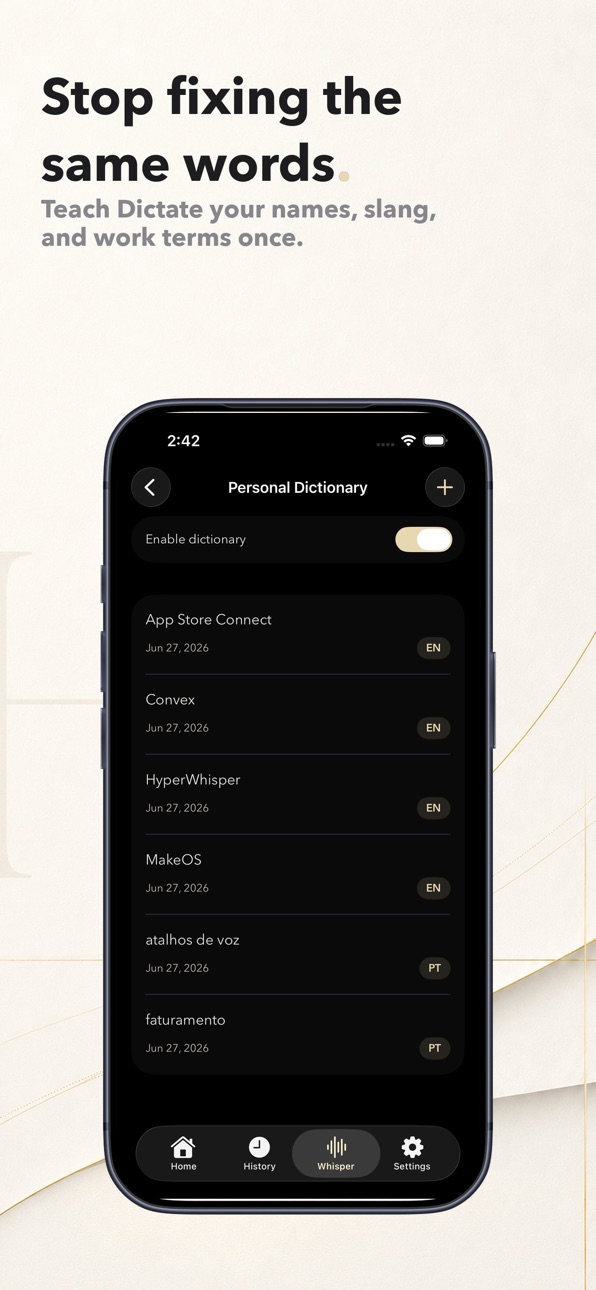
- Personal dictionary — teach names, slang, technical terms, and work phrases once
- Searchable history — find past messages, notes, and ideas in seconds
- Translation — speak in one language and send in another, with support for 4 translation languages
- 30+ dictation languages — speak naturally in the language you use every day
- Edit without switching keyboards — add numbers, symbols, and punctuation from the same keyboard
- Widget + Live Activities — start dictating from the Home Screen and follow sessions in Dynamic Island
- Privacy from the start — your audio is processed securely, and recordings are never stored
### Use Hyper Whisper to
- Clear your inbox faster than typing
- Turn rough ideas into clean prompts for ChatGPT and other AI tools
- Reply in WhatsApp, Telegram, and iMessage
- Write emails in Gmail, Outlook, and Mail
- Capture notes in Notion, Bear, and Apple Notes
- Draft posts for Instagram, X, and LinkedIn
- Fill forms and search without typing
- Reduce hand strain from repetitive typing
### Start in seconds
1. Enable the Hyper Whisper keyboard in Settings → Keyboards
2. Tap the globe icon to switch keyboards
3. Press the microphone and speak naturally
4. Review the text and send it
Works in apps that accept text input. Requires iOS 18.0 or later.
Terms of Use: https://gabrielmalonso.github.io/usedictate-legal/terms/
Privacy Policy: https://gabrielmalonso.github.io/usedictate-legal/privacy/
Capabilities
In-App Purchases
Accessibility
ipadiphonemacrealityDevicetvoswatch
Version history 9 versions
Build 887535084v2.02026-06-30 22:00:26
dictate. is now Hyper Whisper — a new name, a new look, and a cleaner dictation experience on iPhone and Mac.
- New Hyper Whisper identity — the app icon, keyboard design, widgets, and in-app screens have been refreshed.
- Better sync between iPhone and Mac — history, settings, personal dictionary, and Pro access stay connected through your account.
- More languages — added support for French, German, Mexican Spanish, and Simplified Chinese in the app.
- Simpler setup — onboarding and Full Access checks are clearer, so enabling the keyboard takes less guesswork.
- More reliable dictation and Pro access — improvements to sync, dictionary, and purchase validation make sessions and Pro status steadier.
Build 885719366v1.5.22026-05-20 17:54:42
A faster, more reliable dictation pipeline, Japanese localization, and cleaner syncing.
- Faster dictation flow — uploads can start sooner and use a direct fallback path when the normal route is slow or unavailable.
- More reliable results — retries now preserve the right processing context, and dictations finish more smoothly in the background.
- Japanese localization — app screens, App Store metadata, and supporting assets now include Japanese.
- Cleaner syncing — reduced duplicate sync activity helps history and session status stay steadier.
Build 885197694v1.4.52026-05-03 19:16:18
Smarter personal dictionary, more dictation languages, and a cleaner active dictation experience.
- Personal dictionary improvements — names, phrases, and compound terms are protected more reliably, with fewer unwanted corrections.
- More dictation languages — expanded language support, including Chinese, so you can speak naturally in more places.
- Cleaner history and Live Activity — history search is easier to dismiss, language labels are clearer, and active dictation sessions show steadier status and timing.
Build 884866455v1.4.02026-04-26 19:11:00
Improved subscription reliability — Purchases and subscription status are now checked more consistently, with safer verification behind the scenes.
More accurate stats — Weekly charts now handle dates more reliably, so your progress view is less likely to show odd day labels.
Sync and stability fixes — Small improvements across history sync, dictation cleanup, and the overall app experience.
Build 884211180v1.3.12026-04-07 16:55:40
More reliable dictation — Better recovery from audio interruptions, stuck states, and background issues. If the keyboard gets stuck, a cancel/retry button now appears automatically.
Recording safeguards — Sessions now have a 4-minute limit, an on-screen warning near the end, and auto-stop on inactivity so you don't leave dictation running by accident.
Smarter personal dictionary — dictate. now catches more variations of your custom names, terms, and phrases.
Faster sync across devices — Your rules, dictionary, and history now stay updated more quickly and automatically, including when you open the keyboard.
Dictation stats — See your weekly dictations, current streak, best day, and charts right inside the app.
Stability improvements — Better background handling, more reliable cleanup, and overall performance improvements.
Build 884113957v1.3.02026-04-04 17:18:24
More reliable dictation — Better recovery from audio interruptions, stuck states, and background issues. If the keyboard gets stuck, a cancel/retry button now appears automatically.
Recording safeguards — Sessions now have a 4-minute limit, an on-screen warning near the end, and auto-stop on inactivity so you don't leave dictation running by accident.
Smarter personal dictionary — dictate. now catches more variations of your custom names, terms, and phrases.
Faster sync across devices — Your rules, dictionary, and history now stay updated more quickly and automatically, including when you open the keyboard.
Dictation stats — See your weekly dictations, current streak, best day, and charts right inside the app.
Stability improvements — Better background handling, more reliable cleanup, and overall performance improvements.
Build 883545272v1.2.02026-03-21 14:56:00
Personal dictionary — Add custom words and phrases so your dictation gets names, technical terms, and slang right every time.
Smarter formatting — New 3-layer AI pipeline that automatically cleans up your speech with better punctuation, paragraphs, and structure.
Swipe while dictating — Now you can swipe between keyboard pages without stopping your recording.
Notifications — Get helpful tips and feature suggestions as you use the app.
Bug fixes and stability — Improved sync reliability, better audio recording, and various under-the-hood improvements.
Build 883277944v1.1.02026-03-13 21:58:31
Version 1.1.0
- Real-time translation — Dictate in one language and get your text translated instantly. Supports 4 languages with a compact language selector right on the keyboard.
- Smarter formatting — New date, time, and list formatting options for even cleaner output.
- Action Button improvements — Stop active sessions with a single press. More reliable recording start. Bug fix.
- Bug fixes and stability — Improved audio recording reliability, better sign-out cleanup, and various under-the-hood improvements.
Build 882537108v1.02026-03-10 18:52:56
No pricing data captured yet — comparisons appear once the app has paid storefronts or in-app purchases.
Availability 1 of 1 storefronts
| Region | Language | Price | Ratings | Avg | Version |
|---|---|---|---|---|---|
| US | en-US | Free | 0 | — | 2.0 |
Change log 13 changes · US
✎
releaseNotes updated
dictate. is now Hyper Whisper — a new name, a new look, and a cleaner dictation experience on iPhone and Mac.
- New Hyper Whisper identity — the app icon, keyb
✎
description updated
You think faster than you type. Hyper Whisper keeps up with that pace — on iPhone and Mac.
Speak naturally and get clean, ready-to-use text right where you alr
✎
subtitle updated
AI Dictation on iPhone & Mac
✎
name updated
Hyper Whisper: Voice to Text
◆
Version 2.0 released
dictate. is now Hyper Whisper — a new name, a new look, and a cleaner dictation experience on iPhone and Mac.
- New Hyper Whisper identity — the app icon, keyboard design, widgets, and in-app screens have been refreshed.
- Better sync betw
◆
Version 1.5.2 released
A faster, more reliable dictation pipeline, Japanese localization, and cleaner syncing.
- Faster dictation flow — uploads can start sooner and use a direct fallback path when the normal route is slow or unavailable.
- More reliable results
◆
Version 1.4.5 released
Smarter personal dictionary, more dictation languages, and a cleaner active dictation experience.
- Personal dictionary improvements — names, phrases, and compound terms are protected more reliably, with fewer unwanted corrections.
- More
◆
Version 1.4.0 released
Improved subscription reliability — Purchases and subscription status are now checked more consistently, with safer verification behind the scenes.
More accurate stats — Weekly charts now handle dates more reliably, so your progress view i
◆
Version 1.3.1 released
More reliable dictation — Better recovery from audio interruptions, stuck states, and background issues. If the keyboard gets stuck, a cancel/retry button now appears automatically.
Recording safeguards — Sessions now have a 4-minute limit
◆
Version 1.3.0 released
More reliable dictation — Better recovery from audio interruptions, stuck states, and background issues. If the keyboard gets stuck, a cancel/retry button now appears automatically.
Recording safeguards — Sessions now have a 4-minute limit
◆
Version 1.2.0 released
Personal dictionary — Add custom words and phrases so your dictation gets names, technical terms, and slang right every time.
Smarter formatting — New 3-layer AI pipeline that automatically cleans up your speech with better punctuation, pa
◆
Version 1.1.0 released
Version 1.1.0
- Real-time translation — Dictate in one language and get your text translated instantly. Supports 4 languages with a compact language selector right on the keyboard.
- Smarter formatting — New date, time, and list formatting
◆
Version 1.0 released