Home › Utilities

 US
US
1 of 1 storefronts
Content in en-US
Content in en-US
Information
Preview 1 platform
iPhone 6 images




What’s New Version 1.4.0
Rectifi 1.4.0: Better scans and a smoother start.
• A cleaner first launch: onboarding is now folded into one welcome screen, so you reach your first scan faster.
• The Scan screen greets you with a curated set of messages that shift with the time of day.
• Smart Capture: Smart Capture now correctly captures when it tells you. Not a slight beat after.
• Standard Scans: Improved the auto-straighten feature for Standard scans. Don't worry about skewed cards.
• Faster launches: The app opens without waiting on the network, so a weak connection won't stall the splash screen.
• Card rotation: Rotating a card in your results now rotates its centering numbers too.
Description
Don't get burned on bad centering. Scan your card against PSA, BGS, and CGC centering standards in seconds, even from an awkward angle. Free. No ads. No account needed.
BUILT FOR TRADING CARDS WITH AUTOMATIC PERSPECTIVE CORRECTION
Other apps need a perfectly flat photo. Rectifi doesn't. Our app straightens your photo before measuring, so your ratios are accurate no matter how you hold your phone. Watch the perspective correction happen in real time.
Built for trading cards, Rectifi detects cards automatically, even on busy backgrounds.
HOW IT WORKS
1. Snap a photo or import from your library
2. Place your card's corners one at a time
3. Perspective correction kicks in automatically
4. Get centering ratios and grade qualifications for PSA, BGS, and CGC. Toggle between front and back with a tap.
GUIDED MODE: PLACE CORNERS WITH CONFIDENCE
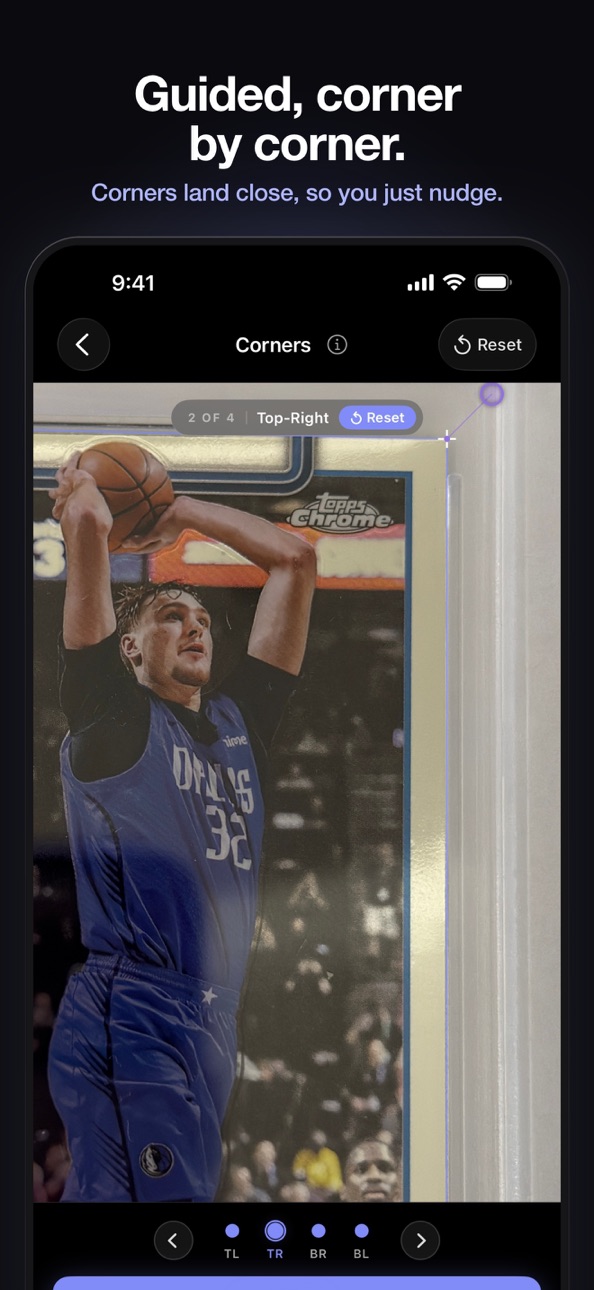
Rectifi walks you through corner placement one corner at a time. The screen zooms into each corner so you can line it up precisely before confirming. An on-device detector places every corner for you first, so most of the time a small adjustment is all it takes. Prefer placing all four corners at once? Switch to Manual mode anytime in Settings.
INTERACTIVE DEMO
Not sure how it works? Walk through an interactive demo with a real card. See corner placement, border adjustment, and full results. No account needed.
A NOTE ON "PRO SCANS"
A Pro Scan is a perspective-corrected scan. You get 3 free to start and 1 per day after that. Unlimited with Rectifi Pro.
FREE FEATURES
• Unlimited standard scans with centering analysis
• Works with Pokémon, Magic, sports cards, and all other standard-sized cards
• Grade qualifications for PSA, BGS, and CGC
• Guided Mode: place corners one at a time in a zoomed-in viewport
• Smart Capture: fires automatically when your card is stable and in focus
• Automatic card detection and cropping
• Level-guided capture for accurate flat photos
• Offset handles keep your finger out of the way when placing corners
• Slow-drag precision mode when zoomed in for sub-pixel accuracy
• Share your scan results with a public link
PRO FEATURES
• Unlimited Pro Scans with perspective correction
• Cloud-synced scan history across devices
• Exact ratios and grade qualifications for every past scan
• Side-by-side comparison to find the better card
• Fullscreen zoom and pan on scan images
• Border re-adjustment on saved scans without rescanning
Stop second-guessing. Never get burned on centering again.
In-App Purchases US pricing
Rectifi Pro Subscription
Monthly · Monthly 7-day free trial$7.99
Capabilities
In-App Purchases
Accessibility
ipadiphonemacrealityDevicetvoswatch
Version history 13 versions
Build 886878011v1.4.02026-06-22 17:31:44
Rectifi 1.4.0: Better scans and a smoother start.
• A cleaner first launch: onboarding is now folded into one welcome screen, so you reach your first scan faster.
• The Scan screen greets you with a curated set of messages that shift with the time of day.
• Smart Capture: Smart Capture now correctly captures when it tells you. Not a slight beat after.
• Standard Scans: Improved the auto-straighten feature for Standard scans. Don't worry about skewed cards.
• Faster launches: The app opens without waiting on the network, so a weak connection won't stall the splash screen.
• Card rotation: Rotating a card in your results now rotates its centering numbers too.
Build 886631856v1.3.32026-06-11 20:55:53
Rectifi 1.3.3: Sharper Smart Capture.
• Smart Capture got sharper: it now waits for your card to be crisply in focus, not just steady, before it fires, so you'll see far fewer blurry shots.
• Sharper photos: captures use the full high-quality pipeline with tighter framing, for cleaner edges and more accurate centering.
• A clearer on-screen hint tells you exactly what it's waiting for: "Focusing…" or "Hold steady…".
• With Smart Capture off, the hint simply says "Tap to capture" once your card is in frame.
• A cleaner upgrade screen makes it easy to see what Pro adds, with free trial and price spelled out up front.
• Plus stability fixes and polish.
Build 885991647v1.3.12026-05-22 02:52:59
Rectifi 1.3: A redesigned scanning experience.
• New Guided Mode: place each corner one at a time inside a zoomed-in viewport.
• Improved on-device corner detector: more accurate starting corners across the whole scan flow (live camera, photo import, corner placement, and auto).
• Smart Capture: the camera fires automatically once your card locks in.
• Pro Scan now reports per-side border widths in millimeters (Standard / Japanese sizes).
• Cleaner scan flow, VoiceOver and Reduce Motion polish.
• Fixes a crash that could occur when opening the app.
Build 885996662v1.3.22026-05-22 13:33:41
Rectifi 1.3: A redesigned scanning experience.
• New Guided Mode: place each corner one at a time inside a zoomed-in viewport.
• Improved on-device corner detector: more accurate starting corners across the whole scan flow (live camera, photo import, corner placement, and auto).
• Smart Capture: the camera fires automatically once your card locks in.
• Pro Scan now reports per-side border widths in millimeters (Standard / Japanese sizes).
• Cleaner scan flow, VoiceOver and Reduce Motion polish.
• Fixes a crash on a specific iOS version.
Build 885704156v1.3.02026-05-20 19:56:54
• New Guided Mode: place each corner one at a time inside a zoomed-in viewport.
• Sharper on-device corner detector: more accurate starting corners across the whole scan flow (live camera, photo import, corner placement, and auto).
• Smart Capture: the camera fires automatically once your card locks in.
• Pro Scan now reports per-side border widths in millimeters (Standard / Japanese sizes).
• Cleaner scan flow, VoiceOver and Reduce Motion polish.
Build 885387129v1.2.12026-05-07 20:38:42
• Bug fixes and minor improvements
Build 884664011v1.2.02026-04-27 18:47:03
• Improved corner detection. More accurate than ever
• Sign-in no longer needed to subscribe. You'll still have to sign in to sync cloud history across devices and for re-installs.
• Pro Scan Stats with BGS centering subgrades and straightening details
• Rotate card results to match your preferred orientation. No more tilting your head for landscape cards
• Smoother straightening animations for all card orientations
• New layout for Settings page to allow subscription management for anonymous users
• Plus the usual round of bug fixes and stability improvements
Build 884500832v1.1.42026-04-14 18:11:49
What's New in 1.1.4
- NEW: Inner border handles can now be repositioned along each edge — slide to find the cleanest part of the border for a more accurate measurement.
- Improved camera quality with faster autofocus and better image capture
- Bug fixes and stability improvements
Build 884070502v1.1.32026-04-07 15:10:16
Sharper photos, smarter limits, safer adjustments.
• ProRAW capture: higher-quality photos with exposure lock and zero-shutter-lag for sharper scans
• Welcome bonus: new users get 3 free Pro Scans to try before the daily limit kicks in
• Outer border warning: Pro Scans now prompt you before adjusting the outer border, preventing accidental accuracy loss
• Corner placement warning: if you don't touch any of the corners, we give a friendly warning that they weren't touched
• Bug fixes and performance improvements
Build 883757425v1.1.22026-03-25 19:12:14
• Start free with a 7-day trial. Try every Pro feature before subscribing
• Border adjustment guidance: First-time prompt reminds you to fine-tune borders for better accuracy
• Rate Rectifi — new quick link in Settings if you'd like to leave a review
• Share link improvements: centering ratios now appear in link previews, plus faster page loads
• Bug fixes and performance improvements
Build 883523588v1.1.12026-03-20 19:59:10
Share your card analysis with a public link. Send it to a friend and they can open it right in Rectifi to view your analysis or adjust the borders.
New in this update:
• Share your scan results with a public link
• Pinch-to-zoom up to 16× with precision drag on corners and borders
• Refined rectification animation. Animation should now feel a lot smoother.
• Various bug fixes and performance improvements
Build 883338244v1.12026-03-15 00:46:05
Inner Border Detection: Rectifi now automatically finds the inner artwork border on your cards, so you spend less time dragging handles into place.
Interactive Onboarding: A hands-on demo walks you through your first scan so you can see results before committing.
Also in this update:
• Redeem codes now available for all users under Account & Plan
• Smoother Apple Sign-In experience
• Improved border adjustment controls
• Refined grading thresholds for BGS and CGC
• 2d Skew correction for standard scans
• UI polish and bug fixes
Build 882483479v1.02026-03-11 16:31:32
Price history by region
Currency
Show
Columns
Search
Availability 1 of 1 storefronts
| Region | Language | Price | Ratings | Avg | Version |
|---|---|---|---|---|---|
| US | en-US | Free | 15 | 4.9 | 1.4.0 |
Change log 17 changes · US
✎
releaseNotes updated
Rectifi 1.4.0: Better scans and a smoother start.
• A cleaner first launch: onboarding is now folded into one welcome screen, so you reach your first scan fast
✎
description updated
Don't get burned on bad centering. Scan your card against PSA, BGS, and CGC centering standards in seconds, even from an awkward angle. Free. No ads. No account
✎
subtitle updated
TCG & Sports Card Grading App
✎
name updated
Rectifi - Card Centering Tool
◆
Version 1.4.0 released
Rectifi 1.4.0: Better scans and a smoother start.
• A cleaner first launch: onboarding is now folded into one welcome screen, so you reach your first scan faster.
• The Scan screen greets you with a curated set of messages that shift with
◆
Version 1.3.3 released
Rectifi 1.3.3: Sharper Smart Capture.
• Smart Capture got sharper: it now waits for your card to be crisply in focus, not just steady, before it fires, so you'll see far fewer blurry shots.
• Sharper photos: captures use the full high-qual
◆
Version 1.3.2 released
Rectifi 1.3: A redesigned scanning experience.
• New Guided Mode: place each corner one at a time inside a zoomed-in viewport.
• Improved on-device corner detector: more accurate starting corners across the whole scan flow (live camera, ph
◆
Version 1.3.1 released
Rectifi 1.3: A redesigned scanning experience.
• New Guided Mode: place each corner one at a time inside a zoomed-in viewport.
• Improved on-device corner detector: more accurate starting corners across the whole scan flow (live camera, ph
◆
Version 1.3.0 released
• New Guided Mode: place each corner one at a time inside a zoomed-in viewport.
• Sharper on-device corner detector: more accurate starting corners across the whole scan flow (live camera, photo import, corner placement, and auto).
• Smart
◆
Version 1.2.1 released
• Bug fixes and minor improvements
◆
Version 1.2.0 released
• Improved corner detection. More accurate than ever
• Sign-in no longer needed to subscribe. You'll still have to sign in to sync cloud history across devices and for re-installs.
• Pro Scan Stats with BGS centering subgrades and stra
◆
Version 1.1.4 released
What's New in 1.1.4
- NEW: Inner border handles can now be repositioned along each edge — slide to find the cleanest part of the border for a more accurate measurement.
- Improved camera quality with faster autofocus and better image captur
◆
Version 1.1.3 released
Sharper photos, smarter limits, safer adjustments.
• ProRAW capture: higher-quality photos with exposure lock and zero-shutter-lag for sharper scans
• Welcome bonus: new users get 3 free Pro Scans to try before the daily limit kicks in
•
◆
Version 1.1.2 released
• Start free with a 7-day trial. Try every Pro feature before subscribing
• Border adjustment guidance: First-time prompt reminds you to fine-tune borders for better accuracy
• Rate Rectifi — new quick link in Settings if you'd like to leav
◆
Version 1.1.1 released
Share your card analysis with a public link. Send it to a friend and they can open it right in Rectifi to view your analysis or adjust the borders.
New in this update:
• Share your scan results with a public link
• Pinch-to-zoom up to 16×
◆
Version 1.1 released
Inner Border Detection: Rectifi now automatically finds the inner artwork border on your cards, so you spend less time dragging handles into place.
Interactive Onboarding: A hands-on demo walks you through your first scan so you can see re
◆
Version 1.0 released