Home › Business

 US
US
1 of 1 storefronts
Content in en-US
Content in en-US
Information
Preview 3 platforms
iPhone 10 images




iPad 8 images




Mac 5 images


What’s New Version 3.1
We're constantly working to make Excart POS better for your business. This update brings powerful new inventory features and essential improvements for a smoother, faster checkout experience.
New Features:
Recipe & Ingredients System: Track raw ingredients automatically. Selling a Cafe Latte now accurately deducts the exact grams of coffee and liters of milk from your inventory.
Flexible Measurements: You can now sell items by custom units like Grams, Liters, Meters, or even Hours—perfect for bulk retail, fabric stores, and rental services.
Revamped Demo Mode: Experience Excart's full potential with our new interactive Demo Mode, showcasing various business types (F&B, Retail, Services) in one tap.
Improvements & Fixes:
Smarter Variant Tracking: Improved SKU architecture for more accurate stock and cost calculations.
UI Enhancements: Polished interface elements and improved notification visibility for a distraction-free experience.
General Stability: Squashed various under-the-hood bugs to ensure your dashboard and inventory data always stay perfectly synced.
Update now to enjoy the best version of Excart POS yet!
Description
Excart POS is a modern point of sale designed for small and growing businesses that need a reliable system for daily operations.
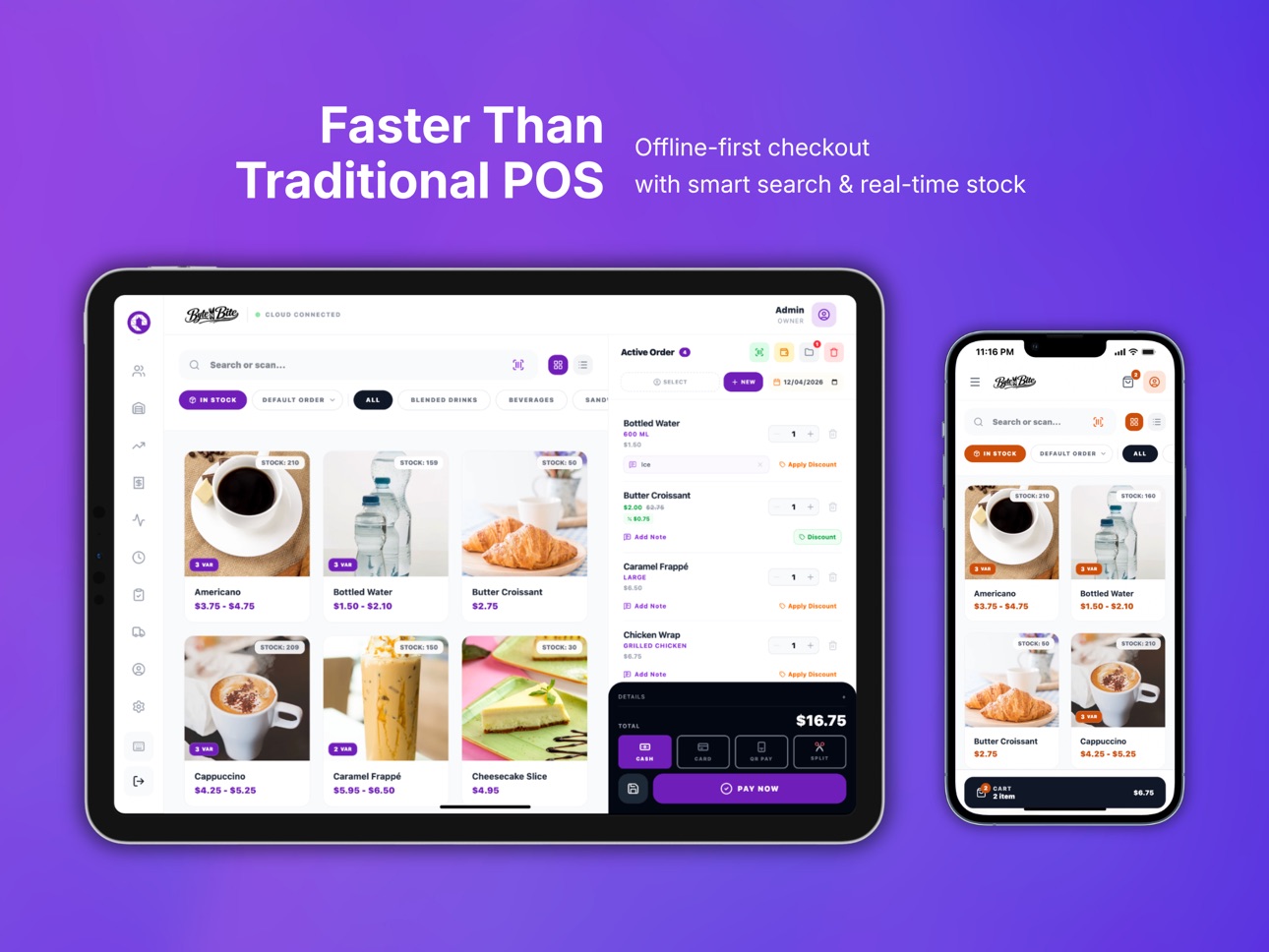
Built with an offline-first approach, Excart keeps your business running smoothly even without an internet connection.
Sales, cashier activity, and reports continue to work locally, so your store stays operational at all times.
Subscription Information
Excart POS Premium is an auto-renewable subscription.
• Title: Excart POS Premium
• Duration: 1 Month (Monthly Subscription)
• Price: See pricing in the App Store (varies by region)
• Payment will be charged to your Apple ID account at confirmation of purchase.
• Subscription automatically renews unless cancelled at least 24 hours before the end of the current period.
• Your account will be charged for renewal within 24 hours prior to the end of the current period.
• You can manage or cancel your subscription anytime in your Apple ID account settings.
Terms of Use (EULA):
https://www.apple.com/legal/internet-services/itunes/dev/stdeula/
Privacy Policy:
https://excart.net/privacy
Key capabilities
• Fast and responsive checkout that works fully offline
• Multiple cashier accounts with secure PIN access
• Simple, clean, and easy-to-use interface
• Daily sales tracking and basic reporting
• Device-based activation for secure usage
All core POS features are available without a subscription.
For businesses that need cloud access, an optional subscription provides:
• Secure cloud backup
• Multi-device activation
• Access to your data across devices
• Cloud synchronization for added safety
Excart POS is built for stability, speed, and simplicity, so you can focus on running your business with confidence.
In-App Purchases US pricing
Excart POS Premium Subscription
Excart Premium · Monthly$4.99
Capabilities
In-App Purchases
Accessibility
ipadiphonemacrealityDevicetvoswatch
Version history 21 versions
Build 887472366v3.12026-06-26 20:43:11
We're constantly working to make Excart POS better for your business. This update brings powerful new inventory features and essential improvements for a smoother, faster checkout experience.
New Features:
Recipe & Ingredients System: Track raw ingredients automatically. Selling a Cafe Latte now accurately deducts the exact grams of coffee and liters of milk from your inventory.
Flexible Measurements: You can now sell items by custom units like Grams, Liters, Meters, or even Hours—perfect for bulk retail, fabric stores, and rental services.
Revamped Demo Mode: Experience Excart's full potential with our new interactive Demo Mode, showcasing various business types (F&B, Retail, Services) in one tap.
Improvements & Fixes:
Smarter Variant Tracking: Improved SKU architecture for more accurate stock and cost calculations.
UI Enhancements: Polished interface elements and improved notification visibility for a distraction-free experience.
General Stability: Squashed various under-the-hood bugs to ensure your dashboard and inventory data always stay perfectly synced.
Update now to enjoy the best version of Excart POS yet!
Build 886941161v3.02026-06-14 20:32:05
Introducing F&B / Restaurant Mode We've supercharged the app for the food and beverage industry! You can now seamlessly manage your restaurant, cafe, or food stall with our brand-new features:
Table Management: Easily map out dining areas and track table statuses in real-time.
Recipe & Ingredients Tracking: Build complex recipes from raw ingredients. Every time a product is sold, the exact ingredients are automatically deducted from your stock.
Ingredient Stock Opname: Run dedicated physical stock-takes specifically for your raw materials to minimize discrepancies and waste.
Smart Purchase Invoices & Restocking Restocking your store just got a whole lot smarter!
Record Purchases: Create purchase invoices directly when buying from your suppliers.
Auto-Sync Expenses: Every purchase automatically logs an expense to keep your Profit & Loss reports crystal clear.
Moving Average Cost (MAC): The system now automatically recalculates your cost of goods sold (COGS) based on your new purchase prices, ensuring your profit margins are always 100% accurate.
Build 886745092v2.92026-06-10 15:12:41
- Added restore from another device through Cloud Backup.
- Restore now shows available device backups with clearer device names.
- Improved the Local Delivery flow and delivery detail modal in checkout.
- Minor fixes and stability improvements.
Build 886425115v2.82026-06-03 16:35:27
Adding automatic cloud backup quantity per day
Modifying the Delivery user interface
Implementing a universal POS mode
Build 886227108v2.72026-05-28 18:53:59
Bug Fix Stock Opname
Build 886064958v2.52026-05-25 00:09:49
Bug fix shift management
Build 886091665v2.62026-05-25 18:03:37
Fix Reports
Build 886011841v2.42026-05-23 02:15:21
• Added support for multiple attendance sessions / split shifts in one day
• New table layout design improvements and UI refinements
• Unlimited Stock
Build 884626392v2.32026-04-17 23:21:40
• Improved backup system with more control and flexibility
• Added Premium-only .excart backup import/export
• You can now restore data from a backup file saved on your device, computer, or personal cloud storage
• Added more frequent automatic local backup schedules
• Cloud backup is now fully optional, so you can choose between local, file-based, or cloud backups
• Simplified and clarified the backup interface
• Added a new support form so you can contact us more easily
Build 884542613v2.22026-04-15 18:53:40
Various fixes and UI improvements for a smoother cashier experience
Build 884453718v2.12026-04-13 22:14:27
• Added support for Dine In, Take Away, and Delivery orders
• Added Kitchen Print mode, so kitchen tickets can be printed separately while still using the same printer
• Fixed Bluetooth-related bugs and improved connection stability
Build 884392533v2.02026-04-12 17:06:54
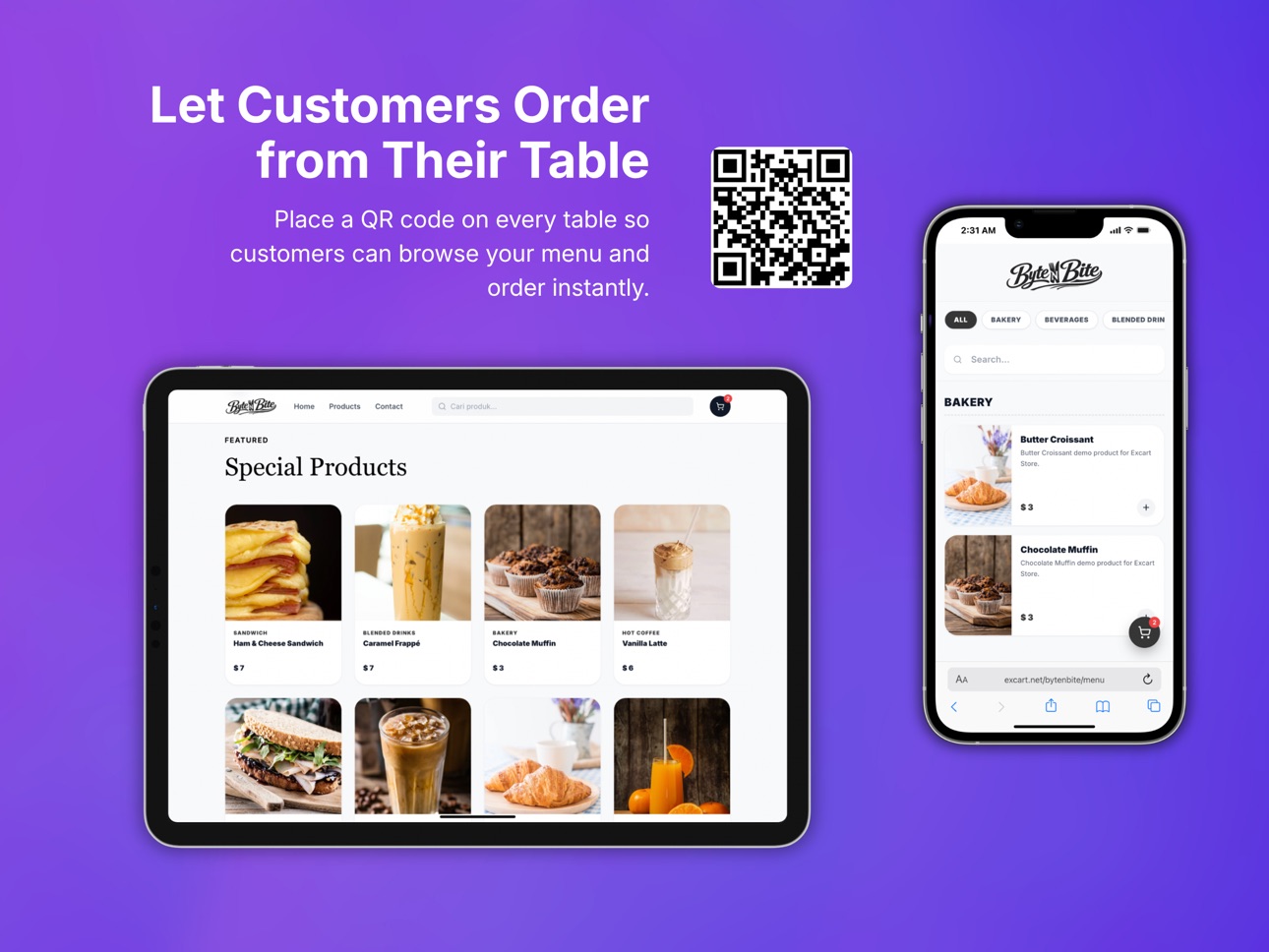
• Added Online Catalog with QR ordering for tables and in-store menus
• New Cloud Dashboard to manage device backups and reports
• Added Back Orders and saved drafts for unfinished sales
• Improved variant management with separate stock, price, and barcode
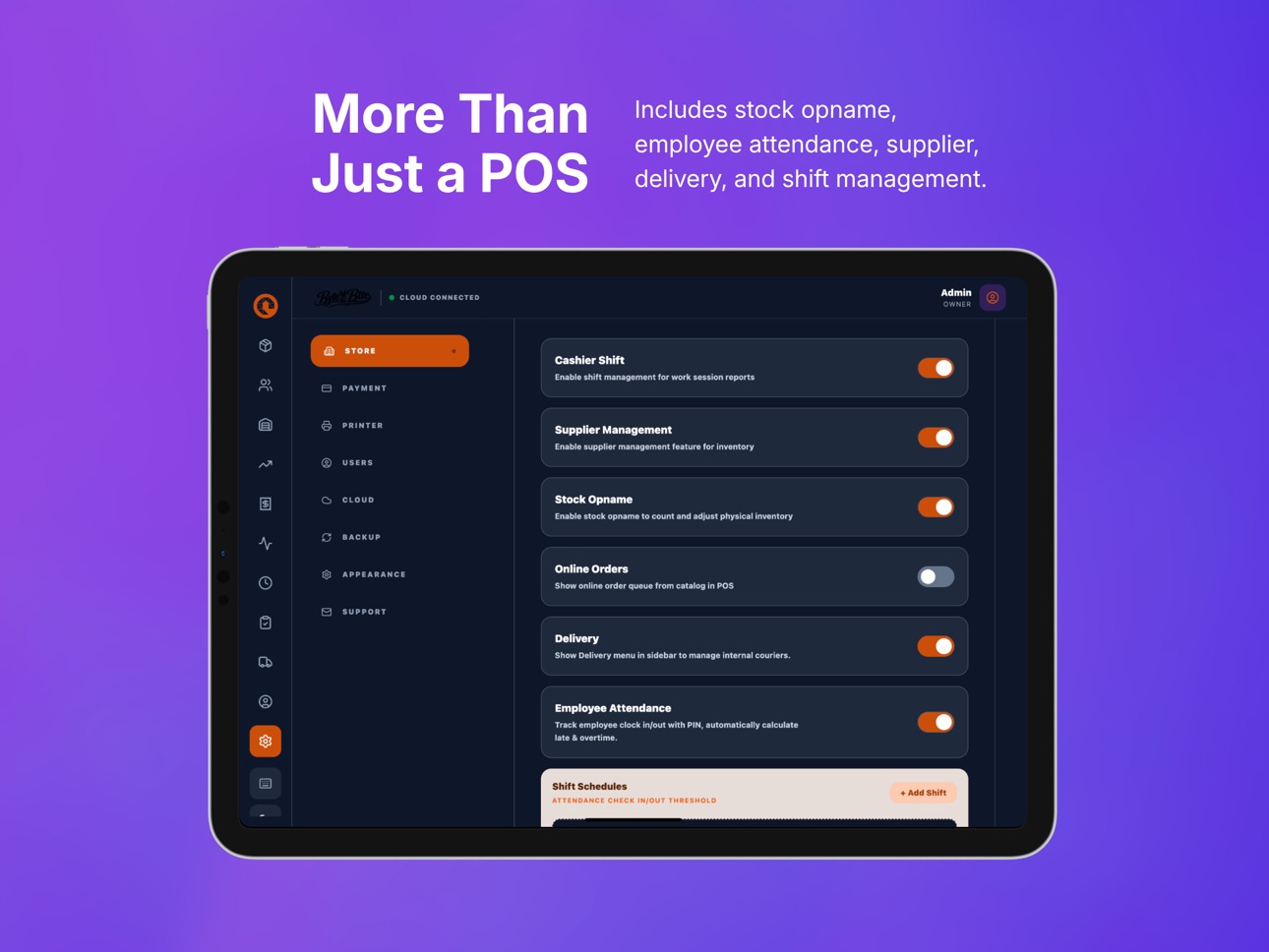
• Added cashier shift tracking with cash in/out and shift closing
• New employee attendance and stock opname tools
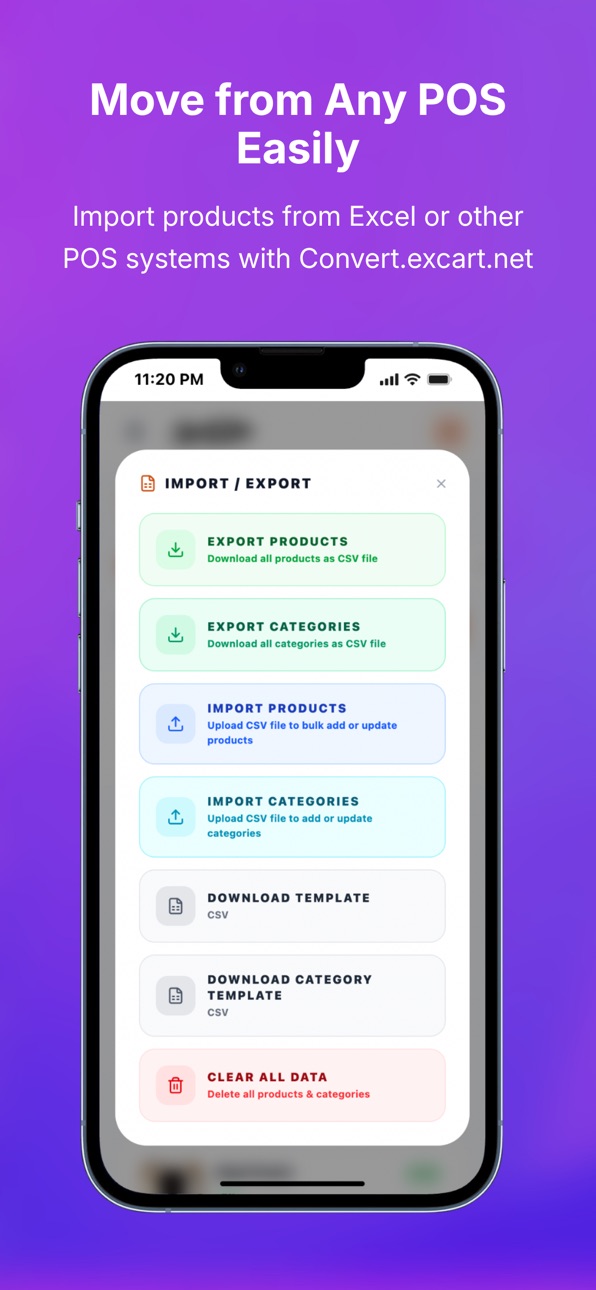
• Faster CSV import from Excel and other POS systems via Convert.Excart.net
• Various improvements and bug fixes
Build 884348423v1.92026-04-10 16:10:34
What's New
• Refreshed interface with a cleaner and more modern design
• Improved navigation for faster access to products, cart, and settings
• Better layout and spacing across iPhone and iPad
• Updated product, cart, and settings screens for a smoother experience
• Improved overall responsiveness and performance
• Various UI improvements and bug fixes throughout the app
Build 884178658v1.82026-04-07 17:40:17
• Added product pagination and improved product filtering
• Improved overall app stability and performance
• Fixed several issues and minor bugs
Build 883629632v1.72026-03-22 23:24:25
We’ve made a big improvement behind the scenes.
• Upgraded to a new, more reliable data system
• Faster and smoother POS experience
• Low Stock Alert
• Your existing data will be migrated automatically
Just update and keep using Exifix POS as usual.
Build 883490569v1.62026-03-18 17:08:12
UI improvements for a smoother and more focused experience.
• Cart is now accessible from the bottom navigation
• Header hides on scroll to maximize workspace
• Minor layout and interaction refinements
Build 883390638v1.52026-03-16 23:07:42
• Inventory Count (Stock Opname)
Easily perform physical stock checks and reconcile inventory differences.
• Printing Improvements
Better receipt formatting and spacing to ensure the footer is fully visible.
• Performance & Stability Improvements
General fixes and enhancements for a smoother POS experience.
Build 883253065v1.42026-03-14 10:22:06
• Backdated transactions: Record missed sales using the correct transaction date (admin permission required).
• Filtered report printing: Print reports by day, week, year, or custom date range.
• UI improvements: Optimized payment method icon changer for better usability.
Build 883109067v1.32026-03-07 00:07:38
Version 1.3
New Features
• Shift Management
Track cashier sessions with opening balance, cash movements, and closing summaries.
• LAN / Network Receipt Printing
Support for EPOS network printers for faster and more reliable receipt printing.
• Multiple Payment Methods
Accept different payment types such as cash, transfer, or other payment options.
• Split Payment
Allow customers to pay using multiple payment methods in a single transaction.
Improvements
• Cash Drawer Support
• Performance and stability improvements
• Minor bug fixes and system optimizations
Build 882897424v1.22026-03-05 13:40:15
• Added Product Import & Export (Premium) for easier migration from other POS systems
• Enhanced staff permission controls with improved visibility settings
• Performance improvements and stability updates
Build 882424896v1.02026-02-26 18:55:36
Price history by region
Currency
Show
Columns
Search
Availability 1 of 1 storefronts
| Region | Language | Price | Ratings | Avg | Version |
|---|---|---|---|---|---|
| US | en-US | Free | 0 | — | 3.1 |
Change log 25 changes · US
✎
releaseNotes updated
We're constantly working to make Excart POS better for your business. This update brings powerful new inventory features and essential improvements for a smooth
✎
description updated
Excart POS is a modern point of sale designed for small and growing businesses that need a reliable system for daily operations.
Built with an offline-first ap
✎
subtitle updated
Offline POS & Cloud Sync
✎
name updated
Excart POS
◆
Version 3.1 released
We're constantly working to make Excart POS better for your business. This update brings powerful new inventory features and essential improvements for a smoother, faster checkout experience.
New Features:
Recipe & Ingredients System: Tra
◆
Version 3.0 released
Introducing F&B / Restaurant Mode We've supercharged the app for the food and beverage industry! You can now seamlessly manage your restaurant, cafe, or food stall with our brand-new features:
Table Management: Easily map out dining areas
◆
Version 2.9 released
- Added restore from another device through Cloud Backup.
- Restore now shows available device backups with clearer device names.
- Improved the Local Delivery flow and delivery detail modal in checkout.
- Minor fixes and stability improve
◆
Version 2.8 released
Adding automatic cloud backup quantity per day
Modifying the Delivery user interface
Implementing a universal POS mode
◆
Version 2.7 released
Bug Fix Stock Opname
◆
Version 2.6 released
Fix Reports
◆
Version 2.5 released
Bug fix shift management
◆
Version 2.4 released
• Added support for multiple attendance sessions / split shifts in one day
• New table layout design improvements and UI refinements
• Unlimited Stock
◆
Version 2.3 released
• Improved backup system with more control and flexibility
• Added Premium-only .excart backup import/export
• You can now restore data from a backup file saved on your device, computer, or personal cloud storage
• Added more frequent a
◆
Version 2.2 released
Various fixes and UI improvements for a smoother cashier experience
◆
Version 2.1 released
• Added support for Dine In, Take Away, and Delivery orders
• Added Kitchen Print mode, so kitchen tickets can be printed separately while still using the same printer
• Fixed Bluetooth-related bugs and improved connection stability
◆
Version 2.0 released
• Added Online Catalog with QR ordering for tables and in-store menus
• New Cloud Dashboard to manage device backups and reports
• Added Back Orders and saved drafts for unfinished sales
• Improved variant management with separate stock, pr
◆
Version 1.9 released
What's New
• Refreshed interface with a cleaner and more modern design
• Improved navigation for faster access to products, cart, and settings
• Better layout and spacing across iPhone and iPad
• Updated product, cart, and settings s
◆
Version 1.8 released
• Added product pagination and improved product filtering
• Improved overall app stability and performance
• Fixed several issues and minor bugs
◆
Version 1.7 released
We’ve made a big improvement behind the scenes.
• Upgraded to a new, more reliable data system
• Faster and smoother POS experience
• Low Stock Alert
• Your existing data will be migrated automatically
Just update and keep using Exifix
◆
Version 1.6 released
UI improvements for a smoother and more focused experience.
• Cart is now accessible from the bottom navigation
• Header hides on scroll to maximize workspace
• Minor layout and interaction refinements
◆
Version 1.5 released
• Inventory Count (Stock Opname)
Easily perform physical stock checks and reconcile inventory differences.
• Printing Improvements
Better receipt formatting and spacing to ensure the footer is fully visible.
• Performance & Stability Impr
◆
Version 1.4 released
• Backdated transactions: Record missed sales using the correct transaction date (admin permission required).
• Filtered report printing: Print reports by day, week, year, or custom date range.
• UI improvements: Optimized payment method ic
◆
Version 1.3 released
Version 1.3
New Features
• Shift Management
Track cashier sessions with opening balance, cash movements, and closing summaries.
• LAN / Network Receipt Printing
Support for EPOS network printers for faster and more reliable receipt print
◆
Version 1.2 released
• Added Product Import & Export (Premium) for easier migration from other POS systems
• Enhanced staff permission controls with improved visibility settings
• Performance improvements and stability updates
◆
Version 1.0 released