Home › Utilities

 US
US
1 of 1 storefronts
Content in en-US
Content in en-US
Information
Preview 2 platforms
iPhone 3 images


iPad 1 image

What’s New Version 1.0.14
Improvement of internal operation
Description
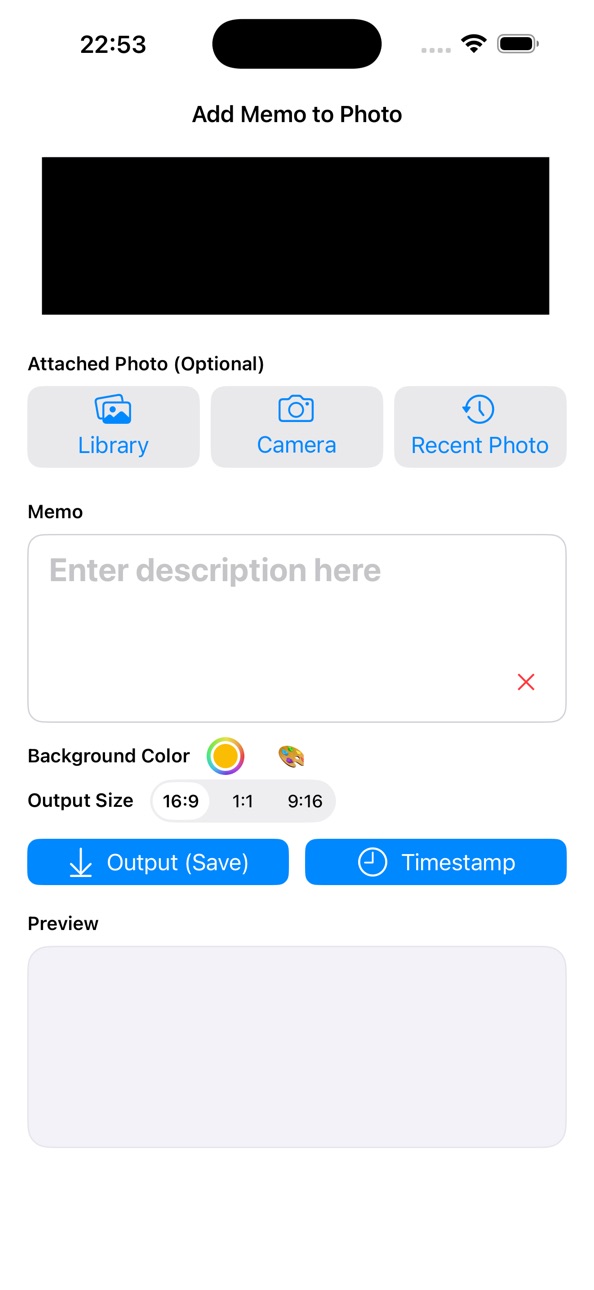
"I want to add a note to the photo and save it as it is" - an app that can be used in such a case.
Instead of writing text like a notepad, you can leave a photo + note as a single image.
What can be done
Put a note on the photo
You can put text by attaching a memo belt under the photo you selected from the camera roll or the photo you took on the spot.
Since it is saved as a single image, you can immediately recognize the "memo of that time" just by looking back at the album.
It's OK without a photo
You can also create "title card-style" images with only background color + notes without using photos.
It can also be used as a slide cover or a piece for SNS.
I can give you an image from anywhere
If you send an image you are viewing in your browser, email, or other app to this app from "Share", you can add a note to that image and save it.
It is convenient to use it, such as attaching a one-word note to a screenshot of the document.
You can leave it with a date
If you want to leave a "when is a memo", output it with a time stamp.
It is also easy to use as a record and trace.
Accessibility
ipadiphonemacrealityDevicetvoswatch
Version history 15 versions
Build 886923381v1.0.142026-06-13 18:12:04
Improvement of internal operation
Build 886674489v1.0.132026-06-08 17:07:45
Minor corrections have been made
Build 886604817v1.0.122026-06-06 17:15:01
- Add to Album — Turn on the "Add to Album" switch above the export button to automatically save images to a named album. The default album name is "Image Memo." If the album doesn't exist, it will be created automatically. Your switch state and album name are saved between sessions.
Build 885962740v1.0.112026-05-21 16:00:42
Correction of detailed problems
Build 885206125v1,0,102026-05-06 00:02:04
New Features
- Text style presets — Choose from 4 styles: Normal, Slim, Outline, and Cinema
Build 884948629v1.0.92026-04-26 17:16:57
Adjust the layout, etc.
Build 884236969v1.0.82026-04-07 16:50:47
Detailed operation changes
Build 883626669v1.0.72026-03-22 17:14:02
Improvement of some operations
Build 883431344v1.0.62026-03-16 22:38:49
Layout correction
Build 883225135v1.0.52026-03-10 20:32:29
Improve UI behavior
Build 882709145v1.0.42026-02-23 18:17:00
Improvement of detailed operations
Build 882576178v1.0.32026-02-19 02:26:32
レイアウト調整
Build 882543118v1.0.22026-02-17 21:49:18
レイアウト一部変更
Build 882467374v1.0.12026-02-14 22:44:36
一部動作の改善
Build 882364933v1.02026-02-13 20:12:51
No pricing data captured yet — comparisons appear once the app has paid storefronts or in-app purchases.
Availability 1 of 1 storefronts
| Region | Language | Price | Ratings | Avg | Version |
|---|---|---|---|---|---|
| US | en-US | Free | 0 | — | 1.0.14 |
Change log 18 changes · US
✎
releaseNotes updated
Improvement of internal operation
✎
description updated
"I want to add a note to the photo and save it as it is" - an app that can be used in such a case.
Instead of writing text like a notepad, you can leave a phot
✎
name updated
ImageMemo
◆
Version 1.0.14 released
Improvement of internal operation
◆
Version 1.0.13 released
Minor corrections have been made
◆
Version 1.0.12 released
- Add to Album — Turn on the "Add to Album" switch above the export button to automatically save images to a named album. The default album name is "Image Memo." If the album doesn't exist, it will be created automatically. Your switch stat
◆
Version 1.0.11 released
Correction of detailed problems
◆
Version 1,0,10 released
New Features
- Text style presets — Choose from 4 styles: Normal, Slim, Outline, and Cinema
◆
Version 1.0.9 released
Adjust the layout, etc.
◆
Version 1.0.8 released
Detailed operation changes
◆
Version 1.0.7 released
Improvement of some operations
◆
Version 1.0.6 released
Layout correction
◆
Version 1.0.5 released
Improve UI behavior
◆
Version 1.0.4 released
Improvement of detailed operations
◆
Version 1.0.3 released
レイアウト調整
◆
Version 1.0.2 released
レイアウト一部変更
◆
Version 1.0.1 released
一部動作の改善
◆
Version 1.0 released