Home › Productivity

 US
US
1 of 1 storefronts
Content in en-US
Content in en-US
Information
Apple ID6758985206
Bundle IDio.impawsible.BlahBlah
SellerSeller
Min iOS17.1
Min macOS14.1
Device familiesiphone, ipad
Released2026-02-27
Copyright© 2026 BlahBlah
Privacy policyLink ↗
Preview 2 platforms
iPhone 9 images


iPad 7 images




What’s New Version 1.18
This update brings a smoother experience when browsing your message history, improved reliability across multiple devices, and better handling of Apple Music links.
# SMOOTHER HISTORY SCROLLING
Scrolling back through your messages to revisit earlier moments now feels noticeably more fluid. As older messages load in above, your reading position holds steady.
# BETTER ACROSS DEVICES
BlahBlah feels more consistent when you move between devices. After iCloud sync completes, your full message window refreshes in place so everything is right where you expect it.
# APPLE MUSIC, MORE RELIABLY
Pasting an Apple Music link now handles more situations gracefully — links that couldn't be fully resolved are kept as plain links, so you never lose the reference.
Plus a few performance improvements under the hood.
Thank you for using BlahBlah. If you're enjoying it, we'd love your support:
• Rate us on the App Store
• Share BlahBlah with friends and family
• Send us your feedback — we're always listening
Description
BlahBlah - Message Your Future Self
Because some things are only worth saying to yourself.
# Sound Familiar?
You send links to yourself on WhatsApp. You text an idea to your own number before it disappears.
Millions of people do this every day — in apps never quite designed for it. BlahBlah is what that habit always deserved.
# What is BlahBlah?
BlahBlah is a self-messaging app for iOS, built around the familiar comfort of a chat interface — except every message is from you, to you.
Not a journal. Not a note-taking app. Not a to-do list.
A chat. With yourself.
# What You Can Send
A thought doesn't always arrive as words — so send text, images, voice memos (with on-device transcription), links with rich previews, locations, and Apple Music cards.
# Capture From Anywhere
See something worth keeping in another app? Tap Share to send text, links or photos straight into BlahBlah.
BlahBlah controls live in Control Centre, the Lock Screen and the Action Button — one tap to a note, voice, photo, link, music or location. A Quick Capture widget and Siri & Shortcuts capture without even opening the app.
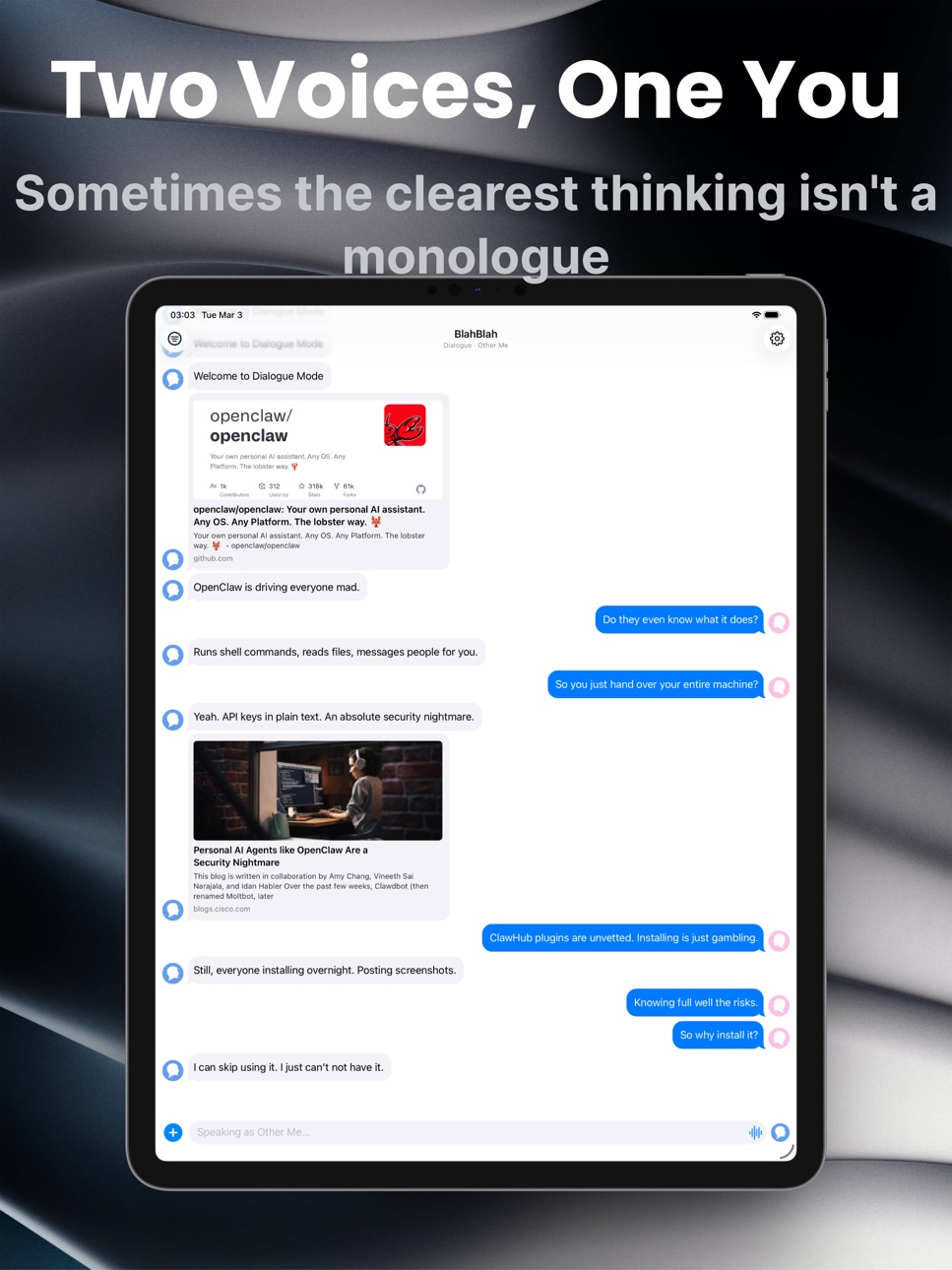
# Two Voices, One You
Sometimes the clearest thinking isn't a monologue. It's an argument.
Dialogue mode splits the conversation into two sides — rational and emotional, question and answer. Set names and avatars for each role, then start talking.
# Write to a Past Moment
Backdate records a message to an earlier date and time — yesterday's forgotten note — then drops it where it belongs in your timeline. A Premium feature, from the "+" menu or Control Centre.
# Look Back
BlahBlah helps you return to yourself:
• On This Day — what you wrote a week, a month, even a year ago. A banner surfaces it, or a daily reminder brings it to you.
• Daily Reflection — a gentle question to look inward, fresh each day. Open it from a widget, reminder or Control Centre; your answer keeps the question with it.
• Streak — a Home and Lock Screen widget counting your days in a row, current at a glance.
# Find Your Past Self
Search and browse your whole history:
Search by keyword, browse by type — every photo, location and link — or filter by date range, tag (Starred, Idea or your own, AND/OR), and dialogue role.
Tap any result to jump back to that moment.
# Keep It Just Right
Long-press any message to edit it in place. Edited messages are automatically tagged so you can find them again.
# Make It Yours
This conversation is personal — so make it look right:
• Five bubble themes, from Classic Blue to Sakura Blossom
• Plus message alignment, timestamp frequency, corner style and bubble tail
# Free vs Premium
Free covers the everyday — text, photo, link, location and music messages, editing, resending, On This Day, iCloud sync, and a 20-message taste of Dialogue mode.
Premium unlocks voice memos with transcription, up to 9 photos a message, unlimited Dialogue mode, 10 custom tags, place and music search, full search history, batch actions, and every personalisation option.
# Private & Everywhere
BlahBlah syncs across all your Apple devices via iCloud — no account, no server, no analytics, no third parties. Everything stays between you and your devices.
Your inner monologue is yours alone.
BlahBlah — Say it. Save it. Come back to it.
Terms of Use: https://www.apple.com/legal/internet-services/itunes/dev/stdeula/
In-App Purchases US pricing
BlahBlah Premium Subscription
Monthly · Monthly$2.99
Yearly · Yearly$4.99
One-Time Purchases
BlahBlah Premium Lifetime$6.99
Capabilities
In-App Purchases
Accessibility
ipadiphonemacrealityDevicetvoswatch
Version history 19 versions
Build 887414436v1.182026-06-25 15:31:52
This update brings a smoother experience when browsing your message history, improved reliability across multiple devices, and better handling of Apple Music links.
# SMOOTHER HISTORY SCROLLING
Scrolling back through your messages to revisit earlier moments now feels noticeably more fluid. As older messages load in above, your reading position holds steady.
# BETTER ACROSS DEVICES
BlahBlah feels more consistent when you move between devices. After iCloud sync completes, your full message window refreshes in place so everything is right where you expect it.
# APPLE MUSIC, MORE RELIABLY
Pasting an Apple Music link now handles more situations gracefully — links that couldn't be fully resolved are kept as plain links, so you never lose the reference.
Plus a few performance improvements under the hood.
Thank you for using BlahBlah. If you're enjoying it, we'd love your support:
• Rate us on the App Store
• Share BlahBlah with friends and family
• Send us your feedback — we're always listening
Build 887325993v1.172026-06-23 18:31:00
This update keeps your reflections whole — the question now travels with your answer — and gives Quick Capture two new ways to live on your Home Screen.
# YOUR REFLECTION, QUESTION AND ALL
When you answer the daily reflection, the question now stays with your message. Scroll back and you'll see it resting above your answer, exactly as it was asked — and it turns up in search, too, so a memory is always easy to find again. Prefer things tidy? A new setting groups repeated questions, so a run of answers to the same prompt shows the header only once.
# QUICK CAPTURE, YOUR WAY
The Quick Capture widget comes in two new medium sizes. One lays all six starting points — text, photo, voice, link, location and music — in a single row, each its own one-tap shortcut. The other arranges the same six as a roomy 2×3 grid with larger icons. Add whichever fits your Home Screen.
# A TIDIER "+" MENU
The things you can send now sit as a clean icon grid at the top of the "+" menu — quicker to scan, easier to reach.
Plus under-the-hood performance improvements and refinements.
Thank you for using BlahBlah. If you're enjoying it, we'd love your support:
• Rate us on the App Store
• Share BlahBlah with friends and family
• Send us your feedback — we're always listening
Build 887131440v1.162026-06-22 18:01:25
Sometimes a thought belongs to yesterday. This update lets you write it to the moment it really happened — plus a fresher way to compose and a tidier place to make BlahBlah your own.
# WRITE TO A PAST MOMENT
Backdate lets you record a message to an earlier date and time — that thought from last night, the one you meant to jot down yesterday. Pick a day and time, write the way you always do, and it slips quietly into your timeline right where it belongs. (Backdate is a Premium feature.)
# REACH IT FROM ANYWHERE
Backdate is one tap away from outside the app, too. Add the Backdate control to Control Centre, your Lock Screen, or the Action Button — or drop the Backdate widget on your Home Screen. Tap, pick a moment, and start writing.
# A FRESHER "+" MENU
Tap "+" and you'll find a cleaner, sorted menu: the things you can send — photos, links, voice, locations, music — up top, and the modes that change how you write — Dialogue and Backdate — grouped together below. Easier to scan, with room to grow.
# MAKE IT YOURS, ALL IN ONE PLACE
Every way to style your conversation now lives together on a single Message Appearance screen — bubble theme, alignment, timestamps, corners, and the bubble tail, with a live preview right at the top. Tweak it, watch it change, and Settings stays short and easy to scan.
Thank you for using BlahBlah. If you're enjoying it, we'd love your support:
• Rate us on the App Store
• Share BlahBlah with friends and family
• Send us your feedback — we're always listening
Build 887065184v1.152026-06-17 17:50:36
Small release, big polish — your streak adds up right, captures land reliably, and adding photos just works.
# YOUR STREAK, COUNTED RIGHT
Your daily-writing streak now looks at your whole history, not just your most recent notes — so if you've been showing up every day, the number finally reflects it. The more you write, the more it adds up.
# QUICK CAPTURE, MORE DEPENDABLE
Thoughts you capture from the Share Sheet, Shortcuts, or Control Center now land right where they belong — even ones captured a while ago — and never show up twice, even if BlahBlah gets interrupted mid-save.
# PHOTOS, WITHOUT THE ROADBLOCK
Adding a batch of photos at once is smoother: BlahBlah keeps as many as it can and quietly lets you know, instead of stopping you in your tracks — whether you paste them in or share them from Photos.
Thank you for using BlahBlah. If you're enjoying it, we'd love your support:
• Rate us on the App Store
• Share BlahBlah with friends and family
• Send us your feedback — we're always listening
Build 886874122v1.142026-06-15 17:19:03
This update brings Daily Reflection to your Home Screen — and gives the widgets a fresh look.
# DAILY REFLECTION, ON YOUR HOME SCREEN
A new widget puts today's reflection question right on your Home Screen. Glance at it through the day, and when you're ready, tap to open BlahBlah with the question waiting — just start writing. It refreshes on its own at midnight, so there's always today's prompt to sit with.
# A FRESH LOOK FOR THE WIDGETS
The Streak, Quick Capture, and Daily Reflection widgets now wear BlahBlah's colors, with the app's mark in the corner — so they feel right at home on your screen, in both light and dark.
# A LITTLE MORE "BLAHBLAH"
A few wording touches — Siri phrases, the Quick Capture widget, a couple of empty states — now sound more like talking to yourself: jot a thought, not just take a note.
Thank you for using BlahBlah. If you're enjoying it, we'd love your support:
• Rate us on the App Store
• Share BlahBlah with friends and family
• Send us your feedback — we're always listening
Build 886752969v1.132026-06-10 16:56:51
This update adds a gentle daily nudge to look inward — Daily Reflection.
# DAILY REFLECTION
A thoughtful question, once a day, at a time you choose. Tap the reminder and BlahBlah opens with the prompt right there — just start writing your answer, with the question in view the whole time. The prompt rotates, so there's always a fresh angle to sit with.
# ALL YOUR REMINDERS IN ONE PLACE
Settings now has a single Notifications screen. Turn On This Day and Daily Reflection on or off independently, each at its own time. The On This Day banner and its reminder are now separate too, so you can keep one without the other.
# REFLECT FROM CONTROL CENTRE (iOS 18)
Add the Daily Reflection control to Control Centre, your Lock Screen, or the Action Button — one tap opens today's question whenever the mood strikes, no waiting for the reminder.
Thank you for using BlahBlah. If you're enjoying it, we'd love your support:
• Rate us on the App Store
• Share BlahBlah with friends and family
• Send us your feedback — we're always listening
Build 886653847v1.122026-06-08 18:07:40
This update puts BlahBlah at your fingertips — capture a thought without even opening the app.
# CONTROL CENTRE, LOCK SCREEN & ACTION BUTTON
On iOS 18 you can add BlahBlah controls and go straight to the right spot with a single tap:
• New note — start writing
• Voice — begin a recording at once
• Photo — open your library
• Link & Music — drop in an article or a song
• Location — attach where you are
• On This Day — revisit a memory
Place them in Control Centre, on your Lock Screen, or bind one to the Action Button.
# QUICK CAPTURE WIDGET
Add the Quick Capture widget to your Home or Lock Screen and tap to land right in the message box.
# SIRI, SHORTCUTS & SPOTLIGHT
Ask Siri or run a Shortcut to jot a quick note — saved to BlahBlah without opening the app — or to open BlahBlah ready to write.
Thank you for using BlahBlah. If you're enjoying it, we'd love your support:
• Rate us on the App Store
• Share BlahBlah with friends and family
• Send us your feedback — we're always listening
Build 886517315v1.112026-06-04 18:00:46
This update lets you save things to BlahBlah from anywhere — without leaving the app you're in.
# SHARE TO BLAHBLAH
Spotted a good article, a photo worth keeping, or a passing thought in another app? Tap Share and choose BlahBlah. A tidy panel lets you add a note and send it straight into your conversation — no copying, no app-switching.
You can share:
• Text — a selection or a quick thought
• Links — articles, App Store pages and more, saved with a rich preview card
• Photos — one or several at a time
• Apple Music links — saved as a music card, just like inside the app
Thank you for using BlahBlah. If you're enjoying it, we'd love your support:
• Rate us on the App Store
• Share BlahBlah with friends and family
• Send us your feedback — we're always listening
Build 886183540v1.102026-05-27 16:45:29
This update adds a visual indicator when your messages are being restored from iCloud, and polishes a handful of details across the app.
# ICLOUD RESTORE
After reinstalling BlahBlah, a spinner banner now appears at the top of your chat while iCloud is bringing your messages back. Once the restore is complete, the conversation refreshes automatically — no app restart required.
# REFINEMENTS
• Playing or recording audio no longer keeps your background music paused — it resumes automatically once you're done
• Link preview titles now display cleanly, without stray HTML characters
• Custom tags are now preserved when you resend a message
• Tapping an On This Day notification when the app is closed now reliably opens the memory after launch
• The streak widget now reflects your chosen in-app language straight away
Thank you for using BlahBlah. If you're enjoying it, we'd love your support:
• Rate us on the App Store
• Share BlahBlah with friends and family
• Send us your feedback — we're always listening
Build 885803336v1.92026-05-25 21:17:46
This release brings BlahBlah to your Home and Lock Screens, and lets your On This Day memories find you — even when the app is closed.
# STREAK WIDGET
A brand-new widget shows how many days in a row you've been writing to yourself. Available in two Home Screen sizes (small and medium) plus a Lock Screen widget, it refreshes automatically at midnight so your streak is always current at a glance.
# ON THIS DAY NOTIFICATIONS
On This Day can now reach out on its own. Switch on the new daily reminder in Settings and pick a time — BlahBlah will quietly let you know whenever it finds something from your past worth revisiting. Tap the notification to jump straight into the memory.
# REFINEMENTS
• App Lock is now disabled on devices without a passcode, with a clearer explanation why
• On This Day no longer opens an empty sheet when there is nothing to show
• Tapping an On This Day notification while the app is locked now waits for Face ID or Touch ID before opening the memory
Thank you for using BlahBlah. If you're enjoying it, we'd love your support:
• Rate us on the App Store
• Share BlahBlah with friends and family
• Send us your feedback — we're always listening
Build 885559086v1.82026-05-12 20:22:16
This update brings a new way to rediscover your past — BlahBlah now surfaces messages from the same day in previous months and years.
# ON THIS DAY
A banner appears at the top of your conversation when BlahBlah finds messages you wrote on this same date in the past — a week ago, a month ago, up to a year ago. Tap it to read through those messages. Dismiss it and it won't appear again for the rest of the day. You can turn the feature off entirely in Settings if you prefer.
We hope you're enjoying BlahBlah. If you are, we'd love your support:
• Rate us on the App Store
• Share the app with friends and family
• Send us your feedback — we're always listening
Build 884785831v1.72026-04-23 20:34:49
This update is about transparency and polish — clearer signals about what requires a subscription, better location sharing, and a privacy upgrade for voice transcription.
# ADD TAGS WITHOUT LEAVING YOUR CONVERSATION
You can now create a custom tag directly from the tag picker inside a conversation. Tap the + button and a sheet appears on the spot. No need to navigate to Settings first.
# LOCATION MESSAGES NOW INCLUDE A MAP LINK
Sharing or copying a location message now includes an Apple Maps link alongside the place name and address. Whoever receives it can tap straight through to Maps.
# VOICE TRANSCRIPTION STAYS ON YOUR DEVICE
Where your device and language support it, BlahBlah now uses on-device speech recognition — your audio never leaves your device. Where on-device recognition isn't available, Apple's Speech service is used instead.
# FREE SEARCH SCOPE IS NOW CLEARLY SHOWN
On the free plan, a note now appears in Search & Filter whenever your results are limited to the past month. Tap it to find out more about upgrading for full history access.
# CLEARER PREMIUM INDICATORS IN THE LONG-PRESS MENU
The Edit and Resend options in the message menu now show a small crown icon when they require a subscription — so you know before you tap, not after.
We hope you're enjoying BlahBlah. If you are, we'd love your support:
• Rate us on the App Store
• Share the app with friends and family
• Send us your feedback — we're always listening
Build 884742538v1.62026-04-21 19:25:11
This update is all about images — specifically how you browse and interact with messages that contain multiple photos.
# SWIPE THROUGH STACKED IMAGES
When a message contains more than one photo, the images appear as a fanned stack. You can now swipe left or right directly on that stack to flip through them — no need to open the full gallery first. A light flick is enough; the card flies off with a satisfying snap and the next one springs into place.
# GALLERY REMEMBERS WHERE YOU ARE
Tap a stack to open the full-screen gallery, and it starts from whichever image you've already swiped to — not always the first one. When you close and reopen, your position is preserved. The same applies in the Search & Filter view.
# SWIPE DOWN TO CLOSE THE GALLERY
The full-screen gallery now dismisses with a natural downward swipe — the same gesture you'd use across iOS. You can see the app underneath as you pull, and releasing at any point snaps back smoothly if you change your mind.
# CLEANER GALLERY TOOLBAR
The gallery header has been redesigned to use the standard iOS navigation bar, with the image counter centred and a "Done" button in the top right. Cleaner and more consistent with the rest of iOS.
# COPY PICKS THE RIGHT IMAGE
Long-pressing a multi-photo message and choosing Copy now copies whichever image is on top — the one you've swiped to. A toast confirms exactly which image was copied (e.g. "Copied image 2 of 3"), so there's no guessing.
We hope you're enjoying BlahBlah. If you are, we'd love your support:
• Rate us on the App Store
• Share the app with friends and family
• Send us your feedback — we're always listening
Build 884524193v1.52026-04-15 14:50:59
This update focuses on the small things that make daily use feel right: clearer feedback, safer actions, and a handful of fixes that were long overdue.
# COPY & SEND FEEDBACK
When you copy a message, a brief confirmation appears so you always know it worked. If a message fails to send for any reason, a notification now appears — no more silent failures.
# DELETE CONFIRMATION
Deleting a message, a batch of messages, or a custom tag now asks for confirmation first. Accidental deletions are no longer a one-way door.
# AUDIO TRANSCRIPTIONS ARE NOW COPYABLE
If an audio message has been transcribed, the Copy action now appears in its menu — letting you copy or share the transcription text directly. Previously, the Copy option was hidden entirely for audio messages.
# FILTER PANEL OPENS CLEAN
The Search & Filter panel used to open with "Images" pre-selected. It now opens with no filter active, so your searches always start from a blank slate.
# BUG FIXES & IMPROVEMENTS
• Deleting a custom tag now reliably removes it from all messages (previously, a failed deletion could leave orphaned references)
• Re-sending an audio message is now correctly restricted to Premium, consistent with the rest of the audio feature
We hope you're enjoying BlahBlah. If you are, we'd love your support:
• Rate us on the App Store
• Share the app with friends and family
• Send us your feedback -- we're always listening
Build 883544799v1.42026-03-25 18:22:22
Your notes are just for you. Version 1.4 makes sure they stay that way.
# APP LOCK
Enable App Lock in Preferences and BlahBlah will require Face ID, Touch ID, or your passcode every time you return to the app. Your messages stay private — even if someone else picks up your phone.
• Face ID triggers automatically the moment the lock screen appears
• Tap Unlock to retry if the first attempt is dismissed
• Falls back to Touch ID or passcode on devices without Face ID
We hope you're enjoying BlahBlah. If you are, we'd love your support:
• Rate us on the App Store
• Share the app with friends and family
• Send us your feedback -- we're always listening
Build 883327998v1.32026-03-17 17:17:04
We thought 1.2 was a tough act to follow. Then we kept building. Version 1.3 is built around one idea: what if you could have a real conversation with yourself?
# DIALOGUE MODE
Ever want to have a conversation with yourself — really have one? Dialogue Mode lets you write as two distinct roles, side by side in the same chat. Role A sits on the left; Role B on the right. Give each role a name, pick an emoji or a photo avatar, and just talk.
It's great for thinking through decisions, planning a difficult conversation, writing from two characters' perspectives, or simply capturing both sides of your inner monologue.
• Tap the new dialogue button in the input bar to switch roles instantly
• Avatars appear in the message stream so you always know who's speaking
• Tap any avatar to edit that role's name and photo on the spot
• Use /a, /b, or /d as quick keyboard shortcuts to switch roles or toggle the mode
• Long-press a dialogue message to switch its side after the fact
• Filter by role in Search — find everything Role A said, or everything Role B said
Free users get a 20-message trial. Unlimited dialogue is available with a Premium subscription.
# INLINE TEXT EDITING
Editing a text message now happens right in the input bar — no more separate sheet popping up. Just long-press, tap Edit, make your changes, and send.
# QUOTE BLOCKS NOW SHOW WHO SAID IT
When you reply to a message in Dialogue Mode, the quote block now shows the sender's role name, so the thread of a conversation stays clear at a glance.
# AND A FEW MORE THINGS
• Preferences now sync across your devices via iCloud
• Haptic feedback when you switch dialogue roles
• Various bug fixes and polish
As always, thank you for your support. If you're enjoying the app, a kind review on the App Store means the world to us.
Build 883162173v1.22026-03-12 11:14:12
This is one of our most feature-packed updates yet -- we're thrilled to bring you three things that have been at the top of your wishlist.
# EDIT MESSAGES
Made a typo? Changed your mind? Long-press any message to edit it in place. Edited messages are automatically tagged as "Edited", so you can filter for them later in Search.
• Free: edit text messages
• Premium: edit all message types (image, audio, link, location, and music)
# TAGS
Organise your notes with emoji tags. Tags appear as badges on bubbles, sync across your devices via iCloud, and are fully searchable in the Filter view. Select multiple tags at once and toggle between AND / OR matching to narrow down exactly what you're looking for.
• Free: three built-in tags -- Starred, Idea, and Edited (applied automatically whenever you edit a message) -- plus 1 custom tag
• Premium: everything above, plus up to 10 custom tags with any emoji and name
# VOICE-TO-TEXT TRANSCRIPTION
Your audio messages can now be transcribed automatically using on-device speech recognition -- no data ever leaves your device. Head to Settings > Preferences to choose your preferred mode:
• Audio Only: transcription off (default)
• Audio + Text: keeps the recording and adds a transcript
• Text Only: transcribes and discards the audio file
Transcriptions are searchable and highlighted when you use the Filter view. Requires a Premium subscription, as voice messages are a Premium feature.
As always, thank you for your support -- we hope you love what's new. If you do, a kind review on the App Store means the world to us.
Build 882925459v1.12026-03-04 06:55:24
We made improvements and squashed bugs to enhance your BlahBlah experience.
Build 882325810v1.02026-02-27 16:06:35
Price history by region
Currency
Show
Columns
Search
Availability 1 of 1 storefronts
| Region | Language | Price | Ratings | Avg | Version |
|---|---|---|---|---|---|
| US | en-US | Free | 1 | 5.0 | 1.18 |
Change log 23 changes · US
✎
releaseNotes updated
This update brings a smoother experience when browsing your message history, improved reliability across multiple devices, and better handling of Apple Music li
✎
description updated
BlahBlah - Message Your Future Self
Because some things are only worth saying to yourself.
# Sound Familiar?
You send links to yourself on WhatsApp. You text
✎
subtitle updated
Notes·Journal·Diary·Voice Memo
✎
name updated
BlahBlah - Message Yourself
◆
Version 1.18 released
This update brings a smoother experience when browsing your message history, improved reliability across multiple devices, and better handling of Apple Music links.
# SMOOTHER HISTORY SCROLLING
Scrolling back through your messages to revis
◆
Version 1.17 released
This update keeps your reflections whole — the question now travels with your answer — and gives Quick Capture two new ways to live on your Home Screen.
# YOUR REFLECTION, QUESTION AND ALL
When you answer the daily reflection, the question
◆
Version 1.16 released
Sometimes a thought belongs to yesterday. This update lets you write it to the moment it really happened — plus a fresher way to compose and a tidier place to make BlahBlah your own.
# WRITE TO A PAST MOMENT
Backdate lets you record a mess
◆
Version 1.15 released
Small release, big polish — your streak adds up right, captures land reliably, and adding photos just works.
# YOUR STREAK, COUNTED RIGHT
Your daily-writing streak now looks at your whole history, not just your most recent notes — so if yo
◆
Version 1.14 released
This update brings Daily Reflection to your Home Screen — and gives the widgets a fresh look.
# DAILY REFLECTION, ON YOUR HOME SCREEN
A new widget puts today's reflection question right on your Home Screen. Glance at it through the day, an
◆
Version 1.13 released
This update adds a gentle daily nudge to look inward — Daily Reflection.
# DAILY REFLECTION
A thoughtful question, once a day, at a time you choose. Tap the reminder and BlahBlah opens with the prompt right there — just start writing your
◆
Version 1.12 released
This update puts BlahBlah at your fingertips — capture a thought without even opening the app.
# CONTROL CENTRE, LOCK SCREEN & ACTION BUTTON
On iOS 18 you can add BlahBlah controls and go straight to the right spot with a single tap:
• New
◆
Version 1.11 released
This update lets you save things to BlahBlah from anywhere — without leaving the app you're in.
# SHARE TO BLAHBLAH
Spotted a good article, a photo worth keeping, or a passing thought in another app? Tap Share and choose BlahBlah. A tidy p
◆
Version 1.10 released
This update adds a visual indicator when your messages are being restored from iCloud, and polishes a handful of details across the app.
# ICLOUD RESTORE
After reinstalling BlahBlah, a spinner banner now appears at the top of your chat whi
◆
Version 1.9 released
This release brings BlahBlah to your Home and Lock Screens, and lets your On This Day memories find you — even when the app is closed.
# STREAK WIDGET
A brand-new widget shows how many days in a row you've been writing to yourself. Availab
◆
Version 1.8 released
This update brings a new way to rediscover your past — BlahBlah now surfaces messages from the same day in previous months and years.
# ON THIS DAY
A banner appears at the top of your conversation when BlahBlah finds messages you wrote on
◆
Version 1.7 released
This update is about transparency and polish — clearer signals about what requires a subscription, better location sharing, and a privacy upgrade for voice transcription.
# ADD TAGS WITHOUT LEAVING YOUR CONVERSATION
You can now create a cu
◆
Version 1.6 released
This update is all about images — specifically how you browse and interact with messages that contain multiple photos.
# SWIPE THROUGH STACKED IMAGES
When a message contains more than one photo, the images appear as a fanned stack. You can
◆
Version 1.5 released
This update focuses on the small things that make daily use feel right: clearer feedback, safer actions, and a handful of fixes that were long overdue.
# COPY & SEND FEEDBACK
When you copy a message, a brief confirmation appears so you alw
◆
Version 1.4 released
Your notes are just for you. Version 1.4 makes sure they stay that way.
# APP LOCK
Enable App Lock in Preferences and BlahBlah will require Face ID, Touch ID, or your passcode every time you return to the app. Your messages stay private —
◆
Version 1.3 released
We thought 1.2 was a tough act to follow. Then we kept building. Version 1.3 is built around one idea: what if you could have a real conversation with yourself?
# DIALOGUE MODE
Ever want to have a conversation with yourself — really have o
◆
Version 1.2 released
This is one of our most feature-packed updates yet -- we're thrilled to bring you three things that have been at the top of your wishlist.
# EDIT MESSAGES
Made a typo? Changed your mind? Long-press any message to edit it in place. Edited m
◆
Version 1.1 released
We made improvements and squashed bugs to enhance your BlahBlah experience.
◆
Version 1.0 released