Home › Utilities

 US
US
1 of 1 storefronts
Content in en-US
Content in en-US
Information
Preview 2 platforms
iPhone 10 images




iPad 10 images




What’s New Version 1.11
- New: Live Activity for the row counter — see and increment your row count directly on the Lock Screen and Dynamic Island.
- New: Home Screen and Lock Screen widgets for row counting — tap to increment without opening the app.
- Fix: the "keep screen awake" setting now works reliably when the row counter is open.
Description
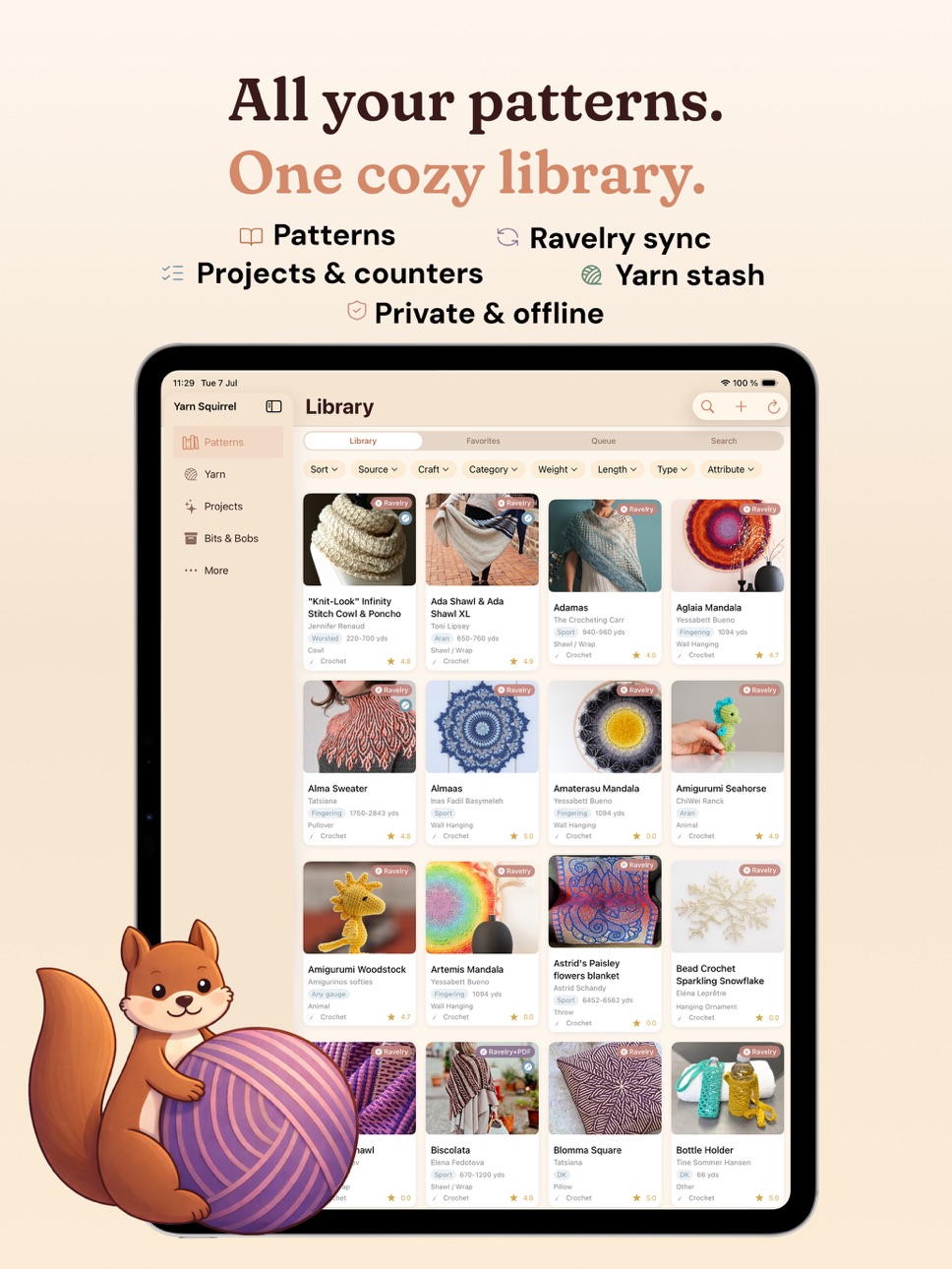
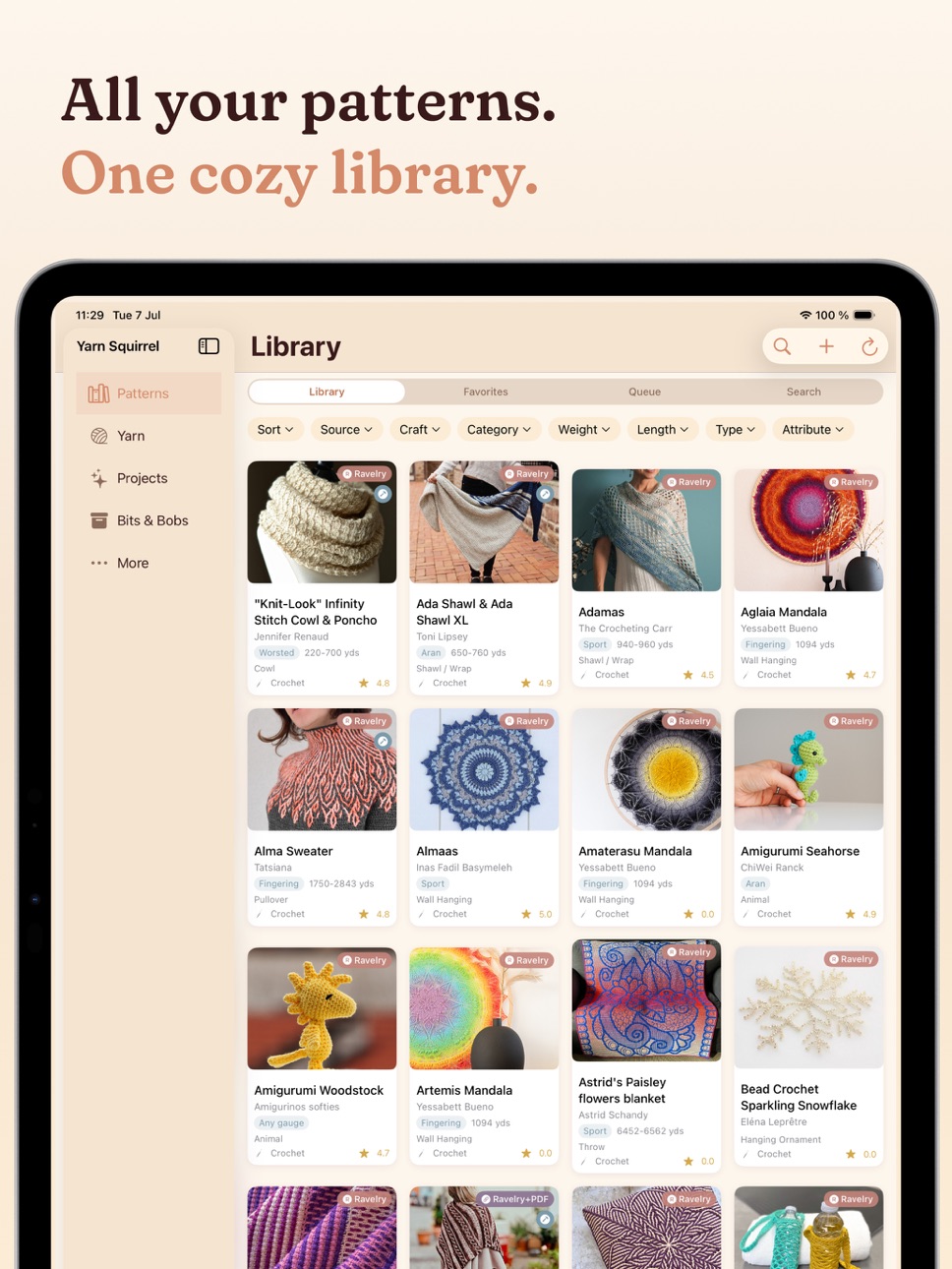
All your patterns. One cozy library.
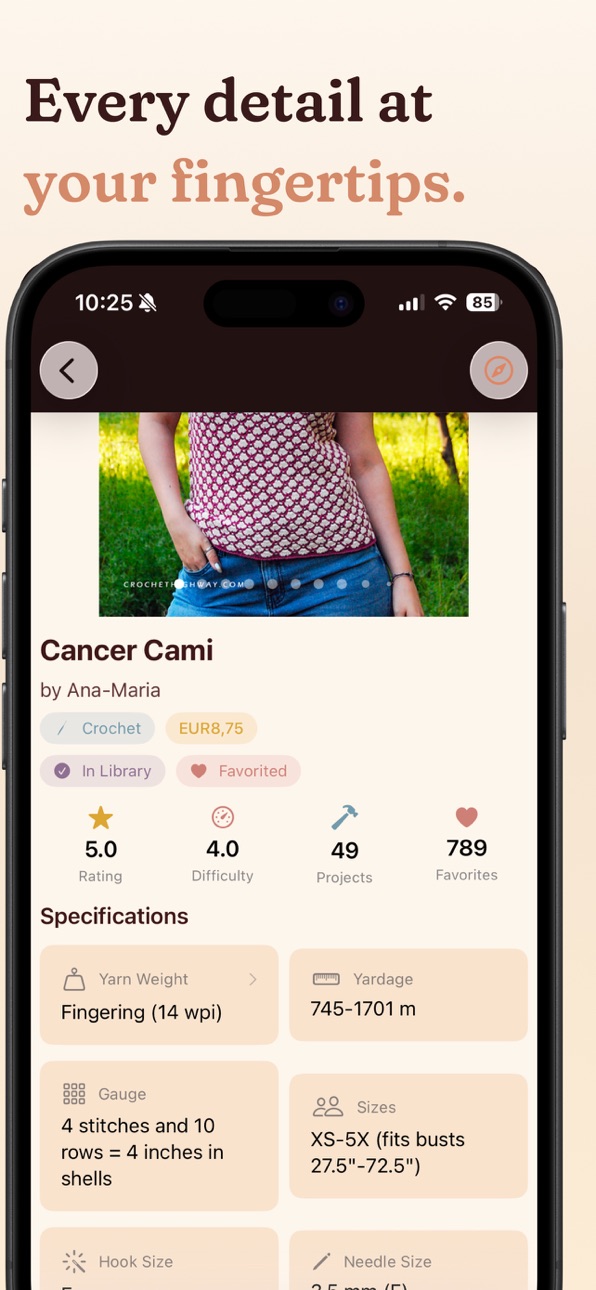
Yarn Squirrel brings together your Ravelry library, imported PDFs, and web-saved patterns into a single, beautifully organized app. No more losing track of that perfect shawl pattern you saved somewhere.
SYNC YOUR RAVELRY LIBRARY
Connect your Ravelry account and your full library, favorites, queue, and projects appear on your device — ready to browse even offline. Every pattern comes with photos, designer info, difficulty ratings, and yarn requirements.
IMPORT YOUR PDF PATTERNS
Drop in PDFs from Files, iCloud, or any app. Yarn Squirrel uses OCR to extract the pattern name, designer, yarn weight, and yardage automatically, then searches Ravelry for a match — even without an account — so you can link your PDF to full metadata in one tap.
SAVE PATTERNS FROM THE WEB
Found a pattern while browsing? Tap Share → Yarn Squirrel from any browser to save it to your Library or Favorites instantly. Paste a direct PDF link and the file downloads and stores locally.
ONE LIBRARY, EVERY SOURCE
See all your patterns together — Ravelry, imported PDFs, web-saved, and linked patterns side by side. Source badges and filters show where each one came from at a glance.
MANAGE YOUR PROJECTS
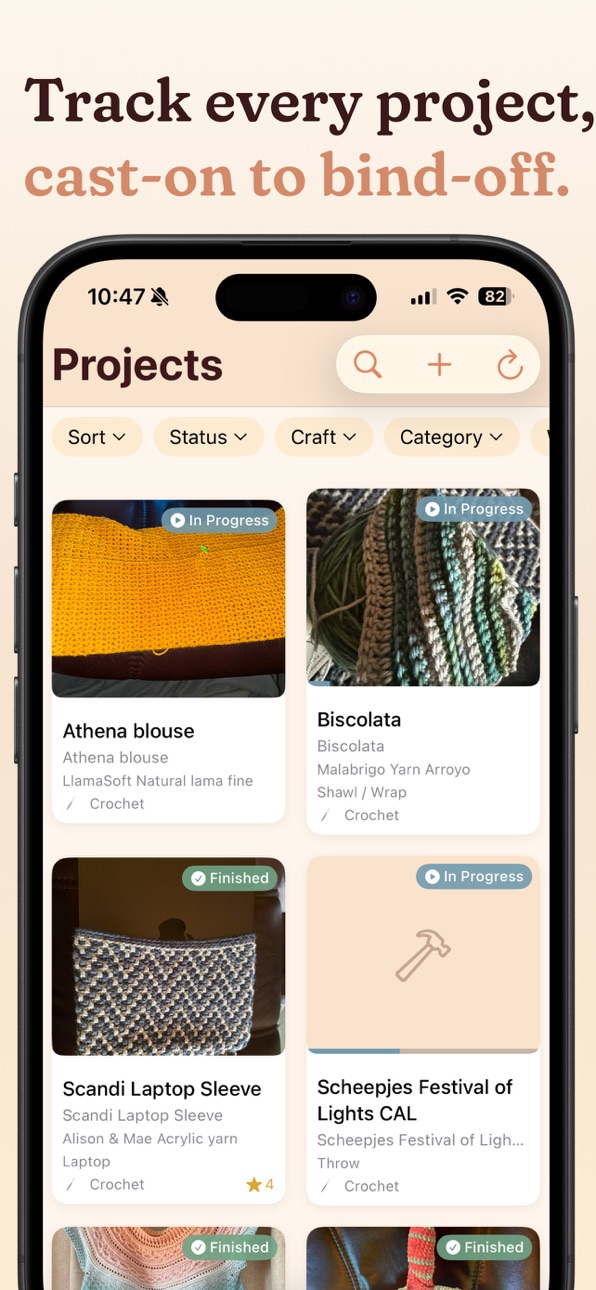
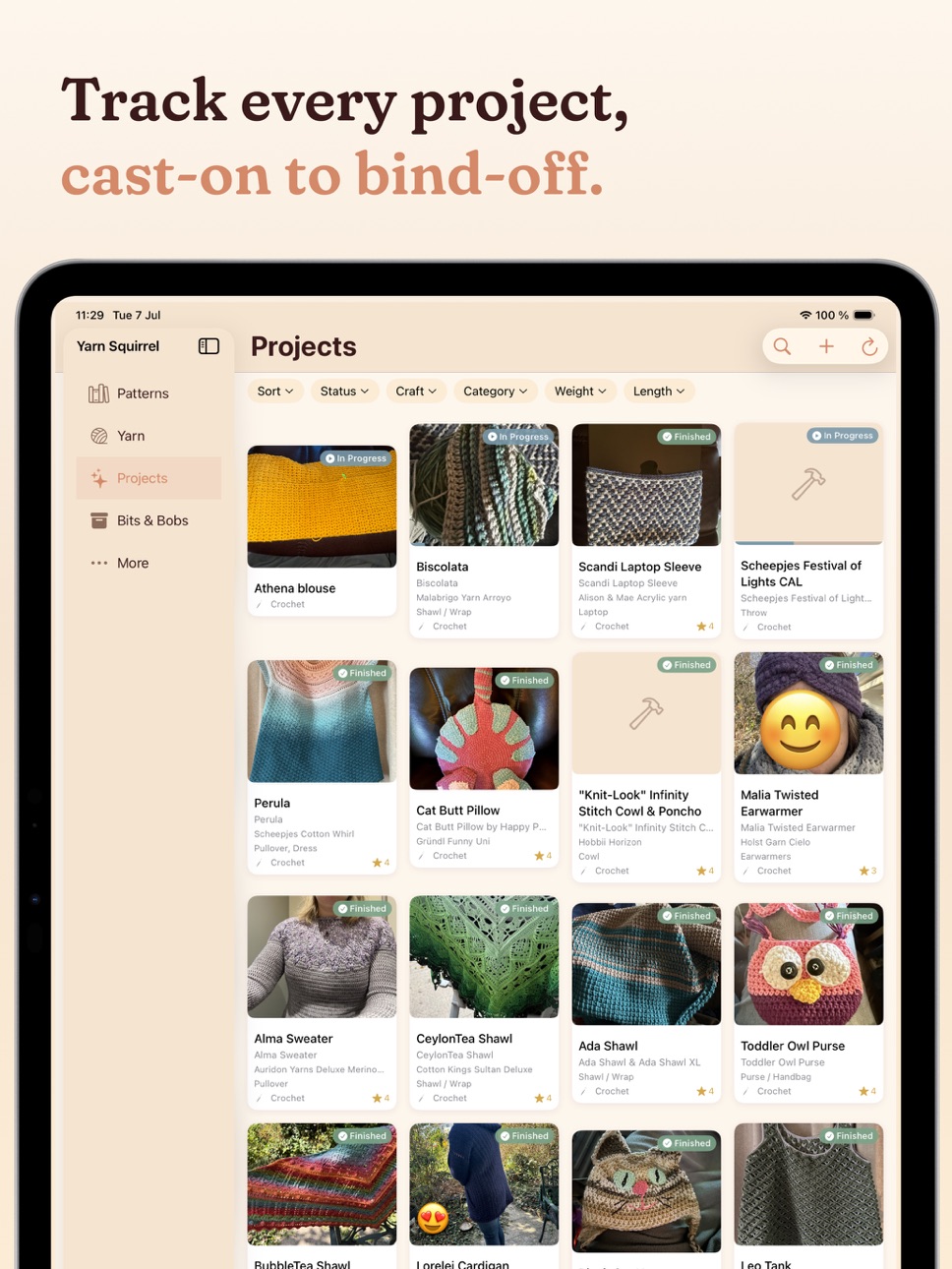
Track every project from cast-on to bind-off. Start one from a pattern, or create a standalone project with just a name, craft type, and yarn. See what's in progress, hibernating, and finished.
COUNT EVERY ROW, RIGHT IN THE PATTERN
Row counters live on every project and stay open while you read — no switching screens to tap a count. Multiple counters, repeating mode, linked counters, row alerts for moments like "Switch to colour B", custom colours, and a keep-awake option so your screen stays on while you work. Including as a widget or a live activity.
BROWSE YOUR YARN STASH
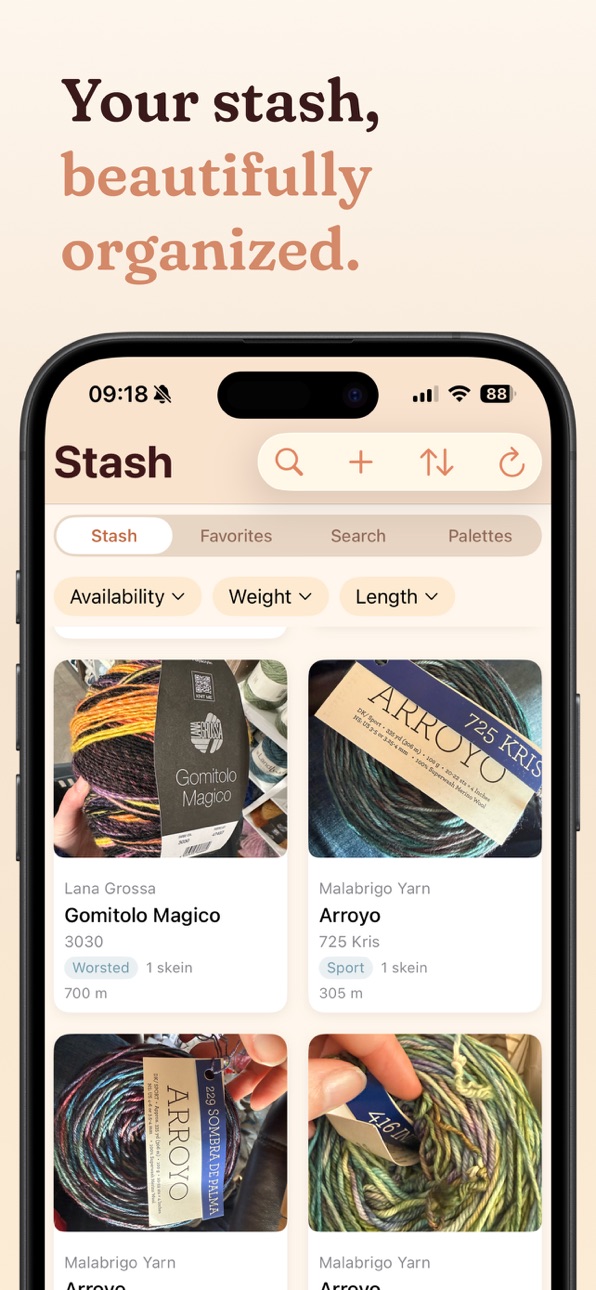
Build and browse your stash, with or without Ravelry. It syncs automatically when connected, or add skeins manually — no sign-in needed. Filter by weight, fiber, or yardage. Photograph a yarn label to search Ravelry automatically, and find patterns that suit a skein right from your stash.
PLAN YOUR COLOUR COMBINATIONS
The Palette Planner lets you build colour palettes for upcoming projects. Pull yarns from your stash, search Ravelry, or pick a colour from a photo, then drag to reorder and save for later.
TRACK YOUR SUPPLIES & TOOLS
Bits & Bobs keeps your craft room organised. Log consumables like safety eyes, buttons, and stuffing — with low-stock warnings — plus your hooks, needles, and notions. Log what you used in a project and Yarn Squirrel deducts it automatically.
BOOKS & MAGAZINES
Patterns from books and magazines show their source volume — tap one to see every pattern you own from it.
SEARCH ALL OF RAVELRY
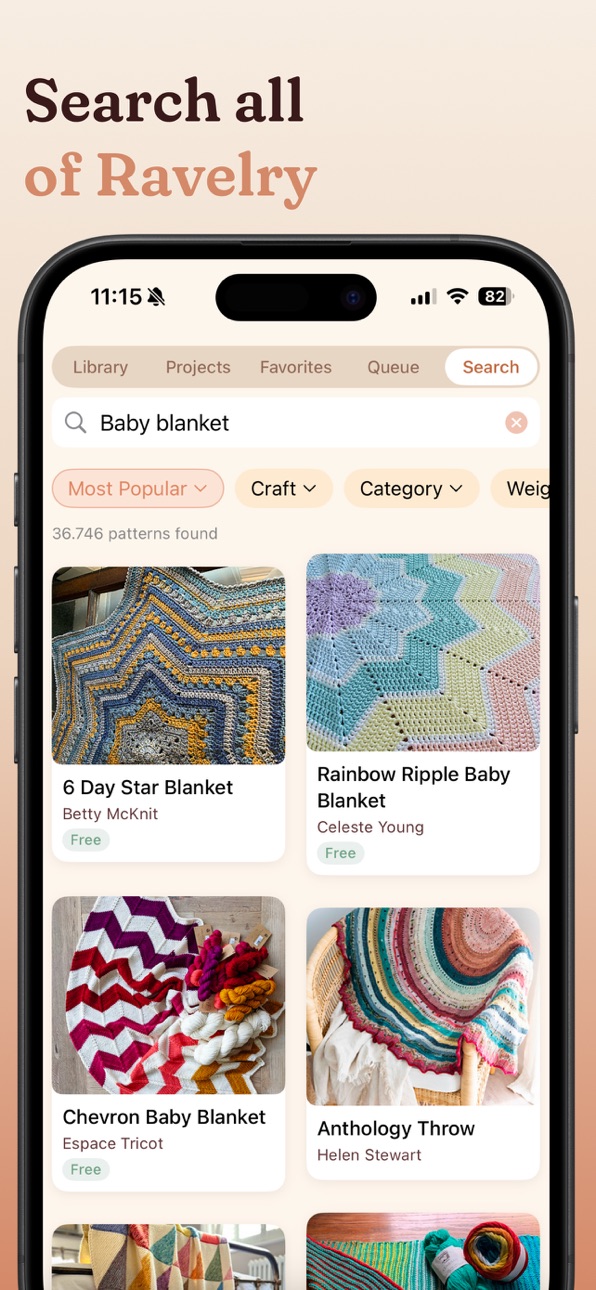
Search the full Ravelry pattern and yarn databases — no account required — with filters for craft type, yarn weight, difficulty, price, language, and tags. Connect a Ravelry account to search your notebook too.
HANDY TOOLS BUILT IN
· Yarn Weight Converter — US, UK, AU/NZ, German, and Japanese systems
· Skein Calculator — exactly how many skeins you need
· Tap any measurement to convert between yards and meters
WORKS WITHOUT RAVELRY
Most of Yarn Squirrel works without ever signing in — import PDFs, search Ravelry, manage your stash, track supplies, and save favorites locally. Everything syncs across devices with iCloud.
GENEROUS FREE TIER
Get started for free: 40 pattern details, 5 PDF imports, full project access, all tools, and up to 10 Bits & Bobs items. Upgrade to Premium for unlimited everything.
Premium Plans:
· Monthly: $1.99/mo
· Annual: $14.99/yr (save 37%)
· Lifetime: $29.99
Monthly and annual plans include a 7-day free trial.
End-User License Agreement for the Subscriptions: https://www.apple.com/legal/internet-services/itunes/dev/stdeula/
In-App Purchases US pricing
Yarn Squirrel Premium Subscription
Monthly Premium · Monthly 7-day free trial$1.99
Premium Yearly · Yearly 7-day free trial$14.99
One-Time Purchases
Lifetime Unlock$34.99
Capabilities
In-App Purchases
Accessibility
ipadiphonemacrealityDevicetvoswatch
Version history 25 versions
Build 887639202v1.112026-07-08 01:44:28
- New: Live Activity for the row counter — see and increment your row count directly on the Lock Screen and Dynamic Island.
- New: Home Screen and Lock Screen widgets for row counting — tap to increment without opening the app.
- Fix: the "keep screen awake" setting now works reliably when the row counter is open.
Build 887579478v1.10.12026-06-30 01:58:57
- New: group your stash by yarn to see all colorways of the same yarn together — toggle the new stacked-card view in the Yarn tab.
- New: tap a yarn group to see all colorways, combined yardage, and care instructions in one place.
- New: sort grouped yarns by number of colorways, or filter to show only yarns with multiple colorways.
- New: when adding yarn to your stash, a "My Yarns" tab shows yarns already in your stash so you can quickly add a new colorway.
- New: manually added yarn can now be synced to your Ravelry stash automatically.
- Fix: the wrong yarn weight category was being sent to Ravelry when syncing a manually added stash entry.
- Fix: manually added stash entries were not appearing at the top when sorting by newest first.
- Fix: several smaller fixes to stash syncing, duplicate detection, and detail view display.
Build 887480190v1.102026-06-26 21:24:29
- New: group your stash by yarn to see all colorways of the same yarn together — toggle the new stacked-card view in the Yarn tab.
- New: tap a yarn group to see all colorways, combined yardage, and care instructions in one place.
- New: sort grouped yarns by number of colorways, or filter to show only yarns with multiple colorways.
- New: when adding yarn to your stash, a "My Yarns" tab shows yarns already in your stash so you can quickly add a new colorway.
- New: manually added yarn can now be synced to your Ravelry stash automatically.
- Fix: the wrong yarn weight category was being sent to Ravelry when syncing a manually added stash entry.
- Fix: manually added stash entries were not appearing at the top when sorting by newest first.
- Fix: several smaller fixes to stash syncing, duplicate detection, and detail view display.
thanks to Jane for the idea
Build 887339864v1.9.22026-06-24 18:54:36
- Fix: yarn added to a project was not syncing to Ravelry.
- Fix: yarn added to a project could disappear after the next sync.
- Fix: project edits (status, progress, notes, yarn) were not syncing to Ravelry for users without a subscription.
- Fix: editing or deleting a stash entry showed a subscription prompt for users without a subscription.
- Fix: remaining skein count in the stash did not update immediately after allocating yarn to a project.
Build 887279421v1.9.12026-06-22 18:26:01
- Fix: crash that could occur when switching away from the app, particularly after a sync completed.
Build 887150247v1.92026-06-18 19:11:14
- New: browse and search Ravelry patterns without an account — tap the Search tab in Patterns to find patterns by keyword, category, weight, and more.
- New: search for yarn on Ravelry without an account — tap the Search tab in Yarn to find any yarn in the Ravelry database.
- New: open any search result to see the full pattern detail, including gauge, yarn requirements, and suggested yarns.
- New: save any pattern to your Favorites without an account — it's stored locally on your device.
- New: when adding yarn to your stash, you can now search Ravelry for the yarn to pre-fill weight, yardage, and fiber details — no account required.
- New: importing a PDF pattern now automatically searches Ravelry for a match, even without an account.
- New: browse available colorways for any yarn — shown as a list when browsing without an account.
- New: the app is now available in French, Italian, and Spanish.
Build 886833029v1.8.12026-06-11 21:59:07
New: added option to redeem a promo code
Build 886677983v1.82026-06-10 10:10:07
- New: pattern viewer — open any linked PDF or web pattern full-screen directly from your project.
- New: overlay guide lines in the pattern viewer — toggle a draggable yellow reading strip and a green vertical marker over your pattern. Drag the handles to reposition them; the lines stay exactly where you left them next time you open the project.
- New: row counter — track your progress directly in the app while following your pattern. Add as many counters as you need, each shown as a compact card. Tap a card to count up, tap the minus button to count down. The counter panel and the guide lines work side by side in the viewer.
- New: customise each counter with a name, starting and ending value (shows a progress bar in the detail view), a custom card colour, and repeating mode — it resets automatically when the ending row is reached and keeps track of how many repeats you've finished.
- New: link counters together — incrementing or decrementing one will automatically update the linked counters.
- New: set row alerts on any counter — a message pops up when the counter reaches the specified row.
- New: the row counter is available both in the pattern viewer and directly from the Project detail view.
- New: counter state stays in sync between the project view and the pattern viewer — your place is always up to date in both.
- New: option in Settings to keep the screen awake while the row counter is open.
- New: when your project has no pattern document linked yet, the pattern viewer now gives you three ways to add one: link a PDF from the Files app, download the PDF directly from Ravelry into the app, or pick photos from your library to convert into a viewable document.
Build 886468157v1.7.12026-06-03 17:21:40
- New: sort your library and favorites by name, date added, or designer — tap the sort icon in the toolbar.
- New: sort your projects by recently updated, name, or date.
- New: when creating a project from the Projects tab, you can now link it to a pattern from your library. The project name and craft type fill in automatically, and Ravelry sync becomes available when you link a Ravelry pattern.
- New: you can also link or change a pattern from the Edit Project screen.
Thanks @Beke for the suggestions
Build 886292626v1.72026-05-29 18:47:10
- New: on iPad, the app now uses a sidebar for navigation instead of the top tab bar.
- New: you can now delete projects, stash entries, and accessories from their detail views. For Ravelry-linked items, the deletion is also sent to Ravelry.
- Fixed: iCloud sync was silently broken for some users due to photos being stored in a format that exceeded CloudKit's record size limit. Affected patterns and projects now sync correctly after updating.
- Improved: project and accessory photos are now compressed before saving, reducing iCloud storage usage and speeding up sync.
Build 885526805v1.6.32026-05-11 18:37:43
- Fixed: colorway changes saved in the stash editor now sync correctly to Ravelry.
- Fixed: yarn colorway list now shows all colorways, including those with only a colour code and no name.
- Improved: the app now saves your data before going to the background, reducing the risk of a rare crash caused by an interrupted CloudKit sync.
Build 885378145v1.6.22026-05-07 19:05:16
- Improved: the app no longer hangs on the launch screen when Ravelry is unreachable — it now times out after 15 seconds and opens normally with your cached data.
- New: a banner now appears when Ravelry is unreachable, so you always know why live data isn't loading.
- New: if you try to add a pattern to your library, favorites, or queue while Ravelry is down, you can now save the action to send automatically when it comes back.
- Improved: the app checks in the background whether Ravelry has come back online, starting immediately and backing off gradually to every 15 minutes.
- Fixed: scrolling jank after linking a web pattern to a Ravelry pattern.
- Fixed: filtering the library by "Web" source no longer shows Ravelry books and magazines.
Build 885020595v1.62026-04-29 02:11:20
- New: save any pattern website to your library or favorites from the iOS share sheet — tap Share → Yarn Squirrel in Safari or any other browser.
- New: the share sheet shows a thumbnail, description, and lets you choose Library or Favorites before you save. Patterns import automatically when you return to the app.
- New: tap the + button in Library or Favorites to paste a URL directly, without leaving the app.
- New: paste a direct link to a PDF file and the app downloads and stores it locally, just like importing from Files — the pattern is immediately viewable.
- New: Ravelry pattern URLs fetch full pattern data (ratings, yarn packs, gauge) automatically when you're signed in.
- New: YouTube links are stored as a separate source type for better organisation.
- New: filter your library and favorites by source — Web and YouTube are now available filter options alongside Ravelry and Imported.
- New: you can now favorite imported PDFs and web-saved patterns, not just Ravelry patterns.
- Fixed: photos added to a project no longer appear twice in the gallery after the app syncs with Ravelry.
- Fixed: scrolling to the bottom of Ravelry search results now loads all pages correctly instead of getting stuck on a spinner.
- Fixed: the category picker now opens correctly when editing an imported pattern.
Build 884364260v1.52026-04-10 19:36:23
- New: create projects without a pattern — start a standalone project with a name, craft type, and yarn, no Ravelry pattern required.
- New: add yarn to your stash without a Ravelry account — build a local yarn stash directly in the app, no sign-in required.
- New: record care instructions for any stash yarn — washing, bleaching, drying, ironing, and dry cleaning symbols, stored locally and shown in the stash detail.
- New: app now remembers your guest mode session across restarts — no more login screen every time you reopen the app.
- Improved: app launches much faster when iCloud is unavailable — the startup delay (up to 20 seconds) is gone.
- Improved: manually added stash yarn now lets you edit the brand, weight, grams per skein, and length per skein directly in the edit form.
- Improved: stash detail now shows gauge info — sourced from the Ravelry yarn for synced stash, or from your manual entry for locally added yarn.
- Improved: stash detail now shows hook and needle sizes for manually added yarn.
- Improved: gauge labels now show "sts / 10 cm" and "rows / 10 cm" when the app is set to meters.
- Improved: editing locally added stash yarn no longer requires a premium subscription.
Build 883973253v1.4.42026-04-01 04:17:01
- Fixed: editing yarn quantity in the stash now saves correctly — updating to 2 skeins no longer results in 2.2 skeins on Ravelry.
- Improved: the stash quantity edit form now uses a Skeins / Length / Weight picker and shows the correct unit (meters or yards) for the length field.
Build 883919978v1.4.32026-03-30 22:10:03
Fixed: imported PDFs stored in iCloud no longer disappear after iOS clears local device storage. Affected patterns now show a "PDF available (needs download)" button that re-downloads and opens the file automatically.
Build 883839378v1.4.22026-03-27 20:36:18
- Fixed: filter chips are no longer hidden when navigating to Stash, Yarn Search, or Library from a pattern or stash item detail view.
- Various bug fixes and improvements.
Build 883702936v1.42026-03-25 13:34:28
- New: the app is now available in German! All tabs, labels, filters, and menus are fully translated.
- New: choose your preferred language in Settings → Preferences → App Language. Switch between System Default, English, and Deutsch without changing your device language. Change takes effect after a restart.
- New: pattern attribute filters (lace, cables, top-down, seamless, and 260+ more) are now shown
- Improved: if your stash images were missing these should now be available (sorry about that)
- Improved: Hook and Needle sizes sometimes did not show up correctly. that should now be fixed.
Build 883760777v1.4.12026-03-25 20:16:22
- Improved: scrolling through patterns, projects, stash, and yarn grids is now smoother — fixed a layout issue that caused items to shift while scrolling.
- Various bug fixes and improvements.
Build 883512092v1.3.32026-03-19 18:32:36
- Fixed: yarn quantity is no longer removed from Ravelry when you save a project edit without changing the quantity.
- Fixed: knitting, machine knitting, loom knitting, and cross-stitch patterns now display the correct craft type instead of always showing Crochet. (Thanks for reporting Kaley!)
Note: projects already in your library that were affected will update their craft type automatically when the app syncs your patterns. If you'd like to fix a project straight away, open it, tap Edit, and change the Craft Type in the Project Details section.
- New: you can now edit the craft type of any project directly in the edit form.
- Fixed: hook and needle sizes now load correctly when creating or editing a project.
Build 883424792v1.3.12026-03-16 22:14:15
Fixed: Editing a project no longer causes havoc on the attached yarn (sorry about that!). It now should sync correctly and keep quantities in place. Also the hooks/needles should now sync correctly on projects
Build 883349576v1.32026-03-14 03:22:27
- New: Ravelry Bundles are now fully supported in the Favorites tab. Bundles are named collections of your favorited patterns — browse all your bundles, see what's inside each one, and create, rename, or delete them directly from the app (premium).
- New: Add any favorited pattern to a bundle from its detail view, or create a new bundle on the spot (premium).
- New: Remove patterns from a bundle with a long-press in the bundle detail view (premium).
- Improved: pattern and stash images load faster throughout the app.
Build 883310596v1.2.12026-03-12 23:44:37
- Fixed: app no longer crashes on launch due to a SwiftData/iCloud sync conflict; the app now recovers automatically if the database container can't be opened.
- Fixed: navigation bar no longer shifts colour when scrolling through image-heavy views — the bar now stays consistently cream on all screens (iOS 26 Liquid Glass fix).
- Fixed: pattern cover photo now loads correctly when opening a pattern from search results.
- Fixed: "Search Ravelry" title no longer disappears after scrolling in the stash yarn search view.
- Fixed: stash search now correctly matches yarn names, and the stash list no longer shows a blank page after dismissing search.
- Fixed: banner background in Stash detail is now fully opaque at all scroll positions.
Build 883055299v1.22026-03-10 18:28:53
New:
* Bits & Bobs tab — track your crafting supplies (safety eyes, buttons, stuffing, stitch markers, and more) and tools (hooks, needles, scissors). Ravelry users can sync their needle & hook inventory automatically. Log what you use in each project and let the app deduct from your stock.
* Patterns from books and magazines now show up individually and as a volume
* the Add to Queue flow now lets you pick yarn from your stash or search Ravelry for a yarn and let's you reorder your queue
Polish & fixes:
* search in the Patterns and Yarn tabs now opens as an iOS 26-style keyboard bar (tap the magnifying glass icon) — and jumps straight to the keyboard when you switch to the Search tab.
* Fixed a bug where linking a local PDF pattern to a matching Ravelry pattern could cause the entry to vanish from your library entirely.
* Headers now have a uniform height
Build 882934259v1.12026-03-02 19:36:10
### Added
- **Color Palette** — explore and save color combinations inspired by your stash yarn
- **Pattern Ideas** — tap any stash yarn to browse patterns that work with it
- **Yarn Ideas** — tap any pattern to discover yarns that match its requirements
- **Project Yarn Editing** — add and manage yarn from the project edit screen, including linking stash yarn directly to a project
- **Pattern Storage** — choose whether imported patterns should be stored in the app or only referenced from the file system
### Fixed
- Stash yarn linked to a project on Ravelry now correctly syncs both ways
- Project detail sync now always refreshes yarn pack data including stash links
- Various minor bug fixes and stability improvements
Price history by region
Currency
Show
Columns
Search
Availability 1 of 1 storefronts
| Region | Language | Price | Ratings | Avg | Version |
|---|---|---|---|---|---|
| US | en-US | Free | 1 | 5.0 | 1.11 |
Change log 29 changes · US
✎
releaseNotes updated
- New: Live Activity for the row counter — see and increment your row count directly on the Lock Screen and Dynamic Island.
- New: Home Screen and Lock Screen w
✎
description updated
All your patterns. One cozy library.
Yarn Squirrel brings together your Ravelry library, imported PDFs, and web-saved patterns into a single, beautifully organ
✎
subtitle updated
Knit & Crochet · PDF & Ravelry
✎
name updated
Yarn Squirrel: Pattern Library
◆
Version 1.11 released
- New: Live Activity for the row counter — see and increment your row count directly on the Lock Screen and Dynamic Island.
- New: Home Screen and Lock Screen widgets for row counting — tap to increment without opening the app.
- Fix: the "
◆
Version 1.10.1 released
- New: group your stash by yarn to see all colorways of the same yarn together — toggle the new stacked-card view in the Yarn tab.
- New: tap a yarn group to see all colorways, combined yardage, and care instructions in one place.
- New: so
◆
Version 1.10 released
- New: group your stash by yarn to see all colorways of the same yarn together — toggle the new stacked-card view in the Yarn tab.
- New: tap a yarn group to see all colorways, combined yardage, and care instructions in one place.
- New: so
◆
Version 1.9.2 released
- Fix: yarn added to a project was not syncing to Ravelry.
- Fix: yarn added to a project could disappear after the next sync.
- Fix: project edits (status, progress, notes, yarn) were not syncing to Ravelry for users without a subscription
◆
Version 1.9.1 released
- Fix: crash that could occur when switching away from the app, particularly after a sync completed.
◆
Version 1.9 released
- New: browse and search Ravelry patterns without an account — tap the Search tab in Patterns to find patterns by keyword, category, weight, and more.
- New: search for yarn on Ravelry without an account — tap the Search tab in Yarn to find
◆
Version 1.8.1 released
New: added option to redeem a promo code
◆
Version 1.8 released
- New: pattern viewer — open any linked PDF or web pattern full-screen directly from your project.
- New: overlay guide lines in the pattern viewer — toggle a draggable yellow reading strip and a green vertical marker over your pattern. Dra
◆
Version 1.7.1 released
- New: sort your library and favorites by name, date added, or designer — tap the sort icon in the toolbar.
- New: sort your projects by recently updated, name, or date.
- New: when creating a project from the Projects tab, you can now link
◆
Version 1.7 released
- New: on iPad, the app now uses a sidebar for navigation instead of the top tab bar.
- New: you can now delete projects, stash entries, and accessories from their detail views. For Ravelry-linked items, the deletion is also sent to Ravelry
◆
Version 1.6.3 released
- Fixed: colorway changes saved in the stash editor now sync correctly to Ravelry.
- Fixed: yarn colorway list now shows all colorways, including those with only a colour code and no name.
- Improved: the app now saves your data before goin
◆
Version 1.6.2 released
- Improved: the app no longer hangs on the launch screen when Ravelry is unreachable — it now times out after 15 seconds and opens normally with your cached data.
- New: a banner now appears when Ravelry is unreachable, so you always know w
◆
Version 1.6 released
- New: save any pattern website to your library or favorites from the iOS share sheet — tap Share → Yarn Squirrel in Safari or any other browser.
- New: the share sheet shows a thumbnail, description, and lets you choose Library or Favorite
◆
Version 1.5 released
- New: create projects without a pattern — start a standalone project with a name, craft type, and yarn, no Ravelry pattern required.
- New: add yarn to your stash without a Ravelry account — build a local yarn stash directly in the app, no
◆
Version 1.4.4 released
- Fixed: editing yarn quantity in the stash now saves correctly — updating to 2 skeins no longer results in 2.2 skeins on Ravelry.
- Improved: the stash quantity edit form now uses a Skeins / Length / Weight picker and shows the correct uni
◆
Version 1.4.3 released
Fixed: imported PDFs stored in iCloud no longer disappear after iOS clears local device storage. Affected patterns now show a "PDF available (needs download)" button that re-downloads and opens the file automatically.
◆
Version 1.4.2 released
- Fixed: filter chips are no longer hidden when navigating to Stash, Yarn Search, or Library from a pattern or stash item detail view.
- Various bug fixes and improvements.
◆
Version 1.4.1 released
- Improved: scrolling through patterns, projects, stash, and yarn grids is now smoother — fixed a layout issue that caused items to shift while scrolling.
- Various bug fixes and improvements.
◆
Version 1.4 released
- New: the app is now available in German! All tabs, labels, filters, and menus are fully translated.
- New: choose your preferred language in Settings → Preferences → App Language. Switch between System Default, English, and Deutsch withou
◆
Version 1.3.3 released
- Fixed: yarn quantity is no longer removed from Ravelry when you save a project edit without changing the quantity.
- Fixed: knitting, machine knitting, loom knitting, and cross-stitch patterns now display the correct craft type instead of
◆
Version 1.3.1 released
Fixed: Editing a project no longer causes havoc on the attached yarn (sorry about that!). It now should sync correctly and keep quantities in place. Also the hooks/needles should now sync correctly on projects
◆
Version 1.3 released
- New: Ravelry Bundles are now fully supported in the Favorites tab. Bundles are named collections of your favorited patterns — browse all your bundles, see what's inside each one, and create, rename, or delete them directly from the app (p
◆
Version 1.2.1 released
- Fixed: app no longer crashes on launch due to a SwiftData/iCloud sync conflict; the app now recovers automatically if the database container can't be opened.
- Fixed: navigation bar no longer shifts colour when scrolling through image-hea
◆
Version 1.2 released
New:
* Bits & Bobs tab — track your crafting supplies (safety eyes, buttons, stuffing, stitch markers, and more) and tools (hooks, needles, scissors). Ravelry users can sync their needle & hook inventory automatically. Log what you use in
◆
Version 1.1 released
### Added
- **Color Palette** — explore and save color combinations inspired by your stash yarn
- **Pattern Ideas** — tap any stash yarn to browse patterns that work with it
- **Yarn Ideas** — tap any pattern to discover yarns that match it