Home › Utilities

 US
US
1 of 1 storefronts
Content in en-US
Content in en-US
Information
Preview 2 platforms
iPhone 8 images





iPad 8 images


What’s New Version 1.0.23
Multi-page image scan: scan several image pages in one flow and bring them into Signer as a single multi-page document.
Description
Sign PDFs, fill forms, and request signatures from your device — no printer, scanner, or account required.
Signer – Signature Maker is a fast and simple app for signing documents, completing forms, creating realistic electronic signatures, and sending signature requests with a shareable link.
Whether a lease just landed in your inbox, a client is waiting on a contract, or a school form is due today, you can open it, add your signature, and send it back in minutes.
Sign PDFs, forms, and contracts
Import a PDF, image, contract, agreement, or scanned document and complete it directly on your device. Add text, dates, checkmarks, initials, stamps, and signatures exactly where they belong. Perfect for rental agreements, waivers, invoices, NDAs, permission slips, job offers, tax forms, and business documents.
Create a realistic electronic signature
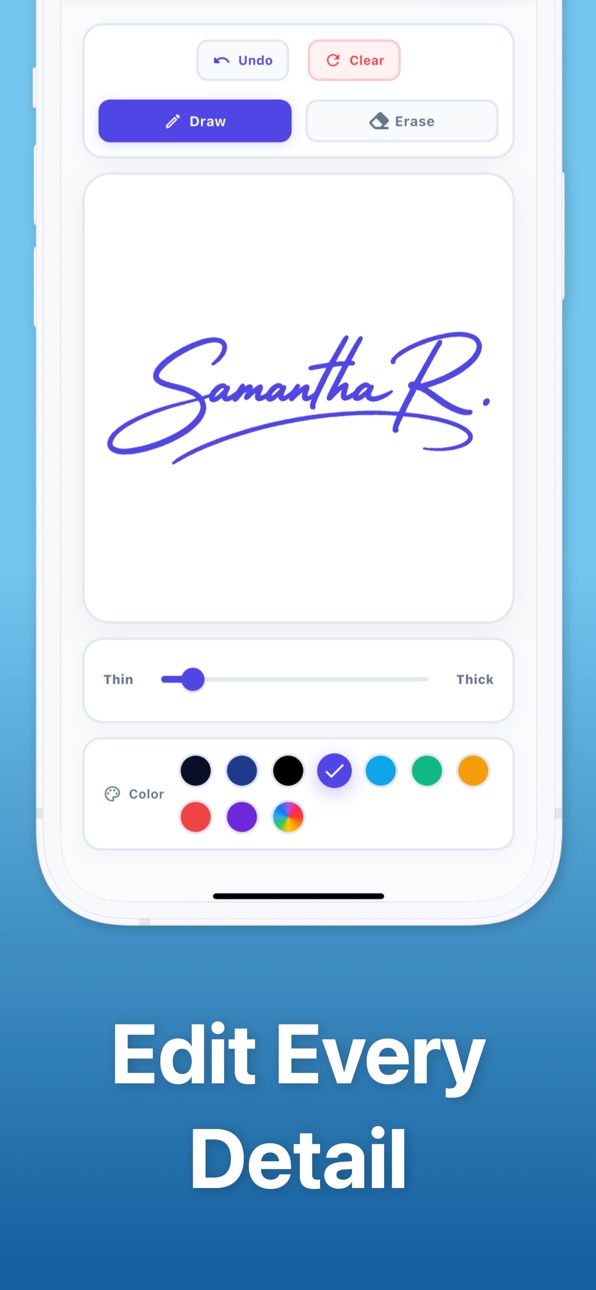
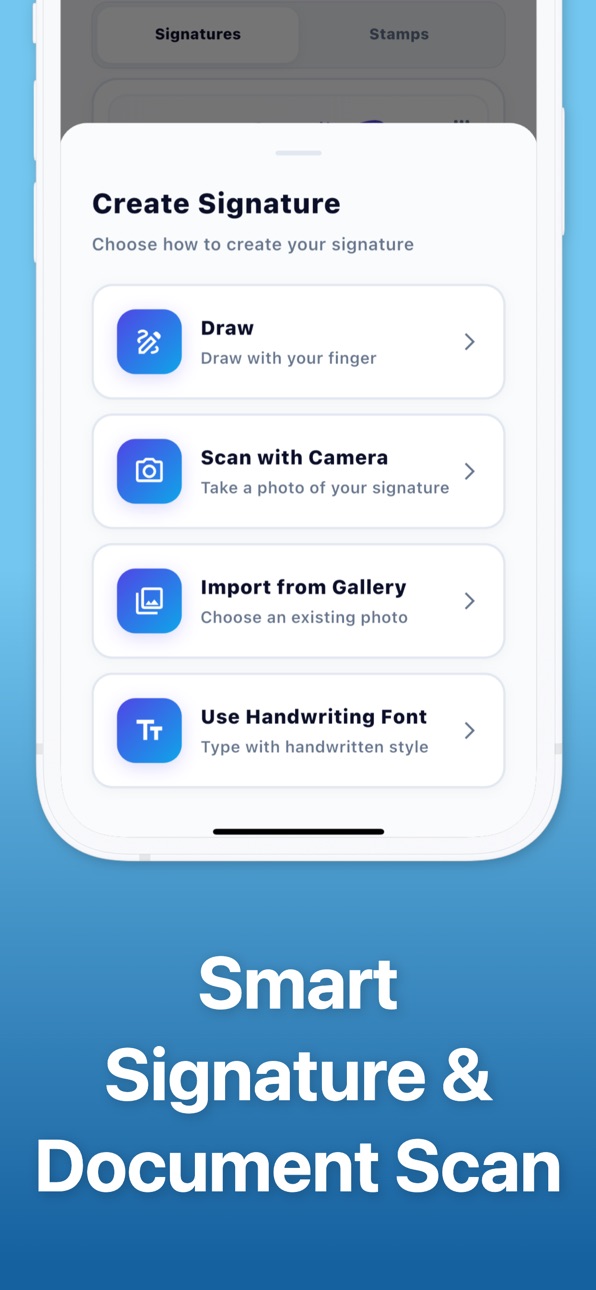
Draw your signature with your finger, scan your handwritten autograph with the camera, or type it using handwriting-style fonts. Adjust stroke thickness, refine lines, change colors, erase, or redraw until your signature looks natural and professional — never artificial or generic.
Smart signature scanning
Take a photo of your handwritten signature and Signer automatically extracts the ink while removing the paper background. The result is a clean, transparent signature ready to place on any PDF, form, contract, or image.
Quick Sign and signature library
Need to sign something once? Use Quick Sign for a one-time signature. Want to reuse your signature later? Save multiple signatures in your library and apply them anytime.
Request signatures with a link
Need someone else to sign a document? Create a signing request and send the link by email, WhatsApp, or any messenger. The recipient can sign without installing the app or creating an account. Ask them to add a signature, stamp, date, initials, or custom text, then track each request from the app: waiting, opened, or completed.
Fill forms without printing
Add text fields, dates, initials, checkmarks, and stamps. Complete multi-page documents, initial every page of a lease, approve invoices, or return signed paperwork without switching apps.
Private by design
Documents you sign locally stay on your device unless you choose to share them or send a signing request. Open password-protected PDFs, organize files into folders, and share finished documents instantly.
Key features
• Sign PDF files, images, forms, and contracts
• Fill forms with text, dates, checkmarks, initials, and stamps
• Draw, scan, or type your digital signature
• Create realistic handwritten electronic signatures
• Quick Sign for one-time signatures
• Save and reuse signatures from your library
• Request signatures with shareable links
• Track signing status: waiting, opened, completed
• Open password-protected PDFs
• Organize documents into folders
• Share signed documents instantly
• Go paperless with fast digital signing
Built for real life
Freelancers closing deals, landlords sending leases, parents returning school forms, students submitting paperwork, and small businesses approving invoices — Signer helps anyone complete documents from their device.
Skip the print–sign–scan routine. Download Signer – Signature Maker and complete your first document today.
Subscriptions:
A subscription is valid for 1 week or 1 year, depending on the subscription type selected.
Payment will be charged to your Apple ID account upon confirmation of purchase.
Subscriptions will automatically renew unless canceled within 24-hours before the end of the current period.
You can cancel anytime in your iTunes account settings.
Any unused portion of a free trial will be forfeited if you purchase a subscription.
Terms of use: https://kreativityapps.com/terms-of-use-signer
Privacy policy: https://kreativityapps.com/privacy-policy-signer
In-App Purchases US pricing
Premium Subscription
Weekly subscription · 7 days 7-day free trial$4.99
Yearly subscription · Yearly$39.99
Weekly subscription · 7 days$7.99
Capabilities
In-App Purchases
Accessibility
ipadiphonemacrealityDevicetvoswatch
Version history 6 versions
Build 887902358v1.0.232026-07-07 05:48:10
Multi-page image scan: scan several image pages in one flow and bring them into Signer as a single multi-page document.
Build 887203259v1.0.202026-06-20 18:06:58
Organize documents with folders: create folders, move saved documents, and keep related files easier to find.
More ways to finish a document: transparent stamps, checkmarks, date formats, and more handwriting styles are now ready in the editor.
Build 886316227v1.0.172026-05-30 21:00:07
This update improves document editing, performance, and reliability, with fixes for image handling and notifications.
Build 884918998v1.0.142026-04-25 21:41:20
You can now generate a signing request link, invite someone else to complete a document, and track the request status from the app. Ask them to add exactly what you need, including a signature, stamp, date, or custom text.
Build 882660583v1.0.132026-02-24 03:36:19
We’re excited to introduce Signer – Signature Maker, your new paperless document signing app.
With this first release, you can:
• Create natural handwritten signatures
• Edit stroke, thickness, and color
• Smart scan documents and extract signatures
• Sign PDF files and digital contracts
• Add stamps, text, and dates
• Export and reuse your signature anywhere
• Keep documents fully private on your device
Thank you for choosing Signer. We’re just getting started.
Build 882268549v1.02026-02-21 01:09:23
Price history by region
Currency
Show
Columns
Search
Availability 1 of 1 storefronts
| Region | Language | Price | Ratings | Avg | Version |
|---|---|---|---|---|---|
| US | en-US | Free | 0 | — | 1.0.23 |
Change log 10 changes · US
✎
releaseNotes updated
Multi-page image scan: scan several image pages in one flow and bring them into Signer as a single multi-page document.
✎
description updated
Sign PDFs, fill forms, and request signatures from your device — no printer, scanner, or account required.
Signer – Signature Maker is a fast and simple app fo
✎
subtitle updated
Digital document PDF eSigner
✎
name updated
Signer: Electronic Signature
◆
Version 1.0.23 released
Multi-page image scan: scan several image pages in one flow and bring them into Signer as a single multi-page document.
◆
Version 1.0.20 released
Organize documents with folders: create folders, move saved documents, and keep related files easier to find.
More ways to finish a document: transparent stamps, checkmarks, date formats, and more handwriting styles are now ready in the ed
◆
Version 1.0.17 released
This update improves document editing, performance, and reliability, with fixes for image handling and notifications.
◆
Version 1.0.14 released
You can now generate a signing request link, invite someone else to complete a document, and track the request status from the app. Ask them to add exactly what you need, including a signature, stamp, date, or custom text.
◆
Version 1.0.13 released
We’re excited to introduce Signer – Signature Maker, your new paperless document signing app.
With this first release, you can:
• Create natural handwritten signatures
• Edit stroke, thickness, and color
• Smart scan documents and extract
◆
Version 1.0 released