Home › Productivity

 US
US
 CNzh-Hans-CN
 AEen-GB
 AFen-GB
 ALen-GB
 AMen-GB
 ATde-DE
 AUen-AU
 AZen-GB
 BAen-GB
 BEen-GB
 BGen-GB
 BHen-GB
 BMen-GB
 BNen-GB
 BTen-GB
 BYen-GB
 CAen-CA
 CHde-CH
 CYen-GB
 CZen-GB
 DEde-DE
 DKen-GB
 EEen-GB
 EGen-GB
 ESes-ES
 FIen-GB
 FJen-GB
 FMen-GB
 FRfr-FR
 GBen-GB
 GEen-GB
 GRen-GB
 HRen-GB
 HUen-GB
 IDen-GB
 IEen-GB
 ILen-GB
 INen-GB
 IQen-GB
 ISen-GB
 ITit
ITit JOen-GB
 JPja
JPja KGen-GB
 KHen-GB
 KRko
KRko KWen-GB
 KZen-GB
 LAen-GB
 LBen-GB
 LKen-GB
 LTen-GB
 LUen-GB
 LVen-GB
 MDen-GB
 MEen-GB
 MKen-GB
 MMen-GB
 MNen-GB
 MOzh-Hant-HK
 MRen-GB
 MTen-GB
 MVen-GB
 MYen-GB
 NLnl
NLnl NOen-GB
 NPen-GB
 NRen-GB
 NZen-AU
 OMen-GB
 PGen-GB
 PHen-GB
 PKen-GB
 PLen-GB
 PTpt-PT
 PWen-GB
 QAen-GB
 ROen-GB
 RSen-GB
 RUru
RUru SAen-GB
 SBen-GB
 SEsv
SEsv SGen-GB
 SIen-GB
 SKen-GB
 THen-GB
 TJen-GB
 TMen-GB
 TOen-GB
 TRen-GB
 UAen-GBUSen-US
 UZen-GB
 VNen-GB
 VUen-GB
 XKen-GB
 YEen-GB
 ZAen-GB
 HKNot Available
 TWNot Available
99 of 101 storefronts
Content in en-US
Content in en-US
Information
Preview 3 platforms
iPhone 9 images



iPad 8 images


Apple Watch 4 images


What’s New Version 2.1.0
In this major update, we are thrilled to introduce three powerful features designed to help you structure your life, sync your schedule, and map out your thoughts with greater elegance and clarity.
1. Apple Calendar Integration
Bring your entire schedule together. You can now seamlessly import events directly from Apple Calendar, ensuring your daily planning and external commitments are always in perfect sync.
2. Introducing "Areas"
Elevate your organizational structure. With the new "Areas" feature, you can now categorize related projects into distinct life domains (e.g., Work, Personal, Health, Growth) for a cleaner, more holistic overview of your commitments.
3. Rich Text Support for Project Details
Your project notes are now more expressive. You can now format project descriptions using rich text—such as bolding and bulleted lists—to organize project outlines, thoughts, and inspirations beautifully.
Thank you for journeying with us. If you love these updates, please take a moment to leave us a review on the App Store. Your support means the world to an independent developer!
Description
Do you struggle with time blindness and feel like your hours just… vanish? For the ADHD brain and visual thinkers, standard checklist apps don't work because time isn't a linear progression—it's a fog. Flowiz is a visual ADHD daily planner app designed to clear that fog, defeat executive dysfunction, and turn daily planning into an effortless, tactile experience.
By combining a visual scheduler with time blocking (time boxing) and a drag-and-drop timeline calendar, Flowiz makes professional time management interactive and friction-free. No more overwhelm, ADHD paralysis, or analysis paralysis. Just instant clarity.
KEY FEATURES
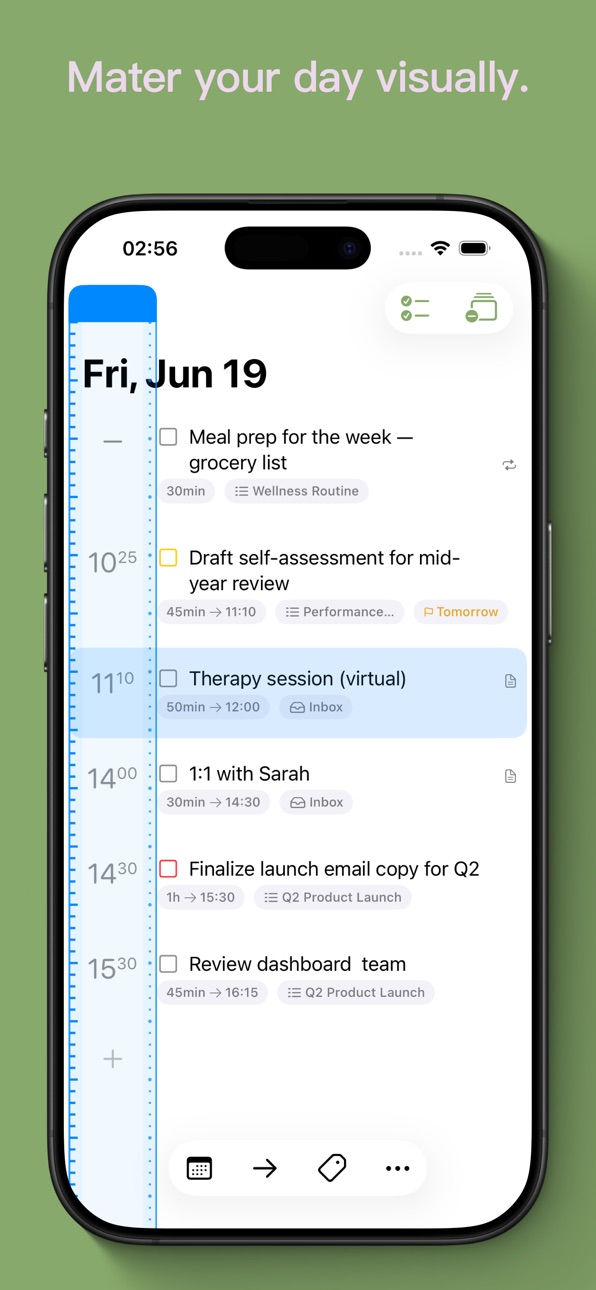
The Batch Time Ruler (Tactile Time Blocking): Say goodbye to tedious digital calendar micro-adjustments. Effortlessly slide, drag, and sync the start times of multiple tasks at once. It’s a sensory-friendly, tactile way to reshape your entire day's timeline in seconds.
One-Tap Auto-Planning (Smart Time Allocation): Eliminate decision fatigue and planning anxiety. Automatically schedule unscheduled tasks into available time slots across your daily calendar. Let Flowiz do the heavy lifting of "when," so you can focus on the "what."
Visual Eisenhower Matrix (Priority Quadrants): Master your priorities. Instantly organize your to-do list into four clear quadrants. Easily distinguish what’s truly urgent from what can wait, preventing ADHD burnout before it even starts.
Unified Upcoming View (Calendar & List Sync): Clear the mental clutter. Seamlessly switch between a stress-free task list and a visual daily calendar to see your schedule, agenda, and to-dos in one cohesive flow.
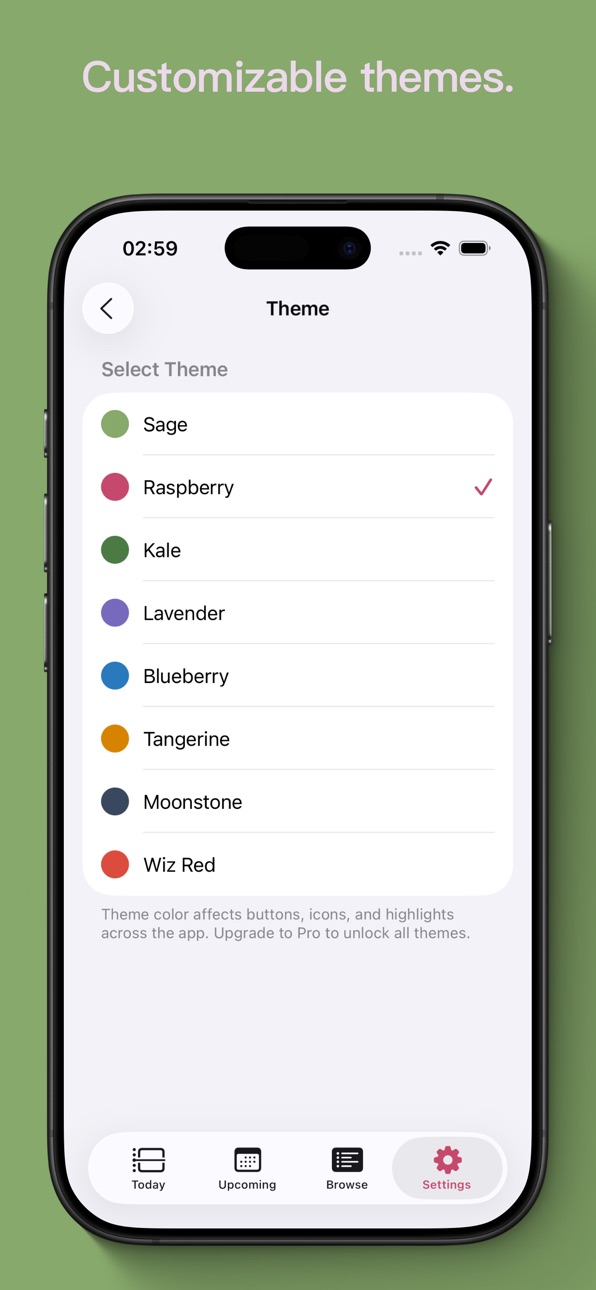
Dynamic Visual Themes: Focus your way. Choose from a curated selection of beautiful color themes—including our signature Sage Green—to create a sensory-friendly, low-stimulation workspace that matches your focus state.
WHY FLOWIZ?
Built for professionals who need more than just a to-do list. Built for those who want to master the science of self-awareness.
Privacy Policy: https://www.flowiz.app/privacy/
Terms of Use (EULA): https://www.apple.com/legal/internet-services/itunes/dev/stdeula/
In-App Purchases US pricing
Flowiz Pro Plan Subscription
Flowiz Pro (Monthly) · Monthly$5.00
Flowiz Pro (Yearly) · Yearly 1-year free trial$48.00
Capabilities
In-App Purchases
Accessibility
ipadiphonemacrealityDevicetvoswatch
Version history 12 versions
Build 887445942v2.1.02026-06-30 01:12:32
In this major update, we are thrilled to introduce three powerful features designed to help you structure your life, sync your schedule, and map out your thoughts with greater elegance and clarity.
1. Apple Calendar Integration
Bring your entire schedule together. You can now seamlessly import events directly from Apple Calendar, ensuring your daily planning and external commitments are always in perfect sync.
2. Introducing "Areas"
Elevate your organizational structure. With the new "Areas" feature, you can now categorize related projects into distinct life domains (e.g., Work, Personal, Health, Growth) for a cleaner, more holistic overview of your commitments.
3. Rich Text Support for Project Details
Your project notes are now more expressive. You can now format project descriptions using rich text—such as bolding and bulleted lists—to organize project outlines, thoughts, and inspirations beautifully.
Thank you for journeying with us. If you love these updates, please take a moment to leave us a review on the App Store. Your support means the world to an independent developer!
Build 887012968v2.0.02026-06-22 09:20:43
- We’ve squashed some bugs and polished the app for a smoother experience.
Build 886828771v1.5.12026-06-13 07:34:57
- We’ve squashed some bugs and polished the app for a smoother experience.
- We have made the Time Ruler feature free for everyone.
Build 886917576v1.5.22026-06-13 22:06:31
- We’ve squashed some bugs and polished the app for a smoother experience.
Build 886577989v1.5.02026-06-08 06:07:25
- Timeline Mode for Today: You can now switch to Timeline view in the Today screen to schedule your day with ultimate clarity.
- Refined Timeline Visuals: Tasks now feature a "Repeat" icon for recurring events. Passed start times are now hidden to keep your timeline clean and focused.
- Smoother Gestures: Optimized and corrected the drag-and-drop gesture responsiveness on the Week view timeline.
Build 886074719v1.4.12026-05-25 18:05:32
- Cleaner Interface: Decluttered the task creation keyboard and the Upcoming screen for a more focused, distraction-free experience.
- Bug Squashing: Fixed a visual glitch (white flash) when closing the keyboard, resolved an issue where the keyboard toolbar would disappear unexpectedly, and corrected minor layout bugs in theme settings and menu text.
Build 885847533v1.4.02026-05-23 17:09:15
- Image attachments: add photos to your tasks.
- Quick task creation: repeat and reminder presets, plus a unified date/time picker.
- Today view: overdue tasks are listed first; cleaner layout with overdue time badge hidden.
Build 885496263v1.3.02026-05-11 21:17:44
• Customizable Widget Button: Set the widget's '+' button to add tasks to your Inbox, the current list, or hide it entirely for a cleaner look.
• Enhanced Widgets: Upcoming and Project widgets now display start dates and wrap longer task names across multiple lines.
• Drag to Select: Seamlessly drag your finger across multiple tasks to select them for quick bulk actions.
Build 885298004v1.2.12026-05-05 21:58:20
We are constantly refining Flowiz to make it the most reliable tool for your focus. In this update, we took a step back to polish the details and squash a few bugs under the hood.
• Smoother Organization: Dragging and dropping tasks is now more fluid and accurate.
• Smarter Scheduling: Auto-scheduling now perfectly respects your end-of-day boundaries.
• UI Polish: Refined date layouts and menus for a cleaner, distraction-free experience.
Keep focusing, and thank you for the feedback!
Build 884993308v1.2.02026-04-29 16:09:02
Flowiz on Your Wrist: We’re excited to introduce the Apple Watch version. Track your time and stay focused right from your wrist.
Home Screen Widgets: Stay on top of your schedule at a glance with our beautiful new iOS widgets.
Bug Fixes & Improvements: We’ve squashed several pesky bugs and improved overall stability for a smoother experience.
Build 884878485v1.1.12026-04-24 19:23:36
What's New:
This update includes minor bug fixes and improvements to the sidebar navigation on iPad.
Build 882213630v1.1.02026-04-23 03:32:14
Price history by region
Currency
Show
Columns
Search
Availability 99 of 101 storefronts
| Region | Language | Price | Ratings | Avg | Version |
|---|---|---|---|---|---|
| CN | zh-Hans-CN | Free | 4 | 4.3 | 2.1.0 |
| AE | en-GB | Free | 0 | — | 2.1.0 |
| AF | en-GB | Free | 0 | — | 2.1.0 |
| AL | en-GB | Free | 0 | — | 2.1.0 |
| AM | en-GB | Free | 0 | — | 2.1.0 |
| AT | de-DE | Free | 0 | — | 2.1.0 |
| AU | en-AU | Free | 0 | — | 2.1.0 |
| AZ | en-GB | Free | 0 | — | 2.1.0 |
| BA | en-GB | Free | 0 | — | 2.1.0 |
| BE | en-GB | Free | 0 | — | 2.1.0 |
| BG | en-GB | Free | 0 | — | 2.1.0 |
| BH | en-GB | Free | 0 | — | 2.1.0 |
| BM | en-GB | Free | 0 | — | 2.1.0 |
| BN | en-GB | Free | 0 | — | 2.1.0 |
| BT | en-GB | Free | 0 | — | 2.1.0 |
| BY | en-GB | Free | 0 | — | 2.1.0 |
| CA | en-CA | Free | 0 | — | 2.1.0 |
| CH | de-CH | Free | 0 | — | 2.1.0 |
| CY | en-GB | Free | 0 | — | 2.1.0 |
| CZ | en-GB | Free | 0 | — | 2.1.0 |
| DE | de-DE | Free | 0 | — | 2.1.0 |
| DK | en-GB | Free | 0 | — | 2.1.0 |
| EE | en-GB | Free | 0 | — | 2.1.0 |
| EG | en-GB | Free | 0 | — | 2.1.0 |
| ES | es-ES | Free | 0 | — | 2.1.0 |
| FI | en-GB | Free | 0 | — | 2.1.0 |
| FJ | en-GB | Free | 0 | — | 2.1.0 |
| FM | en-GB | Free | 0 | — | 2.1.0 |
| FR | fr-FR | Free | 0 | — | 2.1.0 |
| GB | en-GB | Free | 0 | — | 2.1.0 |
| GE | en-GB | Free | 0 | — | 2.1.0 |
| GR | en-GB | Free | 0 | — | 2.1.0 |
| HR | en-GB | Free | 0 | — | 2.1.0 |
| HU | en-GB | Free | 0 | — | 2.1.0 |
| ID | en-GB | Free | 0 | — | 2.1.0 |
| IE | en-GB | Free | 0 | — | 2.1.0 |
| IL | en-GB | Free | 0 | — | 2.1.0 |
| IN | en-GB | Free | 0 | — | 2.1.0 |
| IQ | en-GB | Free | 0 | — | 2.1.0 |
| IS | en-GB | Free | 0 | — | 2.1.0 |
| IT | it | Free | 0 | — | 2.1.0 |
| JO | en-GB | Free | 0 | — | 2.1.0 |
| JP | ja | Free | 0 | — | 2.1.0 |
| KG | en-GB | Free | 0 | — | 2.1.0 |
| KH | en-GB | Free | 0 | — | 2.1.0 |
| KR | ko | Free | 0 | — | 2.1.0 |
| KW | en-GB | Free | 0 | — | 2.1.0 |
| KZ | en-GB | Free | 0 | — | 2.1.0 |
| LA | en-GB | Free | 0 | — | 2.1.0 |
| LB | en-GB | Free | 0 | — | 2.1.0 |
| LK | en-GB | Free | 0 | — | 2.1.0 |
| LT | en-GB | Free | 0 | — | 2.1.0 |
| LU | en-GB | Free | 0 | — | 2.1.0 |
| LV | en-GB | Free | 0 | — | 2.1.0 |
| MD | en-GB | Free | 0 | — | 2.1.0 |
| ME | en-GB | Free | 0 | — | 2.1.0 |
| MK | en-GB | Free | 0 | — | 2.1.0 |
| MM | en-GB | Free | 0 | — | 2.1.0 |
| MN | en-GB | Free | 0 | — | 2.1.0 |
| MO | zh-Hant-HK | Free | 0 | — | 2.1.0 |
| MR | en-GB | Free | 0 | — | 2.1.0 |
| MT | en-GB | Free | 0 | — | 2.1.0 |
| MV | en-GB | Free | 0 | — | 2.1.0 |
| MY | en-GB | Free | 0 | — | 2.1.0 |
| NL | nl | Free | 0 | — | 2.1.0 |
| NO | en-GB | Free | 0 | — | 2.1.0 |
| NP | en-GB | Free | 0 | — | 2.1.0 |
| NR | en-GB | Free | 0 | — | 2.1.0 |
| NZ | en-AU | Free | 0 | — | 2.1.0 |
| OM | en-GB | Free | 0 | — | 2.1.0 |
| PG | en-GB | Free | 0 | — | 2.1.0 |
| PH | en-GB | Free | 0 | — | 2.1.0 |
| PK | en-GB | Free | 0 | — | 2.1.0 |
| PL | en-GB | Free | 0 | — | 2.1.0 |
| PT | pt-PT | Free | 0 | — | 2.1.0 |
| PW | en-GB | Free | 0 | — | 2.1.0 |
| QA | en-GB | Free | 0 | — | 2.1.0 |
| RO | en-GB | Free | 0 | — | 2.1.0 |
| RS | en-GB | Free | 0 | — | 2.1.0 |
| RU | ru | Free | 0 | — | 2.1.0 |
| SA | en-GB | Free | 0 | — | 2.1.0 |
| SB | en-GB | Free | 0 | — | 2.1.0 |
| SE | sv | Free | 0 | — | 2.1.0 |
| SG | en-GB | Free | 0 | — | 2.1.0 |
| SI | en-GB | Free | 0 | — | 2.1.0 |
| SK | en-GB | Free | 0 | — | 2.1.0 |
| TH | en-GB | Free | 0 | — | 2.1.0 |
| TJ | en-GB | Free | 0 | — | 2.1.0 |
| TM | en-GB | Free | 0 | — | 2.1.0 |
| TO | en-GB | Free | 0 | — | 2.1.0 |
| TR | en-GB | Free | 0 | — | 2.1.0 |
| UA | en-GB | Free | 0 | — | 2.1.0 |
| US | en-US | Free | 0 | — | 2.1.0 |
| UZ | en-GB | Free | 0 | — | 2.1.0 |
| VN | en-GB | Free | 0 | — | 2.1.0 |
| VU | en-GB | Free | 0 | — | 2.1.0 |
| XK | en-GB | Free | 0 | — | 2.1.0 |
| YE | en-GB | Free | 0 | — | 2.1.0 |
| ZA | en-GB | Free | 0 | — | 2.1.0 |
Not available in: HK, TW
Change log 16 changes · US
✎
releaseNotes updated
In this major update, we are thrilled to introduce three powerful features designed to help you structure your life, sync your schedule, and map out your though
✎
description updated
Do you struggle with time blindness and feel like your hours just… vanish? For the ADHD brain and visual thinkers, standard checklist apps don't work because ti
✎
subtitle updated
Visual Calendar & Organizer
✎
name updated
Flowiz: Daily Planner Todo
◆
Version 2.1.0 released
In this major update, we are thrilled to introduce three powerful features designed to help you structure your life, sync your schedule, and map out your thoughts with greater elegance and clarity.
1. Apple Calendar Integration
Bring your
◆
Version 2.0.0 released
- We’ve squashed some bugs and polished the app for a smoother experience.
◆
Version 1.5.2 released
- We’ve squashed some bugs and polished the app for a smoother experience.
◆
Version 1.5.1 released
- We’ve squashed some bugs and polished the app for a smoother experience.
- We have made the Time Ruler feature free for everyone.
◆
Version 1.5.0 released
- Timeline Mode for Today: You can now switch to Timeline view in the Today screen to schedule your day with ultimate clarity.
- Refined Timeline Visuals: Tasks now feature a "Repeat" icon for recurring events. Passed start times are now hi
◆
Version 1.4.1 released
- Cleaner Interface: Decluttered the task creation keyboard and the Upcoming screen for a more focused, distraction-free experience.
- Bug Squashing: Fixed a visual glitch (white flash) when closing the keyboard, resolved an issue where the
◆
Version 1.4.0 released
- Image attachments: add photos to your tasks.
- Quick task creation: repeat and reminder presets, plus a unified date/time picker.
- Today view: overdue tasks are listed first; cleaner layout with overdue time badge hidden.
◆
Version 1.3.0 released
• Customizable Widget Button: Set the widget's '+' button to add tasks to your Inbox, the current list, or hide it entirely for a cleaner look.
• Enhanced Widgets: Upcoming and Project widgets now display start dates and wrap longer task na
◆
Version 1.2.1 released
We are constantly refining Flowiz to make it the most reliable tool for your focus. In this update, we took a step back to polish the details and squash a few bugs under the hood.
• Smoother Organization: Dragging and dropping tasks is now
◆
Version 1.2.0 released
Flowiz on Your Wrist: We’re excited to introduce the Apple Watch version. Track your time and stay focused right from your wrist.
Home Screen Widgets: Stay on top of your schedule at a glance with our beautiful new iOS widgets.
Bug Fixes
◆
Version 1.1.1 released
What's New:
This update includes minor bug fixes and improvements to the sidebar navigation on iPad.
◆
Version 1.1.0 released