Home › Utilities

 US
US
1 of 1 storefronts
Content in en-US
Content in en-US
Information
Apple ID6758735578
Bundle IDtechsy.remote.tv.com
SellerSeller
Min iOS15.6
Min macOS12.5
Device familiesiphone, ipod
Released2026-04-02
Copyright© Techsy Group
Privacy policyLink ↗
Preview 1 platform
iPhone 4 images


What’s New Version 1.2
New features and improvements
Description
Turn your iPhone into a powerful Smart TV remote control and media casting device.
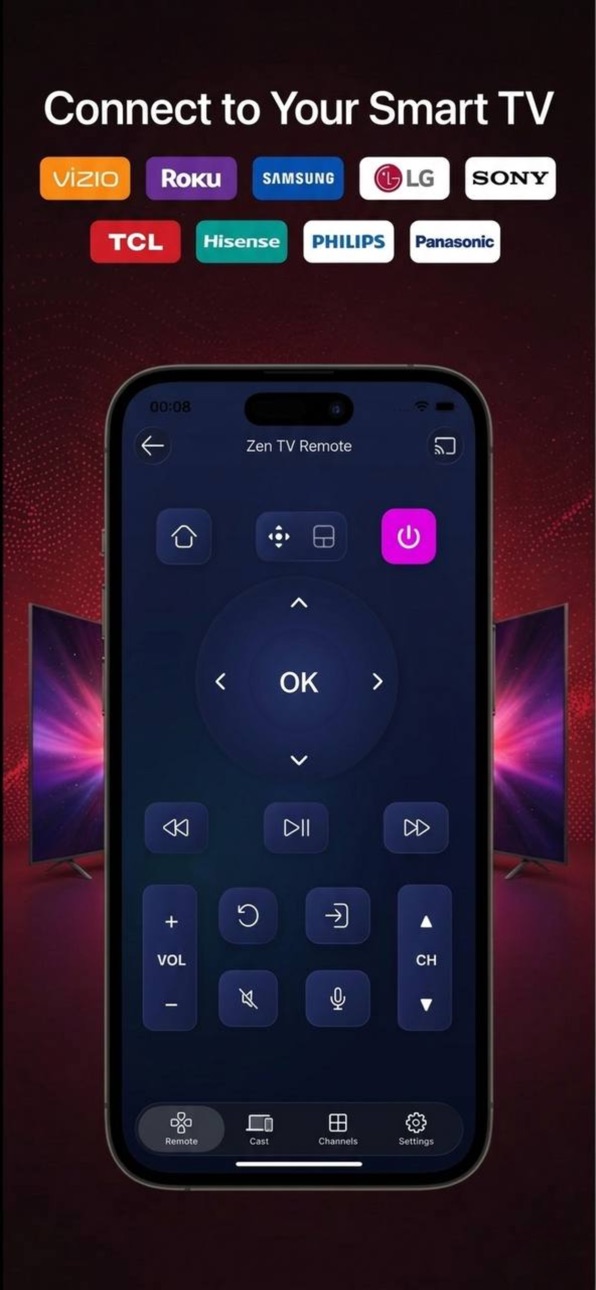
Control your TV, navigate menus, adjust volume, switch channels, and launch apps directly from your phone. The app connects instantly over Wi-Fi and provides smooth, responsive control without the need for a physical remote.
In addition to full remote functionality, the app allows you to cast media from your phone to your TV, making it easy to enjoy your photos and videos on the big screen.
Compatible with many popular Smart TVs including Vizio, Roku, Samsung, LG, Sony, TCL, Hisense
Perfect when your remote is lost, broken, or simply out of reach.
Full Smart TV Remote Control
Use your iPhone as a complete Smart TV remote with all essential controls.
• Power On / Off
• Navigation Pad (Up / Down / Left / Right / OK)
• Touchpad control for smooth and intuitive navigation
• Back and Home buttons
• Volume Up / Down
• Channel Up / Down
• Mute
• Play / Pause
• Fast Forward / Rewind
• Return / Previous
• Input / Source switch
• Voice control button
• Quick app access buttons
The integrated touchpad makes navigation faster and more intuitive, allowing you to easily scroll through menus, apps, and streaming platforms—similar to using a laptop trackpad.
Smart TV Apps
Automatically detects apps available on your TV and lets you open them directly from your phone.
Quickly access your favorite content without navigating through multiple TV menus.
Media Casting
Easily display media from your phone on your TV.
• Cast photos to your TV
• Cast videos to the big screen
Perfect for sharing memories, watching personal videos, or viewing content from your phone on a larger display.
Fast TV Detection
The app automatically detects compatible TVs connected to the same Wi-Fi network and pairs in seconds.
No complicated setup required.
Supported TVs
Works with many Smart TVs including:
• Vizio
• Roku
• Samsung
• LG
• Sony
• TCL
• Hisense
Requirements
• iPhone and TV must be connected to the same Wi-Fi network
• TV must support network remote control
Disclaimer
This application is not affiliated with or endorsed by Vizio, Roku, Samsung, LG, Sony, TCL, Hisense TV.
All trademarks belong to their respective owners.
Terms of Use (EULA): https://www.apple.com/legal/internet-services/itunes/dev/stdeula/
In-App Purchases US pricing
Premium Subscription
Weekly · 7 days 3-day free trial$5.99
Capabilities
In-App Purchases
Accessibility
ipadiphonemacrealityDevicetvoswatch
Version history 3 versions
Build 884449106v1.22026-04-14 10:00:56
New features and improvements
Build 884073794v1.12026-04-03 19:49:55
Fixed minor bugs.
Build 882164368v1.02026-04-02 07:56:50
Price history by region
Currency
Show
Columns
Search
Availability 1 of 1 storefronts
| Region | Language | Price | Ratings | Avg | Version |
|---|---|---|---|---|---|
| US | en-US | Free | 1 | 5.0 | 1.2 |
Change log 7 changes · US
✎
releaseNotes updated
New features and improvements
✎
description updated
Turn your iPhone into a powerful Smart TV remote control and media casting device.
Control your TV, navigate menus, adjust volume, switch channels, and launch
✎
subtitle updated
Universal Smart TV Control
✎
name updated
Zen TV Remote & Cast
◆
Version 1.2 released
New features and improvements
◆
Version 1.1 released
Fixed minor bugs.
◆
Version 1.0 released