Home › Entertainment

RetroGo - Retro Game Emulator
Play GBA, NDS, PSP & PS1
 US
US
USen-US MXes-MX
 COes-MX
 LCen-GB
 AGen-GB
 AIen-GB
 AOen-GB
 BBen-GB
 BFen-GB
 BJen-GB
 BOes-MX
 BRpt-BR
 BSen-GB
 BWen-GB
 BZen-GB
 CDen-GB
 CGen-GB
 CIfr-FR
 CMfr-FR
 CRes-MX
 CVen-GB
 DMen-GB
 DOes-MX
 DZen-GB
 ECes-MX
 GAfr-FR
 GDen-GB
 GHen-GB
 GMen-GB
 GTes-MX
 GWen-GB
 GYen-GB
 HNes-MX
 JMen-GB
 KEen-GB
 KNen-GB
 KYen-GB
 LYen-GB
 MAen-GB
 MGen-GB
 MLen-GB
 MSen-GB
 MUen-GB
 MZen-GB
 NAen-GB
 NEen-GB
 NGen-GB
 NIes-MX
 PAes-MX
 PEes-MX
 PYes-MX
 RWen-GB
 SCen-GB
 SNen-GB
 SRen-GB
 STen-GB
 SVes-MX
 SZen-GB
 TCen-GB
 TDen-GB
 TNen-GB
 TTen-GB
 TZen-GB
 UYen-GB
 VCen-GB
 VEes-MX
 VGen-GB
 ZMen-GB
 ZWen-GB
69 of 69 storefronts
Content in en-US
Content in en-US
Information
Apple ID6758611562
Bundle IDcom.haharsw.pudge
SellerSeller
Min iOS17.0
Min macOS14.0
Device familiesiphone, ipad
Released2026-03-22
Copyright© 2026 Haharsw
Privacy policyLink ↗
Preview 2 platforms
iPhone 10 images




iPad 9 images



What’s New Version 1.7.1
Sega Mega Drive support, auto-matched Mega Drive cheats, and one-tap save overwrite.
• Added the PicoDrive core, bringing Sega Mega Drive / Genesis, 32X, Game Gear, Master System, and Mega-CD games to RetroGo.
• Mega Drive titles are now in Discover — browse and look up games right inside the app, with Chinese names that follow your app language.
• Added a Mega Drive cheat template database with automatic CRC32 matching, so cheats bind to recognized ROMs with no manual setup.
• Reworked save states into a sectioned list: overwrite an existing save in one tap instead of only creating new ones, and watch your save land in the list before the screen closes.
Thanks for playing! Have feedback? Reach us via Settings › Contact Us.
Description
Relive classic games in a native iOS way with RetroGo.
RetroGo is a high-performance retro game emulator for iPhone and iPad, built on RetroArch / Libretro cores and redesigned with native UIKit and SpriteKit interfaces.
Smarter Game Library
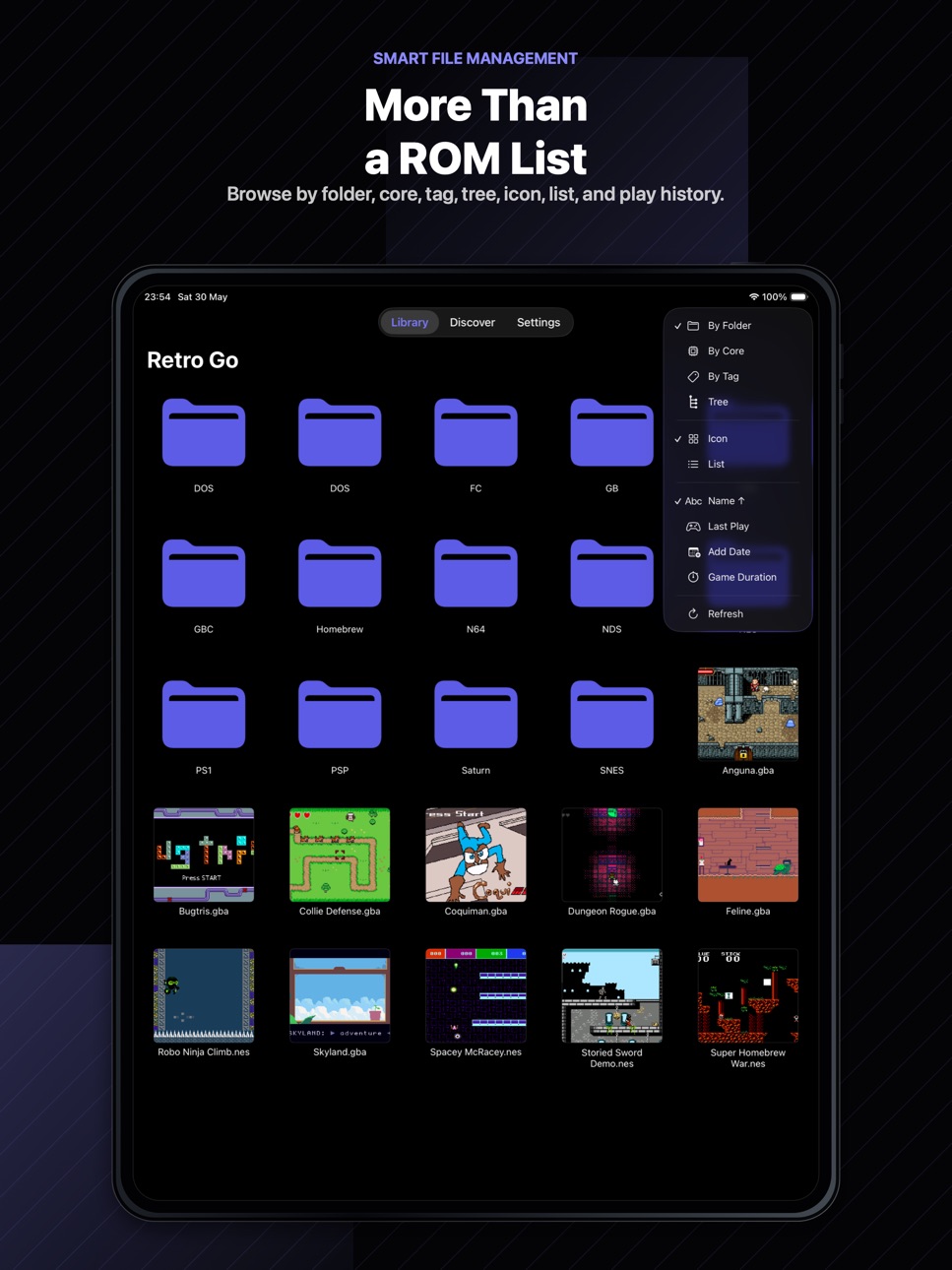
RetroGo is more than a ROM list:
• Browse by folder, tree, tag, or emulator core
• Switch between icon and list layouts
• Import files or folders from the iOS Files app
• Long-press files and folders to rename, move, tag, assign cores, or delete
• Show gameplay snapshots after you play
Built for Retro Collections
• Intelligent detection for supported multi-file games
• Clean grouping for formats such as CUE, M3U, GDI, and related files
• Core assignment for games that need a specific emulator core
Discover Game Metadata
Browse platform databases powered by RetroArch RDB data. View metadata, region, file size, CRC32, MD5, SHA1, and cover artwork when available.
All-in-One Emulation
Includes 15 built-in emulation cores:
• PSP, PlayStation, Saturn
• Sega Mega Drive / Genesis, 32X, Game Gear, Master System, Mega-CD
• Game Boy, Game Boy Color, Game Boy Advance, Nintendo DS
• NES, SNES, Nintendo 64
• DOS and arcade-related systems
Gameplay Features
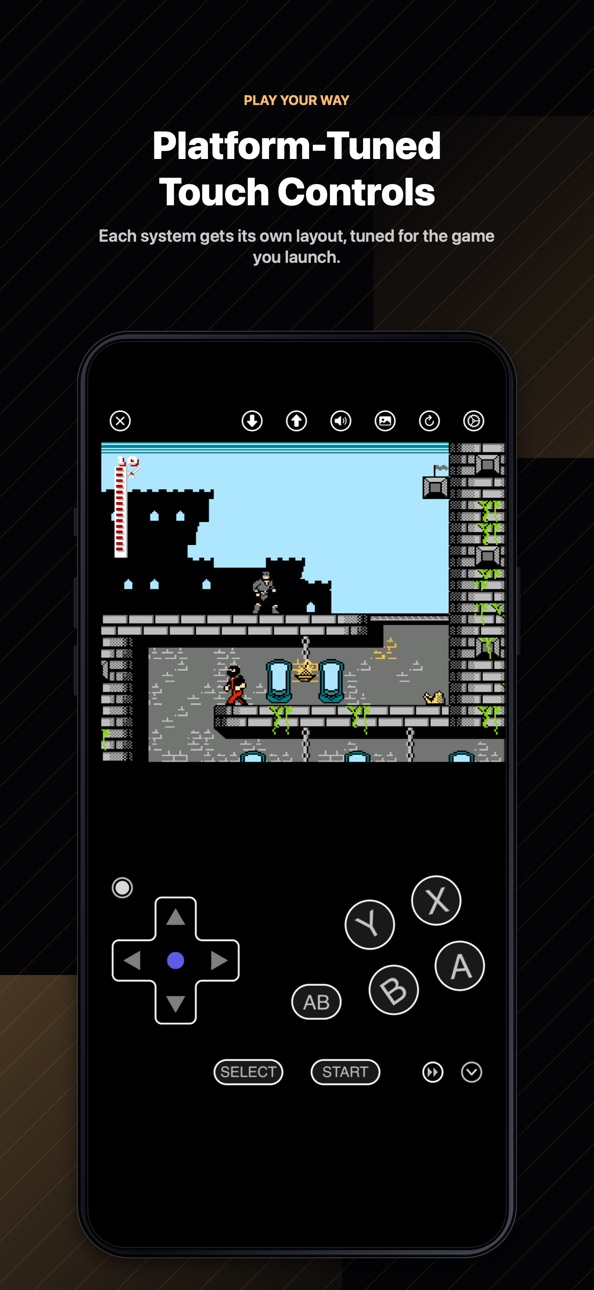
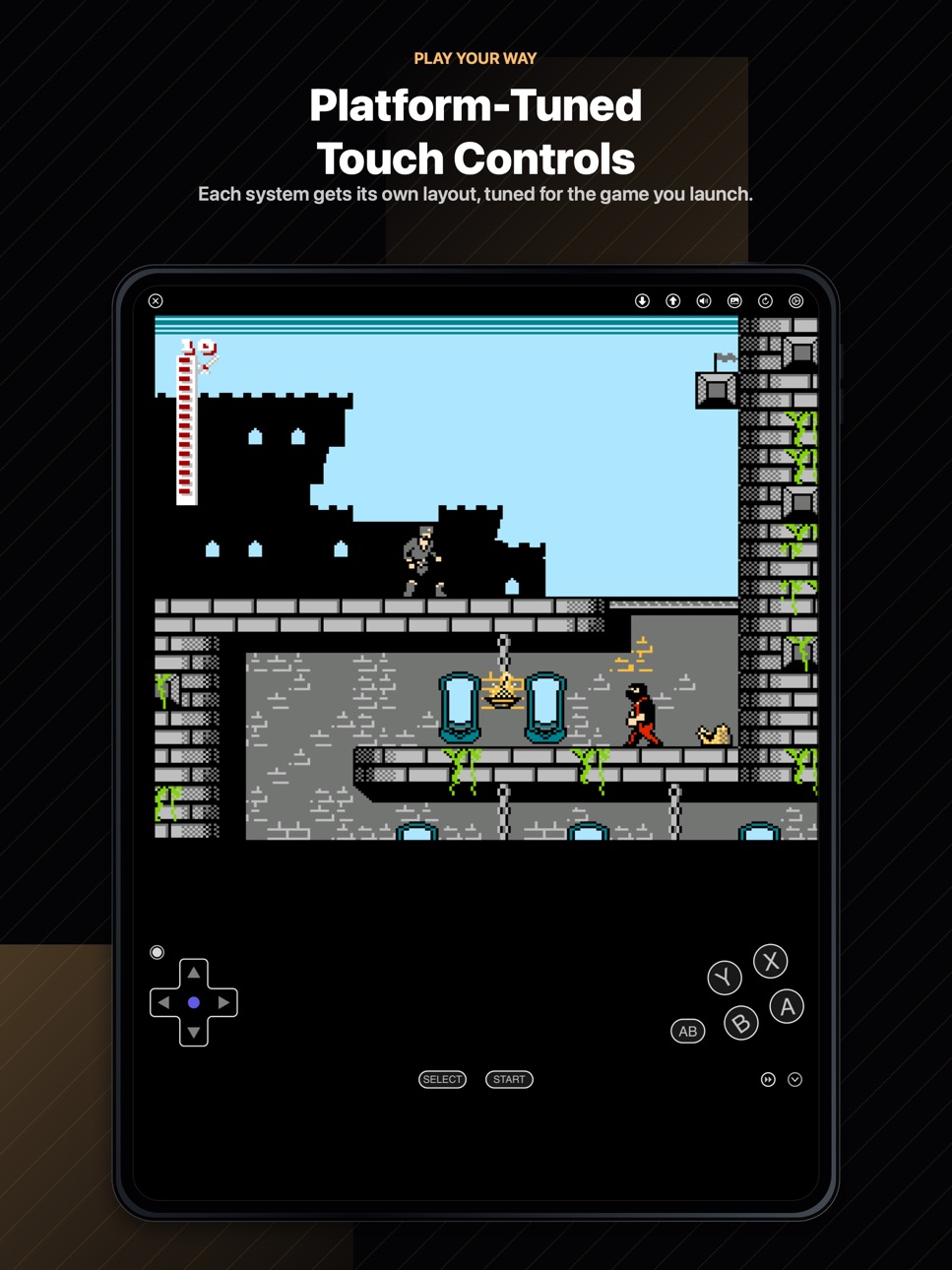
• SpriteKit touch controls
• Per-system control layouts
• Save states and auto save
• Fast-forward
• Physical controller support
• Custom button mapping
• Per-core and per-game settings
Cheat Codes
• Create, edit, and organize your own cheat codes
• Browse built-in cheat template databases for supported platforms
• Automatic template matching by CRC32 — when your ROM is recognized, RetroGo binds a matching cheat template for you
• Enable or disable cheats during gameplay
LAN Multiplayer
• Host or join a game session over the same Wi-Fi network
• Automatic Bonjour discovery — no setup, no accounts
• Live player roster with nicknames, roles, and ping, updated in real time
RetroGo Pro
RetroGo Pro unlocks advanced features and supports continued development.
Available purchase options:
• Monthly subscription
• Yearly subscription
• Lifetime unlock
Prices may vary by country or region and will be shown before purchase.
Subscription Terms
Payment will be charged to your Apple ID account at confirmation of purchase. Subscriptions automatically renew unless auto-renew is turned off at least 24 hours before the end of the current period. Renewal is charged within 24 hours before the end of the current period. You can manage or cancel subscriptions in your Apple ID account settings. You cannot cancel the current active subscription period after purchase.
Privacy & Open Source
RetroGo is open-sourced under the GPLv3 license. RetroGo does not collect or track personal information. Your game files, saves, settings, and app data are stored locally on your device.
GitHub:
https://github.com/askrsw/RetroGo-iOS
Privacy Policy:
https://matrix4x4.com/retrogo/policy
Terms of Use:
https://matrix4x4.com/retrogo/eula
About Screenshots
The games shown in the App Store screenshots are homebrew games, open-source games, or games used with permission. They are shown only to demonstrate RetroGo's features.
RetroGo does not include or provide commercial game ROMs or BIOS files. Users must import their own legally owned game files.
Disclaimer
RetroGo is not affiliated with Nintendo, Sony, Sega, Microsoft, Apple, RetroArch, Libretro, or any other console manufacturer, platform owner, publisher, developer, or trademark holder. All trademarks belong to their respective owners.
Capabilities
In-App PurchasesGame controller
Accessibility
ipadiphonemacrealityDevicetvoswatch
Version history 11 versions
Build 887417841v1.7.12026-06-25 18:13:14
Sega Mega Drive support, auto-matched Mega Drive cheats, and one-tap save overwrite.
• Added the PicoDrive core, bringing Sega Mega Drive / Genesis, 32X, Game Gear, Master System, and Mega-CD games to RetroGo.
• Mega Drive titles are now in Discover — browse and look up games right inside the app, with Chinese names that follow your app language.
• Added a Mega Drive cheat template database with automatic CRC32 matching, so cheats bind to recognized ROMs with no manual setup.
• Reworked save states into a sectioned list: overwrite an existing save in one tap instead of only creating new ones, and watch your save land in the list before the screen closes.
Thanks for playing! Have feedback? Reach us via Settings › Contact Us.
Build 887179229v1.7.02026-06-19 22:07:58
LAN play, smarter cheats, and a stick that follows your thumb.
• Added LAN Multiplayer — host or join a game over the same Wi-Fi network with automatic Bonjour discovery, no setup or accounts required. A live room panel shows players, roles, and ping in real time.
• Added a Popular Games section to the cheat template catalog, making it faster to find cheats for well-known titles without searching.
• Cheat templates can now be unbound manually, so the auto-matcher won't re-attach the same template in future sessions.
• System cheat templates can now be copied as editable user cheats in one tap — customize any built-in entry without modifying the original.
• The analog stick now features dynamic thumb tracking: the base follows your finger as you drag, and keeps responding even when you move outside the original touch zone.
Thanks for playing! Have feedback? Reach us via Settings › Contact Us.
Build 886957175v1.6.02026-06-15 14:16:24
Unlock cheats, cleaner discovery, and smarter game names.
• Added Cheats — create custom cheat codes, enable them in game, and browse built-in cheat templates for supported platforms.
• Added cheat template search, so you can look up available templates by game name.
• RetroGo can now automatically match cheat templates using ROM metadata when available.
• Cheat templates are delivered as an optional on-demand download, keeping the initial app size smaller.
• The Discover page now groups different variants of the same game into one cleaner entry.
• Added Chinese game names for supported titles, improving browsing and search when using Chinese.
• Improved in-game pause and resume timing for menus and popups.
Thanks for playing! Have feedback? Reach us via Settings › Contact Us.
Build 886495883v1.5.02026-06-03 22:28:55
Make the in-game controls your own — and the whole app now rotates with your device.
• Customizable in-game toolbar — rearrange, pin, or hide the top buttons, with the rest tucked into a More menu.
• New landscape lock button to keep the game fixed in landscape while you play.
• The entire app now rotates with your device, not just the game screen.
• Turbo speed levels — Very Slow, Slow, Medium, Fast, Very Fast — set per core or per game.
• Tap-to-lock Turbo for the X/Y buttons: a quick tap keeps auto-fire running hands-free; tap again to release.
• In-game toolbar icons now have subtle shadows, so they stay clearly visible even over bright scenes.
• Added Contact Us in Settings to send feedback by email.
Thanks for playing! Have feedback? Reach us via Settings › Contact Us.
Build 886343791v1.4.12026-05-31 18:16:47
This is a small follow-up update to RetroGo 1.4.
• Added in-game disc switching support for multidisc games, including M3U-based game sets.
• Added an Acknowledgments page for open-source projects, Libretro contributors, and homebrew games used in RetroGo promotional materials.
• Improved legal and attribution information inside the About page.
Build 886205619v1.4.02026-05-30 20:57:11
Version 1.4.0 brings a major redesign to how you browse and discover games.
• All-new tab bar navigation — Library, Discover, and Settings each have
their own dedicated tab for faster, cleaner access.
• Game Discovery — explore game databases for all supported platforms
directly inside the app. Look up titles, check compatibility, and find
what you want without leaving RetroGo.
• Redesigned Library — browse your collection the way you prefer: icon
grid, list, grouped by core, grouped by tag, or a full folder tree.
Every folder is its own page, making deep collections easy to navigate.
• Platform icons — each system now has its own icon in the library, so
you can tell platforms apart at a glance. Icons across the rest of the
app have been refined too.
• Fixed a button conflict that prevented the accelerate button from
working correctly in PSP racing games.
Build 885722568v1.3.12026-05-18 09:18:05
1. Added RetroGo Pro support.
2. Improved purchase and entitlement management.
3. Minor stability and UI improvements.
Build 885377996v1.3.02026-05-08 21:21:21
1. Added per-player external controller mapping with in-app binding configuration.
2. Added persistent game-level input binding profiles, automatically restored per ROM.
3. Added configurable core/game options: video driver, audio driver, and mute during fast-forward.
4. Added overlay touch player assignment and improved virtual/physical input coordination.
5. Improved stability for Saturn (Yabause) when exiting with connected controllers.
Build 884349890v1.2.02026-04-23 18:24:14
1. Architecture Overhaul: Decoupled rendering from game logic. By offloading logic to an independent thread, we’ve achieved more consistent frame pacing and superior system responsiveness.
2. Multi-Speed Fast Forward: New support for 2x, 3x, 4x, and 6x speeds. Skip repetitive sequences and boost your gameplay efficiency instantly.
3. High-Fidelity Fast Forward Audio: Integrated the signalsmith-stretch algorithm to provide smooth audio time-stretching, eliminating noise and artifacts during fast forward.
4. Granular Configuration: Upgraded settings system with per-core and per-game overrides. You can now define unique parameters for every classic title.
Build 884220457v1.1.02026-04-09 10:46:35
1. New Control Experience: Introduced a new SpriteKit-based in-game overlay system, significantly enhancing tactile feedback and control precision.
2. Smart ROM Recognition: Optimized file and folder import workflows with new multi-file association detection.
3. Enhanced Disc Image Support: Added automatic recognition for cue, m3u, gdi, mds, and ccd image groups, including missing file detection to ensure reliable imports of complex games.
4. Data Architecture Upgrade: Migrated core game data to a secure private directory to prevent accidental deletion and ensure your save files are safer and better protected.
Build 882076074v1.02026-03-22 09:01:34
No pricing data captured yet — comparisons appear once the app has paid storefronts or in-app purchases.
Availability 69 of 69 storefronts
| Region | Language | Price | Ratings | Avg | Version |
|---|---|---|---|---|---|
| US | en-US | Free | 38 | 4.5 | 1.7.1 |
| MX | es-MX | Free | 4 | 5.0 | 1.7.1 |
| CO | es-MX | Free | 1 | 5.0 | 1.7.1 |
| LC | en-GB | Free | 1 | 5.0 | 1.7.1 |
| AG | en-GB | Free | 0 | — | 1.7.1 |
| AI | en-GB | Free | 0 | — | 1.7.1 |
| AO | en-GB | Free | 0 | — | 1.7.1 |
| BB | en-GB | Free | 0 | — | 1.7.1 |
| BF | en-GB | Free | 0 | — | 1.7.1 |
| BJ | en-GB | Free | 0 | — | 1.7.1 |
| BO | es-MX | Free | 0 | — | 1.7.1 |
| BR | pt-BR | Free | 0 | — | 1.7.1 |
| BS | en-GB | Free | 0 | — | 1.7.1 |
| BW | en-GB | Free | 0 | — | 1.7.1 |
| BZ | en-GB | Free | 0 | — | 1.7.1 |
| CD | en-GB | Free | 0 | — | 1.7.1 |
| CG | en-GB | Free | 0 | — | 1.7.1 |
| CI | fr-FR | Free | 0 | — | 1.7.1 |
| CM | fr-FR | Free | 0 | — | 1.7.1 |
| CR | es-MX | Free | 0 | — | 1.7.1 |
| CV | en-GB | Free | 0 | — | 1.7.1 |
| DM | en-GB | Free | 0 | — | 1.7.1 |
| DO | es-MX | Free | 0 | — | 1.7.1 |
| DZ | en-GB | Free | 0 | — | 1.7.1 |
| EC | es-MX | Free | 0 | — | 1.7.1 |
| GA | fr-FR | Free | 0 | — | 1.7.1 |
| GD | en-GB | Free | 0 | — | 1.7.1 |
| GH | en-GB | Free | 0 | — | 1.7.1 |
| GM | en-GB | Free | 0 | — | 1.7.1 |
| GT | es-MX | Free | 0 | — | 1.7.1 |
| GW | en-GB | Free | 0 | — | 1.7.1 |
| GY | en-GB | Free | 0 | — | 1.7.1 |
| HN | es-MX | Free | 0 | — | 1.7.1 |
| JM | en-GB | Free | 0 | — | 1.7.1 |
| KE | en-GB | Free | 0 | — | 1.7.1 |
| KN | en-GB | Free | 0 | — | 1.7.1 |
| KY | en-GB | Free | 0 | — | 1.7.1 |
| LY | en-GB | Free | 0 | — | 1.7.1 |
| MA | en-GB | Free | 0 | — | 1.7.1 |
| MG | en-GB | Free | 0 | — | 1.7.1 |
| ML | en-GB | Free | 0 | — | 1.7.1 |
| MS | en-GB | Free | 0 | — | 1.7.1 |
| MU | en-GB | Free | 0 | — | 1.7.1 |
| MZ | en-GB | Free | 0 | — | 1.7.1 |
| NA | en-GB | Free | 0 | — | 1.7.1 |
| NE | en-GB | Free | 0 | — | 1.7.1 |
| NG | en-GB | Free | 0 | — | 1.7.1 |
| NI | es-MX | Free | 0 | — | 1.7.1 |
| PA | es-MX | Free | 0 | — | 1.7.1 |
| PE | es-MX | Free | 0 | — | 1.7.1 |
| PY | es-MX | Free | 0 | — | 1.7.1 |
| RW | en-GB | Free | 0 | — | 1.7.1 |
| SC | en-GB | Free | 0 | — | 1.7.1 |
| SN | en-GB | Free | 0 | — | 1.7.1 |
| SR | en-GB | Free | 0 | — | 1.7.1 |
| ST | en-GB | Free | 0 | — | 1.7.1 |
| SV | es-MX | Free | 0 | — | 1.7.1 |
| SZ | en-GB | Free | 0 | — | 1.7.1 |
| TC | en-GB | Free | 0 | — | 1.7.1 |
| TD | en-GB | Free | 0 | — | 1.7.1 |
| TN | en-GB | Free | 0 | — | 1.7.1 |
| TT | en-GB | Free | 0 | — | 1.7.1 |
| TZ | en-GB | Free | 0 | — | 1.7.1 |
| UY | en-GB | Free | 0 | — | 1.7.1 |
| VC | en-GB | Free | 0 | — | 1.7.1 |
| VE | es-MX | Free | 0 | — | 1.7.1 |
| VG | en-GB | Free | 0 | — | 1.7.1 |
| ZM | en-GB | Free | 0 | — | 1.7.1 |
| ZW | en-GB | Free | 0 | — | 1.7.1 |
Change log 15 changes · US
✎
releaseNotes updated
Sega Mega Drive support, auto-matched Mega Drive cheats, and one-tap save overwrite.
• Added the PicoDrive core, bringing Sega Mega Drive / Genesis, 32X, Game
✎
description updated
Relive classic games in a native iOS way with RetroGo.
RetroGo is a high-performance retro game emulator for iPhone and iPad, built on RetroArch / Libretro cor
✎
subtitle updated
Play GBA, NDS, PSP & PS1
✎
name updated
RetroGo - Retro Game Emulator
◆
Version 1.7.1 released
Sega Mega Drive support, auto-matched Mega Drive cheats, and one-tap save overwrite.
• Added the PicoDrive core, bringing Sega Mega Drive / Genesis, 32X, Game Gear, Master System, and Mega-CD games to RetroGo.
• Mega Drive titles are now i
◆
Version 1.7.0 released
LAN play, smarter cheats, and a stick that follows your thumb.
• Added LAN Multiplayer — host or join a game over the same Wi-Fi network with automatic Bonjour discovery, no setup or accounts required. A live room panel shows players, role
◆
Version 1.6.0 released
Unlock cheats, cleaner discovery, and smarter game names.
• Added Cheats — create custom cheat codes, enable them in game, and browse built-in cheat templates for supported platforms.
• Added cheat template search, so you can look up avail
◆
Version 1.5.0 released
Make the in-game controls your own — and the whole app now rotates with your device.
• Customizable in-game toolbar — rearrange, pin, or hide the top buttons, with the rest tucked into a More menu.
• New landscape lock button to keep the g
◆
Version 1.4.1 released
This is a small follow-up update to RetroGo 1.4.
• Added in-game disc switching support for multidisc games, including M3U-based game sets.
• Added an Acknowledgments page for open-source projects, Libretro contributors, and homebrew game
◆
Version 1.4.0 released
Version 1.4.0 brings a major redesign to how you browse and discover games.
• All-new tab bar navigation — Library, Discover, and Settings each have
their own dedicated tab for faster, cleaner access.
• Game Discovery — explore game da
◆
Version 1.3.1 released
1. Added RetroGo Pro support.
2. Improved purchase and entitlement management.
3. Minor stability and UI improvements.
◆
Version 1.3.0 released
1. Added per-player external controller mapping with in-app binding configuration.
2. Added persistent game-level input binding profiles, automatically restored per ROM.
3. Added configurable core/game options: video driver, audio driver, a
◆
Version 1.2.0 released
1. Architecture Overhaul: Decoupled rendering from game logic. By offloading logic to an independent thread, we’ve achieved more consistent frame pacing and superior system responsiveness.
2. Multi-Speed Fast Forward: New support for 2x, 3x
◆
Version 1.1.0 released
1. New Control Experience: Introduced a new SpriteKit-based in-game overlay system, significantly enhancing tactile feedback and control precision.
2. Smart ROM Recognition: Optimized file and folder import workflows with new multi-file ass
◆
Version 1.0 released