Home › Productivity

 US
US
1 of 1 storefronts
Content in en-US
Content in en-US
Information
Preview 2 platforms
iPhone 5 images


iPad 1 image

What’s New Version 1.3
v1.3 is out
New simple feature to try out:
- "Focus" mode, found under Display in Settings, lets you focus entirely on the currently running timer at the cost of increased battery drain.
Enhancements:
- Visual enhancement for grouping of time entry segments
- Setting for showing seconds now in the Timeline, defaulting to off.
- Vision Pro new default window size for iPad version of app.
New languages:
- Spanish (Spain)
- Spanish (Mexico)
- Polish
- Chinese (Simplified)
- Chinese (Traditional)
- French
- Japanese
- Portuguese (Brazil)
- Portuguese (Portugal)
Bug fixes:
- Fixed some critical bugs around handling of time entry segment deletions, now properly splitting into different segments when appropriate.
- Fixed swipe-to-adjust not reacting properly to timeline entries when segmented by tag trackings. For now a segmented tracking cannot be adjusted after it has run for a little bit and a new tracking needs to be started. Time entries with no segments can always be adjusted while tracking, merely moving the starting time accordingly in the data.
Description
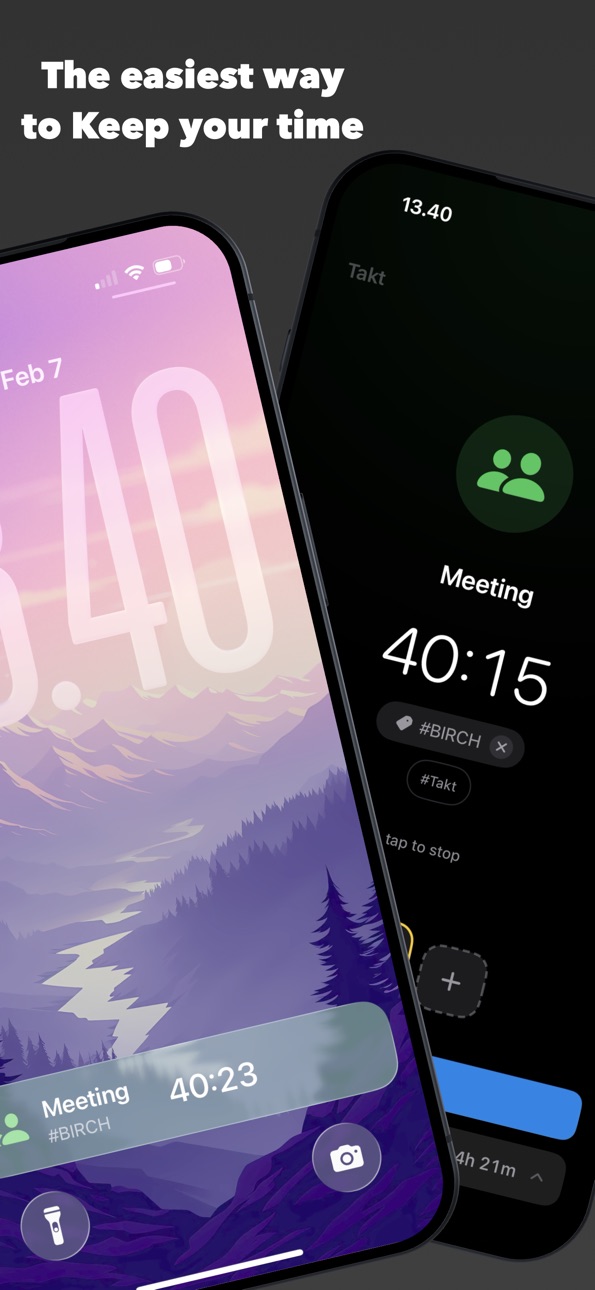
Takt is a fresh take on finding your biggest time wasters during your day. Starting, stopping, or switching tracking to another activity is always just one tap.
Through simple but effective integration with Live Activities, what you're tracking always remains visible at a glance on your Lock Screen or in the Dynamic Island.
Using Takt tracking you can manually or semi-automatically keep an underlying Live Activity running that puts tracking access just a tap away, all day.
Review your days in as little or as many details as you want with Takt's Timeline, or export your days, weeks, and months to CSV, JSON, or a clean PDF.
Takt is free with up to 3 active Activities and 5 Tags. Want more? A lifetime Full version is available, or subscribe monthly and after 12 payments, even non-consecutively, the Full version unlocks permanently.
And we're just getting started. Better Mac integration and Tablet optimization, Siri & Shortcuts, Focus Mode integration, and an Apple Watch
companion app are all on the way.
Takt Terms available at https://taktapp.net/terms
In-App Purchases US pricing
Takt Full Subscription
monthly · Monthly$1.00
One-Time Purchases
Takt Full Lifetime$9.00
Capabilities
In-App Purchases
Accessibility
ipadiphonemacrealityDevicetvoswatch
Version history 3 versions
Build 882476034v1.32026-02-18 09:04:19
v1.3 is out
New simple feature to try out:
- "Focus" mode, found under Display in Settings, lets you focus entirely on the currently running timer at the cost of increased battery drain.
Enhancements:
- Visual enhancement for grouping of time entry segments
- Setting for showing seconds now in the Timeline, defaulting to off.
- Vision Pro new default window size for iPad version of app.
New languages:
- Spanish (Spain)
- Spanish (Mexico)
- Polish
- Chinese (Simplified)
- Chinese (Traditional)
- French
- Japanese
- Portuguese (Brazil)
- Portuguese (Portugal)
Bug fixes:
- Fixed some critical bugs around handling of time entry segment deletions, now properly splitting into different segments when appropriate.
- Fixed swipe-to-adjust not reacting properly to timeline entries when segmented by tag trackings. For now a segmented tracking cannot be adjusted after it has run for a little bit and a new tracking needs to be started. Time entries with no segments can always be adjusted while tracking, merely moving the starting time accordingly in the data.
Build 882437838v1.22026-02-14 21:25:46
First update after launch of Takt - v1.2
Busy first day with a lot of good feedback. The highlight change: increasing the Activity limit from 2 to 3 on the free version. We felt this more was more useful for more people based on user feedback. Thank you for that !
Enhancements:
- Introducing first version of the Statistics sheet, top left button on the Timeline sheet
- 'Takt' tracking, the big button down on your main view of Takt - customized in Settings, captures underlying work/tracking time and keeps a Live Activity on the lockscreen/dynamic Island for an easy entry point
- Widget configurations added to iCloud sync data
- Increased Activity limit on free version from 2 to 3
- More for less, reduced pricing overall to make Takt as approachable to everyone to find out where they are wasting their time
Bug fixes:
- Improved Widget data stability and responsiveness
- Ensured time entries that go across days are properly shown as such in the Timeline and Statistics/Export
- Fixed edge case bug with grayed out widget slots
- Visual fixes and improvements
Build 882057755v1.12026-02-13 09:22:49
Price history by region
Currency
Show
Columns
Search
Availability 1 of 1 storefronts
| Region | Language | Price | Ratings | Avg | Version |
|---|---|---|---|---|---|
| US | en-US | Free | 3 | 5.0 | 1.3 |
Change log 7 changes · US
✎
releaseNotes updated
v1.3 is out
New simple feature to try out:
- "Focus" mode, found under Display in Settings, lets you focus entirely on the currently running timer at the cost
✎
description updated
Takt is a fresh take on finding your biggest time wasters during your day. Starting, stopping, or switching tracking to another activity is always just one tap.
✎
subtitle updated
Keep your time - work timer
✎
name updated
Takt - Time Tracking
◆
Version 1.3 released
v1.3 is out
New simple feature to try out:
- "Focus" mode, found under Display in Settings, lets you focus entirely on the currently running timer at the cost of increased battery drain.
Enhancements:
- Visual enhancement for grouping of
◆
Version 1.2 released
First update after launch of Takt - v1.2
Busy first day with a lot of good feedback. The highlight change: increasing the Activity limit from 2 to 3 on the free version. We felt this more was more useful for more people based on user feedb
◆
Version 1.1 released