Home › Lifestyle

 US
US
1 of 1 storefronts
Content in en-US
Content in en-US
Information
Preview 2 platforms
iPhone 7 images


iPad 7 images


What’s New Version 1.0.97
Minor bug fixes
Description
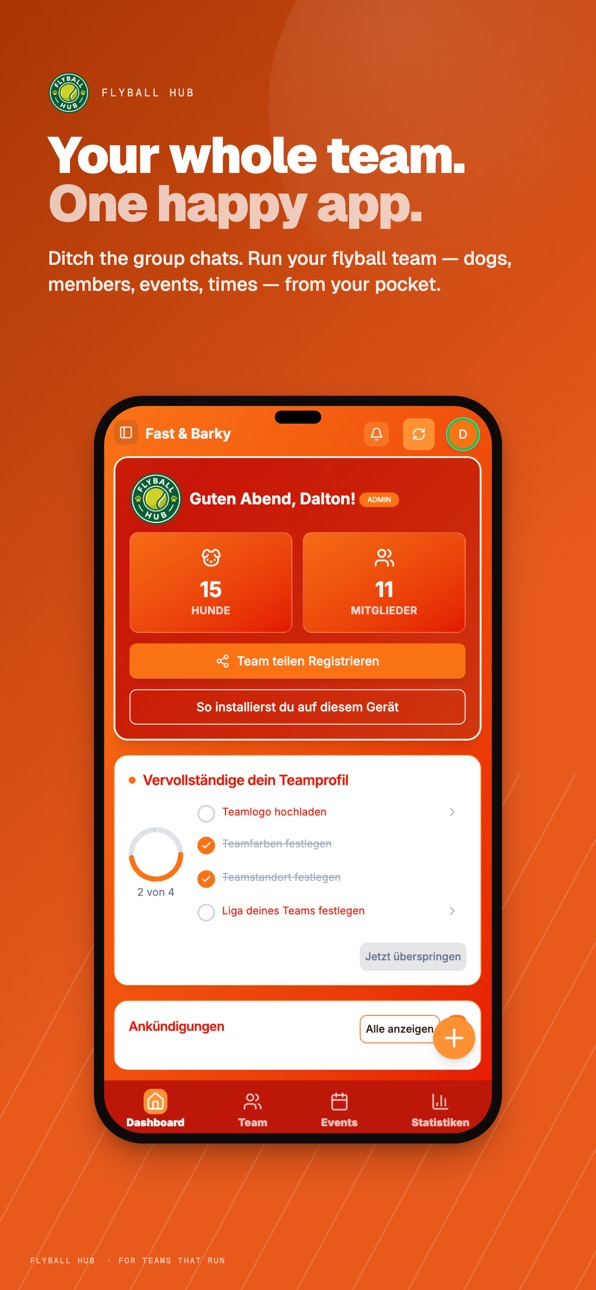
Flyball Hub helps flyball teams organise training sessions, manage events, and track dog progress - all in one place.
Features:
• Team dashboard with quick stats and announcements
• Event management with calendar view and RSVPs
• Dog profiles with training progress tracking
• Push notifications for team updates
Perfect for team captains, trainers, and members who want to stay connected and organised.
Terms of Use (EULA): https://www.apple.com/legal/internet-services/itunes/dev/stdeula/
Privacy Policy: https://app.flyballhub.com/privacy
Capabilities
In-App Purchases
Accessibility
ipadiphonemacrealityDevicetvoswatch
Version history 25 versions
Build 888090198v1.0.972026-07-10 18:06:30
Minor bug fixes
Build 887725754v1.0.952026-07-02 18:46:31
Team Chat now has replies and quoted reply previews, plus more reliable sending, reactions, read status, and reconnect handling.
This update also fixes a few smaller bugs
Build 887507745v1.0.912026-06-30 19:12:29
Bulk add videos to track time
Build 887483404v1.0.902026-06-26 21:24:34
Collectable dog cards! See your beloved dogs all their important stats in sharable collectable cards
Build 887408670v1.0.862026-06-25 05:46:38
Team chat is now available within Flyball Hub!
Just another step to making Flyball Hub your one stop shop for your team's Flyball needs.
No more scattered spreadsheets or WhatsApp chats.
More upgrades to this coming soon!
Build 887247670v1.0.852026-06-22 17:20:32
Upgrades for premium teams
- Video time tracking
- Improved stats and analytics
Build 887132219v1.0.762026-06-18 17:56:36
Minor bug fixes
Build 886955853v1.0.732026-06-15 14:45:25
Public competitions are here!
You can now discover upcoming public flyball events, register interest, and manage entries directly in Flyball Hub.
For hosts, this update adds public competition creation, entry options, venue details, cover images, applicant questions, capacity controls, entry review tools, and notifications when teams apply.
We’ve also improved Discover, added public event share pages, brought hosted and accepted competitions into team schedules, and fixed several issues around entry deadlines, capacity limits, notifications, and session recovery.
Build 886466706v1.0.722026-06-03 16:29:22
Minor bug fixes
Build 886002410v1.0.682026-05-22 19:57:33
## v1.0.68
### New
- **Batch entry for team times** — Stats now has a Team Times batch-entry workflow for recording up to 50 relay runs with shared setup, ordered dogs, optional split times, row notes, and one transactional save that avoids partial records if a batch fails. The Stats quick action can open either single team-time entry or batch entry directly.
- **Duplicate events from the actions menu** — Staff can now clone training sessions, competitions, and general events from the three-dot menu. Duplicates are created as drafts, default to today's date, copy editable setup like lanes, blocks, lineups, locations, and RSVP settings, and leave attendance/results/history behind.
- **Premium welcome badge** — Premium teams now get a blue spinning Premium badge around their team logo on the dashboard welcome card.
### Fixed
- **Emergency contact info saves for staff edits** — Captains/admins can now update another member's emergency info without the save being blocked by an unrelated profile update permission error. Multi-role members are handled correctly, and member-save errors now log useful Supabase details instead of `[object Object]`.
- **Date-only fields no longer shift by timezone** — Calendar dates such as training sessions, event dates, stats dates, RSVP prompts, deal expiry dates, weather lookups, and notification messages now stay on the selected day for users outside the UK. This fixes cases where a date like `2026-04-25` could display as April 24 in US time zones.
- **Stats tables now sort by team and location** — Team Times can now be sorted by team name, and both stats tables can sort recorded entries by location.
### Improved
- **Race and stats times now support thousandths** — Race Mode and Stats now enter, save, sync, restore, and display times to three decimal places, so entries like `18.347` and `4.327` keep their full precision instead of rounding to hundredths.
Build 885338940v1.0.652026-05-07 11:46:25
Minor bug fixes + premium benefits
Build 884627204v1.0.392026-04-25 08:51:00
Added Race Mode for Founders - You can now quickly add your dog's racing time at a competition and it will auto update in your stats.
More features to come such as analytics for your team
Build 884319296v1.0.372026-04-10 02:19:31
Minor bug fixes
Build 884241493v1.0.362026-04-07 18:11:24
Minor bug fixes
Build 884148667v1.0.262026-04-05 02:49:56
Minor updates
Build 884163661v1.0.282026-04-05 23:45:58
Minor updates
Build 883914979v1.0.212026-03-30 20:29:59
- Minor bug fixes
- **Snap-to-grid toggle** — Magnet icon in the training toolbar lets you switch between snap-to-cell (default) and free-form placement. Persists across sessions. Hold Shift to temporarily invert whichever mode you're in. Desktop users get a dismissible hint tooltip after 3 seconds.
Build 883614416v1.0.202026-03-22 00:28:29
Minor bug fixes
Build 883577376v1.0.192026-03-20 20:00:47
v1.0.19 is on it's way out!
Quite a lot in this one, mostly around the competition events feature.
Custom member fields (if you want to use them) - you can now store things like phone numbers, emergency contacts, medical notes and DOB for your members.
Plus up to 5 custom fields if your team needs something specific.
Captains set it up in Settings, members can see and edit their own. Means you don't need a separate spreadsheet or WhatsApp thread for it all.
Quick Teams - if you don't use sub-teams, or just want to use an adhoc team, you can now just build a lineup from scratch. Pick dogs from the roster, give it a name, done.
Competition lineups got a few upgrades too:
- Day notes, self explanatory.
- Team notes on each lineup card.
- Lane indicator so you can mark Left or Right per team.
- Print button on each day tab (notes and lane info all come through on the printout).
- Warnings if a dog's already in another lineup that day.
- Copy from previous day now brings over notes and lane settings
Also fixed a load of bugs and general UI tidy up.
Build 883425638v1.0.182026-03-18 17:03:23
Introducing Competitions! You can now create multi-day competition events for your team.
Organisers can set up team lineups for each day, add venue details and notes, and share everything with the team. Add it straight to your calendar so you never miss a race day.
Behind the scenes, we're laying the groundwork for live race tracking — stay tuned!
Build 883334644v1.0.132026-03-14 03:21:48
Minor bug fixes
Build 882980544v1.0.102026-03-03 18:23:38
Schedule grid gets smarter — When training blocks overlap in the same lane, they now sit side-by-side (like Google Calendar) instead of stacking on top of each other. Much easier to see what's going on when you've got multiple things happening at once.
Fixed a crash when saving sessions — If you'd deleted a lane and had an older draft cached, saving could fail with a database error.
That's sorted now — stale lane references get cleaned up automatically.
Fixed blocks not updating when moved between lanes — Dragging a block to a different lane would sometimes not visually update until you refreshed. Fixed.
Performance — Lane lookups during rendering are faster, and resize drag sensitivity is more consistent when blocks share a lane.
Build 882957525v1.0.92026-03-03 02:29:11
Improved the flexibility of the training session editor
Build 882917986v1.0.72026-03-02 00:00:52
- Minor bug fixes
- Updates to the training session editor to allow for resizing
- Push notifications are now more reliable on both iOS and Android
- Schedule blocks now correctly use your session's time increment instead of defaulting to 15 minutes
- Notification panel improvements: scrollable list, clearer action buttons
- Fixed an issue where a member's only role could accidentally be removed
- Improved touch targets for resizing blocks on the schedule grid
Build 882859883v1.0.42026-02-27 17:09:32
This version adds a few minor bug fixes and some preparation work for an upcoming feature.
No pricing data captured yet — comparisons appear once the app has paid storefronts or in-app purchases.
Availability 1 of 1 storefronts
| Region | Language | Price | Ratings | Avg | Version |
|---|---|---|---|---|---|
| US | en-US | Free | 1 | 5.0 | 1.0.97 |
Change log 29 changes · US
✎
releaseNotes updated
Minor bug fixes
✎
description updated
Flyball Hub helps flyball teams organise training sessions, manage events, and track dog progress - all in one place.
Features:
✎
subtitle updated
Manage Your Flyball Team
✎
name updated
Flyball Hub
◆
Version 1.0.97 released
Minor bug fixes
◆
Version 1.0.95 released
Team Chat now has replies and quoted reply previews, plus more reliable sending, reactions, read status, and reconnect handling.
This update also fixes a few smaller bugs
◆
Version 1.0.91 released
Bulk add videos to track time
◆
Version 1.0.90 released
Collectable dog cards! See your beloved dogs all their important stats in sharable collectable cards
◆
Version 1.0.86 released
Team chat is now available within Flyball Hub!
Just another step to making Flyball Hub your one stop shop for your team's Flyball needs.
No more scattered spreadsheets or WhatsApp chats.
More upgrades to this coming soon!
◆
Version 1.0.85 released
Upgrades for premium teams
- Video time tracking
- Improved stats and analytics
◆
Version 1.0.76 released
Minor bug fixes
◆
Version 1.0.73 released
Public competitions are here!
You can now discover upcoming public flyball events, register interest, and manage entries directly in Flyball Hub.
For hosts, this update adds public competition creation, entry options, venue details, cover
◆
Version 1.0.72 released
Minor bug fixes
◆
Version 1.0.68 released
## v1.0.68
### New
- **Batch entry for team times** — Stats now has a Team Times batch-entry workflow for recording up to 50 relay runs with shared setup, ordered dogs, optional split times, row notes, and one transactional save that avoid
◆
Version 1.0.65 released
Minor bug fixes + premium benefits
◆
Version 1.0.39 released
Added Race Mode for Founders - You can now quickly add your dog's racing time at a competition and it will auto update in your stats.
More features to come such as analytics for your team
◆
Version 1.0.37 released
Minor bug fixes
◆
Version 1.0.36 released
Minor bug fixes
◆
Version 1.0.28 released
Minor updates
◆
Version 1.0.26 released
Minor updates
◆
Version 1.0.21 released
- Minor bug fixes
- **Snap-to-grid toggle** — Magnet icon in the training toolbar lets you switch between snap-to-cell (default) and free-form placement. Persists across sessions. Hold Shift to temporarily invert whichever mode you're in. D
◆
Version 1.0.20 released
Minor bug fixes
◆
Version 1.0.19 released
v1.0.19 is on it's way out!
Quite a lot in this one, mostly around the competition events feature.
Custom member fields (if you want to use them) - you can now store things like phone numbers, emergency contacts, medical notes and DOB for y
◆
Version 1.0.18 released
Introducing Competitions! You can now create multi-day competition events for your team.
Organisers can set up team lineups for each day, add venue details and notes, and share everything with the team. Add it straight to your calendar so
◆
Version 1.0.13 released
Minor bug fixes
◆
Version 1.0.10 released
Schedule grid gets smarter — When training blocks overlap in the same lane, they now sit side-by-side (like Google Calendar) instead of stacking on top of each other. Much easier to see what's going on when you've got multiple things happen
◆
Version 1.0.9 released
Improved the flexibility of the training session editor
◆
Version 1.0.7 released
- Minor bug fixes
- Updates to the training session editor to allow for resizing
- Push notifications are now more reliable on both iOS and Android
- Schedule blocks now correctly use your session's time increment instead of defaulting to 1
◆
Version 1.0.4 released
This version adds a few minor bug fixes and some preparation work for an upcoming feature.