Home › Reference

 US
US
1 of 1 storefronts
Content in en-US
Content in en-US
Information
Preview 2 platforms
iPhone 6 images




iPad 3 images


What’s New Version 1.0.6
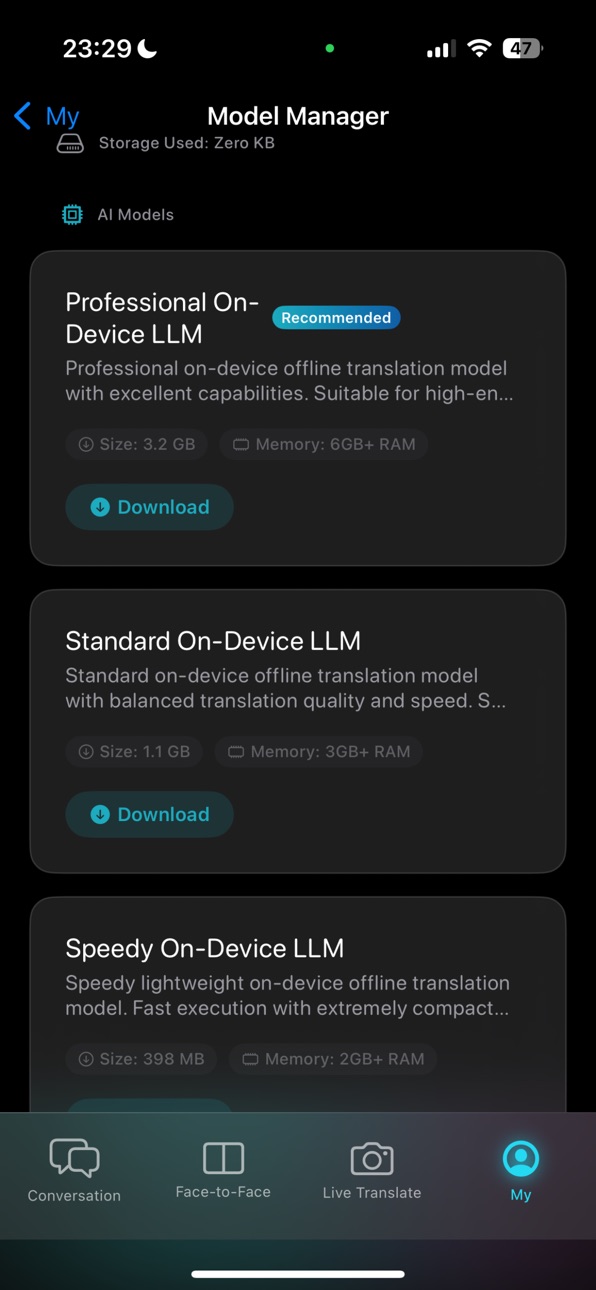
* Integrated an advanced on-device AI translation engine to provide a smarter offline translation experience for high-end devices.
* Improved compatibility for legacy and standard models, automatically recommending the high-speed offline AI model and applying fallback strategies to ensure smooth performance.
* Added a self-healing feature for offline translation data, displaying a helpful alert if translation files are corrupted and allowing a one-click download of the high-speed model to restore functionality instantly.
* Upgraded the face-to-face translation mode, adding a connection status indicator for the background engine and real-time banner alerts if microphone access is missing to avoid unrecognized speech.
* Enhanced live camera translation to rely entirely on the local AI engine for real-time analysis once switched, eliminating dependencies on native system offline packages.
* Expanded download channels for offline models, combining adaptive speed testing to significantly accelerate download speeds across various network conditions.
* Completed localization for all vocabulary book interfaces, adding background processing and smart caching for word definitions and example translations to make reviewing and learning more efficient.
Description
Live Lingo is a real-time translation app designed for iOS 18, featuring live translation, simultaneous interpretation, voice translation, photo translation, camera translation, conversation translation, and offline translation. Perfect for international travel, daily communication, language learning, and business scenarios.
Core Features
[Real-Time Voice Translation / Simultaneous Interpretation]
- Translate as you speak with low latency output
- Face-to-face conversation mode for more natural two-way communication
- Supports audio playback, text copying, and history review
[Photo Translation / AR Camera Translation]
- Point your camera to see translations instantly. Quickly understand menus, street signs, and documents
- Text recognition and extraction for easy copying and use
[Offline Translation]
- Works offline after downloading system offline language packs (subject to system supported languages)
- Quick shortcut within the app to jump to system translation settings for language management
[Widgets and Efficiency Shortcuts]
- Home screen widgets to quickly view and launch common translation scenarios
- Fast access to voice, camera, and conversation translation
[Experience and Privacy]
- Native iOS design for smooth operation
- Highly respects user privacy, collecting no personal data unrelated to translation
Notes
- Some features rely on system translation capabilities and language resource downloads
- Availability and performance of different languages may vary by system version and device.
Accessibility
ipadiphonemacrealityDevicetvoswatch
Version history 7 versions
Build 886615330v1.0.62026-06-16 22:06:26
* Integrated an advanced on-device AI translation engine to provide a smarter offline translation experience for high-end devices.
* Improved compatibility for legacy and standard models, automatically recommending the high-speed offline AI model and applying fallback strategies to ensure smooth performance.
* Added a self-healing feature for offline translation data, displaying a helpful alert if translation files are corrupted and allowing a one-click download of the high-speed model to restore functionality instantly.
* Upgraded the face-to-face translation mode, adding a connection status indicator for the background engine and real-time banner alerts if microphone access is missing to avoid unrecognized speech.
* Enhanced live camera translation to rely entirely on the local AI engine for real-time analysis once switched, eliminating dependencies on native system offline packages.
* Expanded download channels for offline models, combining adaptive speed testing to significantly accelerate download speeds across various network conditions.
* Completed localization for all vocabulary book interfaces, adding background processing and smart caching for word definitions and example translations to make reviewing and learning more efficient.
Build 886220223v1.0.52026-05-30 20:59:24
New Wordbook
- Tap words in translation results to view definitions and dictionary details
- Save new words with one tap for automatic categorization and management
- Search by keywords for quick lookups
New Smart Flashcard Review
- All-new flashcard study mode
- Intelligently schedules reviews based on your memory status
- Helps solidify long-term vocabulary retention
New Export & Share
- Export your wordbook as CSV or PDF files
- Generate text lists and share with one tap
- Quickly share individual words to other apps
Translation Experience Improvements
- AR camera real-time translation is smoother and more stable
- Enhanced document recognition and text parsing success rates
- Optimized overall interactions and performance
Privacy Protection
- Translations, text recognition, learning history, and exports are processed fully on-device
- No personal data uploaded, keeping your privacy completely secure
Build 885536791v1.0.42026-05-12 16:10:46
Live translation now allows selecting source and target languages for clearer direction.
Added a *Freeze/Resume* button in live translation to pause and read the text carefully.
Photo translation results now support three viewing modes: Translated, Original, and Side-by-side.
Switching target languages on the photo result page instantly updates without waiting.
Language download status is now clearer, making offline packs ready to use faster.
Optimized stability when switching between live and photo modes, reducing freezes and reloads.
Build 885144306v1.0.32026-05-01 14:47:34
- Added PDF and Word document translation. Import from files, photos, or the share menu. - New bilingual side-by-side reading view. Export translations to PDF with one tap. - Improved offline translation engine switching. Added automatic activation for a smoother experience without lag or blank screens. - Fixed document translation issues and optimized user interface performance.
Build 884439922v1.0.22026-04-17 16:50:09
- Added an on-device AI translation engine for faster, private results.
- Real-time display of translated text for a smoother, more natural experience.
- Improved voice playback stability and response speed.
- Completed interface and prompt localization for 33 languages.
- Fixed formatting issues, including dates in the history log.
- Enhanced translation accuracy by reducing unnecessary descriptions.
- Smoother transitions in camera translation and live conversation modes.
- Fixed known crashes and improved overall stability.
Build 883708492v1.0.12026-03-25 00:06:07
What's New
------------------
- Based on your feedback: Added voice style settings to the profile page. You can now select and preview voices by language.
- Based on your feedback: Unified the source/target language selection interface. Downloaded and un-downloaded states are now clearer, with a direct download prompt for un-downloaded languages.
------------------
- Optimized offline language management: Easily jump to system *Settings > App > Translate* with new helpful tooltips.
- Smoother search experience.
- Redesigned chat bubbles: Copy and play buttons are now permanently displayed on the side for easier access.
- Auto-scrolls to the latest content in the conversation list when recognizing long texts.
- Improved audio playback logic: Audio now stops automatically when switching sections or starting a new recognition to prevent overlapping sounds.
- Expanded voice styles: Dynamically displays available voices based on downloaded languages (including Japanese, Korean, etc.).
- History records now support audio playback and a detailed popup view.
- Added a *More Apps* recommendation page, allowing you to view App Store details directly within the app.
- Now supports 33 languages.
Build 881811572v1.0.02026-03-04 17:40:40
Price history by region
Currency
Show
Columns
Search
Availability 1 of 1 storefronts
| Region | Language | Price | Ratings | Avg | Version |
|---|---|---|---|---|---|
| US | en-US | USD 1.99 | 1 | 5.0 | 1.0.6 |
Change log 11 changes · US
✎
releaseNotes updated
* Integrated an advanced on-device AI translation engine to provide a smarter offline translation experience for high-end devices.
* Improved compatibility for
✎
description updated
Live Lingo is a real-time translation app designed for iOS 18, featuring live translation, simultaneous interpretation, voice translation, photo translation, ca
✎
subtitle updated
Voice, Photo & Offline
✎
name updated
Live Lingo - Live Translator
◆
Version 1.0.6 released
* Integrated an advanced on-device AI translation engine to provide a smarter offline translation experience for high-end devices.
* Improved compatibility for legacy and standard models, automatically recommending the high-speed offline AI
◆
Version 1.0.5 released
New Wordbook
- Tap words in translation results to view definitions and dictionary details
- Save new words with one tap for automatic categorization and management
- Search by keywords for quick lookups
New Smart Flashcard Review
- All-ne
◆
Version 1.0.4 released
Live translation now allows selecting source and target languages for clearer direction.
Added a *Freeze/Resume* button in live translation to pause and read the text carefully.
Photo translation results now support three viewing modes: Tra
◆
Version 1.0.3 released
- Added PDF and Word document translation. Import from files, photos, or the share menu. - New bilingual side-by-side reading view. Export translations to PDF with one tap. - Improved offline translation engine switching. Added automatic ac
◆
Version 1.0.2 released
- Added an on-device AI translation engine for faster, private results.
- Real-time display of translated text for a smoother, more natural experience.
- Improved voice playback stability and response speed.
- Completed interface and prompt
◆
Version 1.0.1 released
What's New
------------------
- Based on your feedback: Added voice style settings to the profile page. You can now select and preview voices by language.
- Based on your feedback: Unified the source/target language selection interface. Dow
◆
Version 1.0.0 released