Home › Finance

 US
US
1 of 1 storefronts
Content in en-US
Content in en-US
Information
Preview 3 platforms
iPhone 10 images


iPad 4 images


Apple Vision Pro 4 images


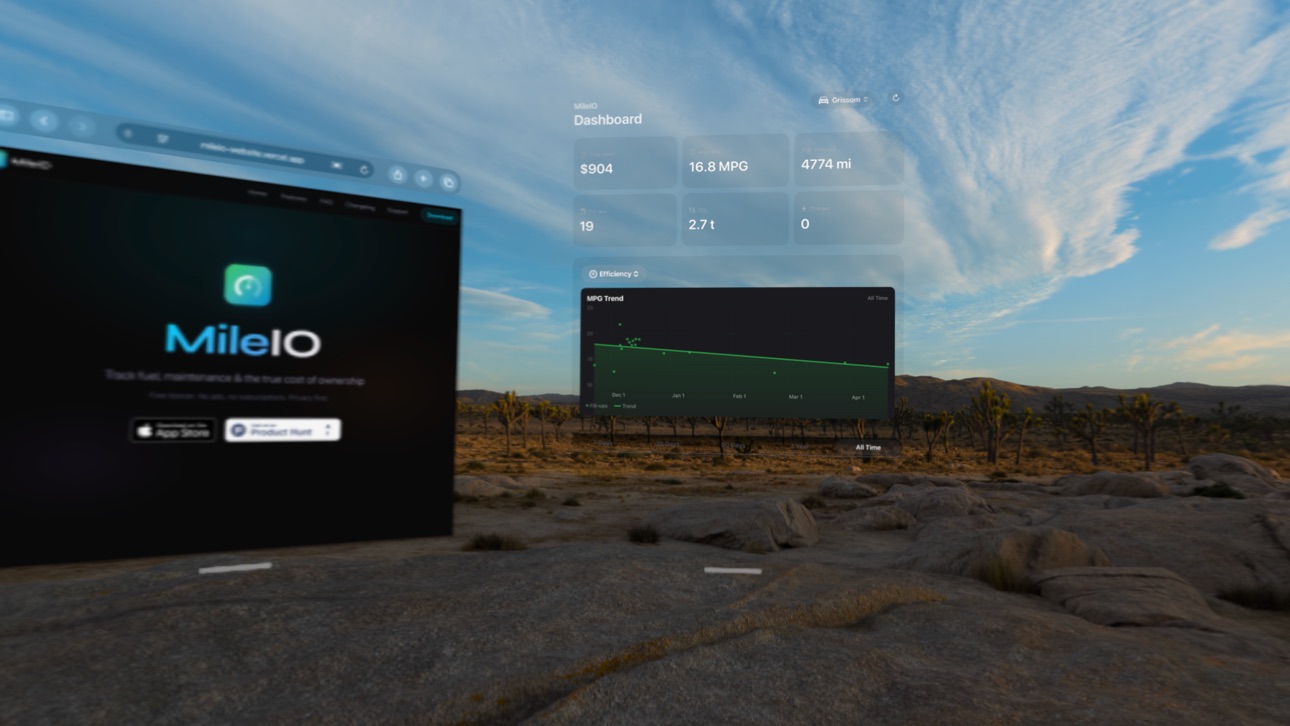
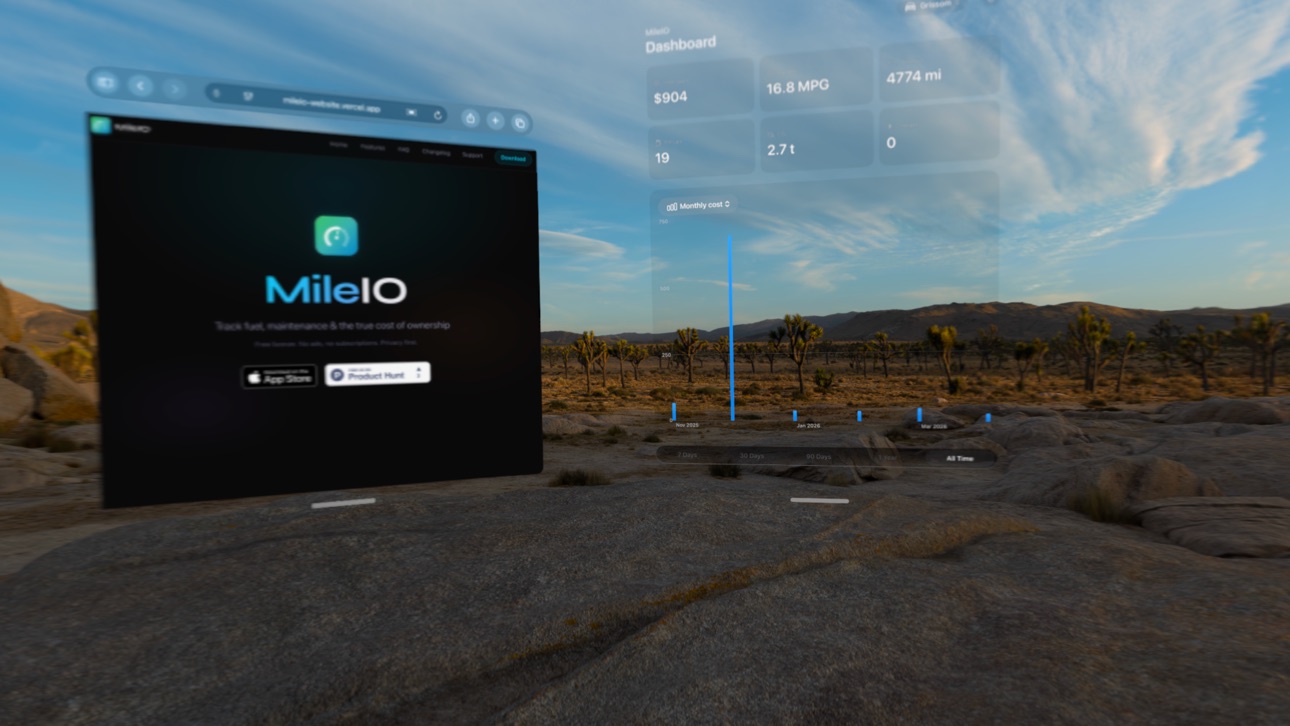
What’s New Version 1.10.6
This update includes behind-the-scenes improvements and polish. Thanks for using MileIO!
Description
MileIO is the smart fuel and vehicle expense tracker for drivers who want to understand their true cost of ownership. Whether you drive gas, diesel, hybrid, or electric — track every fill-up, charge, and car expense in one app.
CARPLAY INTEGRATION
• Find nearby gas stations or EV chargers on your car's built-in display
• One-tap draft entries — log a fill-up at any station, complete it later
• Automatic vehicle detection per car — plug in and go
• Navigate to the nearest station with one tap
SMART RECEIPT SCANNING
• Snap a photo of any gas station or EV charging receipt
• AI-powered OCR extracts total cost, fuel volume, price per unit, and date
• Odometer scanner reads your dashboard mileage with your camera
POWERFUL FUEL ECONOMY ANALYTICS
• Beautiful charts show fuel spending trends over time
• Track efficiency in MPG, L/100km, or kWh/100mi for electric vehicles
• CO₂ emissions tracker with EPA-standard emission factors
• Compare costs across multiple vehicles side by side
• Filter by week, month, year, or custom date ranges
MULTI-VEHICLE FLEET SUPPORT
• Manage unlimited vehicles — cars, trucks, motorcycles, and EVs
• Gas, Diesel, Hybrid, and Electric fuel types supported
• Custom icons and photos for each vehicle
• Set preferred units and currency per vehicle
SEAMLESS iCLOUD SYNC
• All devices stay up to date automatically
• Works offline — syncs when you reconnect
• Your data stays private in your personal iCloud
EXPORT & EXPENSE REPORTS
• Generate PDF reports for mileage and expense tracking
• Export to CSV for spreadsheets and accounting
• Perfect for business vehicle documentation and tax records
HOME SCREEN WIDGET
• See fuel efficiency stats at a glance
• Quick-add new fuel or charging entries
Whether you are tracking one car or managing a fleet, MileIO gives you the insights to save money and drive smarter. Download now and take control of your vehicle expenses.
Accessibility
ipadiphonemacrealityDevicetvoswatch
Version history 25 versions
Build 888029421v1.10.62026-07-11 17:09:28
This update includes behind-the-scenes improvements and polish. Thanks for using MileIO!
Build 887969855v1.10.52026-07-08 04:40:29
This update improves accuracy for metric units:
- Cost-per-distance is now calculated correctly for kilometer-based units (L/100km, kWh/100km, km/kWh)
- Distance labels across the dashboard and vehicle details now match your chosen unit
- Thanks for using MileIO!
Build 887925489v1.10.42026-07-07 19:28:32
New: Fill-up Map on your Dashboard — see where you've fueled up or charged, with your most-visited station at a glance. Tap it for the full map.
Improvements & fixes:
- Widget efficiency values now always match your chosen unit
- The efficiency trend now reads correctly for consumption units (e.g. kWh/100mi, L/100km)
- More accurate efficiency figures for km-based units (L/100km, kWh/100km, km/kWh)
Build 887411540v1.10.22026-06-27 21:46:35
Lock Screen widgets are here! Add MileIO to your iPhone Lock Screen for an at-a-glance look at your fuel efficiency, this month's spending, and the days until your next service — in inline, circular, and rectangular styles.
Build 887262795v1.10.12026-06-24 21:00:09
Bug fix: Fixed an issue where fuel, vehicle, and maintenance entries could not be saved on devices that use a comma as the decimal separator. Saving now works correctly in all regions. Thanks to everyone who reported it.
Build 885593601v1.10.02026-05-14 21:07:04
Plug-in hybrid drivers can now log gas fill-ups AND charging sessions on the same vehicle. Switch entry type per session for true cost tracking.
Improved
• Hybrid vehicles get a new entry type picker — choose gas fill-up or charging session per entry
• Receipt scanning auto-detects whether you've added gas or kWh
• Cleaner cost analytics for hybrid drivers
Build 884956140v1.9.42026-04-28 20:03:10
Plug-in hybrid drivers can now log gas fill-ups AND charging sessions on the same vehicle. Switch entry type per session for true cost tracking.
Improved
• Hybrid vehicles get a new entry type picker — choose gas fill-up or charging session per entry
• Receipt scanning auto-detects whether you've added gas or kWh
• Cleaner cost analytics for hybrid drivers
Build 884778808v1.9.32026-04-22 21:38:59
New seasonal efficiency chart reveals how your fuel economy changes throughout the year — see winter vs summer patterns at a glance with color-coded monthly bars.
New
• Seasonal Efficiency Chart — bar chart showing average fuel economy by month, color-coded by season (winter blue, spring green, summer orange, fall brown)
• Added as a new chart type in the Dashboard picker
Fixed
• Currency display no longer shows a double dollar sign in fuel type stats
Build 884653433v1.9.22026-04-21 20:01:40
Wondering what you'd save by going electric? MileIO now calculates your personalized EV savings using your actual driving data — real miles, real fuel costs, not hypotheticals.
New
• EV Savings Calculator — see exactly how much you'd save per month by switching to an electric vehicle, based on your real fill-up history
• Compare against 45 popular EV models or enter any custom vehicle
• Smart matching picks a comparable EV for your car, truck, or SUV automatically
• Dashboard insight card alerts you when rising gas prices make the EV case even stronger
• Electricity rate setting lets you dial in your local $/kWh for accurate projections
Improved
• Full VoiceOver accessibility across every screen — metric cards, charts, entry forms, and settings all work with screen readers
• Adaptive data windows for infrequent fillers — no more "Not Enough Data" if you fill up monthly
Fixed
• EV comparison section no longer looks cramped on smaller screens
Build 883382202v1.9.12026-03-15 21:45:07
• Receipt Gallery — Tap any receipt photo to view full-screen with zoom and share
• Anomaly Detection — Unusual fuel efficiency entries are automatically flagged with an orange warning
• Maintenance Countdown — See days and miles until your next service at a glance
• Fill-up Map — View all your fuel stops on an interactive map with cost and efficiency details
• Notes Search — Search your entry history by notes content
Build 883236385v1.9.02026-03-11 19:57:30
• Receipt Gallery — Tap any receipt photo to view full-screen with zoom and share
• Anomaly Detection — Unusual fuel efficiency entries are automatically flagged with an orange warning
• Maintenance Countdown — See days and miles until your next service at a glance
• Fill-up Map — View all your fuel stops on an interactive map with cost and efficiency details
• Notes Search — Search your entry history by notes content
Build 882754079v1.8.02026-02-26 14:39:59
NEW IN 1.8:
• CarPlay Integration — Find nearby gas stations and EV chargers right from your car's display. Tap any station to create a draft fuel entry, then complete it later on your iPhone.
• Smart Vehicle Detection — MileIO remembers which vehicle you drive in each car. Switch vehicles once on CarPlay, and it auto-selects the right one next time you connect.
• Navigate to Stations — One tap to get turn-by-turn directions to any nearby station directly from the CarPlay map.
Build 882716357v1.7.02026-02-24 00:24:16
NEW IN 1.7:
• EV Battery Tracking — Log start and end battery state of charge (SoC%) for every charging session. See exactly how much charge you added.
• EV Efficiency Units — Track your electric vehicle efficiency in mi/kWh or km/kWh alongside traditional MPG.
• Charging Summary Dashboard — New dashboard section for EV owners showing average charge per session, cost per 10% charge, and total charging sessions.
• CloudKit Sync Improvements — Enhanced cloud sync reliability for all vehicle and fuel entry data.
Build 882604287v1.6.12026-02-20 00:04:48
NEW IN 1.6:
• Interactive Home Screen Widgets — Switch vehicles, log fuel entries, and mark maintenance complete directly from your Home Screen without opening the app.
• Quick Log Widget — A new dedicated widget with a prominent "Log Entry" button that deep-links straight to the fuel entry screen with your vehicle pre-selected.
• Vehicle Switching — All widgets now include a vehicle switch button. Cycle through your vehicles instantly from the Home Screen.
• Maintenance Quick Actions — Tap "Mark Done" on maintenance items in the Summary Widget to confirm service completion without opening the app.
• Widget Configuration — Long-press any widget to choose which vehicle it displays. Your selection persists across sessions.
BUG FIXES:
• Edit and delete maintenance reminders directly from reminder cards.
• Improved reminder form layout for easier editing.
Build 882570982v1.6.02026-02-19 01:29:28
NEW IN 1.6:
• Interactive Home Screen Widgets — Switch vehicles, log fuel entries, and mark maintenance complete directly from your Home Screen without opening the app.
• Quick Log Widget — A new dedicated widget with a prominent "Log Entry" button that deep-links straight to the fuel entry screen with your vehicle pre-selected.
• Vehicle Switching — All widgets now include a vehicle switch button. Cycle through your vehicles instantly from the Home Screen.
• Maintenance Quick Actions — Tap "Mark Done" on maintenance items in the Summary Widget to confirm service completion without opening the app.
• Widget Configuration — Long-press any widget to choose which vehicle it displays. Your selection persists across sessions.
Build 882547501v1.5.02026-02-18 02:49:23
NEW IN 1.5:
• CO₂ Emissions Tracker — See your carbon footprint from fuel consumption with EPA-standard emission factors. Dashboard shows total CO₂ emitted with a dedicated metric card.
• CO₂ Trend Chart — Bar chart showing per-entry emissions with a cumulative line overlay. Electric vehicles display a zero direct emissions badge.
• Fuel Price Trend Chart — Track how fuel prices change over time with a line chart, average reference line, and multi-vehicle color coding.
• Scrollable Chart Picker — The chart selector is now a scrollable chip row to fit all 6 chart types comfortably.
Build 882525018v1.4.02026-02-17 16:24:25
NEW: Maintenance Tracking
• Track oil changes, tire rotations, brake service, and 10 more service types
• Set mileage and date-based reminders so you never miss a service
• View maintenance history alongside fuel entries with the new History tab
• See total maintenance and vehicle costs on your Dashboard
• Log maintenance via Siri Shortcuts
• Maintenance data included in CSV exports and PDF reports
• iCloud sync for all maintenance records
Build 882347166v1.3.02026-02-11 03:07:26
NEW: MAINTENANCE TRACKING
• Log oil changes, tire rotations, brake service, and 10+ other service types
• Track costs, shop names, odometer readings, and receipt photos
• Set reminders for upcoming maintenance based on date or mileage
• View maintenance history with search and filters
• Export maintenance data to CSV
IMPROVED REPORTS & WIDGETS
• PDF reports now include maintenance cost breakdown
• Summary widget shows next upcoming service
• Maintenance costs included in total cost of ownership
ALSO IN THIS UPDATE
• Siri Shortcuts for logging maintenance
• 4 new maintenance achievements to unlock
• Bug fixes and performance improvements
Build 882303208v1.2.02026-02-09 20:24:03
NEW: Siri Shortcuts & Spotlight Integration
• Log fuel entries, check your MPG, track spending, and export data — all from Siri or the Shortcuts app
• Search for your vehicles directly from Spotlight
• Automate fill-up logging with NFC tags or Shortcuts widgets
CSV Export Improvements
• Export now includes ALL vehicles in a single combined CSV — a true full backup of your data
• Added "Vehicle Name" column so entries are clearly labeled per vehicle
• Efficiency and cost-per-mile columns now populate correctly in exports
Build 882231860v1.1.62026-02-06 21:50:40
• Bug Fixes: Fixed an issue where editing a vehicle's details wouldn't save properly
• Edit Access: Added an Edit button to the vehicle detail screen for easier access
• EV Improvements: Free charging sessions now correctly show $0.00 cost
• Sync Reliability: Fixed a race condition that could cause sync conflicts
Build 882166648v1.1.42026-02-05 01:36:17
NEW: Achievement System
Track your fuel logging milestones and earn badges! 21 achievements across 5 categories: Entry Count, Distance, Spending, Time-Based, and Vehicle milestones. Access from Settings to view your progress.
Settings Improvements
- Better efficiency unit picker with full labels
- Cleaner measurement section layout
- Improved button styling throughout
Bug Fixes & Polish
- Minor UI refinements
- Performance improvements
Build 882192528v1.1.52026-02-05 19:14:51
• CSV Import: Import fuel and EV charging data from CSV files with flexible column matching
• EV Improvements: Better labels and terminology throughout the app for electric vehicle owners
• iCloud Sync: Fixed an issue where pending sync items wouldn't clear
• Stability: Fixed a potential widget crash and improved network monitoring
Build 882133666v1.1.22026-02-04 05:37:34
• CSV Import - Easily import your fuel history from spreadsheets or other apps
• Haptic Feedback - Feel subtle vibrations when saving entries and completing actions
• Delete Confirmations - Extra safety when removing vehicles to prevent accidental data
loss
• Visual Polish - Smoother button animations and save confirmations throughout the app
Bug Fixes:
• Fixed chart rendering issues with large datasets
• Improved data validation for imported entries
Thank you for using MileIO to track your fuel efficiency!
Build 882155626v1.1.32026-02-04 17:24:36
NEW: What's New in MileIO 1.1.3:
• CSV Import - Easily import your fuel history from spreadsheets or other fuel tracking
apps
• Redesigned MPG Trend Chart - A clean linear trend line now shows whether your efficiency
is improving, declining, or stable at a glance
• Haptic Feedback - Feel subtle vibrations when saving entries and completing actions
throughout the app
• Delete Confirmations - Added safety confirmation when removing vehicles to prevent
accidental data loss
• Visual Polish - Smoother button animations and save confirmations for a more responsive
feel
• Widget Updates - All widgets now correctly display "MileIO" branding
Bug Fixes:
• Fixed chart rendering with large datasets
• Improved data validation for imported entries
Thank you for using MileIO to track your fuel efficiency!Plus a redesigned trend chart, haptic feedback, and visual polish throughout.
Build 882118167v1.1.02026-02-03 20:50:14
rebranding to MileIO
No pricing data captured yet — comparisons appear once the app has paid storefronts or in-app purchases.
Availability 1 of 1 storefronts
| Region | Language | Price | Ratings | Avg | Version |
|---|---|---|---|---|---|
| US | en-US | Free | 1 | 5.0 | 1.10.6 |
Change log 29 changes · US
✎
releaseNotes updated
This update includes behind-the-scenes improvements and polish. Thanks for using MileIO!
✎
description updated
MileIO is the smart fuel and vehicle expense tracker for drivers who want to understand their true cost of ownership. Whether you drive gas, diesel, hybrid, or
✎
subtitle updated
Gas, EV & Car Expense Log
✎
name updated
MileIO - Fuel Tracker
◆
Version 1.10.6 released
This update includes behind-the-scenes improvements and polish. Thanks for using MileIO!
◆
Version 1.10.5 released
This update improves accuracy for metric units:
- Cost-per-distance is now calculated correctly for kilometer-based units (L/100km, kWh/100km, km/kWh)
- Distance labels across the dashboard and vehicle details now match your chosen unit
- T
◆
Version 1.10.4 released
New: Fill-up Map on your Dashboard — see where you've fueled up or charged, with your most-visited station at a glance. Tap it for the full map.
Improvements & fixes:
- Widget efficiency values now always match your chosen unit
- The effic
◆
Version 1.10.2 released
Lock Screen widgets are here! Add MileIO to your iPhone Lock Screen for an at-a-glance look at your fuel efficiency, this month's spending, and the days until your next service — in inline, circular, and rectangular styles.
◆
Version 1.10.1 released
Bug fix: Fixed an issue where fuel, vehicle, and maintenance entries could not be saved on devices that use a comma as the decimal separator. Saving now works correctly in all regions. Thanks to everyone who reported it.
◆
Version 1.10.0 released
Plug-in hybrid drivers can now log gas fill-ups AND charging sessions on the same vehicle. Switch entry type per session for true cost tracking.
Improved
• Hybrid vehicles get a new entry type picker — choose gas fill-up or charging sessio
◆
Version 1.9.4 released
Plug-in hybrid drivers can now log gas fill-ups AND charging sessions on the same vehicle. Switch entry type per session for true cost tracking.
Improved
• Hybrid vehicles get a new entry type picker — choose gas fill-up or charging sessio
◆
Version 1.9.3 released
New seasonal efficiency chart reveals how your fuel economy changes throughout the year — see winter vs summer patterns at a glance with color-coded monthly bars.
New
• Seasonal Efficiency Chart — bar chart showing average fuel economy by
◆
Version 1.9.2 released
Wondering what you'd save by going electric? MileIO now calculates your personalized EV savings using your actual driving data — real miles, real fuel costs, not hypotheticals.
New
• EV Savings Calculator — see exactly how much you'd save
◆
Version 1.9.1 released
• Receipt Gallery — Tap any receipt photo to view full-screen with zoom and share
• Anomaly Detection — Unusual fuel efficiency entries are automatically flagged with an orange warning
• Maintenance Countdown — See days and miles until your
◆
Version 1.9.0 released
• Receipt Gallery — Tap any receipt photo to view full-screen with zoom and share
• Anomaly Detection — Unusual fuel efficiency entries are automatically flagged with an orange warning
• Maintenance Countdown — See days and miles until your
◆
Version 1.8.0 released
NEW IN 1.8:
• CarPlay Integration — Find nearby gas stations and EV chargers right from your car's display. Tap any station to create a draft fuel entry, then complete it later on your iPhone.
• Smart Vehicle Detection — MileIO remembers
◆
Version 1.7.0 released
NEW IN 1.7:
• EV Battery Tracking — Log start and end battery state of charge (SoC%) for every charging session. See exactly how much charge you added.
• EV Efficiency Units — Track your electric vehicle efficiency in mi/kWh or km/kWh alo
◆
Version 1.6.1 released
NEW IN 1.6:
• Interactive Home Screen Widgets — Switch vehicles, log fuel entries, and mark maintenance complete directly from your Home Screen without opening the app.
• Quick Log Widget — A new dedicated widget with a prominent "Log Ent
◆
Version 1.6.0 released
NEW IN 1.6:
• Interactive Home Screen Widgets — Switch vehicles, log fuel entries, and mark maintenance complete directly from your Home Screen without opening the app.
• Quick Log Widget — A new dedicated widget with a prominent "Log Ent
◆
Version 1.5.0 released
NEW IN 1.5:
• CO₂ Emissions Tracker — See your carbon footprint from fuel consumption with EPA-standard emission factors. Dashboard shows total CO₂ emitted with a dedicated metric card.
• CO₂ Trend Chart — Bar chart showing per-entry emis
◆
Version 1.4.0 released
NEW: Maintenance Tracking
• Track oil changes, tire rotations, brake service, and 10 more service types
• Set mileage and date-based reminders so you never miss a service
• View maintenance history alongside fuel entries with the new Histo
◆
Version 1.3.0 released
NEW: MAINTENANCE TRACKING
• Log oil changes, tire rotations, brake service, and 10+ other service types
• Track costs, shop names, odometer readings, and receipt photos
• Set reminders for upcoming maintenance based on date or mileage
• Vie
◆
Version 1.2.0 released
NEW: Siri Shortcuts & Spotlight Integration
• Log fuel entries, check your MPG, track spending, and export data — all from Siri or the Shortcuts app
• Search for your vehicles directly from Spotlight
• Automate fill-up logging with NFC tags
◆
Version 1.1.6 released
• Bug Fixes: Fixed an issue where editing a vehicle's details wouldn't save properly
• Edit Access: Added an Edit button to the vehicle detail screen for easier access
• EV Improvements: Free charging sessions now correctly show $0.00 cost
◆
Version 1.1.5 released
• CSV Import: Import fuel and EV charging data from CSV files with flexible column matching
• EV Improvements: Better labels and terminology throughout the app for electric vehicle owners
• iCloud Sync: Fixed an issue where pending sync ite
◆
Version 1.1.4 released
NEW: Achievement System
Track your fuel logging milestones and earn badges! 21 achievements across 5 categories: Entry Count, Distance, Spending, Time-Based, and Vehicle milestones. Access from Settings to view your progress.
Settings Impr
◆
Version 1.1.3 released
NEW: What's New in MileIO 1.1.3:
• CSV Import - Easily import your fuel history from spreadsheets or other fuel tracking
apps
• Redesi
◆
Version 1.1.2 released
• CSV Import - Easily import your fuel history from spreadsheets or other apps
• Haptic Feedback - Feel subtle vibrations when saving entries and completing actions
• Delete Confirmations - Extra safety when removing vehicles to preve
◆
Version 1.1.0 released
rebranding to MileIO