Home › Utilities

 US
US
1 of 1 storefronts
Content in en-US
Content in en-US
Information
Preview 2 platforms
iPhone 5 images



iPad 5 images



What’s New Version 1.13.0
-Client & job details — add client name, site address, job number, and notes to any project; they appear on the PDF report automatically.
-Report revisions — reports are now stamped with the job number, revision (Rev 1, Rev 2…), and generation date, so everyone knows they're looking at the latest version.
-Input sanity check — if a calculated load looks unusually high or low for the floor area, the app quietly suggests double-checking your inputs (never shown on client reports).
Description
The Manual J HVAC Load Calculator is the one HVAC contractors actually want to use.
Stop overpaying for clunky, over-engineered calculators designed for engineers. HVAC Load Calculator brings professional Manual J calculations to your iPhone or iPad — clean, modern, offline-ready, and built for the field.
BUILT FOR HVAC PROFESSIONALS
Unlike expensive desktop software shoehorned onto mobile, we designed this from scratch for techs working in the field. Large buttons you can tap with gloves on. Fast calculations while standing in a basement. Professional reports that win homeowner trust.
THREE LEVELS OF ACCURACY
Simple Mode – 8 inputs
Regional ZIP-code benchmarks and square-footage multipliers. Get an estimate in under 60 seconds with zero measurements. Perfect for quick quotes and initial sales conversations.
Moderate Mode – Standard Accuracy (Whole-House Block Load) – 15 inputs
Component-level factors: insulation quality, window types, foundation — with a conservative safety buffer. Prevents undersizing while staying accessible for non-engineers. The sweet spot for standard replacement jobs.
Pro Mode – Professional Grade (Detailed Whole-House Block Load) – 16 inputs + pro overrides
Full MJ8 physics: altitude-adjusted density, solar load factors, CLTD daily-range lag, and separated duct analysis. Maximizes equipment life and comfort — often right-sizing by 1+ ton. Best for new construction, high-performance builds, and detailed equipment sizing.
NOW AVAILABLE WORLDWIDE
US Mode – ZIP code lookup backed by a climate database covering nearly 28,000 ZIP codes
International Mode – Enter your city, country, and local design temperatures directly — no ZIP code required. Choose your climate zone and moisture regime, and the calculator handles the rest.
Metric Units – Toggle between Imperial and SI (kW, m², m³/h) throughout the app and PDF reports
WORKS IN THE FIELD
Offline-First – No signal in the basement? No problem. Everything runs locally on your device.
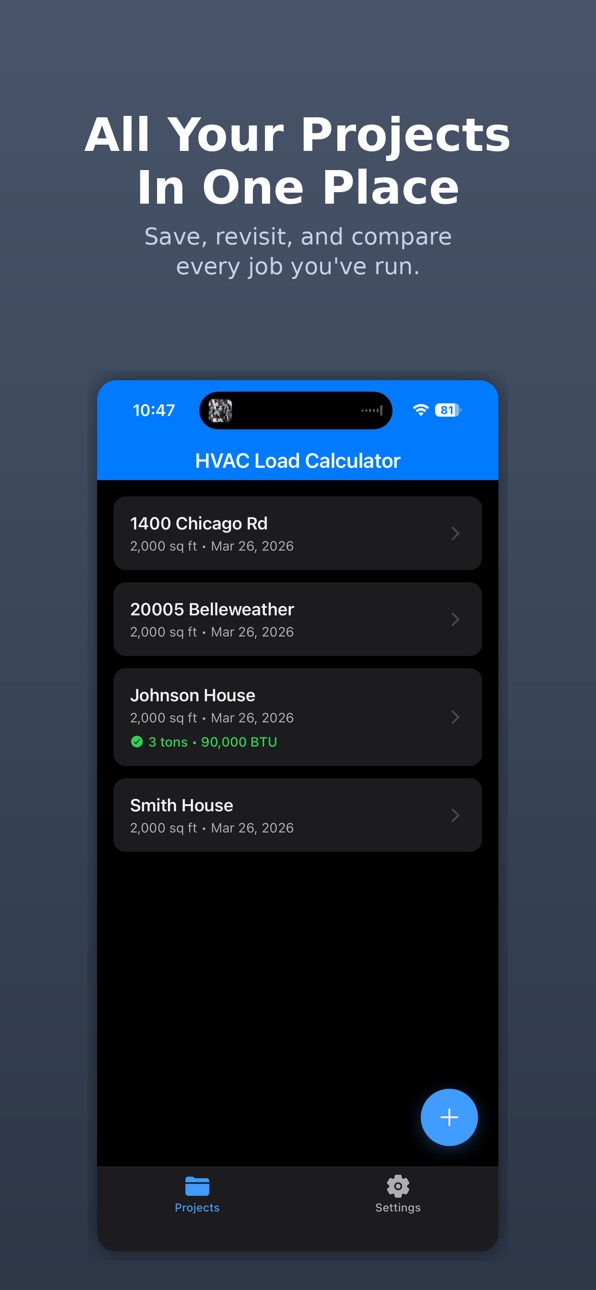
Auto-Save Projects – Every calculation saves automatically. Never lose your work.
iCloud Sync – Start a job on your iPhone, finish it on your iPad. Projects sync automatically across your devices.
Professional PDF Reports – Generate and share detailed load reports from your phone or tablet. Add client name, site address, and job number — every report is stamped with a revision number and date, so everyone knows it's the latest version.
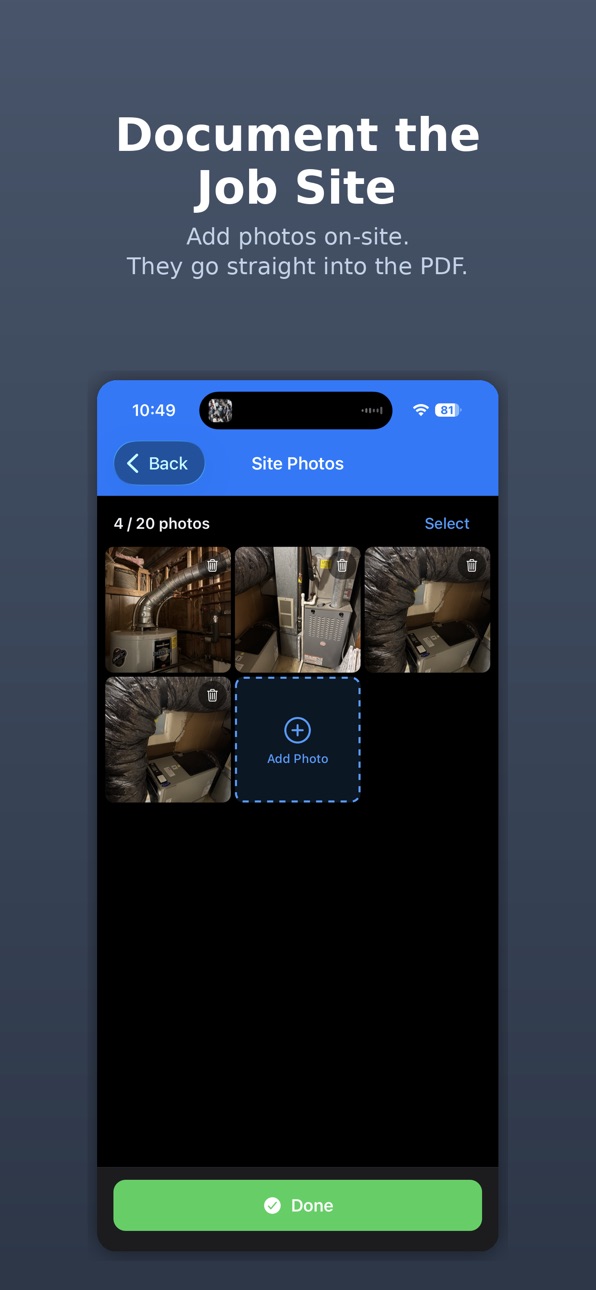
Site Photo Documentation – Capture tagged photos, label by location and component, add notes, and include a professional photo appendix in your reports.
iPad & Tablet Support – Optimized layouts give you more room to work on-site or back at the office.
THE MATH YOU TRUST
Calculations follow ACCA Manual J 8th Edition methodology:
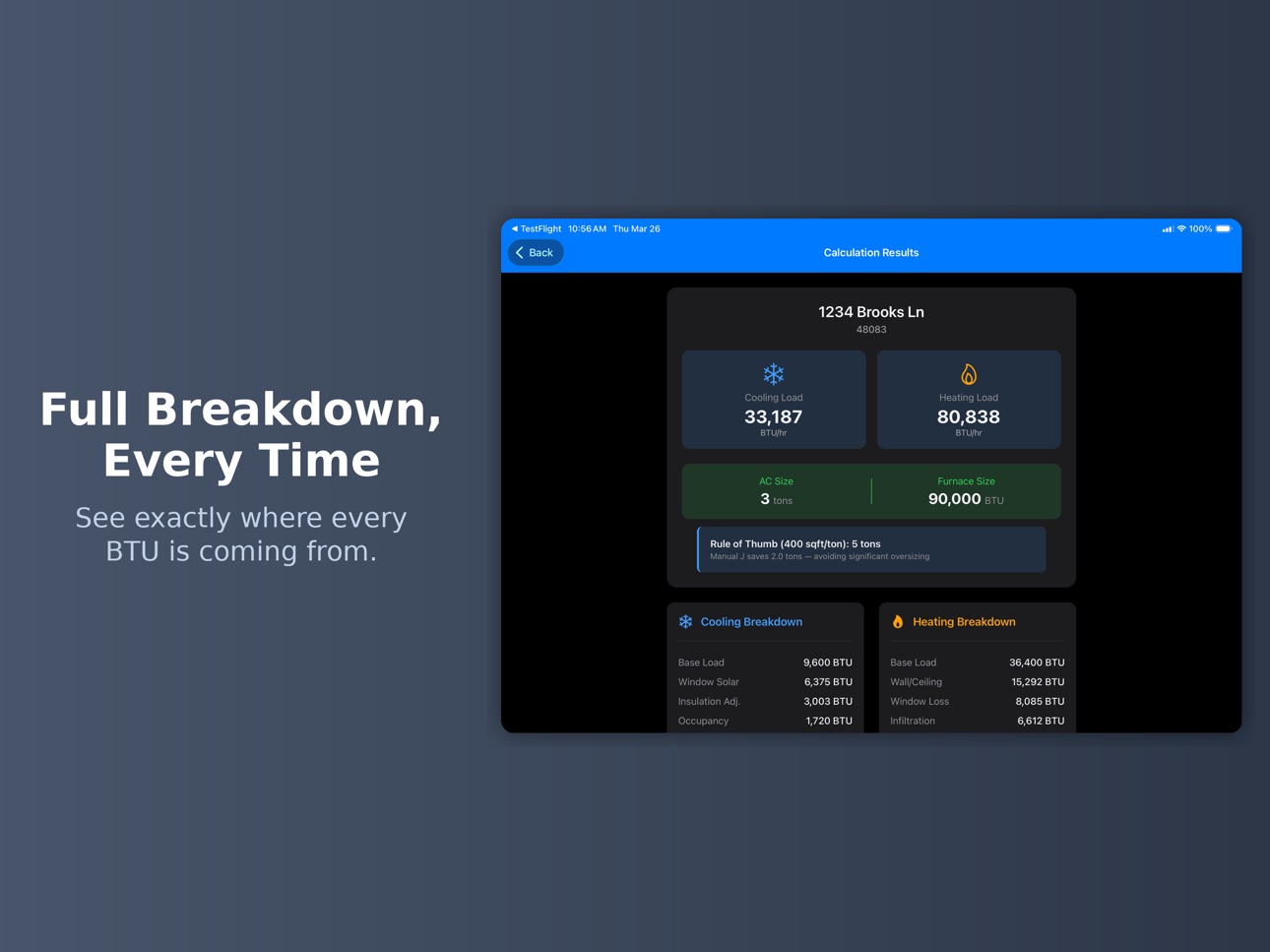
– Cooling BTU/hr (sensible and latent loads)
– Heating BTU/hr
– Recommended tonnage (rounded to 0.5 tons)
– Recommended furnace size (rounded to 5,000 BTU)
– Manual S-based equipment sizing guidance
– Kitchen/appliance heat gain per MJ8 Table 4
And if a result looks unusual for the home's size, the app quietly flags it so you can double-check your inputs before the report goes out.
Tap "How Our Calculator Works" for a plain-English guide to every input and how it shapes your results.
WHY CONTRACTORS CHOOSE US
– Modern, intuitive interface that makes sense the first time you use it
– Dark mode and system theme support
– Fast performance, even on older devices
– Privacy-first: your data stays on your device and your own private iCloud — never our servers
– Free to download — try it on your first calculations before subscribing
PERFECT FOR
– HVAC contractors, installers, and service techs
– Sales teams quoting new systems
– Independent contractors building their business
– International professionals working in metric
– Home inspectors documenting HVAC systems
No account. No setup. Just open the app and get to work.
Terms of Use (EULA): https://www.apple.com/legal/internet-services/itunes/dev/stdeula/
In-App Purchases US pricing
Pro Subscription
Annual Pro with Trial · Yearly 7-day free trial$4.99
Annual Pro with Trial · Yearly 7-day free trial$7.99
Annual Pro with Trial · Yearly 7-day free trial$9.99
License · Yearly 7-day free trial$11.99
Capabilities
In-App Purchases
Accessibility
ipadiphonemacrealityDevicetvoswatch
Version history 23 versions
Build 887847543v1.13.02026-07-05 20:16:21
-Client & job details — add client name, site address, job number, and notes to any project; they appear on the PDF report automatically.
-Report revisions — reports are now stamped with the job number, revision (Rev 1, Rev 2…), and generation date, so everyone knows they're looking at the latest version.
-Input sanity check — if a calculated load looks unusually high or low for the floor area, the app quietly suggests double-checking your inputs (never shown on client reports).
Build 887463427v1.12.12026-06-27 00:40:49
-Fixed the "Calculation Methodology" link in Settings
Build 887317690v1.12.02026-06-23 17:09:35
• New: iCloud Sync — your projects now stay in sync across your iPhone and iPad automatically. Private to your Apple ID, no account or sign-in needed. Turn it on in Settings.
Build 886803979v1.11.2 (77)2026-06-11 21:38:08
More accurate sizing: fixed a calculation that could oversize equipment, especially in mild climates — results may be lower, closer to a true Manual J. Re-run saved projects to update.
• Floor insulation now affects homes over an unconditioned basement.
• Better climate data for more ZIP codes.
• Humidity check is now climate-aware.
• Cold-climate heat pumps: realistic balance point + backup heat.
• New design temps, equipment range & "How We Calculate" in Settings.
Build 886678095v1.11.02026-06-09 19:59:04
• Streamlined data entry — a cleaner project form with the essential inputs up front and extra options tucked away until you need them.
• New wall and roof/ceiling insulation options for more accurate load calculations.
Build 886037039v1.10.58 (69)2026-05-23 20:01:38
-Updated process to document and submit issues
Build 885143823v1.10.3 (67)2026-05-01 14:46:48
-Improved subscription reliability and stability.
Build 884115103v1.10.1 (66)2026-04-05 23:48:59
Calculation Modes
Updated mode labels: Moderate now reads "Standard Accuracy (Whole-House Block Load)," and Pro reads "Professional Grade (Detailed Whole-House Block Load)."
Design Location Coverage
Expanded ZIP-to-design-conditions from ~200 cities to 28,000+ ZIPs — suburban and exurban areas now get exact climate data instead of regional fallbacks
ZIP input and results screens now show matched design location with ASHRAE climate zone and daily temperature range
PDF Reports
Improved text contrast throughout (load values, recommended sizes, BTU details)
Analytics
Added opt-in analytics with a privacy-first system to help identify issues proactively
Build 884069375v1.9.11 (61)2026-04-03 18:41:02
-Added optional anonymous telemtry to help with support and bug fixes
Build 884033590v1.9.10 (60)2026-04-02 00:59:11
-Moderate calculator bug fix
Build 883992877v1.9.9 (59)2026-04-01 14:44:43
-Minor update to calculation screen for new users
Build 883799929v1.9.8 (58)2026-03-26 23:03:25
-Enabled PDF export pre-trial
-Updated header
Build 883565605v1.9.7 (57)2026-03-20 16:41:59
-Updated settings language
Build 883475944v1.9.6 (56)2026-03-17 22:27:13
-Updated paywall details
Build 883375953v1.9.5 (54)2026-03-14 21:43:10
-Updated language
Build 883237090v1.9.0 (50)2026-03-13 22:55:50
- Added details to How Our Calculator Works screen
- Added System/Dark theme support
Build 883071734v1.7.0 (49)2026-03-10 18:59:53
-Pro subscription — Unlock unlimited calculations and unbranded PDF exports with an affordable annual plan. Includes a 7-day free trial.
-Site photo documentation — Capture and tag jobsite photos that appear as an appendix in your PDF reports.
-Metric unit support — Switch between Imperial and Metric units throughout the app.
-Tablet-optimized layouts — Better use of screen space on iPad and larger devices.
-Multi-photo selection — Select multiple photos from your library at once.
Continuous camera capture — Take multiple photos in a row without leaving the camera.
-Tablet-optimized layouts for iPad.
-Most existing users who installed before this update get Pro features free — no action needed.
Build 882804223v1.4.0 (33)2026-03-02 15:58:44
-You can now see the app version and build number in Settings for easier TestFlight identification.
Build 882708779v1.3.3 (31)2026-02-24 20:33:19
-Updated verbiage and removed old header
Build 882665515v1.3.2 (31)2026-02-23 03:24:53
- Performance improvements and bug fixes
- Improved calculation accuracy
- UI refinements for faster data entry
Build 882574679v1.3.1 (29)2026-02-19 02:26:00
-Location based bug fixes
Build 882245949v1.3.02026-02-16 20:53:00
Full metric support. No more stray Imperial units—kW, m², and m³/h display consistently throughout.
Better international controls. Set design temperatures in Celsius, adjust moisture regimes, and pick climate zones that match your local conditions.
Smarter flagging. Reports now highlight unusually high window-to-floor ratios and suggest system zoning where it makes sense.
Clearer breakdowns. See exactly how Infiltration, Ventilation, and Foundation loads contribute to your totals.
Cleaner PDFs. Fixed alignment and text-wrapping so your reports look professional and are easier to read.
Build 881724874v1.2.02026-02-03 01:48:38
Price history by region
Currency
Show
Columns
Search
Availability 1 of 1 storefronts
| Region | Language | Price | Ratings | Avg | Version |
|---|---|---|---|---|---|
| US | en-US | Free | 29 | 4.7 | 1.13.0 |
Change log 27 changes · US
✎
releaseNotes updated
-Client & job details — add client name, site address, job number, and notes to any project; they appear on the PDF report automatically.
-Report revisions — re
✎
description updated
The Manual J HVAC Load Calculator is the one HVAC contractors actually want to use.
Stop overpaying for clunky, over-engineered calculators designed for engine
✎
subtitle updated
BTU Sizing for Contractors
✎
name updated
HVAC Load Calculator Manual J
◆
Version 1.13.0 released
-Client & job details — add client name, site address, job number, and notes to any project; they appear on the PDF report automatically.
-Report revisions — reports are now stamped with the job number, revision (Rev 1, Rev 2…), and generat
◆
Version 1.12.1 released
-Fixed the "Calculation Methodology" link in Settings
◆
Version 1.12.0 released
• New: iCloud Sync — your projects now stay in sync across your iPhone and iPad automatically. Private to your Apple ID, no account or sign-in needed. Turn it on in Settings.
◆
Version 1.11.2 (77) released
More accurate sizing: fixed a calculation that could oversize equipment, especially in mild climates — results may be lower, closer to a true Manual J. Re-run saved projects to update.
• Floor insulation now affects homes over an unconditio
◆
Version 1.11.0 released
• Streamlined data entry — a cleaner project form with the essential inputs up front and extra options tucked away until you need them.
• New wall and roof/ceiling insulation options for more accurate load calculations.
◆
Version 1.10.58 (69) released
-Updated process to document and submit issues
◆
Version 1.10.3 (67) released
-Improved subscription reliability and stability.
◆
Version 1.10.1 (66) released
Calculation Modes
Updated mode labels: Moderate now reads "Standard Accuracy (Whole-House Block Load)," and Pro reads "Professional Grade (Detailed Whole-House Block Load)."
Design Location Coverage
Expanded ZIP-to-design-conditions from ~
◆
Version 1.9.11 (61) released
-Added optional anonymous telemtry to help with support and bug fixes
◆
Version 1.9.10 (60) released
-Moderate calculator bug fix
◆
Version 1.9.9 (59) released
-Minor update to calculation screen for new users
◆
Version 1.9.8 (58) released
-Enabled PDF export pre-trial
-Updated header
◆
Version 1.9.7 (57) released
-Updated settings language
◆
Version 1.9.6 (56) released
-Updated paywall details
◆
Version 1.9.5 (54) released
-Updated language
◆
Version 1.9.0 (50) released
- Added details to How Our Calculator Works screen
- Added System/Dark theme support
◆
Version 1.7.0 (49) released
-Pro subscription — Unlock unlimited calculations and unbranded PDF exports with an affordable annual plan. Includes a 7-day free trial.
-Site photo documentation — Capture and tag jobsite photos that appear as an appendix in your PDF repo
◆
Version 1.4.0 (33) released
-You can now see the app version and build number in Settings for easier TestFlight identification.
◆
Version 1.3.3 (31) released
-Updated verbiage and removed old header
◆
Version 1.3.2 (31) released
- Performance improvements and bug fixes
- Improved calculation accuracy
- UI refinements for faster data entry
◆
Version 1.3.1 (29) released
-Location based bug fixes
◆
Version 1.3.0 released
Full metric support. No more stray Imperial units—kW, m², and m³/h display consistently throughout.
Better international controls. Set design temperatures in Celsius, adjust moisture regimes, and pick climate zones that match your local co
◆
Version 1.2.0 released