Home › Graphics & Design

 US
US
1 of 1 storefronts
Content in en-US
Content in en-US
Information
Preview 2 platforms
iPhone 5 images


iPad 4 images


What’s New Version 1.1
What's new in FontSwipe 2.0:
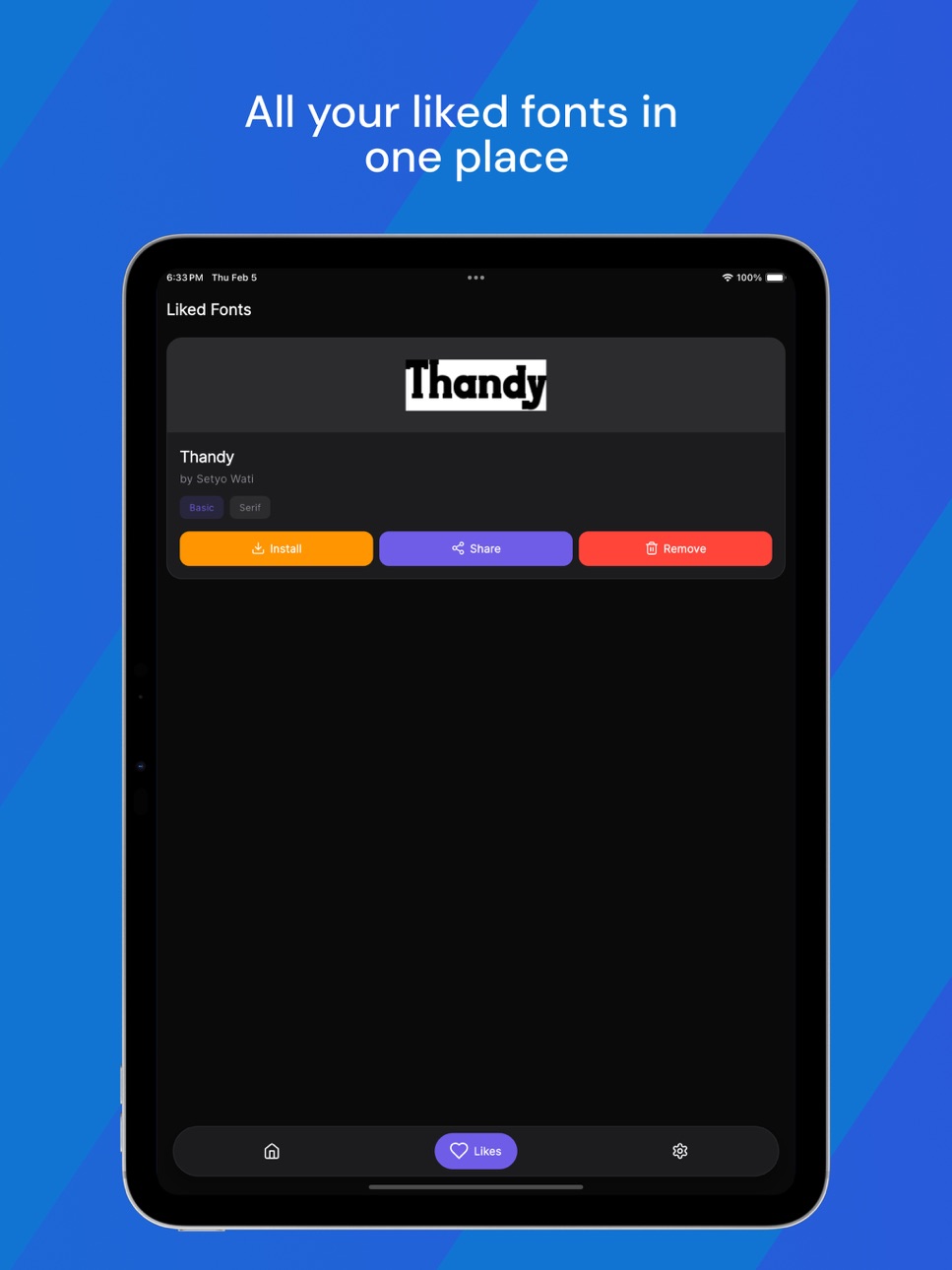
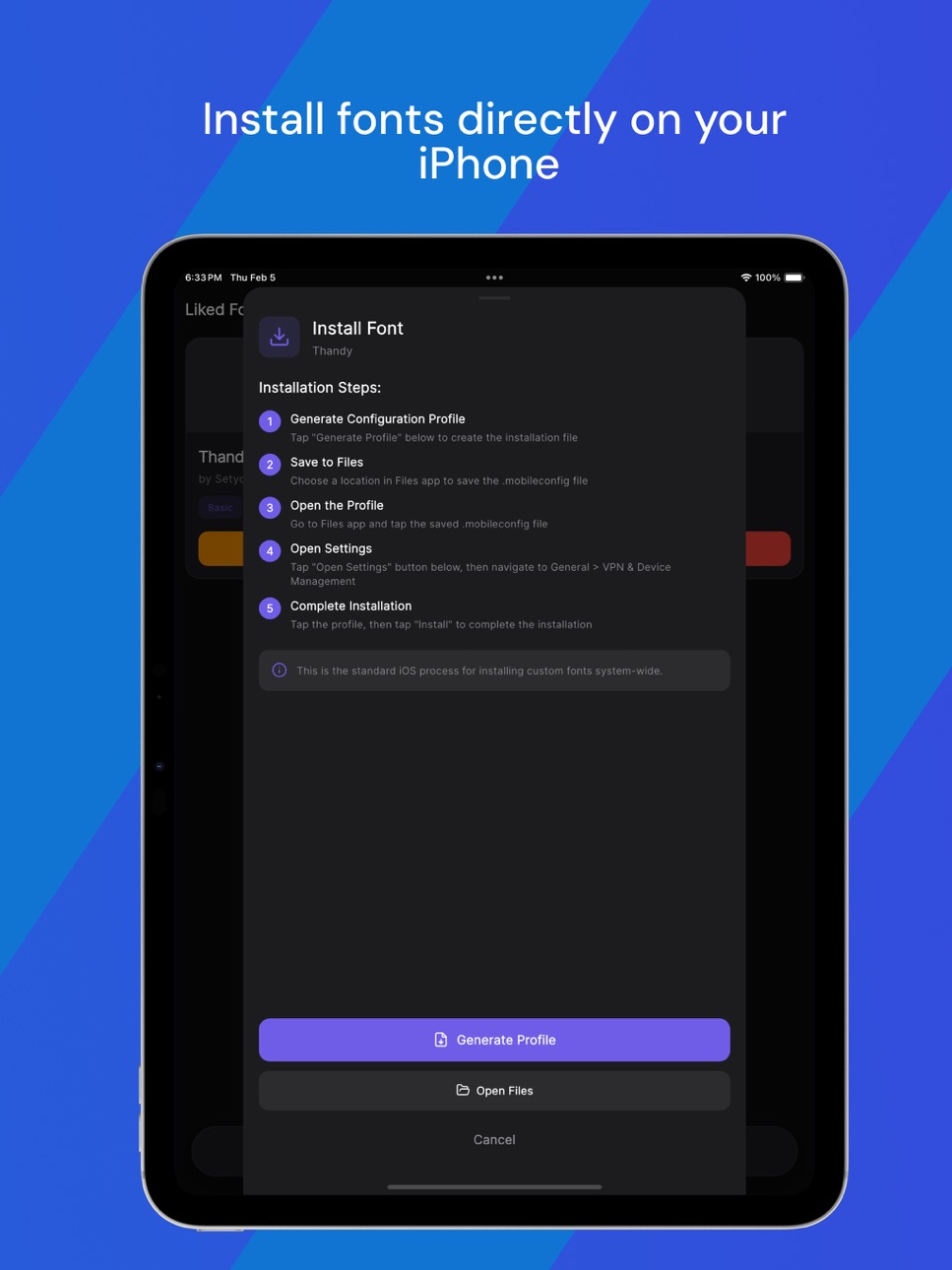
- Install Fonts: You can now install any font directly to your iPhone! Tap Install on any liked font to generate a configuration profile and install it system-wide.
- Pro Subscription: Unlock font installation and ad-free browsing with FontSwipe Pro.
- Ad-Free Mode: Pro subscribers enjoy a completely ad-free experience.
- More Apps: Check out our other font apps in Settings.
- Bug fixes and performance improvements.
Description
FontSwipe is the easiest way to discover and install beautiful fonts on your iPhone and iPad.
Swipe right to save fonts you love. Swipe left to skip. It's that simple.
Browse thousands of curated fonts across categories like Sans Serif, Serif, Script, Display, Handwriting, Monospace, and more. Preview any font with custom text before you decide.
Whether you're a graphic designer looking for the perfect typeface, a student working on a school project, or a content creator searching for unique typography for your social media posts — FontSwipe helps you find the right font in seconds.
DISCOVER FONTS
- Swipe through a huge library of free fonts
- Filter by category and subcategory to find exactly what you need
- Preview fonts with your own custom text
- Discover new styles every time you open the app
- Explore trending, classic, and unique typefaces
- Find fonts for every project — logos, posters, invitations, stories, and more
SAVE YOUR FAVORITES
- Like fonts with a simple swipe right
- Build your personal font collection over time
- Your liked fonts are saved locally for quick offline access
- Keep track of fonts you want to use later
- Never lose a font you loved again
INSTALL FONTS (Pro)
- Install any font directly to your iPhone or iPad
- Fonts work system-wide in Pages, Keynote, Numbers, and other apps that support custom fonts
- Generate iOS configuration profiles with a single tap
- Save the profile to Files, open it, and install through Settings
- Standard iOS installation process — completely safe and secure
- Use your installed fonts in documents, presentations, notes, and design apps
- Support for TTF and OTF font formats
SHARE FONTS
- Share font files with friends, classmates, and colleagues
- Export fonts directly from your liked collection
- Send fonts via AirDrop, Messages, Mail, or any sharing method
AD-FREE EXPERIENCE (Pro)
- Remove all ads for a clean, distraction-free browsing experience
- Enjoy uninterrupted font discovery without banner ads
- A smoother, faster experience throughout the app
FONT CATEGORIES
FontSwipe includes a wide variety of font categories to explore:
- Sans Serif — Clean and modern fonts for any project
- Serif — Classic and elegant typefaces
- Script — Beautiful handwritten and calligraphy styles
- Display — Bold and decorative fonts that stand out
- Handwriting — Personal and authentic hand-lettered fonts
- Monospace — Perfect for coding and technical documents
- And many more subcategories to explore
PERFECT FOR
- Designers looking for font inspiration
- Content creators who need unique typography
- Students working on creative projects
- Anyone who wants custom fonts on their iPhone or iPad
- Social media creators looking for story fonts
- Small business owners designing logos and branding
WHY FONTSWIPE?
- Thousands of fonts to browse — new fonts added regularly
- Simple swipe interface — no complicated menus
- Fast and lightweight — built for a smooth experience
- Works offline — your liked fonts are always available
- Privacy focused — no account required to browse and save fonts
FONTSWIPE PRO
Unlock the full potential of FontSwipe with a Pro subscription:
- Install unlimited fonts to your device
- Ad-free browsing experience
- Support ongoing development and new features
FontSwipe Pro is available as a monthly ($4.99/month) or yearly ($29.99/year) subscription. The yearly plan saves you over 50%.
Subscription automatically renews unless cancelled at least 24 hours before the end of the current period. Payment will be charged to your Apple ID account at confirmation of purchase. You can manage and cancel your subscriptions by going to your Apple ID account settings after purchase.
Accessibility
ipadiphonemacrealityDevicetvoswatch
Version history 2 versions
Build 884122519v1.12026-04-04 19:07:58
What's new in FontSwipe 2.0:
- Install Fonts: You can now install any font directly to your iPhone! Tap Install on any liked font to generate a configuration profile and install it system-wide.
- Pro Subscription: Unlock font installation and ad-free browsing with FontSwipe Pro.
- Ad-Free Mode: Pro subscribers enjoy a completely ad-free experience.
- More Apps: Check out our other font apps in Settings.
- Bug fixes and performance improvements.
Build 881681344v1.02026-02-11 23:03:36
No pricing data captured yet — comparisons appear once the app has paid storefronts or in-app purchases.
Availability 1 of 1 storefronts
| Region | Language | Price | Ratings | Avg | Version |
|---|---|---|---|---|---|
| US | en-US | Free | 0 | — | 1.1 |
Change log 6 changes · US
✎
releaseNotes updated
What's new in FontSwipe 2.0:
- Install Fonts: You can now install any font dire
✎
description updated
FontSwipe is the easiest way to discover and install beautiful fonts on your iPhone and iPad.
Swipe right to save fonts you love. Swipe left to skip. It's that
✎
subtitle updated
Discover & Install Free Fonts
✎
name updated
FontSwipe - Font Installer
◆
Version 1.1 released
What's new in FontSwipe 2.0:
- Install Fonts: You can now install any font directly to your iPhone! Tap Install on any liked font to generate a configuration p
◆
Version 1.0 released