Home › Business

 US
US
 MXes-MXUSen-US
 AGNot Available
 AINot Available
 AONot Available
 ARNot Available
 BBNot Available
 BFNot Available
 BJNot Available
 BRNot Available
 BSNot Available
 BWNot Available
 BZNot Available
 CDNot Available
 CGNot Available
 CINot Available
 CLNot Available
 CMNot Available
 CONot Available
 CVNot Available
 DMNot Available
 DONot Available
 DZNot Available
 ECNot Available
 GANot Available
 GDNot Available
 GHNot Available
 GMNot Available
 GTNot Available
 GWNot Available
 GYNot Available
 HNNot Available
 JMNot Available
 KENot Available
 KNNot Available
 KYNot Available
 LCNot Available
 LRNot Available
 LYNot Available
 MANot Available
 MLNot Available
 MSNot Available
 MUNot Available
 MWNot Available
 MZNot Available
 NANot Available
 NENot Available
 NGNot Available
 NINot Available
 RWNot Available
 SCNot Available
 SLNot Available
 SNNot Available
 SRNot Available
 STNot Available
 SVNot Available
 SZNot Available
 TDNot Available
 TNNot Available
 TZNot Available
 UGNot Available
 VCNot Available
 VENot Available
 ZMNot Available
 ZWNot Available
2 of 65 storefronts
Content in en-US
Content in en-US
Information
Apple ID6758026220
Bundle IDcom.flownect-app
SellerSeller
Min iOS15.1
Min macOS12.0
Device familiesiphone, ipad, ipod
Released2026-02-27
Copyright© 2026 EMCB Group Corporation
Privacy policyLink ↗
Preview 2 platforms
iPhone 5 images

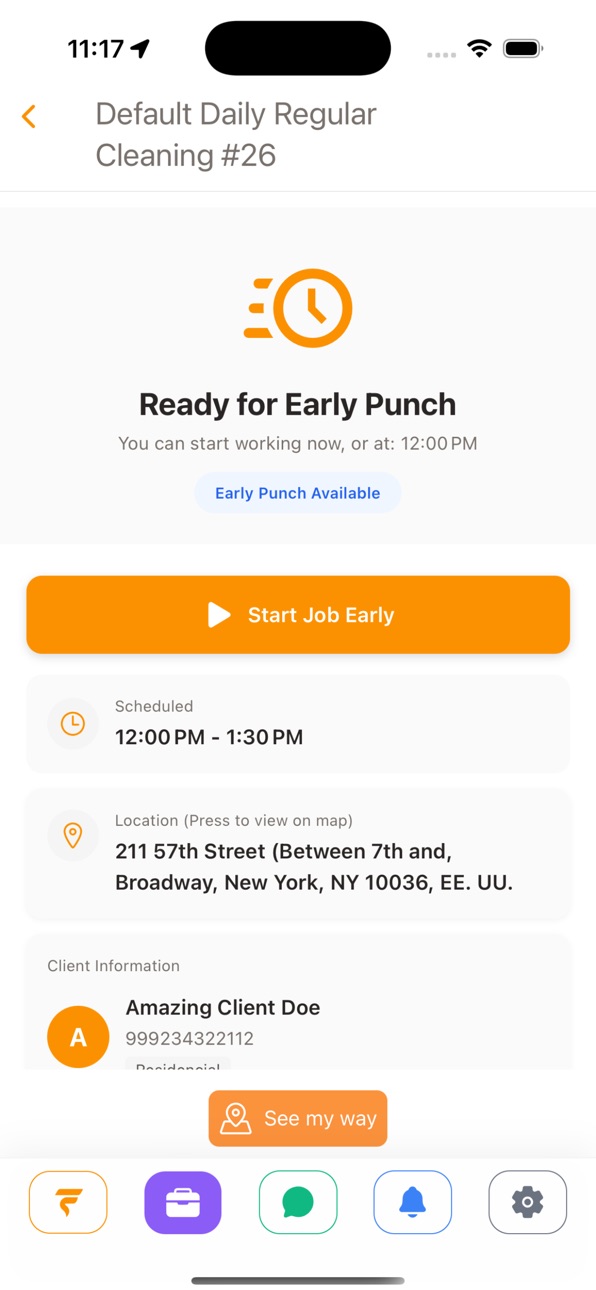


iPad 8 images


What’s New Version 1.09
Flownect keeps your team connected and your operations moving — now with a unified communication flow, a more flexible calling experience, and optimized device permissions.
NEW
• Minimize active calls into a floating banner to navigate the app while on a call
• Manage active job chats inline inside your main conversations list while a job is in progress
• Access a simplified photo picker that attaches images without requesting broad gallery permissions
FOR BUSINESS OWNERS
• Manage and search your contact directory with more accurate labels and search filters
• Load workforce rosters and profiles more stably in production builds
FOR FIELD TEAMS
• Connect with your organization through a single consolidated company contact instead of a fragmented coworker list
• View active job details, participant updates, and unread badges in real time inside team chats
IMPROVEMENTS
• Save message images directly to your device gallery using write-only permission compliance
• Send messages and upload attachments with enhanced network transmission reliability
• Resolve stuck loading spinners on chat image previews immediately
• General calling, messaging, and navigation stability improvements
Thank you for using Flownect. Questions or feedback? Reach out to your account team.
Description
Flownect is a business management platform designed for cleaning service companies to organize daily operations, teams, and workflows from one centralized system.
The app supports both administrators and employees, providing role-based access to ensure clear coordination between management and field teams.
For business owners and managers:
- Manage operations, schedules, and assignments from one place
- Monitor team activity and job progress in real time
- Coordinate tasks, locations, and workflows efficiently
- Improve visibility across daily operations and performance
For employees:
- Securely log in to assigned jobs
- Check in to work locations
- View tasks, schedules, and job details
- Stay connected with management through in-app updates and notifications
Flownect does not provide cleaning or field services and does not act as an employer, staffing agency, or labor provider. All services are performed independently by businesses and workers using the platform.
This application is intended for professional use by service-based organizations seeking a centralized administrative and operational software-as-a-service (SaaS) solution. Access is limited to authorized users with valid accounts.
Accessibility
ipadiphonemacrealityDevicetvoswatch
Version history 11 versions
Build 887713267v1.092026-07-02 18:40:53
Flownect keeps your team connected and your operations moving — now with a unified communication flow, a more flexible calling experience, and optimized device permissions.
NEW
• Minimize active calls into a floating banner to navigate the app while on a call
• Manage active job chats inline inside your main conversations list while a job is in progress
• Access a simplified photo picker that attaches images without requesting broad gallery permissions
FOR BUSINESS OWNERS
• Manage and search your contact directory with more accurate labels and search filters
• Load workforce rosters and profiles more stably in production builds
FOR FIELD TEAMS
• Connect with your organization through a single consolidated company contact instead of a fragmented coworker list
• View active job details, participant updates, and unread badges in real time inside team chats
IMPROVEMENTS
• Save message images directly to your device gallery using write-only permission compliance
• Send messages and upload attachments with enhanced network transmission reliability
• Resolve stuck loading spinners on chat image previews immediately
• General calling, messaging, and navigation stability improvements
Thank you for using Flownect. Questions or feedback? Reach out to your account team.
Build 887510706v1.082026-06-27 20:12:43
Flownect keeps your business line and messages working reliably — with clearer calls, richer messaging, and fewer missed connections after the app has been idle.
NEW
• Hear a ringback tone when you place an outbound business call so you know the line is connecting
• See a full-screen incoming call screen on Android when a business call arrives while the app is in the background
• Preview, share, and save images in SMS and chat conversations
• Start a new SMS from a unified contact search in Flow Mobile
FOR OFFICE / DISPATCH STAFF
• See clearer caller names on incoming and active business calls when the contact is known
• Get a clear message when phone features require a company number purchased from Flownect web
FOR FIELD TEAMS
• Open and share photos from message threads without leaving the conversation
IMPROVEMENTS
• Stay reachable for business calls longer with automatic voice session refresh before credentials expire
• Recover pending incoming calls more reliably when returning to the app from the background
• More dependable sign-in when your session refreshes in the background
• Smoother image sending and viewing in SMS with improved media access
• General stability and performance improvements for calls and messaging
Thank you for using Flownect. Questions or feedback? Reach out to your account team.
Build 887211541v1.0.72026-06-20 16:42:28
Flownect helps you recognize who is calling — with clearer names across calls, history, and recordings, plus smarter contact management.
NEW
• See client, workforce, and contact names on incoming calls — not just phone numbers
• Browse call history and voice recordings with resolved caller names and roles
• Manage contacts with multiple phone numbers — add, label, and remove numbers from one record
• Link an unknown number to an existing contact instead of creating duplicates
FOR OFFICE / DISPATCH STAFF
• Identify callers faster in call history, recordings, and voicemail lists
• Edit Contact Center contacts on the go, including linking numbers to people you already know
IMPROVEMENTS
• Stay signed in longer with more dependable session refresh
• Sign out cleanly when your session can no longer be renewed
• General stability and performance improvements
Thank you for using Flownect. Questions or feedback? Reach out to your account team.
Build 887163162v1.0.62026-06-19 00:54:12
Flownect connects your office and field teams — with team voice calls between web and mobile, online status, and smarter job scheduling.
NEW
• Place and receive in-app team voice calls between Flownect web and the mobile app
• Field workforce on paired devices can receive and answer team calls with push notifications
• See online, busy, or offline status for coworkers and workforce before you call
• Call workforce and coworkers from internal messages on mobile
• Manage job scheduling — create jobs without an upfront event, add or reschedule visits, and view jobs with their events
• See Contact Center contacts with clients, team members, and admins resolved in one place
• Tap push notifications to open the right screen — including the messages tab when a new text arrives
FOR OFFICE / DISPATCH STAFF
• Call field staff from Flownect web or mobile and know when they are available to answer
• Toggle Active or Inactive agent status when you need a break from business and team calls
FOR FIELD TEAMS
• Answer team voice calls from the office on your paired device — whether they call from Flownect web or mobile
• Reach organization contacts with in-app voice calls from internal messages
IMPROVEMENTS
• Stop receiving notifications on a device after you sign out
• Stay signed in longer with more dependable session refresh
• Switch companies and see the correct phone number after accepting an invitation
• More reliable team voice calls across multiple companies and fewer duplicate call connections on one device
Thank you for using Flownect. Questions or feedback? Reach out to your account team.
Build 886590376v1.0.52026-06-06 16:42:21
Flownect keeps your team connected — with clearer calls, smarter contacts, and more flexibility in the field.
NEW
• See caller names instead of phone numbers on incoming and active business calls when the contact is known
• Recognize clients and team members by name in SMS and internal contact lists
• Start a missed job late from the job details screen when you arrive after the scheduled window
• Start a missed job even without internet — your punch-in syncs when you are back online
FOR OFFICE / DISPATCH STAFF
• Clearer call screen with contact names and initials during business calls
FOR FIELD TEAMS
• Unified "Start Job" button on scheduled jobs for a clearer punch-in flow
IMPROVEMENTS
• Faster company switching for accounts linked to multiple companies
• Fixed an issue on iPhone where team voice calls could take a long time to connect or fail to start
• Improved call connection reliability when joining or receiving an in-app voice call
• Keep your session active longer with more dependable automatic sign-in refresh
• Clearer app state after signing out so your previous account data does not linger on the device
Thank you for using Flownect. Questions or feedback? Reach out to your account team.
Build 886407916v1.0.42026-06-02 17:56:55
Critical fix for in-app voice calls.
IMPROVEMENTS
• Fixed an issue where voice calls would get stuck on "Preparing audio" in certain network conditions
• Improved microphone activation reliability when starting calls
• Enhanced audio connection handling for users on mobile networks with strict firewall settings
This hotfix ensures more reliable call setup across different network environments. If you experienced call connection issues in version 0.5.0, this update resolves them.
Thank you for using Flownect. Questions or feedback? Reach out to your account team.
Build 886304214v1.042026-05-29 22:13:03
Flownect keeps your team connected and your operations moving — now with calling and m
essaging built right into the app.
NEW
• Make and receive business phone calls from your company line
• Call teammates directly from internal messages — no phone number swapping
• Send and receive SMS in real time, with read status updates
• Review call history and listen to recorded calls when available
FOR BUSINESS OWNERS
• Create and schedule jobs from your phone, including date and time
• Manage your workforce list, filters, and team details
• Set your company timezone from Settings → Company Settings
• Access clients and coverage areas faster from Quick Access
FOR FIELD TEAMS
• View jobs and timesheets based on your role
• Track time with the timesheet calendar and activity logs
• Stay in sync with your company through messages and calls
IMPROVEMENTS
• Smoother sign-in for Business and other account types
• Clearer job creation flow with cancel confirmation and better navigation
• More reliable messaging when you work with multiple companies
• General stability and performance improvements
Thank you for using Flownect. Questions or feedback? Reach out to your account team
Build 885594177v1.032026-05-13 17:29:41
• Authentication hotfix: resolved an issue affecting API Key login on devices without a linked user account
• Session improvements: added a sign-out option and the ability to relink devices
• Punch button enhancements: improved time tracking with timezone validation and expanded early punch flexibility
• General stability improvements and bug fixes
Build 884300290v1.022026-04-09 15:56:21
This update introduces push notifications to improve real-time communication.
• Receive instant notifications when new assignments are available
• Notifications are delivered even when your device is locked
• General improvements and performance enhancements
Build 883360616v1.012026-03-14 16:59:58
• Improved map view for better job location visibility
• New feature: mark multiple tasks as completed at the same time
• Added informational notice clarifying that the app is intended for individuals, employees, and contractors
• General improvements and performance enhancements
Build 881651867v1.02026-02-27 15:32:52
No pricing data captured yet — comparisons appear once the app has paid storefronts or in-app purchases.
Availability 2 of 65 storefronts
| Region | Language | Price | Ratings | Avg | Version |
|---|---|---|---|---|---|
| MX | es-MX | Free | 4 | 5.0 | 1.09 |
| US | en-US | Free | 0 | — | 1.09 |
Not available in: AG, AI, AO, AR, BB, BF, BJ, BR, BS, BW, BZ, CD, CG, CI, CL, CM, CO, CV, DM, DO, DZ, EC, GA, GD, GH, GM, GT, GW, GY, HN, JM, KE, KN, KY, LC, LR, LY, MA, ML, MS, MU, MW, MZ, NA, NE, NG, NI, RW, SC, SL, SN, SR, ST, SV, SZ, TD, TN, TZ, UG, VC, VE, ZM, ZW
Change log 14 changes · US
✎
releaseNotes updated
Flownect keeps your team connected and your operations moving — now with a unified communication flow, a more flexible calling experience, and optimized device
✎
description updated
Flownect is a business management platform designed for cleaning service companies to organize daily operations, teams, and workflows from one centralized syste
✎
name updated
FlowNect
◆
Version 1.09 released
Flownect keeps your team connected and your operations moving — now with a unified communication flow, a more flexible calling experience, and optimized device permissions.
NEW
• Minimize active calls into a floating banner to navigate the
◆
Version 1.08 released
Flownect keeps your business line and messages working reliably — with clearer calls, richer messaging, and fewer missed connections after the app has been idle.
NEW
• Hear a ringback tone when you place an outbound business call so you kn
◆
Version 1.0.7 released
Flownect helps you recognize who is calling — with clearer names across calls, history, and recordings, plus smarter contact management.
NEW
• See client, workforce, and contact names on incoming calls — not just phone numbers
• Browse cal
◆
Version 1.0.6 released
Flownect connects your office and field teams — with team voice calls between web and mobile, online status, and smarter job scheduling.
NEW
• Place and receive in-app team voice calls between Flownect web and the mobile app
• Field workfo
◆
Version 1.0.5 released
Flownect keeps your team connected — with clearer calls, smarter contacts, and more flexibility in the field.
NEW
• See caller names instead of phone numbers on incoming and active business calls when the contact is known
• Recognize clien
◆
Version 1.0.4 released
Critical fix for in-app voice calls.
IMPROVEMENTS
• Fixed an issue where voice calls would get stuck on "Preparing audio" in certain network conditions
• Improved microphone activation reliability when starting calls
• Enhanced audio conne
◆
Version 1.04 released
Flownect keeps your team connected and your operations moving — now with calling and m
essaging built right into the app.
NEW
• Make and receive business phone calls from your company line
• Call teammates directly from internal messages —
◆
Version 1.03 released
• Authentication hotfix: resolved an issue affecting API Key login on devices without a linked user account
• Session improvements: added a sign-out option and the ability to relink devices
• Punch button enhancements: improved time trackin
◆
Version 1.02 released
This update introduces push notifications to improve real-time communication.
• Receive instant notifications when new assignments are available
• Notifications are delivered even when your device is locked
• General improvements and perfo
◆
Version 1.01 released
• Improved map view for better job location visibility
• New feature: mark multiple tasks as completed at the same time
• Added informational notice clarifying that the app is intended for individuals, employees, and contractors
• General i
◆
Version 1.0 released