Home › Business

 US
US
USen-US AGNot Available
 ARNot Available
 BBNot Available
 BONot Available
 BRNot Available
 BSNot Available
 BZNot Available
 CINot Available
 CLNot Available
 CONot Available
 CRNot Available
 DONot Available
 DZNot Available
 ECNot Available
 GHNot Available
 GMNot Available
 GTNot Available
 GWNot Available
 GYNot Available
 HNNot Available
 JMNot Available
 KENot Available
 LRNot Available
 LYNot Available
 MANot Available
 MGNot Available
 MLNot Available
 MUNot Available
 MWNot Available
 MXNot Available
 NANot Available
 NGNot Available
 NINot Available
 PANot Available
 PENot Available
 PYNot Available
 RWNot Available
 SCNot Available
 SLNot Available
 SNNot Available
 SRNot Available
 STNot Available
 SVNot Available
 SZNot Available
 TDNot Available
 TNNot Available
 TTNot Available
 TZNot Available
 UGNot Available
 UYNot Available
 VENot Available
 ZMNot Available
 ZWNot Available
1 of 54 storefronts
Content in en-US
Content in en-US
Information
Apple ID6758016107
Bundle IDcom.getcleanops.cleanopsmobile
SellerSeller
Min iOS15.1
Min macOS12.0
Device familiesiphone, ipad, ipod
Released2026-03-06
Copyright© 2025 CleanOps LLC
Privacy policyLink ↗
Preview 2 platforms
iPhone 5 images



iPad 3 images


What’s New Version 1.2.4
What's New in Version 1.2.4:
• Review Redirect
Turn happy customers into online reviews. Add your review page (Google, Yelp, or Facebook) under Settings → Brand & Docs, pick when to ask — when a job is completed, after a customer pays, or both — and CleanOps prompts the customer to leave a review right after they pay. Your follow-up "Leave a Review" email uses the same link automatically, so there's nothing to paste per automation.
• Smoother Stripe handoffs
Connecting payments, opening your Stripe dashboard, and paying an invoice now show a clear "Opening Stripe…" state and can't be double-tapped.
• Bug fixes
Fixed building a one-time marketing campaign for the "All Contacts" audience, and improved the merge-tag picker in the campaign composer.
Description
CleanOps is the all-in-one operations app built for pressure washing professionals who want to run their business smarter, faster, and more professionally.
From scheduling jobs to sending quotes and getting paid, CleanOps keeps everything organized in one simple, powerful platform. Designed specifically for pressure washing businesses, it helps eliminate paperwork, reduce missed details, and save hours every week.
With CleanOps, you can:
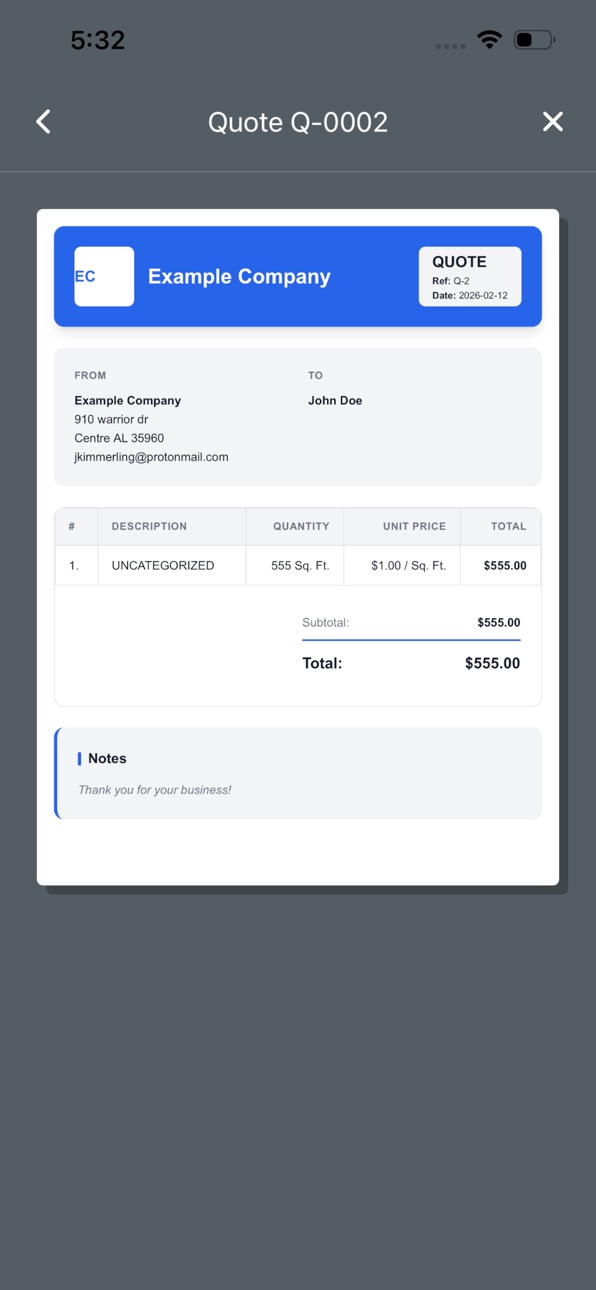
Create and send professional quotes in minutes
Schedule and manage jobs with ease
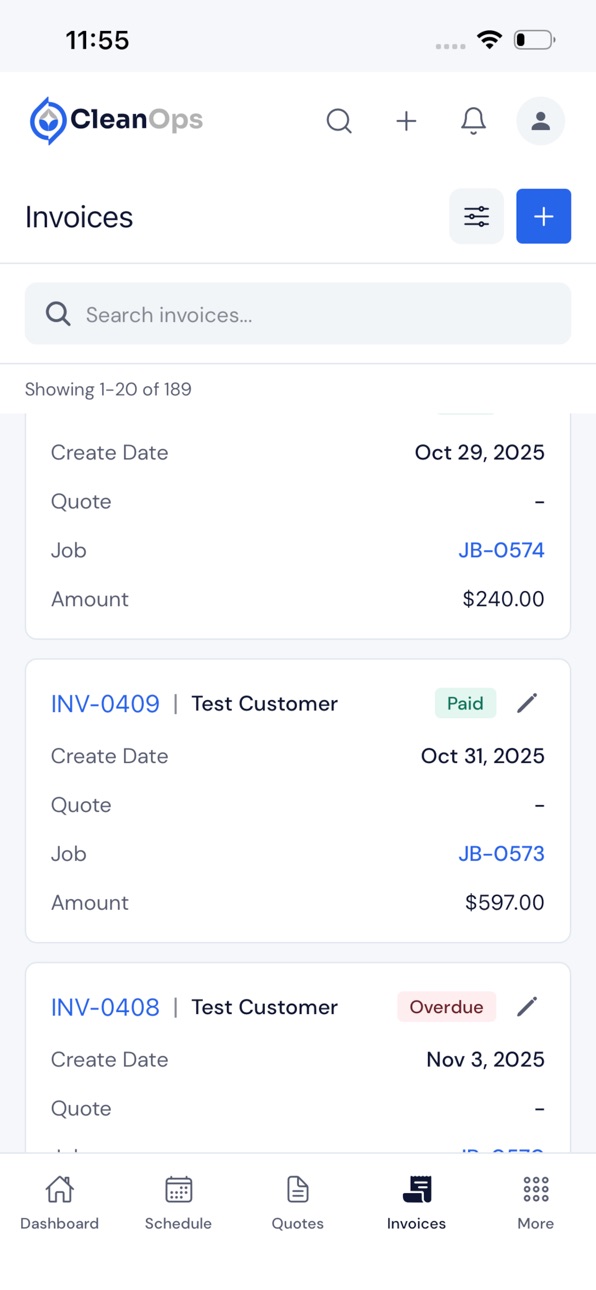
Generate invoices and track payments
Store customer details and job history in one place
Communicate clearly with clients from start to finish
Whether you’re a solo operator or growing a team, CleanOps gives you the tools to stay organized, look professional, and focus on what matters most—getting jobs done and growing your business.
Terms of Use: https://getcleanops.com/terms
Privacy Policy: https://getcleanops.com/privacy
In-App Purchases US pricing
CleanOps Subscription Subscription
CleanOps Basic Monthly · Monthly 14-day free trial$29.00
CleanOps Basic Yearly · Yearly 14-day free trial$274.99
CleanOps Professional Monthly · Monthly 14-day free trial$59.00
CleanOps Pro Yearly · Yearly 14-day free trial$559.99
CleanOps Enterprise Monthly · Monthly 14-day free trial$109.00
CleanOps Enterprise Yearly · Yearly 14-day free trial$1,000.00
Capabilities
In-App Purchases
Accessibility
ipadiphonemacrealityDevicetvoswatch
Version history 18 versions
Build 887604890v1.2.42026-07-02 09:48:04
What's New in Version 1.2.4:
• Review Redirect
Turn happy customers into online reviews. Add your review page (Google, Yelp, or Facebook) under Settings → Brand & Docs, pick when to ask — when a job is completed, after a customer pays, or both — and CleanOps prompts the customer to leave a review right after they pay. Your follow-up "Leave a Review" email uses the same link automatically, so there's nothing to paste per automation.
• Smoother Stripe handoffs
Connecting payments, opening your Stripe dashboard, and paying an invoice now show a clear "Opening Stripe…" state and can't be double-tapped.
• Bug fixes
Fixed building a one-time marketing campaign for the "All Contacts" audience, and improved the merge-tag picker in the campaign composer.
Build 887246950v1.2.22026-06-25 09:44:43
What's New in Version 1.2.2:
• Tips & Gratuity
Collect tips on your invoices. Turn tipping on under Settings → Brand & Docs and set your suggested percentages (15 / 18 / 20 by default). When a customer pays, they can add a suggested tip (calculated from the subtotal), a custom amount, or no tip — and the gratuity shows on the invoice and receipt and counts toward your revenue.
• On The Way notifications
Technicians can now notify a customer that they're on the way — with an optional ETA — straight from the job screen.
Build 887186166v1.2.02026-06-20 11:20:34
What's New in Version 1.2.0:
• Marketing
Reach your customers and leads by email and in-app message — without leaving CleanOps. Build reusable audience Segments, send One-Time campaigns with a guided wizard, and set up Automated follow-ups that fire on triggers like Job Completed, Quote Not Approved, or Invoice Unpaid.
• Promo Codes
Create percentage or fixed-amount discount codes with usage limits and a validity window. The discount shows right on your customers' quotes, invoices, and receipts.
• Email Templates & Usage
Browse and edit reusable email templates, and keep an eye on a live usage banner showing where you stand against your monthly email cap.
Build 886302335v1.1.62026-05-30 09:52:51
What's New in Version 1.1.6:
• Quote & Invoice Notes Fix
Quote and invoice previews now show the "Quote Notes to Customer" / "Invoice Notes to Customer" text you saved under Brand & Docs. Previously, many quotes silently showed "Thank you for your business!" regardless of what you had saved.
• Maintenance Package Description Fix
When a maintenance package is applied to a quote, the package's description now appears on the line item, including for packages that have no per-surface line items. Previously the Description column was blank.
Build 885858020v1.1.52026-05-20 15:27:55
What's New in Version 1.1.5:
• Feature Showcase Carousel
The landing screen now has a Feature Showcase section with short YouTube walkthroughs of CleanOps features. Swipe through the carousel to preview features before you sign up.
Build 885630514v1.1.32026-05-14 01:03:47
What's New in Version 1.1.3:
• Bug Fix: Android Date Picker Double-Tap
Date pickers across the app (job scheduling, quotes, filters, expense dates) sometimes required pressing OK twice on Android before the dialog would close. One tap now confirms and closes as expected.
• App Version in Profile Menu
Open the avatar menu in the upper right — the current app version and build number are now displayed at the bottom of the menu, making it easy to tell support which build you're on.
Build 885536276v1.1.22026-05-12 09:30:37
What's New in Version 1.1.2:
• Notify: On The Way
A new one-tap action in the Job actions menu sends an instant alert to the customer that you're on the way. Optional ETA field — leave blank for a no-ETA message; a single template covers both cases.
• Tappable Job Addresses + Navigate to Job
Job addresses across the app are now tappable: opens an action sheet to view the job or open in Apple Maps (iOS) / Google Maps (Android). The action menu also picks up a direct "Navigate to Job" shortcut for employers and assigned technicians.
• Cross-Store Subscription Safety
If you have an active subscription on the web (Stripe), Google Play, or the Apple App Store, CleanOps now refuses to start a second one on a different store and tells you exactly where to cancel first. Move-between-stores is a clean cancel-then-resubscribe flow.
Build 885439342v1.1.12026-05-09 09:33:48
What's New in Version 1.1.1:
• Edit-Modal Typing Fix
Typing into Quote, Job, Service Request, Pricing Template, or Notification Template edit modals could be wiped if the parent screen re-rendered while you were typing. Each modal now resets only when you actually open it on a different record — not on every parent refresh.
• Quote Resend for SMS-Only Customers
The Resend action on a quote was disabled for customers without an email on file. It now follows the same rule as the web app: enabled if the customer has an email OR a phone number. SMS-only customers can be resent again.
Build 885246035v1.1.02026-05-05 09:39:50
What's New in Version 1.1.0:
• Maintenance Packages & Plans
Build reusable service packages in Settings (line items, frequency, default duration, billing method). Turn an approved quote into a recurring Maintenance Plan with one tap — pick Stripe auto-charge or scheduled invoices, set start/end or max occurrences, choose invoice timing, optionally assign a technician. A daily worker generates jobs and invoices automatically. Customers see their plans, jobs, and invoices in the portal, with a Pay Now button on scheduled-invoice plan invoices.
• Payment Receipts
Every successful payment — one-off invoice, plan invoice, or manual — now emails and texts the customer a branded receipt with a PDF download. Paid invoices show a Download Receipt button.
• Live Discount Math in Quote/Invoice Preview
Flat-$ and %-off discounts now apply in the totals shown on the edit screen. Previously the preview ignored both, so you'd see one number and the API would charge another. An explicit "0" in discount or tax now reaches the API too — you can override a 5% discount down to 0% and have it stick.
• Brand Defaults Actually Apply
The "Include by default on new quotes" toggles for Liability Waiver and Disclaimers now apply on mobile. They were loading after the form reset and getting silently ignored.
• Free-Form Duration Input
Jobs, packages, and plans accept 2, 2.5, 1h, 30m, 1h30m — all round-trip cleanly. No more 0.96666666h prefill.
• Settings Reorganization
"Custom Forms" is now "Service Catalog." Expense Categories is a real first-class setting (create, edit, delete). Quote / invoice / expense pickers surface "Create new" + a Settings link inline so you don't have to bail out of a form to add the missing entry.
• Invoice PDF + Date Sent
Invoice PDFs now show Due Date in the header. The Date Sent button presets due_date = invoice_date with net-0 terms — one tap to send and mark due today.
• Customer Portal Polish
Card values right-align. Currency capped at 2 decimal places. Scheduled job times render in the customer's local timezone, not UTC. Misleading "wait for subscription setup" copy is gone.
• Navigable Notifications
Maintenance plan and payment notifications now deep-link to the right plan or invoice on tap.
Security note: this release closes a draft-invoice/quote leak in the customer portal. No customer-account drafts were surfaced in production.
Build 884984788v1.0.102026-04-28 10:51:43
What's New in Version 1.0.10:
• Cash/Check Discount (replaces card surcharge)
The 3% online payment surcharge is gone. In its place: a 3% cash/check discount toggle on every quote and invoice. Same money, friendlier framing. Listed price stays as-is — card payers are charged the listed total, cash/check payers get 3% off and you record the discount when you mark the invoice paid. The customer-facing PDF and portal show both prices side-by-side.
• Default Tax Rate Auto-Populates
New quotes and invoices on mobile now seed Tax Percent from your account's default tax rate, matching the web app. Existing records keep their stored tax — even an explicit 0% — so editing never silently overwrites your operator's intent.
• Settings → Account: Default Tax Rate
The Default Tax Rate field is now visible in your Company Details and editable from the Edit Company Details modal.
• Quote → Invoice Descriptions
When you create an invoice from a quote, surface descriptions now carry over correctly. Previously they were dropped on mobile (web has always carried them).
• In-App Announcements
We can now push notices directly into the app for important changes. Long announcements scroll inside the modal; the title and confirm button stay pinned.
• Math Refinement on Cash Discount
The earlier "flip" build inflated quote totals by 3%, which surprised operators. Listed totals now equal subtotal + tax exactly; the 3% comes off as a discount for cash/check payers. Stripe charges the listed total exactly.
Update is required to use the new discount toggle. Older builds still show the old surcharge toggle, and any quote/invoice they save has the surcharge field silently dropped.
Build 884465637v1.0.92026-04-14 09:45:21
What's New in Version 1.0.9:
• Timezone Fixes
Dates now display correctly across all US timezones. Previously, jobs scheduled in the evening could show the wrong date on the Expenses page and other screens. All date handling has been standardized with timezone-aware utilities.
• Pricing Template Descriptions
Selecting a pricing template in quote or invoice creation now auto-fills the Description field from the template's Default Description. Works for both manual template selection and auto-matched templates. Only fills when empty so your manual edits are preserved.
• Default Descriptions for Surface Types & Pricing Templates
New Default Description field in Custom Forms settings. Set once and it auto-populates when the surface type or template is selected. Template descriptions take priority over surface type descriptions.
• Report Improvements
- Fixed single-day chart rendering
- Fixed mobile profit bar layout issues
Build 884103242v1.0.82026-04-04 09:44:23
What's New in Version 1.0.8:
• Custom Review Links
Configure custom review links for automated review requests. Set Google My Business, Yelp, Facebook, or any review platform URL. Works across email, SMS, and in-app notifications. URLs are automatically formatted - just enter "google.com" and we add the https://.
• Payment Display Improvements
Invoice cards now show surcharge-inclusive amounts when Stripe surcharge is enabled. See the Amount Collected breakdown showing base amount + surcharge for complete transparency.
• Bug Fixes
- Fixed notification template variables properly displaying customer names and invoice numbers
- Fixed payment notifications showing correct surcharge-inclusive amounts
- Fixed URL validation to accept URLs without http:// or https://
- Updated review request button text to "Leave a Review" for clarity
Build 884026247v1.0.72026-04-02 10:24:08
What's New in Version 1.0.7:
• Release Notes Viewer
Stay informed about new features and improvements directly in the app. Browse release history, view detailed changelogs, and never miss an update.
• Employee Performance Tracking
View detailed performance metrics for your team. Track jobs completed, hours logged, revenue generated, and daily breakdowns. Filter by time ranges (this month, last 3 months, this year, etc.).
• Account Admin Role
Grant employees full account-level admin access. Account admins can manage all aspects of your business including employees, billing, and integrations. Clearly marked with badges throughout the app.
• Overdue Jobs & Action Items
Dashboard now highlights jobs that need attention: unpaid invoices, quotes awaiting approval, unassigned jobs, and overdue jobs. Tap any item to navigate directly to filtered lists.
• Personalized Schedule View
Set your preferred default schedule view (Day, Week, or Month). Your choice persists across sessions and the app automatically returns to your preferred view.
• Enhanced Notifications
SMS character limit increased from 160 to 320 characters. Send more detailed updates and context to customers and team members.
• Improved Navigation & UX
Better keyboard handling prevents inputs from being hidden. Smoother form interactions. Auto-redirect to dashboard after sending quotes/invoices.
Build 883847429v1.0.62026-03-28 09:31:15
What's New in Version 1.0.6:
• Job Expense Tracking
Add detailed expenses directly in the job creation/edit modal. Track materials, equipment rentals, and other costs without leaving the job workflow. Supports categories, descriptions, amounts, and photo attachments.
• Expense Category Improvements
Expense categories now show your actual configured categories instead of generic defaults. Better organization and more accurate expense tracking.
• Media Upload Enhancements
Classify uploads as receipts or photos for better organization. Improved reliability and data sync for expense attachments.
• Bug Fixes
Fixed automation display showing incorrect time units. Improved expense data synchronization to prevent data loss.
Build 883480853v1.0.52026-03-18 09:08:02
What's New in Version 1.0.5:
• Support Ticket Enhancements
Attach up to 10 photos when creating support tickets. Upload from camera or photo library with automatic HEIC conversion and reliable retry logic.
• Follow-ups & Reminders
Fixed rescheduling bugs across jobs, quotes, and invoices. Real-time updates keep your automation status current. Improved display of timing and scheduling information.
• Job Scheduling
Fixed address autocomplete in job creation modal. Added support for monthly recurrence patterns (e.g., "2nd Monday of each month"). Better validation prevents invalid line items.
• QuickBooks Integration
Improved OAuth authentication flow and fixed sync errors for invoices with line items.
Build 883259560v1.0.32026-03-11 17:57:01
What's New in Version 1.0.3:
• Automation & Notification Fixes
Fixed critical issues with job, invoice, and quote follow-ups and reminders. Custom notification templates now save and display correctly. Resolved issues where enabled automations incorrectly showed as disabled.
• Template Editing Improvements
Fixed editing of sent reminders - no more constraint errors. Job-specific custom templates now properly override automation defaults when editing.
• Data Integrity
Improved API response validation and fixed data serialization issues that could cause template data loss.
Build 883146272v1.0.22026-03-08 22:03:47
What's New in Version 1.0.2:
• Template Preview with Sample Data
Preview your notification templates with realistic sample data before saving. The preview updates instantly as you edit, so you can see exactly how messages will look to customers.
• Enhanced Scheduler Navigation
Each view (Day, Week, Month) now has its own specialized date picker and prev/next navigation arrows. Week picker automatically adjusts to Monday-based weeks. Clear date displays show exactly what period you're viewing.
• Bug Fixes & Improvements
- Fixed address picker infinite loop when filtering addresses
- Customer names now clickable in quote/invoice details
- Fixed bottom padding in several modals
- Fixed overlapping labels in Job Performance chart
- Improved schedule header to always show today's date
Build 881640820v1.02026-03-06 10:25:20
Price history by region
Currency
Show
Columns
Search
Availability 1 of 54 storefronts
| Region | Language | Price | Ratings | Avg | Version |
|---|---|---|---|---|---|
| US | en-US | Free | 2 | 5.0 | 1.2.4 |
Not available in: AG, AR, BB, BO, BR, BS, BZ, CI, CL, CO, CR, DO, DZ, EC, GH, GM, GT, GW, GY, HN, JM, KE, LR, LY, MA, MG, ML, MU, MW, MX, NA, NG, NI, PA, PE, PY, RW, SC, SL, SN, SR, ST, SV, SZ, TD, TN, TT, TZ, UG, UY, VE, ZM, ZW
Change log 21 changes · US
✎
releaseNotes updated
What's New in Version 1.2.4:
• Review Redirect
Turn happy customers into online reviews. Add your review page (Google, Yelp, or Facebook) under Settings → Br
✎
description updated
CleanOps is the all-in-one operations app built for pressure washing professionals who want to run their business smarter, faster, and more professionally.
Fro
✎
name updated
CleanOps Mobile
◆
Version 1.2.4 released
What's New in Version 1.2.4:
• Review Redirect
Turn happy customers into online reviews. Add your review page (Google, Yelp, or Facebook) under Settings → Brand & Docs, pick when to ask — when a job is completed, after a customer pays, o
◆
Version 1.2.2 released
What's New in Version 1.2.2:
• Tips & Gratuity
Collect tips on your invoices. Turn tipping on under Settings → Brand & Docs and set your suggested percentages (15 / 18 / 20 by default). When a customer pays, they can add a suggested tip
◆
Version 1.2.0 released
What's New in Version 1.2.0:
• Marketing
Reach your customers and leads by email and in-app message — without leaving CleanOps. Build reusable audience Segments, send One-Time campaigns with a guided wizard, and set up Automated follow-u
◆
Version 1.1.6 released
What's New in Version 1.1.6:
• Quote & Invoice Notes Fix
Quote and invoice previews now show the "Quote Notes to Customer" / "Invoice Notes to Customer" text you saved under Brand & Docs. Previously, many quotes silently showed "Thank yo
◆
Version 1.1.5 released
What's New in Version 1.1.5:
• Feature Showcase Carousel
The landing screen now has a Feature Showcase section with short YouTube walkthroughs of CleanOps features. Swipe through the carousel to preview features before you sign up.
◆
Version 1.1.3 released
What's New in Version 1.1.3:
• Bug Fix: Android Date Picker Double-Tap
Date pickers across the app (job scheduling, quotes, filters, expense dates) sometimes required pressing OK twice on Android before the dialog would close. One tap no
◆
Version 1.1.2 released
What's New in Version 1.1.2:
• Notify: On The Way
A new one-tap action in the Job actions menu sends an instant alert to the customer that you're on the way. Optional ETA field — leave blank for a no-ETA message; a single template covers
◆
Version 1.1.1 released
What's New in Version 1.1.1:
• Edit-Modal Typing Fix
Typing into Quote, Job, Service Request, Pricing Template, or Notification Template edit modals could be wiped if the parent screen re-rendered while you were typing. Each modal now re
◆
Version 1.1.0 released
What's New in Version 1.1.0:
• Maintenance Packages & Plans
Build reusable service packages in Settings (line items, frequency, default duration, billing method). Turn an approved quote into a recurring Maintenance Plan with one tap — pi
◆
Version 1.0.10 released
What's New in Version 1.0.10:
• Cash/Check Discount (replaces card surcharge)
The 3% online payment surcharge is gone. In its place: a 3% cash/check discount toggle on every quote and invoice. Same money, friendlier framing. Listed price
◆
Version 1.0.9 released
What's New in Version 1.0.9:
• Timezone Fixes
Dates now display correctly across all US timezones. Previously, jobs scheduled in the evening could show the wrong date on the Expenses page and other screens. All date handling has been sta
◆
Version 1.0.8 released
What's New in Version 1.0.8:
• Custom Review Links
Configure custom review links for automated review requests. Set Google My Business, Yelp, Facebook, or any review platform URL. Works across email, SMS, and in-app notifications. URLs a
◆
Version 1.0.7 released
What's New in Version 1.0.7:
• Release Notes Viewer
Stay informed about new features and improvements directly in the app. Browse release history, view detailed changelogs, and never miss an update.
• Employee Performance Tracking
Vie
◆
Version 1.0.6 released
What's New in Version 1.0.6:
• Job Expense Tracking
Add detailed expenses directly in the job creation/edit modal. Track materials, equipment rentals, and other costs without leaving the job workflow. Supports categories, descriptions, a
◆
Version 1.0.5 released
What's New in Version 1.0.5:
• Support Ticket Enhancements
Attach up to 10 photos when creating support tickets. Upload from camera or photo library with automatic HEIC conversion and reliable retry logic.
• Follow-ups & Reminders
Fix
◆
Version 1.0.3 released
What's New in Version 1.0.3:
• Automation & Notification Fixes
Fixed critical issues with job, invoice, and quote follow-ups and reminders. Custom notification templates now save and display correctly. Resolved issues where enabled autom
◆
Version 1.0.2 released
What's New in Version 1.0.2:
• Template Preview with Sample Data
Preview your notification templates with realistic sample data before saving. The preview updates instantly as you edit, so you can see exactly how messages will look to cu
◆
Version 1.0 released