Home › Utilities

 US
US
1 of 1 storefronts
Content in en-US
Content in en-US
Information
Apple ID6757983630
Bundle IDcom.Spiro.TOTP.TOTP
SellerSeller
Min iOS17.6
Min macOS14.6
Device familieswatch, iphone, ipad
Released2026-01-22
Copyright© 2025 App by Spiro. Все права защищены.
Privacy policyLink ↗
Preview 3 platforms
iPhone 7 images


iPad 4 images


Apple Watch 2 images


What’s New Version 3.3
• Security Setup checklist: add an account, enable Face ID and create an encrypted backup
• Manual entry now explains where to find your secret key
• Smarter backup restore — duplicates are skipped automatically
• Bug fixes and performance improvements
Description
Protect your online accounts with TOTP Authenticator — the fast, secure, and beautifully designed two-factor authentication app. Generate time-based one-time passwords (TOTP) right on your device, no internet connection required.
Setting up is effortless. Just scan a QR code and your account is ready in seconds. Whether it's Google, GitHub, Amazon, Discord, or any service that supports 2FA — TOTP Authenticator has you covered.
▸ KEY FEATURES
• Scan QR codes to add accounts instantly
• Generate 2FA codes offline — no network needed
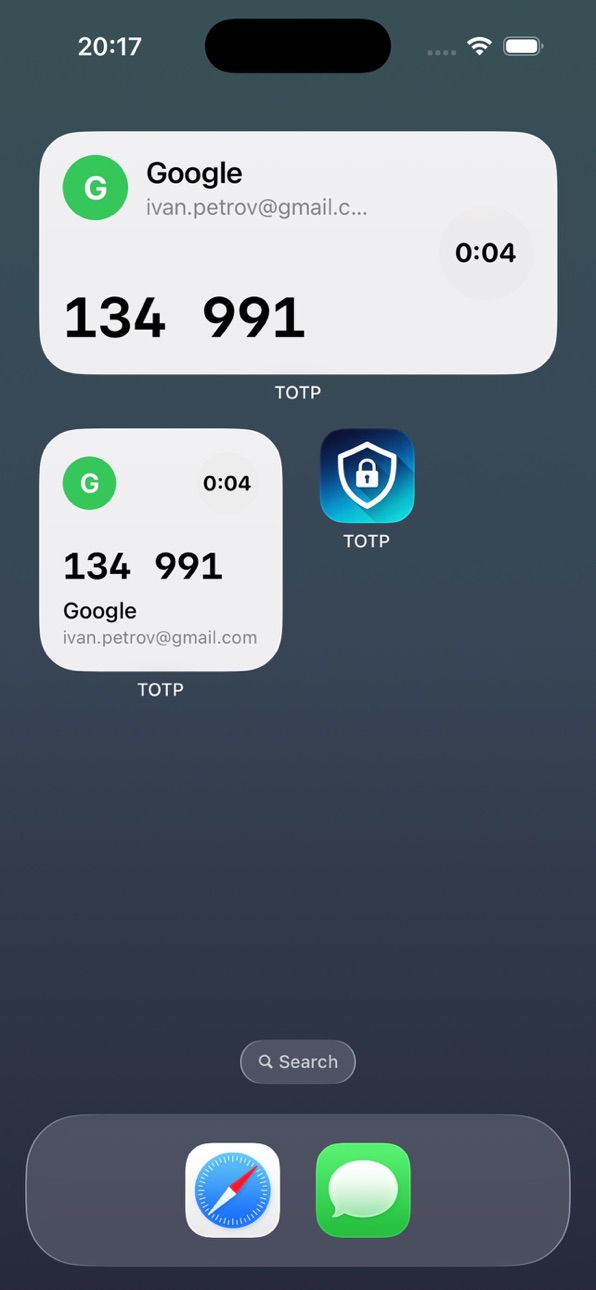
• Lock Screen Widgets for quick access to your codes
• Apple Watch app — view codes right from your wrist
• Password AutoFill integration (iOS 18+) — codes fill automatically
• Biometric Lock with Face ID or Touch ID
• iCloud Sync across all your Apple devices
• Export accounts as QR codes for easy backup or migration
• Support for SHA-1, SHA-256, and SHA-512 algorithms
• Available in 38 languages
▸ SECURITY FIRST
Your secrets never leave your device unprotected. All sensitive data is stored in the iOS Keychain — not in plain text, not in a database. Codes are generated locally on your device, so they work even in airplane mode. Optional biometric lock adds an extra layer of protection.
▸ WIDGETS & AUTOFILL
Add Lock Screen and Home Screen widgets to see your codes at a glance. With iOS 18+ Password AutoFill, your verification codes are suggested automatically when you sign in to apps and websites — no copying and pasting.
▸ PREMIUM
Start with a free 3-day trial. Premium unlocks everything:
• Unlimited accounts
• Apple Watch companion app
• iCloud Sync
• Export accounts as QR codes
• Biometric app lock
Payment will be charged to your Apple ID account at confirmation of purchase. Subscriptions automatically renew unless canceled at least 24 hours before the end of the current period. You can manage or cancel subscriptions in your Apple ID account settings.
Privacy Policy: https://github.com/spiroba/Totp/blob/main/PRIVACY_POLICY.md
Terms of Use: https://github.com/spiroba/Totp/blob/main/TERMS_OF_SERVICE.md
Capabilities
In-App Purchases
Accessibility
ipadiphonemacrealityDevicetvoswatch
Version history 6 versions
Build 887793291v3.32026-07-06 08:47:28
• Security Setup checklist: add an account, enable Face ID and create an encrypted backup
• Manual entry now explains where to find your secret key
• Smarter backup restore — duplicates are skipped automatically
• Bug fixes and performance improvements
Build 886284110v3.22026-05-30 22:55:30
This release brings major new features and security improvements.
• Import accounts from Google Authenticator with one QR scan
• Encrypted backups protected by your password (AES-GCM)
• Folders to organize accounts
• HOTP support and Steam Guard codes
• Hide codes by default — tap to reveal
• Configurable auto-lock timer (30 seconds to 10 minutes)
• Codes are masked during screen recording
• Improved iCloud Sync with reliable account migration
• Brand-new onboarding experience
As always, your secrets stay on your device — stored in the iOS Keychain and never uploaded.
Build 884949498v3.12026-04-27 06:16:33
This release brings major new features and security improvements.
• Import accounts from Google Authenticator with one QR scan
• Encrypted backups protected by your password (AES-GCM)
• Folders to organize accounts
• HOTP support and Steam Guard codes
• Hide codes by default — tap to reveal
• Configurable auto-lock timer (30 seconds to 10 minutes)
• Codes are masked during screen recording
• Improved iCloud Sync with reliable account migration
• Brand-new onboarding experience
As always, your secrets stay on your device — stored in the iOS Keychain and never uploaded.
Build 884920697v3.02026-04-26 08:37:52
This release brings major new features and security improvements.
• Import accounts from Google Authenticator with one QR scan
• Encrypted backups protected by your password (AES-GCM)
• Folders to organize accounts
• HOTP support and Steam Guard codes
• Hide codes by default — tap to reveal
• Configurable auto-lock timer (30 seconds to 10 minutes)
• Codes are masked during screen recording
• Improved iCloud Sync with reliable account migration
• Brand-new onboarding experience
As always, your secrets stay on your device — stored in the iOS Keychain and never uploaded.
Build 882077996v2.02026-02-08 17:51:53
What's New in v2.0:
- Redesigned interface with new animations
- Lock Screen widgets for quick access
- Password AutoFill support (iOS 18+)
- Support for 32 languages
- Improved Apple Watch sync
- Performance improvements and bug fixes
Build 881612175v1.02026-01-22 12:08:19
No pricing data captured yet — comparisons appear once the app has paid storefronts or in-app purchases.
Availability 1 of 1 storefronts
| Region | Language | Price | Ratings | Avg | Version |
|---|---|---|---|---|---|
| US | en-US | Free | 0 | — | 3.3 |
Change log 10 changes · US
✎
releaseNotes updated
• Security Setup checklist: add an account, enable Face ID and create an encrypted backup
• Manual entry now explains where to find your secret key
• Smarter ba
✎
description updated
Protect your online accounts with TOTP Authenticator — the fast, secure, and beautifully designed two-factor authentication app. Generate time-based one-time pa
✎
subtitle updated
2FA Codes, OTP & Passwords
✎
name updated
Authenticator TOTP
◆
Version 3.3 released
• Security Setup checklist: add an account, enable Face ID and create an encrypted backup
• Manual entry now explains where to find your secret key
• Smarter backup restore — duplicates are skipped automatically
• Bug fixes and performance
◆
Version 3.2 released
This release brings major new features and security improvements.
• Import accounts from Google Authenticator with one QR scan
• Encrypted backups protected by your password (AES-GCM)
• Folders to organize accounts
• HOTP support and Steam
◆
Version 3.1 released
This release brings major new features and security improvements.
• Import accounts from Google Authenticator with one QR scan
• Encrypted backups protected by your password (AES-GCM)
• Folders to organize accounts
• HOTP support and Steam
◆
Version 3.0 released
This release brings major new features and security improvements.
• Import accounts from Google Authenticator with one QR scan
• Encrypted backups protected by your password (AES-GCM)
• Folders to organize accounts
• HOTP support and Steam
◆
Version 2.0 released
What's New in v2.0:
- Redesigned interface with new animations
- Lock Screen widgets for quick access
- Password AutoFill support (iOS 18+)
- Support for 32 languages
- Improved Apple Watch sync
- Performance improvements and bug fixes
◆
Version 1.0 released