Home › Education

 US
US
1 of 1 storefronts
Content in en-US
Content in en-US
Information
Preview 3 platforms
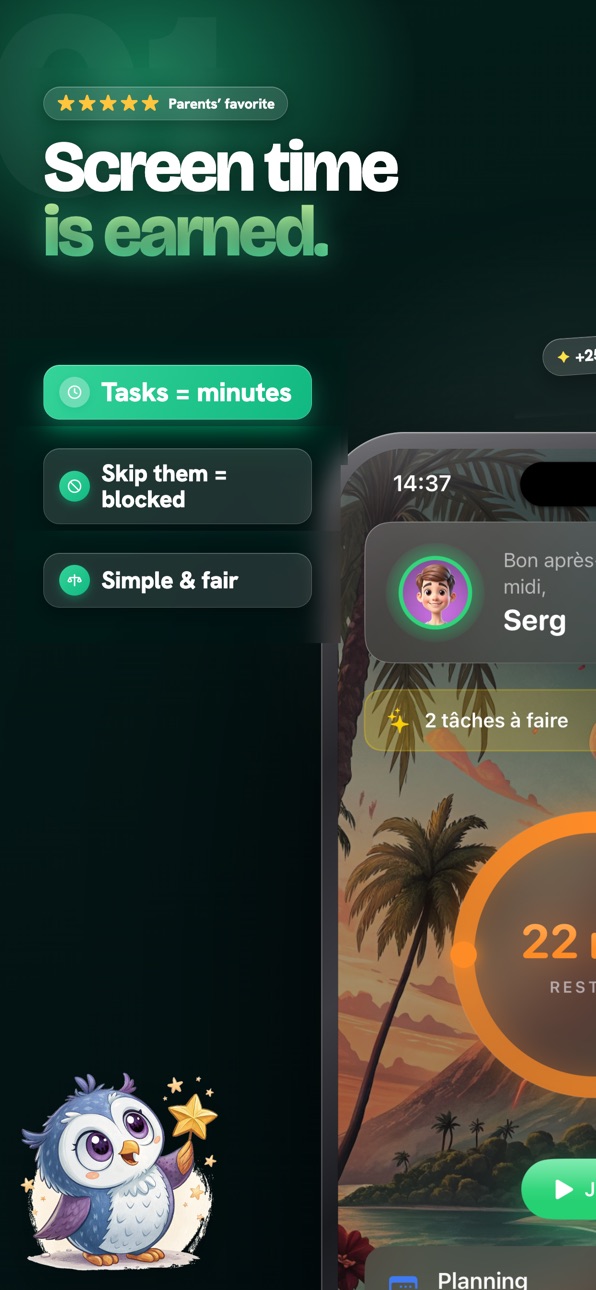
iPhone 7 images


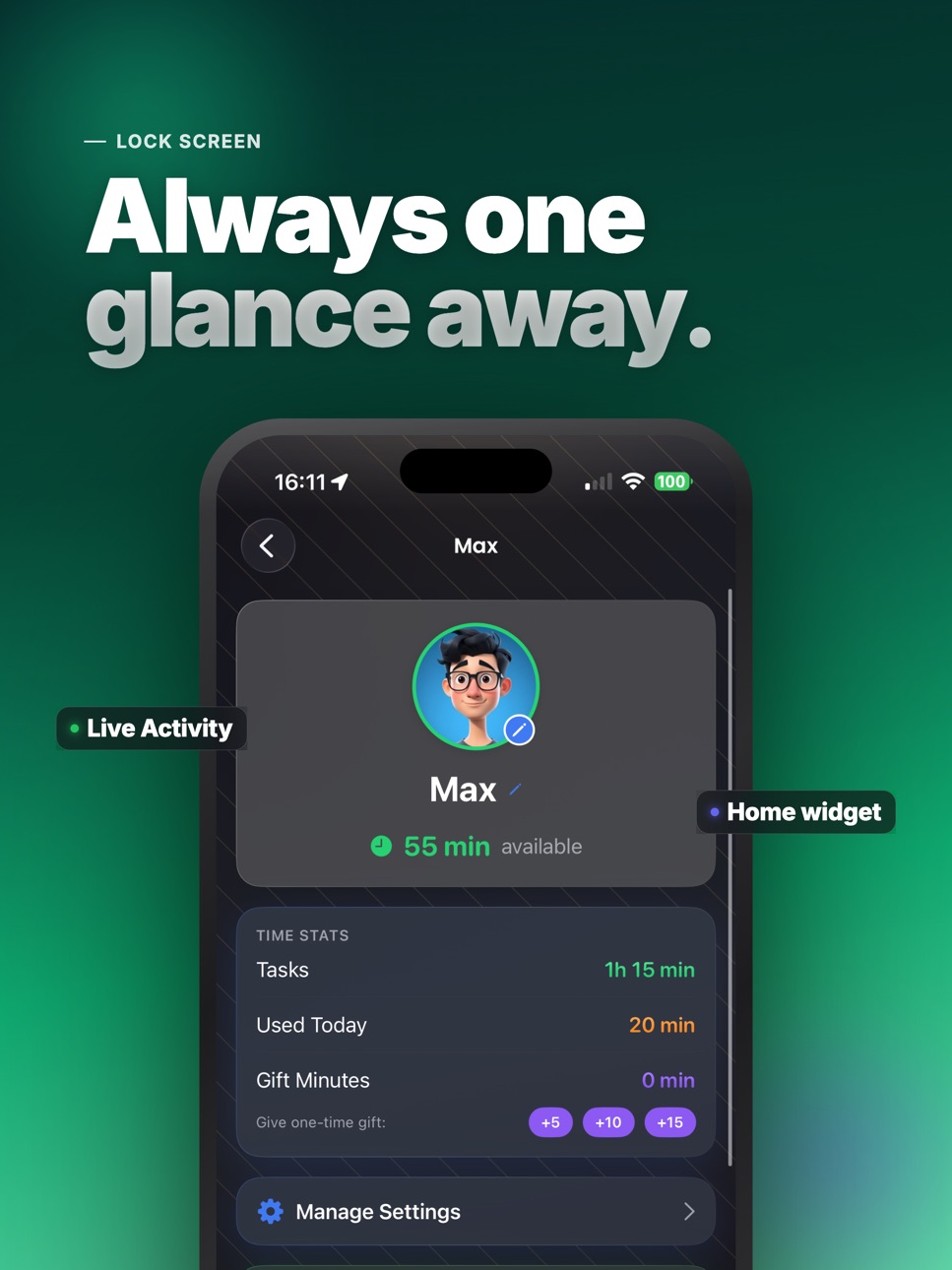
iPad 5 images


Apple Watch 3 images


What’s New Version 4.7
• New plans are here: monthly, yearly or lifetime — pick what fits your family
• See screen time by device on the parent dashboard
• Faster and more reliable
Description
Earn Time turns screen time into something kids actually work for. Instead of fighting over the phone, your child earns minutes by completing real tasks — homework, chores, reading — and you approve with a tap.
HOW IT WORKS
1. Create tasks with time rewards (clean room = 20 min, homework = 30 min).
2. Your child completes a task and sends proof (photo optional).
3. You approve — earned minutes unlock automatically. When time runs out, apps lock again.
PAY ONCE — NO SUBSCRIPTION
One purchase, yours forever. No monthly fees, no renewals. Start with a 7-day free trial and see it work first.
SIMPLEST SETUP — NO FAMILY SHARING
Works with any Apple ID. No Family Sharing, no child account, no device profile to install. Parent uses their phone, child uses theirs — everything syncs privately via iCloud.
RELIABLE BLOCKING
Built on Apple's Screen Time technology with multiple protection layers, so blocking keeps working even when the network is down.
FEATURES
• Custom tasks and rewards with ready-made templates
• Daily schedules and downtime slots
• Study Mode — block everything during homework
• App and website blocking
• Family chat with text, voice and photos
• Achievements and a live countdown
• Apple Watch app and home-screen widgets
• Borrow time and bonus minutes
Earn Time helps kids build healthy habits — and gives parents a calm, fair way to manage screens.
Download free and start your 7-day trial today.
Privacy first: made for families, no ads, no data selling.
Terms of Use: https://kidsquest.app/terms.html
Privacy Policy: https://kidsquest.app/privacy.html
In-App Purchases US pricing
One-Time Purchases
Lifetime Access$69.99
Capabilities
In-App Purchases
Accessibility
ipadiphonemacrealityDevicetvoswatch
Version history 25 versions
Build 888125659v4.72026-07-11 15:31:19
• New plans are here: monthly, yearly or lifetime — pick what fits your family
• See screen time by device on the parent dashboard
• Faster and more reliable
Build 888018251v4.62026-07-10 06:38:40
• Fixed a bug where used time could reset on its own — remaining time is now always accurate, even when your child switches between iPhone and iPad
• Time is now tracked per device: see exactly how many minutes were spent on each device, right on the child's card
• New: Reduce Time — remove minutes with a reason your child will see in the family chat
• Tap a child in Family to instantly see their current status and schedule
• Parent dashboard now updates much faster when a session starts or stops
• Design polish and small fixes throughout the app
Build 887649494v4.52026-07-01 08:24:44
- Refreshed task and reward screens — cleaner layouts, smoother animations, and earned screen time that's easier to read at a glance
- Polished onboarding so new families can set up their first chores in just a few taps
- More reliable in tricky moments — midnight resets, time-zone changes, and offline use are handled more gracefully
- Better Dark Mode, Dynamic Type (larger text), and VoiceOver support
- Various bug fixes and performance improvements
Build 887549671v4.42026-06-29 06:06:55
Fixed a crash that could occur when opening a child's settings on the latest iOS. Thanks to everyone who reported it!
Build 887223369v4.32026-06-23 06:37:43
- Take action right from your Home Screen widget — grant minutes or pause with a single tap.
- New Lock Screen widgets and quick controls in Control Center.
- A smoother, more refined experience throughout.
Build 886945225v4.22026-06-17 06:48:33
- New task illustrations — more colorful art for your kids' chores
- Bug fixes and performance improvements
Build 886873613v4.12026-06-12 23:04:02
• Now supports iPhone with iOS 18 and later — more devices, including older ones.
• Stability improvements.
Build 886614329v4.02026-06-10 06:44:32
Improved app stability and performance for a smoother experience.
Build 886280178v3.92026-06-02 10:02:51
Improved app stability and performance for a smoother experience.
Free trial extended to 7 days.
Build 886203619v3.82026-05-28 16:29:12
Apple Watch support — monitor and manage screen time right from your wrist.
Bug fixes and performance improvements.
Build 886059537v3.72026-05-25 22:10:54
- Family chat — text, voice messages, photos, and stickers between parents and kids
- Borrow system — kids can request minutes from tomorrow's bonus
- Achievement badges — earn rewards for task streaks and milestones
- Live Activity — session countdown on the lock screen
- Website blocking — block specific sites (youtube.com, tiktok.com, etc.)
- Study Mode — block everything except selected educational apps
- Geofencing — notifications when your child arrives or leaves a location
- Device restrictions — block app install/delete, passcode, accounts, explicit content
- Always Allowed apps — choose apps that are never blocked
- Bug fixes and performance improvements
Build 885726195v3.62026-05-19 10:45:48
- Location tracking: Parents can now see their child's location on an interactive map with real-time updates and
directions
- Bug fixes and performance improvements
Build 885440933v3.52026-05-12 22:39:35
- Minor bug fixes.
Build 885237293v3.42026-05-06 13:18:18
• Schedule tasks for any day — not just today! Pick a future date when
creating a one-time task
• Recurring tasks improved — deadline removed (tasks last all day), missed
tasks shown as "Not completed yesterday"
• New calendar view — tap the calendar icon to see all upcoming and recurring
tasks at a glance
• Smarter notifications — get reminded when it's time for a scheduled task, no
more daily spam for repeating tasks
• Advanced options (time, deadline, photo) now grouped under one section for a
cleaner form
• Parents can now edit and delete tasks on any day of the week
• Bug fixes and performance improvements
Build 885116401v3.32026-05-01 14:19:56
App groups now display real application names and icons instead of just group
names. Parents can see blocked apps directly on the child's card and in
schedule details. Children can see which specific apps are blocked in their
schedule.
Build 885074858v3.22026-04-29 18:58:47
- Minor UI/UX improvements for a smoother experience
- Bug fixes and stability enhancements
Build 884909527v3.12026-04-27 19:29:57
- Device role selection at first launch
- Improved account switching stability
- Widget and localization fixes
Build 884767478v3.02026-04-22 09:02:04
• More blocking options — schedule slots, custom app groups, app deletion prevention, and emergency pause
• Redesigned onboarding — easier setup for the whole family
• Home screen widget & Live Activity to track time at a glance
Build 884358218v2.82026-04-14 15:54:44
Bug fixes and performance improvements.
Improved UI/UX and added illustrations to task cards.
Build 884175558v2.72026-04-08 20:18:42
— App blocking now works reliably — simplified setup, no extra configuration
needed
— Streamlined how app groups are managed for a smoother experience
— Stability and performance improvements
— Minor UI refinements
Build 883960492v2.62026-04-01 18:48:16
- Light and Dark theme support.
- Improved child activity statistics.
Build 883850079v2.52026-03-28 07:40:42
Improved app performance and stability
Smoother animations throughout the app
Minor UI improvements for a better experience
Build 883790361v2.42026-03-26 20:13:13
- Bug fixes and performance improvements
Build 883559026v2.32026-03-20 23:49:55
• Multiple block schedules — set separate periods
• Different days, different rules — customize each block for specific weekdays
• App Groups — create your own categories (Games, YouTube, Social) and decide
exactly what gets blocked when
Your kids earn screen time by completing chores. Now you control when and what
they can access — with way more flexibility than built-in Screen Time.
Build 883513023v2.22026-03-19 19:09:39
Minor bugs fixed
Price history by region
Currency
Show
Columns
Search
Availability 1 of 1 storefronts
| Region | Language | Price | Ratings | Avg | Version |
|---|---|---|---|---|---|
| US | en-US | Free | 4 | 3.0 | 4.7 |
Change log 29 changes · US
✎
releaseNotes updated
• New plans are here: monthly, yearly or lifetime — pick what fits your family
• See screen time by device on the parent dashboard
• Faster and more reliable
✎
description updated
Earn Time turns screen time into something kids actually work for. Instead of fighting over the phone, your child earns minutes by completing real tasks — homew
✎
subtitle updated
Parental Control & Rewards
✎
name updated
Earn Screen Time: Kids Chores
◆
Version 4.7 released
• New plans are here: monthly, yearly or lifetime — pick what fits your family
• See screen time by device on the parent dashboard
• Faster and more reliable
◆
Version 4.6 released
• Fixed a bug where used time could reset on its own — remaining time is now always accurate, even when your child switches between iPhone and iPad
• Time is now tracked per device: see exactly how many minutes were spent on each device, ri
◆
Version 4.5 released
- Refreshed task and reward screens — cleaner layouts, smoother animations, and earned screen time that's easier to read at a glance
- Polished onboarding so new families can set up their first chores in just a few taps
- More reliable in t
◆
Version 4.4 released
Fixed a crash that could occur when opening a child's settings on the latest iOS. Thanks to everyone who reported it!
◆
Version 4.3 released
- Take action right from your Home Screen widget — grant minutes or pause with a single tap.
- New Lock Screen widgets and quick controls in Control Center.
- A smoother, more refined experience throughout.
◆
Version 4.2 released
- New task illustrations — more colorful art for your kids' chores
- Bug fixes and performance improvements
◆
Version 4.1 released
• Now supports iPhone with iOS 18 and later — more devices, including older ones.
• Stability improvements.
◆
Version 4.0 released
Improved app stability and performance for a smoother experience.
◆
Version 3.9 released
Improved app stability and performance for a smoother experience.
Free trial extended to 7 days.
◆
Version 3.8 released
Apple Watch support — monitor and manage screen time right from your wrist.
Bug fixes and performance improvements.
◆
Version 3.7 released
- Family chat — text, voice messages, photos, and stickers between parents and kids
- Borrow system — kids can request minutes from tomorrow's bonus
- Achievement badges — earn rewards for task streaks and milestones
- Live Activity — sessi
◆
Version 3.6 released
- Location tracking: Parents can now see their child's location on an interactive map with real-time updates and
directions
◆
Version 3.5 released
- Minor bug fixes.
◆
Version 3.4 released
• Schedule tasks for any day — not just today! Pick a future date when
creating a one-time task
• Recurring tasks improved — deadline removed (tasks last all day), missed
tasks shown as "Not
◆
Version 3.3 released
App groups now display real application names and icons instead of just group
names. Parents can see blocked apps directly on the child's card and in
schedule details. Children can see which specific apps are blocked in their
◆
Version 3.2 released
- Minor UI/UX improvements for a smoother experience
- Bug fixes and stability enhancements
◆
Version 3.1 released
- Device role selection at first launch
- Improved account switching stability
- Widget and localization fixes
◆
Version 3.0 released
• More blocking options — schedule slots, custom app groups, app deletion prevention, and emergency pause
• Redesigned onboarding — easier setup for th
◆
Version 2.8 released
Bug fixes and performance improvements.
Improved UI/UX and added illustrations to task cards.
◆
Version 2.7 released
— App blocking now works reliably — simplified setup, no extra configuration
needed
— Streamlined how app groups are managed for a smoother experience
◆
Version 2.6 released
- Light and Dark theme support.
- Improved child activity statistics.
◆
Version 2.5 released
Improved app performance and stability
Smoother animations throughout the app
Minor UI improvements for a better experience
◆
Version 2.4 released
- Bug fixes and performance improvements
◆
Version 2.3 released
• Multiple block schedules — set separate periods
• Different days, different rules — customize each block for specific weekdays
• App Groups — create your own categories (Games, YouTube, Social) and decide
exactly what gets block
◆
Version 2.2 released
Minor bugs fixed