Home › Productivity

 US
US
1 of 1 storefronts
Content in en-US
Content in en-US
Information
Apple ID6757965441
Bundle IDcom.norton.tempo
SellerSeller
Min iOS18.0
Min macOS15.0
Device familiesiphone, ipad
Released2026-01-22
Copyright© 2026 Dominic Norton
Privacy policyLink ↗
Preview 2 platforms
iPhone 5 images


iPad 4 images


What’s New Version 1.17.1
Once you finish a chapter, ReadMaxx now provides a brief summary and key points to help you remember the most important ideas.
We’ve also improved performance for readers with large libraries.
Description
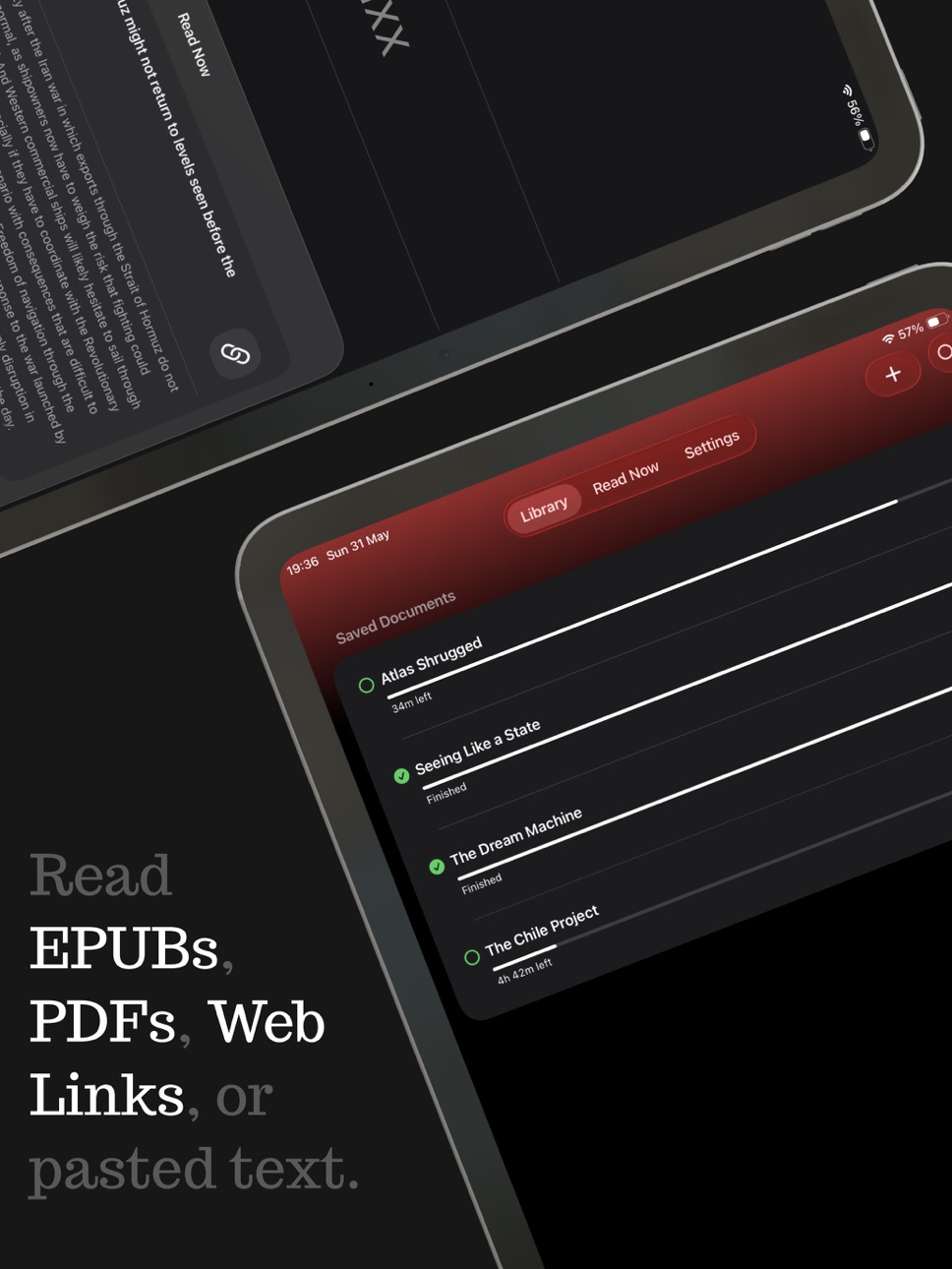
ReadMaxx is an RSVP speed reader designed to help you read more efficiently while maintaining comprehension — whether you’re starting from a PDF, EPUB, Web Link, or text you’ve pasted in.
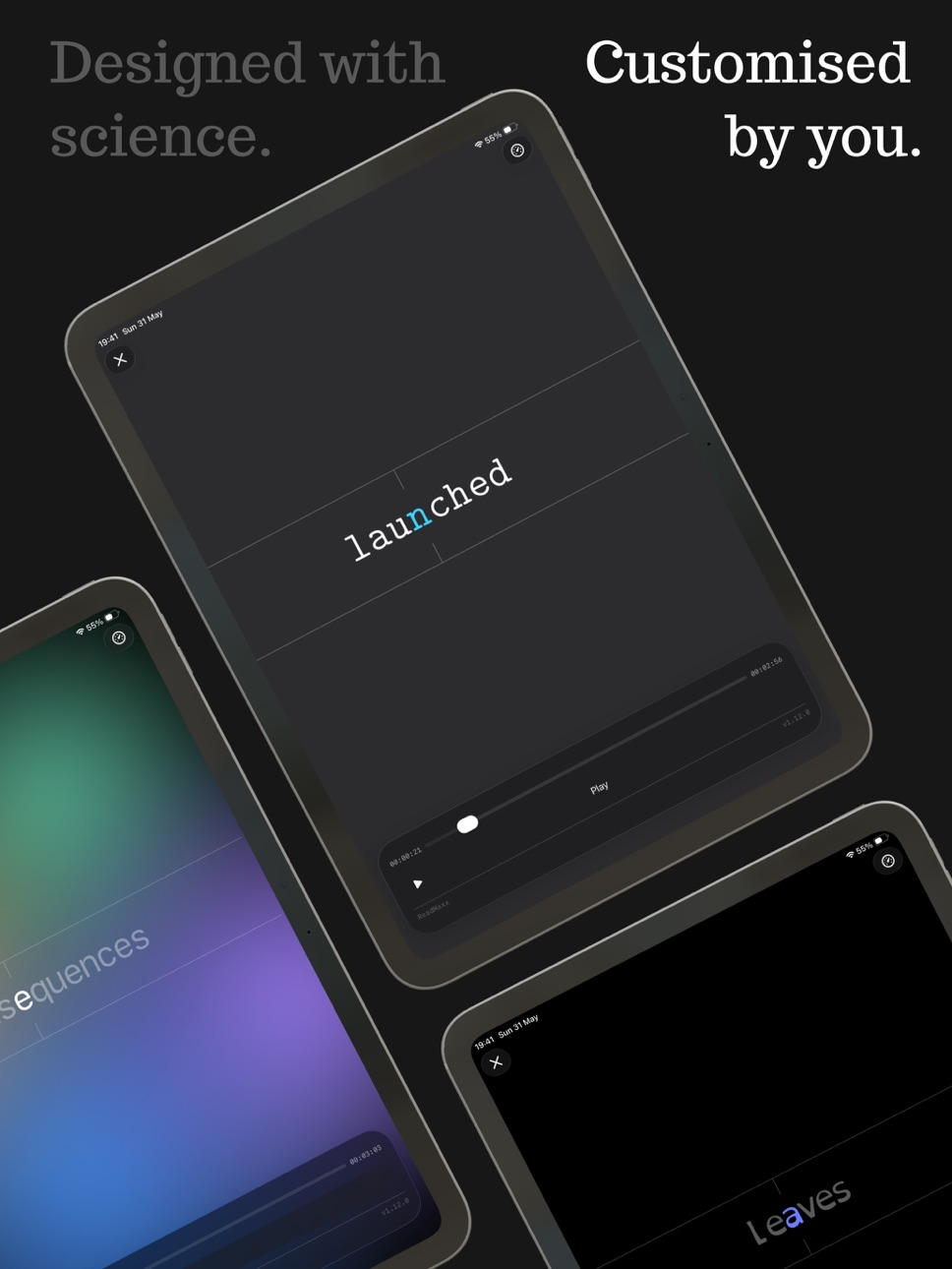
Instead of displaying full lines of text, ReadMaxx presents one word at a time at a controlled pace. This reduces eye movement and helps maintain attention while reading.
ReadMaxx also adds optional haptic cues to reinforce structure as you read — from subtle taps at the start of each word to stronger signals at sentence boundaries. These cues can help anchor attention and support comprehension, without pulling focus away from the text.
Terms of Use (EULA): https://www.apple.com/legal/internet-services/itunes/dev/stdeula/
In-App Purchases US pricing
Unlimited Subscription
Monthly · Monthly$4.99
Weekly · 7 days$2.99
Capabilities
In-App Purchases
Accessibility
ipadiphonemacrealityDevicetvoswatch
Version history 23 versions
Build 887837984v1.17.12026-07-05 00:41:56
Once you finish a chapter, ReadMaxx now provides a brief summary and key points to help you remember the most important ideas.
We’ve also improved performance for readers with large libraries.
Build 887561809v1.17.02026-06-29 08:10:30
Once you finish a chapter, ReadMaxx now provides a brief summary and key points to help you remember the most important ideas.
We’ve also improved performance for readers with large libraries.
Build 887158831v1.16.02026-06-18 21:24:01
A calmer, more organised ReadMaxx.
We've made it easier to see what’s in your library by splitting your documents into new, currently reading, and finished sections.
There’s also a new warm reader background; a softer colour option that’s gentler on the eyes, and especially pleasant in the evenings.
Build 886892729v1.15.02026-06-15 13:50:11
A narrower serif font option has been added for those that want a more compact experience.
Build 886741996v1.14.12026-06-09 21:43:52
This update introduces the new Content Explorer.
Sometimes you don’t want to scrub word-by-word: you just want to quickly find a specific section in a long PDF, article, or book.
Content Explorer gives you a traditional scrolling view of your content, allowing you to browse, skim, and find exactly what you’re looking for.
Once you’ve found your spot, ReadMaxx lets you jump straight there.
Build 886617597v1.14.02026-06-07 18:17:51
This update introduces the new Content Explorer.
Sometimes you don’t want to scrub word-by-word: you just want to quickly find a specific section in a long PDF, article, or book.
Content Explorer gives you a traditional scrolling view of your content, allowing you to browse, skim, and find exactly what you’re looking for.
Once you’ve found your spot, ReadMaxx lets you jump straight there.
Build 886444064v1.13.12026-06-03 21:10:55
ReadMaxx is now on iPad.
You can now read your saved books, PDFs, articles, and pasted text on a bigger screen — with the same focused speed-reading experience you’re used to on iPhone.
Whether you’re at your desk, on the sofa, or working through a long document, ReadMaxx now gives you a little more room to read.
Build 886353176v1.13.02026-06-01 06:52:13
ReadMaxx is now on iPad.
You can now read your saved books, PDFs, articles, and pasted text on a bigger screen — with the same focused speed-reading experience you’re used to on iPhone.
Whether you’re at your desk, on the sofa, or working through a long document, ReadMaxx now gives you a little more room to read.
Build 886282646v1.12.02026-05-29 20:24:53
We’ve made a few behind-the-scenes improvements so ReadMaxx can stay smooth, reliable, and ready for what’s next.
Build 885776109v1.11.02026-05-18 17:18:02
A smoother way to bring things into ReadMaxx.
You can now open PDFs and EPUBs directly from your device into ReadMaxx, instead of needing to start inside the app.
Links to PDFs should behave better too: when ReadMaxx spots one, it’ll try to import the actual PDF rather than giving up.
And, if you start reading something as a quick “read now” item but don’t finish it, ReadMaxx will ask whether you want to save it for later, so your progress is preserved and you can pick up right where you left off when you return.
Build 885635299v1.10.02026-05-14 07:23:16
We've made it easier to explore everything ReadMaxx has to offer.
Build 885492406v1.9.02026-05-11 22:05:39
You can now import web links into ReadMaxx — from your favourite news site to your favourite blog, bringing more of the web into your reading flow.
We’ve also added custom pauses at the end of sentences, so reading can feel a little more natural and less rushed.
Plus, punctuation is now handled more carefully — preserving quote marks and other little details.
Build 885188857v1.8.02026-05-09 08:58:57
This update adds scrubbing gestures to the reader, so moving through a document feels quicker, smoother, and more natural.
You can also customise your reader with new font options, making it easier to find a setup that feels right for you.
ReadMaxx now supports iOS 18, too, allowing even more readers to enjoy the app.
I’ve also added ReadMaxx Unlimited — an optional way to unlock everything and help support the app’s future.
Build 884955146v1.7.02026-04-27 15:58:11
A little more control, a little more clarity.
You can now preview changes while customising your reader, making it easier to get everything looking just right.
Your documents also show percentage progress now, so you can see exactly how far through a document you are.
We also fixed an issue where progress saving wasn’t always consistent — your place should now stay exactly where you left it.
Build 884696174v1.6.02026-04-20 18:08:06
Fine-tune your reading experience as you go: you can now adjust your pace directly in the reader.
Build 884669806v1.5.12026-04-19 20:09:40
Smoother starts all around.
Thanks for your patience while we resolved an issue that was impacting some users when launching the app.
Build 884561479v1.5.02026-04-16 07:13:33
First impressions count - this update brings a brand new onboarding flow to help you get up to speed.
Build 884427912v1.4.02026-04-13 08:40:42
This update gives you more control over your reading experience.
You can now adjust reader text size, hide the guide when you want a cleaner view, and enjoy a simplified settings screen that’s easier to navigate.
Build 884250702v1.3.02026-04-07 21:54:31
ReadMaxx is now more immersive, with the reader opening in full screen.
We’ve also improved pace selection, making it easier than ever to fine-tune your reading speed.
Build 884029456v1.2.12026-04-01 21:50:35
We've tweaked a few things to ensure your reading experience is smoother than ever.
Build 883679590v1.22026-03-24 16:17:52
We've implemented some changes to make the documents screen more intuitive.
Build 883073591v1.12026-03-12 07:19:00
We're excited about this one: EPUB support has landed!
You can now import and read EPUB books directly in ReadMaxx, alongside PDFs and pasted text.
Got a book sitting on your device? Bring it in and start reading right away.
As usual, we’ve also made a few small improvements behind the scenes to keep everything running smoothly.
Happy reading.
Build 881598603v1.02026-01-22 08:50:37
Price history by region
Currency
Show
Columns
Search
Availability 1 of 1 storefronts
| Region | Language | Price | Ratings | Avg | Version |
|---|---|---|---|---|---|
| US | en-US | Free | 5 | 4.8 | 1.17.1 |
Change log 27 changes · US
✎
releaseNotes updated
Once you finish a chapter, ReadMaxx now provides a brief summary and key points to help you remember the most important ideas.
We’ve also improved performance
✎
description updated
ReadMaxx is an RSVP speed reader designed to help you read more efficiently while maintaining comprehension — whether you’re starting from a PDF, EPUB, Web Link
✎
subtitle updated
Speed Reader
✎
name updated
ReadMaxx
◆
Version 1.17.1 released
Once you finish a chapter, ReadMaxx now provides a brief summary and key points to help you remember the most important ideas.
We’ve also improved performance for readers with large libraries.
◆
Version 1.17.0 released
Once you finish a chapter, ReadMaxx now provides a brief summary and key points to help you remember the most important ideas.
We’ve also improved performance for readers with large libraries.
◆
Version 1.16.0 released
A calmer, more organised ReadMaxx.
We've made it easier to see what’s in your library by splitting your documents into new, currently reading, and finished sections.
There’s also a new warm reader background; a softer colour option that’s
◆
Version 1.15.0 released
A narrower serif font option has been added for those that want a more compact experience.
◆
Version 1.14.1 released
This update introduces the new Content Explorer.
Sometimes you don’t want to scrub word-by-word: you just want to quickly find a specific section in a long PDF, article, or book.
Content Explorer gives you a traditional scrolling view of
◆
Version 1.14.0 released
This update introduces the new Content Explorer.
Sometimes you don’t want to scrub word-by-word: you just want to quickly find a specific section in a long PDF, article, or book.
Content Explorer gives you a traditional scrolling view of
◆
Version 1.13.1 released
ReadMaxx is now on iPad.
You can now read your saved books, PDFs, articles, and pasted text on a bigger screen — with the same focused speed-reading experience you’re used to on iPhone.
Whether you’re at your desk, on the sofa, or working
◆
Version 1.13.0 released
ReadMaxx is now on iPad.
You can now read your saved books, PDFs, articles, and pasted text on a bigger screen — with the same focused speed-reading experience you’re used to on iPhone.
Whether you’re at your desk, on the sofa, or working
◆
Version 1.12.0 released
We’ve made a few behind-the-scenes improvements so ReadMaxx can stay smooth, reliable, and ready for what’s next.
◆
Version 1.11.0 released
A smoother way to bring things into ReadMaxx.
You can now open PDFs and EPUBs directly from your device into ReadMaxx, instead of needing to start inside the app.
Links to PDFs should behave better too: when ReadMaxx spots one, it’ll try
◆
Version 1.10.0 released
We've made it easier to explore everything ReadMaxx has to offer.
◆
Version 1.9.0 released
You can now import web links into ReadMaxx — from your favourite news site to your favourite blog, bringing more of the web into your reading flow.
We’ve also added custom pauses at the end of sentences, so reading can feel a little more n
◆
Version 1.8.0 released
This update adds scrubbing gestures to the reader, so moving through a document feels quicker, smoother, and more natural.
You can also customise your reader with new font options, making it easier to find a setup that feels right for you.
◆
Version 1.7.0 released
A little more control, a little more clarity.
You can now preview changes while customising your reader, making it easier to get everything looking just right.
Your documents also show percentage progress now, so you can see exactly how f
◆
Version 1.6.0 released
Fine-tune your reading experience as you go: you can now adjust your pace directly in the reader.
◆
Version 1.5.1 released
Smoother starts all around.
Thanks for your patience while we resolved an issue that was impacting some users when launching the app.
◆
Version 1.5.0 released
First impressions count - this update brings a brand new onboarding flow to help you get up to speed.
◆
Version 1.4.0 released
This update gives you more control over your reading experience.
You can now adjust reader text size, hide the guide when you want a cleaner view, and enjoy a simplified settings screen that’s easier to navigate.
◆
Version 1.3.0 released
ReadMaxx is now more immersive, with the reader opening in full screen.
We’ve also improved pace selection, making it easier than ever to fine-tune your reading speed.
◆
Version 1.2.1 released
We've tweaked a few things to ensure your reading experience is smoother than ever.
◆
Version 1.2 released
We've implemented some changes to make the documents screen more intuitive.
◆
Version 1.1 released
We're excited about this one: EPUB support has landed!
You can now import and read EPUB books directly in ReadMaxx, alongside PDFs and pasted text.
Got a book sitting on your device? Bring it in and start reading right away.
As usual, w
◆
Version 1.0 released