Home › Business

 US
US
1 of 1 storefronts
Content in en-US
Content in en-US
Information
Preview 2 platforms
iPhone 8 images

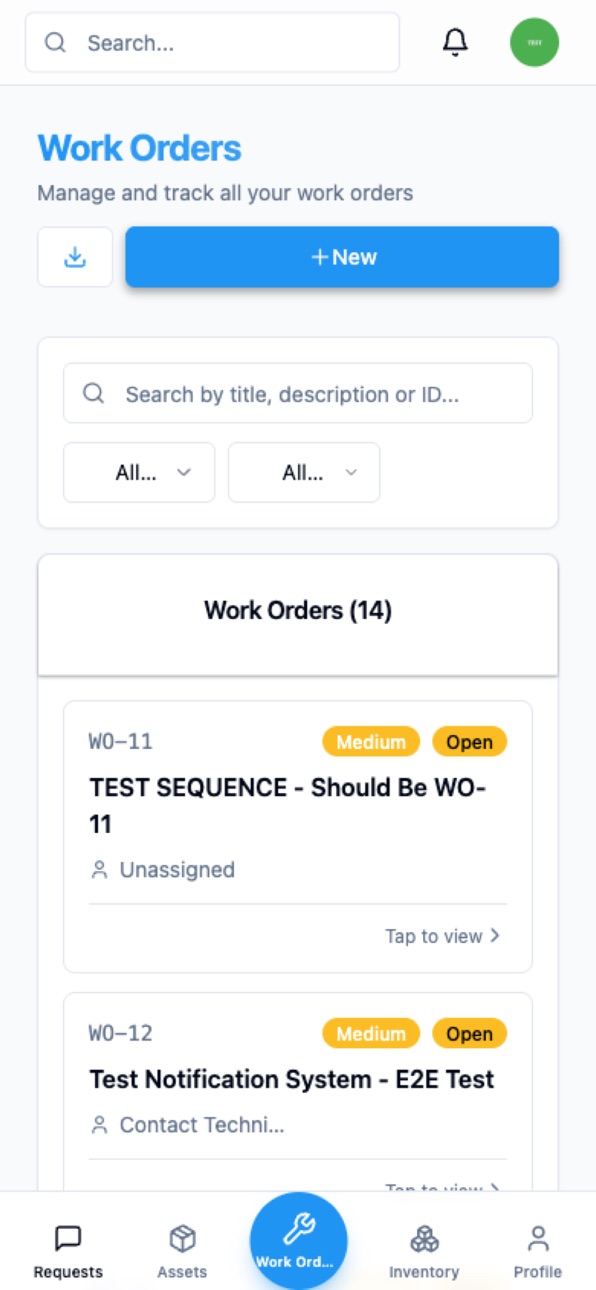


iPad 4 images


What’s New Version 1.0.20
• Fixed a startup issue where the app could freeze on the FreeMaint logo and prevent you from signing in.
• Fixed Google sign-in sometimes stopping on the "Choose an account" screen instead of opening your dashboard.
• Improved sign-in reliability — you now stay signed in across app restarts.
Description
FreeMaint is a complete CMMS (Computerized Maintenance Management System) designed for businesses of all sizes. No user limits, no feature restrictions, no credit card required.
WHY TEAMS CHOOSE FREEMAINT
Most CMMS solutions charge $25-$99 per user per month. FreeMaint delivers the same enterprise-grade features at no cost — forever. No trial period, no surprise upgrades.
POWERFUL FEATURES
Work Order Management
Create, assign, prioritize, and track work orders from anywhere. Set due dates, add photos, attach files, and monitor progress in real time with instant push notifications.
Asset & Equipment Tracking
Register every piece of equipment with detailed profiles. Track maintenance history, monitor condition, and manage assets across multiple locations.
Preventive Maintenance
Schedule recurring maintenance to prevent costly breakdowns. Set time-based or meter-based triggers and automatically generate work orders when maintenance is due.
Inventory & Spare Parts
Track stock levels, set minimum quantities, and manage purchase orders. Know exactly what parts you have and when to reorder.
Multi-Site Locations
Manage operations across unlimited facilities, buildings, and floors. Organize assets and work orders by location.
Team & Vendor Management
Invite unlimited team members with role-based access control. Assign technicians, manage vendors, and track labor time.
Purchase Orders
Create and track purchase orders for parts and services. Manage approvals, receiving, and costs.
Reports & Analytics
Generate reports to identify trends, track KPIs, and make data-driven decisions.
Maintenance Requests
Let anyone submit maintenance requests. Review, approve, and convert them into work orders with a single tap.
BUILT FOR GLOBAL TEAMS
Available in 12 languages: English, French, Spanish, German, Arabic, Chinese, Portuguese, Russian, Italian, Polish, Turkish, and Brazilian Portuguese.
ENTERPRISE-GRADE SECURITY
Role-based access with 6 built-in roles and 71 permissions. Data isolation per company. Sign in with Google, Microsoft, or Apple.
REAL-TIME COLLABORATION
Push notifications and live updates keep your entire team in sync across all devices.
GET STARTED IN MINUTES
1. Download FreeMaint
2. Create your account
3. Add your assets and team
4. Start managing maintenance
Website: https://freemaint.com
Support: https://freemaint.com/support
Accessibility
ipadiphonemacrealityDevicetvoswatch
Version history 17 versions
Build 887832041v1.0.202026-07-05 03:36:42
• Fixed a startup issue where the app could freeze on the FreeMaint logo and prevent you from signing in.
• Fixed Google sign-in sometimes stopping on the "Choose an account" screen instead of opening your dashboard.
• Improved sign-in reliability — you now stay signed in across app restarts.
Build 887808912v1.0.182026-07-04 05:18:56
Push notifications are here on iPhone!
You'll now get notified about your work orders, requests and reminders — even when the app is closed or your phone is locked. Just tap "Allow" when prompted, and manage them anytime in Settings › Notifications › FreeMaint.
Plus reliability improvements under the hood. Thanks for using FreeMaint!
Build 887729646v1.0.172026-07-02 19:42:29
Fixed a bug that could sign you out when you closed and reopened the app — including accounts using "Sign in with Google." You now stay signed in between sessions.
Build 887527530v1.0.162026-06-27 23:42:03
What's new
• Download, open, and share PDFs right from the app — work orders, intervention requests, quotes, inspections, and compliance reports, plus CSV/Excel exports. On mobile these buttons now work, not just on desktop.
• Reports render perfectly in every supported language, including right-to-left (Arabic) and Asian scripts.
• Stability improvements.
Build 886841279v1.0.152026-06-11 19:17:57
• Tapping email, phone or SMS links now opens your mail app or dialer directly.
• Stability improvements and the latest in-app updates.
Build 886306216v1.0.112026-05-30 01:23:21
More reliable photo uploads:
• Photos taken with your phone camera now attach reliably to work orders, assets, inspections and notes.
• iPhone (HEIC) photos now display correctly after upload.
• Large photos are optimized automatically, so they upload faster on slower connections.
Build 885746231v1.0.102026-05-17 18:01:12
mproved Google sign-in: pick your account every time (great for shared devices) and your saved account is now offered automatically. Invitation and password-reset links now open directly in the app. Various fixes.
Build 885434388v1.0.92026-05-09 00:54:27
GPS team clock-in: technicians share their live position with their manager from clock-in to clock-out — Business plan, privacy-safe (auto-deleted after 30 days).
Build 885398269v1.0.82026-05-07 22:57:18
Language fix: the app now uses your phone's language from the first screen and after QR scans. Better display of the invitation screens.
Build 885256215v1.0.72026-05-04 22:03:55
Bug fix: tapping a preventive maintenance notification (bell or email) now opens the PM directly, no more 404 error.
Build 884414737v1.0.62026-04-12 17:03:52
Added support for scanning CODE39, CODE128 and EAN barcode asset tags (not only QR codes). Scanner now accepts codes with spaces, dots, slashes and other CODE39 characters.
Build 884253079v1.0.4 232026-04-08 00:26:00
Improved session stability on iPhone
Fixed an issue where the app would unexpectedly log out after the screen locked or the app was in the background
The app now properly maintains your session when switching between apps
Bug fix: Work Order printing
Fixed double print dialog appearing when printing a Work Order
Build 883965717v1.042026-03-31 18:36:40
Fixed an issue where the mobile app could get stuck on a loading loop after session expiration. The app now correctly redirects to the sign-in page when your session has expired.
Build 883661949v1.0.32026-03-23 20:31:52
Fixed app becoming unresponsive during navigation
Fixed screen freezing on network errors
Added automatic retry on connection issues
Improved error reporting for easier troubleshooting
Build 883504050v1.0.1192026-03-18 20:31:39
Bug fixes and performance improvements. Updated QR code scanner for better compatibility.
Build 882503906v1.0.12026-02-18 20:43:36
Improved app performance and stability. Updated metadata and multilingual support.
Build 881596844v1.02026-01-27 23:55:01
No pricing data captured yet — comparisons appear once the app has paid storefronts or in-app purchases.
Availability 1 of 1 storefronts
| Region | Language | Price | Ratings | Avg | Version |
|---|---|---|---|---|---|
| US | en-US | Free | 0 | — | 1.0.20 |
Change log 21 changes · US
✎
releaseNotes updated
• Fixed a startup issue where the app could freeze on the FreeMaint logo and prevent you from signing in.
• Fixed Google sign-in sometimes stopping on the "Choo
✎
description updated
FreeMaint is a complete CMMS (Computerized Maintenance Management System) designed for businesses of all sizes. No user limits, no feature restrictions, no cred
✎
subtitle updated
Work Order & Asset Management
✎
name updated
FreeMaint - CMMS Software
◆
Version 1.0.20 released
• Fixed a startup issue where the app could freeze on the FreeMaint logo and prevent you from signing in.
• Fixed Google sign-in sometimes stopping on the "Choose an account" screen instead of opening your dashboard.
• Improved sign-in reli
◆
Version 1.0.18 released
Push notifications are here on iPhone!
You'll now get notified about your work orders, requests and reminders — even when the app is closed or your phone is locked. Just tap "Allow" when prompted, and manage them anytime in Settings › Noti
◆
Version 1.0.17 released
Fixed a bug that could sign you out when you closed and reopened the app — including accounts using "Sign in with Google." You now stay signed in between sessions.
◆
Version 1.0.16 released
What's new
• Download, open, and share PDFs right from the app — work orders, intervention requests, quotes, inspections, and compliance reports, plus CSV/Excel exports. On mobile these buttons now work, not just on desktop.
• Reports rende
◆
Version 1.0.15 released
• Tapping email, phone or SMS links now opens your mail app or dialer directly.
• Stability improvements and the latest in-app updates.
◆
Version 1.0.11 released
More reliable photo uploads:
• Photos taken with your phone camera now attach reliably to work orders, assets, inspections and notes.
• iPhone (HEIC) photos now display correctly after upload.
• Large photos are optimized automatically, so
◆
Version 1.0.10 released
mproved Google sign-in: pick your account every time (great for shared devices) and your saved account is now offered automatically. Invitation and password-reset links now open directly in the app. Various fixes.
◆
Version 1.0.9 released
GPS team clock-in: technicians share their live position with their manager from clock-in to clock-out — Business plan, privacy-safe (auto-deleted after 30 days).
◆
Version 1.0.8 released
Language fix: the app now uses your phone's language from the first screen and after QR scans. Better display of the invitation screens.
◆
Version 1.0.7 released
Bug fix: tapping a preventive maintenance notification (bell or email) now opens the PM directly, no more 404 error.
◆
Version 1.0.6 released
Added support for scanning CODE39, CODE128 and EAN barcode asset tags (not only QR codes). Scanner now accepts codes with spaces, dots, slashes and other CODE39 characters.
◆
Version 1.0.4 23 released
Improved session stability on iPhone
Fixed an issue where the app would unexpectedly log out after the screen locked or the app was in the background
The app now properly maintains your session when switching between apps
Bug fix: Work Ord
◆
Version 1.04 released
Fixed an issue where the mobile app could get stuck on a loading loop after session expiration. The app now correctly redirects to the sign-in page when your session has expired.
◆
Version 1.0.3 released
Fixed app becoming unresponsive during navigation
Fixed screen freezing on network errors
Added automatic retry on connection issues
Improved error reporting for easier troubleshooting
◆
Version 1.0.119 released
Bug fixes and performance improvements. Updated QR code scanner for better compatibility.
◆
Version 1.0.1 released
Improved app performance and stability. Updated metadata and multilingual support.
◆
Version 1.0 released