Home › Entertainment

 US
US
1 of 1 storefronts
Content in en-US
Content in en-US
Information
Preview 6 platforms
iPhone 10 images


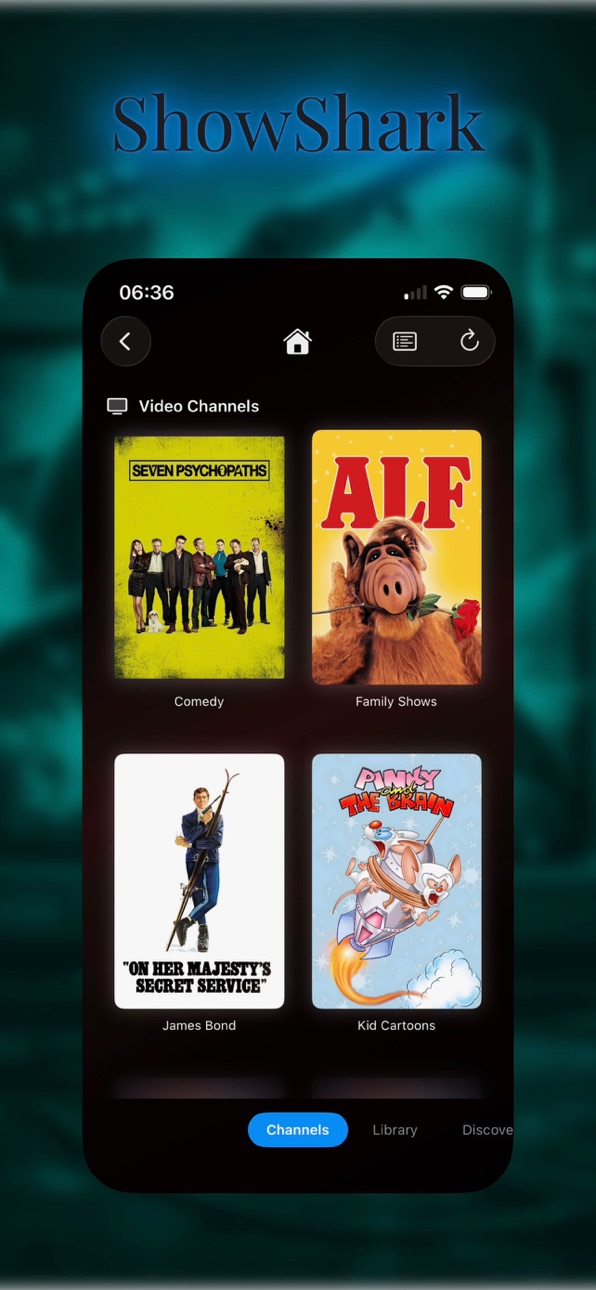


iPad 10 images


Mac 10 images


Apple TV 10 images


Apple Watch 5 images


Apple Vision Pro 10 images


What’s New Version 2026.07.01
- Original playback is the headline feature. Supported single-file media can play in Default or Original mode. Original preserves source video characteristics such as HDR and Dolby Vision when the title, device, and connection allow it. Remux HLS supports Picture in Picture, handles Dolby Digital (AC3) audio more reliably, and explains why each playback option is or is not available.
- ShowShark Web now has HLS playback. Browser playback (which is extremely beta) can use HLS with a compatibility fallback, improving startup, controls, and long-session behavior.
- Profiles can now limit content access. Admins can protect profile switching with a passcode and restrict content by folder, rating, and media type. Restrictions apply across browsing, search, playback, downloads, recommendations, and history.
- Search, Browse, and History are easier to use. File filters can be combined, recent items use clearer date groups, and TV episode history can jump to the episode or its show.
- Live TV, YouTube, updates, and admin screens received focused reliability and polish fixes.
Description
ShowShark brings back the magic of channel surfing—without the cable bill, ads, or anyone spying on what you're watching -- on iPhone, iPad, Apple TV, Mac, Watch and Vision Pro.
Tired of scrolling endlessly through your massive library of movies, TV shows (and even music), paralyzed by choice? ShowShark fixes that by turning your personal collection into old-school TV channels that feel alive and ready to watch right now.
Here's how it works (and why it's awesome):
You install the ShowShark Server app on your Mac—it quietly scans your media folders, pulls in posters, descriptions, genres, and other details from sources like TMDB, then lets you create custom channels. One for high-octane action flicks. One packed with cartoons for the kids. One dedicated to mind-bending sci-fi series. You decide the vibe, and the server builds a 24/7 programming guide that plays content in a curated, continuous flow—like flipping to HBO or Nickelodeon back in the day, but it's 100% your stuff.
Then, on your iPhone, iPad, Apple TV, Mac or Vision Pro, the ShowShark client app connects to your server (over your local network or remotely with simple setup). No cloud middleman, no subscriptions, no data harvesting. Everything stays offline and private on your devices. Browse the channel guide, see what's "currently playing" on each one, and jump in instantly—no more "what should we watch?" debates that kill the mood.
It's the antidote to Netflix-style decision fatigue: glance, pick a channel, and enjoy something already rolling. Pure nostalgia meets modern convenience, all under your control.
Ready to ditch the scroll and start surfing your own channels? Give ShowShark a spin—your media library deserves to feel exciting again.
You can also just watch or listen to any of your media at any time without relying on the Channels feature—you decide. You're in control.
Accessibility
ipadiphonemacrealityDevicetvoswatch
Version history 10 versions
Build 887809718v2026.07.012026-07-04 22:10:35
- Original playback is the headline feature. Supported single-file media can play in Default or Original mode. Original preserves source video characteristics such as HDR and Dolby Vision when the title, device, and connection allow it. Remux HLS supports Picture in Picture, handles Dolby Digital (AC3) audio more reliably, and explains why each playback option is or is not available.
- ShowShark Web now has HLS playback. Browser playback (which is extremely beta) can use HLS with a compatibility fallback, improving startup, controls, and long-session behavior.
- Profiles can now limit content access. Admins can protect profile switching with a passcode and restrict content by folder, rating, and media type. Restrictions apply across browsing, search, playback, downloads, recommendations, and history.
- Search, Browse, and History are easier to use. File filters can be combined, recent items use clearer date groups, and TV episode history can jump to the episode or its show.
- Live TV, YouTube, updates, and admin screens received focused reliability and polish fixes.
Build 886792054v2026.06.202026-06-11 15:43:11
- Offline downloads are much more useful. Stopped downloads can now remain playable as partial downloads, resume from the saved range, show clearer remaining-time estimates, and behave more naturally in the Downloads manager.
- Original file copying is now built for large media files. On Mac, Copy Original File can preserve partial progress, resume interrupted copies, show an ETA, stream data more efficiently, and keep the downloads list synchronized with files on disk.
- Browse is easier to scan and harder to confuse. A new compact Browse layout, article-aware sorting, better server switching, preserved server nicknames, and cleaner iPhone and Apple TV navigation make large libraries feel more predictable.
- Server library work is clearer and better coordinated. Scan startup now shows immediate feedback, maintenance actions avoid running over each other, excluded folders are honored more consistently, and scrub-thumbnail failures can be inspected directly.
- Playback and thumbnail reliability improved. ShowShark is less likely to stall or crash around local playback, high-throughput streams, thumbnail generation, scrub previews, and media pipeline cleanup.
- Several media-related crash fixes.
Build 886324134v2026.06.012026-05-30 20:56:46
- More reliable remote streaming when watching away from home, especially on relayed or slower remote connections.
- New Simple Mode for a cleaner, locations-first browsing experience.
- The Library tab is now Browse, with clearer navigation through folders, media, and server content.
- Improved Apple TV navigation, focus behavior, and back-button handling.
- Search can now find TV episodes directly.
- Recently Added handles TV shows and YouTube content more cleanly.
- History is now grouped by recency, making recent watching easier to scan.
- Server background library work is better scheduled and less intrusive.
- Intro detection and scrub thumbnail caching can now be paused, resumed, or started manually.
- Artwork and scrub thumbnails are prepared more proactively after scans.
- Better handling for DV video files and other playback edge cases.
- ShowShark Server now runs natively on both Intel and Apple Silicon Macs.
Build 885690237v2026.05.182026-05-15 16:06:57
- Files search for raw and providerless media adds a dedicated way to search footage, archives, and other files that do not have movie, TV, or music metadata. ShowShark now scans technical file metadata, exposes facets, shows rich result details, and can reveal or play matching files from the existing library path.
- Professional video playback support is much broader. ProRes, DNxHD/VC-3, MXF workflows, and a long list of intermediate or archive codecs are now recognized and routed through appropriate decoders instead of falling back to the wrong H.264 path.
- Channels can now be built from playlists and YouTube subscriptions. Video and music playlists can drive scheduled channels, and subscribed YouTube content can appear in Library, Search, Recently Added, channel programming, and normal playback flows.
- Admin tools moved into a dedicated Client Admin tab. Admin users now get a focused place for scanning, cleanup, server status, connected devices, and remote access invite generation, while Settings stays focused on profile and client preferences.
- The Library tab is easier to browse at scale. Locations remain available, and the tab now adds paged top-level lists for TV Shows, Movies, and Music so large libraries do not need to start from folder navigation or Search.
- Playback and remote connectivity are more resilient. Scheduled channels reconnect at the current live position, iPhone rotation no longer stops video playback, post-update server startup is more reliable, and remote access failures now produce more specific guidance.
- Server administrators can publish a welcome message that appears once per client per update, with platform-specific presentation on iOS, macOS, tvOS, and visionOS.
ShowShark Server now supports macOS 14, extending the supported Server floor while preserving the newer launch behavior on macOS 15 and later.
Build 884343022v2026.04.272026-04-28 18:51:20
- IPTV (Live TV) is now a first-class Location type alongside Local, S3, and SMB. Add an M3U playlist or Xtream Codes subscription on the Server and live channels mix into the existing Channels tab on every Apple platform, streamed through the same WebSocket pipeline as local files. Now / Next EPG, daily catalog refresh, and shared per-channel decoding for multiple simultaneous viewers all come along.
- TV show intro detection & skipping. The Server fingerprints each episode's opening audio, finds the shared intro across a season, and Clients surface a Skip Intro button at the right moment on iOS, tvOS, macOS, and visionOS. Silently disabled where it would not make sense (trailers, audio-only, channels, short episodes).
- Profiles are now a first-class concept across Client and Server. Play history, playlists, favorites, and watch stats belong to a person who can move between devices, and a new Profiles tab on the Server lets you create, edit, merge, and delete them. The Client lets you switch profiles from the Settings tab or — on tvOS — the tab bar.
- Network shares (SMB) join Local and S3 as a third kind of Location, so you can point the Server at a NAS on your local network and pull media straight from the share without copying it to the Server's disk first.
- Movie trailers now play directly from MovieDetailView. Tap the new clapperboard button on a movie with a known trailer and the server streams the YouTube trailer through the ShowShark video pipeline — same bitrate-adaptive quality, same subtitles-if-you-want-them client-side overlay.
- Redesigned "By Feel" discovery. The recommendation engine now takes three-state votes (tap once for thumbs-up, again for thumbs-down, again to clear), stops penalising cards you never touched, spreads candidates across your library with a randomised-tiebreak selector so the same openers don't keep appearing, and reflows grids per platform (5×1 on Apple TV / iPad landscape / Mac wide / visionOS, 3×2 on iPad portrait, 2×2 on iPhone).
Build 883885822v2026.04.132026-04-08 16:08:40
- A new Watch Party feature lets you schedule, share, and host synchronized playback sessions with friends. Create a party from any playlist, share an invite code, and watch together across devices.
- New tabbed navigation makes it faster to switch between Library, Channels, Search, Discover, and Guide.
- Poster images now appear throughout the app — search results, playlists, channels, history, and more — replacing the old screen caps lists.
- A new Import Issues view helps you find and fix unmatched media in your library, and movie title parsing has been significantly improved for tricky directory names and edition suffixes.
- **Admin library maintenance** moves into Client Settings — kick off scans and cleanups, watch progress, and confirm results without needing access to the Server UI.
- **Music libraries** are now properly scanned, with type-aware audio routing and full orphan cleanup for songs, albums, and artists.
- Multi-file movies now support edition selection (Theatrical, Director's Cut, etc.) directly from the detail view.
- The streaming pipeline has been split into independent decode and encode stages for better reliability, fixing BDMV deadlocks, audio sync issues, and an AAC encoder crash on certain files.
- Remote Access Invites let you onboard devices outside your local network with a simple invite code.
- A redesigned "By Feel" mood-based discovery feature uses multi-select preference rounds and SIMD-accelerated similarity for smarter recommendations.
- On tvOS, the server list has been redesigned with a cinematic hero layout, and grid items now feature a custom green focus glow.
- Dozens of UI refinements and bug fixes round out the release.
Build 883281154v2026.03.232026-03-24 21:55:33
Find the full release notes here: https://acgao.com/showshark-release-notes-v2026-03-23/
What's New in v2026.03.23:
Web Client — Stream your media from any desktop browser. Full video and audio playback with Safari, Chrome, and Firefox support; no app install required. (beta)
Offline Downloads — Download movies, shows, and music for offline playback when you're away from your server.
Playlists & Favorites — Create custom playlists and mark favorites across movies, shows, episodes, albums, artists, and songs. A heart icon throughout the app shows playlist membership at a glance.
Continuous Audio — Background audio continues playing when you leave the music player. A new audio spectrum visualizer adds real-time visual flair with multiple Metal-rendered styles.
YouTube Library — Import locally downloaded YouTube content as browsable shows and episodes with full metadata from yt-dlp sidecar files.
Menu Bar Server — The server now lives in the macOS menu bar instead of the Dock, with a popover showing service status, active streams, and connected clients. Includes launch-at-login and automatic updates via Sparkle.
Remote Connectivity — Per-account tailnet isolation, automatic reconnection on connection drops, and backup export/import for ShowShark Remote.
Expanded Format Support — Deinterlacing for 1080i content, FLV/WMV/ASF container support, H.264 software decoder fallback, and AAC audio output.
Smarter Library Scanning — Location type annotations drive type-aware scanning. Improved episode detection, punctuation-insensitive search, and a Metadata Doctor for manual corrections.
Device Management — Devices identified by marketing name (e.g., "iPhone 16 Pro") with admin roles and per-device icons.
Channels — Per-channel option to allow consecutive episodes from the same show, periodically refreshing thumbnails, and improved filter summaries.
Stability — Fixed multiple crash-causing data races, memory leaks in audio buffers and download sessions, and playback issues including black screens when switching from background audio to video.
Build 883020866v2026.03.092026-03-11 17:58:47
Find the full release notes here: https://acgao.com/showshark-release-notes-v2026-03-09/
What's New in v2026.03.09:
Apple Watch App
- Stream your media library directly on Apple Watch with HLS playback, channel support, watch history, and Digital Crown volume control.
Content Discovery
- Find something to watch with three new discovery modes: "Similar To" for finding titles like ones you love, "By Feel" for filtering by mood and time commitment, and "By Genre" for browsing top-rated titles.
Adaptive Bitrate Streaming
- Video quality now adjusts automatically based on your network conditions. No more manual bitrate or quality settings — playback starts fast and ramps up to the best quality your connection supports.
Synced Play History
- Watch history is now stored on the server and shared across all your devices. Music history is collapsed to one entry per album to keep things tidy.
Library Validation
- Verify that all your media files can be played back correctly with a one-click validation tool in the server library settings.
Server Log Submission
- Easily gather and submit server logs for troubleshooting, with a reference ID for tracking support requests.
Smarter Defaults
- Video codec and output resolution are now chosen automatically based on your device and source media — no technical decisions required.
Improved tvOS Experience
- Redesigned button layout across all views, better focus handling, preserved scroll position on back-navigation, and denser thumbnail grids.
UI Enhancements
- Thumbnail grids replace text lists in library search and genre browsing. New genre pill layout, search history, library stats overview, season selector on show details, and a "Go to Library" button in the player.
Subtitles & Lyrics
- Adjustable subtitle timing delay (±3 seconds). Lyrics now persist across track changes and work reliably during background audio playback.
Bug Fixes
- Fixed a startup delay on iOS, connection hammering during reconnection, stale server connections, visionOS connection failures on Vision Pro hardware, HLS audio corruption with DTS content, lyrics not updating between songs, photo channel display issues, and various navigation/back-button problems across platforms.
Build 882833627v2026.02.262026-03-02 11:15:49
Find the latest release notes here: https://acgao.com/showshark-release-notes-v2026-02-26/
- Blu-ray Disc Playback — Browse and play BDMV Blu-ray disc folders with chapter navigation, MPEG-2/VC-1 codec support, and accurate A/V sync.
- Photo Channels — A new channel type that displays photos from your filesystem or iCloud albums as a synchronized full-screen slideshow, with metadata overlays showing date and location.
- Synced Lyrics — View time-synced lyrics during music playback, with auto-scrolling that follows the current line.
Now Playing & Media Keys — Rich lock screen and Control Center info with artwork, artist, and album. Scrub from the lock screen. macOS media keys work even when ShowShark isn't frontmost.
- Apple Vision Pro — Full support as a first-class platform.
- Playback Improvements — Resume button for saved positions, in-app volume slider, persistent encoder settings, improved audio quality, and faster stream startup.
- Server — Non-blocking thumbnail generation, authentication throttling, faster library scans, and faster reconnection.
- Bug Fixes — Fixed reconnection CPU spikes, stale playback errors, channel guide alignment, program detail layout overflow, and history re-render churn.
Build 881545644v2026.02.162026-02-25 02:27:15
No pricing data captured yet — comparisons appear once the app has paid storefronts or in-app purchases.
Availability 1 of 1 storefronts
| Region | Language | Price | Ratings | Avg | Version |
|---|---|---|---|---|---|
| US | en-US | Free | 4 | 4.5 | 2026.07.01 |
Change log 14 changes · US
✎
releaseNotes updated
- Original playback is the headline feature. Supported single-file media can play in Default or Original mode. Original preserves source video characteristics s
✎
description updated
ShowShark brings back the magic of channel surfing—without the cable bill, ads, or anyone spying on what you're watching -- on iPhone, iPad, Apple TV, Mac, Watc
✎
subtitle updated
Movies, shows, music & more
✎
name updated
ShowShark: Stream Your Media
◆
Version 2026.07.01 released
- Original playback is the headline feature. Supported single-file media can play in Default or Original mode. Original preserves source video characteristics such as HDR and Dolby Vision when the title, device, and connection allow it. Rem
◆
Version 2026.06.20 released
- Offline downloads are much more useful. Stopped downloads can now remain playable as partial downloads, resume from the saved range, show clearer remaining-time estimates, and behave more naturally in the Downloads manager.
- Original fil
◆
Version 2026.06.01 released
- More reliable remote streaming when watching away from home, especially on relayed or slower remote connections.
- New Simple Mode for a cleaner, locations-first browsing experience.
- The Library tab is now Browse, with clearer navigatio
◆
Version 2026.05.18 released
- Files search for raw and providerless media adds a dedicated way to search footage, archives, and other files that do not have movie, TV, or music metadata. ShowShark now scans technical file metadata, exposes facets, shows rich result de
◆
Version 2026.04.27 released
- IPTV (Live TV) is now a first-class Location type alongside Local, S3, and SMB. Add an M3U playlist or Xtream Codes subscription on the Server and live channels mix into the existing Channels tab on every Apple platform, streamed through
◆
Version 2026.04.13 released
- A new Watch Party feature lets you schedule, share, and host synchronized playback sessions with friends. Create a party from any playlist, share an invite code, and watch together across devices.
- New tabbed navigation makes it faster t
◆
Version 2026.03.23 released
Find the full release notes here: https://acgao.com/showshark-release-notes-v2026-03-23/
What's New in v2026.03.23:
Web Client — Stream your media from any desktop browser. Full video and audio playback with Safari, Chrome, and Firefox su
◆
Version 2026.03.09 released
Find the full release notes here: https://acgao.com/showshark-release-notes-v2026-03-09/
What's New in v2026.03.09:
Apple Watch App
- Stream your me
◆
Version 2026.02.26 released
Find the latest release notes here: https://acgao.com/showshark-release-notes-v2026-02-26/
- Blu-ray Disc Playback — Browse and play BDMV Blu-ray disc folders with chapter navigation, MPEG-2/VC-1 codec support, and accurate A/V sync.
- Pho
◆
Version 2026.02.16 released