Home › Finance

 US
US
1 of 1 storefronts
Content in en-US
Content in en-US
Information
Preview 2 platforms
iPhone 7 images




iPad 7 images


What’s New Version 6.7.6
A big design refresh:
• New: Dark Mode. Choose Light, Dark, or Auto in Settings.
• A cleaner, more polished look across every screen, with a redesigned Settings menu and navigation.
• The Savings account is now Cash & CDs, so it clearly covers savings, CDs, money market, and other cash holdings.
• Your Progress now updates the moment you change a balance.
• Clearer charts, a rebuilt year-by-year table, and simpler Monte Carlo controls.
• Dozens of polish and readability improvements throughout.
Description
Know exactly when you can retire, and exactly what you'll have when you do.
NestPlan turns your real accounts, contributions, and goals into one clear projection: your balance at retirement, and at every age for the rest of your life. No vague averages. No "you'll need a million dollars." Your actual number, to the dollar.
SIMPLE OR ADVANCED, YOUR CHOICE
Start in Simple mode with a few questions and get a real answer in seconds, including a realistic tax mix you can adjust (mostly pre-tax, balanced, or Roth-heavy). Ready for more? Switch to Advanced for full, account-by-account detail. Each mode keeps its own plan, so you can move between them without losing a thing.
TODAY'S DOLLARS OR FUTURE DOLLARS
See every number the way that makes sense to you. View your projection in today's dollars to understand its real buying power, or in future dollars to see the actual balance, with one tap, from any screen.
YOUR PROGRESS
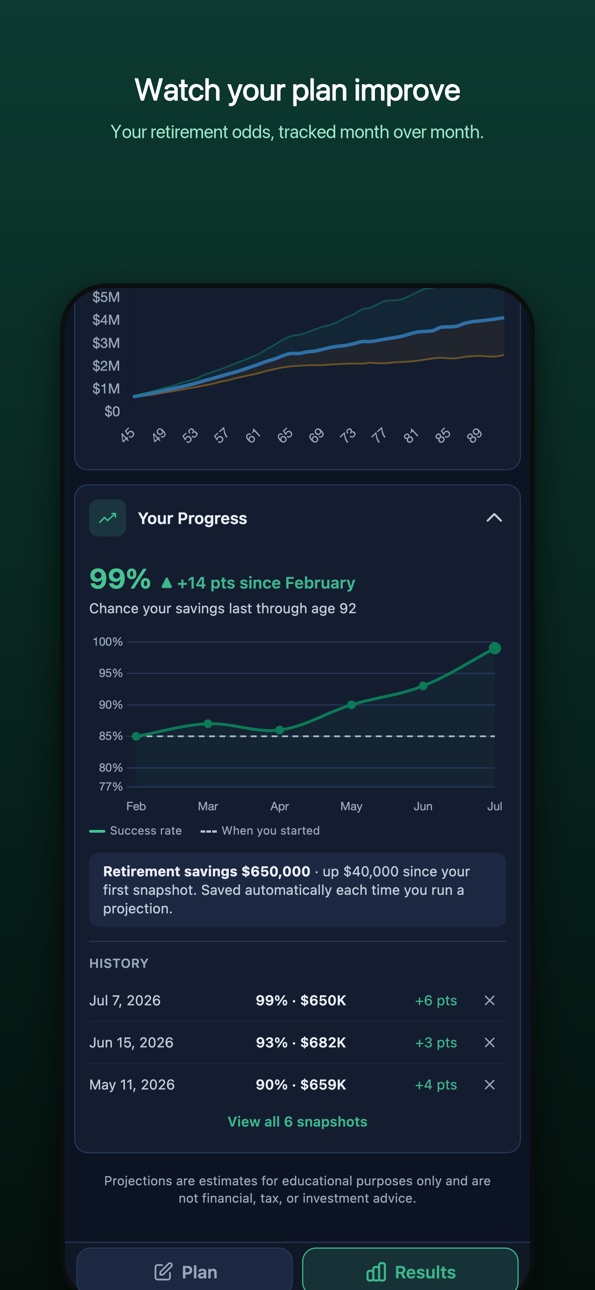
NestPlan saves a snapshot every time you run a projection or update your balances, so you can watch your retirement odds and savings move month over month. Your starting line, your trend, and an honest read when markets dip. Your history is yours: review it, prune it, and back it up.
WHY NESTPLAN
Most calculators give you a single guess. NestPlan gives you the full picture, the way an advisor would:
• Your balance at retirement, and every year through the end of your plan
• The earliest age you can realistically retire, and what you'll have when you get there
• Three market scenarios side by side (expected, better, and worse) so you know how durable your plan really is
• Every account in one place: 401(k), Roth, IRA, Brokerage, HSA, and Cash & CDs
• Balances by account type over time: watch each account grow year by year
• Your Progress: snapshots of your success rate and savings over time
• Social Security built in, at the age you actually plan to claim
• Real annual taxes, RMDs, and a sensible withdrawal order modeled for you
• Light or Dark mode, and a clean, institutional design
BUILT AROUND YOUR NUMBERS
You enter your real balances, your real contributions, your real target date. NestPlan runs the real math. No sign-up, no guesswork.
NESTPLAN PRO, 14-DAY FREE TRIAL
• Monte Carlo: 1,000 market simulations distilled into one clear read on whether your money lasts, and your first stress-test runs automatically
• Your Progress: your plan's history, tracked over time
• Save up to 10 scenarios and compare retiring at 60 vs 65 vs 70 in seconds
• Spouse and joint planning
• PDF reports to share with your advisor
• Back up and restore your plan, progress history included
Cancel anytime before the trial ends and you won't be charged.
PRIVATE BY DESIGN
No account. No ads. No tracking. Your financial data never leaves your iPhone.
Download NestPlan and see your number today.
SUBSCRIPTION DETAILS
NestPlan Pro is an auto-renewable subscription.
• NestPlan Pro: $29.99 per year, after a 14-day free trial
• Payment is charged to your Apple Account at confirmation of purchase
• Your subscription renews automatically unless canceled at least 24 hours before the end of the current period
• Manage or cancel anytime in your Apple Account settings
Terms of Use (EULA): https://www.apple.com/legal/internet-services/itunes/dev/stdeula/
Privacy Policy: https://topshopnation.com/nestplan/privacy.html
In-App Purchases US pricing
Nest Plan Pro Subscription
NestPlan Pro Monthly · Monthly 14-day free trial$3.99
NestPlan Pro · Yearly 14-day free trial$29.99
Capabilities
In-App Purchases
Accessibility
ipadiphonemacrealityDevicetvoswatch
Version history 15 versions
Build 887960245v6.7.62026-07-08 05:46:47
A big design refresh:
• New: Dark Mode. Choose Light, Dark, or Auto in Settings.
• A cleaner, more polished look across every screen, with a redesigned Settings menu and navigation.
• The Savings account is now Cash & CDs, so it clearly covers savings, CDs, money market, and other cash holdings.
• Your Progress now updates the moment you change a balance.
• Clearer charts, a rebuilt year-by-year table, and simpler Monte Carlo controls.
• Dozens of polish and readability improvements throughout.
Build 887876958v6.7.52026-07-06 21:11:50
A big design refresh:
• New: Dark Mode. Choose Light, Dark, or Auto in Settings.
• A cleaner, more polished look across every screen, with a redesigned Settings menu and navigation.
• The Savings account is now Cash & CDs, so it clearly covers savings, CDs, money market, and other cash holdings.
• Your Progress now updates the moment you change a balance.
• Clearer charts, a rebuilt year-by-year table, and simpler Monte Carlo controls.
• Dozens of polish and readability improvements throughout.
Build 887840878v6.7.42026-07-05 03:38:06
Your plan, now tracked over time:
• New: Your Progress. NestPlan saves a snapshot each time you run a projection, so you can watch your retirement odds and savings move month over month. Review your history and remove any entry.
• Your first market stress-test now runs automatically when you open Results.
• Simple mode: choose how your savings are split for taxes (mostly pre-tax, balanced, or Roth-heavy), and see why Advanced can show different results.
• A prominent Simple/Advanced switch and Today's/Future dollars toggle, visible on both tabs.
• Social Security age is now a simple dropdown (62 to 70).
• State tax is now a percentage you set yourself (default 0).
• Improved Monte Carlo accuracy and clearer volatility guidance.
• Now with a 14-day free trial. Polish and fixes throughout.
Build 887114709v6.7.22026-06-18 15:12:54
The biggest NestPlan update yet:
• New Simple and Advanced modes. Start simple, switch to full detail anytime, and each keeps its own plan.
• See every amount in today's dollars or future dollars, with one tap.
• A cleaner, more institutional redesign throughout.
• Simple mode now assumes a realistic tax mix across pre-tax, Roth, and taxable, and grows your savings with inflation.
• Redesigned Monte Carlo: a clear success rate plus a typical-range outlook.
• The earliest age you can retire is now front and center.
• Results open automatically, with polish and fixes throughout.
Build 887049311v6.7.12026-06-16 22:06:40
The biggest NestPlan update yet:
• New Simple and Advanced modes. Start simple, switch to full detail anytime, and each keeps its own plan.
• See every amount in today's dollars or future dollars, with one tap.
• A cleaner, more institutional redesign throughout.
• Simple mode now assumes a realistic tax mix across pre-tax, Roth, and taxable, and grows your savings with inflation.
• Redesigned Monte Carlo: a clear success rate plus a typical-range outlook.
• The earliest age you can retire is now front and center.
• Results open automatically, with polish and fixes throughout.
Build 886643537v6.62026-06-07 19:03:20
A cleaner, more refined NestPlan:
• Refreshed, easier-to-read charts and colors throughout
• Tap the ⓘ on any field for a plain-English explanation
• Drag across either chart to read your balance at any age
• Sensitivity view now shows your actual return rates
• Combined income summary across you, your spouse, and other sources
• Now supports people who are already retired • Polish and fixes, including the account Clear button
Build 886453895v6.42026-06-03 16:33:56
New and Beautifully Redesigned Layout!
• Streamlined two-tab layout: Plan & Analysis
• New menu for scenarios (save, rename, delete, export)
• Tighter spacing and cleaner UI throughout
• JSON export saves with proper NestPlan filename
• Added "Other Income" for pensions or other income during retirement.
• Bug Fixes
Build 886496472v6.52026-06-03 21:47:36
New and Beautifully Redesigned Layout!
• Streamlined two-tab layout: Plan & Analysis
• New menu for scenarios (save, rename, delete, export)
• Tighter spacing and cleaner UI throughout
• JSON export saves with proper NestPlan filename
• Added "Other Income" for pensions or other income during retirement.
• Bug Fixes
Build 885783896v6.32026-05-18 16:03:01
New and Beautifully Redesigned Layout!
• Streamlined 3-tab layout: Plan, Summary, Analysis
• Scenario management moved to Plan tab for faster workflow
• New dropdown + overflow menu for scenarios (save, rename, delete, export)
• Tighter spacing and cleaner UI throughout
• JSON export saves with proper NestPlan filename
• Added "Other Income" for pensions or other income during retirement.
• Bug Fixes
Build 885195562v6.22026-05-05 00:30:57
New and Beautifully Redesigned Layout!
• Streamlined 3-tab layout: Plan, Summary, Analysis
• Scenario management moved to Plan tab for faster workflow
• New dropdown + overflow menu for scenarios (save, rename, delete, export)
• Tighter spacing and cleaner UI throughout
• JSON export saves with proper NestPlan filename
• Bug Fixes
Build 885263253v6.2.12026-05-05 16:19:02
New and Beautifully Redesigned Layout!
• Streamlined 3-tab layout: Plan, Summary, Analysis
• Scenario management moved to Plan tab for faster workflow
• New dropdown + overflow menu for scenarios (save, rename, delete, export)
• Tighter spacing and cleaner UI throughout
• JSON export saves with proper NestPlan filename
• Bug Fixes for Paid Subscriptions
Build 883279748v6.02026-03-12 16:46:22
NestPlan 6.0 — Redesigned Navigation!
• Streamlined 3-tab layout: Plan, Summary, Analysis
• Scenario management moved to Plan tab for faster workflow
• New dropdown + overflow menu for scenarios (save, rename, delete, export)
• Tighter spacing and cleaner UI throughout
• Final Balance now a Pro feature with blur for free users
• JSON export saves with proper NestPlan filename
• Simplified footer with just Privacy, Terms, Support links
Build 883241224v5.62026-03-11 20:18:06
- 7-day free trial: New users get full Pro access for 7 days
- Trial reminders appear as your trial nears its end
- Updated subscription screen with clearer pricing
Build 883138496v5.52026-03-08 18:35:39
Fixed chart display when collapsing and expanding sections.
Updated default values for new users.
Improved free and Pro feature tiers.
Build 881475667v5.42026-02-18 09:36:33
Price history by region
Currency
Show
Columns
Search
Availability 1 of 1 storefronts
| Region | Language | Price | Ratings | Avg | Version |
|---|---|---|---|---|---|
| US | en-US | Free | 4 | 5.0 | 6.7.6 |
Change log 19 changes · US
✎
releaseNotes updated
A big design refresh:
• New: Dark Mode. Choose Light, Dark, or Auto in Settings.
• A cleaner, more polished look across every screen, with a redesigned Settings
✎
description updated
Know exactly when you can retire, and exactly what you'll have when you do.
NestPlan turns your real accounts, contributions, and goals into one clear projecti
✎
subtitle updated
Your number, to the dollar
✎
name updated
NestPlan Retirement Planner
◆
Version 6.7.6 released
A big design refresh:
• New: Dark Mode. Choose Light, Dark, or Auto in Settings.
• A cleaner, more polished look across every screen, with a redesigned Settings menu and navigation.
• The Savings account is now Cash & CDs, so it clearly cov
◆
Version 6.7.5 released
A big design refresh:
• New: Dark Mode. Choose Light, Dark, or Auto in Settings.
• A cleaner, more polished look across every screen, with a redesigned Settings menu and navigation.
• The Savings account is now Cash & CDs, so it clearly cov
◆
Version 6.7.4 released
Your plan, now tracked over time:
• New: Your Progress. NestPlan saves a snapshot each time you run a projection, so you can watch your retirement odds and savings move month over month. Review your history and remove any entry.
• Your firs
◆
Version 6.7.2 released
The biggest NestPlan update yet:
• New Simple and Advanced modes. Start simple, switch to full detail anytime, and each keeps its own plan.
• See every amount in today's dollars or future dollars, with one tap.
• A cleaner, more institution
◆
Version 6.7.1 released
The biggest NestPlan update yet:
• New Simple and Advanced modes. Start simple, switch to full detail anytime, and each keeps its own plan.
• See every amount in today's dollars or future dollars, with one tap.
• A cleaner, more institution
◆
Version 6.6 released
A cleaner, more refined NestPlan:
• Refreshed, easier-to-read charts and colors throughout
• Tap the ⓘ on any field for a plain-English explanation
• Drag across either chart to read your balance at any age
• Sensitivity view now shows yo
◆
Version 6.5 released
New and Beautifully Redesigned Layout!
• Streamlined two-tab layout: Plan & Analysis
• New menu for scenarios (save, rename, delete, export)
• Tighter spacing and cleaner UI throughout
• JSON export saves with proper NestPlan filena
◆
Version 6.4 released
New and Beautifully Redesigned Layout!
• Streamlined two-tab layout: Plan & Analysis
• New menu for scenarios (save, rename, delete, export)
• Tighter spacing and cleaner UI throughout
• JSON export saves with proper NestPlan filena
◆
Version 6.3 released
New and Beautifully Redesigned Layout!
• Streamlined 3-tab layout: Plan, Summary, Analysis
• Scenario management moved to Plan tab for faster workflow
• New dropdown + overflow menu for scenarios (save, rename, delete, export)
• Tig
◆
Version 6.2.1 released
New and Beautifully Redesigned Layout!
• Streamlined 3-tab layout: Plan, Summary, Analysis
• Scenario management moved to Plan tab for faster workflow
• New dropdown + overflow menu for scenarios (save, rename, delete, export)
• Tig
◆
Version 6.2 released
New and Beautifully Redesigned Layout!
• Streamlined 3-tab layout: Plan, Summary, Analysis
• Scenario management moved to Plan tab for faster workflow
• New dropdown + overflow menu for scenarios (save, rename, delete, export)
• Tig
◆
Version 6.0 released
NestPlan 6.0 — Redesigned Navigation!
• Streamlined 3-tab layout: Plan, Summary, Analysis
• Scenario management moved to Plan tab for faster workflow
• New dropdown + overflow menu for scenarios (save, rename, delete, export)
• Tig
◆
Version 5.6 released
- 7-day free trial: New users get full Pro access for 7 days
- Trial reminders appear as your trial nears its end
- Updated subscription screen with clearer pricing
◆
Version 5.5 released
Fixed chart display when collapsing and expanding sections.
Updated default values for new users.
Improved free and Pro feature tiers.
◆
Version 5.4 released