Home › Education

 US
US
 DEde-DE
 AEen-GB
 AGen-GB
 ALen-GB
 AMen-GB
 AOen-GB
 ARes-MX
 ATde-DE
 AUen-AU
 AZen-GB
 BAen-GB
 BBen-GB
 BEen-GB
 BFen-GB
 BGen-GB
 BHen-GB
 BJen-GB
 BOes-MX
 BRpt-BR
 BSen-GB
 BWen-GB
 BYen-GB
 BZen-GB
 CAen-CA
 CDen-GB
 CGen-GB
 CHde-CH
 CIfr-FR
 CLes-MX
 CMfr-FR
 COes-MX
 CRes-MX
 CVen-GB
 CYen-GB
 CZen-GB
 DKen-GB
 DOes-MX
 DZen-GB
 ECes-MX
 EEen-GB
 EGen-GB
 ESes-ES
 FIen-GB
 FRfr-FR
 GAfr-FR
 GBen-GB
 GHen-GB
 GMen-GB
 GRen-GB
 GTes-MX
 GWen-GB
 GYen-GB
 HNes-MX
 HRen-GB
 HUen-GB
 IEen-GB
 ILen-GB
 IQen-GB
 ISen-GB
 ITit
ITit JMen-GB
 JOen-GB
 KEen-GB
 KWen-GB
 LBen-GB
 LRen-GB
 LTen-GB
 LUen-GB
 LVen-GB
 LYen-GB
 MAen-GB
 MDen-GB
 MEen-GB
 MGen-GB
 MKen-GB
 MLen-GB
 MTen-GB
 MUen-GB
 MWen-GB
 MXes-MX
 MZen-GB
 NAen-GB
 NEen-GB
 NGen-GB
 NIes-MX
 NLnl
NLnl NOen-GB
 NZen-AU
 OMen-GB
 PAes-MX
 PEes-MX
 PLen-GB
 PTpt-PT
 PYes-MX
 QAen-GB
 ROen-GB
 RSen-GB
 RUru
RUru RWen-GB
 SAen-GB
 SCen-GB
 SEsv
SEsv SIen-GB
 SKen-GB
 SLen-GB
 SNen-GB
 SRen-GB
 STen-GB
 SVes-MX
 SZen-GB
 TDen-GB
 TNen-GB
 TRen-GB
 TTen-GB
 TZen-GB
 UAen-GB
 UGen-GBUSen-US
 UYen-GB
 VEes-MX
 XKen-GB
 YEen-GB
 ZMen-GB
 ZWen-GB
124 of 124 storefronts
Content in en-US
Content in en-US
Information
Preview 2 platforms
iPhone 10 images




iPad 2 images

What’s New Version 2.0
NEW: Listen Mode — study hands-free
Turn any deck into a podcast and learn with your ears:
• Plays your whole deck aloud — question, answer, card after card
• True background audio with lock-screen and Control Center controls — keep listening with the screen off
• Set the pauses (question-to-answer recall time, and between cards) and the reading speed — adjust them live, mid-session
• Each side read in its own language with a natural on-device voice — great for language learners
Perfect for commuting, walking, working out, or resting your eyes.
Plus playback polish and bug fixes for a smoother experience.
Description
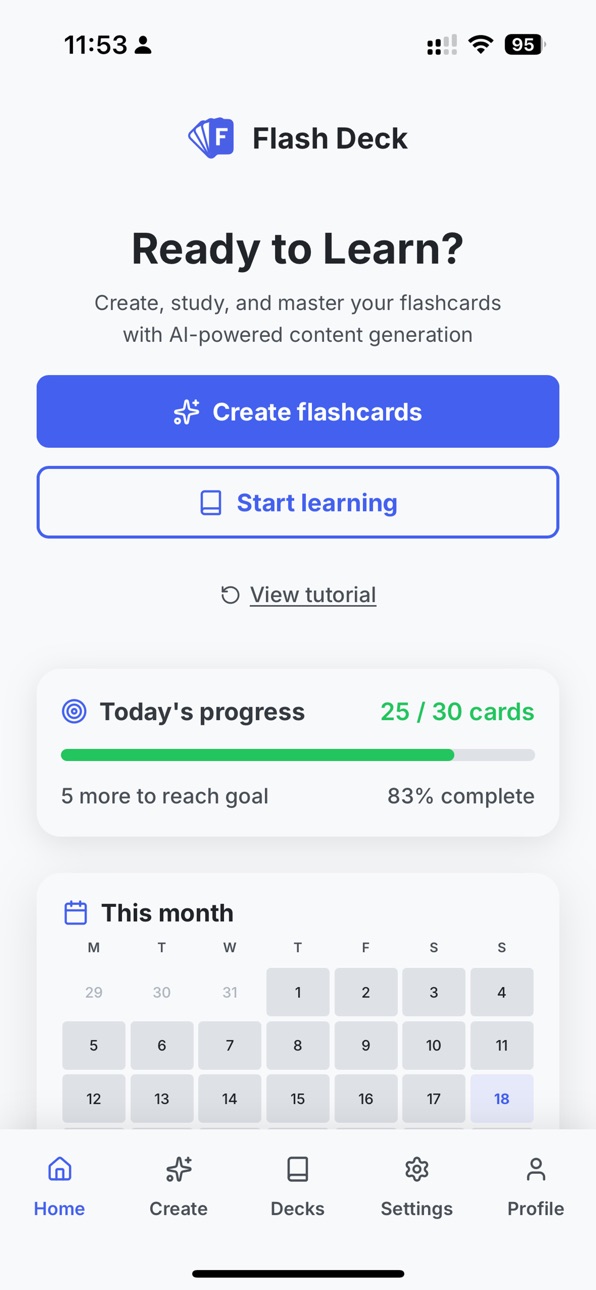
Master anything faster with Flash Deck, the AI-powered flashcard app that transforms how you learn. Instead of spending hours manually creating flashcards, our AI creates them for you in seconds.
KEY FEATURES
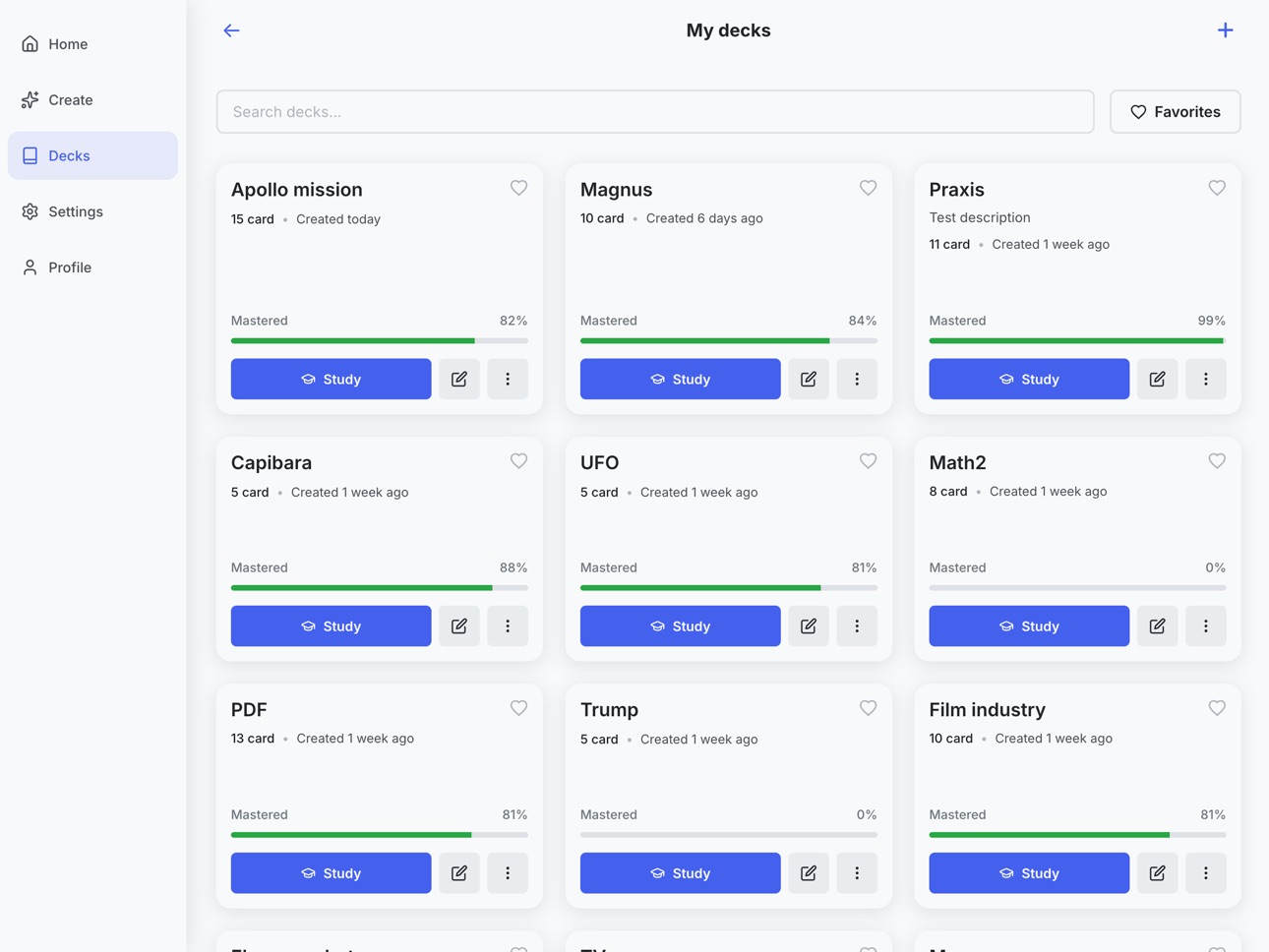
AI-Powered Flashcard Generation
Generate hundreds of flashcards instantly from any source:
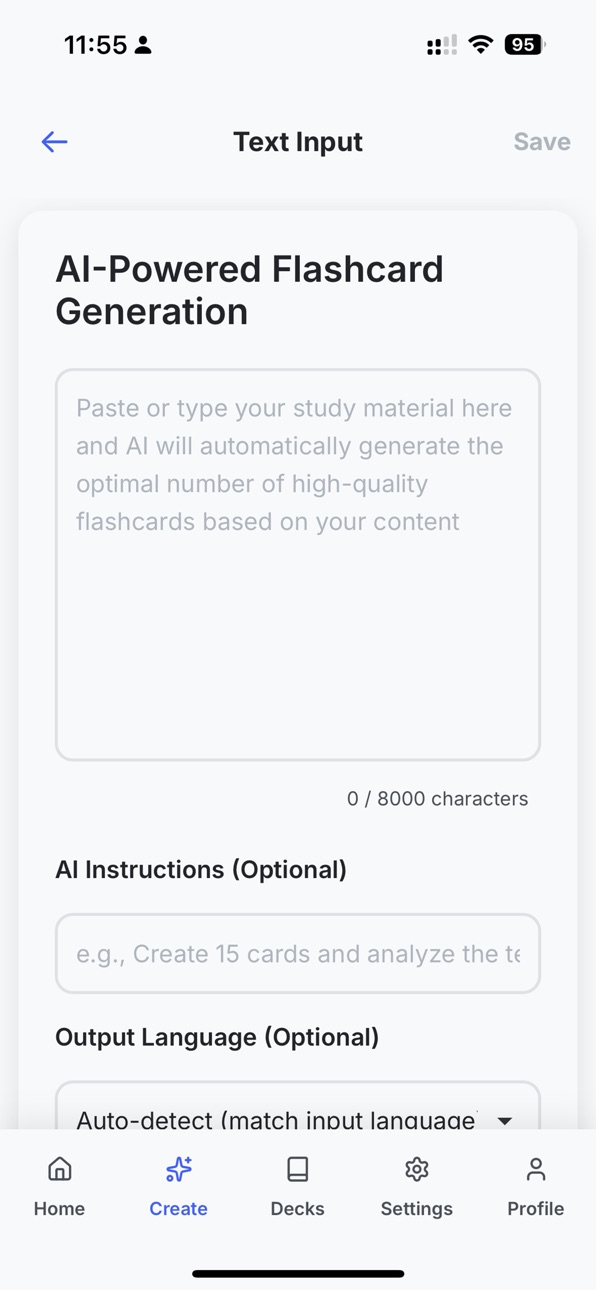
• Text Input: Paste or type any text, and AI creates question-answer pairs
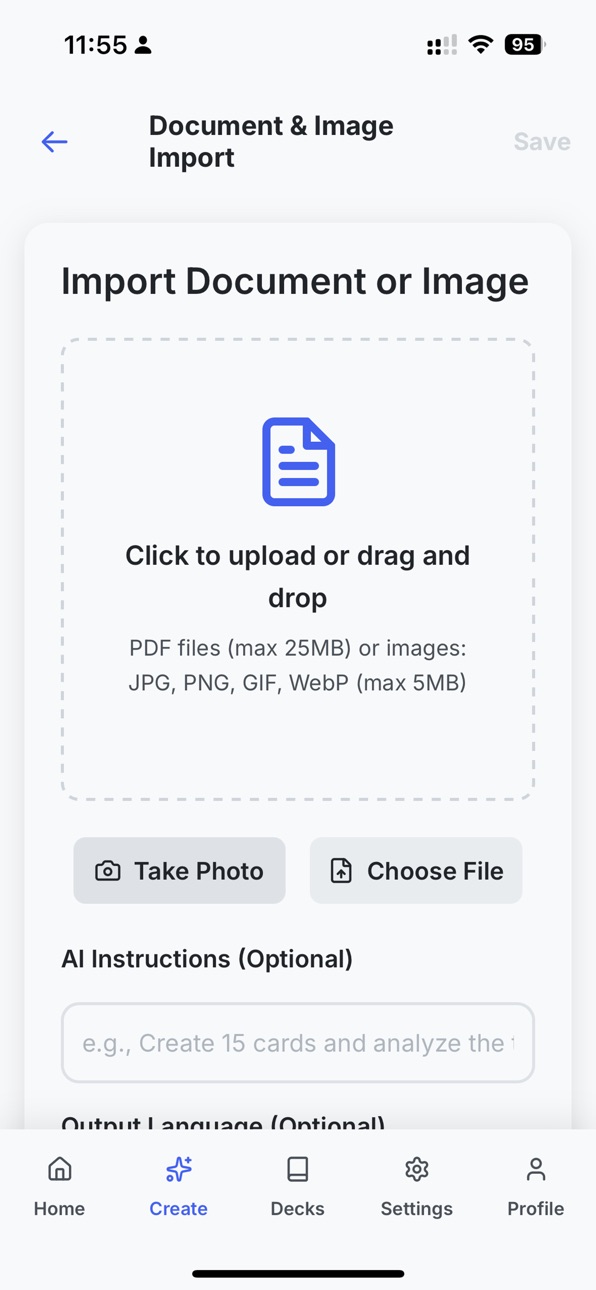
• Image Scanning: Take photos or upload images – AI extracts text and generates flashcards
• PDF Documents: Upload PDFs up to 25MB, and AI turns content into flashcards
• AI Instructions: Describe what you want to learn, and AI generates tailored flashcards
Smart Spaced Repetition
• Our algorithm adapts to your learning pace:
• Swipe-based study mode (like Tinder/Duolingo)
• Cards you know appear less often; difficult cards appear more often
• Review intervals adjust based on your performance
Test Mode
• Quiz yourself with multiple-choice questions:
• Radio-style options with instant feedback
• Clear correct/incorrect indicators
• Review missed cards with your answers vs. correct answers
Listen Mode – Study Hands-Free
Turn any deck into a podcast and learn with your ears:
• Plays your entire deck aloud automatically – question, answer, card after card
• True background audio – keep listening with the screen off or while using other apps
• Full lock-screen and Control Center controls – play, pause, and skip like a music app
• Set the pause between question and answer (time to recall) and the pause between cards
• Adjust the reading speed – and change the pace or pauses live, mid-session
• Each side read in its own language with a natural on-device voice – ideal for language learners
Perfect for commuting, walking, working out, or giving your eyes a rest.
Progress Tracking & Statistics
Monitor your learning
• Track study sessions, cards mastered, and streaks
• Set daily goals and reminders
• View analytics and insights
• Celebrate milestones
Flexible Import & Export
Bring in and save your materials:
• CSV/JSON Import: Import from spreadsheets
• PDF Import: AI generates flashcards from documents
• Manual Creation: Create cards one-by-one or in bulk
• Export & Save: Download decks as CSV or JSON via the Share sheet and save to Files
Study Anywhere, Anytime
• Works offline – study without internet; mark which decks you want available offline
• Syncs when you're back online
• Session recovery: If your session expires before saving, download your cards as CSV or JSON so you never lose them
• Optimized for iPhone and iPad
• Simple, modern interface
Share & Collaborate
• Share decks with classmates via links – recipients can study without creating an account
• Study public decks
• Import shared decks into your collection
• Great for group study
Enhanced Learning Features
• Tap to hear any card read aloud
• Hands-free Listen Mode for your whole deck (see above)
• Multilingual support – AI detects language
• Tap to flip cards
FREE TIER INCLUDES
• 5 AI generations per month (text, images, documents)
• Up to 100 manually created flashcards
• Full access to study mode and spaced repetition
• Basic statistics and progress tracking
PERFECT FOR
Students preparing for exams
Professionals learning new skills
Language learners
Anyone who wants to memorize information effectively
WHY FLASH DECK?
Flash Deck uses AI to create flashcards in seconds instead of hours. Our spaced repetition algorithm is designed to improve memory retention, and now Listen Mode lets you study hands-free anywhere – making learning efficient, flexible, and enjoyable.
Start learning smarter today – download Flash Deck and experience the future of flashcard learning.
---
Questions? Visit flashdeck.net or contact support@flashdeck.net
---
Privacy Policy: https://flashdeck.net/privacy
Terms of Use: https://flashdeck.net/terms
In-App Purchases US pricing
Flash Deck Pro Subscription
Yearly · Yearly$19.99
Monthly · Monthly$3.99
Capabilities
In-App Purchases
Accessibility
ipadiphonemacrealityDevicetvoswatch
Version history 11 versions
Build 886945555v2.02026-06-14 22:06:06
NEW: Listen Mode — study hands-free
Turn any deck into a podcast and learn with your ears:
• Plays your whole deck aloud — question, answer, card after card
• True background audio with lock-screen and Control Center controls — keep listening with the screen off
• Set the pauses (question-to-answer recall time, and between cards) and the reading speed — adjust them live, mid-session
• Each side read in its own language with a natural on-device voice — great for language learners
Perfect for commuting, walking, working out, or resting your eyes.
Plus playback polish and bug fixes for a smoother experience.
Build 886897481v1.92026-06-12 21:10:13
A few UI and Security related fixes and improvements
Build 884834420v1.82026-04-23 17:03:38
A few UI and Security related fixes and improvements
Build 884435538v1.72026-04-13 17:04:26
Fixes that improved native sharing, added public-deck app/universal links with hosting and native config updates plus a few small i18n and theme tweaks
Build 884415417v1.62026-04-12 17:05:15
- Smarter Pro usage and subscription handling
- AI generation for existing decks
- Mobile UI polish: deck toolbar, login above keyboard, dark mode & status bar
- Better deep links, sharing, and toasts
- Reliability updates under the hood
Build 883106810v1.52026-03-06 23:16:56
General maintenance update: including UI enhancements and minor bug fixes for improved reliability.
Build 883035907v1.42026-03-05 17:33:37
Subscription pricing made clearer: Savings percentage and per‑month equivalent are now calculated from the actual subscription prices instead of fixed values. When you select the yearly plan, you’ll see the correct savings % and the real monthly equivalent.
Build 882959570v1.32026-03-03 16:59:16
What's New in the Version 1.3
Session & offline
• Session expired fix – Fixed a bug where generated cards were lost when the session expired before saving. The flow is now:
• Session is checked before generation and before save.
• If the session is expired or about to expire, it is refreshed when possible.
• If a save fails due to session expiry or being offline, a recovery modal appears.
• You can download your cards as CSV or JSON so they are not lost.
• You can log in again and import the file later.
File downloads
• File downloads – Downloads now use the native Share sheet instead of failing silently. Users can choose “Save to Files” to store exports.
• CSVImport template download – Uses the same export flow for compatibility.
Import previews
• Import card previews – HTML tags are stripped from previews in Document, PDF, and CSV import.
Test mode
• Scroll to top – Content scrolls to top when moving to the next card.
• Bottom bar – Reduced height while keeping the Next button centered.
• Loading state – “Loading…” text centered in the middle of the screen.
• Radio-style circles – Grey circles added to options (right side); turn green/red for correct/wrong.
• Layout jump fix – Reserved space for check/X icons so options don’t jump when feedback appears.
• Option text margin – Removed default margin on elements in option text.
• Bottom fade – Restored fade effect for truncated option text.
• Hover – Disabled blue stroke hover on option buttons.
• Max-width – Card width increased from 480px to 760px.
• Truncation limit – Option truncation increased from 100 to 120 characters.
Test results screen
• Labels – “Your answer:” and “Correct answer:” are bold.
• Card styling – Missed cards use white background and grey border (aligned with test mode).
• Bottom spacing – Content extends to the bottom edge with correct safe-area padding.
Bottom sheet
• Scroll lock – Background content no longer scrolls when the Create bottom sheet is open.
Build 882916498v1.22026-03-01 22:34:58
TestMode: expandable options with formatting, animations, and UX improvements
- Center test cards vertically on larger screens; scrollable on small viewports (iPhone SE)
- Add expand/collapse for truncated options (>100 chars) with Show more/Show less link
- Larger tap target (44px) and edge-to-edge separator for Show more link
- Preserve HTML formatting (bold, italic, br) and decode entities (nbsp)
- Smooth expand/collapse animation with bottom fade for expandable items
- Add chevron icon. Allow expand/collapse after answer given
- Add showMore translation (en/de)
Fix: show visible checkmark in Manage deck card selection checkboxes
Add custom checkbox styling to CardCheckbox since global appearance:none
hides native checkboxes. Draw checkmark via ::after pseudo-element when
checked, with dark mode and hover support.
Build 882880459v1.12026-02-28 22:13:59
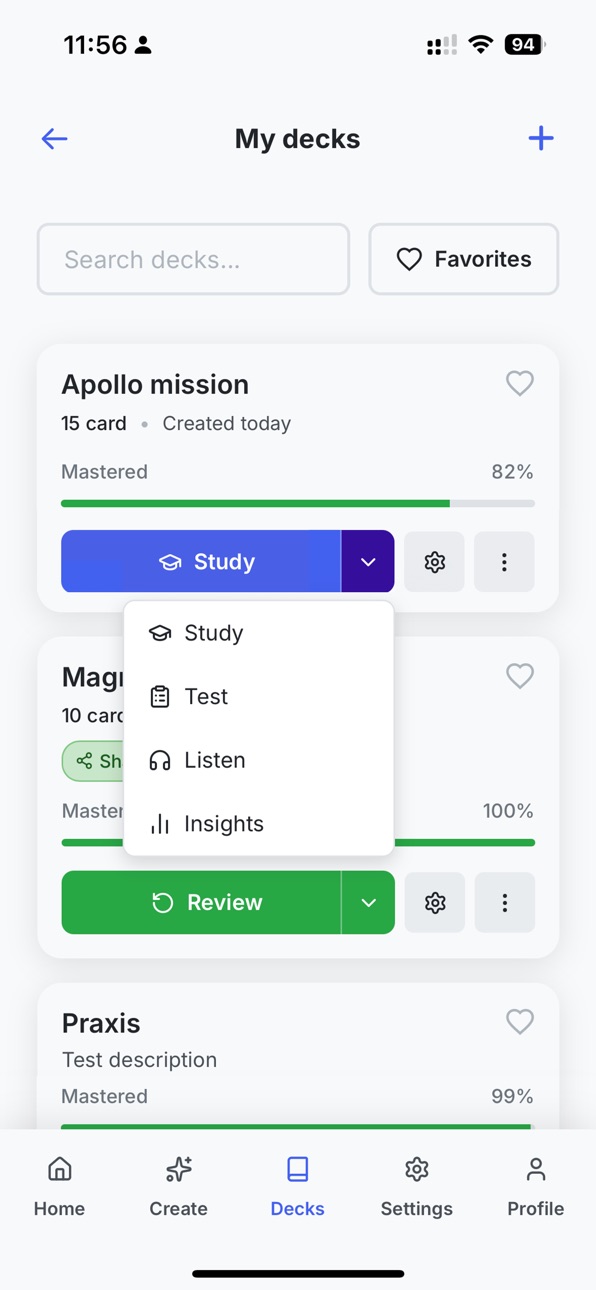
Deck actions- Each deck now has three actions: Study, Test, and Insights (not only Study). Insights shows progress and wrong answers; back button returns to “My decks” when you opened it from the list, or to the deck when you opened it from the deck.Study & cards- For long content that doesn’t fit the card: an overall scroller was added and a bottom fade to the edge so you can scroll the full question or answer; layout and scroll work correctly on iPhone. Short content stays centered.- Test mode: completion screen width adjusted; header and footer stay fixed while you scroll.
Navigation & lists- My decks: “Created …” dates are fully translated and show in days or months.- Referrals: "My referrals" was added so you can invite others and see their status; on small screens long emails now truncate and no longer overlap the label.
General fixes- Bottom navigation and sheets respect safe area with a cleaner look.- Password reset: reset links from email open in the app and complete reliably.
- Create menu: choosing any option (manual entry, AI, document, CSV, etc.) now scrolls the new screen to the top.- Create and Share bottom sheets use less space at the bottom on iPhone.
Build 881376015v1.02026-02-11 08:22:08
Price history by region
Currency
Show
Columns
Search
Availability 124 of 124 storefronts
| Region | Language | Price | Ratings | Avg | Version |
|---|---|---|---|---|---|
| DE | de-DE | Free | 1 | 5.0 | 2.0 |
| AE | en-GB | Free | 0 | — | 2.0 |
| AG | en-GB | Free | 0 | — | 2.0 |
| AL | en-GB | Free | 0 | — | 2.0 |
| AM | en-GB | Free | 0 | — | 2.0 |
| AO | en-GB | Free | 0 | — | 2.0 |
| AR | es-MX | Free | 0 | — | 2.0 |
| AT | de-DE | Free | 0 | — | 2.0 |
| AU | en-AU | Free | 0 | — | 2.0 |
| AZ | en-GB | Free | 0 | — | 2.0 |
| BA | en-GB | Free | 0 | — | 2.0 |
| BB | en-GB | Free | 0 | — | 2.0 |
| BE | en-GB | Free | 0 | — | 2.0 |
| BF | en-GB | Free | 0 | — | 2.0 |
| BG | en-GB | Free | 0 | — | 2.0 |
| BH | en-GB | Free | 0 | — | 2.0 |
| BJ | en-GB | Free | 0 | — | 2.0 |
| BO | es-MX | Free | 0 | — | 2.0 |
| BR | pt-BR | Free | 0 | — | 2.0 |
| BS | en-GB | Free | 0 | — | 2.0 |
| BW | en-GB | Free | 0 | — | 2.0 |
| BY | en-GB | Free | 0 | — | 2.0 |
| BZ | en-GB | Free | 0 | — | 2.0 |
| CA | en-CA | Free | 0 | — | 2.0 |
| CD | en-GB | Free | 0 | — | 2.0 |
| CG | en-GB | Free | 0 | — | 2.0 |
| CH | de-CH | Free | 0 | — | 2.0 |
| CI | fr-FR | Free | 0 | — | 2.0 |
| CL | es-MX | Free | 0 | — | 2.0 |
| CM | fr-FR | Free | 0 | — | 2.0 |
| CO | es-MX | Free | 0 | — | 2.0 |
| CR | es-MX | Free | 0 | — | 2.0 |
| CV | en-GB | Free | 0 | — | 2.0 |
| CY | en-GB | Free | 0 | — | 2.0 |
| CZ | en-GB | Free | 0 | — | 2.0 |
| DK | en-GB | Free | 0 | — | 2.0 |
| DO | es-MX | Free | 0 | — | 2.0 |
| DZ | en-GB | Free | 0 | — | 2.0 |
| EC | es-MX | Free | 0 | — | 2.0 |
| EE | en-GB | Free | 0 | — | 2.0 |
| EG | en-GB | Free | 0 | — | 2.0 |
| ES | es-ES | Free | 0 | — | 2.0 |
| FI | en-GB | Free | 0 | — | 2.0 |
| FR | fr-FR | Free | 0 | — | 2.0 |
| GA | fr-FR | Free | 0 | — | 2.0 |
| GB | en-GB | Free | 0 | — | 2.0 |
| GH | en-GB | Free | 0 | — | 2.0 |
| GM | en-GB | Free | 0 | — | 2.0 |
| GR | en-GB | Free | 0 | — | 2.0 |
| GT | es-MX | Free | 0 | — | 2.0 |
| GW | en-GB | Free | 0 | — | 2.0 |
| GY | en-GB | Free | 0 | — | 2.0 |
| HN | es-MX | Free | 0 | — | 2.0 |
| HR | en-GB | Free | 0 | — | 2.0 |
| HU | en-GB | Free | 0 | — | 2.0 |
| IE | en-GB | Free | 0 | — | 2.0 |
| IL | en-GB | Free | 0 | — | 2.0 |
| IQ | en-GB | Free | 0 | — | 2.0 |
| IS | en-GB | Free | 0 | — | 2.0 |
| IT | it | Free | 0 | — | 2.0 |
| JM | en-GB | Free | 0 | — | 2.0 |
| JO | en-GB | Free | 0 | — | 2.0 |
| KE | en-GB | Free | 0 | — | 2.0 |
| KW | en-GB | Free | 0 | — | 2.0 |
| LB | en-GB | Free | 0 | — | 2.0 |
| LR | en-GB | Free | 0 | — | 2.0 |
| LT | en-GB | Free | 0 | — | 2.0 |
| LU | en-GB | Free | 0 | — | 2.0 |
| LV | en-GB | Free | 0 | — | 2.0 |
| LY | en-GB | Free | 0 | — | 2.0 |
| MA | en-GB | Free | 0 | — | 2.0 |
| MD | en-GB | Free | 0 | — | 2.0 |
| ME | en-GB | Free | 0 | — | 2.0 |
| MG | en-GB | Free | 0 | — | 2.0 |
| MK | en-GB | Free | 0 | — | 2.0 |
| ML | en-GB | Free | 0 | — | 2.0 |
| MT | en-GB | Free | 0 | — | 2.0 |
| MU | en-GB | Free | 0 | — | 2.0 |
| MW | en-GB | Free | 0 | — | 2.0 |
| MX | es-MX | Free | 0 | — | 2.0 |
| MZ | en-GB | Free | 0 | — | 2.0 |
| NA | en-GB | Free | 0 | — | 2.0 |
| NE | en-GB | Free | 0 | — | 2.0 |
| NG | en-GB | Free | 0 | — | 2.0 |
| NI | es-MX | Free | 0 | — | 2.0 |
| NL | nl | Free | 0 | — | 2.0 |
| NO | en-GB | Free | 0 | — | 2.0 |
| NZ | en-AU | Free | 0 | — | 2.0 |
| OM | en-GB | Free | 0 | — | 2.0 |
| PA | es-MX | Free | 0 | — | 2.0 |
| PE | es-MX | Free | 0 | — | 2.0 |
| PL | en-GB | Free | 0 | — | 2.0 |
| PT | pt-PT | Free | 0 | — | 2.0 |
| PY | es-MX | Free | 0 | — | 2.0 |
| QA | en-GB | Free | 0 | — | 2.0 |
| RO | en-GB | Free | 0 | — | 2.0 |
| RS | en-GB | Free | 0 | — | 2.0 |
| RU | ru | Free | 0 | — | 2.0 |
| RW | en-GB | Free | 0 | — | 2.0 |
| SA | en-GB | Free | 0 | — | 2.0 |
| SC | en-GB | Free | 0 | — | 2.0 |
| SE | sv | Free | 0 | — | 2.0 |
| SI | en-GB | Free | 0 | — | 2.0 |
| SK | en-GB | Free | 0 | — | 2.0 |
| SL | en-GB | Free | 0 | — | 2.0 |
| SN | en-GB | Free | 0 | — | 2.0 |
| SR | en-GB | Free | 0 | — | 2.0 |
| ST | en-GB | Free | 0 | — | 2.0 |
| SV | es-MX | Free | 0 | — | 2.0 |
| SZ | en-GB | Free | 0 | — | 2.0 |
| TD | en-GB | Free | 0 | — | 2.0 |
| TN | en-GB | Free | 0 | — | 2.0 |
| TR | en-GB | Free | 0 | — | 2.0 |
| TT | en-GB | Free | 0 | — | 2.0 |
| TZ | en-GB | Free | 0 | — | 2.0 |
| UA | en-GB | Free | 0 | — | 2.0 |
| UG | en-GB | Free | 0 | — | 2.0 |
| US | en-US | Free | 0 | — | 2.0 |
| UY | en-GB | Free | 0 | — | 2.0 |
| VE | es-MX | Free | 0 | — | 2.0 |
| XK | en-GB | Free | 0 | — | 2.0 |
| YE | en-GB | Free | 0 | — | 2.0 |
| ZM | en-GB | Free | 0 | — | 2.0 |
| ZW | en-GB | Free | 0 | — | 2.0 |
Change log 15 changes · US
✎
releaseNotes updated
NEW: Listen Mode — study hands-free
Turn any deck into a podcast and learn with your ears:
• Plays your whole deck aloud — question, answer, card after card
•
✎
description updated
Master anything faster with Flash Deck, the AI-powered flashcard app that transforms how you learn. Instead of spending hours manually creating flashcards, our
✎
subtitle updated
AI-powered flashcard app
✎
name updated
Flashdeck.net
◆
Version 2.0 released
NEW: Listen Mode — study hands-free
Turn any deck into a podcast and learn with your ears:
• Plays your whole deck aloud — question, answer, card after card
• True background audio with lock-screen and Control Center controls — keep listen
◆
Version 1.9 released
A few UI and Security related fixes and improvements
◆
Version 1.8 released
A few UI and Security related fixes and improvements
◆
Version 1.7 released
Fixes that improved native sharing, added public-deck app/universal links with hosting and native config updates plus a few small i18n and theme tweaks
◆
Version 1.6 released
- Smarter Pro usage and subscription handling
- AI generation for existing decks
- Mobile UI polish: deck toolbar, login above keyboard, dark mode & status bar
- Better deep links, sharing, and toasts
- Reliability updates under the hood
◆
Version 1.5 released
General maintenance update: including UI enhancements and minor bug fixes for improved reliability.
◆
Version 1.4 released
Subscription pricing made clearer: Savings percentage and per‑month equivalent are now calculated from the actual subscription prices instead of fixed values. When you select the yearly plan, you’ll see the correct savings % and the real mo
◆
Version 1.3 released
What's New in the Version 1.3
Session & offline
• Session expired fix – Fixed a bug where generated cards were lost when the session expired before saving. The flow is now:
• Session is checked before generation and before save.
• If the s
◆
Version 1.2 released
TestMode: expandable options with formatting, animations, and UX improvements
- Center test cards vertically on larger screens; scrollable on small viewports (iPhone SE)
- Add expand/collapse for truncated options (>100 chars) with Show mo
◆
Version 1.1 released
Deck actions- Each deck now has three actions: Study, Test, and Insights (not only Study). Insights shows progress and wrong answers; back button returns to “My decks” when you opened it from the list, or to the deck when you opened it from
◆
Version 1.0 released