Home › Productivity

Information
Preview 3 platforms
iPhone 9 images




iPad 5 images


Mac 2 images


What’s New Version 1.3.4
1. Fix known issues
Description
[Core Features]
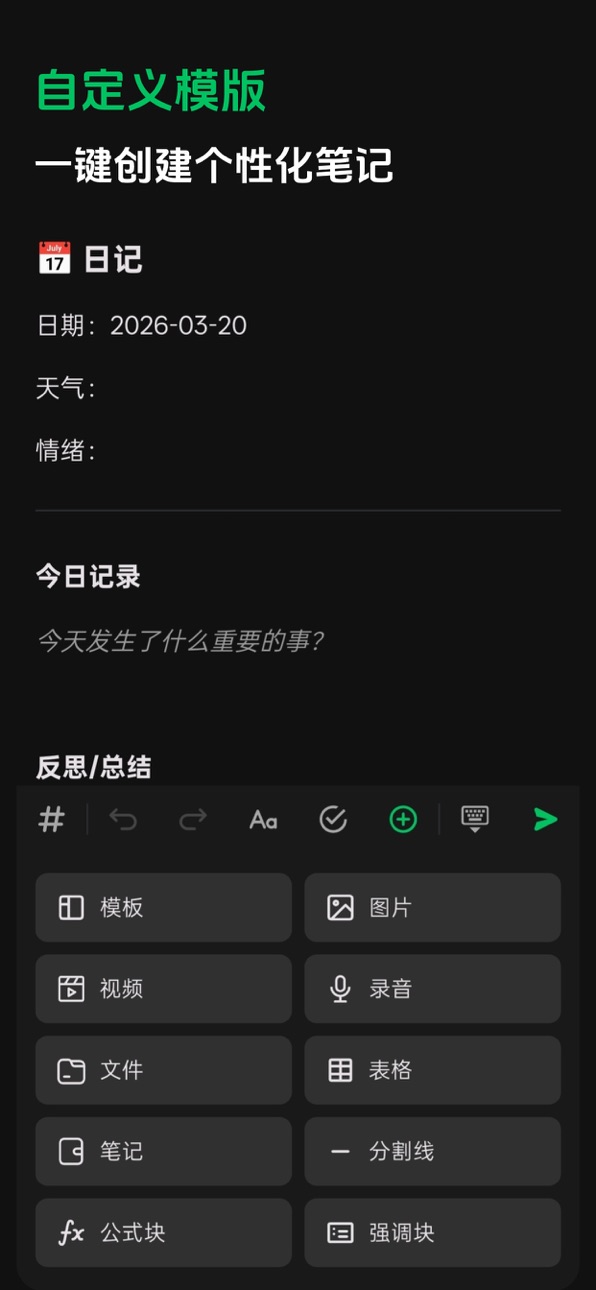
1. All-in-One Rich Text Editor: Supports various content formats including images, videos, audio, files, tables, and formulas. Offers real-time Markdown source preview and export functionality.
2. Bi-Directional Links & Knowledge Graph: Form bi-directional links by linking or inserting notes, and intuitively visualize knowledge relationship graphs.
3. Data Privacy & Offline Usability: Data is stored locally, ensuring full functionality even offline. You retain complete control over your private information.
4. Multi-Device, Cross-Platform LAN Auto-Sync: Devices on the same local network automatically discover each other and synchronize data.
5. Flexible Multi-Level Tagging System: Create multi-level tags, freely sort and move them, and personalize tags with emojis.
6. Version History & Rollback: Complete note editing history is saved, supporting one-click rollback to any previous version.
7. Precise Full-Text Search: Quickly locate note content, supporting multi-dimensional searches by keywords, tags, etc.
8. Integrated To-Do & Notes: Seamlessly combines to-do items with notes, supporting four-quadrant task management and priority settings.
9. Multi-Platform Web Clipping: Easily collect external information from web pages and articles, saving them to your notes with one click.
[Auto-Renewing Subscription Details]
You can subscribe to SnapNote Premium via in-app purchases.
• Auto-Renewing Subscriptions: 1 Month, 1 Year
• One-Time Purchase: Lifetime Membership
• Payment for your subscription will be charged to your iTunes Account upon purchase confirmation. Subscriptions will automatically renew (for the selected period) unless auto-renewal is turned off at least 24 hours before the end of the current period.
• During an active subscription period, the current subscription cannot be cancelled; however, you can manage your subscription and/or turn off auto-renewal by accessing your iTunes Account settings after purchase.
• Privacy Policy: https://www.xingtext.com/zh/snapnote/privacy/
• Terms of Service: https://www.xingtext.com/zh/snapnote/terms/
• End User License Agreement (EULA): https://www.apple.com/legal/internet-services/itunes/dev/stdeula/
In-App Purchases US pricing
Snapnote PRO Subscription
Yearly · Yearly$9.99
Monthly · Monthly$2.99
One-Time Purchases
Lifetime$12.99
Capabilities
In-App Purchases
Accessibility
ipadiphonemacrealityDevicetvoswatch
Version history 25 versions
Build 888125030v1.3.42026-07-11 23:18:04
1. Fix known issues
Build 887600452v1.3.32026-06-30 23:17:56
1. Optimize clipping workflow
2. Fix known issues
Build 887239563v1.3.22026-06-21 18:39:52
1. Third-party sync environment configuration validity check
2. Fixed known issues
Build 887153164v1.3.12026-06-18 18:43:12
1. NAS user WebDAV and S3 synchronization optimization
Build 886949067v1.3.02026-06-15 01:05:05
1. Support custom synchronization frequency
Build 886912492v1.2.92026-06-13 18:50:20
1. Third-party cloud sync optimization (iCloud, S3, WebDAV)
Build 886760746v1.2.82026-06-12 16:58:35
1. Added third-party cloud sync support (iCloud, S3, WebDAV)
2. Fixed known issues
Build 886345764v1.2.72026-05-31 18:17:35
1. Fixed known issues
(Third-party synchronization is under development. Stay tuned.)
Build 886323534v1.2.62026-05-30 21:00:08
1. Fixed known issues
(Third-party synchronization is under development. Stay tuned.)
Build 886020605v1.2.52026-05-22 19:58:50
1. Logo replacement
2. Fixed some bugs
Build 885721803v1.2.42026-05-16 23:45:58
1. Support for adding images in annotations
2. Implement the ability to hide notes under a specific tag from the main list
3. Search page optimization
4. Fixed some unexpected issues / bugs
Build 885317004v1.2.32026-05-06 23:30:48
1. Partial customization of the editing page menu bar on mobile
2. Support EPUB export
3. Support switching between gallery and continuous image modes
4. Random walk optimization
5. Support custom icons for tags
6. Support custom hierarchy display for tags
7. Support multiple light and dark themes
8. Support sending content to the Xingtext app
Build 884899410v1.2.22026-04-25 16:52:58
Here's the English translation of the complete list:
1. Random review
2. Recording stability optimization (screen off, background, incoming calls, etc.)
3. Added image text recognition with search support
4. Optimization for publishing and saving live content
5. Added quick insertion method for bidirectional links (typing @)
6. Improved clipping compatibility with mainstream platforms
7. Fixed some bugs/glitches
Build 884594001v1.2.12026-04-16 22:13:14
experience optimization
Build 884427032v1.2.02026-04-14 19:48:35
1. Add Gallery and Whiteboard
2. Save multi-condition filters as Quick Queries
3. Support list view for tags and quick queries
4. Optimize saving custom attributes to note templates
5. Improve to-dos with system calendar integration
6. Optimize image export (adapt to user-defined font size, line height, etc.)
7. Support uploading custom fonts locally
8. Optimize web clipper popup
9. Add Moments view
10. Improve note merging (in user-selected order)
11. Support filtering in the append note popup
Build 884095128v1.1.82026-04-03 20:42:29
1. Transcribe audio to text
2. Add custom attributes
3. Fixed some bugs/issues
Build 883654179v1.1.72026-03-23 18:34:28
1. Added quick clipping shortcut
2. Swipe left/right to navigate in edit view
3. Improved import/export experience
4. Enhanced tablet view layout
5. Fixed some bugs
Build 883588223v1.1.62026-03-20 20:02:25
1. Added Xiaohongshu live clipping; improved image preview clarity for Xiaohongshu.
2. Added custom template feature.
3. Added support for importing from WeChat Reading, flomo, multiple text formats, and data backup and restore for Flash Notes.
4. Added outline view.
5. Table optimization (direct editing within the editor, support for inserting images, formatting text, etc.).
6. Added formula block, inline formula, and emphasis block components.
7. Added support for resizing images by dragging.
8. Tablet UI overhaul (based on mobile interaction).
9. Added option to hide to-do items on the home page.
10. Fixed various bugs.
Build 882916581v1.1.52026-03-01 22:38:56
1. The to-do quadrant supports drag-and-drop sorting and allows customization of quadrant names.
2. Supports tag locking.
3. Fixed known issues.
Build 882829189v1.1.42026-02-27 22:57:38
1. Added multi-condition filtering
2. Added image export
3. Web clipper titles now support editing (new clippings only)
4. Add tags to multiple selected items
5. Optimized app lock logic
6. Exported markdown now includes tags and annotations
7. Cached expand/collapse state of multi-level tags in the sidebar
8. Fixed some weird bugs
Build 882410541v1.1.32026-02-13 03:24:36
1. Improved stability for clipping images
2. Optimized lag when editing multiple images
3. Added global app lock
Build 882288887v1.1.22026-02-09 18:15:32
fix bugs
Build 882255628v1.1.12026-02-08 19:10:49
1. Added annotation feature
2. Added search and replace
3. Added note password lock
4. Simplified view optimization
5. Fixed some bugs
Build 882055330v1.1.02026-02-02 04:30:40
1. fix bugs
Build 881952985v1.0.92026-02-01 09:57:41
1. Graph Completely Upgraded
2. Text Size, Font, Theme Color Configuration
3. Notes Support Multiple Sorting Methods
4. New Minimalist View and Card View
5. Export All Notes or Export by Tags
6. Web Clipper Optimized
7. LAN Connection Improved, Added QR Code Pairing
8. Fixed Various Bugs
Price history by region
Currency
Show
Columns
Search
Availability 10 of 10 storefronts
| Region | Language | Price | Ratings | Avg | Version |
|---|---|---|---|---|---|
 US US | en-US | Free | 3 | 5.0 | 1.3.4 |
 BW BW | en-GB | Free | 0 | — | 1.3.4 |
 GH GH | en-GB | Free | 0 | — | 1.3.4 |
 KE KE | en-GB | Free | 0 | — | 1.3.4 |
 NA NA | en-GB | Free | 0 | — | 1.3.4 |
 NG NG | en-GB | Free | 0 | — | 1.3.4 |
 TZ TZ | en-GB | Free | 0 | — | 1.3.4 |
 UG UG | en-GB | Free | 0 | — | 1.3.4 |
 ZM ZM | en-GB | Free | 0 | — | 1.3.4 |
 ZW ZW | en-GB | Free | 0 | — | 1.3.4 |
Change log 29 changes · US
✎
releaseNotes updated
1. Fix known issues
✎
description updated
[Core Features]
1. All-in-One Rich Text Editor: Supports various content formats including images, videos, audio, files, tables, and formulas. Offers real-time
✎
subtitle updated
Private Data Storage
✎
name updated
SnapNote - Cross-Platform Sync
◆
Version 1.3.4 released
1. Fix known issues
◆
Version 1.3.3 released
1. Optimize clipping workflow
2. Fix known issues
◆
Version 1.3.2 released
1. Third-party sync environment configuration validity check
2. Fixed known issues
◆
Version 1.3.1 released
1. NAS user WebDAV and S3 synchronization optimization
◆
Version 1.3.0 released
1. Support custom synchronization frequency
◆
Version 1.2.9 released
1. Third-party cloud sync optimization (iCloud, S3, WebDAV)
◆
Version 1.2.8 released
1. Added third-party cloud sync support (iCloud, S3, WebDAV)
2. Fixed known issues
◆
Version 1.2.7 released
1. Fixed known issues
(Third-party synchronization is under development. Stay tuned.)
◆
Version 1.2.6 released
1. Fixed known issues
(Third-party synchronization is under development. Stay tuned.)
◆
Version 1.2.5 released
1. Logo replacement
2. Fixed some bugs
◆
Version 1.2.4 released
1. Support for adding images in annotations
2. Implement the ability to hide notes under a specific tag from the main list
3. Search page optimization
4. Fixed some unexpected issues / bugs
◆
Version 1.2.3 released
1. Partial customization of the editing page menu bar on mobile
2. Support EPUB export
3. Support switching between gallery and continuous image modes
4. Random walk optimization
5. Support custom icons for tags
6. Support custom hierarchy
◆
Version 1.2.2 released
Here's the English translation of the complete list:
1. Random review
2. Recording stability optimization (screen off, background, incoming calls, etc.)
3. Added image text recognition with search support
4. Optimization for publishing and
◆
Version 1.2.1 released
experience optimization
◆
Version 1.2.0 released
1. Add Gallery and Whiteboard
2. Save multi-condition filters as Quick Queries
3. Support list view for tags and quick queries
4. Optimize saving custom attributes to note templates
5. Improve to-dos with system calendar integration
◆
Version 1.1.8 released
1. Transcribe audio to text
2. Add custom attributes
3. Fixed some bugs/issues
◆
Version 1.1.7 released
1. Added quick clipping shortcut
2. Swipe left/right to navigate in edit view
3. Improved import/export experience
4. Enhanced tablet view layout
5. Fixed some bugs
◆
Version 1.1.6 released
1. Added Xiaohongshu live clipping; improved image preview clarity for Xiaohongshu.
2. Added custom template feature.
3. Added support for importing from WeChat Reading, flomo, multiple text formats, and data backup and restore for Flas
◆
Version 1.1.5 released
1. The to-do quadrant supports drag-and-drop sorting and allows customization of quadrant names.
2. Supports tag locking.
3. Fixed known issues.
◆
Version 1.1.4 released
1. Added multi-condition filtering
2. Added image export
3. Web clipper titles now support editing (new clippings only)
4. Add tags to multiple selected items
5. Optimized app lock logic
6. Exported markdown now includes tags and
◆
Version 1.1.3 released
1. Improved stability for clipping images
2. Optimized lag when editing multiple images
3. Added global app lock
◆
Version 1.1.2 released
fix bugs
◆
Version 1.1.1 released
1. Added annotation feature
2. Added search and replace
3. Added note password lock
4. Simplified view optimization
5. Fixed some bugs
◆
Version 1.1.0 released
1. fix bugs
◆
Version 1.0.9 released
1. Graph Completely Upgraded
2. Text Size, Font, Theme Color Configuration
3. Notes Support Multiple Sorting Methods
4. New Minimalist View and Card View
5. Export All Notes or Export by Tags
6. Web Clipper Optimized
7. LAN Conn